
linexcel



Data lineage analysis for Excel workbooks.
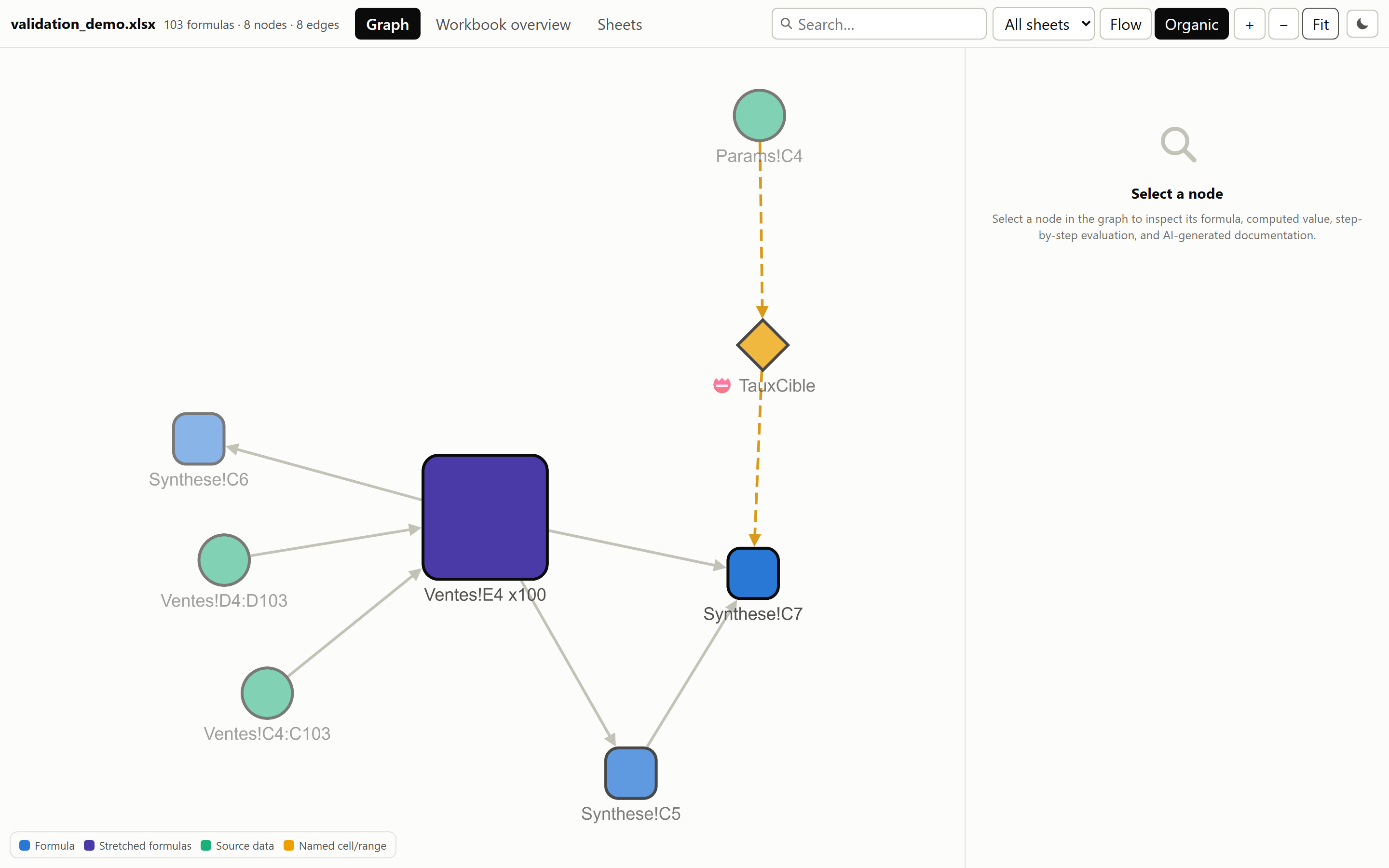
Extracts every formula, groups stretched patterns (R1C1 canonicalization), builds a dependency graph (cells, ranges, defined names, VBA), decomposes composite functions with step-by-step evaluation, and optionally documents calculations via the AI provider of your choice.
Install
uv add linexcel               # pip install linexcel
uv add linexcel[ai]           # + AI documentation (optional)
Note:
linexceldepends on formualizer, a Rust-based spreadsheet engine. Prebuilt wheels are available for Linux, macOS, and Windows. If no wheel matches your platform, a Rust toolchain is required to build from source.
Usage
Command line
No install needed — uvx fetches and runs it in one step:
uvx linexcel analyze workbook.xlsx           # -> workbook_lineage.html
uvx linexcel analyze workbook.xlsx --json graph.json --no-html
uvx linexcel analyze workbook.xlsx --refs-dir ./linked   # workbooks it reads
A workbook that reads '[Budget FY26.xlsx]Annual'!B4 depends on a file
linexcel does not have. It always names that file and the path the workbook
declares; --refs-dir points at a folder holding them, and the reference is
then read for real — the same folder is searched for the .xlam/.xla
add-ins whose VBA the workbook calls.
The default is deterministic: lineage only, no network, no key. --ai-docs
opts in, and needs the ai extra plus an OpenAI-compatible endpoint:
uvx --from "linexcel[ai]" linexcel analyze workbook.xlsx --ai-docs \
    --base-url http://localhost:11434/v1 --model qwen3.8 --language fr
--base-url, --model and --api-key also read LINEXCEL_AI_BASE_URL,
LINEXCEL_AI_MODEL and LINEXCEL_AI_API_KEY. Run linexcel analyze --help
for the full list, including --token-budget to cap what a run may cost.
Sheets can also be rendered and, separately, read by a multimodal model:
uvx linexcel analyze workbook.xlsx --screenshots shots/    # LibreOffice, local
uvx --from "linexcel[ai]" linexcel analyze workbook.xlsx \
    --screenshots shots/ --vision-docs --base-url ... --vision-model ...
--vision-docs is the only option that puts a picture of a sheet in a request,
so it is opt-in and independent of --ai-docs.
Python
from linexcel import analyze

result = analyze("workbook.xlsx")
result                        # interactive graph in marimo / Jupyter
result.save_html("out.html")  # standalone offline HTML viewer
result.stats                  # {totalFormulas, totalNodes, ...}
result.warnings               # list[str]
Everything above is local and needs no key. AI documentation is optional, and you choose the provider — nothing is sent anywhere until you name one:
# A local runtime keeps the workbook on your machine and costs nothing
docs = result.document(base_url="http://localhost:11434/v1", model="qwen3.8")
overview = result.document_workbook(base_url="http://localhost:11434/v1", model="qwen3.8")
result.save_html("out.html", docs=docs, workbook_doc=overview, language="en")
Any OpenAI-compatible endpoint works the same way — a local Ollama or vLLM
runtime, a gateway such as OpenRouter, a vendor's own API — and provider=
takes any callable for anything else. See
Choosing an AI provider.
Features
- Formula extraction via formualizer (Rust engine)
- Stretched pattern grouping — 1000 identical formulas → 1 node
- Dependency graph — cells, ranges, defined names, VBA procedures, Power Query queries
- Power Query lineage — each query with its M source, what it reads and the range it fills, so data from Get & Transform is not a dead end
- Step-by-step evaluation — each operator/function evaluated individually
- Standalone HTML viewer — Cytoscape.js embedded, fully offline, keyboard-navigable, light by default with a dark toggle
- Values you can check — what the file stores and what linexcel recomputed, always side by side, each named and each stated when it is missing; a stretched formula is compared cell by cell over a sample spanning the whole group
- Honest about what it cannot compute — volatile formulas (
TODAY,NOW,RAND) are shown as not recalculated rather than compared against the clock, and a cell reading another workbook names that file, its path, and whether it was read - Dependencies you can supply —
--refs-dirresolves linked workbooks and reads the VBA of the add-ins a file calls into - Workbook context — sheet previews, comments, merged ranges, frozen panes and hidden columns, plus optional LibreOffice-rendered screenshots
- AI documentation — vendor-neutral, grounded in deterministic lineage, with token accounting and a spend ceiling
- Screenshots a model can read — optional, opt-in: a multimodal model describes each rendered sheet, for the colour conventions and layout no extraction reaches
- Nine interface languages — for both the report and the AI prompts
- Command line —
uvx linexcel analyze workbook.xlsx, no install required
Roadmap
Shipped:
- Deterministic lineage — formula extraction, stretched-pattern grouping, dependency graph, VBA
- Step-by-step evaluation, with every value checked against the one stored in the file
- Standalone offline HTML viewer, in nine languages
- Workbook context and LibreOffice-rendered sheet screenshots
- AI documentation — any OpenAI-compatible endpoint, token accounting, spend ceiling
- Command-line interface, installable-free through
uvx - Power Query lineage (#34) — queries as nodes, with their M source, their sources and the range they fill
- Vision (#46) — an optional multimodal description of each sheet screenshot, for what a text dossier cannot carry
Planned:
-
formulasas a fallback (#37) — a second parser for the workbooks formualizer cannot read, so an unsupported construct degrades the graph instead of failing the analysis.
Documentation
| Guide | |
|---|---|
| Quick start | Analyse a workbook, explore it, export it |
| Lineage coverage | What is in the graph, and what is not |
| HTML export | The standalone offline report |
| Workbook context & screenshots | What a reader sees, not only what the file computes |
| Choosing an AI provider | Ollama, OpenRouter, any OpenAI-compatible endpoint, or your own callable |
| AI documentation | Provable cards, token usage, token_budget= |
| Languages | The nine supported locales |
| Data handling | What leaves the machine, and when |
| API reference | LineageResult, analyzer, aidoc, powerquery, external, … |
Sample output
Every image below is captured from a real report by
scripts/capture_viewer.py, so they cannot drift from the viewer without the
readme-shots commit hook noticing.
A node, documented
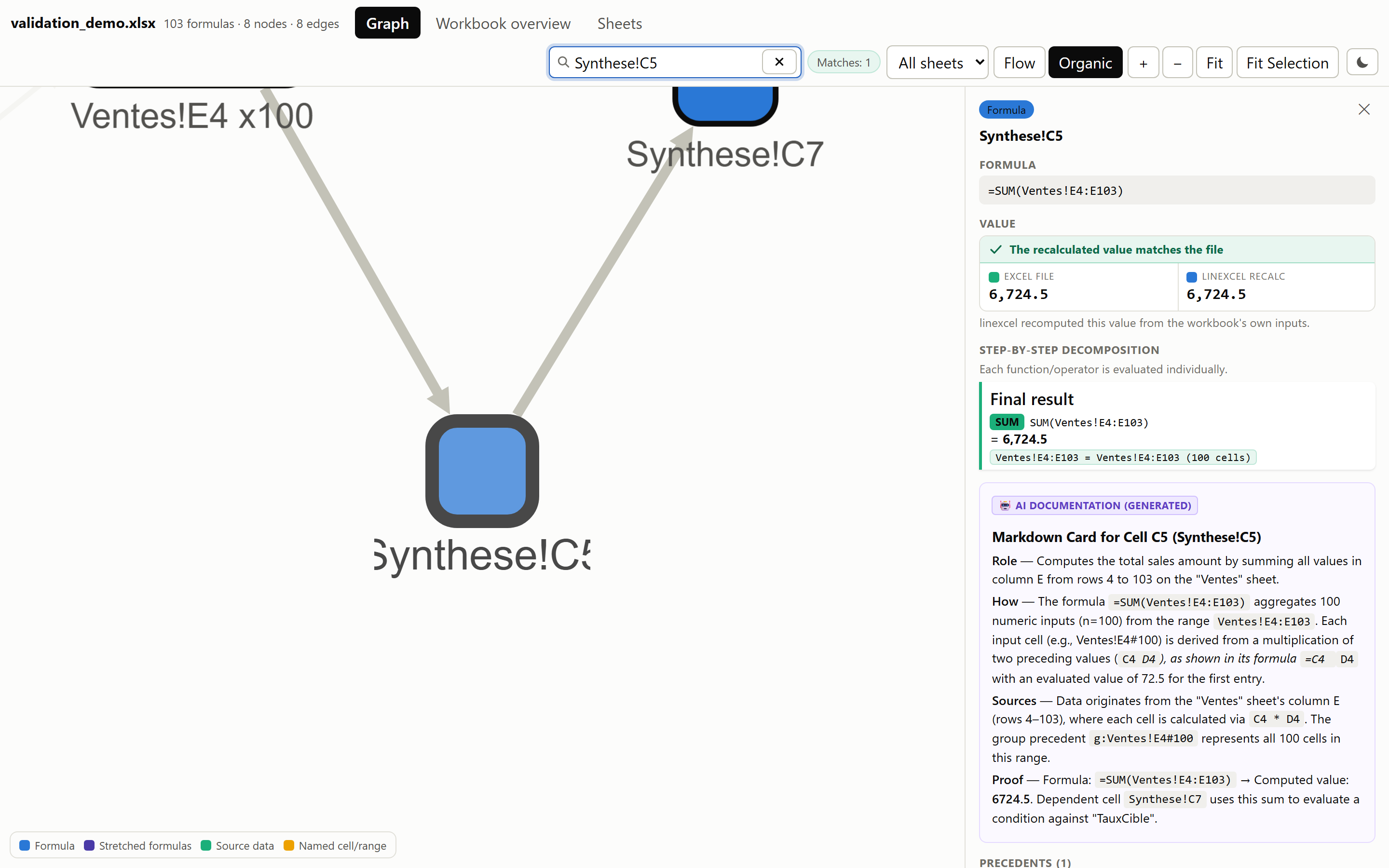
Formula, step-by-step evaluation, precedents and dependents, and the AI card written from that same deterministic dossier.
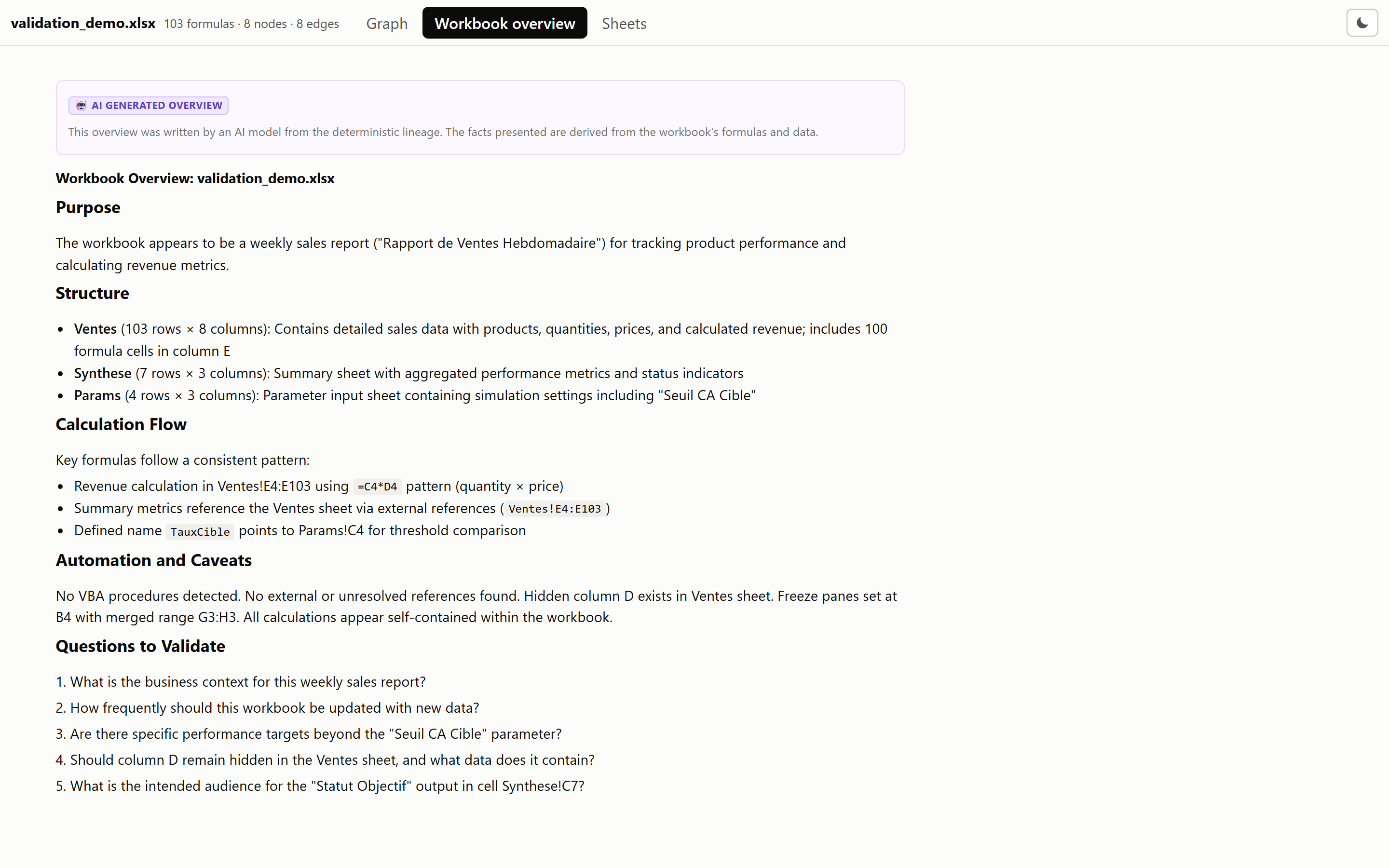
Workbook overview
Sheet context
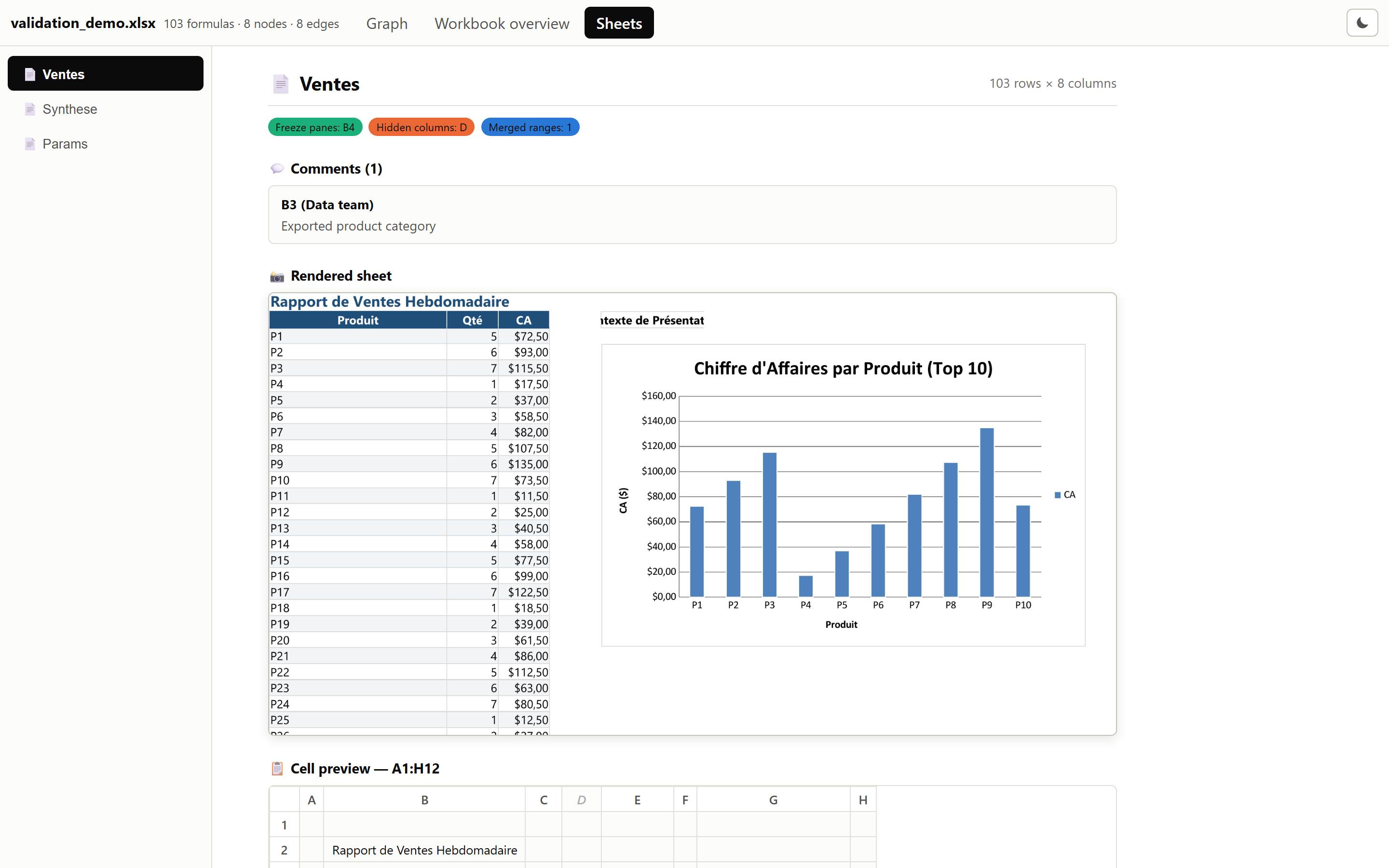
Each sheet rendered whole, over a grid of its first cells, alongside its comments, frozen panes, merged ranges and hidden columns.
Security
Analysis is entirely local. AI documentation sends dossiers only to the provider you configure — see Data handling.
Please report vulnerabilities privately according to SECURITY.md. Do not include sensitive workbooks or credentials in public issues.
Changelog
See CHANGELOG.md.
License
MIT — see LICENSE.
1 maintainer

Download files
Download the file for your platform. If you're not sure which to choose, learn more about installing packages.
Source Distribution
Built Distribution
Filter files by name, interpreter, ABI, and platform.
If you're not sure about the file name format, learn more about wheel file names.
Copy a direct link to the current filters
File details
Details for the file linexcel-1.3.0.tar.gz.
File metadata
- Download URL: linexcel-1.3.0.tar.gz
- Upload date:
- Size: 1.6 MB
- Tags: Source
- Uploaded using Trusted Publishing? Yes
- Uploaded via:
uv/0.12.5 {"installer":{"name":"uv","version":"0.12.5","subcommand":["publish"]},"python":null,"implementation":{"name":null,"version":null},"distro":{"name":"Ubuntu","version":"24.04","id":"noble","libc":null},"system":{"name":null,"release":null},"cpu":null,"openssl_version":null,"setuptools_version":null,"rustc_version":null,"ci":true}
File hashes
| Algorithm | Hash digest | |
|---|---|---|
| SHA256 |
ac9434d733b70e65486a0f4420c04b2b6d36e24e8c29f4b407b22fd4298d29a8
|
|
| MD5 |
69837fec6e7612a5abaf2bb8b28c8530
|
|
| BLAKE2b-256 |
960e91c0eef90402432001139b7b8584bb185fc07b7248230f3697e8c3176225
|
File details
Details for the file linexcel-1.3.0-py3-none-any.whl.
File metadata
- Download URL: linexcel-1.3.0-py3-none-any.whl
- Upload date:
- Size: 361.2 kB
- Tags: Python 3
- Uploaded using Trusted Publishing? Yes
- Uploaded via:
uv/0.12.5 {"installer":{"name":"uv","version":"0.12.5","subcommand":["publish"]},"python":null,"implementation":{"name":null,"version":null},"distro":{"name":"Ubuntu","version":"24.04","id":"noble","libc":null},"system":{"name":null,"release":null},"cpu":null,"openssl_version":null,"setuptools_version":null,"rustc_version":null,"ci":true}
File hashes
| Algorithm | Hash digest | |
|---|---|---|
| SHA256 |
71afa315768b49a53f531da798633b153a16a117f233d6825d08da7e2558c876
|
|
| MD5 |
ca3701c595cde03a9879e7911c5d4a63
|
|
| BLAKE2b-256 |
ab78260fff5d1a824e0b31adbfe2bbda77a060648c722f8b36ff2f44dbd3bb00
|







