
This release is a pre-release and may not be stable for production use.
🚅 LiteLLM
LiteLLM AI Gateway
Open Source AI Gateway for 100+ LLMs. Self-hosted. Enterprise-ready. Call any LLM in OpenAI format.




LiteLLM Proxy Server (AI Gateway) | Hosted Proxy | Enterprise Tier | Website







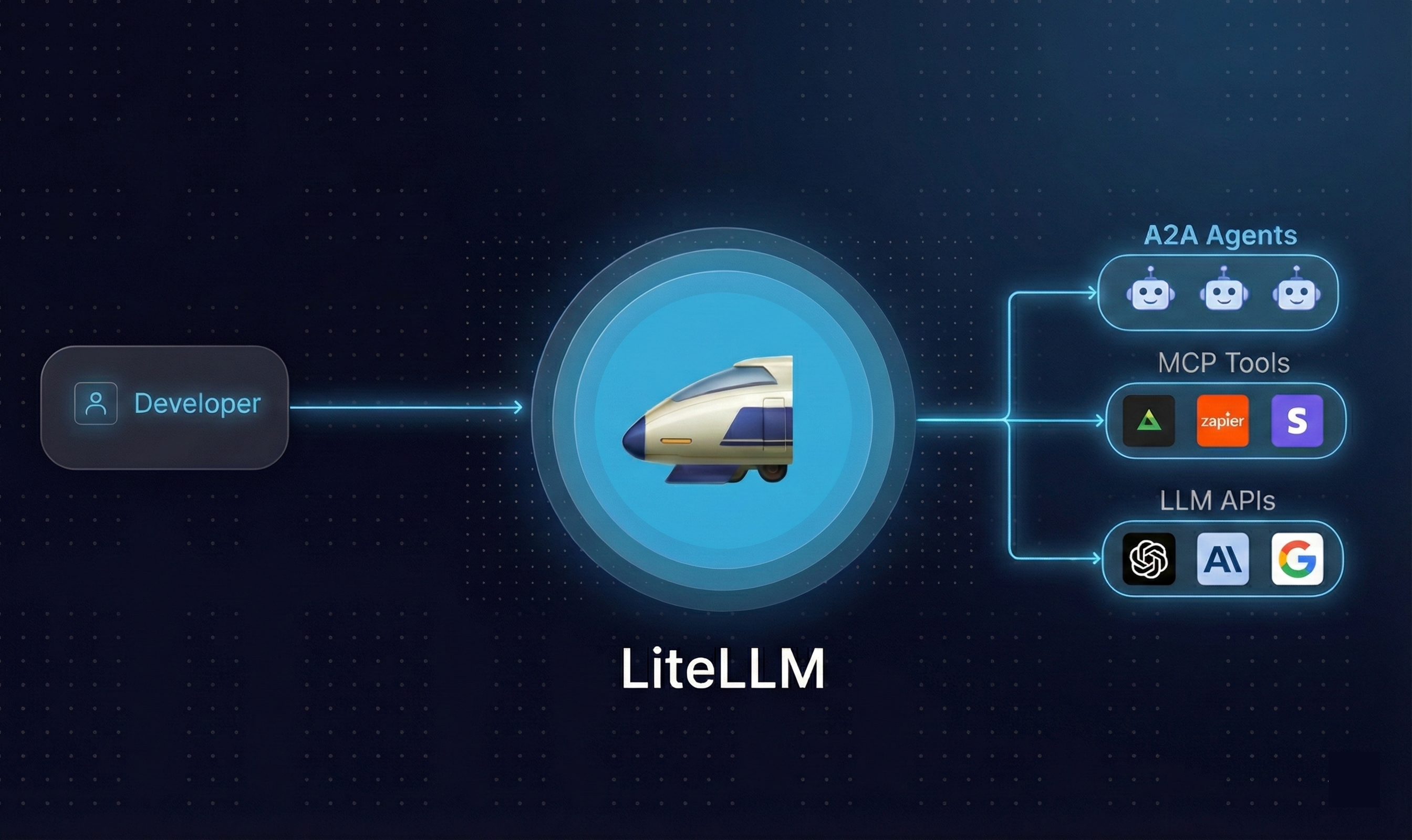
What is LiteLLM
LiteLLM is an open source AI Gateway that gives you a single, unified interface to call 100+ LLM providers — OpenAI, Anthropic, Gemini, Bedrock, Azure, and more — using the OpenAI format.
Use it as a Python SDK for direct library integration, or deploy the AI Gateway (Proxy Server) as a centralized service for your team or organization.
Jump to LiteLLM Proxy (LLM Gateway) Docs
Jump to Supported LLM Providers
Why LiteLLM
Managing LLM calls across providers gets complicated fast — different SDKs, auth patterns, request formats, and error types for every model. LiteLLM removes that friction:
- Unified API — one interface for 100+ LLMs, no provider-specific SDK juggling
- Drop-in OpenAI compatibility — swap providers without rewriting your code
- Production-ready gateway — virtual keys, spend tracking, guardrails, load balancing, and an admin dashboard out of the box
- 8ms P95 latency at 1k RPS (benchmarks)
OSS Adopters
 |
 |
 |
 |
 |
Netflix |
 |
Features
LLMs - Call 100+ LLMs (Python SDK + AI Gateway)
All Supported Endpoints - /chat/completions, /responses, /embeddings, /images, /audio, /batches, /rerank, /a2a, /messages and more.
Python SDK
uv add litellm
An independent litellm-core distribution provides the Python SDK with the same
import litellm API and runtime dependencies. It has no optional extras, CLI entry
points, or bundled dashboard. Install one SDK distribution per environment because
litellm and litellm-core own overlapping Python files. Use litellm for the
proxy, CLI, and optional extras
Build and install core from this checkout while its release integration is pending:
python litellm/scripts/build_core_distribution.py --out-dir dist/core
python -m pip install dist/core/litellm_core-*.whl
The builder requires Git, uv and the Rust build toolchain. It reads the release version
from the root pyproject.toml, leaves source files unchanged, and produces a wheel
and a self-contained sdist in dist/core. Run installation in a fresh environment
without litellm
from litellm import completion
import os

os.environ["OPENAI_API_KEY"] = "your-openai-key"
os.environ["ANTHROPIC_API_KEY"] = "your-anthropic-key"

# OpenAI
response = completion(model="openai/gpt-6.1-sol", messages=[{"role": "user", "content": "Hello!"}])

# Anthropic
response = completion(model="anthropic/claude-sonnet-4-20250514", messages=[{"role": "user", "content": "Hello!"}])
AI Gateway (Proxy Server)
Getting Started - E2E Tutorial - Setup virtual keys, make your first request
uv tool install 'litellm[proxy]'
litellm --model gpt-6.1-sol
import openai

client = openai.OpenAI(api_key="anything", base_url="http://0.0.0.0:4000")
response = client.chat.completions.create(
    model="gpt-6.1-sol",
    messages=[{"role": "user", "content": "Hello!"}]
)
Auto Routing - Choose a model for each prompt (Python SDK + AI Gateway)
Python SDK
Install with uv add litellm and set OPENAI_API_KEY for the models below.
import asyncio
from litellm import Router

router = Router(model_list=[
    {"model_name": "fast", "litellm_params": {"model": "openai/gpt-6-luna"}},
    {"model_name": "capable", "litellm_params": {"model": "openai/gpt-6.1-sol"}},
    {"model_name": "auto", "litellm_params": {
        "model": "auto_router/complexity_router",
        "complexity_router_config": {
            "classifier_type": "heuristic",
            "tiers": {"SIMPLE": "fast", "MEDIUM": "fast",
                      "COMPLEX": "capable", "REASONING": "capable"},
            "return_raw_model_name": True,
        },
        "complexity_router_default_model": "capable",
    }},
])
response = asyncio.run(router.acompletion(
    model="auto", messages=[{"role": "user", "content": "What is 2+2?"}],
))
print(response.model, response.choices[0].message.content)
AI Gateway (Proxy Server)
Create an Auto Router, then call its model name. Replace auto and the URL below with yours, and set LITELLM_API_KEY to your virtual key.
curl http://localhost:4000/v1/chat/completions \
  -H "Authorization: Bearer $LITELLM_API_KEY" \
  -H "Content-Type: application/json" \
  -d '{"model":"auto","messages":[{"role":"user","content":"What is 2+2?"}]}'
A2A - Invoke A2A Agents (Python SDK + AI Gateway)
Supported Providers - LangGraph, Vertex AI Agent Engine, Azure AI Foundry, Bedrock AgentCore, Pydantic AI
Python SDK - A2A Protocol
from litellm.a2a_protocol import A2AClient
from a2a.types import SendMessageRequest, MessageSendParams
from uuid import uuid4

client = A2AClient(base_url="http://localhost:10001")

request = SendMessageRequest(
    id=str(uuid4()),
    params=MessageSendParams(
        message={
            "role": "user",
            "parts": [{"kind": "text", "text": "Hello!"}],
            "messageId": uuid4().hex,
        }
    )
)
response = await client.send_message(request)
AI Gateway (Proxy Server)
Step 1. Add your Agent to the AI Gateway — set protocolVersion to 1.0 or 0.3 per agent
Step 2. Call Agent via A2A SDK (requires a2a-sdk>=1.1.0)
import httpx
from a2a.client import A2ACardResolver, ClientConfig, ClientFactory
from a2a.types import Message, Part, Role, SendMessageRequest
from a2a.utils.constants import TransportProtocol
from uuid import uuid4

base_url = "http://localhost:4000/a2a/my-agent"  # LiteLLM proxy + agent name
headers = {"Authorization": "Bearer <your-master-key>"}    # LiteLLM master key or a virtual key

async with httpx.AsyncClient(headers=headers, timeout=60.0) as http_client:
    resolver = A2ACardResolver(httpx_client=http_client, base_url=base_url)
    agent_card = await resolver.get_agent_card()
    config = ClientConfig(
        httpx_client=http_client,
        streaming=False,
        supported_protocol_bindings=[TransportProtocol.JSONRPC, TransportProtocol.HTTP_JSON],
    )
    client = ClientFactory(config).create(agent_card)

    request = SendMessageRequest(
        message=Message(
            message_id=uuid4().hex,
            role=Role.ROLE_USER,
            parts=[Part(text="Hello!")],
        )
    )
    async for event in client.send_message(request):
        populated = event.ListFields()
        if populated and populated[0][0].name in ("message", "msg"):
            print("".join(getattr(p, "text", "") or "" for p in populated[0][1].parts))
MCP Tools - Connect MCP servers to any LLM (Python SDK + AI Gateway)
Python SDK - MCP Bridge
from mcp import ClientSession, StdioServerParameters
from mcp.client.stdio import stdio_client
from litellm import mcp_client
import litellm

server_params = StdioServerParameters(command="python", args=["mcp_server.py"])

async with stdio_client(server_params) as (read, write):
    async with ClientSession(read, write) as session:
        await session.initialize()

        # Load MCP tools in OpenAI format
        tools = await mcp_client.load_mcp_tools(session=session, format="openai")

        # Use with any LiteLLM model
        response = await litellm.acompletion(
            model="gpt-6.1-sol",
            messages=[{"role": "user", "content": "What's 3 + 5?"}],
            tools=tools
        )
AI Gateway - MCP Gateway
Step 1. Add your MCP Server to the AI Gateway
Step 2. Call MCP tools via /chat/completions
curl -X POST 'http://0.0.0.0:4000/v1/chat/completions' \
  -H 'Authorization: Bearer <your-master-key>' \
  -H 'Content-Type: application/json' \
  -d '{
    "model": "gpt-6.1-sol",
    "messages": [{"role": "user", "content": "Summarize the latest open PR"}],
    "tools": [{
      "type": "mcp",
      "server_url": "litellm_proxy/mcp/github",
      "server_label": "github_mcp",
      "require_approval": "never"
    }]
  }'
Use with Cursor IDE
{
  "mcpServers": {
    "LiteLLM": {
      "url": "http://localhost:4000/mcp/",
      "headers": {
        "x-litellm-api-key": "Bearer <your-master-key>"
      }
    }
  }
}
For MCP OAuth, an upstream may advertise dynamic client registration but refuse requests with HTTP 401 or 403. If the provider requires a pre-registered OAuth app, configure its credentials.client_id and, when required, credentials.client_secret on the MCP server. This skips dynamic registration in the gateway sign-in flow. The provider must approve the app for MCP access; reaching its authorization page does not establish that login or tool calls will succeed
Agents - Run Claude Code, Codex, OpenCode, pi or Deep Agents on any model (Python SDK)
Python SDK - Agents
import litellm
from litellm import Harness, sandbox

result = litellm.agent(
    Harness.CLAUDE_CODE,  # or Harness.CODEX, Harness.OPENCODE, Harness.PI, Harness.DEEPAGENTS
    "Find why tests/test_router.py is flaky and fix it.",
    sandbox=sandbox.local("./repo"),
    model="litellm_proxy/claude-sonnet-4-5",  # a model group on your AI Gateway
)

print(result.text, result.cost, [f.path for f in result.files])
Set LITELLM_PROXY_API_BASE and LITELLM_PROXY_API_KEY and every model call the agent makes goes through your AI Gateway, tagged harness,claude_code. Drop the litellm_proxy/ prefix to call a provider directly. Install starlette uvicorn plus the agent's CLI (claude, codex, opencode or pi), or deepagents langchain-litellm for Deep Agents.
Use litellm.agent_eval(tasks, targets, trials=3) to compare harness and model targets with typed tasks and success checks. If your runner already schedules cases, use await litellm.aagent_eval_attempt(task, target, trial=trial, suite_id=run_id) for each attempt. It returns the same EvalRun used by the suite, including the agent result, check, usage and costs. Both paths prepare a fresh workspace, run setup, execute the agent, grade its output and clean up. Your runner owns concurrency, progress, checkpoint storage and resuming unfinished attempts.
Supported Providers (Website Supported Models | Docs)
Get Started
You can use LiteLLM through either the Proxy Server or Python SDK. Both give you a unified interface to access multiple LLMs (100+ LLMs). Choose the option that best fits your needs:
| LiteLLM AI Gateway | LiteLLM Python SDK | |
|---|---|---|
| Use Case | Central service (LLM Gateway) to access multiple LLMs | Use LiteLLM directly in your Python code |
| Who Uses It? | Gen AI Enablement / ML Platform Teams | Developers building LLM projects |
| Key Features | Centralized API gateway with authentication and authorization, multi-tenant cost tracking and spend management per project/user, per-project customization (logging, guardrails, caching), virtual keys for secure access control, admin dashboard UI for monitoring and management | Direct Python library integration in your codebase, Router with retry/fallback logic across multiple deployments (e.g. Azure/OpenAI) - Router, application-level load balancing and cost tracking, exception handling with OpenAI-compatible errors, observability callbacks (Lunary, MLflow, Langfuse, etc.) |
Stable Release: Use docker images with the -stable tag. These have undergone 12 hour load tests, before being published. More information about the release cycle here
Support for more providers. Missing a provider or LLM Platform, raise a feature request.
Deploy on AWS or GCP with Terraform
Run the LiteLLM proxy as a production-ready componentized stack (gateway, backend, UI on separate services; managed Postgres + Redis + object store) using the published Terraform modules. Both modules are on the public Terraform Registry — no auth needed.
AWS — ECS Fargate + Aurora + ElastiCache + ALB

git clone https://github.com/BerriAI/litellm.git
cd litellm/litellm/deploy/terraform/litellm/aws/examples/default
cp terraform.tfvars.example terraform.tfvars   # edit region/tenant/env
terraform init && terraform apply
Or call the module from your own root config:
# main.tf
terraform {
  required_version = ">= 1.6.0"
  required_providers {
    aws = { source = "hashicorp/aws", version = "~> 5.60" }
  }
}

provider "aws" {
  region = "us-west-2"
}

module "litellm" {
  source  = "BerriAI/litellm/aws"
  version = "~> 1.89"

  region = "us-west-2"
  azs    = ["us-west-2a", "us-west-2b"]
  tenant = "acme"
  env    = "prod"

  # Production: provide an ACM cert. Without one, set allow_plaintext_alb = true
  # (dev/trial only).
  # acm_certificate_arn = "arn:aws:acm:us-west-2:111122223333:certificate/..."
  allow_plaintext_alb = true
}

output "litellm_url" {
  value = module.litellm.alb_dns_name
}
terraform init
terraform apply
Provider API keys live in AWS Secrets Manager; reference ARNs via gateway_extra_secrets. Full input list and architecture diagram on the registry page.
GCP — Cloud Run + Cloud SQL + Memorystore + HTTPS LB

Real 1-click. Opens Cloud Shell, clones the terraform-google-litellm module mirror at the latest stable release (a small download instead of the full litellm repo), and walks you through terraform apply via a built-in DeployStack tutorial. Pick the project, the tutorial sets up the Artifact Registry remote repo, writes terraform.tfvars from your answers, and runs apply
To call the module from your own config instead, Cloud Run can't pull from ghcr.io directly, so first set up a one-time Artifact Registry remote repo backed by GHCR:
gcloud artifacts repositories create litellm \
  --location=us-central1 \
  --repository-format=docker \
  --mode=remote-repository \
  --remote-docker-repo=https://ghcr.io \
  --project=my-gcp-project
Then:
# main.tf
terraform {
  required_version = ">= 1.6.0"
  required_providers {
    google      = { source = "hashicorp/google",      version = "~> 6.10" }
    google-beta = { source = "hashicorp/google-beta", version = "~> 6.10" }
  }
}

provider "google"      { project = "my-gcp-project"; region = "us-central1" }
provider "google-beta" { project = "my-gcp-project"; region = "us-central1" }

module "litellm" {
  source  = "BerriAI/litellm/google"
  version = "~> 1.89"

  project_id = "my-gcp-project"
  region     = "us-central1"
  tenant     = "acme"
  env        = "prod"

  # Replace my-gcp-project with your GCP project ID (same value as project_id above).
  image_registry = "us-central1-docker.pkg.dev/my-gcp-project/litellm/berriai"

  # Production: provide DNS already pointing at the LB IP for Google-managed certs.
  # Without one, set allow_plaintext_lb = true (dev/trial only).
  # lb_domains         = ["proxy.example.com"]
  allow_plaintext_lb = true
}

output "litellm_url" {
  value = module.litellm.load_balancer_url
}
terraform init
terraform apply
Provider API keys live in Secret Manager; reference resource IDs (e.g. projects/my-gcp-project/secrets/openai-api-key) via gateway_extra_secrets. Full input list and architecture diagram on the registry page.
Both stacks include
- The full componentized split (gateway / backend / UI as independent services)
- Managed Postgres (writer + reader) and Redis
- Versioned object store for proxy state + file uploads
- An auto-generated
LITELLM_MASTER_KEYin your cloud's secret manager - A one-off migration job that runs
prisma migrate deploybefore the proxy starts - The same
proxy_configsurface as the Helm chart — pass YAML as a typed map
The Terraform modules live at litellm/deploy/terraform/litellm/aws/ and litellm/deploy/terraform/litellm/gcp/ in this repo; the registry entries are read-only mirrors updated on each release.
Run in Developer Mode
Services
- Setup .env file in root
- Run dependent services
docker compose -f litellm/deploy/compose/docker-compose.yml up db prometheus
Backend
- Run
make bootstrap - Start proxy backend:
uv run python litellm/proxy/proxy_cli.py
Frontend
- Navigate to
litellm/ui/litellm-dashboard(dependencies were already installed w/make bootstrap) - Start dashboard:
npm run dev
Verify Docker Image Signatures
All LiteLLM Docker images published to GHCR are signed with cosign. Releases are signed with the key introduced in commit e82a3c6.
Verify using the pinned commit hash (recommended):
A commit hash is cryptographically immutable, so this is the strongest way to ensure you are using the published signing key:
cosign verify \
  --key https://raw.githubusercontent.com/BerriAI/litellm/e82a3c646908ba0a6ee0beddc4310d7a6cac4065/cosign.pub \
  ghcr.io/berriai/litellm:<release-tag>
Verify using a release tag (convenience):
Tags are protected in this repository and resolve to the same key. This option is easier to read but relies on tag protection rules:
cosign verify \
  --key https://raw.githubusercontent.com/BerriAI/litellm/<release-tag>/cosign.pub \
  ghcr.io/berriai/litellm:<release-tag>
Replace <release-tag> with the version you are deploying (e.g. v1.83.0-stable).
Enterprise
For companies that need better security, user management and professional support
Get an Enterprise License Talk to founders
This covers:
- ✅ Features under the LiteLLM Commercial License:
- ✅ Feature Prioritization
- ✅ Custom Integrations
- ✅ Professional Support - Dedicated discord + slack
- ✅ Custom SLAs
- ✅ Secure access with Single Sign-On
Contributing
We welcome contributions to LiteLLM! Whether you're fixing bugs, adding features, or improving documentation, we appreciate your help.
If you want to work closely with our team, check out LiteLLM OSS Champions, our program for trusted OSS contributors with their own Slack channel and a voice in the roadmap
Quick Start for Contributors
This requires uv to be installed.
git clone https://github.com/BerriAI/litellm.git
cd litellm
make install-dev    # Install development dependencies
make format         # Format your code
make lint           # Run all linting checks
make test-unit      # Run unit tests
make format-check   # Check formatting only
For detailed contributing guidelines, see CONTRIBUTING.md.
📖 Contributing to documentation? The LiteLLM docs have moved to a separate repository: BerriAI/litellm-docs. Please open doc PRs there. Docs are served at docs.litellm.ai.
Code Quality / Linting
LiteLLM follows the Google Python Style Guide.
Our automated checks include:
- Ruff for formatting, linting, and code quality
- basedpyright for type checking
- Circular import detection
- Import safety checks
All these checks must pass before your PR can be merged.
Support / talk with founders
- Schedule Demo 👋
- Community Discord 💭
- Community Slack 💭
- Our emails ✉️ ishaan@berri.ai / krrish@berri.ai
Contributors
Metadata
Release files for litellm 1.112.0rc1
For a detailed explanation of source distributions (sdists) and built distributions (wheels), please see the package formats documentation.
Source distribution (sdist)
| File | Size | Uploaded | Provenance | Actions |
|---|---|---|---|---|
| litellm-1.112.0rc1.tar.gz | 29.6 MB | With provenance | Details for litellm-1.112.0rc1.tar.gz |
Built distributions (wheels)
Total release size: 407.6 MB
Release files / litellm-1.112.0rc1.tar.gz
| Download URL | litellm-1.112.0rc1.tar.gz |
|---|---|
| Size | 29.6 MB |
| Tags | Source |
|
SHA-256 checksum How to use checksums |
60058fc1e39ab08c7192f7685caaa827641ea5b1308493a28f5ae65a65d8d2a2
|
|
BLAKE2b-256 checksum How to use checksums |
0e3b0a176f05085a67d07a7159648ef8696835a871d2478fb84132d6b503f39b
|
| Upload date | |
|
Uploaded using Trusted Publishing? What is trusted publishing? |
Yes |
| Uploaded via |
twine/7.0.0 CPython/3.13.16
|
Provenance
Provenance describes where a file came from. On PyPI, provenance is shared via attestations, which provide a verifiable record of the build or publishing details. View details, limitations and caveats.


PyPI Publish Attestation
PyPI verified that this artifact, at this checksum, originated from the publisher listed below.
Signed by GitHub Actions, verified by PyPI on Nov 24, 2026.
Transparency logRelease files / litellm-1.112.0rc1-cp310-abi3-win_amd64.whl
| Download URL | litellm-1.112.0rc1-cp310-abi3-win_amd64.whl |
|---|---|
| Size | 56.8 MB |
| Tags | CPython 3.10 Windows x86-64 abi3 |
|
SHA-256 checksum How to use checksums |
2639ffa3335ba9091bf3b37762553ee524d8762981f08a04ed2c0bab4d707c67
|
|
BLAKE2b-256 checksum How to use checksums |
26bba601e1f3df394d30ec145a0011c17abeaf9a9c8050de05c5d5d17b0bcf76
|
| Upload date | |
|
Uploaded using Trusted Publishing? What is trusted publishing? |
Yes |
| Uploaded via |
twine/7.0.0 CPython/3.13.16
|
Provenance
Provenance describes where a file came from. On PyPI, provenance is shared via attestations, which provide a verifiable record of the build or publishing details. View details, limitations and caveats.
PyPI Publish Attestation
PyPI verified that this artifact, at this checksum, originated from the publisher listed below.
Signed by GitHub Actions, verified by PyPI on Nov 24, 2026.
Transparency logRelease files / litellm-1.112.0rc1-cp310-abi3-musllinux_1_2_x86_64.whl
| Download URL | litellm-1.112.0rc1-cp310-abi3-musllinux_1_2_x86_64.whl |
|---|---|
| Size | 54.9 MB |
| Tags | CPython 3.10 Linux musl 1.2+ x86-64 abi3 |
|
SHA-256 checksum How to use checksums |
dee57ab25f0d8b48204ac0c241ecfdb6dd172950ead5302e618cd805b67bc962
|
|
BLAKE2b-256 checksum How to use checksums |
ac44f8a0739368b06d0422ea67b8d34c922814d613eda020342a90bbe4dc1c21
|
| Upload date | |
|
Uploaded using Trusted Publishing? What is trusted publishing? |
Yes |
| Uploaded via |
twine/7.0.0 CPython/3.13.16
|
Provenance
Provenance describes where a file came from. On PyPI, provenance is shared via attestations, which provide a verifiable record of the build or publishing details. View details, limitations and caveats.
PyPI Publish Attestation
PyPI verified that this artifact, at this checksum, originated from the publisher listed below.
Signed by GitHub Actions, verified by PyPI on Nov 24, 2026.
Transparency logRelease files / litellm-1.112.0rc1-cp310-abi3-musllinux_1_2_aarch64.whl
| Download URL | litellm-1.112.0rc1-cp310-abi3-musllinux_1_2_aarch64.whl |
|---|---|
| Size | 53.2 MB |
| Tags | CPython 3.10 Linux musl 1.2+ ARM64 abi3 |
|
SHA-256 checksum How to use checksums |
15646f8ce58be28e1437cf07b04242dcd5f9a0b233c7b4848158e5ac3779bed3
|
|
BLAKE2b-256 checksum How to use checksums |
3eb3276ff5bd5a5235c56d5b8656df9268827042f413a4a6f5856c110b25c4ba
|
| Upload date | |
|
Uploaded using Trusted Publishing? What is trusted publishing? |
Yes |
| Uploaded via |
twine/7.0.0 CPython/3.13.16
|
Provenance
Provenance describes where a file came from. On PyPI, provenance is shared via attestations, which provide a verifiable record of the build or publishing details. View details, limitations and caveats.
PyPI Publish Attestation
PyPI verified that this artifact, at this checksum, originated from the publisher listed below.
Signed by GitHub Actions, verified by PyPI on Nov 24, 2026.
Transparency logRelease files / litellm-1.112.0rc1-cp310-abi3-manylinux_2_28_x86_64.whl
| Download URL | litellm-1.112.0rc1-cp310-abi3-manylinux_2_28_x86_64.whl |
|---|---|
| Size | 54.6 MB |
| Tags | CPython 3.10 Linux glibc 2.28+ x86-64 abi3 |
|
SHA-256 checksum How to use checksums |
8e59bdf2c89ace8dd05989fe73c75a90a72fa914fa1b7756d9629444b26f1c8c
|
|
BLAKE2b-256 checksum How to use checksums |
e340f6eb0fde213e7c206cc00516a4463d75dc448b6dfc1ad4a8a3d5f3feacd6
|
| Upload date | |
|
Uploaded using Trusted Publishing? What is trusted publishing? |
Yes |
| Uploaded via |
twine/7.0.0 CPython/3.13.16
|
Provenance
Provenance describes where a file came from. On PyPI, provenance is shared via attestations, which provide a verifiable record of the build or publishing details. View details, limitations and caveats.
PyPI Publish Attestation
PyPI verified that this artifact, at this checksum, originated from the publisher listed below.
Signed by GitHub Actions, verified by PyPI on Nov 24, 2026.
Transparency logRelease files / litellm-1.112.0rc1-cp310-abi3-manylinux_2_28_aarch64.whl
| Download URL | litellm-1.112.0rc1-cp310-abi3-manylinux_2_28_aarch64.whl |
|---|---|
| Size | 53.0 MB |
| Tags | CPython 3.10 Linux glibc 2.28+ ARM64 abi3 |
|
SHA-256 checksum How to use checksums |
e9794a796928beeef6defef35818469dedebab5a3eae5db60bc955b59c4f0ed3
|
|
BLAKE2b-256 checksum How to use checksums |
5f797009734092b5cf2a094d6f8e808368f2a09b543f9b92eed7dd553c34ca3d
|
| Upload date | |
|
Uploaded using Trusted Publishing? What is trusted publishing? |
Yes |
| Uploaded via |
twine/7.0.0 CPython/3.13.16
|
Provenance
Provenance describes where a file came from. On PyPI, provenance is shared via attestations, which provide a verifiable record of the build or publishing details. View details, limitations and caveats.
PyPI Publish Attestation
PyPI verified that this artifact, at this checksum, originated from the publisher listed below.
Signed by GitHub Actions, verified by PyPI on Nov 24, 2026.
Transparency logRelease files / litellm-1.112.0rc1-cp310-abi3-macosx_11_0_arm64.whl
| Download URL | litellm-1.112.0rc1-cp310-abi3-macosx_11_0_arm64.whl |
|---|---|
| Size | 51.6 MB |
| Tags | CPython 3.10 abi3 macOS 11.0+ ARM64 |
|
SHA-256 checksum How to use checksums |
43813c21bbf932fa08618db6cd2bc648e552b0eef255d2e61395801a5b44056c
|
|
BLAKE2b-256 checksum How to use checksums |
3c96c92e3c73aa48ed2a6fa300443adda43b5979e81d69165fdcd0d9f9ffa76d
|
| Upload date | |
|
Uploaded using Trusted Publishing? What is trusted publishing? |
Yes |
| Uploaded via |
twine/7.0.0 CPython/3.13.16
|
Provenance
Provenance describes where a file came from. On PyPI, provenance is shared via attestations, which provide a verifiable record of the build or publishing details. View details, limitations and caveats.
PyPI Publish Attestation
PyPI verified that this artifact, at this checksum, originated from the publisher listed below.
Signed by GitHub Actions, verified by PyPI on Nov 24, 2026.
Transparency logRelease files / litellm-1.112.0rc1-cp310-abi3-macosx_10_12_x86_64.whl
| Download URL | litellm-1.112.0rc1-cp310-abi3-macosx_10_12_x86_64.whl |
|---|---|
| Size | 53.8 MB |
| Tags | CPython 3.10 abi3 macOS 10.12+ x86-64 |
|
SHA-256 checksum How to use checksums |
3bb10d214a2ad9f15bf5b45661e494c35286c935bb87b602d7442d2a55eafe44
|
|
BLAKE2b-256 checksum How to use checksums |
7fa6739c7a2d71a77fc3c56efbc62e2606c96d61234b7398cf3d783b38cc7b1b
|
| Upload date | |
|
Uploaded using Trusted Publishing? What is trusted publishing? |
Yes |
| Uploaded via |
twine/7.0.0 CPython/3.13.16
|
Provenance
Provenance describes where a file came from. On PyPI, provenance is shared via attestations, which provide a verifiable record of the build or publishing details. View details, limitations and caveats.
PyPI Publish Attestation
PyPI verified that this artifact, at this checksum, originated from the publisher listed below.
Signed by GitHub Actions, verified by PyPI on Nov 24, 2026.
Transparency logSecurity for litellm 1.112.0rc1
Provenance
Provenance describes where a file came from. On PyPI, provenance is shared via attestations, which provide a verifiable record of the build or publishing details. View details, limitations and caveats.
Full provenance
All 8 files in this release have been uploaded with provenance metadata.
Attestation for litellm-1.112.0rc1.tar.gz
PyPI Publish Attestation
PyPI verified that this artifact, at this checksum, originated from the publisher listed below.
Signed by GitHub Actions, verified by PyPI on Nov 24, 2026.
Transparency logA note on package security
PyPI is a repository for distributing packages, not a service for auditing them. While third-party security researchers and our staff do their best to detect and remove malicious packages, PyPI cannot guarantee the quality, security or suitability of any given package.
To learn more about protecting yourself from malicious actors, visit our package security documentation.














