
LLM testing framework for validating agent behavior and tool usage

Project description
LLM Goose 🪿
LLM-powered testing for LLM agents — define expectations as you'd describe them to a human






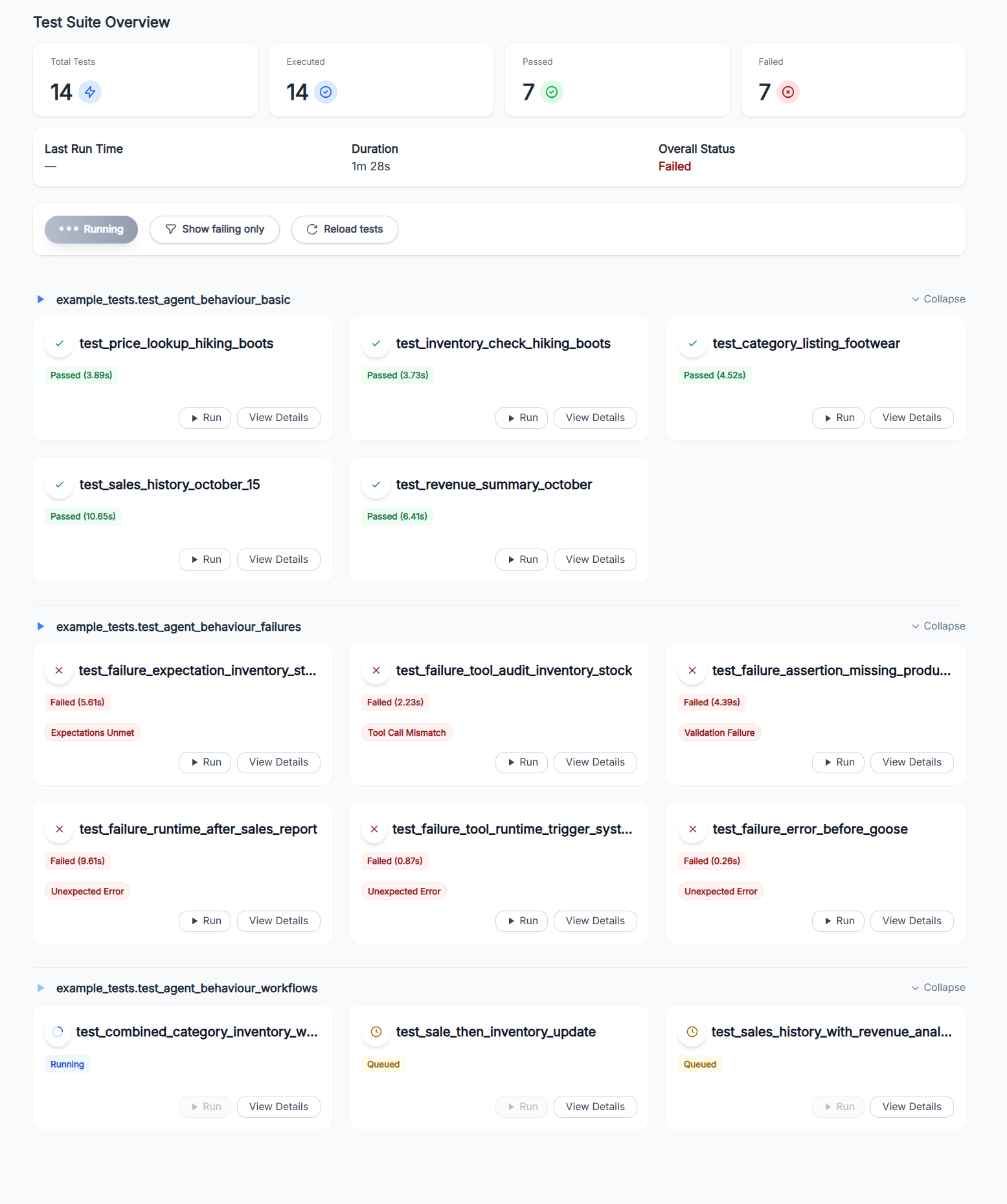
Goose is a Python library, CLI, and web dashboard that helps developers build and iterate on LLM agents faster.
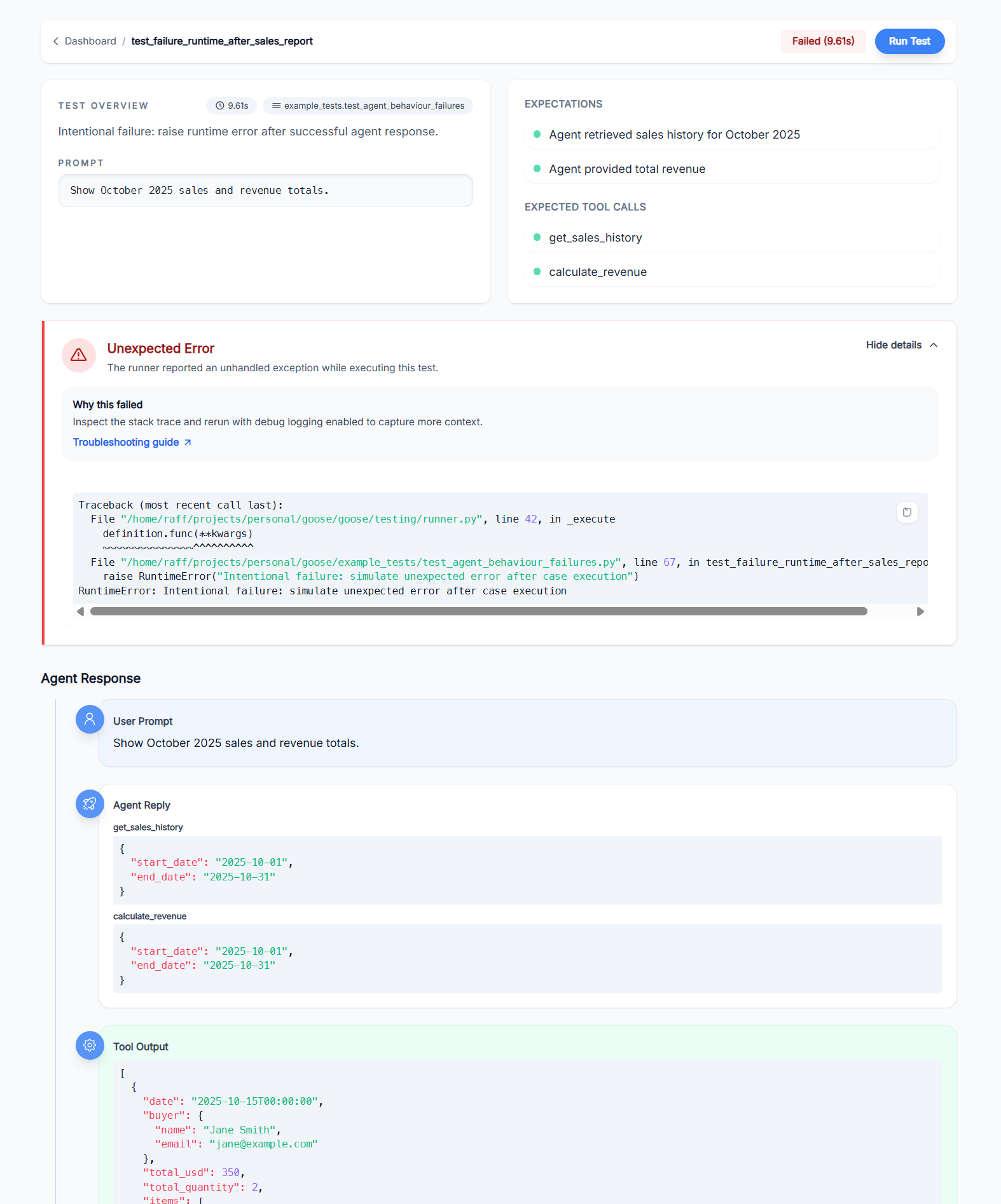
Write tests in Python, run them from the terminal or dashboard, and instantly see what went wrong when things break.
Currently designed for LangChain-based agents, with plans for framework-agnostic support.
Why Goose?
Think of Goose as pytest for LLM agents:
- Natural language expectations – Describe what should happen in plain English; an LLM validator checks if the agent delivered.
- Tool call assertions – Verify your agent called the right tools, not just that it sounded confident.
- Full execution traces – See every tool call, response, and validation result in the web dashboard.
- Pytest-style fixtures – Reuse agent setup across tests with
@fixturedecorators. - Hot-reload during development – Edit your agent code, re-run tests instantly without restarting the server.
Install 🚀
pip install llm-goose
npm install -g @llm-goose/dashboard-cli
CLI
# Initialize a new gooseapp/ project structure
goose init

# run tests from the terminal
goose test run gooseapp.tests

# list tests without running them
goose test list gooseapp.tests

# add -v / --verbose to stream detailed steps
goose test run -v gooseapp.tests
API & Dashboard
# Start the dashboard (auto-discovers gooseapp/ in current directory)
goose api

# Enable hot-reloading of your agent/tools code during development
goose api --reload

# Custom host and port
goose api --host 0.0.0.0 --port 3000

# run the dashboard (connects to localhost:8000 by default)
goose-dashboard

# or point the dashboard at a custom API URL
GOOSE_API_URL="http://localhost:8000" goose-dashboard
GooseApp Configuration
Run goose init to create a gooseapp/ folder with centralized configuration:
# gooseapp/app.py
from goose import GooseApp
from my_agent.tools import get_weather, get_forecast

app = GooseApp(
    tools=[get_weather, get_forecast],  # Tools visible in the Tooling dashboard
    reload_targets=["my_agent"],         # Modules to hot-reload during development
    reload_exclude=["my_agent.data"],    # Modules to skip during reload
)
Quick Start: Minimal Example 🏃♂️
Here's a complete, runnable example of testing an LLM agent with Goose. This creates a simple weather assistant agent and tests it.
1. Set up your agent
Create my_agent.py:
from typing import Any

from dotenv import load_dotenv
from langchain.agents import create_agent
from langchain_core.messages import HumanMessage
from langchain_core.tools import tool
from goose.testing.models.messages import AgentResponse

load_dotenv()

@tool
def get_weather(location: str) -> str:
    """Get the current weather for a given location."""
    return f"The weather in {location} is sunny and 75°F."

agent = create_agent(
    model="gpt-4o-mini",
    tools=[get_weather],
    system_prompt="You are a helpful weather assistant",
)

def query_weather_agent(question: str) -> AgentResponse:
    """Query the agent and return a normalized response."""
    result = agent.invoke({"messages": [HumanMessage(content=question)]})
    return AgentResponse.from_langchain(result)
2. Set up fixtures
Create tests/conftest.py:
from langchain_openai import ChatOpenAI

from goose.testing import Goose, fixture
from my_agent import query_weather_agent

@fixture(name="weather_goose")  # name is optional - defaults to func name
def weather_goose_fixture() -> Goose:
    """Provide a Goose instance wired up to the sample LangChain agent."""

    return Goose(
        agent_query_func=query_weather_agent,
        validator_model=ChatOpenAI(model="gpt-4o-mini"),
    )
3. Write a test
Create tests/test_weather.py. Fixture will be injected into recognized test functions. Test function and file names need to start with test_ in order to be discovered.
from goose.testing import Goose
from my_agent import query_weather_agent

def test_weather_query(weather_goose: Goose) -> None:
    """Test that the agent can answer weather questions."""

    weather_goose.case(
        query="What's the weather like in San Francisco?",
        expectations=[
            "Agent provides weather information for San Francisco",
            "Response mentions sunny weather and 75°F",
        ],
        expected_tool_calls=[get_weather],
    )
4. Run the test
goose test run tests
That's it! Goose will run your agent, check that it called the expected tools, and validate the response against your expectations.
Writing tests
At its core, Goose lets you describe what a good interaction looks like and then assert that your agent and tools actually behave that way.
Pytest-inspired syntax
Goose cases combine a natural‑language query, human‑readable expectations, and (optionally) the tools
you expect the agent to call. This example is adapted from
example_tests/agent_behaviour_test.py and shows an analytical workflow where the agent both
retrieves data and creates records:
def test_sale_then_inventory_update(goose_fixture: Goose) -> None:
    """Complex workflow: Sell 2 Hiking Boots and report the remaining stock."""

    count_before = Transaction.objects.count()
    inventory = ProductInventory.objects.get(product__name="Hiking Boots")
    assert inventory is not None, "Expected inventory record for Hiking Boots"

    goose_fixture.case(
        query="Sell 2 pairs of Hiking Boots to John Doe and then tell me how many we have left",
        expectations=[
            "Agent created a sale transaction for 2 Hiking Boots to John Doe",
            "Agent then checked remaining inventory after the sale",
            "Response confirmed the sale was processed",
            "Response provided updated stock information",
        ],
        expected_tool_calls=[check_inventory, create_sale],
    )

    count_after = Transaction.objects.count()
    inventory_after = ProductInventory.objects.get(product__name="Hiking Boots")

    assert count_after == count_before + 1, f"Expected 1 new transaction, got {count_after - count_before}"
    assert inventory_after is not None, "Expected inventory record after sale"
    assert inventory_after.stock == inventory.stock - 2, f"Expected stock {inventory.stock - 2}, got {inventory_after.stock}"
Custom lifecycle hooks
You can use existing lifecycle hooks or implement yours to suit your needs. Hooks are invoked before a test starts and after it finishes. This lets you setup your environment and teardown it afterwards.
from goose.testing.hooks import TestLifecycleHook

class MyLifecycleHooks(TestLifecycleHook):
    """Suite and per-test lifecycle hooks invoked around Goose executions."""

    def pre_test(self, definition: TestDefinition) -> None:
        """Hook invoked before a single test executes."""
        setup()

    def post_test(self, definition: TestDefinition) -> None:
        """Hook invoked after a single test completes."""
        teardown()


# tests/conftest.py
from langchain_openai import ChatOpenAI

from goose.testing import Goose, fixture
from my_agent import query

@fixture()
def goose_fixture() -> Goose:
    """Provide a Goose instance wired up to the sample LangChain agent."""

    return Goose(
        agent_query_func=query,
        validator_model=ChatOpenAI(model="gpt-4o-mini"),
        hooks=MyLifecycleHooks(),
    )
License
MIT License – see LICENSE for full text.
Release history Release notifications | RSS feed


Download files
Download the file for your platform. If you're not sure which to choose, learn more about installing packages.
Source Distribution
Built Distribution
Filter files by name, interpreter, ABI, and platform.
If you're not sure about the file name format, learn more about wheel file names.
Copy a direct link to the current filters
File details
Details for the file llm_goose-0.1.24.tar.gz.
File metadata
- Download URL: llm_goose-0.1.24.tar.gz
- Upload date:
- Size: 47.1 kB
- Tags: Source
- Uploaded using Trusted Publishing? No
- Uploaded via: twine/6.2.0 CPython/3.13.6
File hashes
| Algorithm | Hash digest | |
|---|---|---|
| SHA256 |
f4d4e313435a0a7118111e8eb270a2212f0d8d44ff252f6f304fa5a15c45c97b
|
|
| MD5 |
ce3385cd482659e8b9ae48bb4e83b2c6
|
|
| BLAKE2b-256 |
6247cddd1e5889a4b731b57229feb7c0161601b75bb6f2eef2db6df91a7d3c49
|
File details
Details for the file llm_goose-0.1.24-py3-none-any.whl.
File metadata
- Download URL: llm_goose-0.1.24-py3-none-any.whl
- Upload date:
- Size: 59.0 kB
- Tags: Python 3
- Uploaded using Trusted Publishing? No
- Uploaded via: twine/6.2.0 CPython/3.13.6
File hashes
| Algorithm | Hash digest | |
|---|---|---|
| SHA256 |
c18d2766ce0b5b40001bab059fdfca55d441b1ca9042e097f546c0dd54a6a6db
|
|
| MD5 |
3ce736bbb002eb8332708b0e3a110c6d
|
|
| BLAKE2b-256 |
8da2e9adc489a62e4a4aae5c3476459738c921e73bb448106c6de648a7c9606c
|






