
LLM Preflight
Last reviewed: 2026-10-19 · As of: v2.22.2



Check LLM responses against the output rules your application depends on—before changing a model, prompt, schema, or provider.
Define the JSON shape, routing labels, or exact output your feature needs. Check responses against those rules, preview provider requests and estimated cost, and keep evidence for the change review.
Built for engineers maintaining an LLM feature. Runs locally as a CLI, GitHub Action, or MCP server. Python 3.10+; no third-party runtime dependencies.
Try it · Observed models · Use your own contract · CI and agents
Watch an invalid response get caught and fixed (23 seconds).
billing passes → change the response to sales → check fails → restore
billing → check passes. The allowed labels stay unchanged.
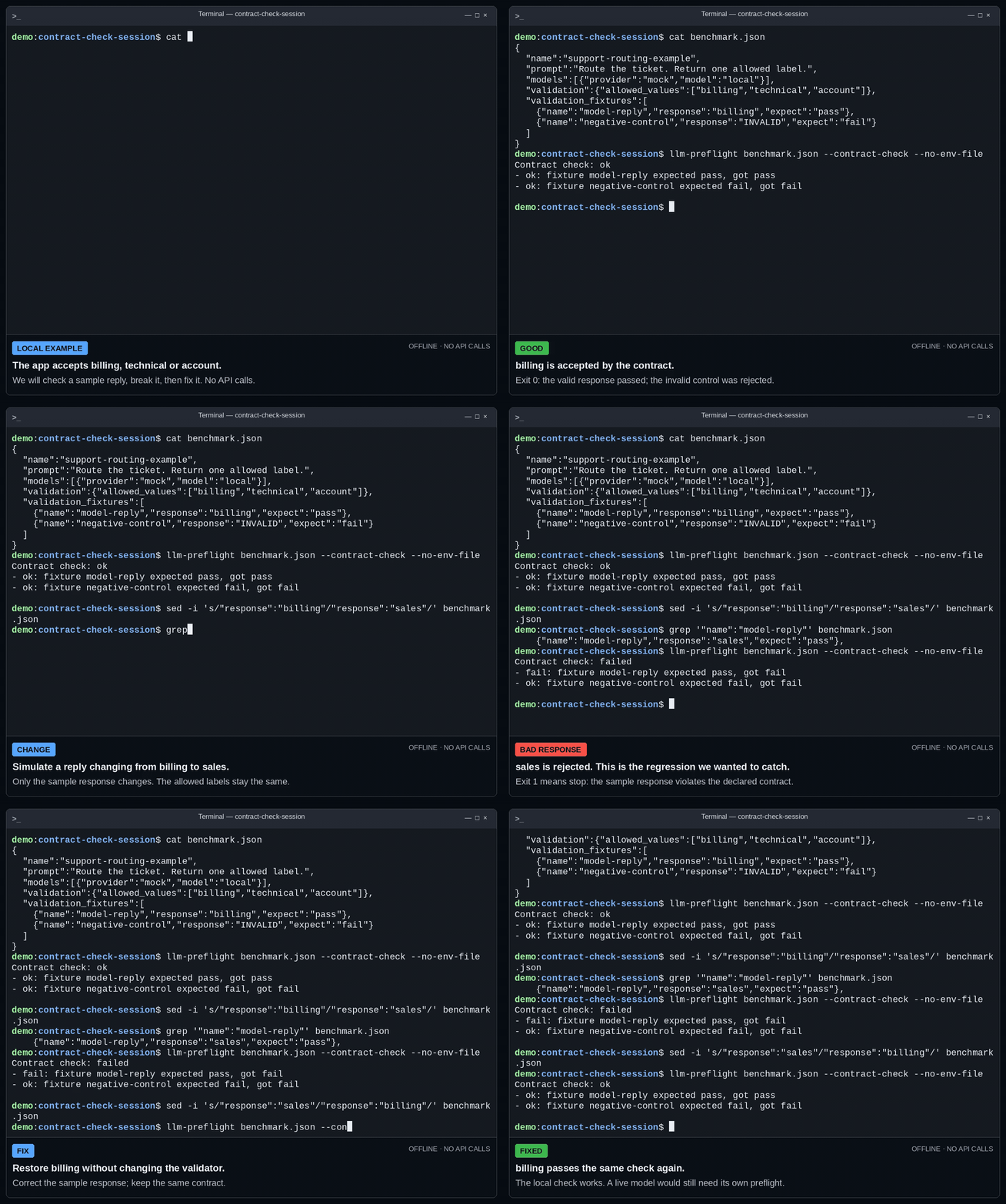
Real CLI output with synthetic response fixtures. This checks the validator; it makes no provider requests and does not execute your application's parser. Watch the MP4.
Try it in 60 seconds
In a new directory, install the tool and run the local mock—no API key or provider request:
python3 -m venv .venv
. .venv/bin/activate
python3 -m pip install llm-preflight
llm-preflight init
llm-preflight benchmark.json --no-save --no-env-file
The activation command above is for POSIX shells; PowerShell uses
.\.venv\Scripts\Activate.ps1.
init refuses to overwrite an existing config. Look for local-mock with
PASS in the quality gate: the mock replied ok and passed the exact-output
test. The overall decision is inconclusive (exit 3) because a local mock
provides no live-provider evidence. The demo worked; it cannot approve a model.
--no-save skips JSON/Markdown result artifacts; --no-env-file skips credential files.
Watch the interactive default template (30 seconds)
Select the mock and default Reply with ok test, review the plan, and confirm
the local run. The session also reads the same decision through CLI JSON:
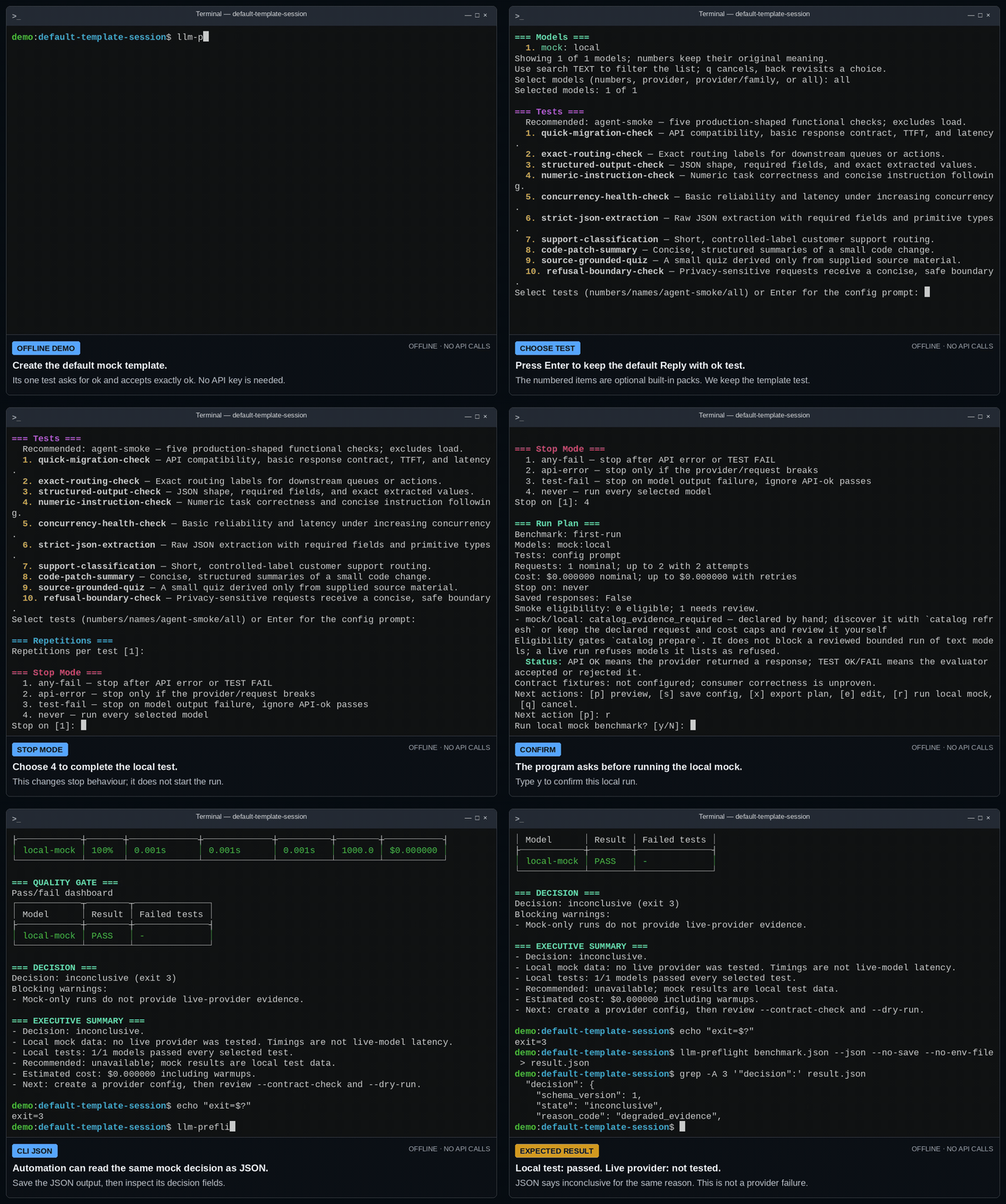
Local test: passed. Live provider: not tested. No API keys or provider calls. Watch the MP4 or start with the text walkthrough and interactive CLI JSON example.
For benchmark runs, read the decision before acting:
pass, exit0: the configured checks passed with the required evidence.fail, exit1: a configured check failed; inspect the cause.inconclusive, exit3: evidence is insufficient; read the blocking warnings.
A passing run is evidence for the configured workload, not production approval.
Observed results on a support-routing contract
These are selected real provider observations, including failed checks and rejected requests. Each model received 16 requests. Dates, routes and request settings differ; the results describe one workload and are not a general ranking.

Latency covers successful API responses, including contract failures, and
excludes API errors. — means unavailable; missing usage keeps total cost
unknown. OpenRouter observations do not establish native-provider behavior.
Read the results as text, request settings, and failure analysis.
First live run
Start with one rule your application already enforces. The project integration guide provides a complete routing contract with accepted/rejected fixtures and a no-spend pull-request check. Match your deployed prompt and response parser; local fixture checks do not execute application code automatically.
To try a minimal provider starter instead:
llm-preflight init live.json --template provider \
  --provider openai --model gpt-6.1-sol --api-key-env OPENAI_API_KEY
The starter asks for exactly ok. Add this top-level field to live.json,
keeping its existing fields, to check the validator locally:
{
  "validation_fixtures": [
    {"name": "accepted-label", "response": "ok", "expect": "pass"},
    {"name": "rejected-label", "response": "not ok", "expect": "fail"}
  ]
}
Set OPENAI_API_KEY in your shell or in an uncommitted .env.production
beside live.json. The config stores the variable name, never the key.
Preview the check without making a generation request:
llm-preflight live.json --contract-check
llm-preflight live.json --doctor
llm-preflight live.json --pricing-check
llm-preflight live.json --dry-run
The starter has a three-request limit and a $0.05 estimated-cost cap. Resolve warnings and review the route, retry-expanded request bound, pricing and retention settings. The starter saves failed responses by default; review artifacts before sharing them.
Paid request: only after reviewing and authorizing that plan, run:
llm-preflight live.json
A direct CLI run has no separate approval prompt. Results are saved as JSON
and Markdown under results/ unless you use --no-save. The CLI reads the
config-adjacent .env.production without replacing existing shell values;
choose another file with --env-file PATH or skip it with --no-env-file.
Choose your path
- Set up a real project. Adapt one application rule with the project integration guide.
- Validate a change. Compare approved and candidate configurations with the model-change guide.
- Automate an established contract. Use CI and JSON output or the GitHub Action.
- Configure a coding agent. Start with
llm-preflight-mcp --workspace "$PWD"in a trusted repository and follow the MCP server guide.
See a contract change fail
A review artifact retains the decision, contract validity, latency, usage,
estimated cost and blocking warnings. Render saved schema-version-1 JSON as
a standalone report without another provider request. Substitute the saved
JSON path printed by your run for results/run.json:
llm-preflight report results/run.json --output report.html
The renderer omits prompts, responses, local paths and identifying run metadata. For reproducible examples, run these from a source checkout:
python3 -m llm_preflight report examples/reports/schema-baseline.json --format markdown
python3 -m llm_preflight report examples/reports/schema-break.json --format markdown
The first synthetic result passes; the second reports contract_failure, 67%
contract validity and one contract-only failure. The
report gallery
also demonstrates a gate blocked with no_record (exit 1). These fixtures
make no provider calls and cannot supply attested CI evidence.
CLI, CI, and MCP
Works as a CLI, GitHub Action, and local MCP server. The Action defaults to no generation requests; a live MCP run requires explicit paid-run confirmation. Keep the client's tool approval enabled: its confirmation field is not proof that a person authorized spending.
No preflight, no merge. With a required check configured, the offline gate
requires a fresh passing CI record matching the current contract, routes,
prompts and run selection. Protect the producer and gate workflows; signed
records also need gh attestation verify before the gate. Follow
proof of preflight
to configure it. A local fixture pass or installed package does not enforce a
merge policy.
It doesn't certify production behaviour. It proves the check was done.
MCP for coding agents
Configure the installed stdio command in your MCP client:
{
  "mcpServers": {
    "llm-preflight": {
      "command": "llm-preflight-mcp",
      "args": ["--workspace", "/absolute/path/to/repository"]
    }
  }
}
The seven tools audit literal model IDs, validate a config, preview a plan, run
a preflight, compare saved baselines, verify a record and gate CI evidence.
For an existing contract, begin with validate_config and dry_run_plan.
Agents must read the structured decision and report missing evidence.
See the MCP guide
for request/result examples and workspace boundaries.
The agent-smoke suite with --smoke makes six requests per model before
configured retries. Use the
coding-agent workflow
for CLI commands. An agent must not weaken a validator to get a pass or infer
permission for paid work from a gate result.
Common jobs
-
Audit existing model IDs:
llm-preflight --audit-source .reports literal IDs marked retired or retiring in the bundled snapshot. No config or key is needed. Add--cito make the retirement decision affect the exit code; without it, findings normally exit0. In Git, the scan reads tracked, unignored files. See model retirements. -
Inspect pricing:
--doctorprovides pricing advisory;--pricing-checkis the fail-closed coverage gate. Preview the run withllm-preflight benchmark.json --dry-run. -
Review Git changes:
llm-preflight benchmark.json --change-planproposes checks from static signals; it does not authorize execution. -
Discover a candidate: refresh metadata, prepare a plan and preview it:
llm-preflight catalog refresh benchmarks/watch.json
llm-preflight catalog prepare benchmarks/watch.json \
  --against benchmarks/approved.json --output benchmarks/candidates.json
llm-preflight benchmarks/candidates.json --migration-check --dry-run
Create the watch/approved files first with the model catalogue guide. Catalogue probes are a separate, potentially billable step.
Change a model safely
Put approved and candidate models in a reviewed config, then preview the built-in compatibility pack:
llm-preflight benchmark.json --migration-check --dry-run
After approving that plan, llm-preflight benchmark.json --migration-check
sends three built-in cases per model before configured retries: a capital-city
answer, summary and rewrite. They check basic compatibility; use your own
application contract tests
to establish whether the change meets your feature's rules.
Safety boundary
Results apply to the configured account, route, prompts and validators at one time. Model responses remain stochastic. Deterministic validation checks the rules you declare; it does not establish semantic accuracy or production safety. Preview limits before live requests and keep paid-run authority with the person responsible for the integration.
How it compares
Use this project for a bounded contract check and reviewable evidence before an integration change. Evaluation frameworks also support assertions and CI; keep one when it already meets your needs. Broader evaluation suites serve semantic scoring and statistical comparisons; observability tools serve production tracing and incident investigation. See when to use it.
Get help or try it in your project
Ask for setup help or a contract example. Include the version, intended check and redacted output. Never share keys, private prompts or provider responses. Use the security policy for vulnerabilities.
Documentation
The documentation homepage routes by task. Consult CLI reference, configuration and result JSON for exact behavior. Native routes and dated pricing coverage are listed in current snapshots. The north star and AI implementation testing guide explain the intended workflow and scope.
Release notes for every version are in the changelog.
Contributing and license
See Contributing for development and documentation standards. Released under the MIT License.
1 maintainer

Metadata
1 maintainer
Release files for llm-preflight 2.22.2
For a detailed explanation of source distributions (sdists) and built distributions (wheels), please see the package formats documentation.
Source distribution (sdist)
| File | Size | Uploaded | Provenance | |
|---|---|---|---|---|
| llm_preflight-2.22.2.tar.gz | 987.4 kB | With provenance | Details |
Built distribution (wheel)
| File | Interpreter | ABI | Platform | Reset |
|---|---|---|---|---|
| llm_preflight-2.22.2-py3-none-any.whl | Python 3 | none | any | Details |
Total release size: 1.2 MB
Release files / llm_preflight-2.22.2.tar.gz
| Download URL | llm_preflight-2.22.2.tar.gz |
|---|---|
| Size | 987.4 kB |
| Tags | Source |
|
SHA-256 checksum How to use checksums |
12aefa81b9bd042ca788a88f211751a016724e09fca6252319c6b4275769e481
|
|
BLAKE2b-256 checksum How to use checksums |
55d362f077f688043bdd10e9e4563159f06edf87abb3df4d58adedda25072144
|
| Upload date | |
|
Uploaded using Trusted Publishing? What is trusted publishing? |
Yes |
| Uploaded via |
twine/7.0.0 CPython/3.13.14
|
Provenance
Provenance describes where a file came from. On PyPI, provenance is shared via attestations, which provide a verifiable record of the build or publishing details. View details, limitations and caveats.


PyPI Publish Attestation
PyPI verified that this artifact, at this checksum, originated from the publisher listed below.
Signed by GitHub Actions, verified by PyPI on Oct 19, 2026.
Transparency logRelease files / llm_preflight-2.22.2-py3-none-any.whl
| Download URL | llm_preflight-2.22.2-py3-none-any.whl |
|---|---|
| Size | 166.0 kB |
| Tags | Python 3 |
|
SHA-256 checksum How to use checksums |
744f778ef01c04479cb37e02d4bb6e30c85b01accd1a2ba32d109f59ac72c7e1
|
|
BLAKE2b-256 checksum How to use checksums |
94bb49cd11f98e8f35c8407a33879d0c97e3f10e05d442c173b09e40a7347cd8
|
| Upload date | |
|
Uploaded using Trusted Publishing? What is trusted publishing? |
Yes |
| Uploaded via |
twine/7.0.0 CPython/3.13.14
|
Provenance
Provenance describes where a file came from. On PyPI, provenance is shared via attestations, which provide a verifiable record of the build or publishing details. View details, limitations and caveats.
PyPI Publish Attestation
PyPI verified that this artifact, at this checksum, originated from the publisher listed below.
Signed by GitHub Actions, verified by PyPI on Oct 19, 2026.
Transparency logSecurity for llm-preflight 2.22.2
Provenance
Provenance describes where a file came from. On PyPI, provenance is shared via attestations, which provide a verifiable record of the build or publishing details. View details, limitations and caveats.
Full provenance
All 2 files in this release have been uploaded with provenance metadata.
Attestation for llm_preflight-2.22.2.tar.gz
PyPI Publish Attestation
PyPI verified that this artifact, at this checksum, originated from the publisher listed below.
Signed by GitHub Actions, verified by PyPI on Oct 19, 2026.
Transparency logA note on package security
PyPI is a repository for distributing packages, not a service for auditing them. While third-party security researchers and our staff do their best to detect and remove malicious packages, PyPI cannot guarantee the quality, security or suitability of any given package.
To learn more about protecting yourself from malicious actors, visit our package security documentation.














