
for creating fast and easy llm apps

Project description
LLMSERVICE

Add LLM logic in your app with complience of Modern Software Engineering Principles
| Package |   |
Installation
Install LLMService via pip:
pip install llmservice
What is it?
Integrating LLMs often means embedding prompt construction, API calls, and post-processing directly into your application code—creating tangled pipelines and maintenance headaches. llmservice was created to decouple and streamline LLM workflows—handling prompts, invocations, and post-processing in a clean, reusable layer
LLMService adheres to established software development best practices. With a strong focus on Modularity and Separation of Concerns, Robust Error Handling, and Modern Software Engineering Principles, LLMService delivers a well-structured alternative to more monolithic frameworks like LangChain.
"LangChain isn't a library, it's a collection of demos held together by duct tape, fstrings, and prayers."
Main Features
-
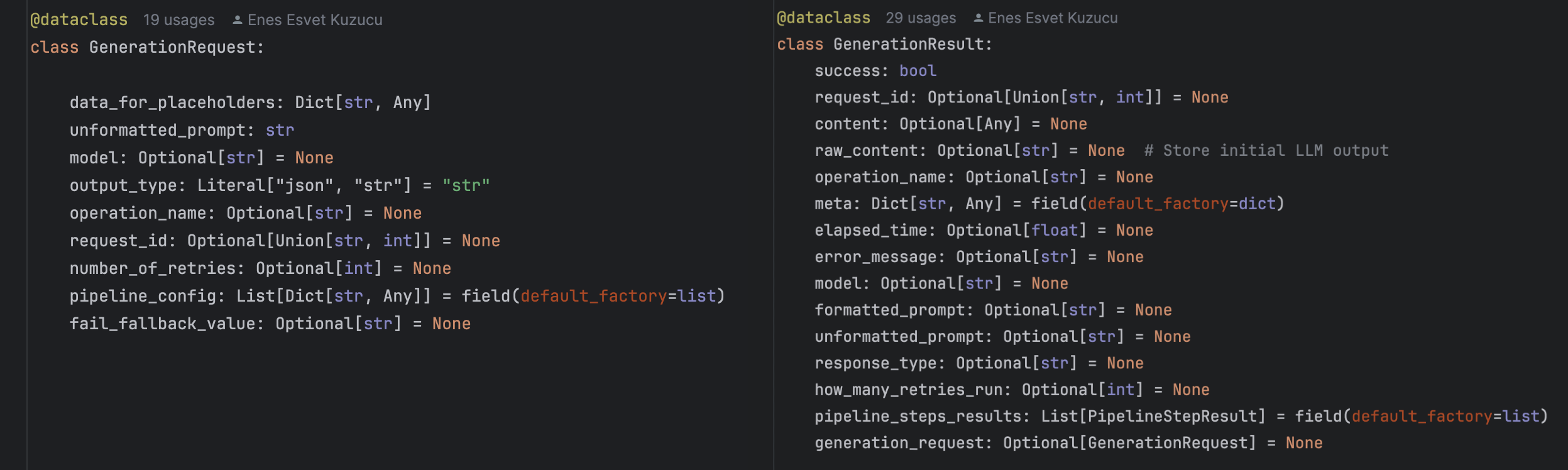
Result Monad Pattern Every invocation returns a
GenerationResultdataclass, unifying success/failure handling, error metadata, and retry control in a single, consistent call. -
Customizable Post-Processing Pipelines Declaratively chain steps like semantic extraction, advanced JSON parsing, string validation, and more via simple pipeline configs.
-
Rate-Limit-Aware Asynchronous Requests Centralized queuing with real-time rate-limit feedback drives dynamic worker scaling, maximising throughput while honouring API quotas.
-
Transparent Cost & Usage Monitoring Automatic token counting and cost calculation per model, with detailed metadata returned alongside your content.
-
Retry Mechanisms Utilizes the
tenacitylibrary to implement retries with exponential backoff for handling transient errors like rate limits or network issues.
- Custom Exception Handling Provides tailored responses to specific errors (e.g., insufficient quota), enabling graceful degradation and clearer insights into failure scenarios.
Architecture
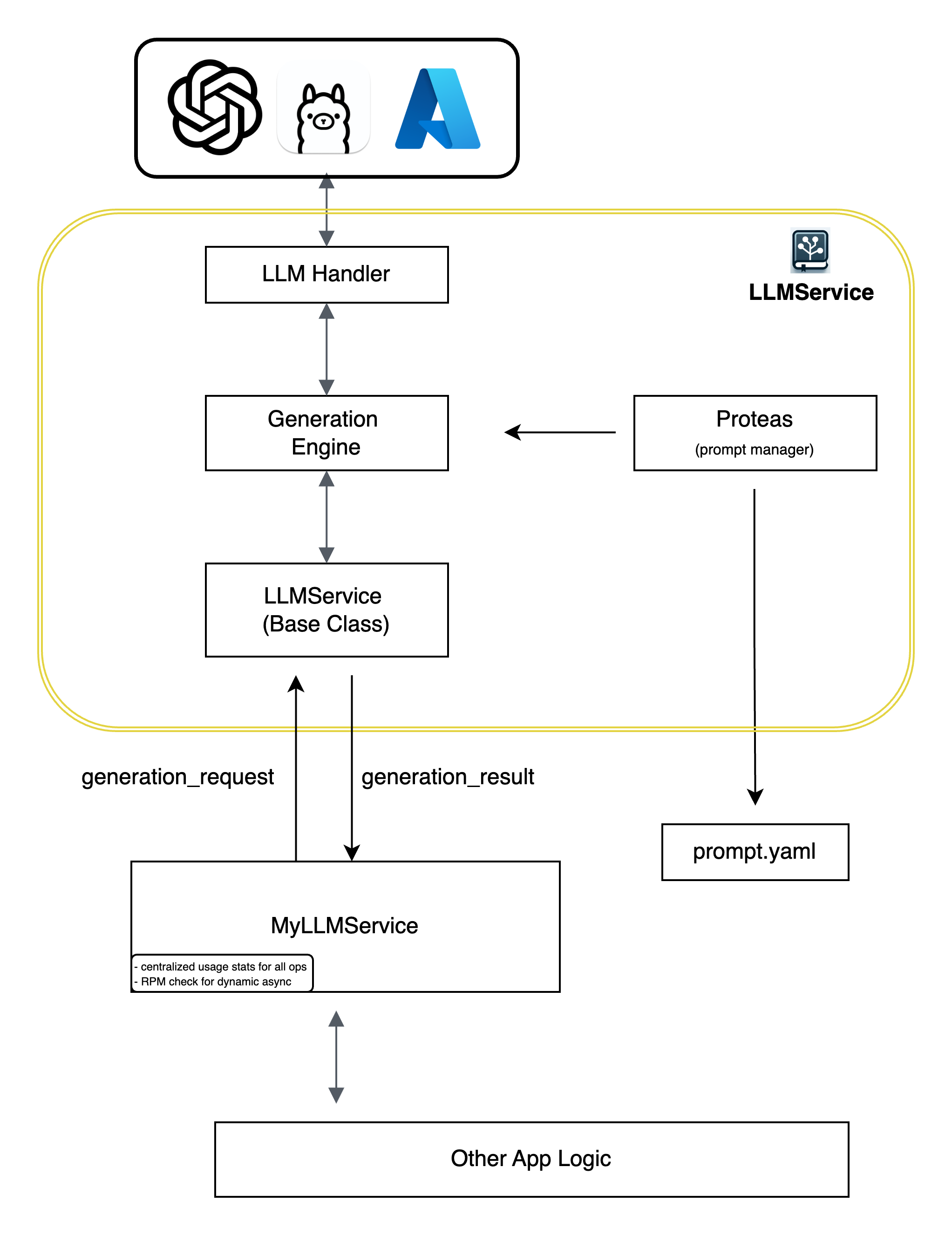
- LLM Handler: Manages interaction with different LLM providers (e.g., OpenAI, Ollama, Azure).
- Generation Engine: Orchestrates the generation process, including prompt crafting, invoking the LLM through llm handler, and post-processing.
- Proteas: A sophisticated prompt management system that loads and manages prompt templates from YAML files (
prompt.yaml). - LLMService (Base Class): A base class that serves as a template for users to implement their custom service logic.
- App: The application that consumes the services provided by LLMService, receiving structured
generation_resultresponses for further processing.
BaseLLMService Class
LLMService provides an abstract BaseLLMService class to guide users in implementing their own service layers:
- Modern Software Development Practices: Encourages adherence to best practices through a well-defined interface.
- Customization: Allows developers to tailor the service layer to their specific application needs while leveraging the core functionalities provided by LLMService.
- Extensibility: Facilitates the addition of new features and integrations without modifying the core library.
Proteas: The Main Prompt Management System
Proteas serves as LLMService's (optional) prompt management system for mid level applications where there are losts of prompts to handle but not enough to put them in database, It offers powerful tools for crafting, managing, and reusing prompts:
- Prompt Crafting: Utilizes
PromptTemplateto create consistent and dynamic prompts based on placeholders and data inputs. - Unit Skeletons: Supports loading and managing prompt templates from YAML files, promoting reusability and organization.
Installation
Install LLMService via pip:
pip install llmservice
Quick Start
Core Components
LLMService provides the following core modules:
llmhandler: Manages interactions with different LLM providers.generation_engine: Handles the process of prompt crafting, LLM invocation, and post-processing.base_service: Provides an abstract class that serves as a blueprint for building custom services.
Creating a Custom LLMService
To create your own service layer, follow these steps:
Step 0: Create your prompts.yaml file
Proteas uses a yaml file to load and manage your prompts. Prompts are encouraged to store as prompt template units where component of a prompt is decomposed into prompt template units and store in such way. To read more go to proteas docs (link here)
Create a new Python file (e.g., prompts.yaml)
add these lines
main:


  - name: "input_paragraph"
    statement_suffix: "Here is"
    question_suffix: "What is "
    placeholder_proclamation: input text to be translated
    placeholder: "input_paragraph"


  - name: "translate_to_russian"
    info: >
      take above text and translate it to russian with a scientific language, Do not output any additiaonal text.
Step 1: Subclass BaseLLMService
Create a new Python file (e.g., my_llm_service.py) and extend the BaseLLMService class.
In your app all llm generation data flow will go through this class. This is a good way of not coupling rest of your
app logic with LLM relevant logics.
You simply arange the names of your prompt template units in a list and pass this to generation engine.
from llmservice.base_service import BaseLLMService
from llmservice.generation_engine import GenerationEngine
import logging


class MyLLMService(BaseLLMService):
    def __init__(self, logger=None):
        self.logger = logger or logging.getLogger(__name__)
        self.generation_engine = GenerationEngine(logger=self.logger, model_name="gpt-4o-mini")

    def translate_to_russian(self, input_paragraph: str):
        data_for_placeholders = {'input_paragraph': input_paragraph}
        order = ["input_paragraph", "translate_to_russian"]

        unformatted_prompt = self.generation_engine.craft_prompt(data_for_placeholders, order)

        generation_result = self.generation_engine.generate_output(
            unformatted_prompt,
            data_for_placeholders,
            response_type="string"
        )

        return generation_result.content
Step 2: Use the Custom Service
# app.py
from my_llm_service import MyLLMService

if __name__ == '__main__':
    service = MyLLMService()
    result = service.translate_to_russian("Hello, how are you?")
    print(result)
Result will be a generation_result object which inludes all the information you need.
some notes to add to future
The Result Monad enhances error management by providing detailed insights into why a particular operation might have failed, enhancing the robustness of systems that interact with external data. As evident from the examples, each of these monads facilitates the creation of function chains, employing a paradigm often referred to as a “railroad approach.” This approach visualizes the sequence of functions as a metaphorical railroad track, where the code smoothly travels along, guided by the monadic structure. The beauty of this railroad approach lies in its ability to elegantly manage complex computations and transformations, ensuring a structured and streamlined flow of operations.
Release history Release notifications | RSS feed


Download files
Download the file for your platform. If you're not sure which to choose, learn more about installing packages.
Source Distribution
Built Distribution
Filter files by name, interpreter, ABI, and platform.
If you're not sure about the file name format, learn more about wheel file names.
Copy a direct link to the current filters
File details
Details for the file llmservice-0.2.0.tar.gz.
File metadata
- Download URL: llmservice-0.2.0.tar.gz
- Upload date:
- Size: 21.8 kB
- Tags: Source
- Uploaded using Trusted Publishing? No
- Uploaded via: twine/6.1.0 CPython/3.9.22
File hashes
| Algorithm | Hash digest | |
|---|---|---|
| SHA256 |
2d629a72f7e200215171a86d43badc0f1ee098c567bd553754241accca32984b
|
|
| MD5 |
dbc6ce16e01590a879bc52dd9bd2947c
|
|
| BLAKE2b-256 |
2f2a428d207f1ea068f4626101d9f0b7c4fa4398162776f2d87e2e0ba20a6024
|
File details
Details for the file llmservice-0.2.0-py3-none-any.whl.
File metadata
- Download URL: llmservice-0.2.0-py3-none-any.whl
- Upload date:
- Size: 20.7 kB
- Tags: Python 3
- Uploaded using Trusted Publishing? No
- Uploaded via: twine/6.1.0 CPython/3.9.22
File hashes
| Algorithm | Hash digest | |
|---|---|---|
| SHA256 |
c7637720fddc434e29ec1b5563cce75b7fcfb47801a2204890bbd4dd9c16d5d5
|
|
| MD5 |
cf9a9a28cc70976a946fe64e4fb2b110
|
|
| BLAKE2b-256 |
88560857666e9f52130b111c9fc3e4b1a8981c86cb820997b01691537440d475
|






