
A lightweight, production-ready service layer for modular, rate-aware LLM integrations

Project description

LLMService does one thing well - manage LLM invocations with production concerns (structured outputs, rate limits, costs, retries, extensive logging, scalable architecture).
A clean, production-ready service layer that centralizes prompts, invocations, and structured data extraction, ensuring rate-aware, maintainable, and scalable LLM logic in your application.
| Package |   |
Installation
Install LLMService via pip:
pip install llmservice
Table of Contents
- Installation
- What's New in v3.0
- What makes it unique?
- Main Features
- Architecture
- Usage
- Structured Outputs
- Async support
- Rate Limiting & Concurrency
- Cost Tracking
What's New in v3.0
🚀 Structured Outputs with Pydantic - Direct extraction of typed data using Pydantic schemas, no more manual JSON parsing!
🎯 OpenAI Responses API - Full support for the latest OpenAI structured output features
❌ Pipeline Removal - Deprecated complex pipeline system in favor of clean, direct structured outputs
✨ Simplified API - Cleaner, more intuitive methods for common tasks
What makes it unique?
| Feature | LLMService | LangChain |
|---|---|---|
| Structured Outputs | Native Pydantic schema support with automatic validation and type safety via OpenAI's structured outputs API | Requires manual output parser setup and chaining |
| Result Handling | Returns a single GenerationResult dataclass encapsulating success/failure, rich metadata (tokens, cost, latency), and typed data |
Composes chains of tools and agents; success/failure handling is dispersed via callbacks and exceptions |
| Rate-Limit & Throughput Control | Built-in sliding-window RPM/TPM counters and an adjustable semaphore for concurrency, automatically pausing when you hit your API quota | Relies on external throttlers or underlying client logic; no native RPM/TPM management |
| Cost Monitoring | Automatic per-model token-level cost calculation and aggregated usage stats for real-time billing insights | No built-in cost monitoring—you must implement your own wrappers or middleware |
| Dependencies | Minimal footprint: only Tenacity, OpenAI client, and Pydantic | Broad ecosystem: agents, retrievers, vector stores, callback managers, and other heavy dependencies |
| Extensibility | Provides a clear BaseLLMService subclassing interface so you encapsulate each business operation and never call the engine directly |
You wire together chains or agents at call-site, mixing business logic with prompt orchestration |
LLMService delivers a well-structured alternative to more monolithic frameworks like LangChain.
"LangChain isn't a library, it's a collection of demos held together by duct tape, fstrings, and prayers."
Main Features
-
Structured Outputs with Pydantic Define your expected output format as Pydantic models and get validated, typed responses directly.
-
Minimal Footprint & Low Coupling Designed for dependency injection—your application code never needs to know about LLM logic.
-
Result Monad Pattern Returns a
GenerationResultdataclass for every invocation, encapsulating success/failure status, raw and processed outputs, error details, retry information—giving you full control over custom workflows. -
Rate-Limit-Aware Asynchronous Requests Dynamically queue and scale workers based on real-time RPM/TPM metrics to maximize throughput without exceeding API quotas.
-
Transparent Cost & Usage Monitoring Automatically track input/output tokens and compute per-model cost, exposing detailed metadata with each response.
-
Automated Retry & Exponential Backoff Handle transient errors (rate limits, network hiccups) with configurable retries and exponential backoff powered by Tenacity.
-
Custom Exception Handling Provide clear, operation-specific fallbacks (e.g., insufficient quota, unsupported region) for graceful degradation.
Architecture
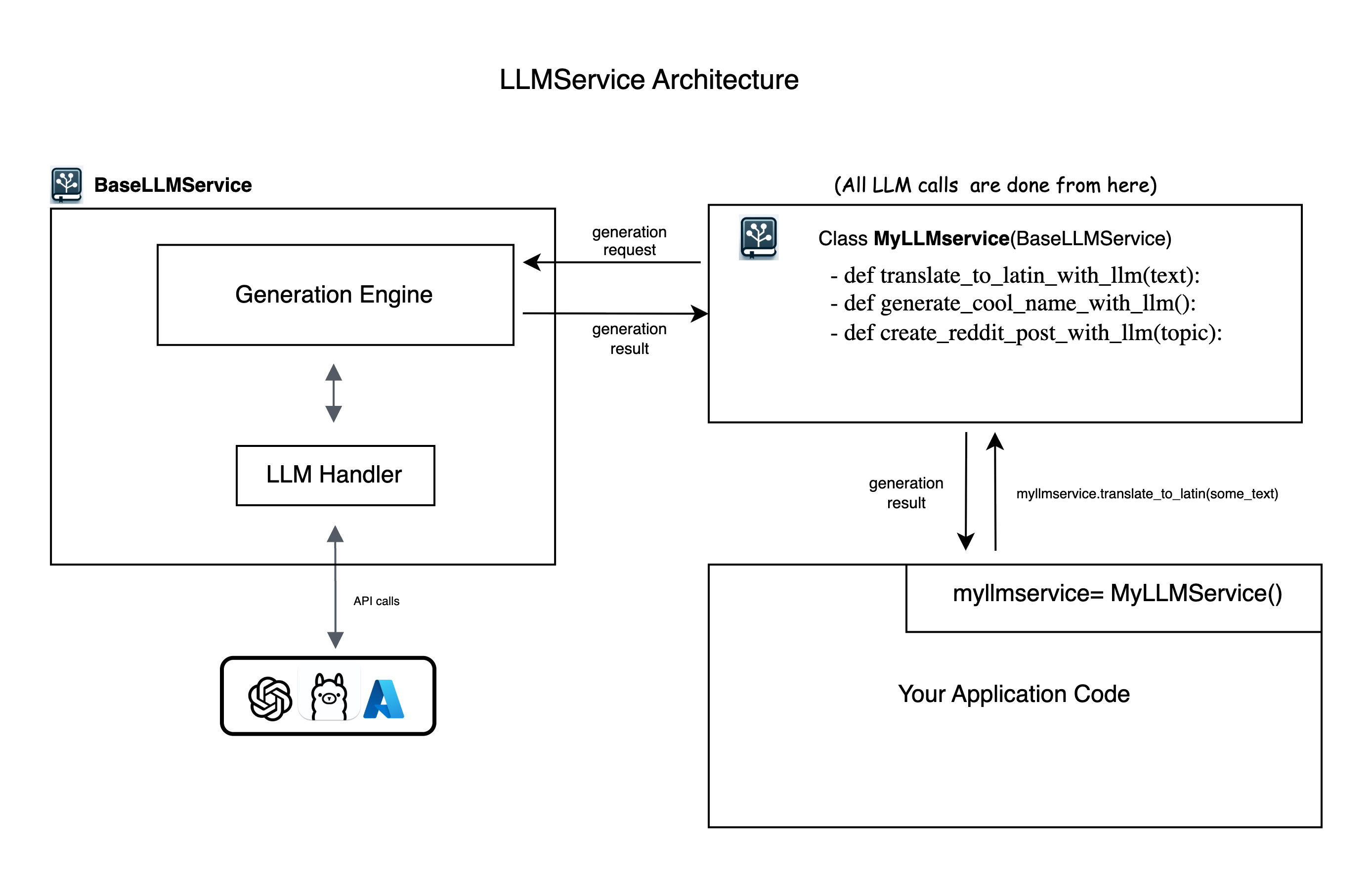
LLMService provides an abstract BaseLLMService class to guide users in implementing their own service layers. It includes llm_handler which manages interactions with OpenAI's API and generation_engine which handles the process of prompt crafting, LLM invocation, and structured output processing.
Usage
Step 0: Config & Installation
-
Put your
OPENAI_API_KEYinside.envfile -
Install LLMService via pip:
pip install llmservice
Step 1: Subclassing BaseLLMService and create methods
Create a new Python file (e.g., myllmservice.py) and extend the BaseLLMService class. All LLM logic for your business will be defined here as methods.
Simple Text Generation
from llmservice import BaseLLMService, GenerationRequest

class MyLLMService(BaseLLMService):
    def translate_to_latin(self, input_paragraph: str) -> GenerationResult:
        my_prompt = f"translate this text to latin: {input_paragraph}"

        generation_request = GenerationRequest(
            user_prompt=my_prompt,
            model="gpt-4o-mini",
            operation_name="translate_to_latin"
        )

        # Execute the generation synchronously
        generation_result = self.execute_generation(generation_request)
        return generation_result
Structured Output with Pydantic
from pydantic import BaseModel, Field
from typing import List, Optional

class TranslationResult(BaseModel):
    original_text: str = Field(description="The original text")
    translated_text: str = Field(description="The translated text")
    confidence: float = Field(ge=0, le=1, description="Translation confidence")
    alternative_translations: Optional[List[str]] = Field(default=None)

class MyLLMService(BaseLLMService):
    def translate_with_metadata(self, text: str, target_language: str) -> TranslationResult:
        prompt = f"Translate '{text}' to {target_language}"

        # Method 1: Using GenerationRequest with response_schema
        request = GenerationRequest(
            user_prompt=prompt,
            response_schema=TranslationResult,  # Pydantic schema
            model="gpt-4o-mini",
            operation_name="structured_translation"
        )

        result = self.execute_generation(request)

        if result.success:
            # Content is already parsed and validated
            import json
            return TranslationResult(**json.loads(result.content))
        else:
            # Handle error
            raise Exception(f"Translation failed: {result.error_message}")
Step 2: Import your llm layer and use the methods
# in your app code anywhere you need to run LLM logic
from myllmservice import MyLLMService

if __name__ == '__main__':
    myllmservice = MyLLMService()

    # Simple text generation
    result = myllmservice.translate_to_latin("Hello, how are you?")
    print(result.content)  # "Salve, quomodo vales?"

    # Structured output
    translation = myllmservice.translate_with_metadata(
        text="Hello world",
        target_language="Spanish"
    )
    print(translation.translated_text)  # "Hola mundo"
    print(translation.confidence)  # 0.95
Step 3: Inspect and Use generation_result
Below is the structure of the GenerationResult dataclass. While the .content field provides the direct LLM response, advanced applications will benefit from leveraging the full set of metadata.
@dataclass
class GenerationResult:
    success: bool
    trace_id: str
    request_id: Optional[Union[str, int]] = None
    content: Optional[Any] = None  # For structured outputs, this is JSON string
    raw_content: Optional[str] = None  # Store initial LLM output
    raw_response: Optional[Any] = None  # Complete response object
    operation_name: Optional[str] = None
    usage: Dict[str, Any] = field(default_factory=dict)
    elapsed_time: Optional[float] = None
    error_message: Optional[str] = None
    model: Optional[str] = None
    response_type: Optional[str] = None
    response_id: Optional[str] = None  # For CoT chaining
    # Rate limit tracking
    rpm_at_the_beginning: Optional[int] = None
    rpm_at_the_end: Optional[int] = None
    tpm_at_the_beginning: Optional[int] = None
    tpm_at_the_end: Optional[int] = None
    # ... and more metadata fields
Common GenerationResult fields usage:
# Success checking
if not res.success:
    print("LLM call failed:", res.error_message)

# Token and cost breakdown
print("Input tokens:", res.usage["input_tokens"])
print("Output tokens:", res.usage["output_tokens"])
print("Total cost (USD):", res.usage["total_cost"])

# Latency info
print("LLM round-trip (ms):", res.elapsed_time * 1000)

# Rate-limit stats
print("RPM at start:", res.rpm_at_the_beginning)
print("RPM at end:", res.rpm_at_the_end)
Structured Outputs
LLMService provides multiple ways to work with structured outputs using Pydantic schemas:
Method 1: Direct Schema in GenerationRequest
from pydantic import BaseModel, Field

class ProductInfo(BaseModel):
    name: str = Field(description="Product name")
    price: float = Field(gt=0, description="Price in USD")
    in_stock: bool = Field(description="Availability")

request = GenerationRequest(
    user_prompt="Extract product info from: 'iPhone 15 Pro - $999, available now'",
    response_schema=ProductInfo,
    model="gpt-4o-mini"
)

result = myllmservice.execute_generation(request)
# result.content contains validated JSON matching ProductInfo schema
Method 2: Using generate_structured()
from llmservice import GenerationEngine

engine = GenerationEngine(model_name="gpt-4o-mini")

# Direct structured generation
product = engine.generate_structured(
    prompt="Extract product info from: 'MacBook Pro M3 - $1999, in stock'",
    schema=ProductInfo,
    system="You are a product data extractor"
)
# Returns parsed ProductInfo instance directly
print(f"Product: {product.name}, Price: ${product.price}")
Method 3: Process existing content with schema
# Process already generated content
raw_llm_output = "The product is iPhone 15 at $999 and it's available"
product = engine.process_with_schema(
    content=raw_llm_output,
    schema=ProductInfo,
    system="Extract product information"
)
Complex Nested Schemas
class Address(BaseModel):
    street: str
    city: str
    country: str

class Customer(BaseModel):
    name: str
    email: str
    addresses: List[Address]
    preferred_contact: Literal["email", "phone", "mail"]

# Works with nested schemas automatically
customer = engine.generate_structured(
    prompt="Create a customer record for John Doe...",
    schema=Customer
)
Async Support
LLMService includes first-class asynchronous methods with built-in rate and concurrency controls:
class MyLLMService(BaseLLMService):
    def __init__(self):
        super().__init__(
            default_model_name="gpt-4o-mini",
            max_rpm=120,  # Max requests per minute
            max_tpm=10_000,  # Max tokens per minute
            max_concurrent_requests=50  # Concurrent request limit
        )

    async def translate_async(self, text: str, target_lang: str) -> GenerationResult:
        request = GenerationRequest(
            user_prompt=f"Translate to {target_lang}: {text}",
            model="gpt-4o-mini",
            operation_name="async_translation"
        )

        return await self.execute_generation_async(request)

# Usage
import asyncio

async def translate_batch(texts: List[str]):
    myllmservice = MyLLMService()
    tasks = [myllmservice.translate_async(text, "Spanish") for text in texts]
    results = await asyncio.gather(*tasks)
    return results
Rate Limiting & Concurrency
LLMService provides sophisticated rate limiting with sliding window tracking:
myllmservice = MyLLMService()

# Set rate limits
myllmservice.set_rate_limits(max_rpm=100, max_tpm=20_000)
myllmservice.set_concurrency(max_concurrent_requests=25)

# Monitor current rates
snapshot = myllmservice.metrics.snapshot()
print(f"Current RPM: {snapshot.rpm}")
print(f"Current TPM: {snapshot.tpm}")
print(f"Total cost: ${snapshot.cost:.4f}")
Cost Tracking
Track costs at operation level:
# Get usage statistics per operation
stats = myllmservice.usage_stats.operation_usage
for operation, usage in stats.items():
    print(f"{operation}:")
    print(f"  Total tokens: {usage['total_tokens']}")
    print(f"  Total cost: ${usage['total_cost']:.6f}")

# Get total usage
total = myllmservice.usage_stats.total_usage
print(f"Session total: ${total['total_cost']:.6f}")
Examples
Check out the examples/ directory for complete working examples:
- capital_finder: Basic text generation and structured data extraction
- SQL_code_generator: Generate SQL from natural language with validation
- translator: Multi-language translation with async batch processing
License
MIT
Contributing
Contributions are welcome! Please feel free to submit a Pull Request.
Release history Release notifications | RSS feed


Download files
Download the file for your platform. If you're not sure which to choose, learn more about installing packages.
Source Distribution
Built Distribution
Filter files by name, interpreter, ABI, and platform.
If you're not sure about the file name format, learn more about wheel file names.
Copy a direct link to the current filters
File details
Details for the file llmservice-0.3.1.tar.gz.
File metadata
- Download URL: llmservice-0.3.1.tar.gz
- Upload date:
- Size: 76.1 kB
- Tags: Source
- Uploaded using Trusted Publishing? No
- Uploaded via: twine/6.2.0 CPython/3.9.25
File hashes
| Algorithm | Hash digest | |
|---|---|---|
| SHA256 |
357b2f054bac78a010f53cdabfe3201dfc4679d9ce61e25eee7f8da4db12d84d
|
|
| MD5 |
3bd7e60b73f069d17ce7da2050830ce9
|
|
| BLAKE2b-256 |
77e1fe79ec6e48f2dacdb0f25c7f171ba70376e8467228cafc1301febb8e61df
|
File details
Details for the file llmservice-0.3.1-py3-none-any.whl.
File metadata
- Download URL: llmservice-0.3.1-py3-none-any.whl
- Upload date:
- Size: 88.0 kB
- Tags: Python 3
- Uploaded using Trusted Publishing? No
- Uploaded via: twine/6.2.0 CPython/3.9.25
File hashes
| Algorithm | Hash digest | |
|---|---|---|
| SHA256 |
60833688c563a8b917d9dd988c60ed8876aa1a7fbc1aa8c96035f02a1837a70f
|
|
| MD5 |
d7b79816494cf89adbb6f967ab7c4fa6
|
|
| BLAKE2b-256 |
ae077e0ecef0663dce273946b971480382530540da582ada24ce1661aeb4fc30
|






