
Lattice AI Workspace OS for local-first graph, memory, agent, workflow, and skill operations

Project description

AI Workspace OS for local-first graph, memory, agents, workflows, skills, and timelines.







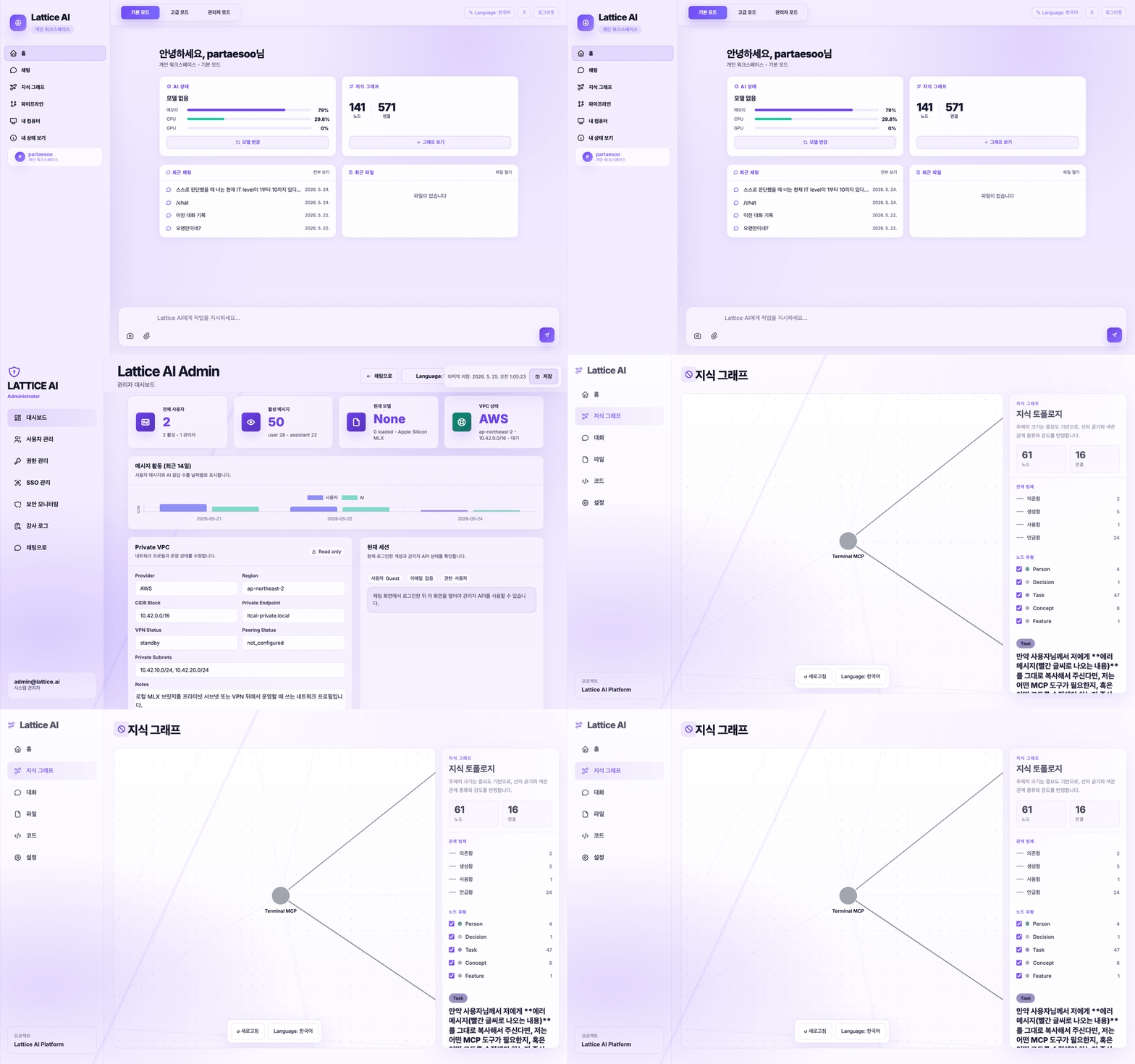
What is Lattice AI?
Most AI tools answer one chat at a time. They do not remember your folders, your project history, your previous decisions, or how your files relate to each other.
Lattice AI turns your local workspace into an AI Workspace OS.
It reads approved local folders, indexes chats and documents, builds a searchable knowledge graph, and connects the graph to snapshots, personal memory, agent runs, workflow history, skills, and an auditable timeline.
Local files + chats + folders
          ↓
Automatic knowledge graph
          ↓
Graph-aware chat, snapshots, memory, agents, workflows, skills, and timeline
New in 1.1.0: Organization Workspace Foundation
- Organization Workspace alongside Personal Workspace — create shared org workspaces, list/switch between them, and archive (non-destructively)
- Workspace roles & permissions —
owner,admin,member,viewermapped to read / write / manage-members / manage-workspace - Workspace-scoped data — snapshots, memory, agent runs, workflows, traces,
and timeline carry a
workspace_id; reads scope via theX-Workspace-Idheader - CI / release hardening — Node.js 24 ready workflow, version-scoped
artifact upload (never
dist/*), and a release artifact validator - Enterprise extension foundation (open-core) — a stable seam for a future Enterprise plugin; Community ships everything it has today, unrestricted (see docs/ENTERPRISE.md and docs/EDITION_STRATEGY.md)
New in 1.0.0: AI Workspace OS
- Workspace OS command center at
/workspace - First-run onboarding state API and UI
- Graph RAG answer traces with sources, nodes, edges, confidence, and jump links
- Local indexing dashboard with watcher state, success/failure counts, pause/resume/remove
- Workspace snapshots, Time Machine views, export, and Knowledge Diff
- Personal memory CRUD/search linked back to the graph
- Multi-agent graph entities and agent run history
- Relationship Explorer for inbound, outbound, related entities, and shortest path
- Local Computer Memory remains OFF by default and requires explicit approval
- Skill Marketplace registry with install, uninstall, update, enable, disable, and version state
- Workflow Graph for upload -> summarize -> generate -> export style work histories
- VS Code commands for Explain Selection, Refactor Selection, Generate Tests, Send To Lattice, and Ask About Current File
Built for people who want
- a private AI workspace that runs from their own machine
- local model setup without hunting through many tools
- folder indexing that becomes useful AI memory
- a visual knowledge graph instead of disconnected files and chats
- optional team/admin controls for audit, permissions, and sensitive-data monitoring
Quick Start
Python / PyPI
pip install ltcai
LTCAI
# open http://localhost:4825
Apple Silicon local models
pip install "ltcai[local]"
LTCAI
Node / npm
npm install -g ltcai
LTCAI
VS Code / Cursor
- Install Lattice AI from the VS Code Marketplace or Open VSX
- Start the local server with
LTCAI - Press
Cmd+Shift+Ato open the chat panel
First run: create an account -> the first account becomes admin -> open /workspace -> complete onboarding -> choose a model -> connect folders -> start asking questions.
The 3-minute workflow
1. Install
   pip install ltcai && LTCAI

2. Detect hardware
   CPU, GPU, RAM are detected and a suitable local model is recommended.

3. Connect folders
   Pick the local folders you want Lattice AI to index.

4. Build knowledge
   Files and chats become nodes and edges in a local knowledge graph.

5. Ask questions
   “What did I decide about the auth migration last week?”

6. Keep working
   Use the same local knowledge from the web UI, VS Code, Telegram, or MCP clients.
Product Preview
Workspace Chat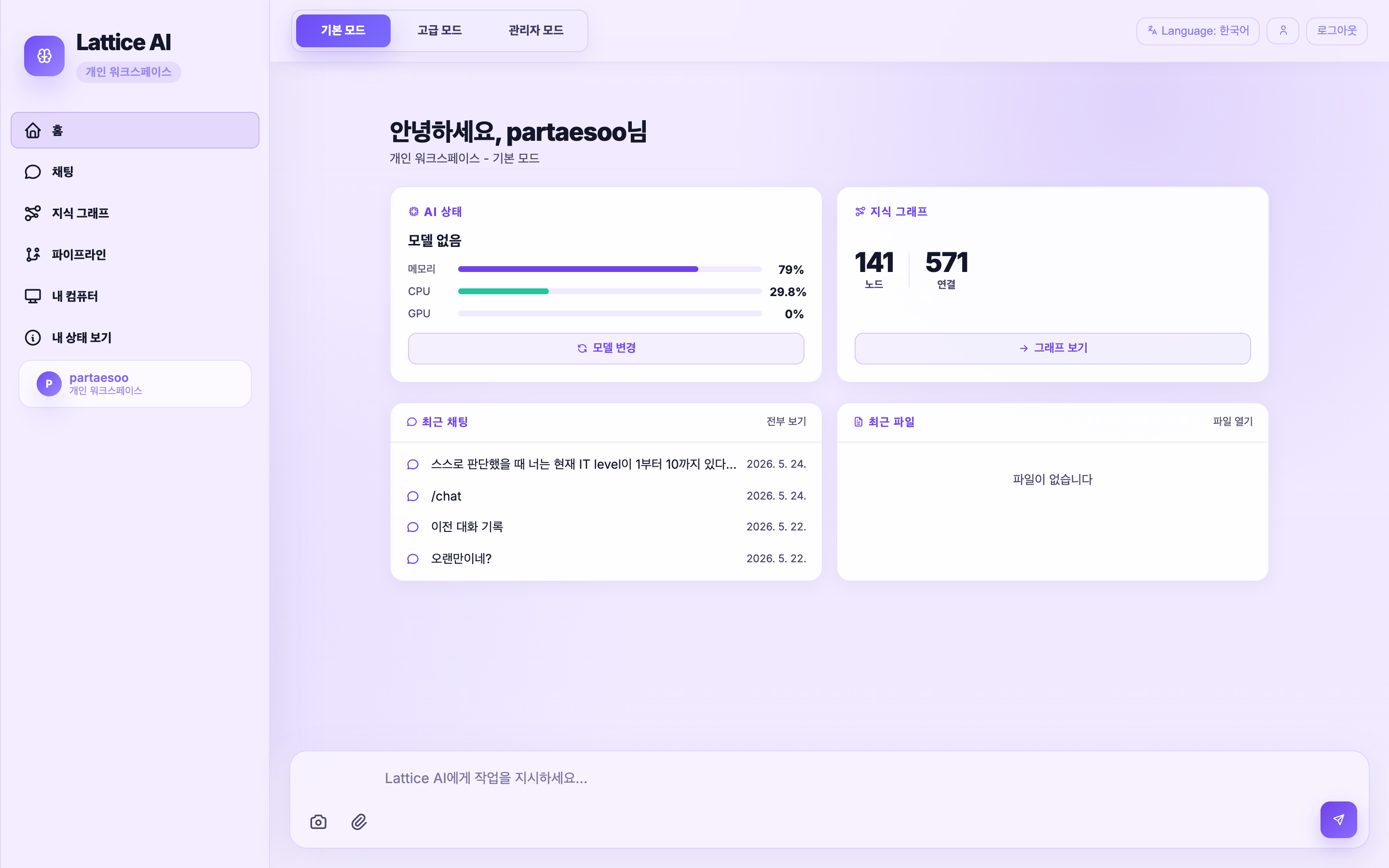 Chat with local/cloud models, upload files, and control pipelines.
|
Knowledge Graph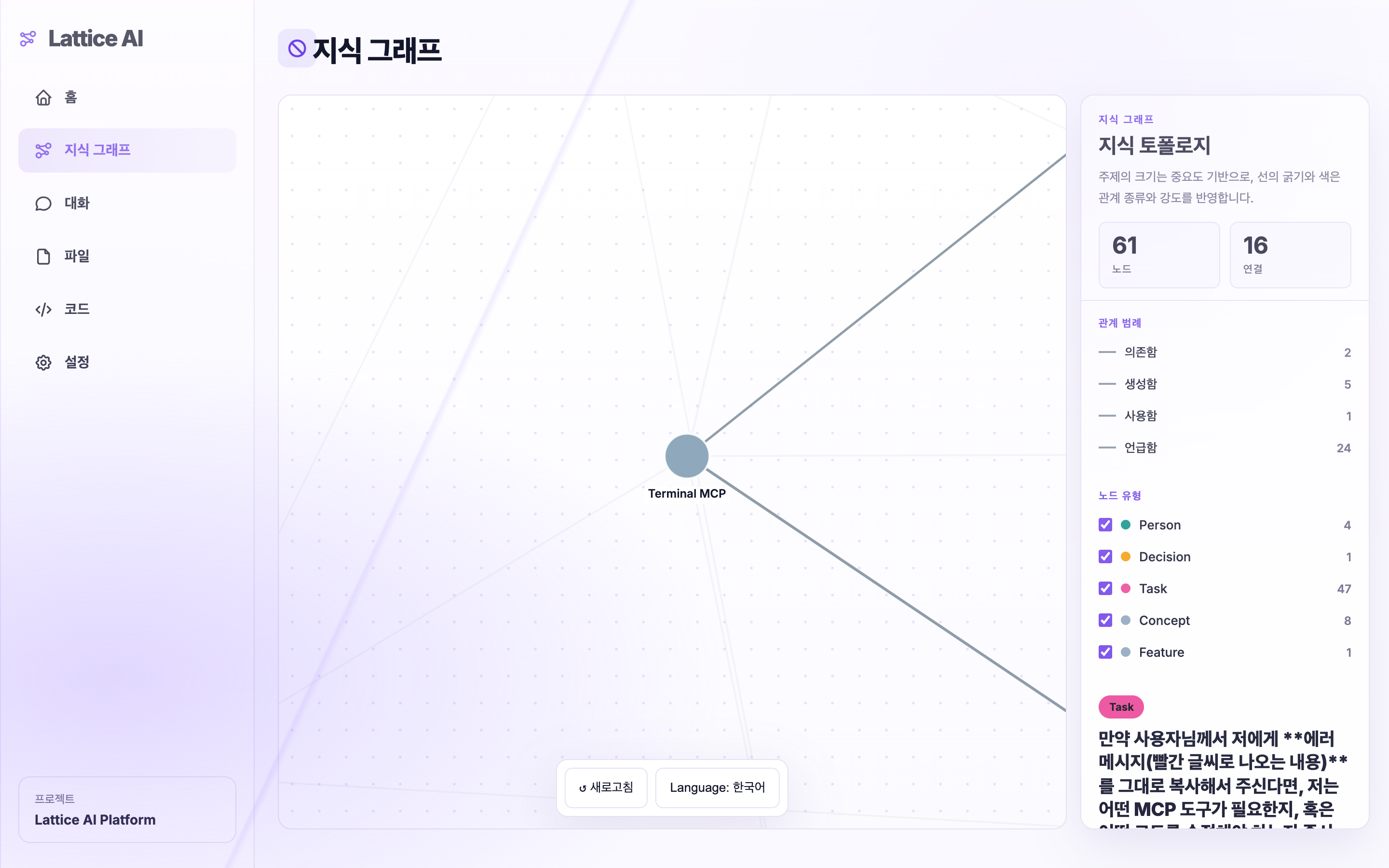 Automatically built from chats, files, folders, and project context.
|
Admin Dashboard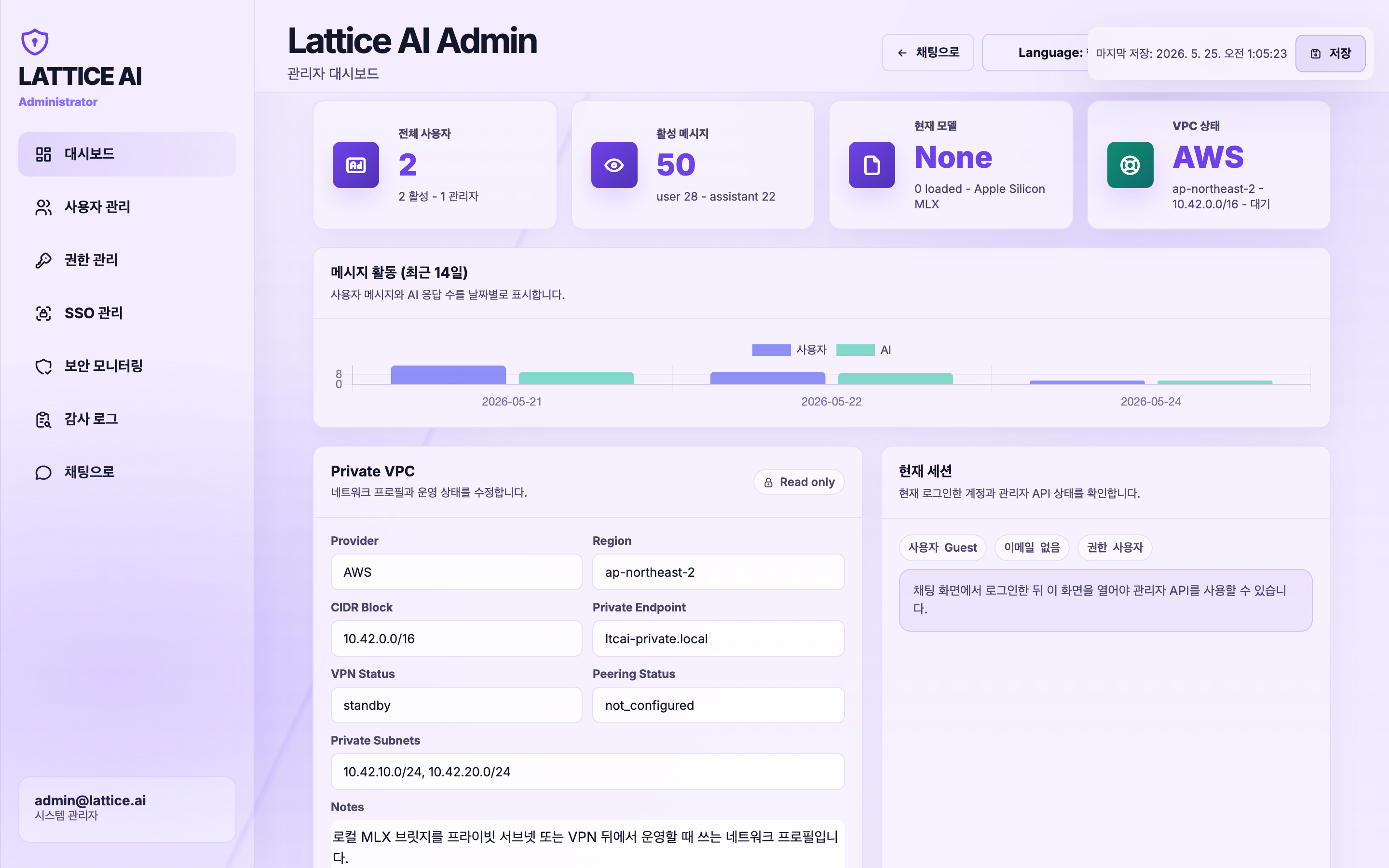 User management, audit logs, permissions, and security monitoring.
|
Why it is different
| Problem | Lattice AI approach |
|---|---|
| AI forgets every conversation | Chats and files are indexed into persistent local memory |
| Files are scattered across folders | Approved folders become searchable graph context |
| Local model setup is confusing | Hardware detection recommends and loads a suitable model |
| Graph tools require manual node editing | Nodes and edges are created automatically from real work |
| Cloud AI may expose private data | Local models keep data on your machine; cloud is opt-in |
| Teams need visibility | Admin dashboard, audit logs, role controls, and sensitive-data monitoring |
Core Features
Local-first AI workspace
- Web UI running from a local server
- Local SQLite storage under
~/.ltcai/ - Local folder indexing with explicit approval
- File upload, chat history, graph search, and document generation
- Optional cloud providers when you choose to use them
Automatic knowledge graph
Lattice AI turns your work into structure automatically.
Nodes can represent:
| Node type | Examples |
|---|---|
| Document | PDF, DOCX, PPTX, XLSX, Markdown, code files |
| Concept | technologies, project names, ideas, architecture topics |
| Person | you, teammates, mentioned people |
| Chat | previous conversations and sessions |
| Task | TODOs, action items, follow-ups |
| Decision | choices made during discussions |
Edges describe relationships such as:
mentions · contains · depends on · explains · uses · replaces · supports · related to
The graph is curated automatically: noisy tokens, file extensions, generic words, and hard secrets are filtered before promotion.
Model loading that users can trust
Lattice AI keeps model identity consistent across recommendation, download, load, backend router state, and frontend display.
- unified model resolution
- local model smoke test after load
ok/degraded/failedcompatibility status- per-family compatibility profiles for GPT-OSS, Gemma, Qwen, Llama, Mistral, Phi, Deepseek, and more
- fast post-processing path during normal chat
- recovery path only when output looks broken
Admin and security command center
For team or organization usage, Lattice AI includes admin-facing controls:
- user management and roles
- permission approvals for local file access
- audit event timeline
- sensitive chat/file detection
- risk overview by user
- raw data explorer with hard-secret redaction
- export to JSON, CSV, XLSX, TXT, or PDF
Hard secrets such as API keys, tokens, passwords, private keys, and common cloud credentials are redacted from security responses.
Supported Models
Local on Apple Silicon MLX
| Model | Best for | Approx. size | Suggested RAM |
|---|---|---|---|
| Qwen3-VL 4B | Multimodal / low spec | ~2.7 GB | 8 GB |
| Qwen3-VL 8B | Multimodal / balanced | ~4.8 GB | 16 GB |
| GPT-OSS 20B | Reasoning / open-weight | ~12.1 GB | 32 GB |
| Gemma 4 26B | Multimodal / large | ~15.6 GB | 32 GB |
| Gemma 4 31B | Multimodal / latest Gemma 4 | ~18.4 GB | 48 GB |
| Qwen3-VL 30B A3B | Multimodal / top local | ~18 GB | 48 GB |
| GPT-OSS 120B | Large reasoning model | ~62.3 GB | 128 GB |
| Phi 4 Mini | Fast coding/general chat | ~2.2 GB | 8 GB |
| Llama 3.1 8B | General chat | ~4.7 GB | 8 GB |
| Mistral 7B v0.3 | General / Apache | ~4.1 GB | 8 GB |
Cross-platform engines
Lattice AI can also work with models served by:
- Ollama
- LM Studio
- llama.cpp
- vLLM
- OpenAI-compatible local or remote endpoints
Cloud providers
Cloud models are optional. When enabled, prompts are sent to the selected provider.
Supported routes include OpenAI-compatible APIs, OpenRouter, Groq, Together, xAI, and other compatible endpoints.
Privacy and data storage
| Area | Default behavior |
|---|---|
| Storage | Data is stored locally under ~/.ltcai/ |
| Default binding | 127.0.0.1:4825 local server |
| Telemetry | No built-in product telemetry by default |
| Folder access | Explicit approval per folder/action scope |
| Sensitive files | .env, credentials, keys, certificates, and similar files are auto-excluded |
| Cloud models | Off unless configured; cloud prompts go to the selected provider |
| Delete controls | Remove chats, graph nodes, indexed folders, and local data |
Comparison
| Capability | Lattice AI | Open WebUI | Continue.dev | GitHub Copilot |
|---|---|---|---|---|
| Local model workflow | Yes | Yes | Yes | No |
| Local folder indexing | Yes | Limited | Workspace-focused | Limited |
| Automatic knowledge graph | Yes | No | No | No |
| Chat + file memory | Yes | Partial | Partial | Partial |
| VS Code / Cursor extension | Yes | No | Yes | Yes |
| Admin dashboard | Yes | Yes | No | No |
| Security audit exports | Yes | Limited | No | No |
| Optional cloud models | Yes | Yes | Yes | Yes |
| Local-first by default | Yes | Self-hosted | Local/dev focused | No |
Current release
0.6.0 completes the runtime / registry / config extraction sprint:
server.pyis now a thin compatibility entrypoint; FastAPI app assembly lives inlatticeai.server_app- tool dispatch, governance, permission views, MCP descriptions, and prompt
catalog metadata are centralized in
ToolRegistry - agent role prompts are split into
latticeai.core.agent_prompts, whileAgentRuntimeremains the injected state-machine core - Python package, npm package, VS Code extension, FastAPI app, and
/healthversion metadata are aligned at0.6.0
See the full changelog.
All Features
Core experience
| Feature | Description |
|---|---|
| Web UI | Chat, file upload, model picker, graph view, admin pages |
| Auto setup wizard | Detect hardware, recommend model, install dependencies, verify load |
| Graph RAG | Retrieve context from indexed chats, files, and graph relationships |
| Local folder indexing | Browse, audit, approve, index, and optionally watch folders |
| Document generation | Use graph context to generate reports, summaries, and structured drafts |
Developer tools
| Feature | Description |
|---|---|
| VS Code / Cursor | Chat panel, edit selection, explain code, generate code |
| Multi-step agent | File edit/create, grep, todo, and terminal workflow with human-in-the-loop |
| Multi-LLM pipeline | Plan, execute, and review with different models |
| MCP server | Expose Lattice tools to MCP-compatible clients |
| MCP registry | Install MCP servers from supported registries |
| Skills browser | Browse and install optional skills |
| Plugin browser | Browse compatible open-source plugins |
Access and communication
| Feature | Description |
|---|---|
| Telegram bot | Chat, upload files, and manage models remotely |
| PWA | Install the web UI on mobile/tablet home screens |
| Public tunnel | LTCAI --tunnel for a temporary Cloudflare HTTPS URL |
Administration
| Feature | Description |
|---|---|
| User management | Roles, permissions, account enable/disable |
| SSO | Entra ID / Okta OIDC configuration |
| Audit dashboard | AI usage, sensitive-data events, file access, exports |
| Security monitoring | Rate limits, approval logs, raw explorer, redaction |
Security
| Property | Detail |
|---|---|
| Binding | Default 127.0.0.1:4825 local only |
| Auth | Session required when network-exposed or public mode |
| Cookies | HttpOnly + SameSite=Lax; no localStorage token |
| Local file access | Approval-token gated by path, user, and action scope |
| Package install | Admin-only with audit trail for MCP, skills, pip, npm |
| CORS | Localhost only by default; configurable via LATTICEAI_CORS_ALLOWED_ORIGINS |
| File upload | Magic-number signature checks for extension spoofing defense |
| Rate limits | /chat 30/min · /agent 6/min · /upload 12/min per user |
| Telemetry | No built-in product telemetry by default |
Report vulnerabilities in SECURITY.md.
Setup & Configuration
VS Code shortcuts
| Shortcut | Action |
|---|---|
Cmd+Shift+A |
Open chat |
Cmd+Shift+E |
Edit selected code |
Cmd+Shift+M |
Load or switch model |
| Right-click | Explain / Save to Knowledge Garden |
Telegram bot
LATTICEAI_TELEGRAM_BOT_TOKEN=your-token LTCAI
Public server
LATTICEAI_MODE=public \
LATTICEAI_PUBLIC_MODEL=openai:gpt-4o-mini \
OPENAI_API_KEY=sk-... \
LATTICEAI_INVITE_CODE=my-secret \
LTCAI
Public tunnel
LTCAI --tunnel
# → https://xxxx.trycloudflare.com
Auto-start on macOS
cat > ~/Library/LaunchAgents/com.ltcai.plist << 'EOF'
<?xml version="1.0" encoding="UTF-8"?>
<!DOCTYPE plist PUBLIC "-//Apple//DTD PLIST 1.0//EN" "http://www.apple.com/DTDs/PropertyList-1.0.dtd">
<plist version="1.0">
<dict>
  <key>Label</key><string>com.ltcai</string>
  <key>ProgramArguments</key><array><string>/usr/local/bin/LTCAI</string></array>
  <key>RunAtLoad</key><true/>
  <key>KeepAlive</key><true/>
  <key>StandardOutPath</key><string>/tmp/ltcai.log</string>
  <key>StandardErrorPath</key><string>/tmp/ltcai.err</string>
</dict>
</plist>
EOF
launchctl load ~/Library/LaunchAgents/com.ltcai.plist
API Reference
| Method | Path | Description |
|---|---|---|
| GET | /health |
Server status and current model |
| GET | /models |
Model list and load state |
| POST | /models/load |
Load a model |
| POST | /chat |
Chat with streaming or non-streaming output |
| POST | /agent |
Multi-step file agent |
| GET | /knowledge-graph/stats |
Graph statistics |
| GET | /knowledge-graph/search?q= |
Search the knowledge graph |
| GET | /knowledge-graph/local/roots |
Discover local drives and folders |
| POST | /knowledge-graph/local/audit |
Audit a folder before indexing |
| POST | /knowledge-graph/local/index |
Index a folder into Graph RAG |
| GET | /mcp/installed |
Installed MCP servers |
| POST | /mcp/install |
Install MCP server as admin |
| GET | /skills/marketplace |
Skills marketplace |
| POST | /skills/install |
Install a skill as admin |
| GET | /admin/audit |
Audit report |
| GET | /permissions/pending |
Pending file-access approvals |
Full reference: docs/mcp-tools.md
Troubleshooting
| Symptom | Fix |
|---|---|
| Port 4825 is already in use | lsof -i :4825 then kill <PID>, or run LTCAI --port 4826 |
ModuleNotFoundError: mlx |
Install local extras with pip install "ltcai[local]" on Apple Silicon |
| Python version is too old | Use Python 3.11 or newer |
| No API key warning | Set a provider key or use a local model |
| Cannot reach from iPad | Use LATTICEAI_HOST=0.0.0.0 LTCAI or LTCAI --tunnel |
| Model loads but chat looks broken | Check compatibility status; try another engine or model family |
Platform Support
| Feature | macOS Apple Silicon | macOS Intel / Windows / Linux |
|---|---|---|
| Web UI + cloud models | Yes | Yes |
| VS Code / Cursor extension | Yes | Yes |
| Telegram bot | Yes | Yes |
| MLX local models | Yes | No |
| Ollama / LM Studio / vLLM / llama.cpp | Yes | Yes |
Distribution
| Channel | Link |
|---|---|
| PyPI | pypi.org/project/ltcai |
| npm | npmjs.com/package/ltcai |
| VS Code Marketplace | marketplace.visualstudio.com |
| Open VSX | open-vsx.org |
Contributing
See CONTRIBUTING.md. Issues and pull requests are welcome.
License
MIT — TaeSoo Park
한국어 안내 (Korean)
Lattice AI
내 PC의 파일, 대화, 폴더를 기억하고 연결하는 로컬 우선 AI 워크스페이스
대부분의 AI 도구는 대화가 끝나면 맥락을 잊습니다. Lattice AI는 승인한 로컬 폴더와 대화를 인덱싱하고, 사람·프로젝트·개념·문서를 자동으로 지식 그래프로 연결합니다.
로컬 파일 + 대화 + 폴더
        ↓
자동 지식 그래프
        ↓
그래프 기반 AI 검색, 채팅, 문서 생성, 관리자 감사
설치
pip install ltcai
LTCAI
# http://localhost:4825
Apple Silicon에서 로컬 모델까지 쓰려면:
pip install "ltcai[local]"
LTCAI
사용 흐름
1. 설치한다.
2. CPU, GPU, RAM을 감지해서 적합한 로컬 모델을 추천받는다.
3. 연결할 로컬 폴더를 선택한다.
4. 파일과 대화가 자동으로 지식 그래프가 된다.
5. “지난주 인증 마이그레이션에서 결정한 게 뭐였지?”처럼 질문한다.
6. 같은 지식을 웹 UI, VS Code, Telegram, MCP에서 사용한다.
핵심 차별점
- 내 데이터가 AI의 기억이 됨 — 채팅과 파일을 자동으로 구조화
- 로컬 우선 — 기본 데이터는
~/.ltcai/에 저장 - 자동 그래프 — 사용자가 노드와 엣지를 직접 만들 필요 없음
- 모델 추천/로드 흐름 — 하드웨어 감지 후 적합한 모델 추천
- 선택형 클라우드 — 클라우드 모델은 사용자가 설정한 경우에만 사용
- 관리자/보안 기능 — 권한, 감사 로그, 민감정보 감지, export 지원
자세한 내용은 docs/CHANGELOG.md, SECURITY.md, CONTRIBUTING.md를 참고하세요.
Release history Release notifications | RSS feed


Download files
Download the file for your platform. If you're not sure which to choose, learn more about installing packages.
Source Distribution
Built Distribution
Filter files by name, interpreter, ABI, and platform.
If you're not sure about the file name format, learn more about wheel file names.
Copy a direct link to the current filters
File details
Details for the file ltcai-1.1.0.tar.gz.
File metadata
- Download URL: ltcai-1.1.0.tar.gz
- Upload date:
- Size: 478.5 kB
- Tags: Source
- Uploaded using Trusted Publishing? No
- Uploaded via: twine/6.2.0 CPython/3.14.5
File hashes
| Algorithm | Hash digest | |
|---|---|---|
| SHA256 |
585f564c148fff957b05940d25160465626f56c6ff53162f03fecefc96fb6b07
|
|
| MD5 |
31f369d081ca0cdb5e67f70a391ab135
|
|
| BLAKE2b-256 |
2077f487a93cd194556785372e2ed76d6e87c5e019f5ab647bc464cdf795466c
|
File details
Details for the file ltcai-1.1.0-py3-none-any.whl.
File metadata
- Download URL: ltcai-1.1.0-py3-none-any.whl
- Upload date:
- Size: 428.3 kB
- Tags: Python 3
- Uploaded using Trusted Publishing? No
- Uploaded via: twine/6.2.0 CPython/3.14.5
File hashes
| Algorithm | Hash digest | |
|---|---|---|
| SHA256 |
af53a4d8bd3abe6ada5d1cfcc3957f118fffdaf6861f4500b83f49f0ac7fe41c
|
|
| MD5 |
498bf7d9111f5990010ca73b4acb50c8
|
|
| BLAKE2b-256 |
81889b349bea4544ee0d101a810c9bd716335242b4bbf0323a9bba0201a487ad
|






