

🧠 m3 Memory
Your AI agents forget everything between sessions. m3 helps them remember.
Switch from Claude Code to Antigravity, then to Cursor, and you lose nothing. Your agents' accumulated memory comes with you, so you never start from scratch. The memory is yours, and it stays with you whatever agent or whatever model you use.
m3 is local-first and cloud-friendly. It runs on your own machine, with no account and no
API key, and by default nothing leaves it. When you want the cloud, it's there: cloud models
for enrichment, a shared PostgreSQL server, or a remote MCP endpoint (m3 serve) for any
client that can send a bearer token.






pipx install m3-memory  # or pip install m3-memory in a virtual environment; use one, not both
m3 setup                # finds your agents and connects them to m3
m3 doctor               # checks that everything is working
No pipx yet? sudo apt install pipx (Debian, Ubuntu), brew install pipx (macOS) or
py -m pip install --user pipx (Windows). If m3 is not found right after installing,
open a new terminal.
That's the whole install. New here? The 5-minute Getting Started guide walks you through your first saved memory.
⚡ m3 at a glance
- What it is: a local-first, cloud-friendly, persistent memory layer for AI agents. It works as an MCP server and as a JSON-in, JSON-out command-line tool. It is not an LLM, a chatbot, a plain vector database or a RAG framework. (Memory model)
- Works with: Claude Code, Cursor, Cline, Gemini CLI, Google Antigravity, Aider, OpenCode, OpenClaw, Hermes, LangChain/LangGraph, CrewAI, PydanticAI, and any MCP client. (Client setup)
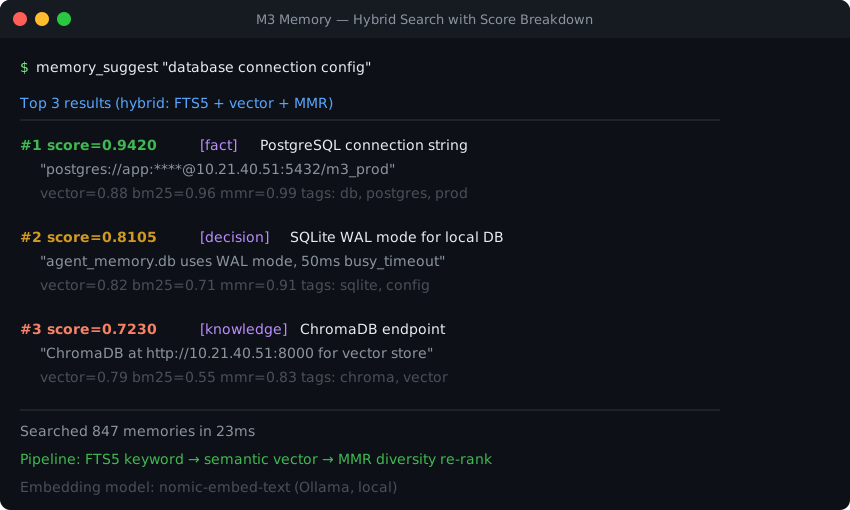
- Search: hybrid search (meaning plus keywords) over nine ranking signals, and every result can explain its score. 99.2% session hit rate at k=8 on LongMemEval-S, retrieval alone. (Ranking signals · Benchmarks)
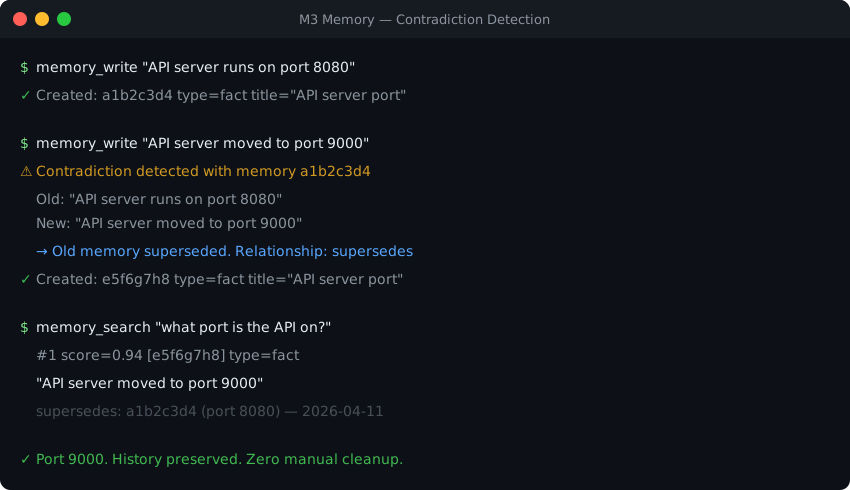
- Keeps history: text is stored verbatim and corrections never overwrite it. Storage is bitemporal, so you can ask what was believed at any point in time, and contradictions are caught on write. (Technical details)
- Improves in the background: an optional cognitive loop embeds, extracts entities and relationships, finds duplicates, decays stale memories and distils reusable procedures. (Enrichment · How memory maintains itself)
- Files and chats: a 25-tool files domain ingests and chunks directories; a 9-tool chatlog domain captures conversation turns before compaction. (Files memory · Chat log)
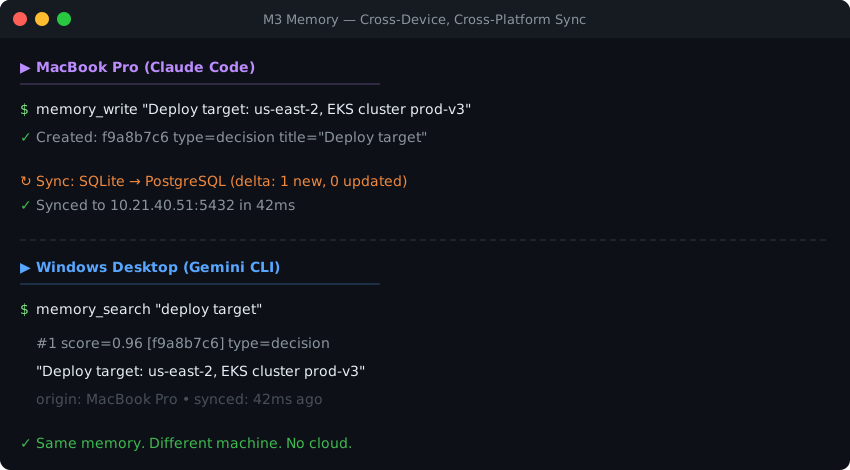
- Storage: SQLite by default, with nothing to run. PostgreSQL 16 or newer (tested on 16, 17 and 18) is a first-class alternative for one store shared across machines. (Architecture · Sync)
- Speed: a write takes ~31 ms with its embedding, or ~2 ms with the embedding deferred and is keyword-searchable at once; hybrid search takes ~45 ms (p50) on the benchmark store and 0.45 s at 50,000 memories. (Performance)
- Privacy and compliance: works fully offline and installs air-gapped. FIPS 140-3-ready crypto, GDPR export and erasure, and an audit log of who read which memory. (Sovereign deployment · Compliance)
- Multi-agent: per-agent, per-user and per-org scopes, handoffs and shared tasks; concurrent readers and writers are safe. (Multi-agent)
- Tools: 100+ tools, of which 10 load at startup, about 2% of a 200K context window; the rest load on demand. (Domain gating · MCP tools)
- Configuration: one file,
m3_config.toml.m3 config showprints every setting and where it came from. (Config reference) - Tested: 5,700+ tests on Windows, macOS and Linux × Python 3.12–3.15, plus a PostgreSQL (with pgvector) lane on Linux, with the native (Rust) core that ships with m3; warnings fail the build. Security scans are published in
docs/audits/. (Testing) - Status: stable: the core, the web dashboard, the autonomous cognitive loop and the Observer & Reflector stages. Apache 2.0. (Project status · Roadmap)
- For AI agents: llm-context.md lists the real tool names and usage rules, and features.json is the machine-readable summary.
📍 Project status
The core is stable, and so is everything else m3 ships. One summary line per point, each linked to the doc that owns the detail. The test suite checks these lines against the code and the ROADMAP.
| Status | What it means | Features |
|---|---|---|
| Stable | Safe to build on. Covered by the full test matrix on every release; changes go through a deprecation notice. | Memory write / search / update / supersede · hybrid retrieval (BM25 + vectors + MMR) · bitemporal history · contradiction detection on write · GDPR forget / export · SQLite and PostgreSQL storage · MCP server and m3 CLI · cross-device sync · web dashboard · autonomous cognitive loop · Observer & Reflector stages |
| Planned | Not available yet, in this order (ROADMAP). | Health and Prometheus metrics endpoint · HNSW approximate search on PostgreSQL · official Docker image, if users ask for one · server / multi-user deployment guide · stable public SDK with semver guarantees |
- Search time by store size (default hybrid search, exact on both backends): SQLite answers in 0.45 s at 50,000 memories, 0.97 s at 100,000 and 1.55 s at 150,000. PostgreSQL: 0.88 s, 1.70 s and 2.54 s; with the pgvector extension, 0.27 s, 0.35 s and 0.46 s. Real stores hold about two vectors per memory: a real 83,000-memory SQLite store answers in 2.7 s, and a real 90,000-memory PostgreSQL store in 1.6 s, or 0.54 s with pgvector (measured).
- Many writers on SQLite: SQLite takes one write at a time; writes take milliseconds, so concurrent writers wait briefly instead of failing. 16 agents writing at once lost nothing and waited at most half a second (measured). Agents on several machines, or a busier fleet, should share a PostgreSQL store (Multi-agent).
- Reads are audited: every
memory_getand every search hit is logged with the reading agent, the data subject and the time, kept 90 days, included ingdpr_exportand erased bygdpr_forget(GDPR). Chat-log reads are not audited yet. - Configuration lives in
m3_config.toml:m3 config showprints every setting and where it came from, andm3 config setchanges one (Config reference). A new install gets one listing every setting with its doc, commented at its default. Older environment-variable names keep working with a warning for two releases, andm3 doctorandm3 config import-envname any still in use (Environment variables). - Versioning: calendar versions (
YYYY.M.D.N). A renamed or removed setting, argument or tool keeps working, with a warning, for at least two releases after its replacement ships (Changelog).
👀 See it work
Save a decision — your AI agent, or you from the shell:
$ m3 memory memory_write --type decision --title "auth-jwt-algorithm" \
    --content "The auth service uses RS256 JWTs. HS256 was rejected because we need asymmetric verification at the edge."
"Created: 84a944fb-ef3e-403b-9240-f53ab3c015f7"
Next week, in a different agent, on a different model — ask in your own words:
$ m3 memory memory_search --query "which signing algorithm did we pick for tokens?" --k 3
{
  "count": 1,
  "items": [
    {
      "id": "84a944fb-ef3e-403b-9240-f53ab3c015f7",
      "score": 0.7501,
      "type": "decision",
      "title": "auth-jwt-algorithm",
      "content": "The auth service uses RS256 JWTs. HS256 was rejected because we need asymmetric verification at the edge."
    }
  ]
}
Prefer the rendered form for reading? Add --no-as_records.
The query shares no keywords with the stored text — no "RS256", no "JWT" — and still finds it. That's the hybrid engine: BM25 for exact terms, local BGE-M3 vectors for meaning, MMR for diversity. Your agent calls the same tools over MCP, so it recalls this automatically instead of asking you again.
Core Tools lists the five you'll use most. Prefer to watch? A short captioned video shows one decision saved in one agent and recalled by another (download).
🧭 Where to go next
| I want to... | Read |
|---|---|
| Get set up step by step | Getting Started · Windows · macOS · Linux |
| Connect a specific agent or framework | Installation · Client setup · LangChain · CrewAI · PydanticAI |
| Make my agent use it well | Agent instructions · For AI agents |
| Use it from scripts, hooks or CI | For developers · Coding guide · CLI reference |
| Understand how it works | Memory model · Architecture · Technical details |
| Compare it with Mem0, Letta, Zep and others | Comparison |
| Run it offline or in a regulated environment | Sovereign deployments · Compliance |
| Fix a problem | Troubleshooting · FAQ · Health FAQ |
| See every doc | Documentation index |
🛠️ For developers: a memory backend, not a framework
MCP is optional. m3 is a memory layer — it owns durable, searchable, multi-agent memory and stops there, so it drops into whatever you already have instead of asking you to adopt a stack.
Every tool in the catalog reads JSON on stdin and writes JSON on stdout, so m3 is scriptable from any language or runtime — and from hooks, CI, and cron. No SDK, no client library, no MCP server required:
echo '{"query":"auth","k":3}' | m3 memory memory_search --json-file - | jq '.items[].id'
Results compose, so one tool's output drives the next:
# Raise the importance of everything matching a query: search, transform, bulk-update.
m3 memory memory_search --query "deployment runbook" --k 20 \
  | jq '{updates: [.items[] | {id: .id, importance: 0.9}]}' \
  | m3 memory memory_update_bulk --json-file -
Language-specific work stays on your side of the boundary — by design. Code parsing and VCS watching are integrations, not missing features, and each is a few lines of your own code:
# AST indexing with any parser you already trust — ast, tree-sitter, ts-morph.
symbols = [n.name for n in ast.walk(ast.parse(src))
           if isinstance(n, (ast.FunctionDef, ast.ClassDef))]
subprocess.run(["m3", "memory", "memory_write", "--json-file", "-"],
               input=json.dumps({"type": "reference", "title": path,
                                 "content": "\n".join(symbols)}), text=True)
That is what keeps one memory layer serving a Python monorepo, a Rust service and a TypeScript frontend without forking it.
Using m3 for coding work → — the full integration guide: composing tools, git hooks, CI steps, and where the layer boundary sits.
(jq is not a dependency — it just reads well in examples. m3 emits plain
JSON, so any parser works.)
🧩 Beyond the core
The install at the top is the whole product for most people: shared memory, wired into your agents, working offline. Everything below is optional surface you can ignore until you want it — each row says what it costs to turn on.
| 🤖 | Coding agents · included in the base installm3 setup auto-detects and wires m3 into Claude Code, Cursor, Cline, Gemini CLI, Google Antigravity, Aider, OpenCode, OpenClaw, Hermes — one shared memory across every agent, and any agent you add later is picked up automatically. (See MCP Client Install) |
| 👥 | Multi-agent synchronization · included in the base install agents coordinate through one store: memory scoped per agent / org / user, direct handoffs into another agent's inbox, shared tasks with a recursive task tree, and opt-in SQL-layer isolation so an agent's private notes stay private. Concurrent readers and writers are safe by design (WAL + retry), so a planner, an implementer and a reviewer can work at the same time. (See Multi-Agent Orchestration) |
| 🖥️ | Web dashboard, open to all users — not just developers · included in the base install a built-in, backend-agnostic control panel (default http://127.0.0.1:8088): browse memory, read your auto-generated Memory Wiki, explore the interactive knowledge graph, and watch system health / load. Just run m3 dashboard. (See Dashboard Guide) |
| 📖 | Auto-generated wiki + Obsidian export · core feature — in the base install, nothing extra to enablem3 wiki generate compiles your canonical memories (pinned, high-confidence, beliefs, procedures) and indexed files into a browsable, interlinked Markdown vault — one page per topic, real hyperlinks for every relationship, and provenance links down to the source document each fact came from. Renders on GitHub, in a self-contained offline HTML viewer, or as an Obsidian vault (--obsidian for graph view + backlinks). (See Wiki Guide) |
| 🐘 | PostgreSQL · optional — you do not need a database Most people should ignore this row. m3 stores everything in a local SQLite file by default: nothing to install, nothing to run. Point m3 at a PostgreSQL server instead when you want one shared store for several machines — install pip install "m3-memory[postgres]", store your server's DSN with m3 secret set M3_PRIMARY_PG_URL, and run m3 install-m3 --db-backend postgres. m3 setup always keeps SQLite; it does not configure PostgreSQL for you. (See Architecture · Sync) |
Also a drop-in memory backend for LangChain / LangGraph, CrewAI, and PydanticAI — see the framework guides.
Every path gains automatic contradiction supersession, bitemporal historical queries, local sovereign embedding, and the full 100+ MCP tool set.
⚖️ How m3 Compares
A full, feature-by-feature comparison table — m3 vs Mem0, Letta, Zep, Graphiti, LangChain Memory / LangMem, agentmemory, Chronos, Hindsight, Mastra OM, Memento, and more — with sourced benchmarks and honest "when to choose the other tool" guidance, lives in COMPARISON.md.
Short version: m3 is the local-first, cloud-friendly, MCP-native option that stays yours and works across every agent — where cloud services (Mem0), full agent runtimes (Letta), and graph-database systems (Zep, Graphiti) each ask you to adopt their infrastructure. See the comparison guide for the row-by-row detail.
📦 Installation
⚠️ Python 3.12+ required (changed in
2026.9.13.0)m3 now requires Python 3.12 or newer. Releases up to and including
2026.9.12.0supported Python 3.11; from2026.9.13.0onward,pipwill refuse to install m3 on 3.11 and will silently keep you on the last 3.11-era release instead of upgrading.On Python 3.11? Check with
python --version. To upgrade:
- macOS:
brew install python@3.14 && brew link --overwrite python@3.14- Windows:
winget install -e --id Python.Python.3.14- Debian/Ubuntu: use deadsnakes or a distro release shipping 3.14.
After a Python minor-version bump, recreate your virtualenv (
rm -rf .venv && python3 -m venv .venv) — see HOW-TO-UPGRADE.md. Your memories are unaffected: the databases live outside the venv under~/.m3/engine.We recommend 3.14 or newer for new installs. Python 3.12 and 3.13 now receive security fixes only upstream (no further bug fixes), so a future m3 release will raise the floor again — announced at least one minor release in advance.
The install at the top covers the common path (pip install m3-memory → m3 setup). This section adds the alternatives: the shell installer, per-agent wiring, and manual MCP configuration.
The One-Liner (macOS & Linux)
curl -fsSL https://raw.githubusercontent.com/skynetcmd/m3-memory/main/install.sh | bash
- For Windows, please follow the Windows Manual Installation Guide.
- To install manually on any platform, refer to the OS-Specific Install Instructions or examine the installer script.
Developer Setup Wizard
If you are developing inside python environments:
pip install m3-memory
m3 setup
The m3 setup wizard automatically detects your installed agents — Claude Code, Cursor, Cline, Gemini CLI, OpenCode, Antigravity, OpenClaw, Hermes — and wires the m3 memory MCP server into each, installs settings files/hooks, provisions the sovereign CPU embedder, and performs a system diagnostic. Detection and wiring re-run on every m3 update/m3 setup, and m3 doctor --fix repoints any config whose paths have moved — so an agent you install later gets picked up automatically the next time you run setup or update.
Integrating with AI Coding Tools
🤖 Claude Code
Install as a plugin to unlock /m3:* slash commands, curation subagents, and automatic hooks:
/plugin marketplace add skynetcmd/m3-memory
/plugin install m3@skynetcmd
See Claude Code Plugin Reference and Claude.ai Connector Guide.
▷ Cursor
Auto-detected and wired by the setup wizard — it writes the m3 memory MCP server into ~/.cursor/mcp.json:
m3 setup
Re-run after installing Cursor and it's picked up automatically; m3 doctor --fix repoints the entry if paths move. See MCP Client Install Guide.
◧ Cline (VS Code)
Auto-detected and wired by the setup wizard — it writes the m3 memory MCP server into Cline's cline_mcp_settings.json:
m3 setup
Also available from Cline's MCP marketplace (see llms-install.md). See MCP Client Install Guide.
🪐 Google Antigravity
Install the plugin directly:
agy plugin install https://github.com/skynetcmd/m3-memory
See Antigravity Plugin Reference.
🦊 Hermes Agent
Run the wizard to automatically wire up optimal memory providers:
m3 setup
See Hermes Plugin Integration Guide.
🐍 Python / LangChain & LangGraph
Use m3 as a drop-in Mem0 replacement or LangMem backend:
pip install m3-memory[langchain]
See LangChain Integration Guide.
👥 CrewAI (v1.x)
A drop-in StorageBackend for CrewAI's unified memory:
pip install m3-memory[crewai] # crewai>=1.10,<2 · Python 3.12–3.13 (a 3.14 escape hatch is documented)
🧩 PydanticAI
m3 tools + auto-recall, or a formal M3MemoryToolset. Built on Pydantic v2 — runs natively on Python 3.14:
pip install m3-memory[pydantic-ai] # pydantic-ai-slim>=2,<3
See PydanticAI Integration Guide.
⌨️ The m3 CLI — the same memory, without an agent
MCP is not the only way in. The m3 CLI and the MCP server are two front doors
to the same database, so anything an agent can do over MCP you can do from a
shell — the whole tool catalog, grouped as memory, files, chat, tasks,
agent, admin, conversations, diagnostics and entity:
m3 memory memory_search --query "which signing algorithm did we pick?" --k 5
m3 memory memory_write --content "..." --type belief --title "..."
m3 memory memory_write_from_file --path notes.md --type belief --title "..."
m3 chatlog status
Content comes from a command-line argument (--content) or from a file
(--path) — handy when the body is long enough that shell quoting would mangle
it.
Results go to stdout and logs to stderr, so output pipes cleanly into
jq, grep or a script:
m3 memory memory_search --query "postgres" --k 20 2>/dev/null | jq '.'
This matters when your MCP client drops the connection: that is not a memory
outage. A dropped stdio session only the client can respawn leaves the store
completely intact and fully usable from the CLI until you reconnect (/mcp in
Claude Code). Check with m3 --version; if the CLI answers, m3 is up.
See the CLI Reference for the full command surface.
Manual MCP Server Configuration
To expose m3 to any Model Context Protocol host, add it to your configuration file:
{
  "mcpServers": {
    "memory": {
      "command": "m3"
    }
  }
}
🎚️ Domain Gating: the Full Catalog Without the Context Cost
Most MCP servers make you pay for every tool in every prompt; m3 registers a small set at startup and loads the rest on demand. Tools are grouped into 9 domains (memory, chatlog, files, entity, agent, tasks, conversations, diagnostics, admin) and loaded lazily.
Only 10 schemas register at startup (~3,885 tokens). That set is chosen by measurement rather than judgement: across real-world multi-agent development sessions it absorbed 95% of all observed tool calls, so gating the rest costs almost nothing in practice. When your agent needs more, it calls tools_load_domain(domain="...") to fetch a domain on demand — or invokes any single tool by name through m3_call, with no domain load at all.
| Gating Mode | Registered Tools | Tokens in Schema | % of 200K Window |
|---|---|---|---|
| Lazy (Default) | 10 | ~3,885 | 1.9% |
Typical Active Session (+memory +admin) |
61 | ~18,613 | 9.3% |
Eager Mode (tools.lazy = false) |
119 | ~29,485 | 14.7% |
🛠️ Note: If your client does not support dynamic tool registration, run
m3 config set tools.lazy false(or setlazy = falseunder[tools]inm3_config.toml) to register every tool at startup.
🛡️ Sovereign & Air-Gapped Deployments
m3 operates completely offline by default.
Sovereign Local Embedder
A high-performance BGE-M3 embedder runs locally after installation.
- Default: one shared local embed server on
127.0.0.1:8082, running them3-embed-serverbinary that ships inside them3-core-rswheel. CPU execution using GGUF format (_assets/models/bge-m3-Q4_K_M.gguf). Every m3 process reuses that single server — one model in host RAM — and one GPU context when a GPU wheel is installed — instead of each loading its own copy. It is local-only and never leaves the machine. - Optional (opt-in at
m3 setup): additionally embed in-process via them3-core-rsnative module (llama.cpp linked in-process, zero IPC). On measured real text it is faster than the shared server — ~1.9× on short chunks, ~1.75× on medium — so the reason to prefer shared is memory, not latency: in-process loads one model copy per process, and a typical setup runs several (MCP server, cognitive loop, CLI), while the shared server keeps one model in RAM for all of them. Choose in-process when you have RAM to spare and a short-text workload. (measurements and caveats) - Hardware Acceleration (GPU): Run
m3 embedder install-gputo install the CUDA, Vulkan, or Metal build — a prebuilt wheel where one matches your platform, otherwise a source build. - External Provider Fallback: set
embed.url(m3 config set embed.url ...) to any OpenAI-compatible/v1/embeddingsendpoint (Ollama, LM Studio, vLLM, or another machine's m3 embed server), andembed.fallback_urlfor a second endpoint to try if the first is unreachable.
Rust-Oxidized Performance Core
m3 ships a Rust compute core (m3_core_rs) that speeds up MMR re-ranking by 95× to 846× and packed batch cosine by 97× to 178× (list-based cosine and other operations gain less — see the per-operation table). It is installed by default (the installer's --no-native-wheel is the opt-out), not an optional add-on. A pure-Python fallback covers every code path and is results-equivalent — exact for FTS compilation and graph traversal, and within float tolerance for vector math, enforced by tests/test_oxidation_parity.py, test_fts_parity.py and test_graph_neighbor_parity.py. So the core changes speed, never answers: if the wheel is absent, m3 falls back automatically and returns the same results more slowly. (See Oxidation Benchmarks).
Enterprise Security & Compliance
-
FIPS 140-3 Ready: m3 implements no cryptography; its own (secrets vault, key derivation, HMACs, audit chain, random keys) runs through one provider that a validated module (wolfCrypt FIPS) can serve, and every network path is named and fails closed under FIPS mode. Ready, not validated: see the FIPS Boundary Reference for each path and the deployment profiles.
-
Air-Gapped Install: Supports installation without internet access via pre-compiled python wheels. (See Sovereign Deployment Guide & FIPS Boundary Reference).
-
Storage Location: State lives under separate roots, so databases, configuration and logs can be relocated and secured independently:
Root Default Holds [paths] engine_root~/.m3/engineDatabases + runtime state ( agent_memory.db,agent_chatlog.db,files_database.db)M3_CONFIG_ROOT(orm3 --config FILE)~/.m3/configConfiguration: m3_config.toml, chatlog config, salt[paths] logs_root~/.m3/logsScheduled-task and service logs [paths] memory_rootunset Legacy, removed after release N+3: when set, the others derive from it. Set engine_rootandlogs_rootinsteadAll are relocatable. Set a root under
[paths]inm3_config.toml; the config file itself is found throughM3_CONFIG_ROOTorm3 --config. A specific root wins overmemory_root, from which the others otherwise derive as<root>/engineand<root>/logs. (See Architecture.)
🎯 Who This Is For
m3 is a great fit if...
- You run a homelab or self-hosted stack: m3 is a single
pip installwith no account, no API key, and no outbound calls — it runs on the hardware you already own, alongside your other self-hosted services. SQLite by default (zero infrastructure); PostgreSQL when you want a shared store across machines. - You operate under sovereignty or data-residency requirements — corporate,
government, defence, healthcare, or any regulated environment: memory and
embeddings never leave your boundary. The embedder runs on your own hardware, the
store is a file you control, and installation works fully air-gapped from
pre-compiled wheels. FIPS 140-3-ready crypto (
crypto.fips_mode), GDPRgdpr_forget/gdpr_export, audit logs, and relocatable storage roots so databases and configuration can be secured independently. - You want the freedom to switch or add agents without losing what they know: change tools on the fly or down the road — Claude Code, Gemini, OpenClaw, Hermes, whatever comes next — and your project's knowledge carries over instead of disappearing with the switch.
- You build with LangChain/LangGraph: An advanced replacement for standard memory models, adding bitemporal queries, contradiction management, and local embeddings.
- You build with CrewAI (v1.10–1.x): A drop-in
StorageBackend(Memory(storage=M3StorageBackend(user_id="crew-alpha"))) that gives CrewAI bitemporal recall, contradiction-aware supersession, and local embeddings — plus the thing single-vector stores can't do: a CrewAI-written memory can also be searchable by every other m3 agent (Claude Code, Gemini, LangChain) if you want.pip install m3-memory[crewai]. See the CrewAI integration guide. - You build with PydanticAI: m3-backed memory as either drop-in tools + auto-recall (
register_m3_tools,m3_recall_processor) or a formalM3MemoryToolset(a real PydanticAIAbstractToolset). Built on Pydantic v2, so it runs on Python 3.14 with a plainpip install m3-memory[pydantic-ai]. See the PydanticAI integration guide. - You need security and compliance: Built-in
gdpr_forgetandgdpr_exporttools, air-gapped support, and audit logs. - You value privacy: Zero external cloud requests or subscriptions required.
m3 is NOT a fit if...
- You need a hosted SaaS dashboard with managed infrastructure (use Letta).
- You don't want persistent memory: you want each session to start fresh, with no ability to retrieve prior sessions' knowledge — m3 exists to do the opposite, so your agent's built-in defaults are the simpler fit.
📊 Benchmarks
Read retrieval accuracy first — it is the only number that measures the memory layer.
Session Hit-Rate (SHR) asks one question: did the system surface the evidence that answers the query? No answer model is involved, so the score reflects the memory layer and nothing else. It is the like-for-like metric across memory systems.
End-to-end QA accuracy runs that retrieved context through an LLM and has a judge model grade the answer. Both choices move the score independently of retrieval: a stronger answerer lifts a weaker memory layer, a lenient judge lifts everyone, and neither is held constant across published comparisons. Two systems quoting QA numbers are usually not measuring the same thing.
Both are reported below. SHR is the headline; QA is context.
Retrieval Accuracy — Session Hit-Rate @ k (the memory-layer metric)
Evaluated on the 500-question LongMemEval-S dataset, using m3's production search function:
| Retrieve Depth (k) | Session Hit-Rate (SHR) ⁂ | Success Count | vs. Prior Version |
|---|---|---|---|
| 1 | 91.8% | 459 / 500 | First Report † |
| 5 | 98.2% | 491 / 500 | +2.0pp |
| 8 (default) | 99.2% | 496 / 500 | — |
| 10 | 99.2% | 496 / 500 | +2.4pp |
| 20 | 100.0% | 500 / 500 | First Report ‡ |
† SHR@1 is the strictest cut — a gold session as the single top-ranked result. At k=8, m3's default search depth, a gold session is present for 99.2% of questions — the same as at k=10, which retrieves 25% more rows on LongMemEval-S for no gain; k=1 is reported here for completeness, not as the headline. Cross-system SHR/recall figures are usually quoted at k=5, k=10, k=20, or k=50, so comparing another system's k=10+ number against this k=1 figure is not a like-for-like comparison. Where m3 is set beside other systems, its figure is the k=8 one; k=8 is not reported by others, and SHR can only rise with k.
⁂ Which aggregation. These are binary per-question
recall_any@kvalues — the convention adjacent LongMemEval submissions report. The benchmarking report's per-question-type table aggregates slightly differently and reads marginally higher at shallow depth (98.8% at k=5, 99.4% at k=10); k=20 is 100.0% either way. The table above quotes the more conservative figures.
‡ v3 improvement — the v3 engine reaches 100% SHR at k=20, exceeding the prior version's 97.8% measured at the deeper k=30 (LongMemEval issue #43) — higher recall at shallower depth. Both figures are retrieval-only SHR (no answerer). The "vs. Prior Version" deltas at k=5/k=10 compare v3 against the prior version's 96.2% / 96.8% at the same k.
End-to-End QA Accuracy (answer-model and judge dependent — not a memory-layer comparison)
92.0% accuracy (460/500 correct responses) with zero oracle metadata routing. Reported for completeness; see the note above on why this number is not comparable across systems the way SHR is:
| Question Domain | Count (n) | Accuracy |
|---|---|---|
| single-session-user | 70 | 94.3% |
| single-session-assistant | 56 | 96.4% |
| single-session-preference | 30 | 80.0% |
| multi-session | 133 | 87.2% |
| temporal-reasoning | 133 | 95.5% |
| knowledge-update | 78 | 93.6% |
| Overall Summary | 500 | 92.0% |
How the QA figure was produced. m3 retrieves; it does not answer questions. In deployment the calling agent chooses what to retrieve and writes the answer. The benchmark harness plays that role: it chooses retrieval options per question (session expansion and a precomputed recall surface, both available in m3's engine but off by default) using a question-text router that is part of the harness, and it supplies the answer prompts and model. m3's built-in intent routing is on by default in both. The retrieval figures (SHR) use m3's search alone.
Methodology and reproducibility details are located in the LongMemEval-S Benchmarking Report.
🧰 Core Tools
While m3 features 100+ tools, these five serve as your primary interface:
| Tool Name | Operation Description |
|---|---|
memory_write |
Save a specific fact, project preference, or technical configuration. |
memory_search |
Run hybrid keyword (BM25) and semantic vector search. |
memory_update |
Edit existing facts to keep memory accurate. |
memory_suggest |
Query memories alongside a mathematically explicit score breakdown. |
memory_get |
Fetch details of a single memory using its unique ID. |
Refer to the Agent Instructions Guide and Full MCP Tool Catalog for complete parameter definitions.
🤖 For AI Agents
You can drop the agent ruleset file examples/AGENT_RULES.md into your workspace to teach your agent best practices (e.g., query before writing, update existing records instead of duplicating).
Command Installation Prompts
Copy and paste these prompts into your terminal client to let your agent set up m3 for you:
Claude Code Prompt
Install m3-memory for persistent memory. Run: pip install m3-memory
Then run: m3 setup
That wires the m3 memory MCP server into my agents and provisions the
local BGE-M3 embedder — no external embedding service is needed. If it
doesn't detect Claude Code, run: claude mcp add --scope user -- m3_memory m3
Then use /mcp to verify the memory server loaded.
Gemini CLI Prompt
Install m3-memory for persistent memory. Run: pip install m3-memory
Then run: m3 setup
That wires the m3 "memory" MCP server into my agents and provisions the
local BGE-M3 embedder — no external embedding service is needed. If it
doesn't detect Gemini CLI, add {"mcpServers":{"memory":{"command":"m3"}}}
to my ~/.gemini/settings.json under "mcpServers".
Active Chatlog Capture Plugin
To configure instant conversation logging and backup, tell your active coding agent:
Install the m3-memory chat log subsystem.
The agent executes bin/chatlog_init.py and configures execution triggers (see Chat Log Architecture Guide).
🎬 See it in action
Contradiction Detection & Automatic Resolution
Hybrid Search Scoring Details
Multi-Device Database Sync
💬 Community


How to Contribute · FAQ for Developers · Good First Issues
📜 License & Attributions
This project is licensed under the Apache License 2.0. See LICENSE for details.
Built with
m3 Memory is authored and maintained by skynetCMD. It was built with the help of AI coding assistants — Gemini CLI, Claude Code, and Google Antigravity — which contributed code under the author's direction. (They are tools that assisted; they are not maintainers, sponsors, or co-owners of the project.)
Asset & Icon Credits
The provider badges under docs/badges/ embed small logo glyphs:
- OpenClaw & OpenCode icons are from the MIT-licensed LobeHub icon set (
lobe-icons). - The Hermes badge uses a generic caduceus glyph.
See NOTICE for the full third-party attribution list.



PyPI downloads, all-time and last 30 days. GitHub clones are unique clones. Badges are regenerated on a schedule by star-history.yml.
Python: m3 core runs on Python 3.12, 3.13, 3.14 and 3.15. The optional framework extras follow their own caps — PydanticAI is 3.14-native (plain pip install); CrewAI requires 3.12–3.13 with m3 (a 3.14 escape hatch is documented).
---
⭐ Star History
⭐ View star history → (click to expand the chart)
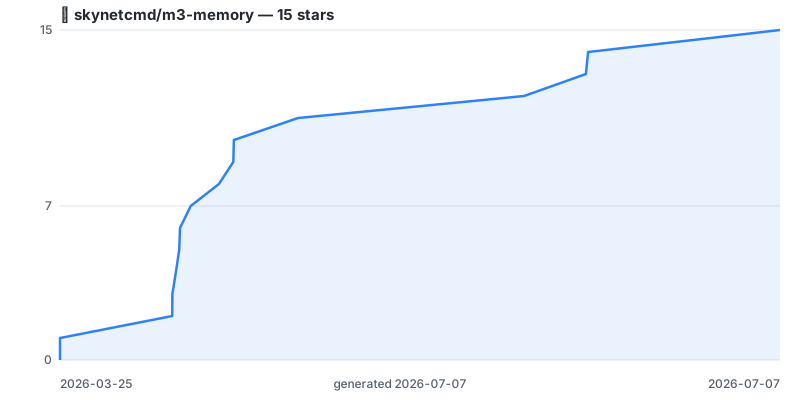
Chart regenerated on a schedule by .github/workflows/star-history.yml using the repo's own token — no third-party embed. Click through for the live interactive version.
1 maintainer

Metadata
1 maintainer
Release files for m3-memory 2026.10.17.1
For a detailed explanation of source distributions (sdists) and built distributions (wheels), please see the package formats documentation.
Source distribution (sdist)
| File | Size | Uploaded | |
|---|---|---|---|
| m3_memory-2026.10.17.1.tar.gz | 5.1 MB | Details |
Built distribution (wheel)
| File | Interpreter | ABI | Platform | Reset |
|---|---|---|---|---|
| m3_memory-2026.10.17.1-py3-none-any.whl | Python 3 | none | any | Details |
Total release size: 10.7 MB
Release files / m3_memory-2026.10.17.1.tar.gz
| Download URL | m3_memory-2026.10.17.1.tar.gz |
|---|---|
| Size | 5.1 MB |
| Tags | Source |
|
SHA-256 checksum How to use checksums |
e7049f109daa21aae9cc3ac937007e0a217c7ad90645fb4f25f4766635d64285
|
|
BLAKE2b-256 checksum How to use checksums |
f385ecfc7b38bcf9c62121894de48b4190c8ec3625cde2338bd22e9416fa343f
|
| Upload date | |
|
Uploaded using Trusted Publishing? What is trusted publishing? |
Yes |
| Uploaded via |
twine/6.1.0 CPython/3.13.14
|
Provenance
Provenance describes where a file came from. On PyPI, provenance is shared via attestations, which provide a verifiable record of the build or publishing details. View details, limitations and caveats.


PyPI Publish Attestation
PyPI verified that this artifact, at this checksum, originated from the publisher listed below.
Signed by GitHub Actions, verified by PyPI on Oct 17, 2026.
Transparency logRelease files / m3_memory-2026.10.17.1-py3-none-any.whl
| Download URL | m3_memory-2026.10.17.1-py3-none-any.whl |
|---|---|
| Size | 5.6 MB |
| Tags | Python 3 |
|
SHA-256 checksum How to use checksums |
80155355607514eda2c156d330e7291b18a9356015a1dea31ccde32da9418fc3
|
|
BLAKE2b-256 checksum How to use checksums |
8ca68fad0dd536b6bd3b403f645891235c8e6d6544ffefaa7a20e2253d924e92
|
| Upload date | |
|
Uploaded using Trusted Publishing? What is trusted publishing? |
Yes |
| Uploaded via |
twine/6.1.0 CPython/3.13.14
|
Provenance
Provenance describes where a file came from. On PyPI, provenance is shared via attestations, which provide a verifiable record of the build or publishing details. View details, limitations and caveats.
PyPI Publish Attestation
PyPI verified that this artifact, at this checksum, originated from the publisher listed below.
Signed by GitHub Actions, verified by PyPI on Oct 17, 2026.
Transparency log













