
Maida
Don't let broken agent changes merge.


Maida is a local-first, CI-first behavioral regression gate for AI agents. It captures structured traces, turns known-good runs into checked-in baselines, and fails changes when structural behavior regresses: more steps, unexpected tool calls, loops, latency spikes, or cost blowups.
Add @trace, capture a baseline sample, then run the current policy-v2 gate:
maida run my_agent.py --trials 25 --no-fail-fast --json-out baseline-report.json
maida baseline --from-report baseline-report.json --out baselines/my_agent.json
# ...after your next change:
maida run my_agent.py --baseline baselines/my_agent.json --policy .maida/policy.yaml --format markdown
For local inspection, use:
maida view
The viewer shows the execution timeline behind a pass/fail decision, but the core workflow is baseline, policy, and CI gate.
No cloud. No accounts. No telemetry. Everything stays on your machine.
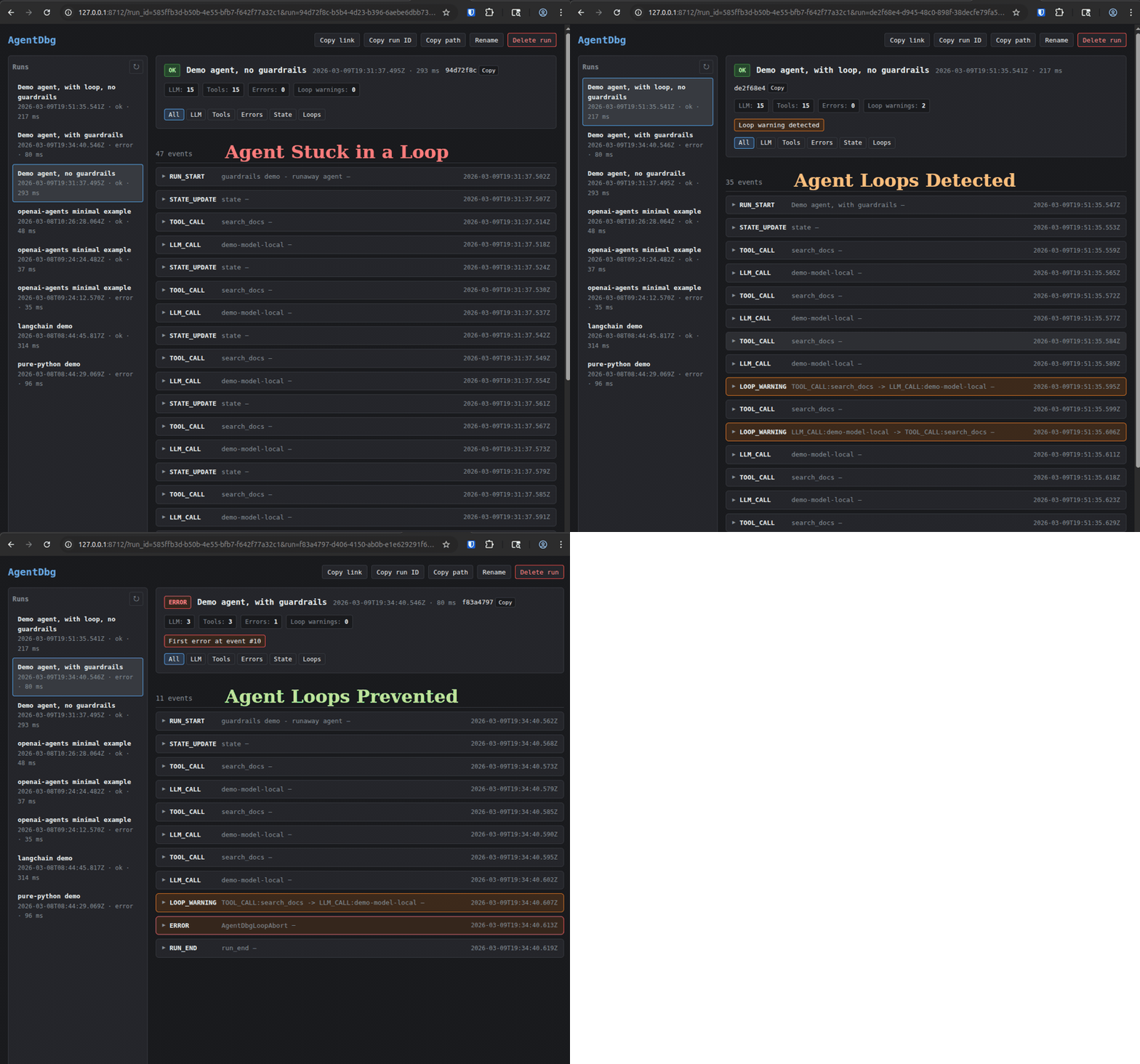
Built-in run guardrails: stop runaway agent runs when a prompt, model, or tool change starts looping or exceeds your limits for LLM calls, tool calls, total events, or duration.
Try it in 60 seconds
No repo clone, config file, API key, or sign-up:
uv tool install "maida-ai>=0.5"
maida demo
maida view
maida demo runs a bundled simulated customer-support agent (tool calls, LLM calls, state updates, automatic secret redaction — all canned data, nothing leaves your machine). maida view opens the timeline at http://127.0.0.1:8712 — every event with inputs, outputs, and timing. The viewer stays running: run more agents and their timelines appear automatically.
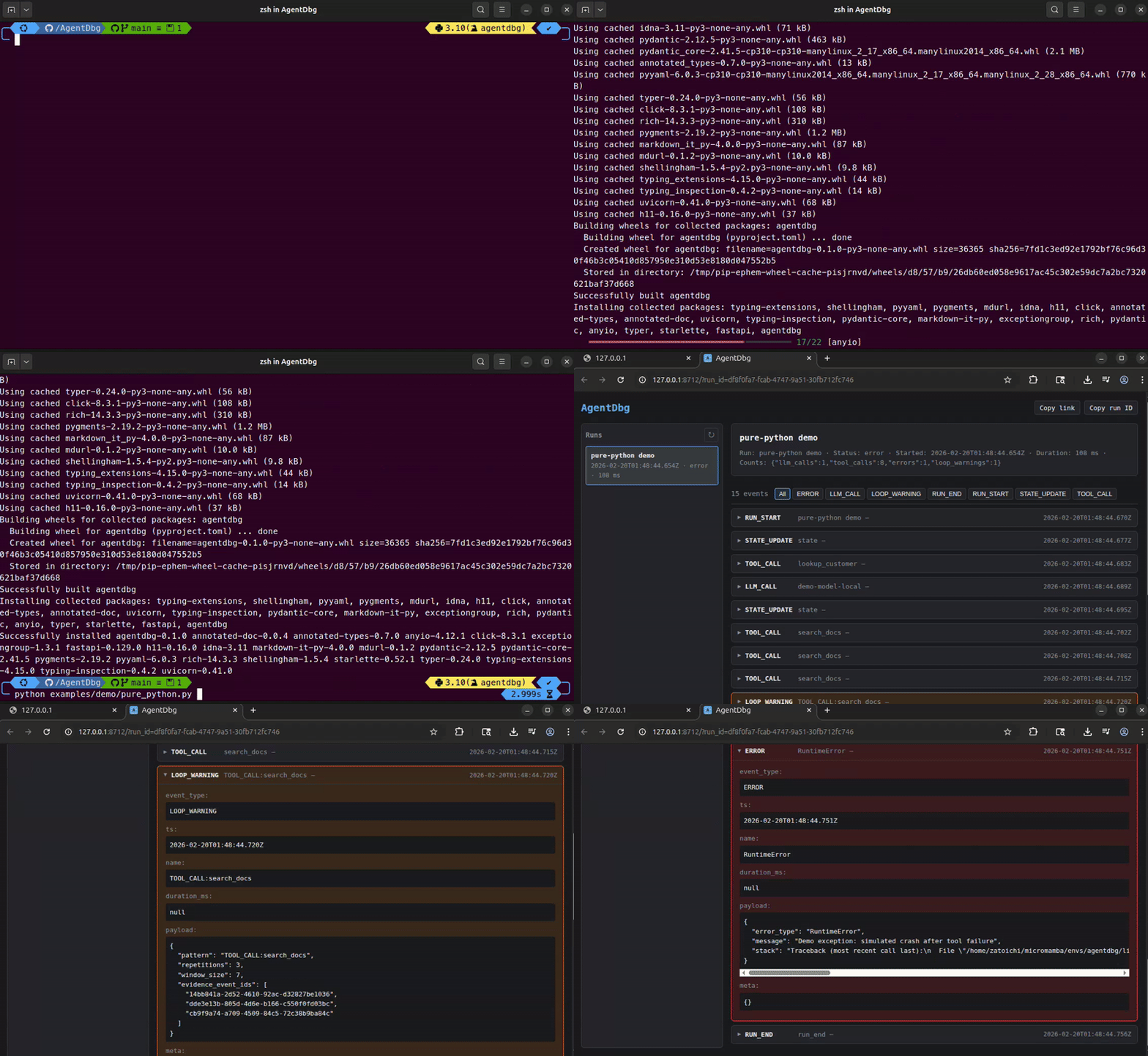
That trace is the evidence source for baselines, diffs, and CI assertions.
Watch Maida catch a regression
maida demo --regression
One command tells the whole story: Maida baselines a known-good run of the demo agent, then runs a "refactored" version that swaps in a cheaper model, loops on a tool, calls a tool the baseline has never seen, and burns 5x the tokens — while still exiting with status ok. The gate fails, the terminal shows exactly what changed, and you get a preview of the PR comment your team would see in CI.
Refuse a runtime-generated plan before it runs
Install the optional local backend, then run the plan story through the same
maida CLI:
uv tool install --force --python 3.12 --with "maida-workflows>=0.1.0" "maida-ai>0.5.2"
maida demo --plan
The demo uses .maida/policy.yaml when that file exists and names the selected
policy source in its output. Otherwise it uses the bundled refusal policy;
--policy <path> always takes precedence over both defaults.
The simulated planner emits only graph choices. Trusted application contracts
resolve the modules, and core policy 2.1 refuses the plan before a generated
module executes. The command needs no repository clone, database, API key, or
network call at runtime. Core Maida and its ordinary demos keep working without
maida-workflows installed. The optional backend supports Python 3.12 and 3.13;
core Maida retains its wider Python support when the backend is absent.
Set up your own project
maida init            # writes a starter .maida/policy.yaml
maida init --github   # also writes .github/workflows/maida.yml
Instrument your own agent
Add three lines to any Python agent:
from maida import trace, record_llm_call, record_tool_call


@trace
def run_agent():
    # ... your existing agent code ...

    record_tool_call(
        name="search_db",
        args={"query": "active users"},
        result={"count": 42},
    )

    record_llm_call(
        model="gpt-4",
        prompt="Summarize the search results.",
        response="There are 42 active users.",
        usage={"prompt_tokens": 12, "completion_tokens": 8, "total_tokens": 20},
    )


run_agent()
Then use maida run to execute the policy-v2 gate, maida baseline to capture
reviewed evidence, or maida view to inspect a run.
What gets captured
| Event | Recorded by | What you see |
|---|---|---|
| Run start/end | @trace (automatic) |
Duration, status, error if any |
| LLM calls | record_llm_call() |
Model, prompt, response, token usage |
| Tool calls | record_tool_call() |
Tool name, args, result, status |
| State updates | record_state() |
Arbitrary state snapshots |
| Errors | @trace (automatic) |
Exception type, message, stack trace |
| Loop warnings | Automatic detection | Repetitive pattern + evidence |
Stop runaway runs with guardrails
Guardrails are opt-in and meant for development-time safety rails: they let you stop an agent when it starts looping or using more budget than intended, while still writing a normal trace you can inspect afterward.
from maida import (
    GuardrailExceeded,
    LoopAbort,
    record_llm_call,
    record_tool_call,
    trace,
)


@trace(
    stop_on_loop=True,
    max_llm_calls=10,
    max_tool_calls=20,
    max_events=80,
    max_duration_s=30,
)
def run_agent(): ...


try:
    run_agent()
except LoopAbort:
    print("Maida stopped a repeated loop.")
except GuardrailExceeded as exc:
    print(exc.guardrail, exc.threshold, exc.actual)
When a guardrail fires, Maida uses the existing lifecycle:
- it records the event that triggered the issue
- it records
ERROR - it records
RUN_END(status=error) - it re-raises a dedicated exception so your code knows the run was intentionally aborted
Available guardrails:
stop_on_loopstop_on_loop_min_repetitionsmax_llm_callsmax_tool_callsmax_eventsmax_duration_s
You can set them in @trace(...), traced_run(...), .maida/config.yaml, ~/.maida/config.yaml, or env vars like MAIDA_MAX_LLM_CALLS=50.
See docs/guardrails.md for full examples, precedence, and trace behavior.
What you see
In the UI, you see:
- Run summary panel: status (ok / error / running), duration, LLM call count, tool call count, error count, loop warnings, jump-to-first-error, jump-to-first-loop-warning
- Chronological timeline of events
- Expandable events: LLM calls (prompt, response, usage), tool calls (args, results, error status), loop warnings with evidence
- Live-refresh: leave
maida viewrunning — new runs appear in the sidebar, events stream in real-time for running agents - Filter chips: All, LLM, Tools, Errors, State, Loops
Each run produces meta.json (metadata, status, counts) and spans.jsonl (OpenTelemetry span records) under ~/.maida/. Nothing leaves your machine.
What Maida is
- A behavioral regression gate: compare agent runs against checked-in baselines and policy.
- CI-first:
maida runreturns stable exit codes and markdown/JSON output for pull request checks. - Local-first: traces are JSONL on disk. No cloud, no accounts, no telemetry by default.
- Framework-agnostic: works with any Python code and optional framework adapters.
- Redacted by default: secrets are scrubbed before writing to disk.
- Inspection-friendly: the local timeline helps explain why a gate passed or failed.
What Maida is NOT
- Not a hosted service or cloud platform
- Not a production telemetry or alerting platform
- Not a generic output eval or scoring framework
- Not tied to a single framework
CLI reference
Commands that take a run ID (assert, baseline, accept, export, diff) default to the latest run when the ID is omitted; a short prefix also works.
Run the bundled demo
maida demo               # trace a simulated agent (no network, no API keys)
maida demo --regression  # baseline a good run, then watch the gate catch a bad refactor
maida demo --plan        # refuse a generated plan before any child executes
Scaffold a project
maida init           # starter .maida/policy.yaml
maida init --github  # + PR gate and authorized /maida accept workflow
List recent runs
maida list              # last 20 runs
maida list --limit 50   # more runs
maida list --json       # machine-readable output
View a run timeline
maida view              # opens latest run, stays running
maida view <TRACE_ID>   # specific run
maida view --no-browser # just print the URL
Export a run
maida export --out run-export.json             # latest run
maida export <TRACE_ID> --out run-export.json  # specific run
Validate an external trace
maida validate-trace path/to/run
maida validate-trace path/to/run/meta.json --json
External emitters can write Maida's native meta.json + spans.jsonl contract
without an SDK. Validation is local and read-only. See the
emitter guide.
Capture a baseline
maida baseline                                      # latest run -> .maida/baselines/<run_name>.json
maida baseline <TRACE_ID> --out baselines/v1.json   # specific run, custom path
Run the policy-v2 gate
maida run my_agent.py \
  --policy .maida/policy.yaml \
  --baseline .maida/baselines/my_agent.json \
  --format markdown \
  --json-out maida-report.json
Exit code 0 = PASS or INCONCLUSIVE and 1 = FAIL. The Markdown report starts
with the verdict and includes top behavior changes, tier evidence, and next
steps. See docs/regression-testing.md for the full
workflow and docs/reference/policy.md for policy v2.
The single-run maida assert interface remains available for v1 migration and
direct inspection of an already-completed trace. New gates should use
maida run; see the CLI compatibility section.
Accept an intentional baseline change
maida diff --baseline .maida/baselines/my_agent.json
maida view
maida accept --baseline .maida/baselines/my_agent.json --reason "expected tool flow change"
git diff .maida/baselines/my_agent.json
Use maida accept only after inspecting the diff and trace. It updates the baseline from the selected run and records who accepted it, when, the source PR/commit when available, an accepted-run verdict summary, the reason, and the previous baseline hash. Subsequent Markdown gate reports show this baseline provenance. If the run already matches the baseline, Maida exits successfully without rewriting the file.
Diff two runs
maida diff <RUN_A> <RUN_B>
maida diff --baseline .maida/baselines/my_agent.json  # latest run vs baseline
To gate a captured Claude Code session before pushing, import and evaluate it in one command:
maida diff --capture "$CLAUDE_SESSION_ID" \
  --baseline .maida/baselines/my_agent.json \
  --policy .maida/policy.yaml \
  --format markdown
Capture mode prints the same assertion and structural-diff report used by
maida assert: exit 0 means pass and exit 1 means a policy regression.
Capture selection/import notices are written to stderr, so JSON or Markdown
stdout can be redirected directly.
Capture Claude Code without agent patches
maida capture claude-code
# Or capture one configured Claude command-hook event from stdin:
maida capture claude-hook
Point Claude Code's OTLP HTTP/protobuf logs and beta traces at
http://127.0.0.1:4318. Maida validates, redacts, and persists the source
capture locally for later import and gating. See
docs/claude-code.md for the complete configuration.
maida import claude-code --session-id "$CLAUDE_SESSION_ID"
maida baseline --out .maida/baselines/claude-code.json
Imports use the current framework-agnostic Maida trace schema, so the normal baseline, assertion, diff, and viewer commands work unchanged.
Run pinned Claude Code scenarios
Commit a versioned .maida/scenarios.yaml, then run every scenario or select
one by ID:
maida scenario run
maida scenario run --scenario edit-config --format markdown
The runner verifies the exact Claude Code version and explicit config files, copies only declared Git-tracked fixture files into a temporary workspace, starts an ephemeral loopback receiver, and evaluates the imported capture with the normal Maida baseline and policy engine. It reports agent failures (including timeout and process failure) separately from assertion failures. See the Claude Code guide for the manifest contract and CI safety controls.
Regression testing
Policies, immutable baseline samples, and structural reports catch agent regressions locally or in CI. The current workflow is:
- Sample known-good trials (
maida run --no-fail-fast --json-out ...) - Baseline the reviewed sample (
maida baseline --from-report ...) - Gate candidate trials (
maida run --baseline ...) - Diff failures to see what changed (
maida diff)
Control acceptance criteria through a committed policy-v2
.maida/policy.yaml. Reports support text, JSON, and Markdown output.
See docs/regression-testing.md for the end-to-end guide and docs/reference/policy.md for the policy file reference.
Redaction & privacy
Redaction is ON by default. Maida scrubs values for keys matching sensitive patterns (case-insensitive) before writing to disk. Large fields are truncated (marked with __TRUNCATED__ marker).
Default redacted keys: api_key, token, authorization, cookie, secret, password.
# Override defaults via environment variables
export MAIDA_REDACT=1                    # on by default
export MAIDA_REDACT_KEYS="api_key,token,authorization,cookie,secret,password"
export MAIDA_MAX_FIELD_BYTES=20000       # truncation limit
You can also configure redaction in .maida/config.yaml (project root) or ~/.maida/config.yaml.
Guardrails
Guardrails are separate from redaction and are disabled by default. They are useful when you want Maida to actively stop a run instead of only recording what happened.
export MAIDA_STOP_ON_LOOP=1
export MAIDA_STOP_ON_LOOP_MIN_REPETITIONS=3
export MAIDA_MAX_LLM_CALLS=50
export MAIDA_MAX_TOOL_CALLS=50
export MAIDA_MAX_EVENTS=200
export MAIDA_MAX_DURATION_S=60
YAML example:
guardrails:
  stop_on_loop: true
  stop_on_loop_min_repetitions: 3
  max_llm_calls: 50
  max_tool_calls: 50
  max_events: 200
  max_duration_s: 60
Precedence:
- Function arguments passed to
@trace(...)ortraced_run(...) - Environment variables
- Project YAML:
.maida/config.yaml - User YAML:
~/.maida/config.yaml - Defaults
See docs/guardrails.md and docs/reference/config.md.
Storage
All data is local. Plain files, easy to inspect or delete.
~/.maida/
└── runs/
    └── <trace_id>/
        ├── meta.json       # run metadata (status, counts, timing)
        └── spans.jsonl     # append-only OpenTelemetry span records
Override the location:
export MAIDA_DATA_DIR=/path/to/traces
Integrations
Maida is framework-agnostic at its core. The SDK works with any Python code.
LangChain / LangGraph
Optional callback handler that auto-records LLM and tool events. Requires langchain-core:
uv add "maida-ai[langchain]>=0.5"
from maida import trace
from maida.integrations import LangChainCallbackHandler


@trace
def run_agent():
    handler = LangChainCallbackHandler()
    # pass to your chain: config={"callbacks": [handler]}
    ...
See examples/langchain/minimal.py for a runnable example.
OpenAI Agents SDK
Optional tracing adapter that auto-records generation, function, and handoff spans. Requires openai-agents:
uv add "maida-ai[openai]>=0.5"
from maida import trace
from maida.integrations import openai_agents  # registers hooks


@trace
def run_agent():
    # ... your OpenAI Agents SDK code ...
    ...
See examples/openai_agents/minimal.py for a runnable fake-data example with no API key and no networked model calls.
CrewAI
Optional execution-hook adapter that auto-records LLM and tool events from CrewAI crews and flows. Requires crewai[tools]:
uv add "maida-ai[crewai]>=0.5"
import maida
from maida.integrations import crewai as mai_crewai  # registers hooks


@maida.trace
def run_crew():
    # ... your crew.kickoff() or flow.kickoff() ...
    ...
See examples/crewai/minimal.py for a deterministic fake-hook example that
uses no API key or network calls. Its --regression mode repeats the same
search_docs call three times so a strict baseline assertion catches the
structural change.
Langfuse trace import
Langfuse tells you what happened; Maida tells you whether it changed. Import an existing Langfuse trace through its read-only observations API, then use the normal local baseline and gate workflow:
export LANGFUSE_PUBLIC_KEY=pk-lf-...
export LANGFUSE_SECRET_KEY=sk-lf-...
maida import langfuse --trace-id 7f0d4a2c...
maida baseline --out .maida/baselines/support-agent.json
maida assert --baseline .maida/baselines/support-agent.json
One Langfuse trace becomes one Maida run. No additional dependency is needed,
and the importer neither changes Langfuse data nor sends the imported run to a
hosted Maida service. Until the next PyPI release, install Maida from main as
shown in the Langfuse import guide, which also covers
range selection, the mapping contract, self-hosting, and the fully synthetic
conformance fixture.
More framework adapters coming soon (Agno, and others).
Tutorials
Step-by-step Jupyter notebooks live in a separate repository: maida-ai/maida-tutorials. Covers LangChain, OpenAI Agents SDK, CrewAI, and guardrails - all runnable without API keys.
Development
git clone https://github.com/maida-ai/maida.git
cd maida
uv venv && uv sync && uv pip install -e .
No uv? Use pip instead.
python -m venv .venv && source .venv/bin/activate
pip install -e .
For LangChain support: pip install -e ".[langchain]". For OpenAI Agents support: pip install -e ".[openai]". Run tests: uv run pytest (or pytest).
License
Licensed under the Apache License, Version 2.0. See LICENSE.
1 maintainer

Release files for maida-ai 0.5.2.post1
For a detailed explanation of source distributions (sdists) and built distributions (wheels), please see the package formats documentation.
Source distribution (sdist)
| File | Size | Uploaded | |
|---|---|---|---|
| maida_ai-0.5.2.post1.tar.gz | 9.2 MB | Details |
Built distribution (wheel)
| File | Interpreter | ABI | Platform | Reset |
|---|---|---|---|---|
| maida_ai-0.5.2.post1-py3-none-any.whl | Python 3 | none | any | Details |
Total release size: 9.4 MB
Release files / maida_ai-0.5.2.post1.tar.gz
| Download URL | maida_ai-0.5.2.post1.tar.gz |
|---|---|
| Size | 9.2 MB |
| Tags | Source |
|
SHA-256 checksum How to use checksums |
ee48a2b12b48d88f1cb6f04dff7a481aa33222fca76e40cca0a734b68f4506bb
|
|
BLAKE2b-256 checksum How to use checksums |
46efa01d1e81db8dcc6350edabf0a87602322a237d0f78f05bf10e143f79a96c
|
| Upload date | |
|
Uploaded using Trusted Publishing? What is trusted publishing? |
No |
| Uploaded via |
twine/7.0.0 CPython/3.13.5
|
Release files / maida_ai-0.5.2.post1-py3-none-any.whl
| Download URL | maida_ai-0.5.2.post1-py3-none-any.whl |
|---|---|
| Size | 204.6 kB |
| Tags | Python 3 |
|
SHA-256 checksum How to use checksums |
7b6bd5cbb4000e422838fbeaac6def29b249b1247cb1b6b610d4ac49d67dd40a
|
|
BLAKE2b-256 checksum How to use checksums |
d69222b78372e158b2c205a9523c0b96ad6d630719e869f9faf42f1ccadecf0b
|
| Upload date | |
|
Uploaded using Trusted Publishing? What is trusted publishing? |
No |
| Uploaded via |
twine/7.0.0 CPython/3.13.5
|














