
2D Turbulence (SciPy + CuPy)

Project description
2D Turbulence Simulation (SciPy / CuPy)
Source code: https://github.com/mannetroll/palinstrophy
A Direct Numerical Simulation (DNS) code for 2D homogeneous incompressible turbulence
It supports:
- SciPy / NumPy for CPU runs
- CuPy (optional) for GPU acceleration on CUDA devices (e.g. RTX 3090)
One-liner CPU/SciPy (macOS)
$ curl -LsSf https://astral.sh/uv/install.sh | sh
$ uv cache clean mannetroll-palinstrophy
$ uv run --python 3.13 --with mannetroll-palinstrophy==0.1.3 turbulence
$ uvx --python 3.13 --from mannetroll-palinstrophy==0.1.3 turbulence
One-liner GPU/CuPy (Windows or Linux with CUDA)
$ uv run --python 3.13 --with mannetroll-palinstrophy[cuda]==0.1.3 turbulence
$ uvx --python 3.13 --from mannetroll-palinstrophy[cuda]==0.1.3 turbulence
DNS solver
The solver includes:
- PAO-style random-field initialization
- 3/2 de-aliasing in spectral space
- Crank–Nicolson time integration
- CFL-based adaptive time stepping (Δt updated from the current flow state)
cupystorm GUI (PySide6)
Run an cupystorm window that:
- Displays the flow field as a live image (fast Indexed8 palette rendering)
- Lets you switch displayed variable:
- U, V (velocity components)
- K (kinetic energy)
- Ω (vorticity)
- φ (stream function)
- Lets you switch colormap (several built-in palettes)
- Lets you change simulation parameters on the fly:
- Grid size N
- Reynolds number Re (adapted)
- Initial spectrum peak K0
- CFL number CFL
- Max steps / auto-reset limit
- GUI update interval (how often to refresh the display)
Keyboard shortcuts
Single-key shortcuts (application-wide) for fast control:
- H: stop
- G: start
- Y: reset
- V: cycle variable
- C: cycle colormap
- N: cycle grid size
- K: cycle K0
- L: cycle CFL
- S: cycle max steps
- U: cycle update interval
Saving / exporting
From the GUI you can:
- Save the current frame as a PNG image
- Dump full-resolution fields to a folder as PGM images:
- u-velocity, v-velocity, kinetic energy, vorticity
Display scaling
To keep the GUI responsive for large grids, the displayed image is automatically upscaled/downscaled depending on N.
The window is resized accordingly when you change N.
Installation
Using uv
From the project root:
$ uv sync
$ uv run turbulence
$ uv run sim
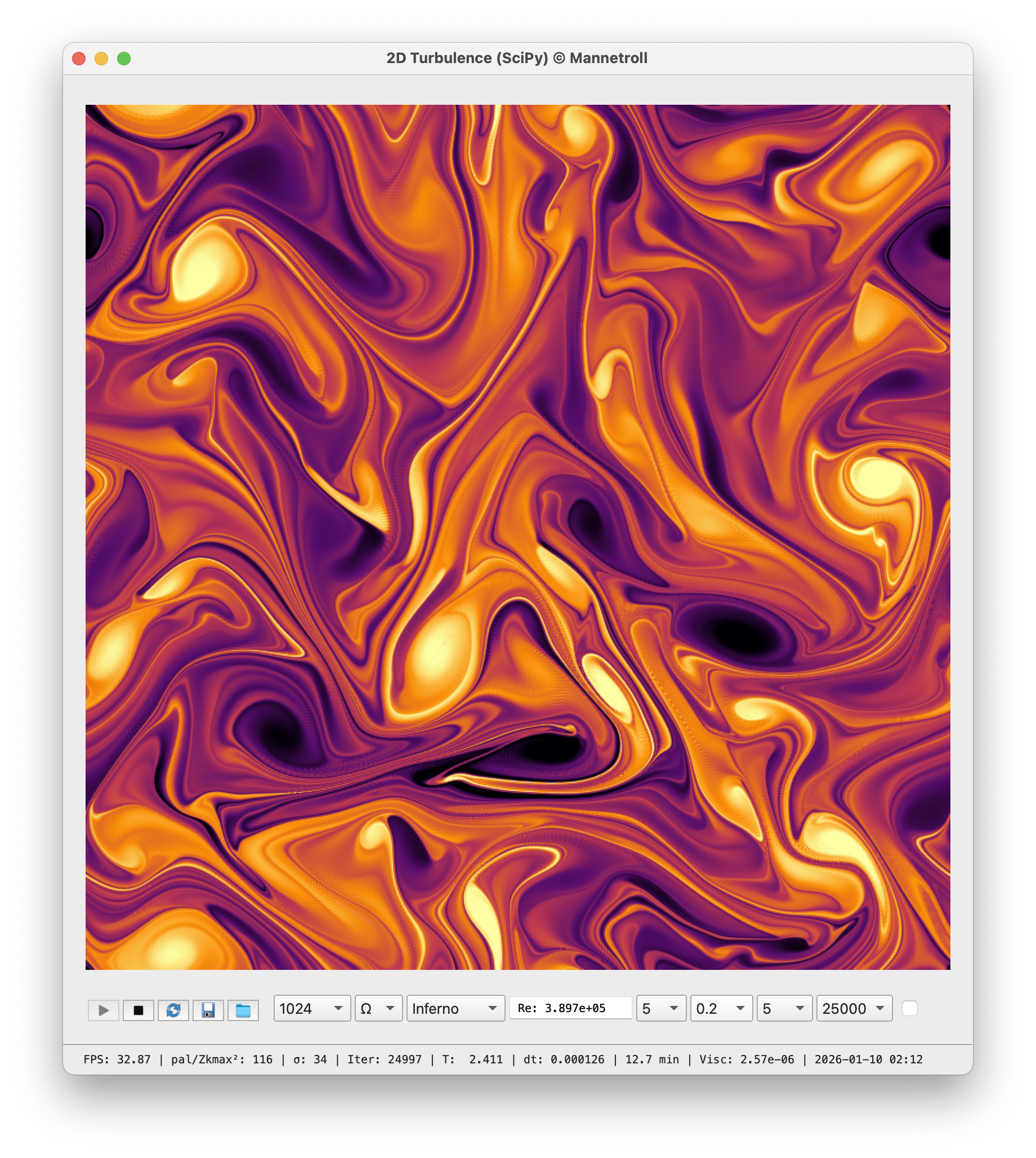
The DNS with SciPy (1024 x 1024)
Full CLI
$ python -m palinstrophy.turbo_simulator N Re K0 STEPS CFL BACKEND
Where:
- N — grid size (e.g. 256, 512)
- Re — Reynolds number (e.g. 10000)
- K0 — peak wavenumber of the energy spectrum
- STEPS — number of time steps
- CFL — target CFL number (e.g. 0.75)
- BACKEND — "cpu", "gpu", or "auto"
Examples:
# CPU run (SciPy with 4 workers)
$ python -m palinstrophy.turbo_simulator 256 10000 10 1001 0.75 cpu

# Auto-select backend (GPU if CuPy + CUDA are available)
$ python -m palinstrophy.turbo_simulator 256 10000 10 1001 0.75 auto
Enabling GPU with CuPy (CUDA 13)
On a CUDA machine (e.g. RTX 3090):
Download: https://developer.nvidia.com/cuda-downloads
-
Check that the driver/CUDA are available:
$ nvidia-smi -
Install CuPy into the uv environment:
$ uv sync --extra cuda $ uv run turbulence $ uv run sim -
Verify that CuPy sees the GPU:
$ uv run python -c "import cupy as cp; x = cp.arange(5); print(x, x.device)" -
Run in GPU mode:
$ uv run python -m palinstrophy.turbo_simulator 256 10000 10 1001 0.75 gpu
Or let the backend auto-detect:
$ uv run python -m palinstrophy.turbo_simulator 256 10000 10 1001 0.75 auto
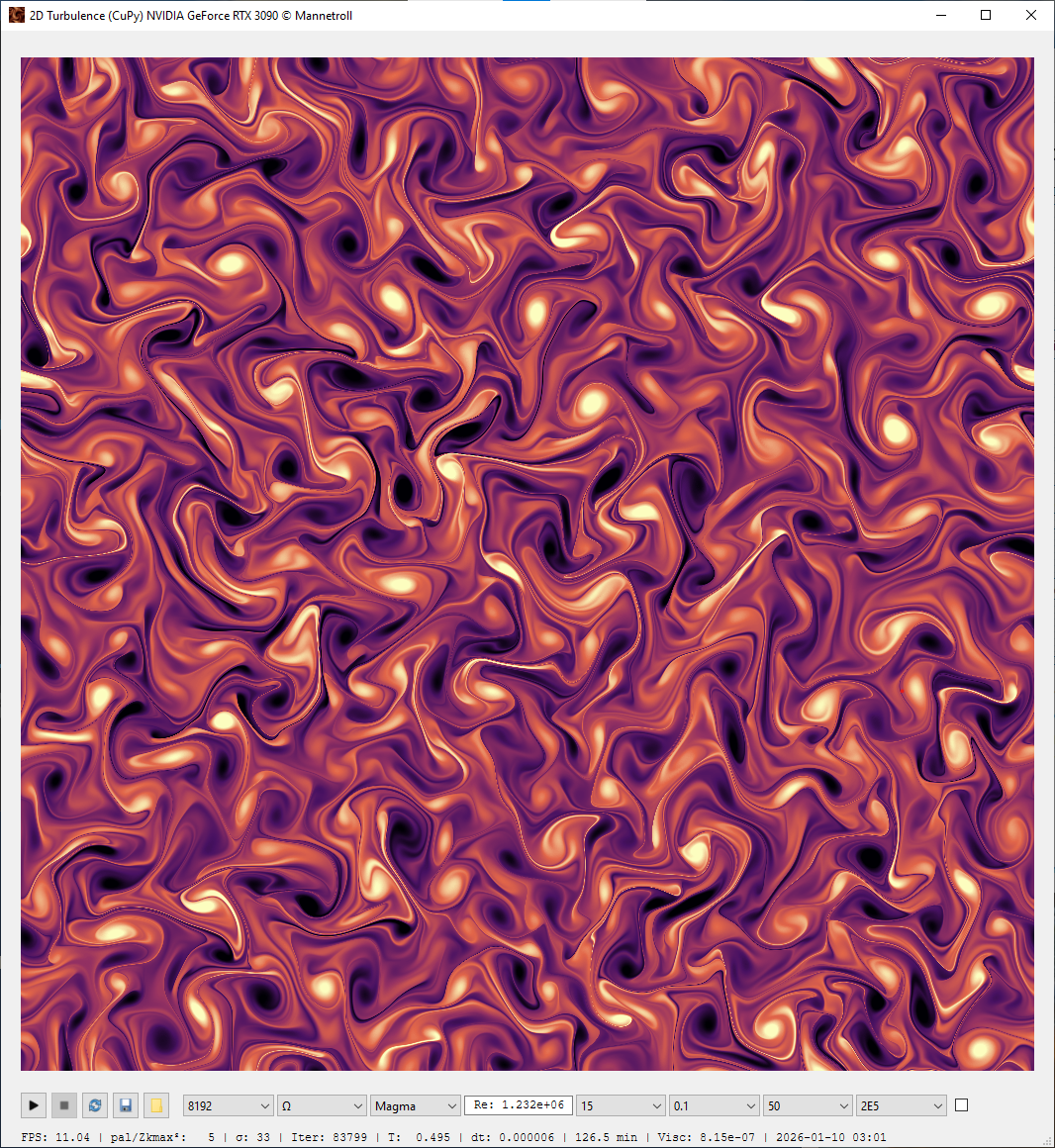
The DNS with CuPy (8192 x 8192) Dedicated GPU memory 18/24 GB
Profiling
cProfile (CPU)
$ python -m cProfile -o turbo_simulator.prof -m palinstrophy.turbo_simulator
Inspect the results:
$ python -m pstats turbo_simulator.prof
# inside pstats:
turbo_simulator.prof% sort time
turbo_simulator.prof% stats 20
GUI profiling with SnakeViz
Install SnakeViz:
$ uv pip install snakeviz
Visualize the profile:
$ snakeviz turbo_simulator.prof
Memory & CPU profiling with Scalene (GUI)
Install Scalene:
$ uv pip install "scalene==1.5.55"
Run with GUI report:
$ scalene -m palinstrophy.turbo_simulator 256 10000 10 201 0.75 cpu
Memory & CPU profiling with Scalene (CLI only)
For a terminal-only summary:
$ scalene --cli --cpu -m palinstrophy.turbo_simulator 512 10000 10 201 0.75 cpu
$ scalene --cli --cpu -m palinstrophy.turbo_main 512 15 10000 1E5 0.1 auto 10 201
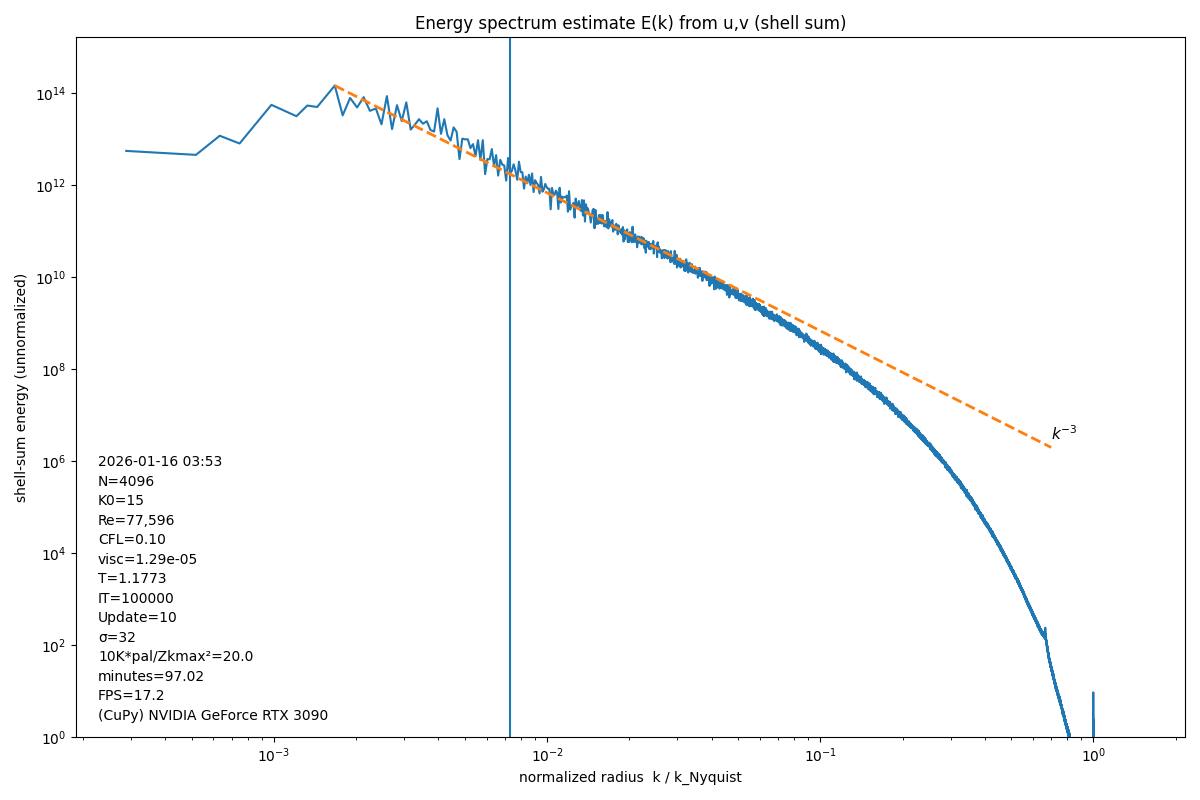
The power spectrum of the energy field
The radially averaged (isotropic) 2D FFT energy spectrum E(k) computed from the velocity fields u and v on log–log axes.
The x-axis is the normalized radial wavenumber (k/k_Nyquist), and the y-axis is the shell-summed spectral energy ∑(|û(k)|² + |v̂(k)|²) accumulated within radial wavenumber bins (DC removed and excluded).
A dashed reference slope k⁻³ is drawn (anchored at the spectral peak) to compare against the expected 2D enstrophy-cascade inertial-range power-law behavior.
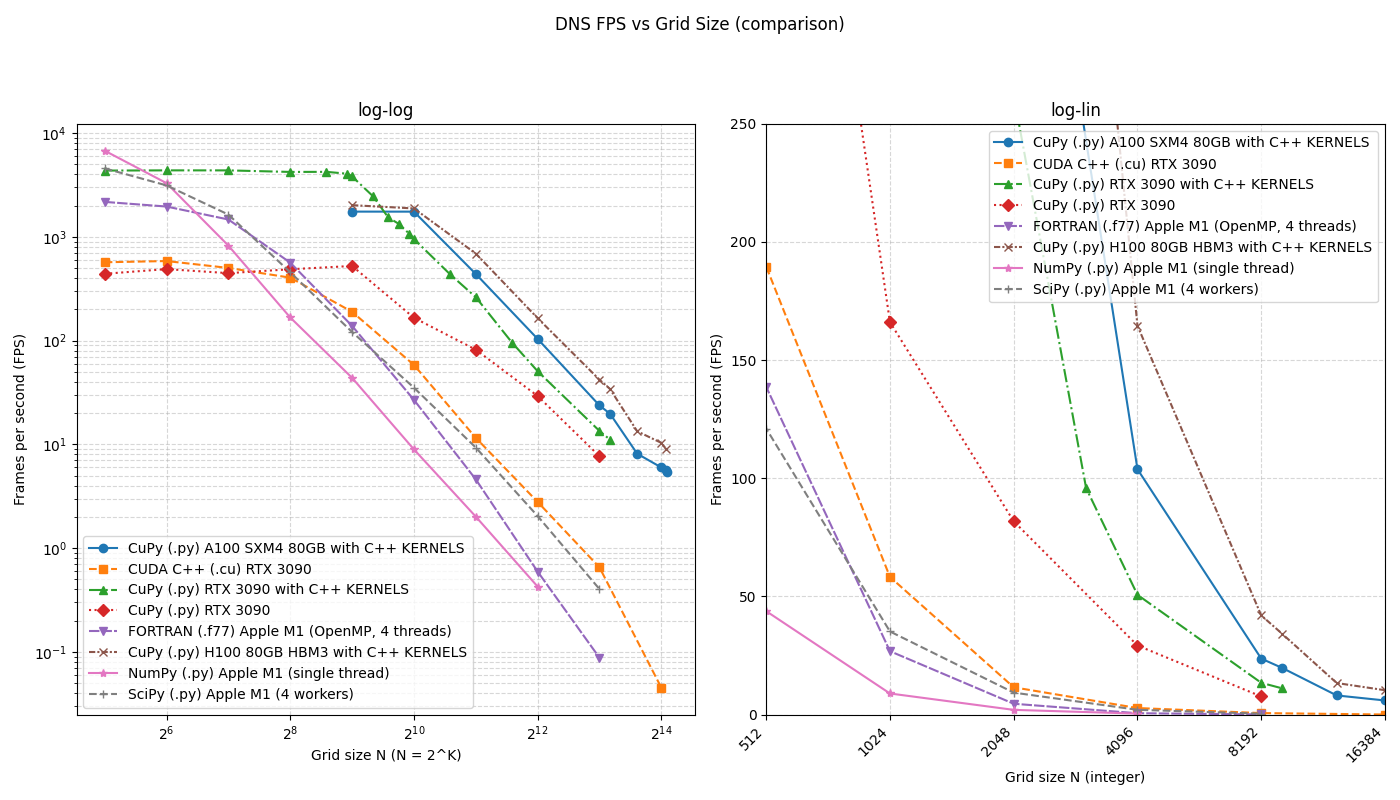
FPS Comparison Plot (DNS FPS vs Grid Size and Code)
Code bases compared
- CUDA C++ (
.cu) — RTX 3090 - CuPy (Python) + custom C++ kernels (
.py+ C++ kernels) — RTX 3090 - CuPy (Python) (
.py) — RTX 3090 - FORTRAN (
.f77) — Apple M1 (OpenMP, 4 threads) - NumPy (Python) (
.py) — Apple M1 (single thread) - SciPy (Python) (
.py) — Apple M1 (4 workers)
License
Copyright © 2026 mannetroll
Release history Release notifications | RSS feed


Download files
Download the file for your platform. If you're not sure which to choose, learn more about installing packages.
Source Distribution
Built Distribution
Filter files by name, interpreter, ABI, and platform.
If you're not sure about the file name format, learn more about wheel file names.
Copy a direct link to the current filters
File details
Details for the file mannetroll_palinstrophy-0.1.3.tar.gz.
File metadata
- Download URL: mannetroll_palinstrophy-0.1.3.tar.gz
- Upload date:
- Size: 282.3 kB
- Tags: Source
- Uploaded using Trusted Publishing? No
- Uploaded via: twine/6.2.0 CPython/3.13.11
File hashes
| Algorithm | Hash digest | |
|---|---|---|
| SHA256 |
5198c57032abdc838b44ee2dac2f9d573052e5d0f5f9bcdd221230a550b8c6be
|
|
| MD5 |
6025c9c07887ea84f5632bdf54305413
|
|
| BLAKE2b-256 |
331b0e017d7a8b5dcbddd1631b4021d2046d853d4eadb511759ce981174ab5d8
|
File details
Details for the file mannetroll_palinstrophy-0.1.3-py3-none-any.whl.
File metadata
- Download URL: mannetroll_palinstrophy-0.1.3-py3-none-any.whl
- Upload date:
- Size: 286.8 kB
- Tags: Python 3
- Uploaded using Trusted Publishing? No
- Uploaded via: twine/6.2.0 CPython/3.13.11
File hashes
| Algorithm | Hash digest | |
|---|---|---|
| SHA256 |
5dd85b326448e0ae21d587ac560ee59504ba45ff81935ba331602cfaf082561c
|
|
| MD5 |
b25def865608f989f480a3bb34d70e9b
|
|
| BLAKE2b-256 |
92e04995ee7f8a5661014290168f0067c9e0b7f3a635706d5eabad660bc31455
|






