
markdown-convert
Convert Markdown files to PDF from your command line.
pip install markdown-convert


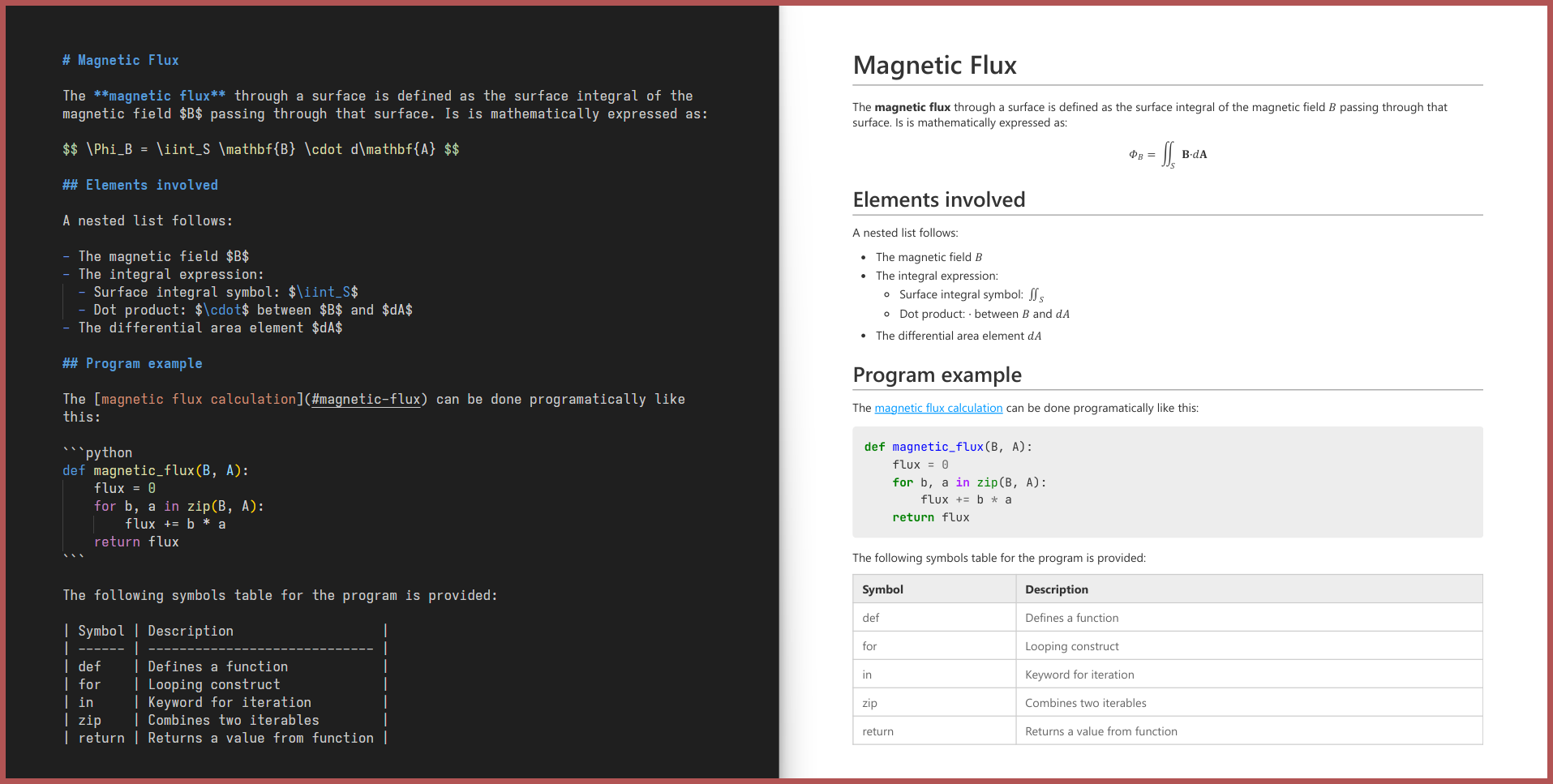
Why markdown-convert?
Unlike other similar tools, markdown-convert:
-
Can be fully installed via
pip install markdown-convert, with no external system-level dependencies. -
Comes with a sensible default CSS stylesheet out of the box.
-
Supports:
Feature Example LaTeX Math Equations $E=mc^2$is rendered as a math equation.Mermaid, Vega-Lite and Schemdraw Diagrams ```mermaid ...is rendered as a diagram.Syntax-Highlighted Code Blocks ```python ...gets syntax highlighting.Admonitions !!! note ...is styled as a note box.Dynamic Table of Contents [TOC]inserts a Table of Contents.Image Attributes shows a shadow behind the image.Captions _A beautiful sky_shows a caption, centered below the image.Tables and Queries > [my_table]under your table gives it a name,[query:select ... from my_table]queries it.Live Conversion markdown-convert file.md --mode=liveupdates the PDF every time the Markdown file changes.Custom CSS markdown-convert file.md --css=style.cssextends the default CSS with your own stylesheet.Task Lists, Containers, CSS Paged Media and more! ... Check out CUSTOM_SYNTAX.md for all the extra features and how to use them.
Installation
markdown-convert is available on PyPI and can be installed via pip:
pip install markdown-convert
Usage
1. From your terminal
Simply run markdown-convert file.md to convert file.md to file.pdf.
You can specify the following options:
Usage:
  markdown-convert [markdown_file_path] [options]

Options:
  --mode=once|live|debug
      Convert the markdown file once (default) or live.
      Use debug to preserve the intermediate html file.
  --css=[css_file_path]
      Use a custom CSS file.
  --out=[output_file_path]
      Specify the output file path.
  --extras=[extra1,extra2,...]
      Specify the extras to use. Uses all extras if not specified.
      Supported extras:
        admonitions,anchors,task-lists,math,custom-spans,highlights,
        syntax-highlighting,table-of-contents,vega-lite,inline-math,
        block-math,schemdraw,mermaid,dynamic-tables,dynamic-queries
  --security=basic|default|strict
      Specify the security level.
      Basic:
        - Inline HTML:   No restrictions.
        - JS:            Restricted to extras.
        - Remote files:  Restricted to images and fonts via https.
        - Local files:   No restrictions.
      Default:
        - Inline HTML:   Disabled.
        - JS:            Restricted to extras.
        - Remote files:  Restricted to images and fonts via https.
        - Local files:   Restricted to files inside the base directory.
      Strict:
        - Inline HTML:   Disabled.
        - JS:            Disabled (may break some extras).
        - Remote files:  Disabled (internet access completely disabled).
        - Local files:   Restricted to files inside the base directory.
For example: markdown-convert README.md --mode=live --css=style.css --out=output.pdf will convert README.md to output.pdf using style.css and update the PDF live as you edit the Markdown file.
2. As a Python library
You can also use markdown-convert as a library in your Python code:
from markdown_convert import convert, convert_text, live_convert

# Convert your Markdown file and save it as a PDF file
convert('README.md', 'style.css', 'README.pdf')

# Convert your Markdown string and get the PDF bytes
pdf_bytes = convert_text('# Hello World', 'h1 { color: red; }')

# Convert your Markdown file to PDF every time it changes
live_convert('README.md', 'style.css', 'README.pdf')
3. From the context menu of your file explorer
Install the extension of your choice:
- For Windows Explorer: markdown_convert_explorer
- For Linux (Nautilus): markdown_convert_nautilus
Then right click any Markdown file and select Convert to PDF to convert it.
1 maintainer

Metadata
1 maintainer
Release files for markdown_convert 2.0.16
For a detailed explanation of source distributions (sdists) and built distributions (wheels), please see the package formats documentation.
Source distribution (sdist)
| File | Size | Uploaded | |
|---|---|---|---|
| markdown_convert-2.0.16.tar.gz | 28.4 kB | Details |
Built distribution (wheel)
| File | Interpreter | ABI | Platform | Reset |
|---|---|---|---|---|
| markdown_convert-2.0.16-py3-none-any.whl | Python 3 | none | any | Details |
Total release size: 60.5 kB
Release files / markdown_convert-2.0.16.tar.gz
| Download URL | markdown_convert-2.0.16.tar.gz |
|---|---|
| Size | 28.4 kB |
| Tags | Source |
|
SHA-256 checksum How to use checksums |
627360ca8323a6bd92362b3e6bd7f792c64cc1c52be2f694a448dea211120d24
|
|
BLAKE2b-256 checksum How to use checksums |
791d1e5e72d0a899bb741f51339e81332a1d6759d24b09526a06345d6afc71e1
|
| Upload date | |
|
Uploaded using Trusted Publishing? What is trusted publishing? |
No |
| Uploaded via |
uv/0.12.21 {"installer":{"name":"uv","version":"0.12.21","subcommand":["publish"]},"python":null,"implementation":{"name":null,"version":null},"distro":{"name":"Ubuntu","version":"24.04","id":"noble","libc":null},"system":{"name":null,"release":null},"cpu":null,"openssl_version":null,"setuptools_version":null,"rustc_version":null,"ci":true}
|
Release files / markdown_convert-2.0.16-py3-none-any.whl
| Download URL | markdown_convert-2.0.16-py3-none-any.whl |
|---|---|
| Size | 32.2 kB |
| Tags | Python 3 |
|
SHA-256 checksum How to use checksums |
07edbd037f15f6197c7309ea773e39c4125f4d0e67615ab59a034d6017b45e22
|
|
BLAKE2b-256 checksum How to use checksums |
9629ba95837dba0617481b43ecb91c51d2b8cb2c58697594c8b05685e86691f3
|
| Upload date | |
|
Uploaded using Trusted Publishing? What is trusted publishing? |
No |
| Uploaded via |
uv/0.12.21 {"installer":{"name":"uv","version":"0.12.21","subcommand":["publish"]},"python":null,"implementation":{"name":null,"version":null},"distro":{"name":"Ubuntu","version":"24.04","id":"noble","libc":null},"system":{"name":null,"release":null},"cpu":null,"openssl_version":null,"setuptools_version":null,"rustc_version":null,"ci":true}
|














