
Convert Markdown files to PDF from your command line.

Project description
markdown-convert
Convert Markdown files to PDF from your command line.
pip install markdown-convert


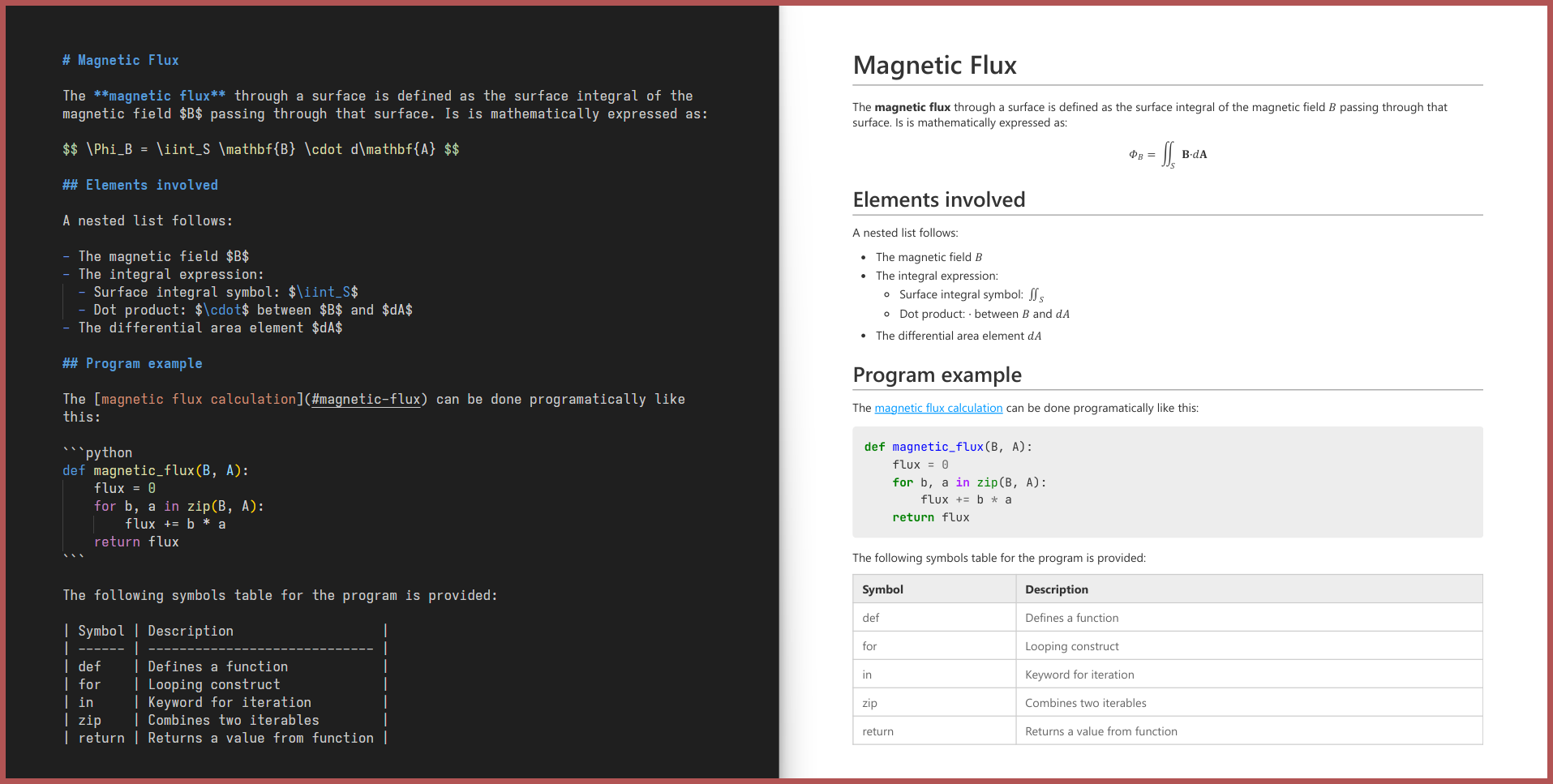
Why markdown-convert?
Unlike other similar tools, markdown-convert:
-
Can be fully installed via
pip install markdown-convert, with no external system-level dependencies. -
Comes with a sensible default CSS stylesheet out of the box.
-
Supports:
Feature Example LaTeX Math Equations $E=mc^2$is rendered as a math equation.Mermaid, Vega-Lite and Schemdraw Diagrams ```mermaid ...is rendered as a diagram.Syntax-Highlighted Code Blocks ```python ...gets syntax highlighting.Admonitions !!! note ...is styled as a note box.Dynamic Table of Contents [TOC]inserts a Table of Contents.Image Attributes shows a shadow behind the image.Captions _A beautiful sky_shows a caption, centered below the image.Tables and Queries > [my_table]under your table gives it a name,[query:select ... from my_table]queries it.Live Conversion markdown-convert file.md --mode=liveupdates the PDF every time the Markdown file changes.Custom CSS markdown-convert file.md --css=style.cssextends the default CSS with your own stylesheet.Task Lists, Containers, CSS Paged Media and more! ... Check out CUSTOM_SYNTAX.md for all the extra features and how to use them.
Installation
markdown-convert is available on PyPI and can be installed via pip:
pip install markdown-convert
Usage
1. From your terminal
Simply run markdown-convert file.md to convert file.md to file.pdf.
You can specify the following options:
Usage:
  markdown-convert [markdown_file_path] [options]

Options:
  --mode=once|live|debug
      Convert the markdown file once (default) or live.
      Use debug to preserve the intermediate html file.
  --css=[css_file_path]
      Use a custom CSS file.
  --out=[output_file_path]
      Specify the output file path.
  --extras=[extra1,extra2,...]
      Specify the extras to use. Uses all extras if not specified.
      Supported extras:
        admonitions,anchors,task-lists,math,custom-spans,highlights,
        syntax-highlighting,table-of-contents,vega-lite,inline-math,
        block-math,schemdraw,mermaid,dynamic-tables,dynamic-queries
  --security=basic|default|strict
      Specify the security level.
      Basic:
        - Inline HTML:   No restrictions.
        - JS:            Restricted to extras.
        - Remote files:  Restricted to images and fonts via https.
        - Local files:   No restrictions.
      Default:
        - Inline HTML:   Disabled.
        - JS:            Restricted to extras.
        - Remote files:  Restricted to images and fonts via https.
        - Local files:   Restricted to files inside the base directory.
      Strict:
        - Inline HTML:   Disabled.
        - JS:            Disabled (may break some extras).
        - Remote files:  Disabled (internet access completely disabled).
        - Local files:   Restricted to files inside the base directory.
For example: markdown-convert README.md --mode=live --css=style.css --out=output.pdf will convert README.md to output.pdf using style.css and update the PDF live as you edit the Markdown file.
2. As a Python library
You can also use markdown-convert as a library in your Python code:
from markdown_convert import convert, convert_text, live_convert

# Convert your Markdown file and save it as a PDF file
convert('README.md', 'style.css', 'README.pdf')

# Convert your Markdown string and get the PDF bytes
pdf_bytes = convert_text('# Hello World', 'h1 { color: red; }')

# Convert your Markdown file to PDF every time it changes
live_convert('README.md', 'style.css', 'README.pdf')
3. From the context menu of your file explorer
Install the extension of your choice:
- For Windows Explorer: markdown_convert_explorer
- For Linux (Nautilus): markdown_convert_nautilus
Then right click any Markdown file and select Convert to PDF to convert it.
Release history Release notifications | RSS feed


Download files
Download the file for your platform. If you're not sure which to choose, learn more about installing packages.
Source Distribution
Built Distribution
Filter files by name, interpreter, ABI, and platform.
If you're not sure about the file name format, learn more about wheel file names.
Copy a direct link to the current filters
File details
Details for the file markdown_convert-2.0.12.tar.gz.
File metadata
- Download URL: markdown_convert-2.0.12.tar.gz
- Upload date:
- Size: 27.0 kB
- Tags: Source
- Uploaded using Trusted Publishing? No
- Uploaded via: uv/0.11.2 {"installer":{"name":"uv","version":"0.11.2","subcommand":["publish"]},"python":null,"implementation":{"name":null,"version":null},"distro":{"name":"Ubuntu","version":"24.04","id":"noble","libc":null},"system":{"name":null,"release":null},"cpu":null,"openssl_version":null,"setuptools_version":null,"rustc_version":null,"ci":true}
File hashes
| Algorithm | Hash digest | |
|---|---|---|
| SHA256 |
68866c9f28c39e49fa7e3f2da48732904852d297ac3f6e4e346278f64df6aee3
|
|
| MD5 |
3b8b9b1a5927ed70a3b5141812de0417
|
|
| BLAKE2b-256 |
5f00b2e9c5319bdadbf170d75105efabfa82833f1df093675c8468d6c27c76fe
|
File details
Details for the file markdown_convert-2.0.12-py3-none-any.whl.
File metadata
- Download URL: markdown_convert-2.0.12-py3-none-any.whl
- Upload date:
- Size: 30.6 kB
- Tags: Python 3
- Uploaded using Trusted Publishing? No
- Uploaded via: uv/0.11.2 {"installer":{"name":"uv","version":"0.11.2","subcommand":["publish"]},"python":null,"implementation":{"name":null,"version":null},"distro":{"name":"Ubuntu","version":"24.04","id":"noble","libc":null},"system":{"name":null,"release":null},"cpu":null,"openssl_version":null,"setuptools_version":null,"rustc_version":null,"ci":true}
File hashes
| Algorithm | Hash digest | |
|---|---|---|
| SHA256 |
9ac0e29807d687a11403f1d3b3763145348cbc0d5ec7bbbd36e0b5647ddd2f14
|
|
| MD5 |
36694210f41a6724943a7d5a01bcef0f
|
|
| BLAKE2b-256 |
0bc00d332ec3e203f8eef55e6a6cfd22a8e66f2a2d64421ba344e200c6272faf
|






