
markdown-convert
Convert Markdown files to PDF from your command line.
pip install markdown-convert


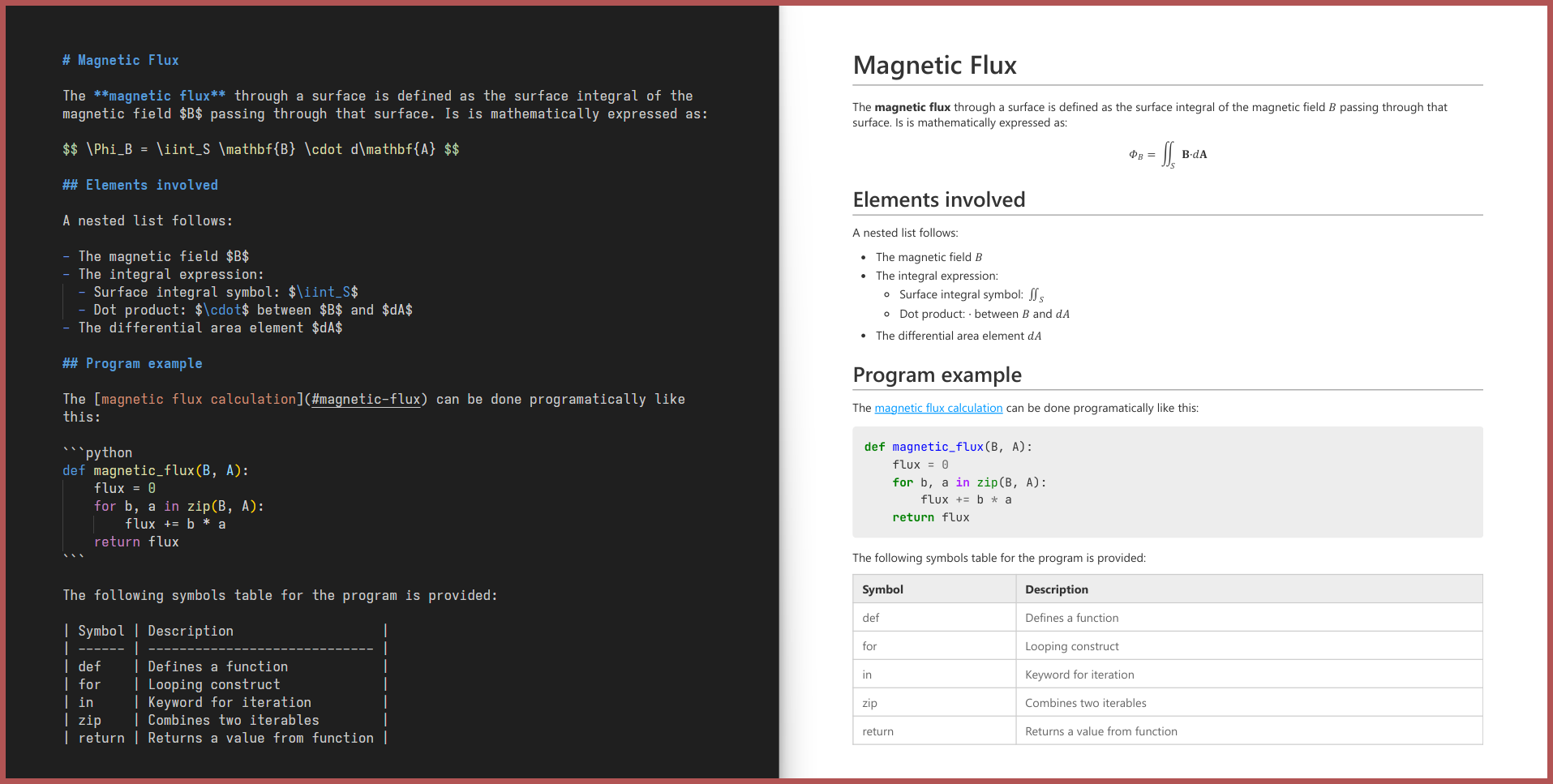
Why markdown-convert?
Unlike other similar tools, markdown-convert:
-
Can be fully installed via
pip install markdown-convert, with no external system-level dependencies. -
Comes with a sensible default CSS stylesheet out of the box.
-
Supports:
Feature Example LaTeX Math Equations $E=mc^2$is rendered as a math equation.Mermaid, Vega-Lite and Schemdraw Diagrams ```mermaid ...is rendered as a diagram.Syntax-Highlighted Code Blocks ```python ...gets syntax highlighting.Admonitions !!! note ...is styled as a note box.Dynamic Table of Contents [TOC]inserts a Table of Contents.Image Attributes shows a shadow behind the image.Captions _A beautiful sky_shows a caption, centered below the image.Tables and Queries > [my_table]under your table gives it a name,[query:select ... from my_table]queries it.Live Conversion markdown-convert file.md --mode=liveupdates the PDF every time the Markdown file changes.Custom CSS markdown-convert file.md --css=style.cssextends the default CSS with your own stylesheet.Task Lists, Containers, CSS Paged Media and more! ... Check out CUSTOM_SYNTAX.md for all the extra features and how to use them.
Installation
markdown-convert is available on PyPI and can be installed via pip:
pip install markdown-convert
Usage
1. From your terminal
Simply run markdown-convert file.md to convert file.md to file.pdf.
You can specify the following options:
Usage:
  markdown-convert [markdown_file_path] [options]

Options:
  --mode=once|live|debug
      Convert the markdown file once (default) or live.
      Use debug to preserve the intermediate html file.
  --css=[css_file_path]
      Use a custom CSS file.
  --out=[output_file_path]
      Specify the output file path.
  --extras=[extra1,extra2,...]
      Specify the extras to use. Uses all extras if not specified.
      Supported extras:
        admonitions,anchors,task-lists,math,custom-spans,highlights,
        syntax-highlighting,table-of-contents,vega-lite,inline-math,
        block-math,schemdraw,mermaid,dynamic-tables,dynamic-queries
  --security=basic|default|strict
      Specify the security level.
      Basic:
        - Inline HTML:   No restrictions.
        - JS:            Restricted to extras.
        - Remote files:  Restricted to images and fonts via https.
        - Local files:   No restrictions.
      Default:
        - Inline HTML:   Disabled.
        - JS:            Restricted to extras.
        - Remote files:  Restricted to images and fonts via https.
        - Local files:   Restricted to files inside the base directory.
      Strict:
        - Inline HTML:   Disabled.
        - JS:            Disabled (may break some extras).
        - Remote files:  Disabled (internet access completely disabled).
        - Local files:   Restricted to files inside the base directory.
For example: markdown-convert README.md --mode=live --css=style.css --out=output.pdf will convert README.md to output.pdf using style.css and update the PDF live as you edit the Markdown file.
2. As a Python library
You can also use markdown-convert as a library in your Python code:
from markdown_convert import convert, convert_text, live_convert

# Convert your Markdown file and save it as a PDF file
convert('README.md', 'style.css', 'README.pdf')

# Convert your Markdown string and get the PDF bytes
pdf_bytes = convert_text('# Hello World', 'h1 { color: red; }')

# Convert your Markdown file to PDF every time it changes
live_convert('README.md', 'style.css', 'README.pdf')
3. From the context menu of your file explorer
Install the extension of your choice:
- For Windows Explorer: markdown_convert_explorer
- For Linux (Nautilus): markdown_convert_nautilus
Then right click any Markdown file and select Convert to PDF to convert it.
1 maintainer

Metadata
1 maintainer
Release files for markdown_convert 2.0.17
For a detailed explanation of source distributions (sdists) and built distributions (wheels), please see the package formats documentation.
Source distribution (sdist)
| File | Size | Uploaded | Provenance | |
|---|---|---|---|---|
| markdown_convert-2.0.17.tar.gz | 28.4 kB | Without provenance | Details |
Built distribution (wheel)
| File | Interpreter | ABI | Platform | Reset |
|---|---|---|---|---|
| markdown_convert-2.0.17-py3-none-any.whl | Python 3 | none | any | Details |
Total release size: 60.5 kB
Release files / markdown_convert-2.0.17.tar.gz
| Download URL | markdown_convert-2.0.17.tar.gz |
|---|---|
| Size | 28.4 kB |
| Tags | Source |
|
SHA-256 checksum How to use checksums |
6915f38a0dedfb6caef9e9f8569424a52c20d5b2c2ce936bc46a8da77328e7e1
|
|
BLAKE2b-256 checksum How to use checksums |
c30e1b7e2b7a244f489d2b658ef3305b137b645ae2b899b0ba75ffe761d00442
|
| Upload date | |
|
Uploaded using Trusted Publishing? What is trusted publishing? |
No |
| Uploaded via |
uv/0.13.1 {"installer":{"name":"uv","version":"0.13.1","subcommand":["publish"]},"python":null,"implementation":{"name":null,"version":null},"distro":{"name":"Ubuntu","version":"24.04","id":"noble","libc":null},"system":{"name":null,"release":null},"cpu":null,"openssl_version":null,"setuptools_version":null,"rustc_version":null,"ci":true}
|
Release files / markdown_convert-2.0.17-py3-none-any.whl
| Download URL | markdown_convert-2.0.17-py3-none-any.whl |
|---|---|
| Size | 32.2 kB |
| Tags | Python 3 |
|
SHA-256 checksum How to use checksums |
87a9dd4245073542844659c2c4e0634d52acc2c31920333d4335fbd7943ab5f9
|
|
BLAKE2b-256 checksum How to use checksums |
4fd4391080d748ce48cd8e40f9f5e5fcf077c59aa35792cd227c9245f46eb490
|
| Upload date | |
|
Uploaded using Trusted Publishing? What is trusted publishing? |
No |
| Uploaded via |
uv/0.13.1 {"installer":{"name":"uv","version":"0.13.1","subcommand":["publish"]},"python":null,"implementation":{"name":null,"version":null},"distro":{"name":"Ubuntu","version":"24.04","id":"noble","libc":null},"system":{"name":null,"release":null},"cpu":null,"openssl_version":null,"setuptools_version":null,"rustc_version":null,"ci":true}
|
Security for markdown_convert 2.0.17
Provenance
Provenance describes where a file came from. On PyPI, provenance is shared via attestations, which provide a verifiable record of the build or publishing details. View details, limitations and caveats.
No provenance found
None of the files in this release were uploaded with provenance metadata.
A note on package security
PyPI is a repository for distributing packages, not a service for auditing them. While third-party security researchers and our staff do their best to detect and remove malicious packages, PyPI cannot guarantee the quality, security or suitability of any given package.
To learn more about protecting yourself from malicious actors, visit our package security documentation.














