
markdown-convert
Convert Markdown files to PDF from your command line.
pip install markdown-convert


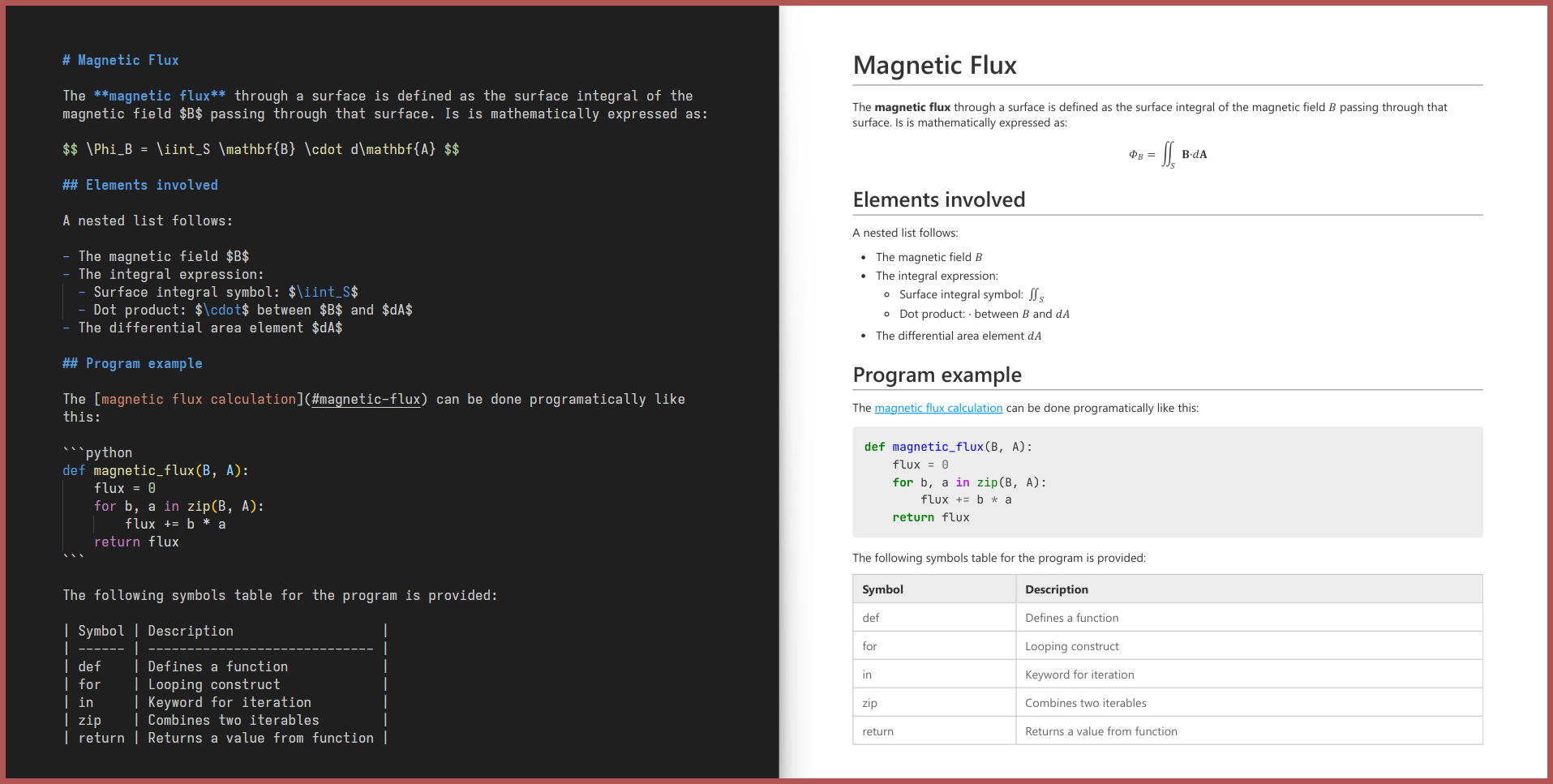
Why markdown-convert?
Unlike other similar tools, markdown-convert:
- Can be fully installed via
pip install markdown-convert, with no external system-level dependencies. - Comes with a sensible default CSS stylesheet out of the box.
- Supports:
- LaTeX math equations:
$...$for inline and$$...$$for block equations. - Mermaid diagrams:
```mermaid ...```code blocks get rendered as diagrams. - Syntax highlighting for code blocks: Applied automatically based on the specified language.
- Live conversion:
markdown-convert file.md --mode=liveupdates the PDF every time the Markdown file changes. - Custom CSS
markdown-convert file.md --css=style.cssextends the default CSS with your own stylesheet. - Pipe tables, checkboxes, header links, CSS paged media features and more!
- LaTeX math equations:
Check out CUSTOM_SYNTAX.md for all the extra features and how to use them.
Installation
markdown-convert is available on PyPI and can be installed via pip:
pip install markdown-convert
Usage
1. From your terminal
Simply run markdown-convert file.md to convert file.md to file.pdf.
You can specify the following options:
Usage:
  markdown-convert [markdown_file_path] [options]

Options:
  --mode=once|live|debug
      Convert the markdown file once (default) or live.
      Use debug to preserve the intermediate html file.
  --css=[css_file_path]
      Use a custom CSS file.
  --out=[output_file_path]
      Specify the output file path.
  --extras=[extra1,extra2,...]
      Specify the extras to use. Uses all extras if not specified.
      Supported extras:
        fenced-code-blocks,header-ids,breaks,tables,latex,mermaid,
        strike,admonitions,checkboxes,custom-spans,highlights,toc,
        vega-lite,schemdraw,dynamic-tables,dynamic-queries
  --security=default|strict
      Specify the security level.
      Strict mode disables inline HTML, internet access and JS,
      but local files can still be referenced.
      This improves security, but will break some extras.
For example: markdown-convert README.md --mode=live --css=style.css --out=output.pdf will convert README.md to output.pdf using style.css and update the PDF live as you edit the Markdown file.
2. As a Python library
You can also use markdown-convert as a library in your Python code:
from markdown_convert import convert, convert_text, live_convert

# Convert your Markdown file and save it as a PDF file
convert('README.md', 'style.css', 'README.pdf')

# Convert your Markdown string and get the PDF bytes
pdf_bytes = convert_text('# Hello World', 'h1 { color: red; }')

# Convert your Markdown file to PDF every time it changes
live_convert('README.md', 'style.css', 'README.pdf')
3. From the context menu of your file explorer
Install the extension of your choice:
- For Windows Explorer: markdown_convert_explorer
- For Linux (Nautilus): markdown_convert_nautilus
Then right click any Markdown file and select Convert to PDF to convert it.
1 maintainer

Metadata
1 maintainer
Release files for markdown_convert 1.2.66
For a detailed explanation of source distributions (sdists) and built distributions (wheels), please see the package formats documentation.
Source distribution (sdist)
| File | Size | Uploaded | Provenance | Actions |
|---|---|---|---|---|
| markdown_convert-1.2.66.tar.gz | 26.1 kB | Without provenance | Details for markdown_convert-1.2.66.tar.gz |
Built distribution (wheel)
| File | Interpreter | ABI | Platform | Actions Reset |
|---|---|---|---|---|
| markdown_convert-1.2.66-py3-none-any.whl | Python 3 | none | any | Details for markdown_convert-1.2.66-py3-none-any.whl |
Total release size: 56.0 kB
Release files / markdown_convert-1.2.66.tar.gz
| Download URL | markdown_convert-1.2.66.tar.gz |
|---|---|
| Size | 26.1 kB |
| Tags | Source |
|
SHA-256 checksum How to use checksums |
9e2282935ef1e93b7d8f27492cc27b10ade2b354aa2b44df4eb9a44899695a1d
|
|
BLAKE2b-256 checksum How to use checksums |
36d53dc279b5eed62a039ad0924b763c0daf3e9c80f52bfa03c1fefcabc28e66
|
| Upload date | |
|
Uploaded using Trusted Publishing? What is trusted publishing? |
No |
| Uploaded via |
uv/0.10.4 {"installer":{"name":"uv","version":"0.10.4","subcommand":["publish"]},"python":null,"implementation":{"name":null,"version":null},"distro":{"name":"Ubuntu","version":"24.04","id":"noble","libc":null},"system":{"name":null,"release":null},"cpu":null,"openssl_version":null,"setuptools_version":null,"rustc_version":null,"ci":true}
|
Release files / markdown_convert-1.2.66-py3-none-any.whl
| Download URL | markdown_convert-1.2.66-py3-none-any.whl |
|---|---|
| Size | 29.9 kB |
| Tags | Python 3 |
|
SHA-256 checksum How to use checksums |
480088f9ca63bfc14284db2f8111efc06a0433ea087b08d4825735323dcc836e
|
|
BLAKE2b-256 checksum How to use checksums |
b639e84377f80645e7221f0d2a63e07dd98e6ce5bc0e3e0a123bb9d8e638307b
|
| Upload date | |
|
Uploaded using Trusted Publishing? What is trusted publishing? |
No |
| Uploaded via |
uv/0.10.4 {"installer":{"name":"uv","version":"0.10.4","subcommand":["publish"]},"python":null,"implementation":{"name":null,"version":null},"distro":{"name":"Ubuntu","version":"24.04","id":"noble","libc":null},"system":{"name":null,"release":null},"cpu":null,"openssl_version":null,"setuptools_version":null,"rustc_version":null,"ci":true}
|
Security for markdown_convert 1.2.66
Provenance
Provenance describes where a file came from. On PyPI, provenance is shared via attestations, which provide a verifiable record of the build or publishing details. View details, limitations and caveats.
No provenance found
None of the files in this release were uploaded with provenance metadata.
A note on package security
PyPI is a repository for distributing packages, not a service for auditing them. While third-party security researchers and our staff do their best to detect and remove malicious packages, PyPI cannot guarantee the quality, security or suitability of any given package.
To learn more about protecting yourself from malicious actors, visit our package security documentation.














