
Dynamic MDF synthetic market data generator
Verified details
These details have been verified by PyPIProject links
GitHub Statistics
Maintainers

Project description
market-wave

Fast, lightweight synthetic market data from a Dynamic Market Distribution Function.




English | 한국어
market-wave is a Python library for generating synthetic market paths from a
market-wide entry price distribution. It does not create individual
participants. Instead, it models aggregate buy/sell entry intent, resting
order-book depth, probabilistic order cancellation, taker flow, and
execution-driven price movement from probability mass over gap-unit offsets.
It is not a forecasting model. It is a lightweight simulation primitive for experiments, visualization, teaching, and strategy-environment prototyping.
Core engine rule: market state reshapes the two entry MDFs, incoming order offsets are sampled directly from those MDFs, and the realized samples feed back into the next market state. The engine does not post-correct sampled orders or force a target path after sampling.
Why market-wave?
- Aggregate intent, not agents: market participants are represented by probability mass over gap-unit offsets, not by individual objects.
- Raw-mass MDF: buy/sell entry intent is built by summing observable offset-level mass, then normalizing directly.
- Separated shape and size: MDFs decide where intent sits; intensity decides how much order flow appears.
- Execution-driven prices: prices stay flat unless trades execute.
- No post-sampling correction: sampled order prices are not rewritten to hit target volatility, trend, spread, or path shape.
- Plain batch loops: create reproducible synthetic paths by instantiating
Marketand callingstep(n). - Inspectable state: every step returns a
StepInfosnapshot with MDFs, submitted volume, cancelled volume, executions, order book state, VWAP, spread, and imbalance. - Built-in plotting:
matplotlibis included, with a clean light chart style by default.
Install
pip install market-wave
For dataframe export:
pip install "market-wave[dataframe]"
For local development:
git clone https://github.com/smturtle2/market-wave.git
cd market-wave
uv sync --extra dev
Python >=3.10 is supported.
Quickstart
from market_wave import Market
from market_wave.metrics import compute_metrics

market = Market(popularity=3.0, seed=42)
steps = market.step(500)
paths = [steps]
metrics = compute_metrics(paths)

last = steps[-1]
print(last.price_before, "->", last.price_after)
print("entry:", round(sum(last.entry_volume_by_price.values()), 3))
print("executed:", round(last.total_executed_volume, 3))
print("resting bid/ask:", round(sum(last.orderbook_after.bid_volume_by_price.values()), 3), round(sum(last.orderbook_after.ask_volume_by_price.values()), 3))
print("imbalance:", round(last.order_flow_imbalance, 3))
print("execution rate:", round(metrics.execution_rate, 3))
Configure the model directly with plain constructor parameters:
from market_wave import Market

market = Market(initial_price=10_000, gap=10, popularity=3.0, regime="normal", seed=42)
steps = market.step(500)
regime defines only the initial market condition. Later StepInfo.regime
values are active condition labels produced by the simulator state transition,
not a fixed constructor label.
Market.step(n) always returns list[StepInfo] and appends the same objects to
market.history.
For simple export workflows, use step.to_dict(), step.to_json(), or
market.history_records().
The exact numbers are seed- and version-dependent. The printed fields are meant to show the current mark, sampled entry volume, executed volume, resting book depth, and realized order-flow imbalance for the final step.
Smoke Matrix
The simulator is deterministic for a fixed seed, so it is easy to run the same invariants across different market conditions:
from market_wave import Market

cases = [
    ("baseline", dict(initial_price=10_000, gap=10, popularity=1.0, seed=42), 500),
    ("busy", dict(initial_price=10_000, gap=10, popularity=2.5, seed=7), 500),
    ("thin", dict(initial_price=500, gap=5, popularity=0.25, seed=123), 500),
    ("low_price", dict(initial_price=1, gap=1, popularity=3.0, seed=17), 500),
    ("trend_up", dict(initial_price=10_000, gap=10, popularity=1.0, seed=42, regime="trend_up"), 500),
    ("high_vol", dict(initial_price=10_000, gap=10, popularity=1.0, seed=7, regime="high_vol"), 500),
    ("inactive", dict(initial_price=100, gap=1, popularity=0.0, seed=9), 100),
]

for name, kwargs, steps_count in cases:
    market = Market(**kwargs)
    steps = market.step(steps_count)
    tick_changes = [step.tick_change for step in steps]
    cumulative_ticks = [sum(tick_changes[: index + 1]) for index in range(len(tick_changes))]
    move_steps = sum(step.tick_change != 0 for step in steps)
    exec_steps = sum(step.total_executed_volume > 0 for step in steps)
    tick_range = max(cumulative_ticks, default=0) - min(cumulative_ticks, default=0)
    print(name, tick_range, move_steps, exec_steps)
Use this matrix as a plausibility check, not a promise of exact ranges. Regression tests assert tick-native invariants instead of fixed final prices: MDFs stay finite and normalized, price coordinates never fall below one tick, order-book depth remains non-negative, tick changes only occur on executed-volume steps, inactive markets stay flat, and busier markets generally produce more executed volume and trades than thin markets under the same seed.
Diagnostic note for the current engine: the simulator is designed to express
many synthetic market families, not to replay or calibrate to one specific
market. Seeded mood, trend, volatility, microstructure activity,
cancellation pressure, participant pressure, and visible book state evolve each
step and reshape the two MDFs. Prices remain execution-driven; when trades
print, the next mark uses the current quote context and execution VWAP so thin
and busy markets can react differently to the same order flow. Treat these
ranges, move counts, and execution counts as regression diagnostics, not claims
that generated paths match any specific real market.
Entry MDF keys are gap-unit offsets. An incoming order samples an offset first, then converts it to an executable order price. Buy entry orders arrive as bids, sell entry orders arrive as asks, and they execute only when they overlap existing opposite-side quotes. Executions print at the resting quote price. Unfilled volume remains in the book at the converted order price. Resting orders then leave through probabilistic cancellation: orders at prices with weaker same-side MDF support are more likely to shrink or disappear.
MDF note for the current engine: buy/sell MDFs no longer use score softmax updates. The engine builds raw mass at each gap-unit offset from near-market continuity, visible book shortage, gap/front/occupancy signals, hidden participant pressure, volatility, stress, and microstructure texture. Hidden participant pressure is not an extra public MDF or a set of agents; it is an internal state derived from market conditions and noise that expresses upward push, downward push, upward resistance, downward resistance, and general noisy participation before the two MDFs are sampled.
Microstructure note for the current engine: order-book changes are shaped by the current entry MDFs, resiliency, stress-aware cancellation, event-driven volume bursts, dry-up after cancellation pressure, trend exhaustion, and book-pressure squeeze signals from one-sided visible liquidity. Live order-book totals remain cached by price/side, and lots are coalesced by price/kind.
Visualization
from market_wave import Market

market = Market(
    initial_price=10_000,
    gap=10,
    popularity=1.0,
    seed=42,
)
market.step(500)

fig, ax = market.plot(last=220, orderbook_depth=12)
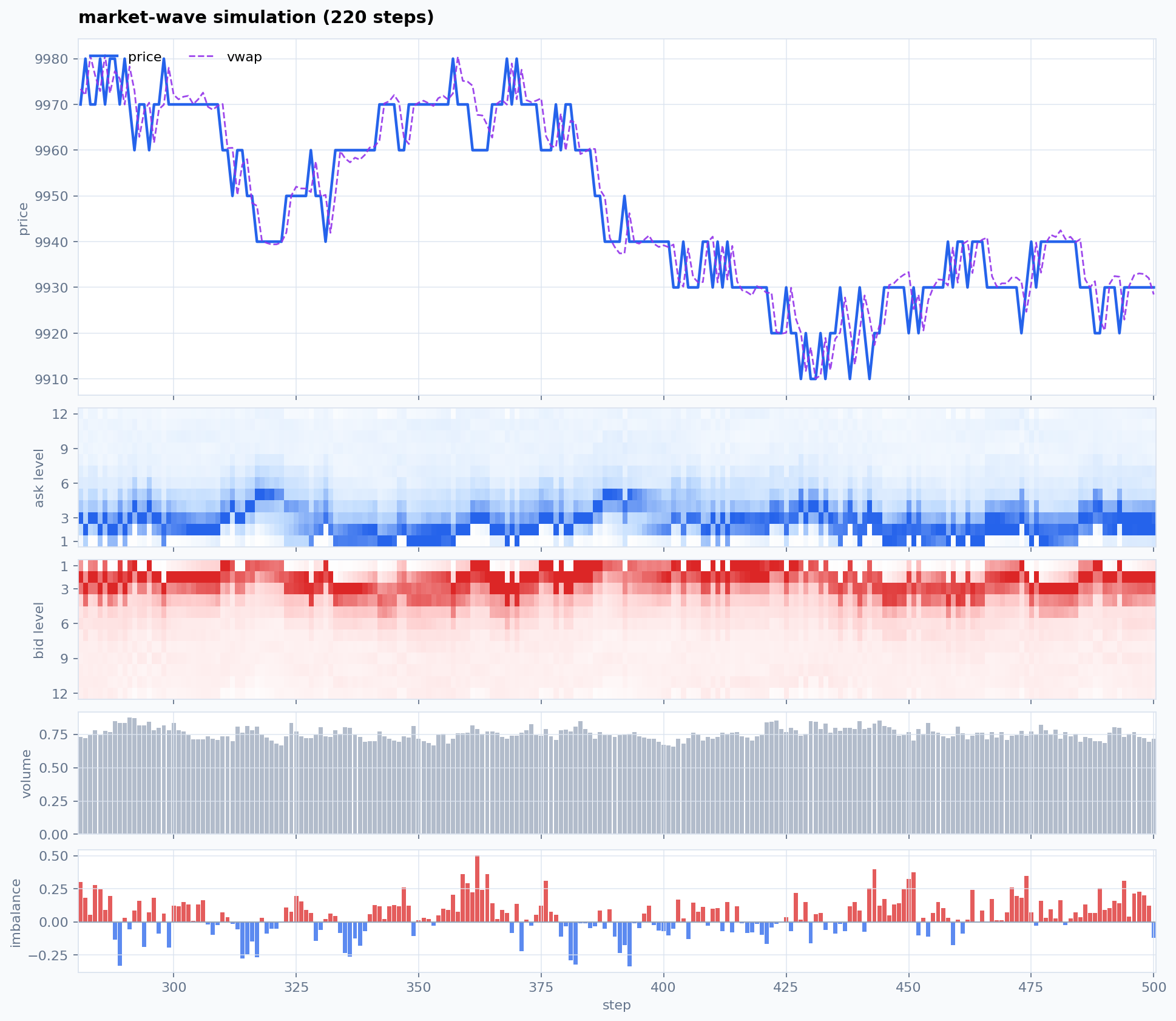
The default market_wave style uses a light multi-panel chart: price/VWAP,
bid and ask orderbook depth heatmaps by simple level, executed volume, and
order-flow imbalance. To keep the legacy three-panel view, pass
orderbook=False.
Dark overlay mode is still available:
fig, ax = market.plot(layout="overlay", style="market_wave_dark")
Synthetic Data
from market_wave import Market
from market_wave.metrics import (
    compare_metrics,
    compute_metrics,
    load_reference_metrics_profile,
    save_metrics_profile_json,
    validate_reference_records,
)

paths = []
for path_id in range(100):
    market = Market(initial_price=10_000, gap=10, popularity=1.0, seed=10_000 + path_id)
    paths.append(market.step(512))

metrics = compute_metrics(paths)
print(metrics.tick_return_std, metrics.volume_mean, metrics.max_drawdown_ticks)
print(metrics.cancellation_rate, metrics.position_change_rate)
print(metrics.mean_abs_mdf_anchor_change_ticks, metrics.mdf_anchor_event_pressure_corr)
print(metrics.mean_spread_ticks, metrics.mean_near_depth_share, metrics.one_sided_book_rate)
print(metrics.mean_quote_age)
save_metrics_profile_json(metrics, "synthetic-metrics.json", name="synthetic")
reference = load_reference_metrics_profile("real-reference-records.jsonl", name="reference", gap=10)
comparison = compare_metrics(metrics, reference)
print(comparison.score)
ValidationMetrics.volatility_clustering_score is computed within each generated
path and aggregated, so independent path boundaries do not affect the diagnostic.
Cancellation and position-change diagnostics are computed from exported
StepInfo fields, not from visualization code.
Anchor diagnostics report how far the MDF basis moves in tick units and how that
movement correlates with realized event pressure.
Book-topology diagnostics report spread and depth concentration in tick-native
terms, so they stay comparable across absolute price scales.
mean_quote_age reports the volume-weighted lifecycle age of visible resting
quotes. It is diagnostic-only unless you explicitly include it in
compare_metrics(fields=...).
compare_metrics() compares synthetic metrics against an externally prepared
reference profile, so calibration can stay in Python instead of visualization code.
Use load_reference_metrics_profile() with a metrics JSON file, or with JSONL/CSV
rows that follow StepInfo.to_dict() field names after your real L2/tape
data has been converted into that step-level schema.
Reference records must include tick_change, tick_before, tick_after,
price_after, total_executed_volume, cancelled_volume_by_price,
trade_count, order_flow_imbalance, mdf_price_basis, spread_after, and
orderbook_after. path_id and mean_quote_age are optional. orderbook_after
must contain bid_volume_by_price and ask_volume_by_price maps.
These contracts are also exported as REFERENCE_RECORD_REQUIRED_FIELDS,
REFERENCE_RECORD_OPTIONAL_FIELDS, and REFERENCE_ORDERBOOK_REQUIRED_FIELDS.
Use validate_reference_records(records) to check converted rows before running
calibration.
Core Concepts
At every step, the market builds gap-unit offsets around the current price:
x = (price - current_price) / gap
gap_offsets = [-grid_radius, ..., 0, ..., +grid_radius]
The simulator maintains two Market Distribution Functions on that x-domain:
buy_entry_mdfsell_entry_mdf
Each MDF is normalized. It is built from raw offset-level mass:
raw_mass(x) =
    near_market_continuity
  + book_shortage_or_front_mass
  + gap_front_occupancy_pressure
  + hidden_participant_pressure
  + microstructure_texture

proposal = Normalize(raw_mass)
MDF_next = Normalize(proposal)
There is no custom score model, no temperature, and no score softmax path.
mood, trend, volatility, visible liquidity, shortage, recent flow,
participant pressure, and stress reshape the raw MDF directly. Market-adjacent
ticks keep nonzero mass, while shortage/front/occupancy signals can create
multiple local pockets away from the current price.
The public MDF fields are the effective distributions used for sampling. The
engine does not apply a separate post-sampling correction layer to force a
desired path shape. Incoming order prices and taker/limit character come from
directly sampling x from the two MDFs shaped by the current market state. The
only boundary conversion is the sampled gap offset projected from
mdf_price_basis onto the executable tick grid. Resting quotes then live or
cancel through a state-dependent quote lifecycle hazard, not through a separate
public cancellation MDF. The realized samples update the book, executions, flow
memory, participant pressure, and next-step market state.
MDFs generate aggregate intent. Intensity controls expected fixed-slice activity, not guaranteed submitted volume. The order book and execution layer then turn sampled arrivals into limit flow, taker flow, cancellations, matched volume, and price changes; quiet slices with no executions are valid output.
Execution Guarantee
Price movement is execution-driven:
- If a step has no executed volume,
price_after == price_before. - If trades execute,
price_afterfollows the sampled execution path. Trades that all print at the previous price cannot move the mark by flow alone. seedmakes the simulation reproducible for the same version and inputs.
This is a simulator, not a market data replay engine and not financial advice.
API Overview
from market_wave import (
    Market,
    MarketState,
    IntensityState,
    LatentState,
    MDFState,
    OrderBookState,
    StepInfo,
)
Useful StepInfo fields include:
price_before,price_after,price_changetick_before,tick_after,tick_changemdf_price_basis,price_gridbuy_entry_mdf,sell_entry_mdfentry_volume_by_price,cancelled_volume_by_pricebuy_volume_by_price,sell_volume_by_priceexecuted_volume_by_price,total_executed_volume,trade_countmarket_buy_volume,market_sell_volumevwap_price,best_bid_before,best_ask_before,spread_aftermean_quote_ageorderbook_before,orderbook_after
buy_volume_by_price and sell_volume_by_price are submitted side-intent maps
keyed by sampled order price, not executed or resting liquidity. market_*
volume fields report the executed incoming buy/sell volume. residual_market_*
fields report incoming buy/sell volume that did not execute and was restable in
the book. Unfilled incoming volume rests in orderbook_after; crossed_market_volume
is kept as a compatibility diagnostic and remains zero in the current
order-book-first engine.
buy_entry_mdf and sell_entry_mdf are the only public MDF distributions.
Their keys are sampled as gap-unit offsets first; stale price-keyed
*_mdf_by_price or PMF examples from earlier prototypes should be considered
obsolete.
Public Contract and Snapshot Policy
The public import surface is the package __all__: Market and the state
dataclasses shown above. Simulation advances through Market.step() only.
Market behavior is configured through plain constructor parameters. Tick-native
metrics helpers live in market_wave.metrics. Custom MDF model/protocol types
are no longer public API. The entrypoints are intentionally small, but the
observation contract is broad because StepInfo and MarketState expose
detailed simulator diagnostics.
During the current alpha line, existing public names and existing StepInfo /
state fields are kept compatible where practical. New diagnostic fields may be
added in alpha releases. MDF names are the supported public distribution names;
stale PMF names from earlier prototypes are obsolete.
Snapshot mutability: state dataclasses are frozen=True at the attribute level,
but nested dict and list fields are plain mutable containers so to_dict()
and JSON export remain simple. Treat Market.state and StepInfo as read-only
observations. Use Market.snapshot() when downstream code needs a mutation-safe
deep copy of the current state.
Compatibility note: Market.state remains available as the live current-state
attribute for the alpha line. Future releases may add a more explicit read-model
API or deprecation path for code that mutates state containers in place.
Development
uv sync --extra dev --extra dataframe
uv run ruff check .
uv run pytest
uv build
License
MIT
Project details
Verified details
These details have been verified by PyPIProject links
GitHub Statistics
Maintainers
Release history Release notifications | RSS feed


Download files
Download the file for your platform. If you're not sure which to choose, learn more about installing packages.
Source Distribution
Built Distribution
Filter files by name, interpreter, ABI, and platform.
If you're not sure about the file name format, learn more about wheel file names.
Copy a direct link to the current filters
File details
Details for the file market_wave-0.5.0.tar.gz.
File metadata
- Download URL: market_wave-0.5.0.tar.gz
- Upload date:
- Size: 1.8 MB
- Tags: Source
- Uploaded using Trusted Publishing? Yes
- Uploaded via: twine/6.1.0 CPython/3.13.12
File hashes
| Algorithm | Hash digest | |
|---|---|---|
| SHA256 |
267ba9f45505f2c566a0352d5c13c5db523bf665835370a8399a40e473f8ffac
|
|
| MD5 |
a950377d26680cc81d5192d7e015720e
|
|
| BLAKE2b-256 |
b817fa05ed28241eac8649ac387e5e8699e87d2f34d89082684b64c1c42f2c07
|
Provenance
The following attestation bundles were made for market_wave-0.5.0.tar.gz:
Publisher:
workflow.yml on smturtle2/market-wave
-
Statement:
-
Statement type:
https://in-toto.io/Statement/v1 -
Predicate type:
https://docs.pypi.org/attestations/publish/v1 -
Subject name:
market_wave-0.5.0.tar.gz -
Subject digest:
267ba9f45505f2c566a0352d5c13c5db523bf665835370a8399a40e473f8ffac - Sigstore transparency entry: 1424988726
- Sigstore integration time:
-
Permalink:
smturtle2/market-wave@b72ea2a7fb223a33c9b38e98ee46b26707d81fe1 -
Branch / Tag:
refs/tags/v0.5.0 - Owner: https://github.com/smturtle2
-
Access:
public
-
Token Issuer:
https://token.actions.githubusercontent.com -
Runner Environment:
github-hosted -
Publication workflow:
workflow.yml@b72ea2a7fb223a33c9b38e98ee46b26707d81fe1 -
Trigger Event:
push
-
Statement type:
File details
Details for the file market_wave-0.5.0-py3-none-any.whl.
File metadata
- Download URL: market_wave-0.5.0-py3-none-any.whl
- Upload date:
- Size: 56.9 kB
- Tags: Python 3
- Uploaded using Trusted Publishing? Yes
- Uploaded via: twine/6.1.0 CPython/3.13.12
File hashes
| Algorithm | Hash digest | |
|---|---|---|
| SHA256 |
61871af70ce859deb509c61e98f7ddc5b44ec417569dcccb324b5da82095f4d7
|
|
| MD5 |
3a70a69a39fb7681c25b517df9fc6beb
|
|
| BLAKE2b-256 |
a992ceace1d7819d9b638fe3020e346430009c103c7eff82ec0f019bb55e8922
|
Provenance
The following attestation bundles were made for market_wave-0.5.0-py3-none-any.whl:
Publisher:
workflow.yml on smturtle2/market-wave
-
Statement:
-
Statement type:
https://in-toto.io/Statement/v1 -
Predicate type:
https://docs.pypi.org/attestations/publish/v1 -
Subject name:
market_wave-0.5.0-py3-none-any.whl -
Subject digest:
61871af70ce859deb509c61e98f7ddc5b44ec417569dcccb324b5da82095f4d7 - Sigstore transparency entry: 1424988851
- Sigstore integration time:
-
Permalink:
smturtle2/market-wave@b72ea2a7fb223a33c9b38e98ee46b26707d81fe1 -
Branch / Tag:
refs/tags/v0.5.0 - Owner: https://github.com/smturtle2
-
Access:
public
-
Token Issuer:
https://token.actions.githubusercontent.com -
Runner Environment:
github-hosted -
Publication workflow:
workflow.yml@b72ea2a7fb223a33c9b38e98ee46b26707d81fe1 -
Trigger Event:
push
-
Statement type:






