
Mathematica MCP
A front-end / notebook automation layer for Mathematica, built for AI agents.
A local MCP server that lets an AI agent drive a live Mathematica session: run code, create and edit notebooks, capture screenshots, verify derivations, and read .nb files without a kernel. Works with Claude, Cursor, VS Code, Codex, and Gemini.
It is designed to run beside the official Wolfram Local MCP, not to replace it: Wolfram's server is the reference Wolfram-Language evaluator and documentation surface; this one is the notebook / front-end automation layer. See How it compares.






v1.0 is a breaking release. The default profile is now
lean(12 tools) instead offull(82 tools). SetMATHEMATICA_PROFILE=classic(orfull) to keep the old surface, and reinstall the Mathematica addon. See the Migration Guide. v1.1 bumps the addon protocol to 4 (honestevaluation_pendingstatus for front-end evaluations): re-runsetuporwolframscript -file addon/install.wlafter upgrading, then restart Mathematica.
Watch it in action
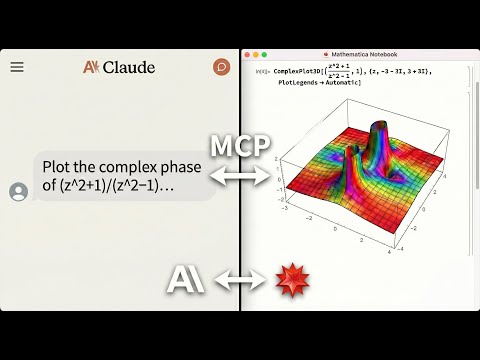
An AI agent solving math, generating plots, and controlling a live Mathematica notebook. Errors are returned directly to the agent, no copy-pasting notebook output back into chat.
Why This Exists
LLMs can write Mathematica code, but they can't run it, control a live notebook, or verify their own results. This MCP server bridges that gap:
- Live notebook control: create, edit, evaluate, and screenshot Mathematica notebooks directly from your AI agent.
- License-free notebook reading:
read_notebook_filereads.nbfiles even when no kernel or Mathematica license is available (Python-native fallback parser; a kernel is used for higher fidelity when present, and is required for.wlscripts). - Warm execution: computation runs on a persistent headless kernel session that starts warming in the background the moment the server launches, so the agent's calls return in sub-second time instead of paying a cold
wolframscriptstart-up on every request. - Error-aware execution: Mathematica messages are fed back to the agent with a
suggested_fixand, where a correction can be derived, a concreteretry_withcall, so it can debug without you copying notebook output into chat. - Local and private: core execution runs on your machine. Optional tools like
wolfram_alphaand repository search contact Wolfram's cloud services only when invoked.
The lean default
v1.0 ships a consolidated 12-tool surface as the default profile: status, notebooks, cells, edit_cells, evaluate, screenshot, verify_derivation, kernel, vars, read_notebook_file, guide, and batch. It exposes ~11.5 KB of tool schema (~2.9k tokens) versus ~61 KB / ~15k tokens for the old 82-tool surface - roughly a 5x cut in the context the agent pays before it does any work. Each tool is a thin wrapper over the exact internals the classic surface uses.
Prefer the old surface? classic (alias full) keeps all 82 legacy tools byte-identical to pre-1.0, and MATHEMATICA_TOOLSETS adds opt-in extras (data I/O, cloud, graphics, ...) to lean without switching profiles.
- Full tool reference with parameters and action enums: Technical Reference - Lean Profile Tools
- All profiles and opt-in toolsets: Technical Reference - Tool Profiles
- How execution stays fast (warm persistent kernel, error guidance, Mathematica 15 notes): Technical Reference - Architecture
How it compares
This server runs alongside the official Wolfram Local MCP (tool names per the MCPServer paclet docs) - setup <client> --with-official writes the official server's config next to this one so they run side by side. Overlap is deliberate where it helps agents; the differentiator is notebook / front-end automation that runs without a license round trip.
| Capability | Official Wolfram Local MCP | This MCP |
|---|---|---|
| Wolfram-Language evaluation | WolframLanguageEvaluator |
evaluate (warm persistent kernel) |
| Wolfram Alpha | WolframAlpha |
wolfram_alpha (opt-in cloud) |
| Symbol docs / definitions | SymbolDefinition, CreateSymbolDoc |
kernel(action="inspect"), symbols extra |
| Read a notebook file | ReadNotebook (needs kernel) |
read_notebook_file - works with no kernel / license (Python fallback) |
| Write a notebook file | WriteNotebook |
notebooks, edit_cells (live front-end) |
| Live notebook control (create/edit/eval/screenshot) | No | Yes |
Interactive UIs (sliders, Manipulate) |
No | Yes, in the live front-end |
| Derivation verification | No | verify_derivation |
| Doc search / code inspection / test reports | CodeInspector, TestReport |
Deliberately not duplicated - use the official server |
ReadNotebook / WriteNotebook overlap the notebook tools here, but the official ReadNotebook runs through a kernel; read_notebook_file parses the .nb directly in Python, so an agent can read notebooks with no license consumed and no kernel start-up.
Quick Start
From install to first working notebook plot in under 2 minutes.
Prerequisites
-
Mathematica 14.0+ (15+ recommended) with
wolframscriptin your PATH- Download Mathematica
- macOS: add to
~/.zshrc:export PATH="/Applications/Mathematica.app/Contents/MacOS:$PATH"
-
uv package manager
curl -LsSf https://astral.sh/uv/install.sh | sh
One-Command Setup
The PyPI package and CLI are named
mathematica-mcp-full(unchanged in 1.0 - the name predates the lean default).
# For Claude Desktop
uvx mathematica-mcp-full setup claude-desktop

# For Cursor
uvx mathematica-mcp-full setup cursor

# For VS Code (requires GitHub Copilot Chat extension)
uvx mathematica-mcp-full setup vscode

# For OpenAI Codex CLI
uvx mathematica-mcp-full setup codex

# For Google Gemini CLI
uvx mathematica-mcp-full setup gemini

# For Claude Code CLI
uvx mathematica-mcp-full setup claude-code

# Optional: pick a profile (default is "lean")
uvx mathematica-mcp-full setup claude-desktop --profile classic
Then restart Mathematica and your editor. Done!
VS Code: Alternative setup via Command Palette
Prerequisite: GitHub Copilot Chat extension must be installed - MCP support is built into Copilot.
- Press
Cmd+Shift+P(Mac) /Ctrl+Shift+P(Windows) - Type "MCP" -> Select "MCP: Add Server"
- Choose "Command (stdio)": not "pip"
- Enter command:
uvx - Enter args:
mathematica-mcp-full - Name it:
mathematica - Choose scope: Workspace or User
Alternative: Interactive Installer
bash <(curl -sSL https://raw.githubusercontent.com/AbhiRawat4841/mathematica-mcp/main/install.sh)
Verify Installation
uvx mathematica-mcp-full doctor
Tip: If you encounter errors after updating, clear the cache:
uv cache clean mathematica-mcp-full && uvx mathematica-mcp-full setup <client>
What You Can Ask For
"Integrate x^2 sin(x) from 0 to pi, then verify the result."
evaluate("Integrate[x^2 Sin[x], {x, 0, Pi}]")   =>  -4 + Pi^2
verify_derivation(steps=["Integrate[x^2 Sin[x], {x, 0, Pi}]", "-4 + Pi^2"])
=> Step 1 → 2: ✓ VALID
   All steps are valid!
"Plot the sombrero function in a new notebook."
notebooks(action="create", title="Sombrero")
evaluate("Plot3D[Sinc[Sqrt[x^2+y^2]], {x,-4,4}, {y,-4,4}]", target="notebook")
=> [3D surface plot rendered in the live notebook]
"Read the derivation in this notebook without opening Mathematica."
read_notebook_file("paper/derivation.nb", mode="markdown")
=> [structured markdown; works even with no kernel or license available]
Who This Is For
| Audience | Use Case |
|---|---|
| Researchers using LLM coding assistants | Run Mathematica from Claude/Cursor/VS Code without leaving your editor |
| Data scientists | Import, transform, and visualize data through natural language |
| Educators | Create interactive Mathematica notebooks through AI conversation |
| Not for | Production web services, untrusted multi-tenant environments |
Manual Installation
For full details, troubleshooting, and advanced configuration, see the Installation Guide.
Click to expand quick manual setup
-
Clone & Install:
git clone https://github.com/AbhiRawat4841/mathematica-mcp.git
cd mathematica-mcp
uv sync
-
Install Mathematica Addon:
wolframscript -file addon/install.wl
Restart Mathematica after this step.
-
Configure your editor: add the MCP server to your client's config file. See the Installation Guide for Claude Desktop, Cursor, VS Code, and other client configs.
Documentation
- Migration Guide (0.9.x → 1.0): breaking default-profile change and old→new tool mapping
- Technical Reference: Architecture, tools, and configuration
- Security Model: Threat model, permissions, and vulnerability reporting
- Benchmarks: Performance data and reproduction steps
- Contributing: Development setup, testing, and PR process
- Changelog: Version history
- Examples: Polished agent session walkthroughs
License
MIT License
1 maintainer

Metadata
1 maintainer
Release files for mathematica-mcp-full 1.1.2
For a detailed explanation of source distributions (sdists) and built distributions (wheels), please see the package formats documentation.
Source distribution (sdist)
| File | Size | Uploaded | |
|---|---|---|---|
| mathematica_mcp_full-1.1.2.tar.gz | 145.6 kB | Details |
Built distribution (wheel)
| File | Interpreter | ABI | Platform | Reset |
|---|---|---|---|---|
| mathematica_mcp_full-1.1.2-py3-none-any.whl | Python 3 | none | any | Details |
Total release size: 306.8 kB
Release files / mathematica_mcp_full-1.1.2.tar.gz
| Download URL | mathematica_mcp_full-1.1.2.tar.gz |
|---|---|
| Size | 145.6 kB |
| Tags | Source |
|
SHA-256 checksum How to use checksums |
298b1fc34b8c11d4450c232c46a3cab1ba7cec447e39fc5bcd55c0ee473fe16c
|
|
BLAKE2b-256 checksum How to use checksums |
b26d07d7296c83592556132eec28449e4db9db4095d46909ed55548cbf975475
|
| Upload date | |
|
Uploaded using Trusted Publishing? What is trusted publishing? |
No |
| Uploaded via |
uv/0.11.26 {"installer":{"name":"uv","version":"0.11.26","subcommand":["publish"]},"python":null,"implementation":{"name":null,"version":null},"distro":{"name":"Ubuntu","version":"24.04","id":"noble","libc":null},"system":{"name":null,"release":null},"cpu":null,"openssl_version":null,"setuptools_version":null,"rustc_version":null,"ci":true}
|
Release files / mathematica_mcp_full-1.1.2-py3-none-any.whl
| Download URL | mathematica_mcp_full-1.1.2-py3-none-any.whl |
|---|---|
| Size | 161.2 kB |
| Tags | Python 3 |
|
SHA-256 checksum How to use checksums |
5c64d4c2260e3e035669655ceea627de2d9138c1ed15aeca56d74adb6ffbbbf5
|
|
BLAKE2b-256 checksum How to use checksums |
46d6bcdbd447781aaeab11d15cf669b0ad5e473ed1ecccbf97d451c63dcb4072
|
| Upload date | |
|
Uploaded using Trusted Publishing? What is trusted publishing? |
No |
| Uploaded via |
uv/0.11.26 {"installer":{"name":"uv","version":"0.11.26","subcommand":["publish"]},"python":null,"implementation":{"name":null,"version":null},"distro":{"name":"Ubuntu","version":"24.04","id":"noble","libc":null},"system":{"name":null,"release":null},"cpu":null,"openssl_version":null,"setuptools_version":null,"rustc_version":null,"ci":true}
|














