
Full GUI control of Mathematica notebooks and kernel via Model Context Protocol

Project description
Mathematica MCP
Give your AI Agent the power of Wolfram Language.



What is this?
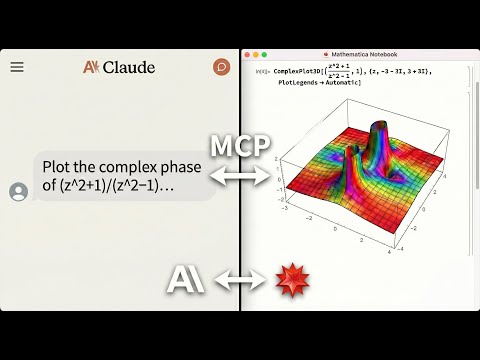
This MCP Server empowers AI Agents & IDEs (like Claude Desktop, Cursor, or OpenCode) with a direct interface to your local Wolfram Engine. It enables your agent to perform symbolic reasoning, precise calculation, and interactive visualization natively.
Capabilities:
- Execute Code: Run Wolfram Language expressions in a secure sandbox.
- Self-Correct: Diagnose and fix syntax errors automatically.
- Visualize: Generate high-fidelity plots and export them as images.
- Analyze Notebooks: Parse and manipulate
.nbfiles contextually. - Persist State: Maintain a stateful session (e.g.
x = 5) across interactions.
Watch it in action
Quick Start
Prerequisites
Before installing, you need:
-
Mathematica 14.0+ with
wolframscriptin your PATH- Download Mathematica
- macOS: Add to
~/.zshrc:export PATH="/Applications/Mathematica.app/Contents/MacOS:$PATH"
-
uv package manager
curl -LsSf https://astral.sh/uv/install.sh | sh
One-Command Setup (Recommended)
# For Claude Desktop
uvx mathematica-mcp-full setup claude-desktop

# For Cursor
uvx mathematica-mcp-full setup cursor

# For VS Code
uvx mathematica-mcp-full setup vscode

# For OpenAI Codex CLI
uvx mathematica-mcp-full setup codex

# For Google Gemini CLI
uvx mathematica-mcp-full setup gemini
Then restart Mathematica and your editor. Done!
Alternative: Interactive Installer
bash <(curl -sSL https://raw.githubusercontent.com/AbhiRawat4841/mathematica-mcp/main/install.sh)
Verify Installation
uvx mathematica-mcp-full doctor
Tip: If you encounter errors after updating, clear the cache:
uv cache clean mathematica-mcp-full && uvx mathematica-mcp-full setup <client>
Manual Installation
Click to expand manual setup instructions
-
Clone & Install:
git clone https://github.com/AbhiRawat4841/mathematica-mcp.git
cd mathematica-mcp
uv sync
-
Install Mathematica Addon:
wolframscript -file addon/install.wl
Restart Mathematica after this step.
-
Configure your editor (replace path with your actual path):
Claude Desktop (
~/Library/Application Support/Claude/claude_desktop_config.json):{ "mcpServers": { "mathematica": { "command": "uv", "args": ["--directory", "/path/to/mathematica-mcp", "run", "mathematica-mcp-full"] } } }
Cursor (
~/.cursor/mcp.json):{ "mcpServers": { "mathematica": { "command": "uv", "args": ["--directory", "/path/to/mathematica-mcp", "run", "mathematica-mcp-full"] } } }
VS Code (
~/.vscode/mcp.json):{ "servers": { "mathematica": { "type": "stdio", "command": "uv", "args": ["--directory", "/path/to/mathematica-mcp", "run", "mathematica-mcp-full"] } } }
📖 See the Installation Guide for troubleshooting and advanced setup.
Why use it?
For Students & Researchers
- Symbolic Math: "Integrate
Sin[x]^4 Cos[x]^2, simplify it, and show the steps." - Visualization: "Render a 3D Sombrero surface and export as SVG."
For Developers
- Debugging: "Trace the evaluation of
MyCustomFunction[x]." - Parsing: "Extract only the Wolfram code from this
.nbfile."
For Data Scientists
- Real Data: "Compare GDP for US, China, and Japan."
- Import: "Load
data.csvand plot the distribution."
Documentation
- Technical Reference: Deep dive into architecture, tools, and configuration.
License
MIT License
Release history Release notifications | RSS feed


Download files
Download the file for your platform. If you're not sure which to choose, learn more about installing packages.
Source Distribution
Built Distribution
Filter files by name, interpreter, ABI, and platform.
If you're not sure about the file name format, learn more about wheel file names.
Copy a direct link to the current filters
File details
Details for the file mathematica_mcp_full-0.1.5.tar.gz.
File metadata
- Download URL: mathematica_mcp_full-0.1.5.tar.gz
- Upload date:
- Size: 63.8 kB
- Tags: Source
- Uploaded using Trusted Publishing? No
- Uploaded via: uv/0.9.26 {"installer":{"name":"uv","version":"0.9.26","subcommand":["publish"]},"python":null,"implementation":{"name":null,"version":null},"distro":{"name":"Ubuntu","version":"24.04","id":"noble","libc":null},"system":{"name":null,"release":null},"cpu":null,"openssl_version":null,"setuptools_version":null,"rustc_version":null,"ci":true}
File hashes
| Algorithm | Hash digest | |
|---|---|---|
| SHA256 |
eb9415664843033d71d671c76e9e3af4e0a48009a666978725c7e68a2742741c
|
|
| MD5 |
8317fd3f3fdc095899cfb1cb333756fe
|
|
| BLAKE2b-256 |
46e632cf0e92335c491ed02cda51d1c5e06084def330eab94e81d86dfdd11813
|
File details
Details for the file mathematica_mcp_full-0.1.5-py3-none-any.whl.
File metadata
- Download URL: mathematica_mcp_full-0.1.5-py3-none-any.whl
- Upload date:
- Size: 69.6 kB
- Tags: Python 3
- Uploaded using Trusted Publishing? No
- Uploaded via: uv/0.9.26 {"installer":{"name":"uv","version":"0.9.26","subcommand":["publish"]},"python":null,"implementation":{"name":null,"version":null},"distro":{"name":"Ubuntu","version":"24.04","id":"noble","libc":null},"system":{"name":null,"release":null},"cpu":null,"openssl_version":null,"setuptools_version":null,"rustc_version":null,"ci":true}
File hashes
| Algorithm | Hash digest | |
|---|---|---|
| SHA256 |
b9e1cf45f266d196556736d6c84011f9fa26687f43377a689b56110c219b0251
|
|
| MD5 |
4c4727f0606c4ae222e6bb1603fb96ca
|
|
| BLAKE2b-256 |
d8fb0b4837c4d5962de7549473a26a07b1e4aed555012bd89a19c0d2ab55070c
|






