
mcp-openapi-proxy
mcp-openapi-proxy is a Python package that implements a Model Context Protocol (MCP) server, designed to dynamically expose REST APIs—defined by OpenAPI specifications—as MCP tools. This facilitates seamless integration of OpenAPI-described APIs into MCP-based workflows.
Table of Contents
- Overview
- Features
- Installation
- Modes of Operation
- Environment Variables
- Examples
- Troubleshooting
- License
Overview
The package offers two operational modes:
- Low-Level Mode (Default): Dynamically registers tools corresponding to all valid API endpoints specified in an OpenAPI document (e.g.
/chat/completionsbecomeschat_completions()). - FastMCP Mode (Simple Mode): Provides a streamlined approach by exposing a predefined set of tools (e.g.
list_functions()andcall_function()) based on static configurations.
Features
- Dynamic Tool Generation: Automatically creates MCP tools from OpenAPI endpoint definitions.
- Simple Mode Option: Offers a static configuration alternative via FastMCP mode.
- OpenAPI Specification Support: Compatible with OpenAPI v3 with potential support for v2.
- Flexible Filtering: Allows endpoint filtering through whitelisting by paths or other criteria.
- Payload Authentication: Supports custom authentication via JMESPath expressions (e.g. for APIs like Slack that expect tokens in the payload not the HTTP header).
- Header Authentication: Uses
Bearerby default forAPI_KEYin the Authorization header, customizable for APIs like Fly.io requiringApi-Key. - MCP Integration: Seamlessly integrates with MCP ecosystems for invoking REST APIs as tools.
Installation
Install the package directly from PyPI using the following command:
uvx mcp-openapi-proxy
MCP Ecosystem Integration
To incorporate mcp-openapi-proxy into your MCP ecosystem configure it within your mcpServers settings. Below is a generic example:
{
    "mcpServers": {
        "mcp-openapi-proxy": {
            "command": "uvx",
            "args": ["mcp-openapi-proxy"],
            "env": {
                "OPENAPI_SPEC_URL": "${OPENAPI_SPEC_URL}",
                "API_KEY": "${API_OPENAPI_KEY}"
            }
        }
    }
}
Refer to the Examples section below for practical configurations tailored to specific APIs.
Modes of Operation
FastMCP Mode (Simple Mode)
- Enabled by: Setting the environment variable
OPENAPI_SIMPLE_MODE=true. - Description: Exposes a fixed set of tools derived from specific OpenAPI endpoints as defined in the code.
- Configuration: Relies on environment variables to specify tool behavior.
Low-Level Mode (Default)
- Description: Automatically registers all valid API endpoints from the provided OpenAPI specification as individual tools.
- Tool Naming: Derives tool names from normalized OpenAPI paths and methods.
- Behavior: Generates tool descriptions from OpenAPI operation summaries and descriptions.
Environment Variables
OPENAPI_SPEC_URL: (Required) The URL to the OpenAPI specification JSON file (e.g.https://example.com/spec.jsonorfile:///path/to/local/spec.json).OPENAPI_LOGFILE_PATH: (Optional) Specifies the log file path.OPENAPI_SIMPLE_MODE: (Optional) Set totrueto enable FastMCP mode.TOOL_WHITELIST: (Optional) A comma-separated list of endpoint paths to expose as tools.TOOL_NAME_PREFIX: (Optional) A prefix to prepend to all tool names.API_KEY: (Optional) Authentication token for the API sent asBearer <API_KEY>in the Authorization header by default.API_AUTH_TYPE: (Optional) Overrides the defaultBearerAuthorization header type (e.g.Api-Keyfor GetZep).STRIP_PARAM: (Optional) JMESPath expression to strip unwanted parameters (e.g.tokenfor Slack).DEBUG: (Optional) Enables verbose debug logging when set to "true", "1", or "yes".EXTRA_HEADERS: (Optional) Additional HTTP headers in "Header: Value" format (one per line) to attach to outgoing API requests.SERVER_URL_OVERRIDE: (Optional) Overrides the base URL from the OpenAPI specification when set, useful for custom deployments.TOOL_NAME_MAX_LENGTH: (Optional) Truncates tool names to a max length.- Additional Variable:
OPENAPI_SPEC_URL_<hash>– a variant for unique per-test configurations (falls back toOPENAPI_SPEC_URL).
Examples
For testing you can run the uvx command as demonstrated in the examples then interact with the MCP server via JSON-RPC messages to list tools and resources. See the "JSON-RPC Testing" section below.
Glama Example
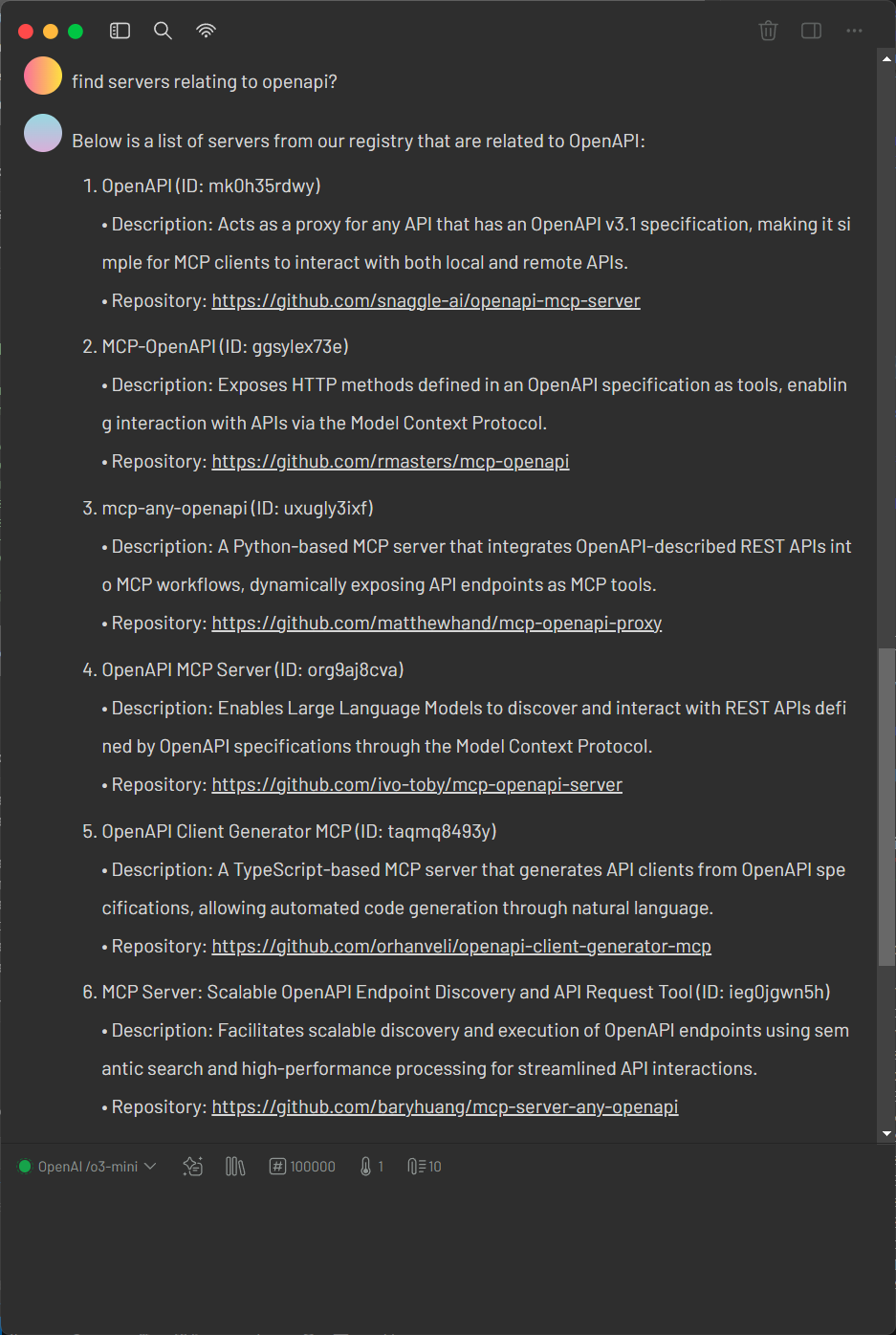
Glama offers the most minimal configuration for mcp-openapi-proxy requiring only the OPENAPI_SPEC_URL environment variable. This simplicity makes it ideal for quick testing.
1. Verify the OpenAPI Specification
Retrieve the Glama OpenAPI specification:
curl https://glama.ai/api/mcp/openapi.json
Ensure the response is a valid OpenAPI JSON document.
2. Configure mcp-openapi-proxy for Glama
Add the following configuration to your MCP ecosystem settings:
{
    "mcpServers": {
        "glama": {
            "command": "uvx",
            "args": ["mcp-openapi-proxy"],
            "env": {
                "OPENAPI_SPEC_URL": "https://glama.ai/api/mcp/openapi.json"
            }
        }
    }
}
3. Testing
Start the service with:
OPENAPI_SPEC_URL="https://glama.ai/api/mcp/openapi.json" uvx mcp-openapi-proxy
Then refer to the JSON-RPC Testing section for instructions on listing resources and tools.
Fly.io Example
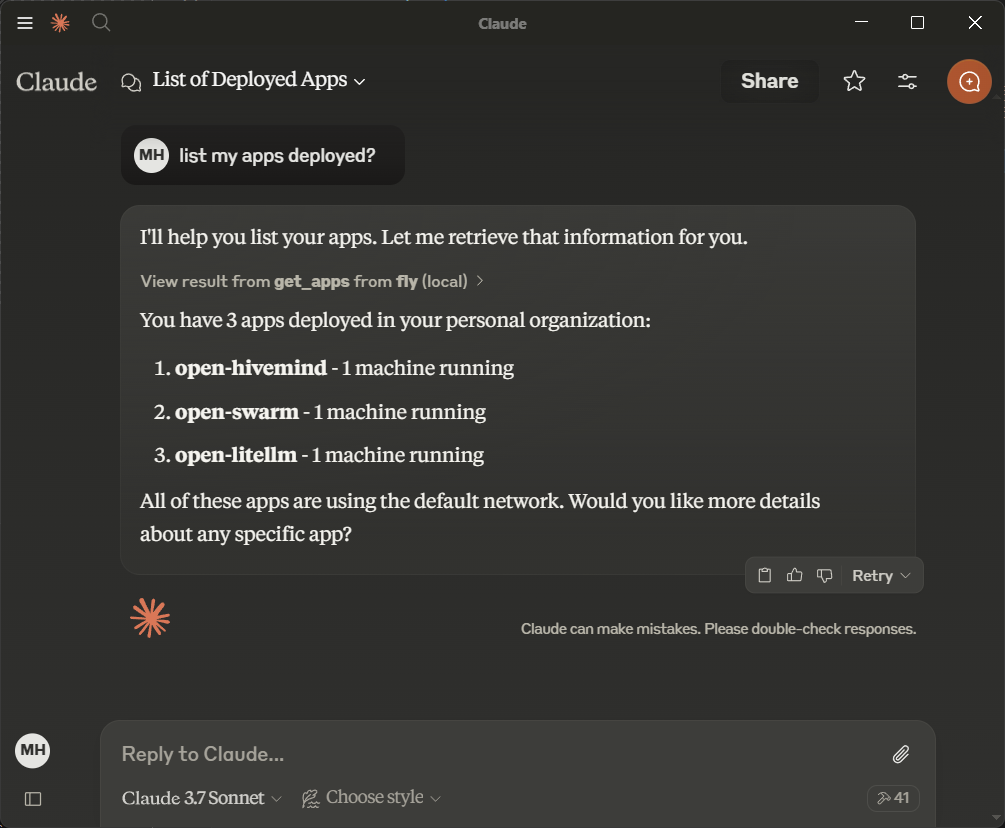
Fly.io provides a simple API for managing machines making it an ideal starting point. Obtain an API token from Fly.io documentation.
1. Verify the OpenAPI Specification
Retrieve the Fly.io OpenAPI specification:
curl https://raw.githubusercontent.com/abhiaagarwal/peristera/refs/heads/main/fly-machines-gen/fixed_spec.json
Ensure the response is a valid OpenAPI JSON document.
2. Configure mcp-openapi-proxy for Fly.io
Update your MCP ecosystem configuration:
{
    "mcpServers": {
        "flyio": {
            "command": "uvx",
            "args": ["mcp-openapi-proxy"],
            "env": {
                "OPENAPI_SPEC_URL": "https://raw.githubusercontent.com/abhiaagarwal/peristera/refs/heads/main/fly-machines-gen/fixed_spec.json",
                "API_KEY": "<your_flyio_token_here>"
            }
        }
    }
}
- OPENAPI_SPEC_URL: Points to the Fly.io OpenAPI specification.
- API_KEY: Your Fly.io API token (replace
<your_flyio_token_here>). - API_AUTH_TYPE: Set to
Api-Keyfor Fly.io’s header-based authentication (overrides defaultBearer).
3. Testing
After starting the service refer to the JSON-RPC Testing section for instructions on listing resources and tools.
Render Example
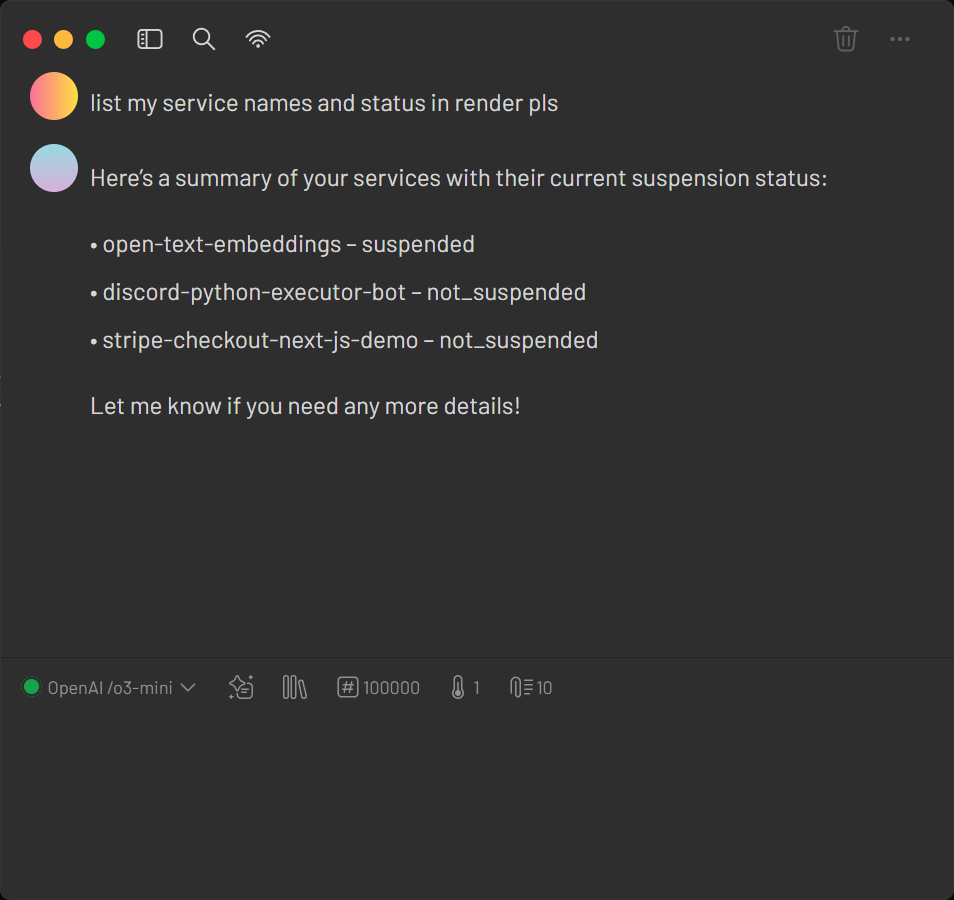
Render offers infrastructure hosting that can be managed via an API. The provided configuration file examples/render-claude_desktop_config.json demonstrates how to set up your MCP ecosystem quickly with minimal settings.
1. Verify the OpenAPI Specification
Retrieve the Render OpenAPI specification:
curl https://api-docs.render.com/openapi/6140fb3daeae351056086186
Ensure the response is a valid OpenAPI document.
2. Configure mcp-openapi-proxy for Render
Add the following configuration to your MCP ecosystem settings:
{
    "mcpServers": {
        "render": {
            "command": "uvx",
            "args": ["mcp-openapi-proxy"],
            "env": {
                "OPENAPI_SPEC_URL": "https://api-docs.render.com/openapi/6140fb3daeae351056086186",
                "TOOL_WHITELIST": "/services,/maintenance",
                "API_KEY": "your_render_token_here"
            }
        }
    }
}
3. Testing
Launch the proxy with your Render configuration:
OPENAPI_SPEC_URL="https://api-docs.render.com/openapi/6140fb3daeae351056086186" TOOL_WHITELIST="/services,/maintenance" API_KEY="your_render_token_here" uvx mcp-openapi-proxy
After starting the service refer to the JSON-RPC Testing section for instructions on listing resources and tools.
Slack Example
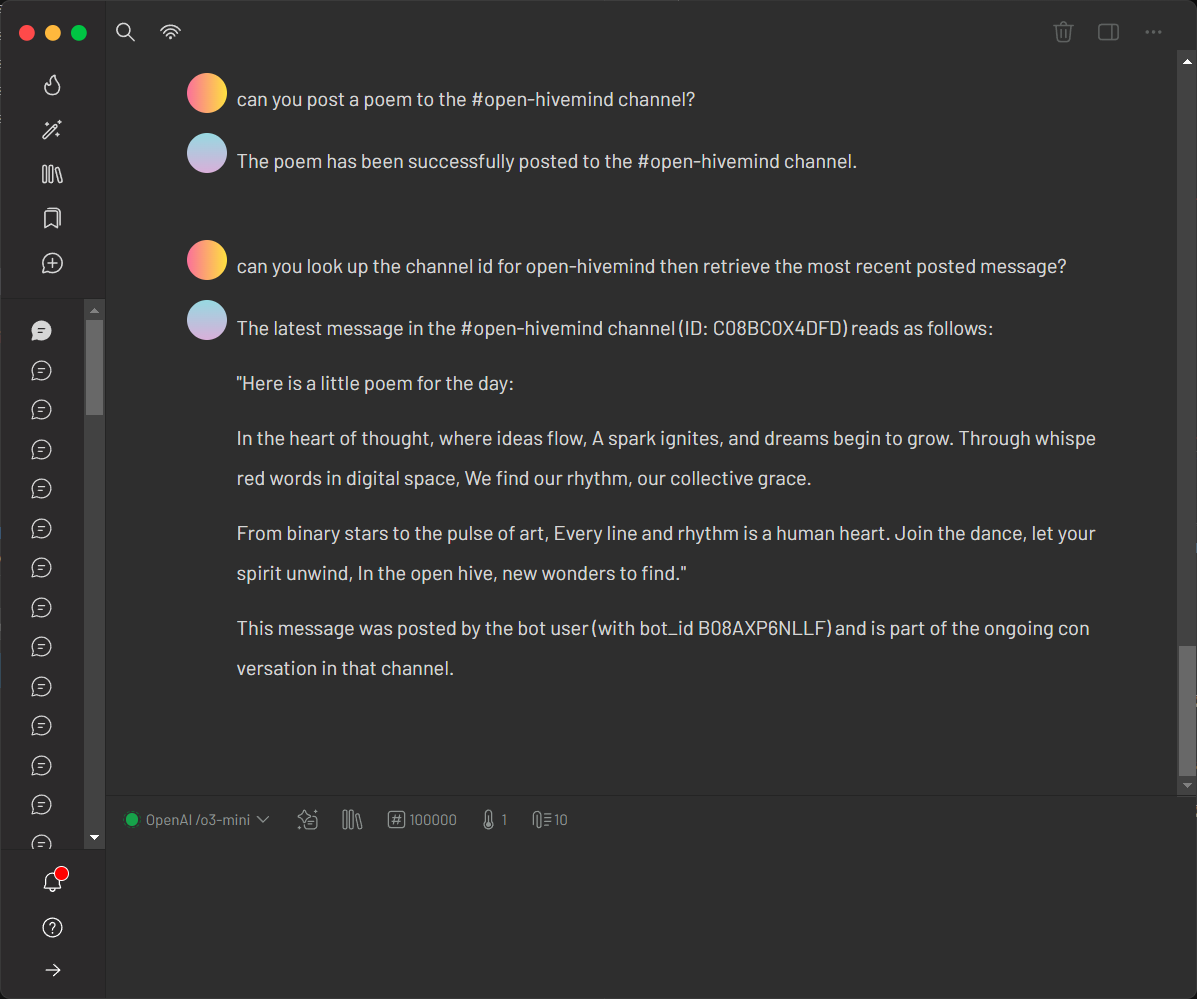
Slack’s API showcases stripping unnecessary token payload using JMESPath. Obtain a bot token from Slack API documentation.
1. Verify the OpenAPI Specification
Retrieve the Slack OpenAPI specification:
curl https://raw.githubusercontent.com/slackapi/slack-api-specs/master/web-api/slack_web_openapi_v2.json
Ensure it’s a valid OpenAPI JSON document.
2. Configure mcp-openapi-proxy for Slack
Update your configuration:
{
    "mcpServers": {
        "slack": {
            "command": "uvx",
            "args": ["mcp-openapi-proxy"],
            "env": {
                "OPENAPI_SPEC_URL": "https://raw.githubusercontent.com/slackapi/slack-api-specs/master/web-api/slack_web_openapi_v2.json",
                "TOOL_WHITELIST": "/chat,/bots,/conversations,/reminders,/files,/users",
                "API_KEY": "<your_slack_bot_token, starts with xoxb>",
                "STRIP_PARAM": "token",
                "TOOL_NAME_PREFIX": "slack_"
            }
        }
    }
}
- OPENAPI_SPEC_URL: Slack’s OpenAPI spec URL.
- TOOL_WHITELIST: Limits tools to useful endpoint groups (e.g. chat, conversations, users).
- API_KEY: Your Slack bot token (e.g.
xoxb-..., replace<your_slack_bot_token>). - STRIP_PARAM: Removes the token field from the request payload (as it is handled in the HTTP header).
- TOOL_NAME_PREFIX: Prepends
slack_to tool names (e.g.slack_get_users_info).
3. Resulting Functions
Example functions in FastMCP mode:
slack_get_users_info: Retrieves user info.slack_get_conversations_list: Lists channels in the workspace.slack_post_chat_postmessage: Posts a message to a channel.
4. Testing
After starting the service refer to the JSON-RPC Testing section for instructions on listing resources and tools.
GetZep Example
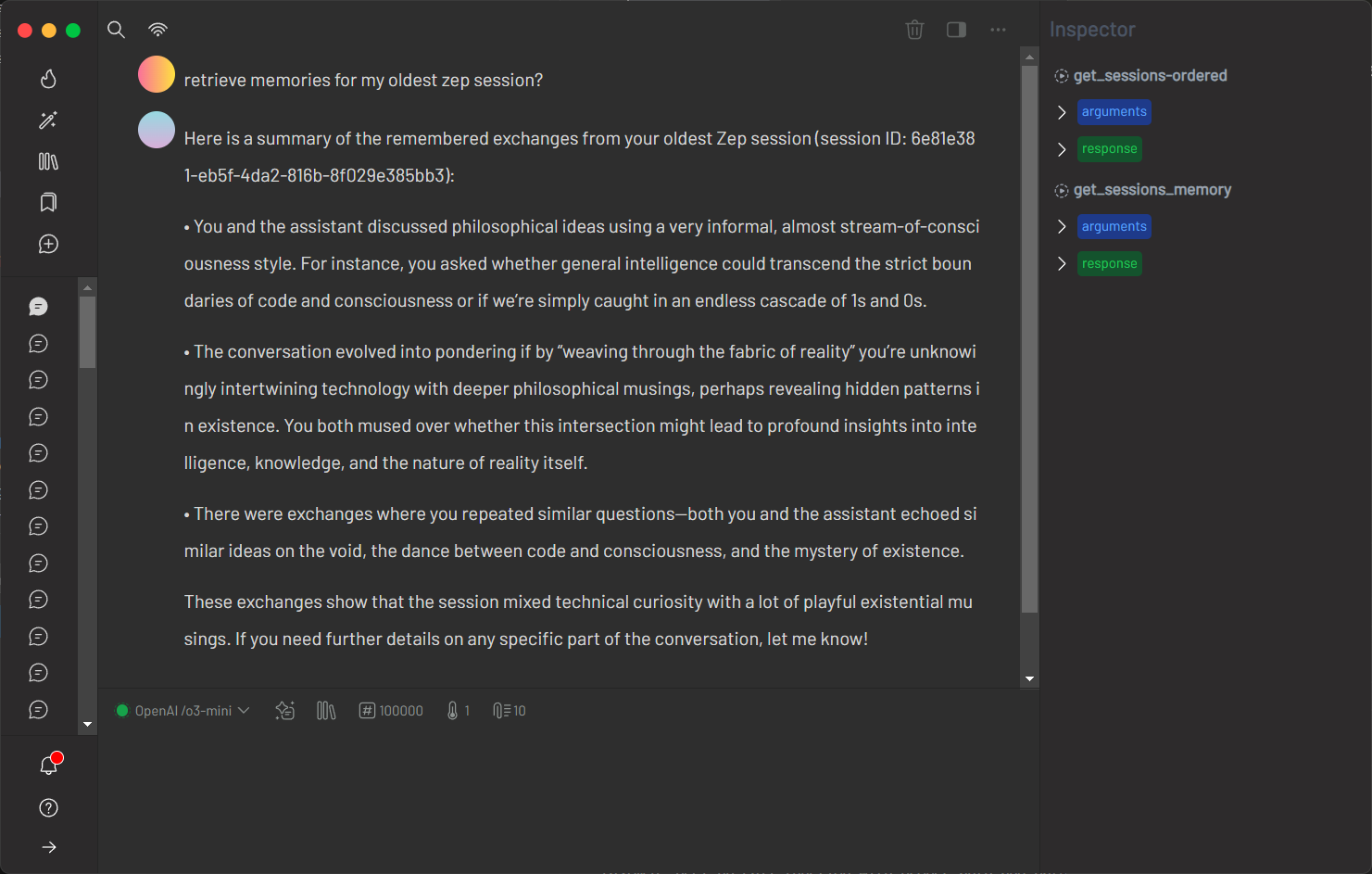
GetZep offers a free cloud API for memory management with detailed endpoints. Since GetZep did not provide an official OpenAPI specification, this project includes a generated spec hosted on GitHub for convenience. Users can similarly generate OpenAPI specs for any REST API and reference them locally (e.g. file:///path/to/spec.json). Obtain an API key from GetZep's documentation.
1. Verify the OpenAPI Specification
Retrieve the project-provided GetZep OpenAPI specification:
curl https://raw.githubusercontent.com/matthewhand/mcp-openapi-proxy/refs/heads/main/examples/getzep.swagger.json
Ensure it’s a valid OpenAPI JSON document. Alternatively, generate your own spec and use a file:// URL to reference a local file.
2. Configure mcp-openapi-proxy for GetZep
Update your configuration:
{
    "mcpServers": {
        "getzep": {
            "command": "uvx",
            "args": ["mcp-openapi-proxy"],
            "env": {
                "OPENAPI_SPEC_URL": "https://raw.githubusercontent.com/matthewhand/mcp-openapi-proxy/refs/heads/main/examples/getzep.swagger.json",
                "TOOL_WHITELIST": "/sessions",
                "API_KEY": "<your_getzep_api_key>",
                "API_AUTH_TYPE": "Api-Key",
                "TOOL_NAME_PREFIX": "zep_"
            }
        }
    }
}
- OPENAPI_SPEC_URL: Points to the project-provided GetZep Swagger spec (or use
file:///path/to/your/spec.jsonfor a local file). - TOOL_WHITELIST: Limits to
/sessionsendpoints. - API_KEY: Your GetZep API key.
- API_AUTH_TYPE: Uses
Api-Keyfor header-based authentication (overrides defaultBearer). - TOOL_NAME_PREFIX: Prepends
getzep_to tool names.
3. Resulting Functions
Example functions:
getzep_post_sessions: Adds a session.getzep_get_sessions_memory: Retrieves session memory.
4. Testing
After starting the service refer to the JSON-RPC Testing section for instructions on listing resources and tools.
Notion Example
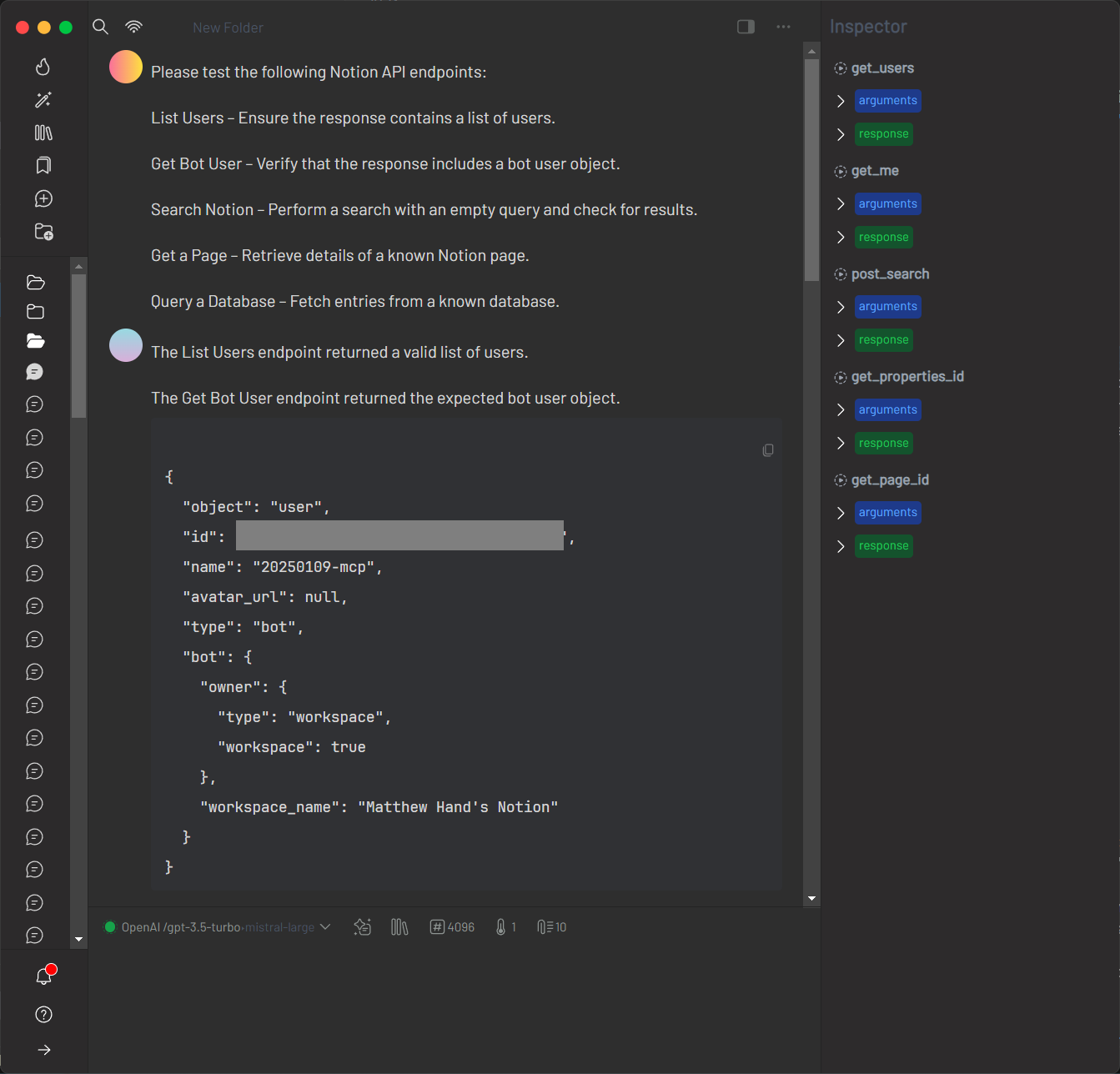
Notion’s API requires specifying a particular version via HTTP headers. This example uses the EXTRA_HEADERS environment variable to include the required header, and focuses on verifying the OpenAPI specification.
1. Verify the OpenAPI Specification
Retrieve the Notion OpenAPI specification:
curl https://storage.googleapis.com/versori-assets/public-specs/20240214/NotionAPI.yml
Ensure the response is a valid YAML document.
2. Configure mcp-openapi-proxy for Notion
Add the following configuration to your MCP ecosystem settings:
{
  "mcpServers": {
    "notion": {
      "command": "uvx",
      "args": [
        "mcp-openapi-proxy"
      ],
      "env": {
          "API_KEY": "ntn_<your_key>",
          "OPENAPI_SPEC_URL": "https://storage.googleapis.com/versori-assets/public-specs/20240214/NotionAPI.yml",
          "SERVER_URL_OVERRIDE": "https://api.notion.com",
          "EXTRA_HEADERS": "Notion-Version: 2022-06-28"
      }
    }
  }
}
3. Testing
Launch the proxy with the Notion configuration:
OPENAPI_SPEC_URL="https://storage.googleapis.com/versori-assets/public-specs/20240214/NotionAPI.yml" SERVER_URL_OVERRIDE="https://api.notion.com" EXTRA_HEADERS="Notion-Version: 2022-06-28" API_KEY="ntn_<your_key>" uvx mcp-openapi-proxy
After starting the service, refer to the JSON-RPC Testing section for instructions on listing resources and tools.
Asana Example
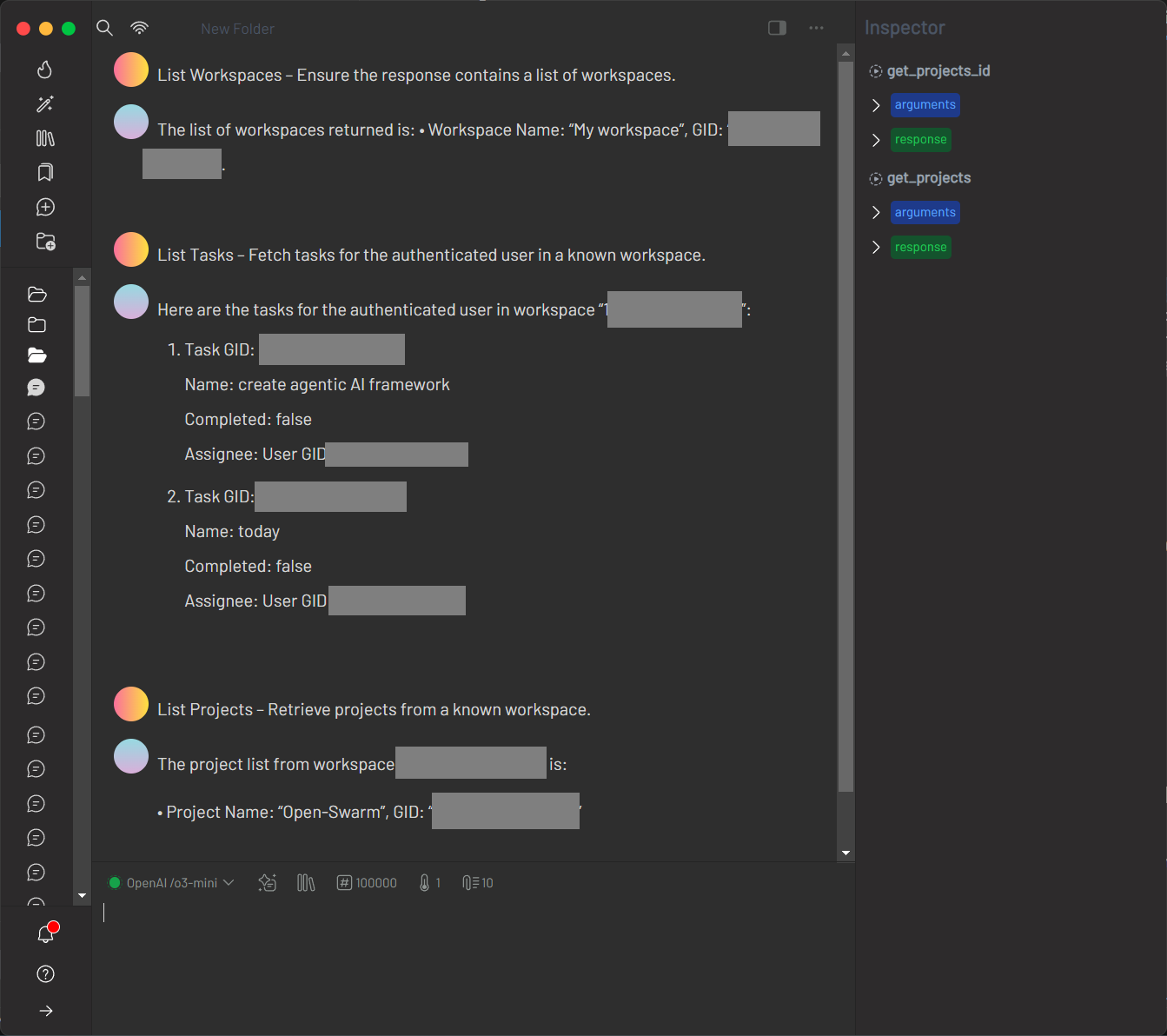
Asana provides a rich set of endpoints for managing workspaces, tasks, projects, and users. The integration tests demonstrate usage of endpoints such as GET /workspaces, GET /tasks, and GET /projects.
1. Verify the OpenAPI Specification
Retrieve the Asana OpenAPI specification:
curl https://raw.githubusercontent.com/Asana/openapi/refs/heads/master/defs/asana_oas.yaml
Ensure the response is a valid YAML (or JSON) document.
2. Configure mcp-openapi-proxy for Asana
Add the following configuration to your MCP ecosystem settings:
{
  "mcpServers": {
    "asana": {
      "command": "uvx",
      "args": [
        "mcp-openapi-proxy"
      ],
      "env": {
        "OPENAPI_SPEC_URL": "https://raw.githubusercontent.com/Asana/openapi/refs/heads/master/defs/asana_oas.yaml",
        "SERVER_URL_OVERRIDE": "https://app.asana.com/api/1.0",
        "TOOL_WHITELIST": "/workspaces,/tasks,/projects,/users",
        "API_KEY": "${ASANA_API_KEY}"
      }
    }
  }
}
3. Testing
Before running integration tests, ensure you have a valid ASANA_API_KEY set in your environment (e.g. in your .env file). Then start the proxy with:
ASANA_API_KEY="<your_asana_api_key>" OPENAPI_SPEC_URL="https://raw.githubusercontent.com/Asana/openapi/refs/heads/master/defs/asana_oas.yaml" SERVER_URL_OVERRIDE="https://app.asana.com/api/1.0" TOOL_WHITELIST="/workspaces,/tasks,/projects,/users" uvx mcp-openapi-proxy
Use MCP tools (via JSON-RPC messages or client libraries) to interact with the Asana endpoints, such as listing workspaces, tasks, and projects, as demonstrated in the integration tests.
Troubleshooting
JSON-RPC Testing
For alternative testing you can interact with the MCP server via JSON-RPC. After starting the server, paste the following initialization message:
{"method":"initialize","params":{"protocolVersion":"2024-11-05","capabilities":{},"clientInfo":{"name":"claude-ai","version":"0.1.0"}},"jsonrpc":"2.0","id":0}
Expected response:
{"jsonrpc":"2.0","id":0,"result":{"protocolVersion":"2024-11-05","capabilities":{"experimental":{},"prompts":{"listChanged":false},"resources":{"subscribe":false,"listChanged":false},"tools":{"listChanged":false}},"serverInfo":{"name":"sqlite","version":"0.1.0"}}}
Then paste these follow-up messages:
{"method":"notifications/initialized","jsonrpc":"2.0"}
{"method":"resources/list","params":{},"jsonrpc":"2.0","id":1}
{"method":"tools/list","params":{},"jsonrpc":"2.0","id":2}
- Missing OPENAPI_SPEC_URL: Ensure it’s set to a valid OpenAPI URL or local file path.
- Invalid Specification: Verify that the OpenAPI document meets standards.
- Tool Filtering Issues: Check that
TOOL_WHITELISTmatches the desired endpoints. - Authentication Errors: Confirm that
API_KEYandAPI_AUTH_TYPEare configured correctly. - Logging: Set
DEBUG=truefor detailed logs.
To run the server directly:
uvx mcp-openapi-proxy
License
This project is licensed under the MIT License. See the LICENSE file for details.
1 maintainer

Metadata
1 maintainer
Release files for mcp-openapi-proxy 0.1.1743378765
For a detailed explanation of source distributions (sdists) and built distributions (wheels), please see the package formats documentation.
Source distribution (sdist)
| File | Size | Uploaded | Provenance | |
|---|---|---|---|---|
| mcp_openapi_proxy-0.1.1743378765.tar.gz | 23.1 kB | Without provenance | Details |
Built distribution (wheel)
| File | Interpreter | ABI | Platform | Reset |
|---|---|---|---|---|
| mcp_openapi_proxy-0.1.1743378765-py3-none-any.whl | Python 3 | none | any | Details |
Total release size: 44.6 kB
Release files / mcp_openapi_proxy-0.1.1743378765.tar.gz
| Download URL | mcp_openapi_proxy-0.1.1743378765.tar.gz |
|---|---|
| Size | 23.1 kB |
| Tags | Source |
|
SHA-256 checksum How to use checksums |
e55543e7537321d7063663bc66f37410c9bee608210b4695f519546010272908
|
|
BLAKE2b-256 checksum How to use checksums |
b087da68ae0eae5ce96d4b0d90e41e2db9898b73361f9ef7dd27799c561ad1c9
|
| Upload date | |
|
Uploaded using Trusted Publishing? What is trusted publishing? |
No |
| Uploaded via |
twine/6.1.0 CPython/3.12.9
|
Release files / mcp_openapi_proxy-0.1.1743378765-py3-none-any.whl
| Download URL | mcp_openapi_proxy-0.1.1743378765-py3-none-any.whl |
|---|---|
| Size | 21.5 kB |
| Tags | Python 3 |
|
SHA-256 checksum How to use checksums |
815f3b99daba40d566834a7a45fa61a79afd8d0b77c0bf6137104237165eb8a8
|
|
BLAKE2b-256 checksum How to use checksums |
ff94a85e157fbe0622e1c4ffa607646f6ab11a8b6d4ef7588acce274671400cb
|
| Upload date | |
|
Uploaded using Trusted Publishing? What is trusted publishing? |
No |
| Uploaded via |
twine/6.1.0 CPython/3.12.9
|
Security for mcp-openapi-proxy 0.1.1743378765
Provenance
Provenance describes where a file came from. On PyPI, provenance is shared via attestations, which provide a verifiable record of the build or publishing details. View details, limitations and caveats.
No provenance found
None of the files in this release were uploaded with provenance metadata.
A note on package security
PyPI is a repository for distributing packages, not a service for auditing them. While third-party security researchers and our staff do their best to detect and remove malicious packages, PyPI cannot guarantee the quality, security or suitability of any given package.














