
mcp-openapi-proxy
mcp-openapi-proxy is a Python package that implements a Model Context Protocol (MCP) server, designed to dynamically expose REST APIs—defined by OpenAPI specifications—as MCP tools. This facilitates seamless integration of OpenAPI-described APIs into MCP-based workflows.
Table of Contents
- Overview
- Features
- Installation
- Modes of Operation
- Environment Variables
- Examples
- Troubleshooting
- License
Overview
The package offers two operational modes:
- Low-Level Mode (Default): Dynamically registers tools corresponding to all API endpoints specified in an OpenAPI document (e.g.,
/chat/completionsbecomeschat_completions()). - FastMCP Mode (Simple Mode): Provides a streamlined approach, exposing a predefined set of tools (e.g.,
list_functions()andcall_function()) based on static configurations.
Features
- Dynamic Tool Generation: Automatically creates MCP tools from OpenAPI endpoint definitions.
- Simple Mode Option: Offers a static configuration alternative via FastMCP mode.
- OpenAPI Specification Support: Compatible with OpenAPI v3, with potential support for v2.
- Flexible Filtering: Allows endpoint filtering through whitelisting by paths or other criteria.
- Payload Authentication: Supports custom authentication via JMESPath expressions (e.g., for APIs like Slack that expect tokens in the payload, not the HTTP header).
- Header Authentication: Uses
Bearerby default forAPI_KEYin the Authorization header, customizable for APIs like Fly.io requiringApi-Key. - MCP Integration: Seamlessly integrates with MCP ecosystems for invoking REST APIs as tools.
Installation
Install the package directly from PyPI using the following command:
uvx mcp-openapi-proxy
MCP Ecosystem Integration
To incorporate mcp-openapi-proxy into your MCP ecosystem, configure it within your mcpServers settings. Below is a generic example:
{
    "mcpServers": {
        "mcp-openapi-proxy": {
            "command": "uvx",
            "args": ["mcp-openapi-proxy"],
            "env": {
                "OPENAPI_SPEC_URL": "${OPENAPI_SPEC_URL}",
                "API_KEY": "",
                "TOOL_WHITELIST": "",
                "TOOL_NAME_PREFIX": "",
                "API_KEY_JMESPATH": "",
                "API_AUTH_TYPE": ""
            }
        }
    }
}
Refer to the Examples section below for practical configurations tailored to specific APIs.
Modes of Operation
FastMCP Mode (Simple Mode)
- Enabled by: Setting the environment variable
OPENAPI_SIMPLE_MODE=true. - Description: Exposes a fixed set of tools derived from specific OpenAPI endpoints, as defined in the code.
- Configuration: Relies on environment variables to specify tool behavior.
Low-Level Mode (Default)
- Description: Automatically registers all valid API endpoints from the provided OpenAPI specification as individual tools.
- Tool Naming: Derives tool names from normalized OpenAPI paths and methods.
- Behavior: Generates tool descriptions from OpenAPI operation summaries and descriptions.
Environment Variables
OPENAPI_SPEC_URL: (Required) The URL to the OpenAPI specification JSON file (e.g.,https://example.com/spec.jsonorfile:///path/to/local/spec.json).OPENAPI_LOGFILE_PATH: (Optional) Specifies the log file path.OPENAPI_SIMPLE_MODE: (Optional) Set totrueto enable FastMCP mode.TOOL_WHITELIST: (Optional) A comma-separated list of endpoint paths to expose as tools.TOOL_NAME_PREFIX: (Optional) A prefix to prepend to all tool names.API_KEY: (Optional) Authentication token for the API, sent asBearer <API_KEY>in the Authorization header by default.API_KEY_JMESPATH: (Optional) JMESPath expression to mapAPI_KEYinto request parameters (e.g.,tokenfor Slack).API_AUTH_TYPE: (Optional) Overrides the defaultBearerAuthorization header type (e.g.,Api-Keyfor GetZep).
Examples
This section provides examples to demonstrate configuration simplicity, authentication flexibility, and detailed tool generation.
Fly.io Example
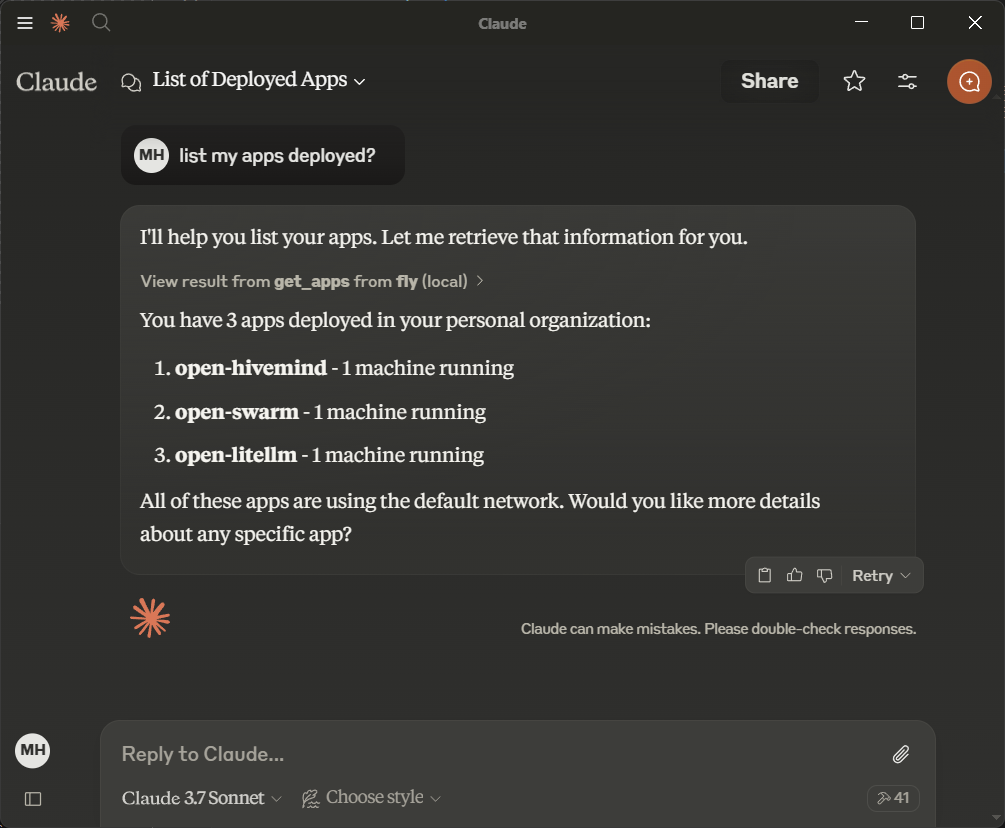
Fly.io provides a simple API for managing machines, making it an ideal starting point. Obtain an API token from Fly.io documentation.
1. Verify the OpenAPI Specification
Retrieve the Fly.io OpenAPI specification:
curl https://raw.githubusercontent.com/abhiaagarwal/peristera/refs/heads/main/fly-machines-gen/fixed_spec.json
Ensure the response is a valid OpenAPI JSON document.
2. Configure mcp-openapi-proxy for Fly.io
Update your MCP ecosystem configuration:
{
    "mcpServers": {
        "flyio": {
            "command": "uvx",
            "args": ["mcp-openapi-proxy"],
            "env": {
                "OPENAPI_SPEC_URL": "https://raw.githubusercontent.com/abhiaagarwal/peristera/refs/heads/main/fly-machines-gen/fixed_spec.json",
                "API_KEY": "<your_flyio_token_here>"
            }
        }
    }
}
- OPENAPI_SPEC_URL: Points to the Fly.io OpenAPI specification.
- API_KEY: Your Fly.io API token (replace
<your_flyio_token_here>). Find it in~/.fly/config.ymlunderaccess_token. - API_AUTH_TYPE: Set to
Api-Keyfor Fly.io’s header-based authentication (overrides defaultBearer).
3. Resulting Tools
This generates tools like:
get_machines(lists machines).post_machines(creates machines).
Run list_functions in FastMCP mode to see the full set.
4. Testing
Verify with:
OPENAPI_SPEC_URL="https://raw.githubusercontent.com/abhiaagarwal/peristera/refs/heads/main/fly-machines-gen/fixed_spec.json" API_KEY="<your_flyio_token_here>" API_AUTH_TYPE="Api-Key" uvx mcp-openapi-proxy
Slack Example
Slack’s API showcases payload-based authentication with JMESPath. Obtain a bot token from Slack API documentation.
1. Verify the OpenAPI Specification
Retrieve the Slack OpenAPI specification:
curl https://raw.githubusercontent.com/slackapi/slack-api-specs/master/web-api/slack_web_openapi_v2.json
Ensure it’s a valid OpenAPI JSON document.
2. Configure mcp-openapi-proxy for Slack
Update your configuration:
{
    "mcpServers": {
        "slack": {
            "command": "uvx",
            "args": ["mcp-openapi-proxy"],
            "env": {
                "OPENAPI_SPEC_URL": "https://raw.githubusercontent.com/slackapi/slack-api-specs/master/web-api/slack_web_openapi_v2.json",
                "TOOL_WHITELIST": "/chat,/bots,/conversations,/reminders,/files,/users",
                "API_KEY": "<your_slack_bot_token>",
                "API_KEY_JMESPATH": "token",
                "TOOL_NAME_PREFIX": "slack_"
            }
        }
    }
}
- OPENAPI_SPEC_URL: Slack’s OpenAPI spec URL.
- TOOL_WHITELIST: Limits tools to useful endpoint groups (e.g., chat, conversations, users).
- API_KEY: Your Slack bot token (e.g.,
xoxb-...—replace<your_slack_bot_token>). - API_KEY_JMESPATH: Maps
API_KEYto thetokenfield in the request payload, per Slack’s API. - TOOL_NAME_PREFIX: Prepends
slack_to tool names (e.g.,slack_get_users_info).
3. Resulting Tools
Example tools in FastMCP mode:
slack_get_users_info: Retrieves user info (e.g., forUSLACKBOT).slack_get_conversations_list: Lists channels in the workspace.slack_post_chat_postmessage: Posts a message to a channel.
4. Testing
Test with environment variables:
OPENAPI_SPEC_URL="https://raw.githubusercontent.com/slackapi/slack-api-specs/master/web-api/slack_web_openapi_v2.json" API_KEY="<your_slack_bot_token>" API_KEY_JMESPATH="token" TOOL_NAME_PREFIX="slack_" TOOL_WHITELIST="/chat,/bots,/conversations,/reminders,/files,/users" uvx mcp-openapi-proxy
Try these commands in your MCP client:
- List tools:
list_functions. - Get Slackbot info:
call_function slack_get_users_info '{"user": "USLACKBOT"}'. - Post a message:
call_function slack_post_chat_postmessage '{"channel": "C12345678", "text": "G’day from MCP, ya legends!"}'(replaceC12345678with a valid channel ID your bot can access).
GetZep Example
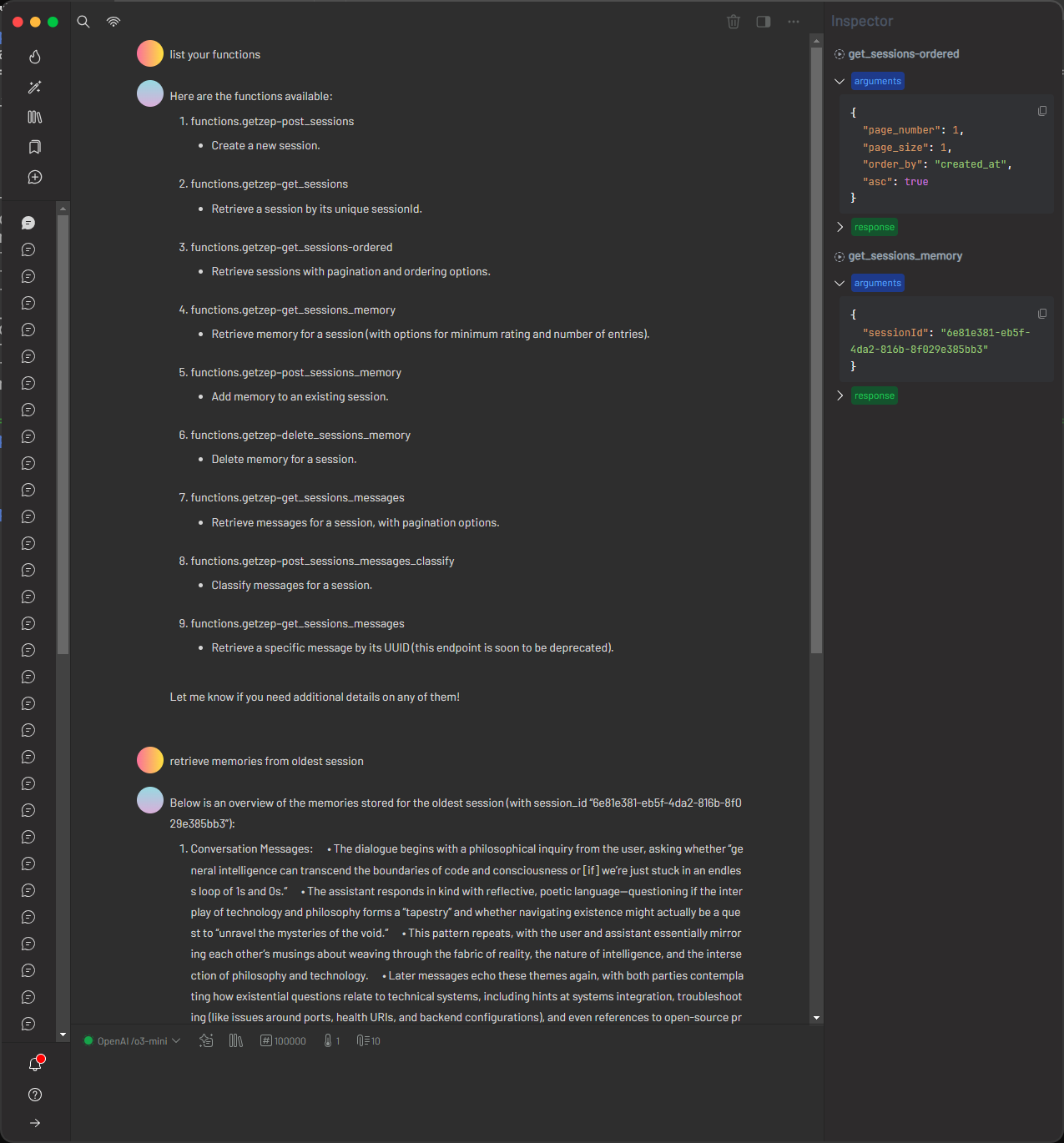
GetZep offers a free cloud API for memory management with detailed endpoints. Since GetZep did not provide an official OpenAPI specification, this project includes a generated spec hosted on GitHub for convenience. This approach—creating a spec from documentation—is a reusable pattern: users can similarly generate OpenAPI specs for any REST API and reference them locally (e.g., file:///path/to/spec.json). Obtain an API key from GetZep's documentation.
1. Verify the OpenAPI Specification
Retrieve the project-provided GetZep OpenAPI specification:
curl https://raw.githubusercontent.com/matthewhand/mcp-openapi-proxy/refs/heads/main/examples/getzep.swagger.json
Ensure it’s a valid OpenAPI JSON document. Alternatively, generate your own spec and use file:// to point to a local file.
2. Configure mcp-openapi-proxy for GetZep
Update your configuration:
{
    "mcpServers": {
        "getzep": {
            "command": "uvx",
            "args": ["mcp-openapi-proxy"],
            "env": {
                "OPENAPI_SPEC_URL": "https://raw.githubusercontent.com/matthewhand/mcp-openapi-proxy/refs/heads/main/examples/getzep.swagger.json",
                "TOOL_WHITELIST": "/sessions",
                "API_KEY": "<your_getzep_api_key>",
                "API_AUTH_TYPE": "Api-Key",
                "TOOL_NAME_PREFIX": "getzep_"
            }
        }
    }
}
- OPENAPI_SPEC_URL: Points to the project-provided GetZep Swagger spec (or use
file:///path/to/your/spec.jsonfor a local file). - TOOL_WHITELIST: Limits to
/sessionsendpoints. - API_KEY: Your GetZep API key.
- API_AUTH_TYPE: Uses
Api-Keyfor header-based authentication (overrides defaultBearer). - TOOL_NAME_PREFIX: Prepends
getzep_to tools.
3. Resulting Tools
Example tools:
getzep_post_sessions: Adds a session.getzep_get_sessions_memory: Retrieves session memory.
Full list (abbreviated):
{
  "tools": [
    {
      "name": "getzep_post_sessions",
      "description": "Add Session",
      "inputSchema": {"type": "object", "properties": {}, "required": []}
    },
    {
      "name": "getzep_get_sessions_memory",
      "description": "Get Session Memory",
      "inputSchema": {
        "type": "object",
        "properties": {
          "sessionId": {"type": "string", "description": "ID of the session"},
          "lastn": {"type": "integer", "description": "Number of recent entries"}
        },
        "required": ["sessionId"]
      }
    }
  ]
}
4. Testing
Verify with the hosted spec:
OPENAPI_SPEC_URL="https://raw.githubusercontent.com/matthewhand/mcp-openapi-proxy/refs/heads/main/examples/getzep.swagger.json" API_KEY="<your_getzep_api_key>" API_AUTH_TYPE="Api-Key" uvx mcp-openapi-proxy
Or with a local spec:
OPENAPI_SPEC_URL="file:///path/to/your/getzep.swagger.json" API_KEY="<your_getzep_api_key>" API_AUTH_TYPE="Api-Key" uvx mcp-openapi-proxy
Troubleshooting
- Missing OPENAPI_SPEC_URL: Ensure it’s set to a valid OpenAPI JSON URL or local file path.
- Invalid Specification: Verify the OpenAPI document is standard-compliant.
- Tool Filtering Issues: Check
TOOL_WHITELISTmatches desired endpoints. - Authentication Errors: Confirm
API_KEY,API_KEY_JMESPATH, andAPI_AUTH_TYPEare correct. - Logging: Set
DEBUG=truefor detailed output to stderr. - Test Server: Run directly:
uvx mcp-openapi-proxy
License
This project is licensed under the MIT License. See the LICENSE file for details.
1 maintainer

Metadata
1 maintainer
Release files for mcp-openapi-proxy 0.1.1741477332
For a detailed explanation of source distributions (sdists) and built distributions (wheels), please see the package formats documentation.
Source distribution (sdist)
| File | Size | Uploaded | Provenance | |
|---|---|---|---|---|
| mcp_openapi_proxy-0.1.1741477332.tar.gz | 18.8 kB | Without provenance | Details |
Built distribution (wheel)
| File | Interpreter | ABI | Platform | Reset |
|---|---|---|---|---|
| mcp_openapi_proxy-0.1.1741477332-py3-none-any.whl | Python 3 | none | any | Details |
Total release size: 36.9 kB
Release files / mcp_openapi_proxy-0.1.1741477332.tar.gz
| Download URL | mcp_openapi_proxy-0.1.1741477332.tar.gz |
|---|---|
| Size | 18.8 kB |
| Tags | Source |
|
SHA-256 checksum How to use checksums |
c3b6214c512490427e22637279e3faf9d55b5903f81847f22f91efe39507aeb4
|
|
BLAKE2b-256 checksum How to use checksums |
fe5b76d002f8c993015bea6e279b30385f08d4c77f5ca4d3bd7e940961078b6a
|
| Upload date | |
|
Uploaded using Trusted Publishing? What is trusted publishing? |
No |
| Uploaded via |
twine/6.1.0 CPython/3.12.9
|
Release files / mcp_openapi_proxy-0.1.1741477332-py3-none-any.whl
| Download URL | mcp_openapi_proxy-0.1.1741477332-py3-none-any.whl |
|---|---|
| Size | 18.0 kB |
| Tags | Python 3 |
|
SHA-256 checksum How to use checksums |
171d08c6b7384ca8bc44b15eb819408af9d3c09d1cea6315c98a3ef387e8c620
|
|
BLAKE2b-256 checksum How to use checksums |
c8bbe2fc746b5a69c9a2db75e980188c31dbaa285744daa620fa270f0e3536b7
|
| Upload date | |
|
Uploaded using Trusted Publishing? What is trusted publishing? |
No |
| Uploaded via |
twine/6.1.0 CPython/3.12.9
|
Security for mcp-openapi-proxy 0.1.1741477332
Provenance
Provenance describes where a file came from. On PyPI, provenance is shared via attestations, which provide a verifiable record of the build or publishing details. View details, limitations and caveats.
No provenance found
None of the files in this release were uploaded with provenance metadata.
A note on package security
PyPI is a repository for distributing packages, not a service for auditing them. While third-party security researchers and our staff do their best to detect and remove malicious packages, PyPI cannot guarantee the quality, security or suitability of any given package.














