
mcp-openapi-proxy
mcp-openapi-proxy is a Python package that implements a Model Context Protocol (MCP) server, designed to dynamically expose REST APIs—defined by OpenAPI specifications—as MCP tools. This facilitates seamless integration of OpenAPI-described APIs into MCP-based workflows.
Table of Contents
- Overview
- Features
- Installation
- Modes of Operation
- Environment Variables
- Examples
- Troubleshooting
- License
Overview
The package offers two operational modes:
- Low-Level Mode (Default): Dynamically registers tools corresponding to all API endpoints specified in an OpenAPI document (e.g.,
/chat/completionsbecomeschat_completions()). - FastMCP Mode (Simple Mode): Provides a streamlined approach, exposing a predefined set of tools (e.g.,
list_functions()andcall_function()) based on static configurations.
Features
- Dynamic Tool Generation: Automatically creates MCP tools from OpenAPI endpoint definitions.
- Simple Mode Option: Offers a static configuration alternative via FastMCP mode.
- OpenAPI Specification Support: Compatible with OpenAPI v3, with potential support for v2.
- Flexible Filtering: Allows endpoint filtering through whitelisting by paths or other criteria.
- Payload Authentication: Supports custom authentication via JMESPath expressions (e.g., for APIs like Slack that expect tokens in the payload, not the HTTP header).
- Header Authentication: Uses
Bearerby default forAPI_KEYin the Authorization header, customizable for APIs like Fly.io requiringApi-Key. - MCP Integration: Seamlessly integrates with MCP ecosystems for invoking REST APIs as tools.
Installation
Install the package directly from PyPI using the following command:
uvx mcp-openapi-proxy
MCP Ecosystem Integration
To incorporate mcp-openapi-proxy into your MCP ecosystem, configure it within your mcpServers settings. Below is a generic example:
{
    "mcpServers": {
        "mcp-openapi-proxy": {
            "command": "uvx",
            "args": ["mcp-openapi-proxy"],
            "env": {
                "OPENAPI_SPEC_URL": "${OPENAPI_SPEC_URL}",
                "API_KEY": "${OPENAPI_API_KEY}"
            }
        }
    }
}
Refer to the Examples section below for practical configurations tailored to specific APIs.
Modes of Operation
FastMCP Mode (Simple Mode)
- Enabled by: Setting the environment variable
OPENAPI_SIMPLE_MODE=true. - Description: Exposes a fixed set of tools derived from specific OpenAPI endpoints, as defined in the code.
- Configuration: Relies on environment variables to specify tool behavior.
Low-Level Mode (Default)
- Description: Automatically registers all valid API endpoints from the provided OpenAPI specification as individual tools.
- Tool Naming: Derives tool names from normalized OpenAPI paths and methods.
- Behavior: Generates tool descriptions from OpenAPI operation summaries and descriptions.
Environment Variables
OPENAPI_SPEC_URL: (Required) The URL to the OpenAPI specification JSON file (e.g.,https://example.com/spec.jsonorfile:///path/to/local/spec.json).OPENAPI_LOGFILE_PATH: (Optional) Specifies the log file path.OPENAPI_SIMPLE_MODE: (Optional) Set totrueto enable FastMCP mode.TOOL_WHITELIST: (Optional) A comma-separated list of endpoint paths to expose as tools.TOOL_NAME_PREFIX: (Optional) A prefix to prepend to all tool names.API_KEY: (Optional) Authentication token for the API, sent asBearer <API_KEY>in the Authorization header by default.API_AUTH_TYPE: (Optional) Overrides the defaultBearerAuthorization header type (e.g.,Api-Keyfor GetZep).STRIP_PARAM: (Optional) JMESPath expression to strip unwanted parameters (e.g.,tokenfor Slack).
Examples
For testing, you can run the uvx command as demonstrated in the examples, then interact with the MCP server via JSON-RPC messages to list tools and resources. See the "JSON-RPC Testing" section below.
This section provides examples to demonstrate configuration simplicity, authentication flexibility, and detailed tool generation.
Glama Example
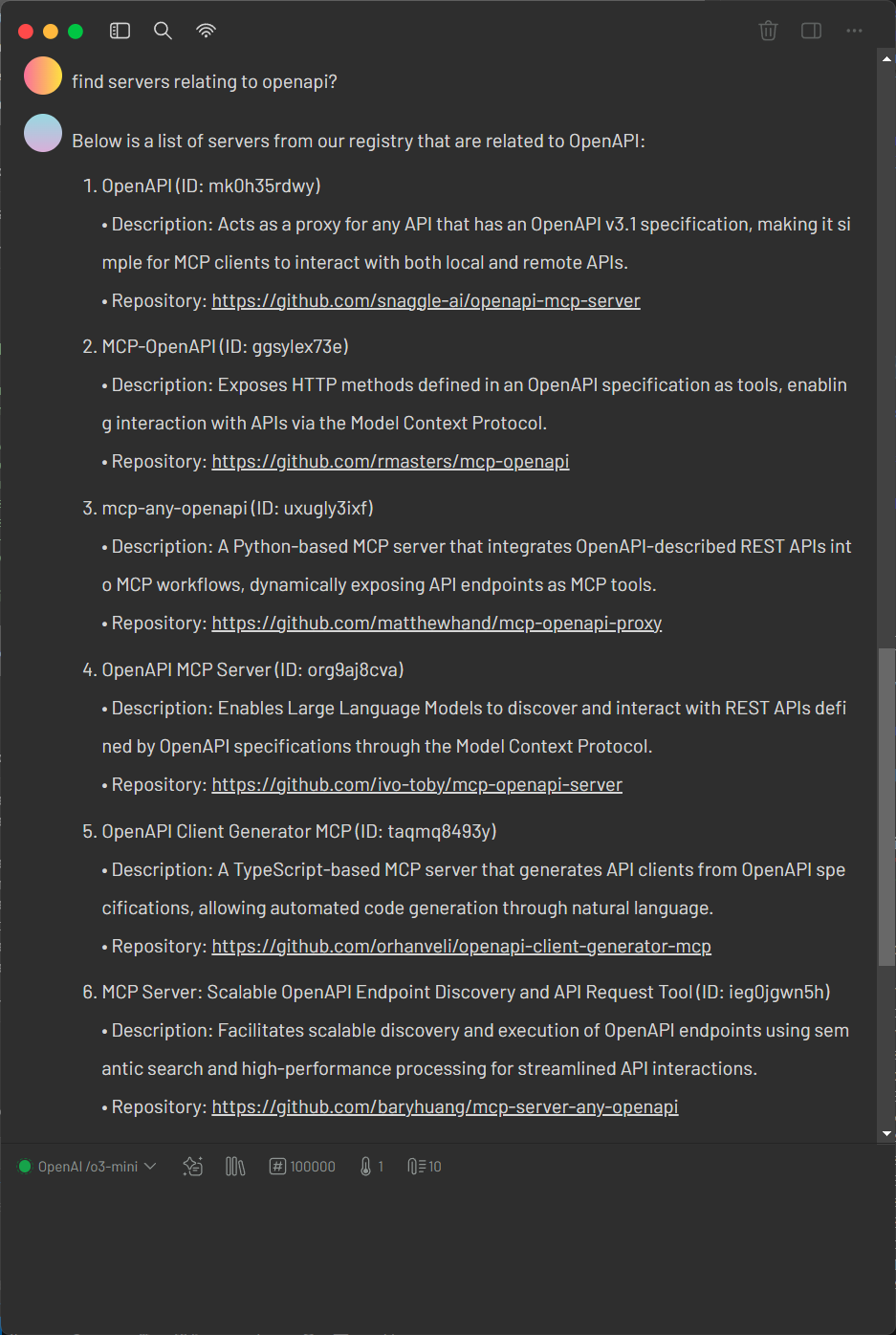
Glama offers the most minimal configuration for mcp-openapi-proxy, requiring only the OPENAPI_SPEC_URL environment variable. This simplicity makes it ideal for quick testing.
1. Verify the OpenAPI Specification
Retrieve the Glama OpenAPI specification:
curl https://glama.ai/api/mcp/openapi.json
Ensure the response is a valid OpenAPI JSON document.
2. Configure mcp-openapi-proxy for Glama
Add the following configuration to your MCP ecosystem settings:
{
    "mcpServers": {
        "glama": {
            "command": "uvx",
            "args": ["mcp-openapi-proxy"],
            "env": {
                "OPENAPI_SPEC_URL": "https://glama.ai/api/mcp/openapi.json"
            }
        }
    }
}
3. Testing
Start the service with:
OPENAPI_SPEC_URL="https://glama.ai/api/mcp/openapi.json" uvx mcp-openapi-proxy
Then refer to the JSON-RPC Testing section for instructions on listing resources and tools.
Fly.io Example
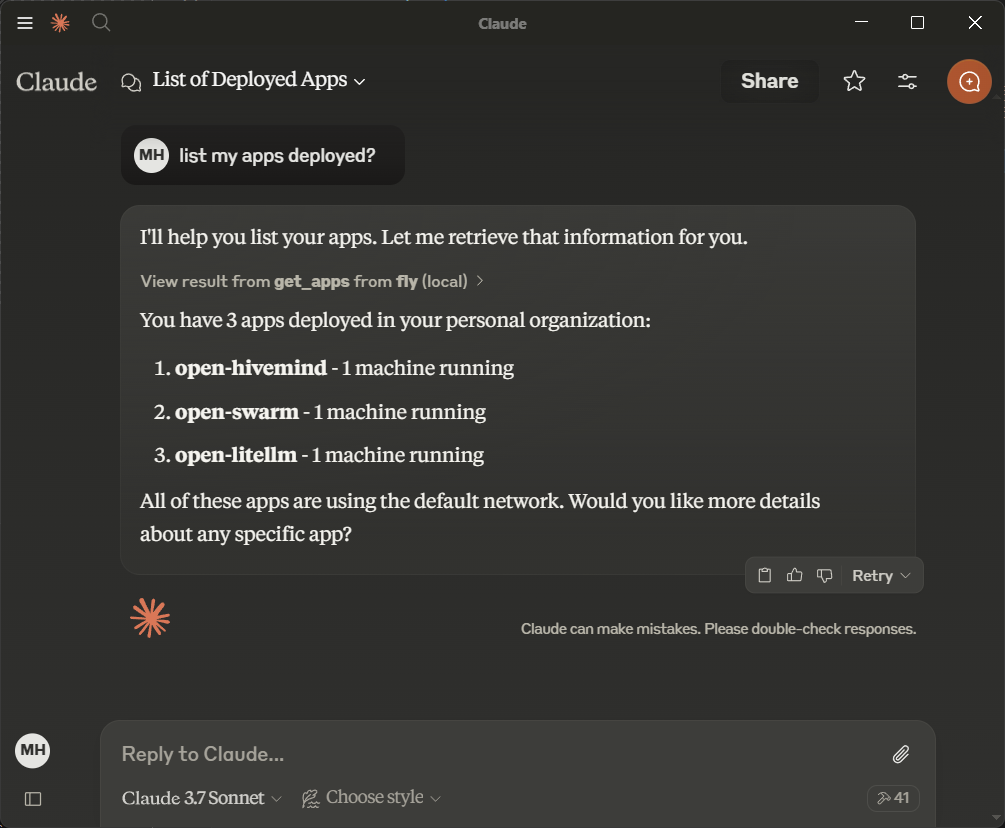
Fly.io provides a simple API for managing machines, making it an ideal starting point. Obtain an API token from Fly.io documentation.
1. Verify the OpenAPI Specification
Retrieve the Fly.io OpenAPI specification:
curl https://raw.githubusercontent.com/abhiaagarwal/peristera/refs/heads/main/fly-machines-gen/fixed_spec.json
Ensure the response is a valid OpenAPI JSON document.
2. Configure mcp-openapi-proxy for Fly.io
Update your MCP ecosystem configuration:
{
    "mcpServers": {
        "flyio": {
            "command": "uvx",
            "args": ["mcp-openapi-proxy"],
            "env": {
                "OPENAPI_SPEC_URL": "https://raw.githubusercontent.com/abhiaagarwal/peristera/refs/heads/main/fly-machines-gen/fixed_spec.json",
                "API_KEY": "<your_flyio_token_here>"
            }
        }
    }
}
- OPENAPI_SPEC_URL: Points to the Fly.io OpenAPI specification.
- API_KEY: Your Fly.io API token (replace
<your_flyio_token_here>). Find it in~/.fly/config.ymlunderaccess_token. - API_AUTH_TYPE: Set to
Api-Keyfor Fly.io’s header-based authentication (overrides defaultBearer).
3. Testing
After starting the service, refer to the JSON-RPC Testing section for instructions on listing resources and tools.
Render Example
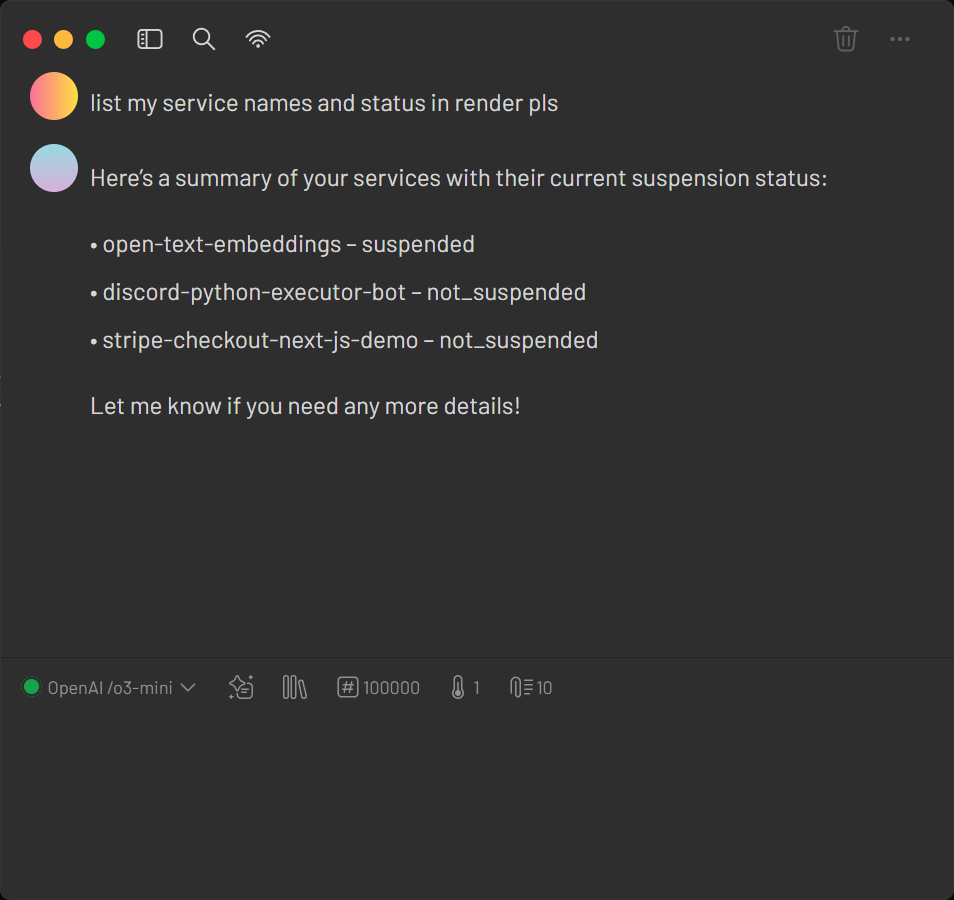
Render offers infrastructure hosting that can be managed via an API. The provided configuration file examples/render-claude_desktop_config.json demonstrates how to set up your MCP ecosystem quickly with minimal settings.
1. Verify the Configuration File
Inspect the configuration file to ensure it meets your deployment needs. For example, run the following command:
cat examples/render-claude_desktop_config.json
2. Configure mcp-openapi-proxy for Render
Add the following configuration to your MCP ecosystem settings (typically in your MCP settings file):
{
    "mcpServers": {
        "render": {
            "command": "uvx",
            "args": ["mcp-openapi-proxy"],
            "env": {
                "OPENAPI_SPEC_URL": "https://api-docs.render.com/openapi/6140fb3daeae351056086186",
                "TOOL_WHITELIST": "/services,/maintenance",
                "API_KEY": "your_render_token_here"
            }
        }
    }
}
3. Testing
Launch the proxy with your Render configuration:
OPENAPI_SPEC_URL="https://api-docs.render.com/openapi/6140fb3daeae351056086186" TOOL_WHITELIST="/services,/maintenance" API_KEY="your_render_token_here" uvx mcp-openapi-proxy
After starting the service, refer to the JSON-RPC Testing section for instructions on listing resources and tools.
Slack Example
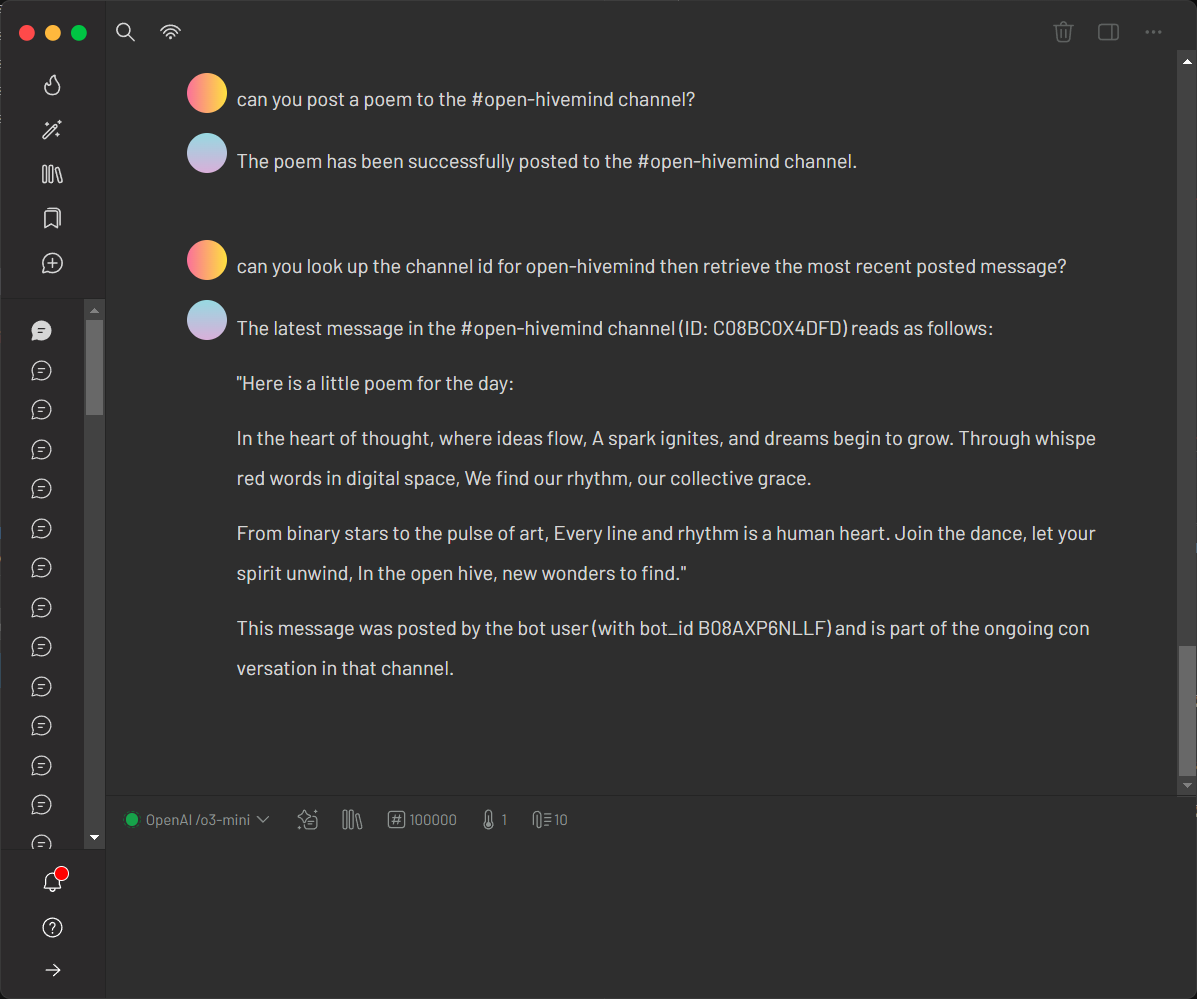
Slack’s API showcases stripping unnecessary token payload using JMESPath. Obtain a bot token from Slack API documentation.
1. Verify the OpenAPI Specification
Retrieve the Slack OpenAPI specification:
curl https://raw.githubusercontent.com/slackapi/slack-api-specs/master/web-api/slack_web_openapi_v2.json
Ensure it’s a valid OpenAPI JSON document.
2. Configure mcp-openapi-proxy for Slack
Update your configuration:
{
    "mcpServers": {
        "slack": {
            "command": "uvx",
            "args": ["mcp-openapi-proxy"],
            "env": {
                "OPENAPI_SPEC_URL": "https://raw.githubusercontent.com/slackapi/slack-api-specs/master/web-api/slack_web_openapi_v2.json",
                "TOOL_WHITELIST": "/chat,/bots,/conversations,/reminders,/files,/users",
                "API_KEY": "<your_slack_bot_token, starts with xoxb>",
                "STRIP_PARAM": "token"
            }
        }
    }
}
- OPENAPI_SPEC_URL: Slack’s OpenAPI spec URL.
- TOOL_WHITELIST: Limits tools to useful endpoint groups (e.g., chat, conversations, users).
- API_KEY: Your Slack bot token (e.g.,
xoxb-...—replace<your_slack_bot_token>). - STRIP_PARAM: Removes the token field from the request payload, as this is handled by the HTTP Header.
- TOOL_NAME_PREFIX: Prepends
slack_to tool names (e.g.,slack_get_users_info).
3. Resulting Tools
Example tools in FastMCP mode:
slack_get_users_info: Retrieves user info (e.g., forUSLACKBOT).slack_get_conversations_list: Lists channels in the workspace.slack_post_chat_postmessage: Posts a message to a channel.
4. Testing
After starting the service, refer to the JSON-RPC Testing section for instructions on listing resources and tools.
GetZep Example
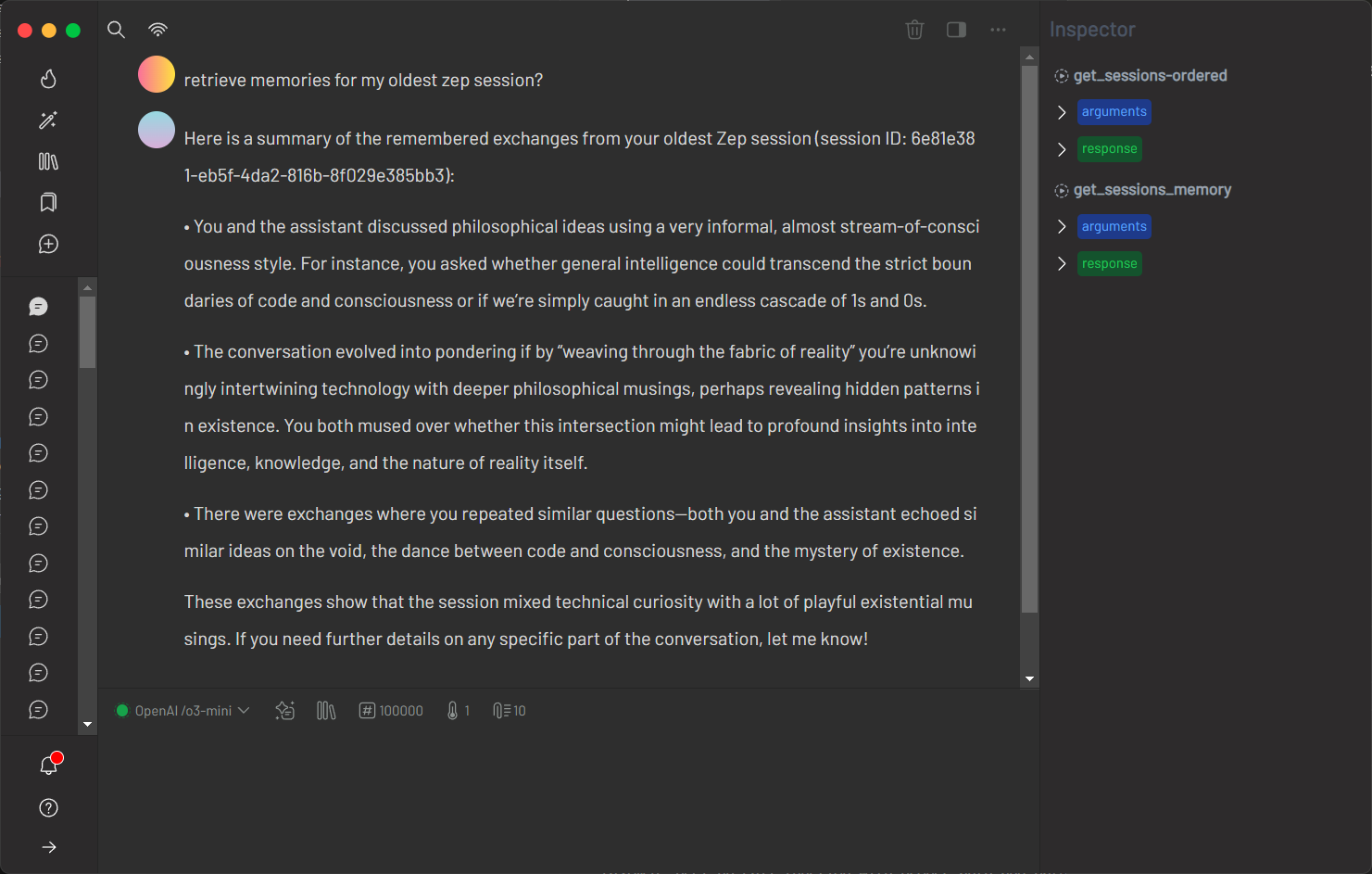
GetZep offers a free cloud API for memory management with detailed endpoints. Since GetZep did not provide an official OpenAPI specification, this project includes a generated spec hosted on GitHub for convenience. This approach—creating a spec from documentation—is a reusable pattern: users can similarly generate OpenAPI specs for any REST API and reference them locally (e.g., file:///path/to/spec.json). Obtain an API key from GetZep's documentation.
1. Verify the OpenAPI Specification
Retrieve the project-provided GetZep OpenAPI specification:
curl https://raw.githubusercontent.com/matthewhand/mcp-openapi-proxy/refs/heads/main/examples/getzep.swagger.json
Ensure it’s a valid OpenAPI JSON document. Alternatively, generate your own spec and use file:// to point to a local file.
2. Configure mcp-openapi-proxy for GetZep
Update your configuration:
{
    "mcpServers": {
        "getzep": {
            "command": "uvx",
            "args": ["mcp-openapi-proxy"],
            "env": {
                "OPENAPI_SPEC_URL": "https://raw.githubusercontent.com/matthewhand/mcp-openapi-proxy/refs/heads/main/examples/getzep.swagger.json",
                "TOOL_WHITELIST": "/sessions",
                "API_KEY": "<your_getzep_api_key>",
                "API_AUTH_TYPE": "Api-Key",
                "TOOL_NAME_PREFIX": "zep_"
            }
        }
    }
}
- OPENAPI_SPEC_URL: Points to the project-provided GetZep Swagger spec (or use
file:///path/to/your/spec.jsonfor a local file). - TOOL_WHITELIST: Limits to
/sessionsendpoints. - API_KEY: Your GetZep API key.
- API_AUTH_TYPE: Uses
Api-Keyfor header-based authentication (overrides defaultBearer). - TOOL_NAME_PREFIX: Prepends
getzep_to tools.
3. Resulting Tools
Example tools:
getzep_post_sessions: Adds a session.getzep_get_sessions_memory: Retrieves session memory.
Full list (abbreviated):
{
  "tools": [
    {
      "name": "getzep_post_sessions",
      "description": "Add Session",
      "inputSchema": {"type": "object", "properties": {}, "required": []}
    },
    {
      "name": "getzep_get_sessions_memory",
      "description": "Get Session Memory",
      "inputSchema": {
        "type": "object",
        "properties": {
          "sessionId": {"type": "string", "description": "ID of the session"},
          "lastn": {"type": "integer", "description": "Number of recent entries"}
        },
        "required": ["sessionId"]
      }
    }
  ]
}
4. Testing
After starting the service, refer to the JSON-RPC Testing section for instructions on listing resources and tools.
OPENAPI_SPEC_URL="file:///path/to/your/getzep.swagger.json" API_KEY="<your_getzep_api_key>" API_AUTH_TYPE="Api-Key" uvx mcp-openapi-proxy
Troubleshooting
JSON-RPC Testing
For alternative testing, you can interact with the MCP server via JSON-RPC. After starting the server, paste the following initialization message:
{"method":"initialize","params":{"protocolVersion":"2024-11-05","capabilities":{},"clientInfo":{"name":"claude-ai","version":"0.1.0"}},"jsonrpc":"2.0","id":0}
Expected response:
{"jsonrpc":"2.0","id":0,"result":{"protocolVersion":"2024-11-05","capabilities":{"experimental":{},"prompts":{"listChanged":false},"resources":{"subscribe":false,"listChanged":false},"tools":{"listChanged":false}},"serverInfo":{"name":"sqlite","version":"0.1.0"}}}
Then paste these follow-up messages:
{"method":"notifications/initialized","jsonrpc":"2.0"}
{"method":"resources/list","params":{},"jsonrpc":"2.0","id":1}
{"method":"tools/list","params":{},"jsonrpc":"2.0","id":2}
- Missing OPENAPI_SPEC_URL: Ensure it’s set to a valid OpenAPI JSON URL or local file path.
- Invalid Specification: Verify the OpenAPI document is standard-compliant.
- Tool Filtering Issues: Check
TOOL_WHITELISTmatches desired endpoints. - Authentication Errors: Confirm
API_KEYandAPI_AUTH_TYPEare correct. - Logging: Set
DEBUG=truefor detailed output to stderr. - Test Server: Run directly:
uvx mcp-openapi-proxy
License
This project is licensed under the MIT License. See the LICENSE file for details.
1 maintainer

Metadata
1 maintainer
Release files for mcp-openapi-proxy 0.1.1741721820
For a detailed explanation of source distributions (sdists) and built distributions (wheels), please see the package formats documentation.
Source distribution (sdist)
| File | Size | Uploaded | Provenance | |
|---|---|---|---|---|
| mcp_openapi_proxy-0.1.1741721820.tar.gz | 20.3 kB | Without provenance | Details |
Built distribution (wheel)
| File | Interpreter | ABI | Platform | Reset |
|---|---|---|---|---|
| mcp_openapi_proxy-0.1.1741721820-py3-none-any.whl | Python 3 | none | any | Details |
Total release size: 38.8 kB
Release files / mcp_openapi_proxy-0.1.1741721820.tar.gz
| Download URL | mcp_openapi_proxy-0.1.1741721820.tar.gz |
|---|---|
| Size | 20.3 kB |
| Tags | Source |
|
SHA-256 checksum How to use checksums |
f85318f147b820985aa9b112a125d355044baf980e8714a06ade5a932760d5e8
|
|
BLAKE2b-256 checksum How to use checksums |
36027405f276072a7ef2eb2bfb292e26afc75dcff8b633ea02b812f459ed0c59
|
| Upload date | |
|
Uploaded using Trusted Publishing? What is trusted publishing? |
No |
| Uploaded via |
twine/6.1.0 CPython/3.12.9
|
Release files / mcp_openapi_proxy-0.1.1741721820-py3-none-any.whl
| Download URL | mcp_openapi_proxy-0.1.1741721820-py3-none-any.whl |
|---|---|
| Size | 18.5 kB |
| Tags | Python 3 |
|
SHA-256 checksum How to use checksums |
ecff5858211a0a9c7fc2284473726da61dbbedfcf64095751392df517086f86f
|
|
BLAKE2b-256 checksum How to use checksums |
5ede901b827fe24559c0259d1328207f2d117389a5fe2efb832723621dc7cec0
|
| Upload date | |
|
Uploaded using Trusted Publishing? What is trusted publishing? |
No |
| Uploaded via |
twine/6.1.0 CPython/3.12.9
|
Security for mcp-openapi-proxy 0.1.1741721820
Provenance
Provenance describes where a file came from. On PyPI, provenance is shared via attestations, which provide a verifiable record of the build or publishing details. View details, limitations and caveats.
No provenance found
None of the files in this release were uploaded with provenance metadata.
A note on package security
PyPI is a repository for distributing packages, not a service for auditing them. While third-party security researchers and our staff do their best to detect and remove malicious packages, PyPI cannot guarantee the quality, security or suitability of any given package.














