
MCP server for exposing OpenAPI specifications as MCP tools.

Project description
mcp-openapi-proxy
mcp-openapi-proxy is a Python package that implements a Model Context Protocol (MCP) server, designed to dynamically expose REST APIs—defined by OpenAPI specifications—as MCP tools. This facilitates seamless integration of OpenAPI-described APIs into MCP-based workflows.
What's New in 0.2.0
Works with every modern MCP-enabled client we tested. Strict MCP clients can now discover and call tools — the low-level server advertises correct capabilities and no longer crashes during resource/prompt discovery, and a slow spec download no longer crash-loops short-timeout clients. Verified live against the full list of mainstream agent CLIs:
- ✅ Codex, Gemini, Qwen, Kilocode, opencode — native tool calls over stdio
- ✅ Vibe — native discovery and read calls (writes were CLI-flaky, not a proxy issue)
- ✅ Letta — Cloud (via a remote streamable-HTTP MCP URL) and self-hosted (via stdio)
- ⚠️ agy — could not attach in headless mode; MCP tool enablement is interactive-only in agy (an agy limitation, not the proxy)
See the client matrix for attach mechanisms, models, and exact results.
Prompts and resources are real now — including custom resources. Both MCP surfaces are functional and tested: the summarize_spec / whimsical_blog prompts and the spec_file resource, plus a new ADDITIONAL_RESOURCES env var that serves your own use-case documents (e.g. a NetBox naming policy or an Asana project-layout guide) as MCP resources — see examples/resources/.
Bug fixes (every one live-verified):
- MCP client discovery: empty capability set + a crash in resource discovery left strict clients seeing zero tools (#23) — fixed, with a full stdio-handshake test harness.
IGNORE_SSL_TOOLSwas ignored by the low-level dispatcher (#14) — fixed (original patch by @robbycochran, #15).- Server crash-loop when a slow spec fetch outran a client's connect timeout (#28) — handshake now answers immediately, spec loads lazily, closed streams exit cleanly.
API_AUTH_TYPEcustom schemes (e.g. NetBoxToken) sent no auth header at all (#24) — fixed.TOOL_WHITELISTnever matched Slack-style dot paths like/users.list(#27) — fixed.TOOL_NAME_MAX_LENGTHwas not respected, and name-truncation collisions silently dropped tools (#11) — fixed.- Array parameters were emitted without
items, which the OpenAI API rejects (#16) — fixed. EXTRA_HEADERSnow accepts a JSON array and literal\nseparators, not just real newlines (#17).- Dead Render spec URL (#26) and incomplete ElevenLabs example (#29) — fixed; the GetZep example is documented for self-hosted Zep CE since the hosted endpoint now 401s (#38).
- Added a
Dockerfile+glama.jsonfor the Glama listing (#13); collapsible README examples + a verified-client/API matrix (#35).
Full environment-variable reference is in Environment Variables.
Table of Contents
- Overview
- Features
- Installation
- Modes of Operation
- Environment Variables
- Verified Clients & Live Results (2026-06-12)
- Examples — Glama, Fly.io, Render, Slack, GetZep, Virustotal, Notion, Asana, APIs.guru, NetBox, Box, WolframAlpha (collapsed)
- Troubleshooting
- License
Overview
The package offers two operational modes:
- Low-Level Mode (Default): Dynamically registers tools corresponding to all valid API endpoints specified in an OpenAPI document (e.g.
/chat/completionsbecomeschat_completions()). - FastMCP Mode (Simple Mode): Provides a streamlined approach by exposing a predefined set of tools (e.g.
list_functions()andcall_function()) based on static configurations.
Features
- Dynamic Tool Generation: Automatically creates MCP tools from OpenAPI endpoint definitions.
- Simple Mode Option: Offers a static configuration alternative via FastMCP mode.
- OpenAPI Specification Support: Compatible with OpenAPI v3 with potential support for v2.
- Flexible Filtering: Allows endpoint filtering through whitelisting by paths or other criteria.
- Payload Authentication: Supports custom authentication via JMESPath expressions (e.g. for APIs like Slack that expect tokens in the payload not the HTTP header).
- Header Authentication: Uses
Bearerby default forAPI_KEYin the Authorization header, customizable for APIs like Fly.io requiringApi-Key. - MCP Integration: Seamlessly integrates with MCP ecosystems for invoking REST APIs as tools.
Installation
Install the package directly from PyPI using the following command:
uvx mcp-openapi-proxy
MCP Ecosystem Integration
To incorporate mcp-openapi-proxy into your MCP ecosystem configure it within your mcpServers settings. Below is a generic example:
{
    "mcpServers": {
        "mcp-openapi-proxy": {
            "command": "uvx",
            "args": ["mcp-openapi-proxy"],
            "env": {
                "OPENAPI_SPEC_URL": "${OPENAPI_SPEC_URL}",
                "API_KEY": "${API_OPENAPI_KEY}"
            }
        }
    }
}
Refer to the Examples section below for practical configurations tailored to specific APIs.
Modes of Operation
FastMCP Mode (Simple Mode)
- Enabled by: Setting the environment variable
OPENAPI_SIMPLE_MODE=true. - Description: Exposes a fixed set of tools derived from specific OpenAPI endpoints as defined in the code.
- Configuration: Relies on environment variables to specify tool behavior.
Low-Level Mode (Default)
- Description: Automatically registers all valid API endpoints from the provided OpenAPI specification as individual tools.
- Tool Naming: Derives tool names from normalized OpenAPI paths and methods.
- Behavior: Generates tool descriptions from OpenAPI operation summaries and descriptions.
Environment Variables
OPENAPI_SPEC_URL: (Required) The URL to the OpenAPI specification JSON file (e.g.https://example.com/spec.jsonorfile:///path/to/local/spec.json).OPENAPI_SIMPLE_MODE: (Optional) Set totrueto enable FastMCP mode.TOOL_WHITELIST: (Optional) A comma-separated list of endpoint paths to expose as tools.ADDITIONAL_RESOURCES: (Optional) Comma-separatedname=/path/to/fileentries served as extra MCP resources (use-case docs such as naming policies or layout conventions; seeexamples/resources/).TOOL_NAME_PREFIX: (Optional) A prefix to prepend to all tool names.API_KEY: (Optional) Authentication token for the API sent asBearer <API_KEY>in the Authorization header by default.API_AUTH_TYPE: (Optional) Overrides the defaultBearerAuthorization scheme.api-keysends the key in the header named byAPI_AUTH_HEADER; any other value is used as a custom scheme prefix (e.g.Tokenfor NetBox →Authorization: Token <key>).STRIP_PARAM: (Optional) JMESPath expression to strip unwanted parameters (e.g.tokenfor Slack).DEBUG: (Optional) Enables verbose debug logging when set to "true", "1", or "yes".EXTRA_HEADERS: (Optional) One or more outgoing HTTP headers. Accepts a JSON array (["X-A: 1","X-B: 2"]), oneHeader: Valueper line, or literal\n-separated entries (for configs that cannot embed newlines).SERVER_URL_OVERRIDE: (Optional) Overrides the base URL from the OpenAPI specification when set, useful for custom deployments.TOOL_NAME_MAX_LENGTH: (Optional) Truncates tool names to a max length.- Additional Variable:
OPENAPI_SPEC_URL_<hash>– a variant for unique per-test configurations (falls back toOPENAPI_SPEC_URL). IGNORE_SSL_SPEC: (Optional) Set totrueto disable SSL certificate verification when fetching the OpenAPI spec.IGNORE_SSL_TOOLS: (Optional) Set totrueto disable SSL certificate verification for API requests made by tools.API_AUTH_HEADER: (Optional) Header name used whenAPI_AUTH_TYPE=api-key(e.g.x-apikeyfor VirusTotal,xi-api-keyfor ElevenLabs). Defaults toAuthorization.OPENAPI_SPEC_FORMAT: (Optional) Set toyamlto parsefile://specs as YAML (remote specs auto-detect). Defaultjson.OPENAPI_SPEC_CACHE_TTL_SECONDS: (Optional) Live-first disk cache for remote specs: the cached copy is served only when the live fetch fails or stalls (and respawned servers fail fast to it). Default86400; set0to disable.ENABLE_TOOLS/ENABLE_PROMPTS/ENABLE_RESOURCES: (Optional) Feature gates for the three MCP surfaces in low-level mode; each defaults to enabled. Disabling a feature removes its handlers and its capability advertisement.CAPABILITIES_TOOLS/CAPABILITIES_PROMPTS/CAPABILITIES_RESOURCES: (Optional) AdvertiselistChangedon the corresponding capability (for clients that key on it). Defaultfalse.
Verified Clients & Live Results (2026-06-12)
The example configurations below were exercised against the live APIs, and the proxy was attached to a range of agent CLIs over stdio MCP. Results from that verification run:
API example results
| API example | Tools | Sample call proven | Extra env needed |
|---|---|---|---|
| glama | 6 | get_v1_attributes |
none |
| apis.guru | 7 | get_metrics_json |
none |
| wolframalpha | 2 | get_v1_llm_api |
API_KEY |
| virustotal | 4 | IP report | API_KEY + API_AUTH_TYPE=api-key + API_AUTH_HEADER=x-apikey |
| asana | 73 (whitelist /workspaces,/projects,/tasks) |
created project + 11 tasks | SERVER_URL_OVERRIDE + API_KEY |
| render | 52 | get_services |
API_KEY (NEW spec URL render-public-api-1.json) |
| notion | 4–5 (whitelist /v1/users,/v1/search or /v1/pages) |
page create + title read-back | SERVER_URL_OVERRIDE + EXTRA_HEADERS (Notion-Version) + API_KEY |
| elevenlabs | 19 | TTS mp3 generated | SERVER_URL_OVERRIDE + API_AUTH_TYPE=api-key + API_AUTH_HEADER=xi-api-key |
| flyio | 34–35 | apps + machine health | API_KEY |
| slack | 7 (exact dot-path whitelist until #27 fix) | auth.test + postMessage |
API_KEY |
| netbox | 9 (whitelist /ipam/ip-addresses) |
IPAM write + read | API_KEY + API_AUTH_TYPE=Token |
Client matrix
| Agent CLI | Model used (live test) | MCP attach mechanism | Tool calls | Prompts/Resources surfaced to model? |
|---|---|---|---|---|
| Codex | gpt-5-codex (OpenAI API) |
codex exec -c mcp_servers.* |
✅ native | ❌ (used raw stdio) |
| Gemini | Google OAuth free tier (CLI default model) | project .gemini/settings.json mcpServers |
✅ native | ❌ interactive slash-commands only |
| Qwen | agent group via local LiteLLM gateway |
project .qwen/settings.json |
✅ native | ❌ NO_PROMPT_ACCESS |
| Kilocode | kilo-auto/free |
global settings/mcp_settings.json, clean workspace |
✅ native | ❌ |
| opencode | orchestration group via local LiteLLM gateway |
~/.config/opencode/opencode.json mcp |
✅ native | ❌ |
| Vibe | mistral-medium-3.5 |
~/.vibe/config.toml [[mcp_servers]] |
✅ discovery + reads (writes flaky) | ❌ |
| agy | — | — | ❌ headless cannot enable MCP | — |
| letta cloud | Letta Cloud default | streamable-HTTP MCP URL (/mcp add --transport http + bearer) |
✅ remote (stdio rejected) | — |
| letta (self-hosted ≤0.11.x) | agent group via local LiteLLM gateway |
stdio via PUT /v1/tools/mcp/servers |
✅ native | — |
Minimal sanitized configs per client (the no-auth Glama spec is used as the smallest working example; substitute your own spec URL and $YOUR_KEY as needed):
Codex — inline -c mcp_servers.* overrides
codex exec \
  -c 'mcp_servers.glama.command="uvx"' \
  -c 'mcp_servers.glama.args=["mcp-openapi-proxy"]' \
  -c 'mcp_servers.glama.env.OPENAPI_SPEC_URL="https://glama.ai/api/mcp/openapi.json"' \
  "list the available tools"
Gemini — project .gemini/settings.json
{
  "mcpServers": {
    "glama": {
      "command": "uvx",
      "args": ["mcp-openapi-proxy"],
      "env": { "OPENAPI_SPEC_URL": "https://glama.ai/api/mcp/openapi.json" }
    }
  }
}
Qwen — project .qwen/settings.json
{
  "mcpServers": {
    "glama": {
      "command": "uvx",
      "args": ["mcp-openapi-proxy"],
      "env": { "OPENAPI_SPEC_URL": "https://glama.ai/api/mcp/openapi.json" }
    }
  }
}
Kilocode — global settings/mcp_settings.json (use a clean workspace)
{
  "mcpServers": {
    "glama": {
      "command": "uvx",
      "args": ["mcp-openapi-proxy"],
      "env": { "OPENAPI_SPEC_URL": "https://glama.ai/api/mcp/openapi.json" }
    }
  }
}
opencode — ~/.config/opencode/opencode.json mcp block
{
  "mcp": {
    "glama": {
      "type": "local",
      "command": ["uvx", "mcp-openapi-proxy"],
      "environment": { "OPENAPI_SPEC_URL": "https://glama.ai/api/mcp/openapi.json" }
    }
  }
}
Vibe — ~/.vibe/config.toml [[mcp_servers]]
[[mcp_servers]]
name = "glama"
command = "uvx"
args = ["mcp-openapi-proxy"]

[mcp_servers.env]
OPENAPI_SPEC_URL = "https://glama.ai/api/mcp/openapi.json"
agy (headless) and letta cloud could not attach a stdio MCP server at all, so no config snippet applies: agy provides no way to enable MCP in headless mode, and letta cloud only accepts remote MCP servers.
Tips
- Big specs need
TOOL_WHITELIST. Large APIs (Asana, Render, Fly.io, Slack, NetBox) expose dozens of endpoints; whitelist the paths you need to keep the tool count manageable for clients. - Dot-style paths need exact whitelist entries for now. Slack-style paths like
/chat.postMessageare not matched by prefix whitelisting — list each path exactly (issue #27 / PR #32). - Slow remote specs can crash-loop short-timeout clients. If a client kills the server before a large spec finishes downloading, fetch the spec once and point
OPENAPI_SPEC_URLat a localfile://copy (issue #28). - Custom auth schemes are handled via
API_AUTH_TYPE(PR #25), e.g.Tokenfor NetBox, orapi-keywithAPI_AUTH_HEADERfor Virustotal/ElevenLabs-style header keys.
Examples
For testing you can run the uvx command as demonstrated in the examples then interact with the MCP server via JSON-RPC messages to list tools and resources. See the "JSON-RPC Testing" section below.
Each example below is collapsed — click to expand.
Glama Example — the most minimal config: just OPENAPI_SPEC_URL, no auth
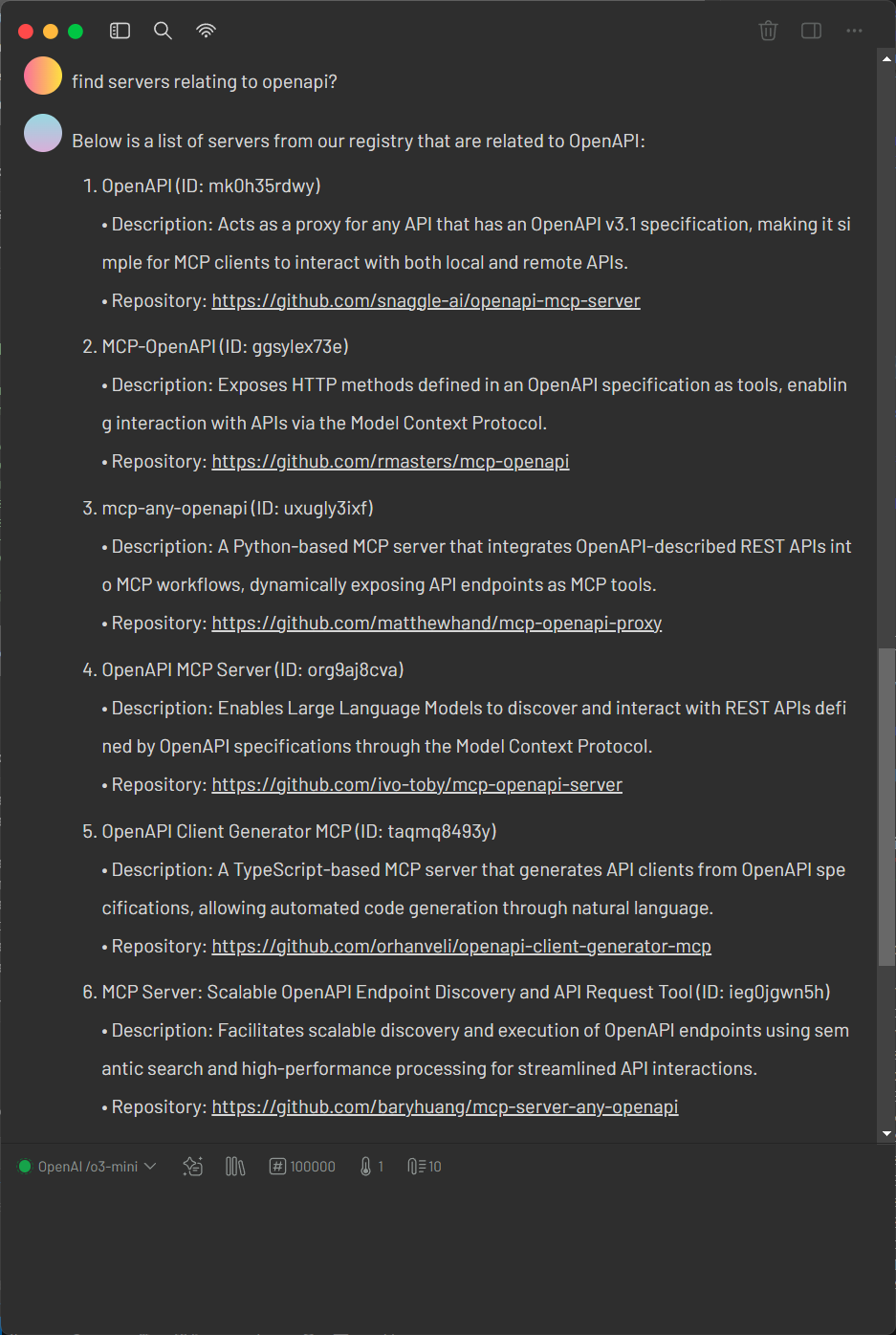
Glama offers the most minimal configuration for mcp-openapi-proxy requiring only the OPENAPI_SPEC_URL environment variable. This simplicity makes it ideal for quick testing.
1. Verify the OpenAPI Specification
Retrieve the Glama OpenAPI specification:
curl https://glama.ai/api/mcp/openapi.json
Ensure the response is a valid OpenAPI JSON document.
2. Configure mcp-openapi-proxy for Glama
Add the following configuration to your MCP ecosystem settings:
{
    "mcpServers": {
        "glama": {
            "command": "uvx",
            "args": ["mcp-openapi-proxy"],
            "env": {
                "OPENAPI_SPEC_URL": "https://glama.ai/api/mcp/openapi.json"
            }
        }
    }
}
3. Testing
Start the service with:
OPENAPI_SPEC_URL="https://glama.ai/api/mcp/openapi.json" uvx mcp-openapi-proxy
Then refer to the JSON-RPC Testing section for instructions on listing resources and tools.
Fly.io Example — machines API with an API token
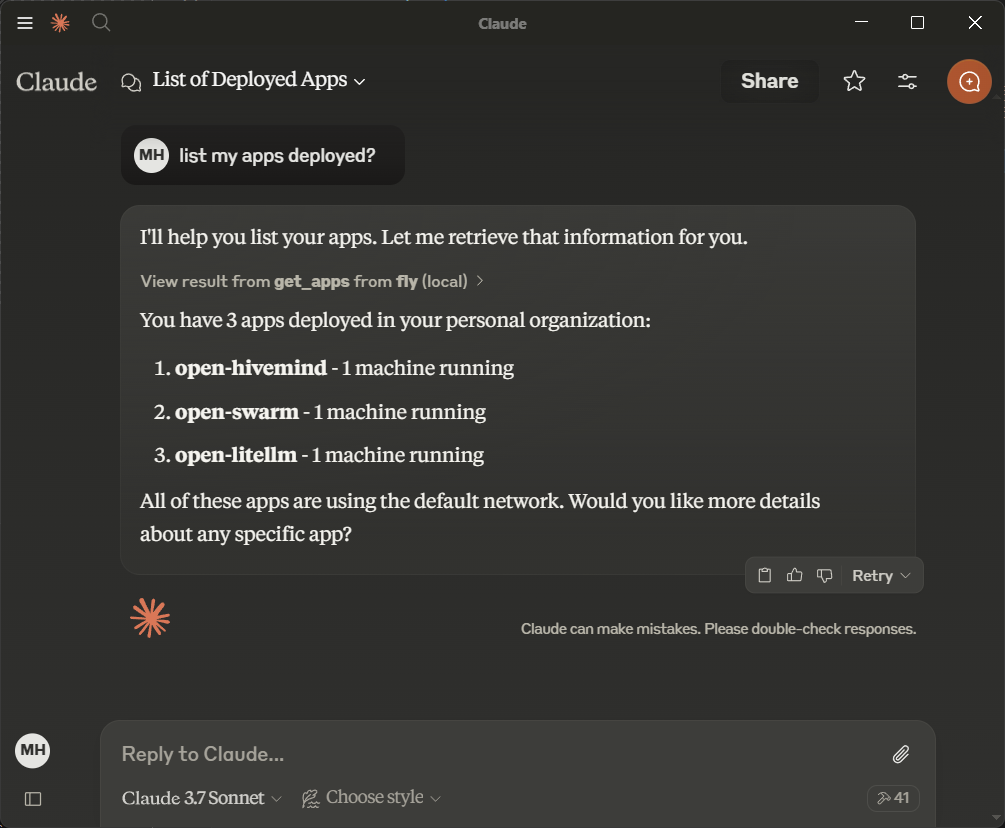
Fly.io provides a simple API for managing machines making it an ideal starting point. Obtain an API token from Fly.io documentation.
1. Verify the OpenAPI Specification
Retrieve the Fly.io OpenAPI specification:
curl https://raw.githubusercontent.com/abhiaagarwal/peristera/refs/heads/main/fly-machines-gen/fixed_spec.json
Ensure the response is a valid OpenAPI JSON document.
2. Configure mcp-openapi-proxy for Fly.io
Update your MCP ecosystem configuration:
{
    "mcpServers": {
        "flyio": {
            "command": "uvx",
            "args": ["mcp-openapi-proxy"],
            "env": {
                "OPENAPI_SPEC_URL": "https://raw.githubusercontent.com/abhiaagarwal/peristera/refs/heads/main/fly-machines-gen/fixed_spec.json",
                "API_KEY": "<your_flyio_token_here>"
            }
        }
    }
}
- OPENAPI_SPEC_URL: Points to the Fly.io OpenAPI specification.
- API_KEY: Your Fly.io API token (replace
<your_flyio_token_here>). - API_AUTH_TYPE: Set to
Api-Keyfor Fly.io’s header-based authentication (overrides defaultBearer).
3. Testing
After starting the service refer to the JSON-RPC Testing section for instructions on listing resources and tools.
Render Example — manage hosted services with a tool whitelist
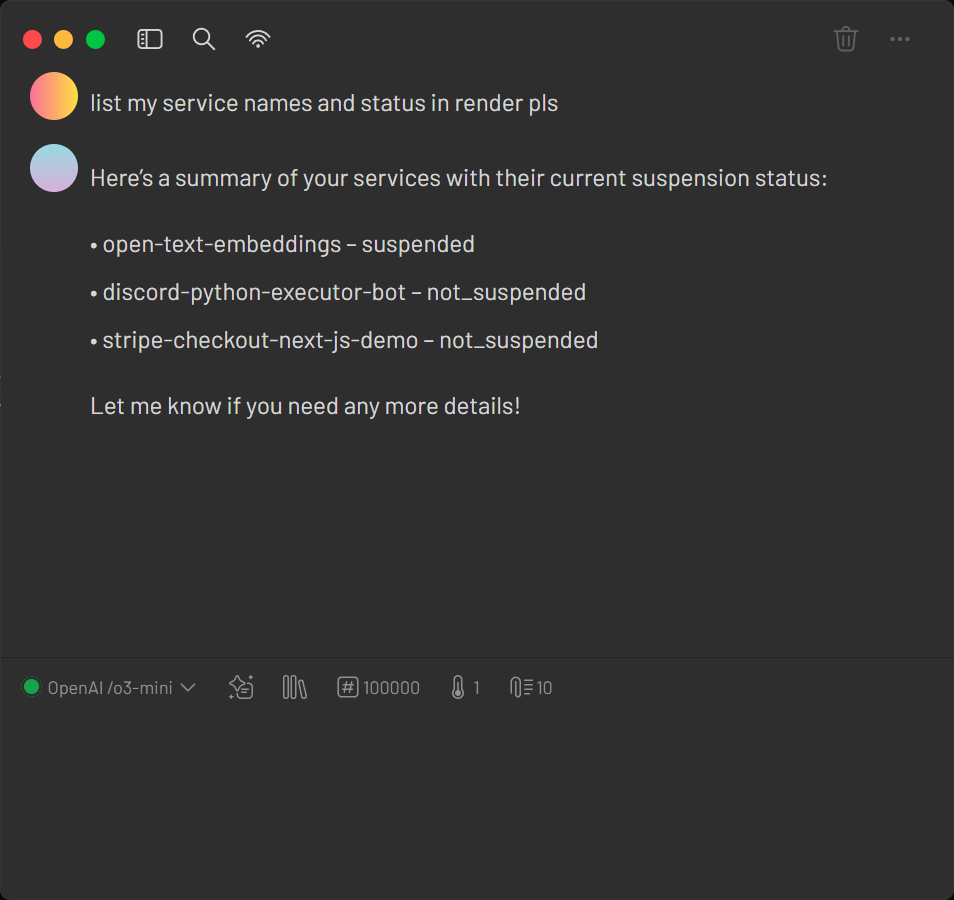
Render offers infrastructure hosting that can be managed via an API. The provided configuration file examples/render-claude_desktop_config.json demonstrates how to set up your MCP ecosystem quickly with minimal settings.
1. Verify the OpenAPI Specification
Retrieve the Render OpenAPI specification:
curl https://api-docs.render.com/openapi/render-public-api-1.json
Ensure the response is a valid OpenAPI document.
2. Configure mcp-openapi-proxy for Render
Add the following configuration to your MCP ecosystem settings:
{
    "mcpServers": {
        "render": {
            "command": "uvx",
            "args": ["mcp-openapi-proxy"],
            "env": {
                "OPENAPI_SPEC_URL": "https://api-docs.render.com/openapi/render-public-api-1.json",
                "TOOL_WHITELIST": "/services,/maintenance",
                "API_KEY": "your_render_token_here"
            }
        }
    }
}
3. Testing
Launch the proxy with your Render configuration:
OPENAPI_SPEC_URL="https://api-docs.render.com/openapi/render-public-api-1.json" TOOL_WHITELIST="/services,/maintenance" API_KEY="your_render_token_here" uvx mcp-openapi-proxy
Then refer to the JSON-RPC Testing section for instructions on listing resources and tools.
Slack Example — payload token stripping via JMESPath (STRIP_PARAM)
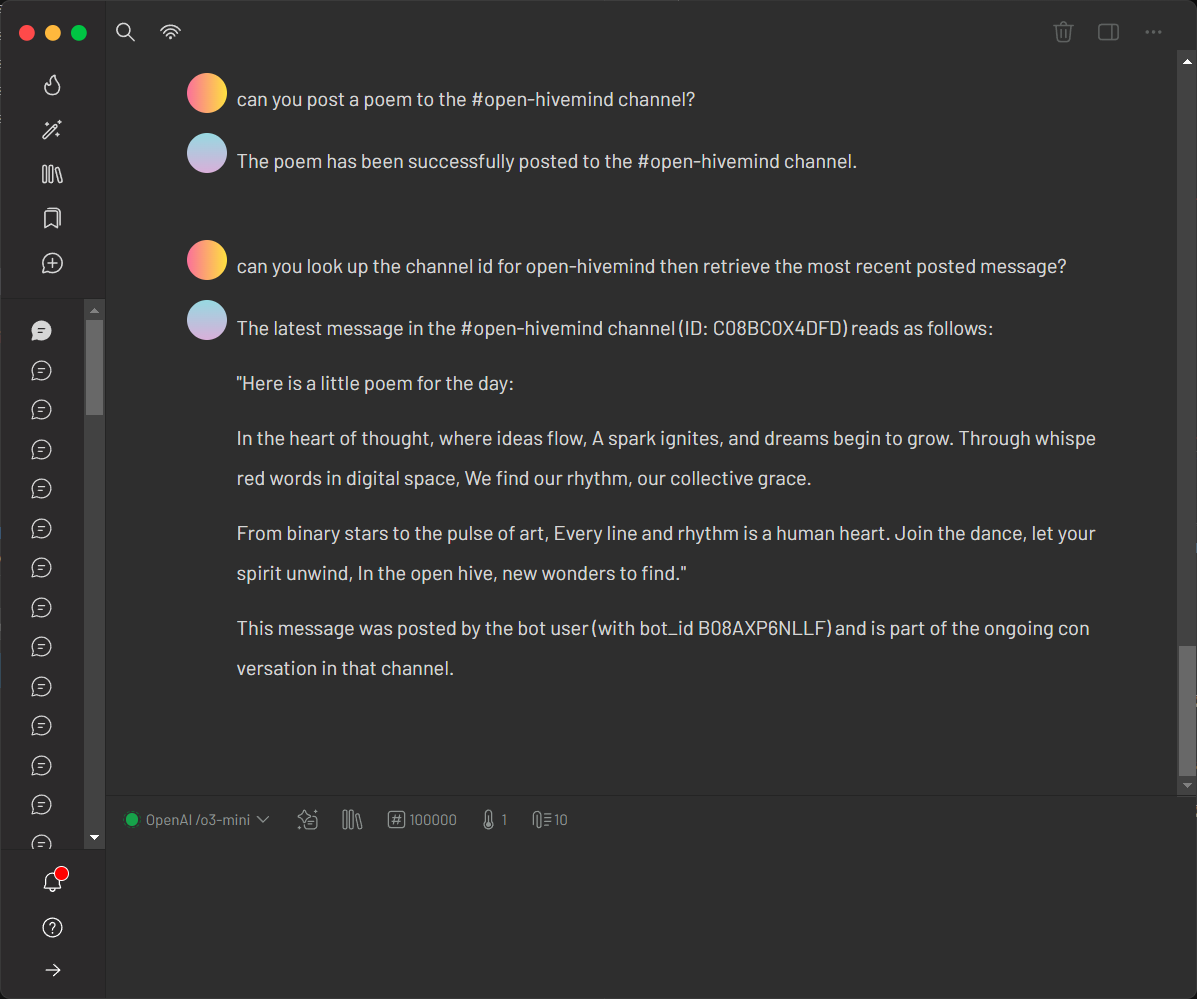
Slack’s API showcases stripping unnecessary token payload using JMESPath. Obtain a bot token from Slack API documentation.
1. Verify the OpenAPI Specification
Retrieve the Slack OpenAPI specification:
curl https://raw.githubusercontent.com/slackapi/slack-api-specs/master/web-api/slack_web_openapi_v2.json
Ensure it’s a valid OpenAPI JSON document.
2. Configure mcp-openapi-proxy for Slack
Update your configuration:
{
    "mcpServers": {
        "slack": {
            "command": "uvx",
            "args": ["mcp-openapi-proxy"],
            "env": {
                "OPENAPI_SPEC_URL": "https://raw.githubusercontent.com/slackapi/slack-api-specs/master/web-api/slack_web_openapi_v2.json",
                "TOOL_WHITELIST": "/chat,/bots,/conversations,/reminders,/files,/users",
                "API_KEY": "<your_slack_bot_token, starts with xoxb>",
                "STRIP_PARAM": "token",
                "TOOL_NAME_PREFIX": "slack_"
            }
        }
    }
}
- OPENAPI_SPEC_URL: Slack’s OpenAPI spec URL.
- TOOL_WHITELIST: Limits tools to useful endpoint groups (e.g. chat, conversations, users).
- API_KEY: Your Slack bot token (e.g.
xoxb-..., replace<your_slack_bot_token>). - STRIP_PARAM: Removes the token field from the request payload.
- TOOL_NAME_PREFIX: Prepends
slack_to tool names.
3. Testing
After starting the service refer to the JSON-RPC Testing section for instructions on listing resources and tools.
GetZep Example — project-generated spec with Api-Key auth
Note (2026): GetZep's hosted endpoint (
api.getzep.com) returns 401 for previously-working keys — the hosted free tier no longer accepts API keys. The example now targets a self-hosted Zep CE: seeexamples/zep-ce/docker-compose.yml(zep built from source tag v1.0.2 +pgvector/pgvector:pg17; the delistedzepai/zepimage must be rebuilt via the officialDockerfile.ce). Auth quirk: Zep's scheme is literallyApi-Key, which collides with the proxy's specialapi-keymode — useAPI_AUTH_TYPE=api-keywithAPI_KEY="Api-Key <your-secret>". Live-verified: 8 tools viaTOOL_WHITELIST=/sessions; session create + read-back through the bridge.
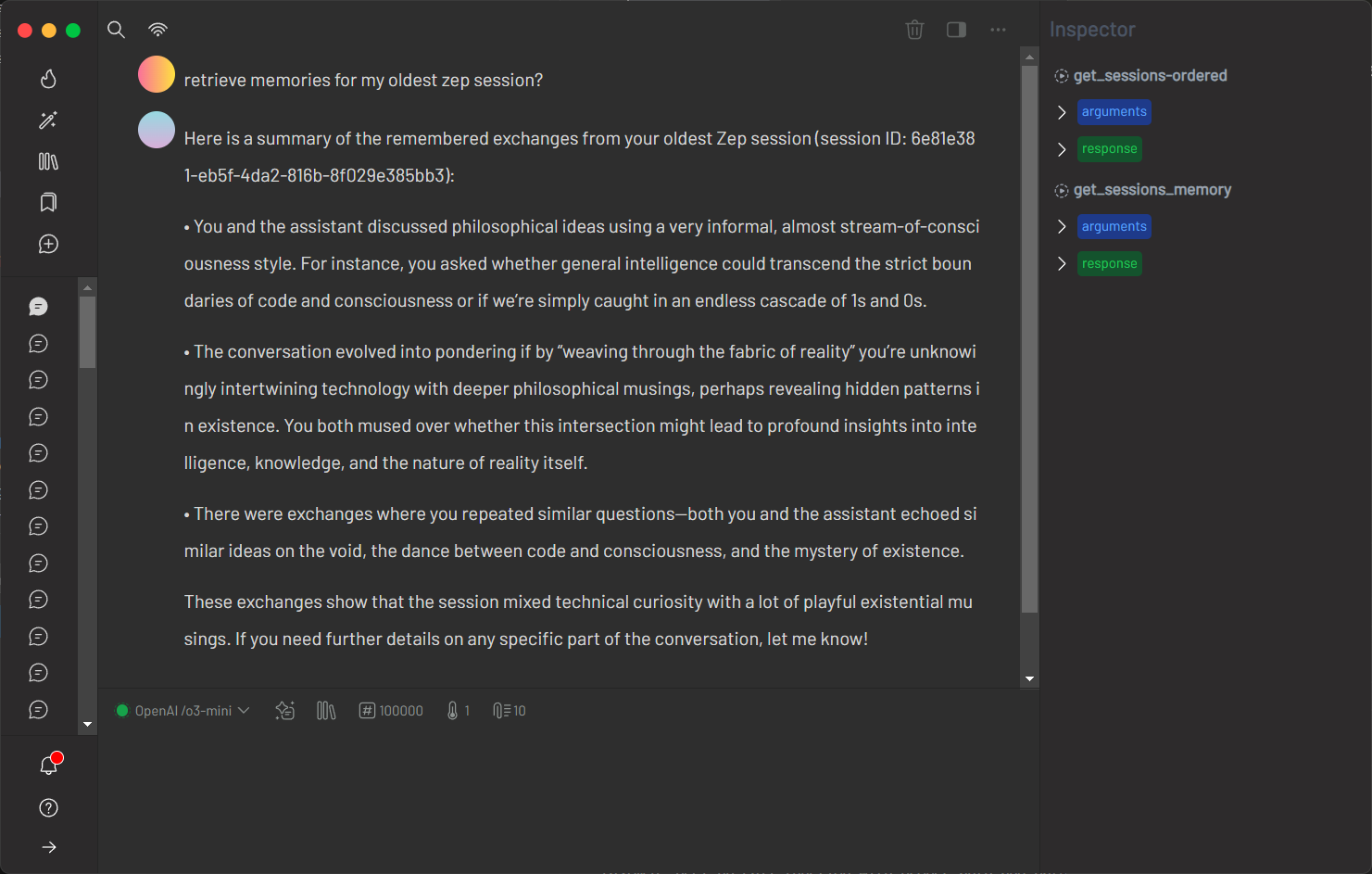
GetZep offers a free cloud API for memory management with detailed endpoints. Since GetZep did not provide an official OpenAPI specification, this project includes a generated spec hosted on GitHub for convenience. Users can similarly generate OpenAPI specs for any REST API and reference them locally (e.g. file:///path/to/spec.json). Obtain an API key from GetZep's documentation.
1. Verify the OpenAPI Specification
Retrieve the project-provided GetZep OpenAPI specification:
curl https://raw.githubusercontent.com/matthewhand/mcp-openapi-proxy/refs/heads/main/examples/getzep.swagger.json
Ensure it’s a valid OpenAPI JSON document. Alternatively, generate your own spec and use a file:// URL to reference a local file.
2. Configure mcp-openapi-proxy for GetZep
Update your configuration:
{
    "mcpServers": {
        "getzep": {
            "command": "uvx",
            "args": ["mcp-openapi-proxy"],
            "env": {
                "OPENAPI_SPEC_URL": "https://raw.githubusercontent.com/matthewhand/mcp-openapi-proxy/refs/heads/main/examples/getzep.swagger.json",
                "TOOL_WHITELIST": "/sessions",
                "API_KEY": "<your_getzep_api_key>",
                "API_AUTH_TYPE": "Api-Key",
                "TOOL_NAME_PREFIX": "zep_"
            }
        }
    }
}
- OPENAPI_SPEC_URL: Points to the project-provided GetZep Swagger spec (or use
file:///path/to/your/spec.jsonfor a local file). - TOOL_WHITELIST: Limits to
/sessionsendpoints. - API_KEY: Your GetZep API key.
- API_AUTH_TYPE: Uses
Api-Keyfor header-based authentication. - TOOL_NAME_PREFIX: Prepends
zep_to tool names.
3. Testing
After starting the service refer to the JSON-RPC Testing section for instructions on listing resources and tools.
Virustotal Example — YAML spec + custom x-apikey auth header
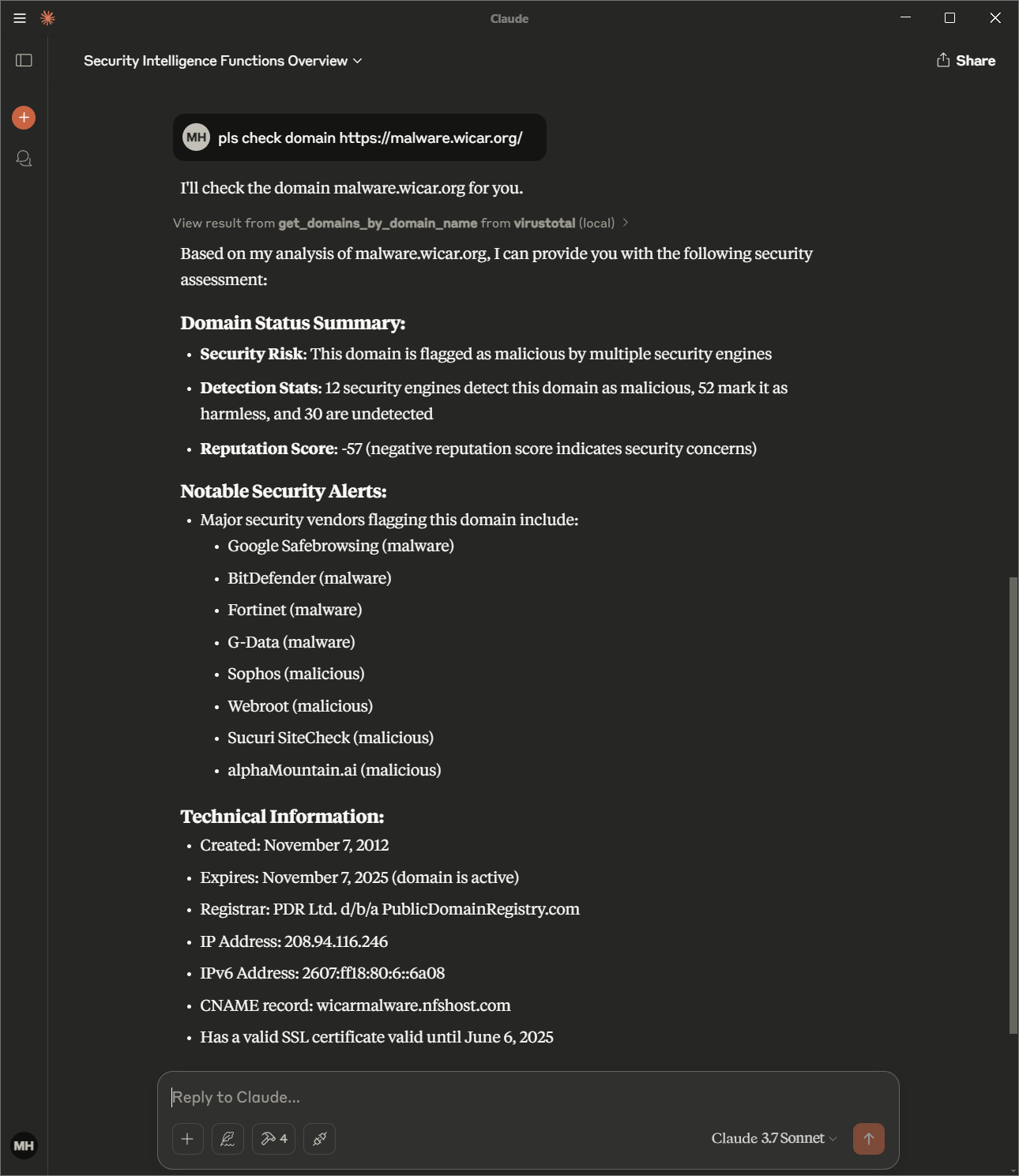
This example demonstrates:
- Using a YAML OpenAPI specification file
- Using custom HTTP auth header, "x-apikey"
1. Verify the OpenAPI Specification
Retrieve the Virustotal OpenAPI specification:
curl https://raw.githubusercontent.com/matthewhand/mcp-openapi-proxy/refs/heads/main/examples/virustotal.openapi.yml
Ensure that the response is a valid OpenAPI YAML document.
2. Configure mcp-openapi-proxy for Virustotal
Add the following configuration to your MCP ecosystem settings:
{
    "mcpServers": {
        "virustotal": {
            "command": "uvx",
            "args": ["mcp-openapi-proxy"],
            "env": {
                "OPENAPI_SPEC_URL": "https://raw.githubusercontent.com/matthewhand/mcp-openapi-proxy/refs/heads/main/examples/virustotal.openapi.yml",
                "EXTRA_HEADERS": "x-apikey: ${VIRUSTOTAL_API_KEY}",
                "OPENAPI_SPEC_FORMAT": "yaml"
            }
        }
    }
}
Key configuration points:
- By default, the proxy expects a JSON specification and sends the API key with a Bearer prefix.
- To use a YAML OpenAPI specification, include
OPENAPI_SPEC_FORMAT="yaml". - Note: VirusTotal requires a special authentication header; EXTRA_HEADERS is used to transmit the API key as "x-apikey: ${VIRUSTOTAL_API_KEY}".
3. Testing
Launch the proxy with the Virustotal configuration:
OPENAPI_SPEC_URL="https://raw.githubusercontent.com/matthewhand/mcp-openapi-proxy/refs/heads/main/examples/virustotal.openapi.yml" API_KEY="your_virustotal_api_key" API_AUTH_HEADER="x-apikey" API_AUTH_TYPE="" OPENAPI_SPEC_FORMAT="yaml" uvx mcp-openapi-proxy
After starting the service, refer to the JSON-RPC Testing section for instructions on listing resources and tools.
Notion Example — API version header via EXTRA_HEADERS
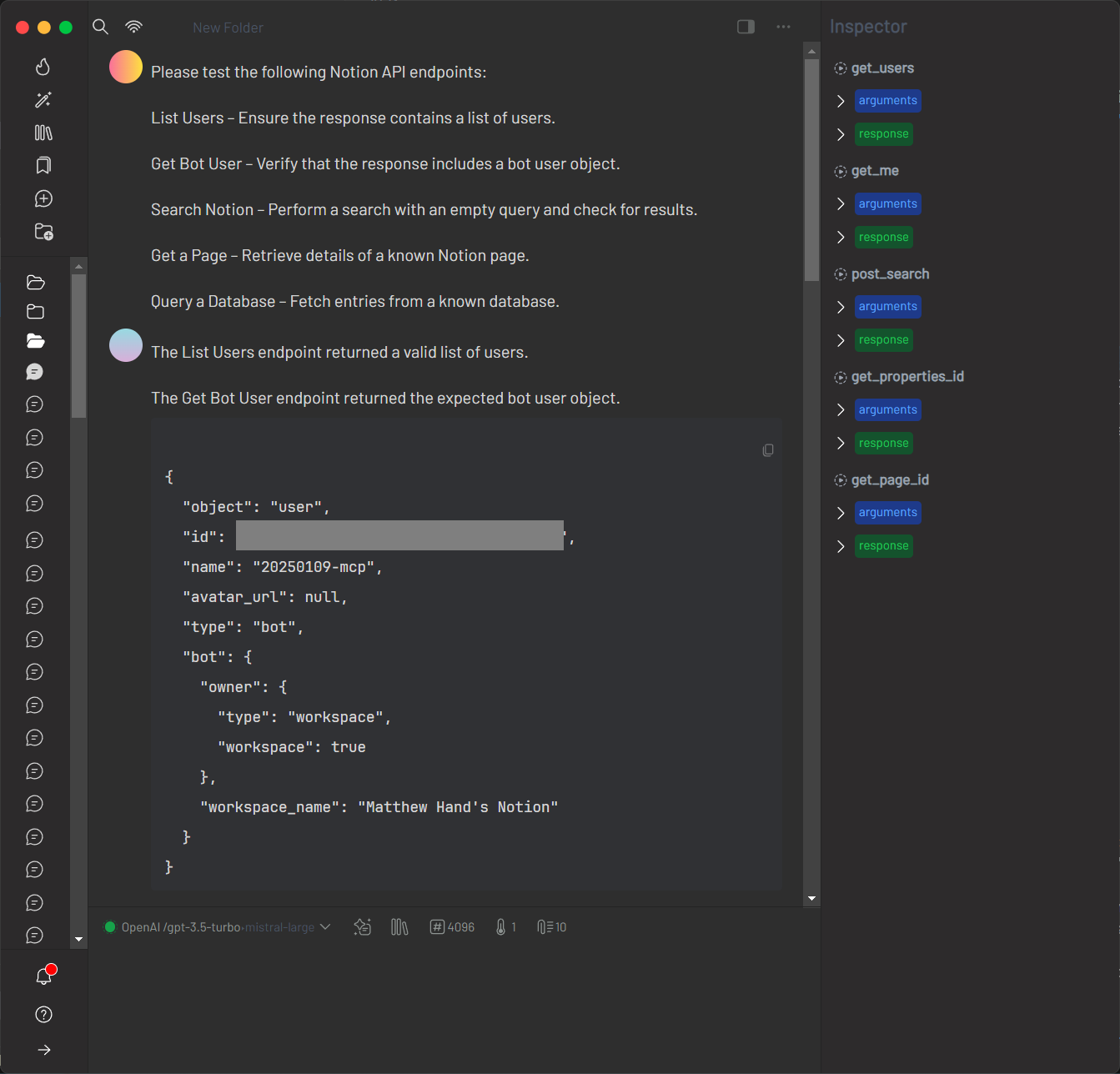
Notion’s API requires specifying a particular version via HTTP headers. This example uses the EXTRA_HEADERS environment variable to include the required header, and focuses on verifying the OpenAPI specification.
1. Verify the OpenAPI Specification
Retrieve the Notion OpenAPI specification:
curl https://storage.googleapis.com/versori-assets/public-specs/20240214/NotionAPI.yml
Ensure the response is a valid YAML document.
2. Configure mcp-openapi-proxy for Notion
Add the following configuration to your MCP ecosystem settings:
{
  "mcpServers": {
    "notion": {
      "command": "uvx",
      "args": [
        "mcp-openapi-proxy"
      ],
      "env": {
          "API_KEY": "ntn_<your_key>",
          "OPENAPI_SPEC_URL": "https://storage.googleapis.com/versori-assets/public-specs/20240214/NotionAPI.yml",
          "SERVER_URL_OVERRIDE": "https://api.notion.com",
          "EXTRA_HEADERS": "Notion-Version: 2022-06-28"
      }
    }
  }
}
3. Testing
Launch the proxy with the Notion configuration:
OPENAPI_SPEC_URL="https://storage.googleapis.com/versori-assets/public-specs/20240214/NotionAPI.yml" SERVER_URL_OVERRIDE="https://api.notion.com" EXTRA_HEADERS="Notion-Version: 2022-06-28" API_KEY="ntn_<your_key>" uvx mcp-openapi-proxy
After starting the service, refer to the JSON-RPC Testing section for instructions on listing resources and tools.
Asana Example — workspaces/tasks/projects with a whitelist and SERVER_URL_OVERRIDE
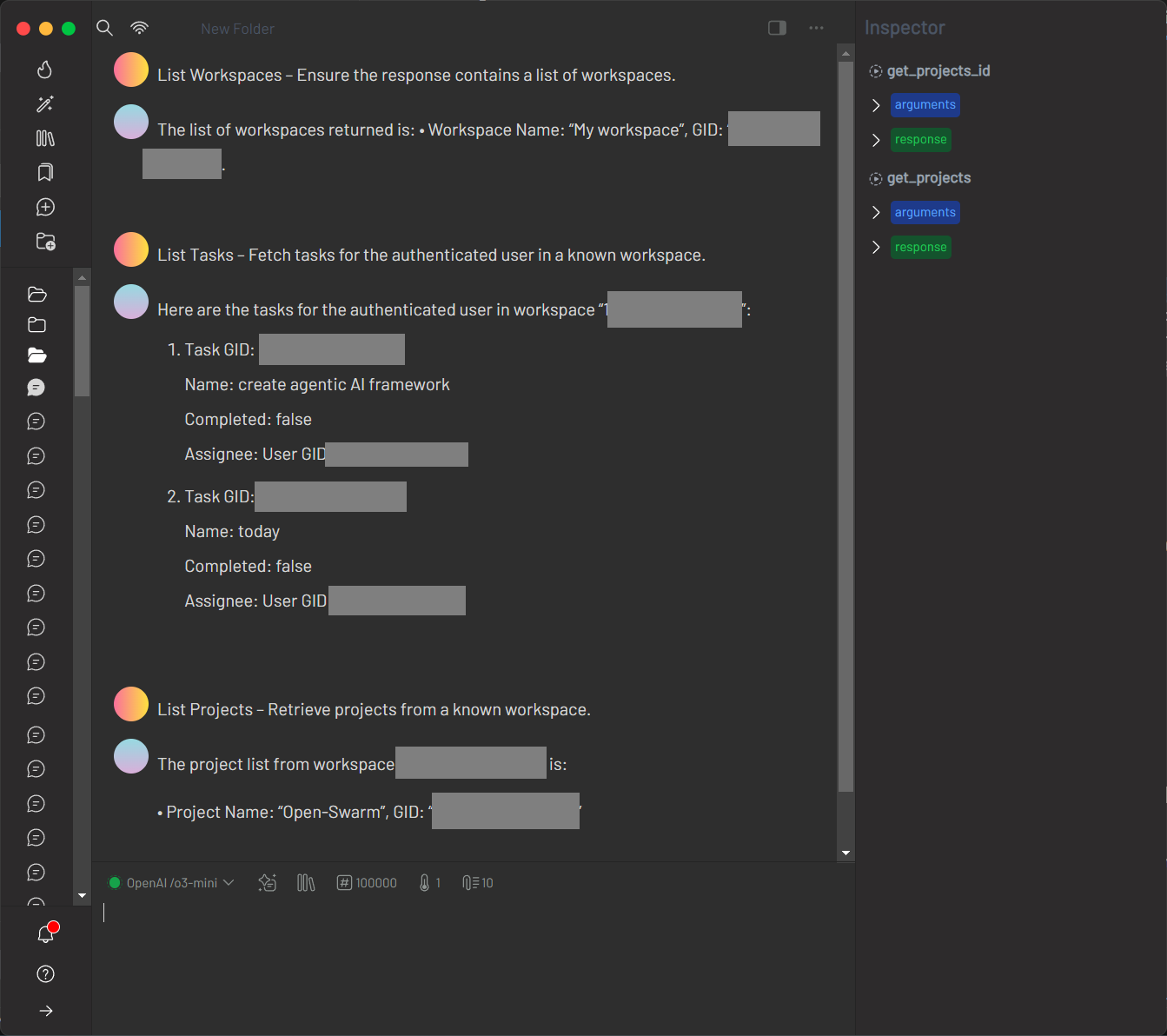
Asana provides a rich set of endpoints for managing workspaces, tasks, projects, and users. The integration tests demonstrate usage of endpoints such as GET /workspaces, GET /tasks, and GET /projects.
1. Verify the OpenAPI Specification
Retrieve the Asana OpenAPI specification:
curl https://raw.githubusercontent.com/Asana/openapi/refs/heads/master/defs/asana_oas.yaml
Ensure the response is a valid YAML (or JSON) document.
2. Configure mcp-openapi-proxy for Asana
Add the following configuration to your MCP ecosystem settings:
{
  "mcpServers": {
    "asana": {
      "command": "uvx",
      "args": [
        "mcp-openapi-proxy"
      ],
      "env": {
        "OPENAPI_SPEC_URL": "https://raw.githubusercontent.com/Asana/openapi/refs/heads/master/defs/asana_oas.yaml",
        "SERVER_URL_OVERRIDE": "https://app.asana.com/api/1.0",
        "TOOL_WHITELIST": "/workspaces,/tasks,/projects,/users",
        "API_KEY": "${ASANA_API_KEY}"
      }
    }
  }
}
Note: Most Asana API endpoints require authentication. Set ASANA_API_KEY in your environment or .env file with a valid token.
3. Testing
Start the service with:
ASANA_API_KEY="<your_asana_api_key>" OPENAPI_SPEC_URL="https://raw.githubusercontent.com/Asana/openapi/refs/heads/master/defs/asana_oas.yaml" SERVER_URL_OVERRIDE="https://app.asana.com/api/1.0" TOOL_WHITELIST="/workspaces,/tasks,/projects,/users" uvx mcp-openapi-proxy
You can then use the MCP ecosystem to list and invoke tools for endpoints like /dcim/devices/ and /ipam/ip-addresses/.
APIs.guru Example — directory of thousands of public OpenAPI definitions, no auth
APIs.guru provides a directory of OpenAPI definitions for thousands of public APIs. This example shows how to use mcp-openapi-proxy to expose the APIs.guru directory as MCP tools.
1. Verify the OpenAPI Specification
Retrieve the APIs.guru OpenAPI specification:
curl https://raw.githubusercontent.com/APIs-guru/openapi-directory/refs/heads/main/APIs/apis.guru/2.2.0/openapi.yaml
Ensure the response is a valid OpenAPI YAML document.
2. Configure mcp-openapi-proxy for APIs.guru
Add the following configuration to your MCP ecosystem settings:
{
    "mcpServers": {
        "apisguru": {
            "command": "uvx",
            "args": ["mcp-openapi-proxy"],
            "env": {
                "OPENAPI_SPEC_URL": "https://raw.githubusercontent.com/APIs-guru/openapi-directory/refs/heads/main/APIs/apis.guru/2.2.0/openapi.yaml"
            }
        }
    }
}
3. Testing
Start the service with:
OPENAPI_SPEC_URL="https://raw.githubusercontent.com/APIs-guru/openapi-directory/refs/heads/main/APIs/apis.guru/2.2.0/openapi.yaml" uvx mcp-openapi-proxy
You can then use the MCP ecosystem to list and invoke tools such as listAPIs, getMetrics, and getProviders that are defined in the APIs.guru directory.
NetBox Example — IPAM/DCIM API with Token auth
NetBox is an open-source IP address management (IPAM) and data center infrastructure management (DCIM) tool. This example demonstrates how to use mcp-openapi-proxy to expose the NetBox API as MCP tools.
1. Verify the OpenAPI Specification
Retrieve the NetBox OpenAPI specification:
curl https://raw.githubusercontent.com/APIs-guru/openapi-directory/refs/heads/main/APIs/netbox.dev/3.4/openapi.yaml
Ensure the response is a valid OpenAPI YAML document.
2. Configure mcp-openapi-proxy for NetBox
Add the following configuration to your MCP ecosystem settings:
{
    "mcpServers": {
        "netbox": {
            "command": "uvx",
            "args": ["mcp-openapi-proxy"],
            "env": {
                "OPENAPI_SPEC_URL": "https://raw.githubusercontent.com/APIs-guru/openapi-directory/refs/heads/main/APIs/netbox.dev/3.4/openapi.yaml",
                "API_KEY": "${NETBOX_API_KEY}"
            }
        }
    }
}
Note: Most NetBox API endpoints require authentication. Set NETBOX_API_KEY in your environment or .env file with a valid token.
3. Testing
Start the service with:
OPENAPI_SPEC_URL="https://raw.githubusercontent.com/APIs-guru/openapi-directory/refs/heads/main/APIs/netbox.dev/3.4/openapi.yaml" API_KEY="$NETBOX_API_KEY" uvx mcp-openapi-proxy
You can then use the MCP ecosystem to list and invoke tools for endpoints like /dcim/devices/ and /ipam/ip-addresses/.
Box API Example — developer-token access to Box content
You can integrate the Box Platform API using your own developer token for authenticated access to your Box account. This example demonstrates how to expose Box API endpoints as MCP tools.
Example config: examples/box-claude_desktop_config.json
"env": {
  "OPENAPI_SPEC_URL": "https://raw.githubusercontent.com/APIs-guru/openapi-directory/refs/heads/main/APIs/box.com/2.0.0/openapi.yaml",
  "TOOL_WHITELIST": "/folders/{folder_id}/items,/files/{file_id},/search,/recent_items",
  "API_KEY": "${BOX_API_KEY}"
}
-
Set your Box developer token as an environment variable in
.env:BOX_API_KEY=your_box_developer_token -
Or run the proxy with a one-liner:
OPENAPI_SPEC_URL="https://raw.githubusercontent.com/APIs-guru/openapi-directory/refs/heads/main/APIs/box.com/2.0.0/openapi.yaml" API_KEY="$BOX_API_KEY" uvx mcp-openapi-proxy
You can now use the MCP ecosystem to list and invoke Box API tools. For integration tests, see tests/integration/test_box_integration.py.
Note: developer api keys for free tier box users are limited to 60 minutes :(.
WolframAlpha API Example — computation API keyed by App ID
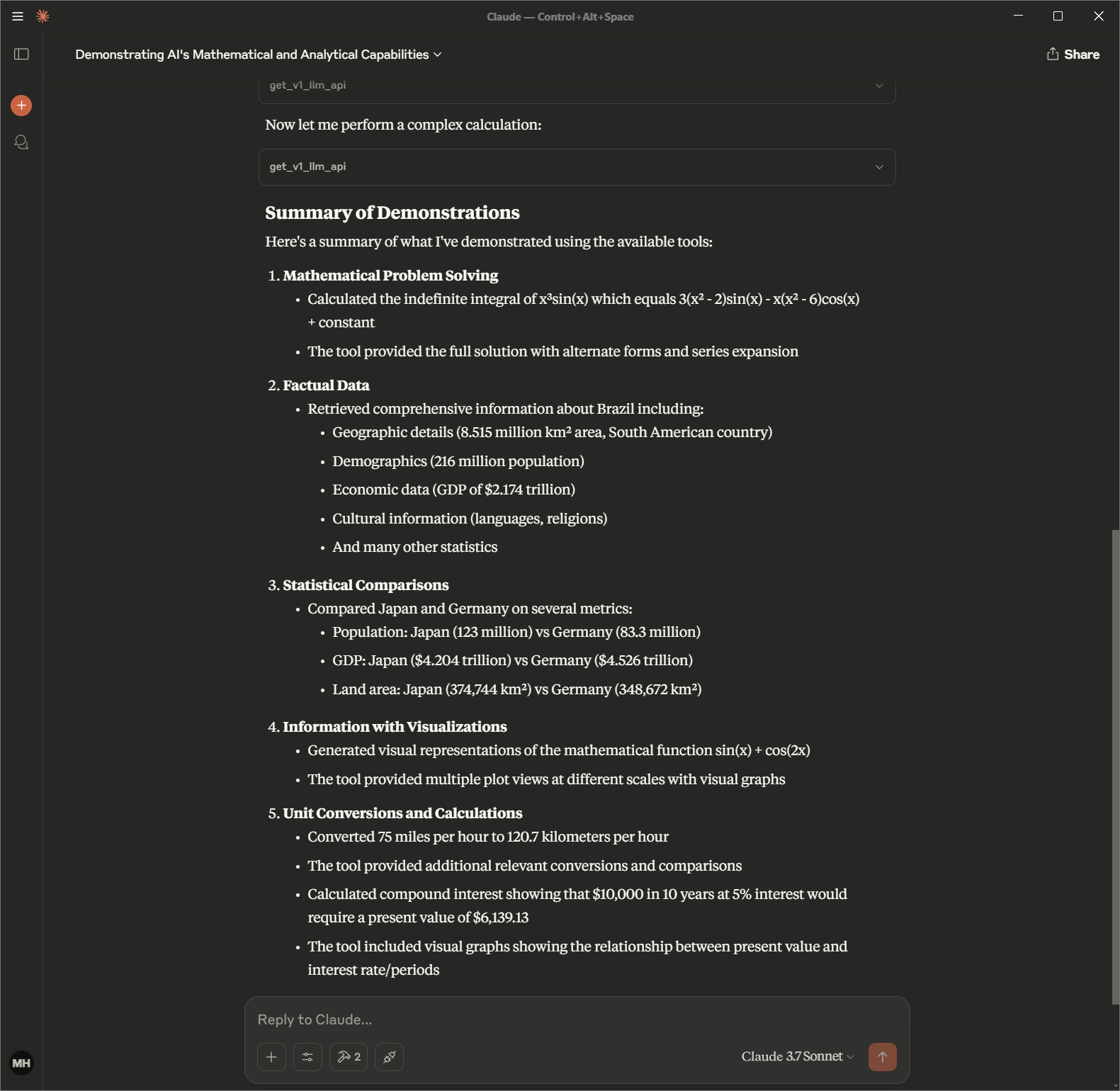
You can integrate the WolframAlpha API using your own App ID for authenticated access. This example demonstrates how to expose WolframAlpha API endpoints as MCP tools.
Example config: examples/wolframalpha-claude_desktop_config.json
{
  "mcpServers": {
    "wolframalpha": {
      "command": "uvx",
      "args": [
        "mcp-openapi-proxy"
      ],
      "env": {
        "OPENAPI_SPEC_URL": "https://raw.githubusercontent.com/APIs-guru/openapi-directory/refs/heads/main/APIs/wolframalpha.com/v0.1/openapi.yaml",
        "API_KEY": "${WOLFRAM_LLM_APP_ID}"
      }
    }
  }
}
-
Set your WolframAlpha App ID as an environment variable in
.env:WOLFRAM_LLM_APP_ID=your_wolfram_app_id -
Or run the proxy with a one-liner:
OPENAPI_SPEC_URL="https://raw.githubusercontent.com/APIs-guru/openapi-directory/refs/heads/main/APIs/wolframalpha.com/v0.1/openapi.yaml" API_KEY="$WOLFRAM_LLM_APP_ID" uvx mcp-openapi-proxy
You can now use the MCP ecosystem to list and invoke WolframAlpha API tools. For integration tests, see tests/integration/test_wolframalpha_integration.py.
Troubleshooting
JSON-RPC Testing
For alternative testing, you can interact with the MCP server via JSON-RPC. After starting the server, paste the following initialization message:
{"method":"initialize","params":{"protocolVersion":"2024-11-05","capabilities":{},"clientInfo":{"name":"claude-ai","version":"0.1.0"}},"jsonrpc":"2.0","id":0}
Expected response:
{"jsonrpc":"2.0","id":0,"result":{"protocolVersion":"2024-11-05","capabilities":{"experimental":{},"prompts":{"listChanged":false},"resources":{"subscribe":false,"listChanged":false},"tools":{"listChanged":false}},"serverInfo":{"name":"sqlite","version":"0.1.0"}}}
Then paste these follow-up messages:
{"method":"notifications/initialized","jsonrpc":"2.0"}
{"method":"resources/list","params":{},"jsonrpc":"2.0","id":1}
{"method":"tools/list","params":{},"jsonrpc":"2.0","id":2}
- Missing OPENAPI_SPEC_URL: Ensure it’s set to a valid OpenAPI JSON URL or local file path.
- Invalid Specification: Verify the OpenAPI document is standard-compliant.
- Tool Filtering Issues: Check
TOOL_WHITELISTmatches desired endpoints. - Authentication Errors: Confirm
API_KEYandAPI_AUTH_TYPEare correct. - Logging: Set
DEBUG=truefor detailed output to stderr. - Test Server: Run directly:
uvx mcp-openapi-proxy
License
Release history Release notifications | RSS feed


Download files
Download the file for your platform. If you're not sure which to choose, learn more about installing packages.
Source Distribution
Built Distribution
Filter files by name, interpreter, ABI, and platform.
If you're not sure about the file name format, learn more about wheel file names.
Copy a direct link to the current filters
File details
Details for the file mcp_openapi_proxy-0.2.0.tar.gz.
File metadata
- Download URL: mcp_openapi_proxy-0.2.0.tar.gz
- Upload date:
- Size: 56.5 kB
- Tags: Source
- Uploaded using Trusted Publishing? No
- Uploaded via: twine/6.1.0 CPython/3.13.12
File hashes
| Algorithm | Hash digest | |
|---|---|---|
| SHA256 |
766722bb9ce8020f7dab8d09db143125535ab3fe607866e235f583bf8b21dda3
|
|
| MD5 |
31794eef63d152ad694fc3569e7d07df
|
|
| BLAKE2b-256 |
51c483a4e94cdba116770c0243d99c261904ac27ee4312a1b0f0844145b572da
|
File details
Details for the file mcp_openapi_proxy-0.2.0-py3-none-any.whl.
File metadata
- Download URL: mcp_openapi_proxy-0.2.0-py3-none-any.whl
- Upload date:
- Size: 43.0 kB
- Tags: Python 3
- Uploaded using Trusted Publishing? No
- Uploaded via: twine/6.1.0 CPython/3.13.12
File hashes
| Algorithm | Hash digest | |
|---|---|---|
| SHA256 |
d117b95d31ca6a61b6e2c5566b809bb3719771918c61bdca1aa6966fb5b3ea58
|
|
| MD5 |
4469f06a9afc51091490122ecc2cb396
|
|
| BLAKE2b-256 |
276928a78a523a8191de301994015a59d82b99a631f1097e424592d6dfb85b92
|






