
MCP Virtual Computer
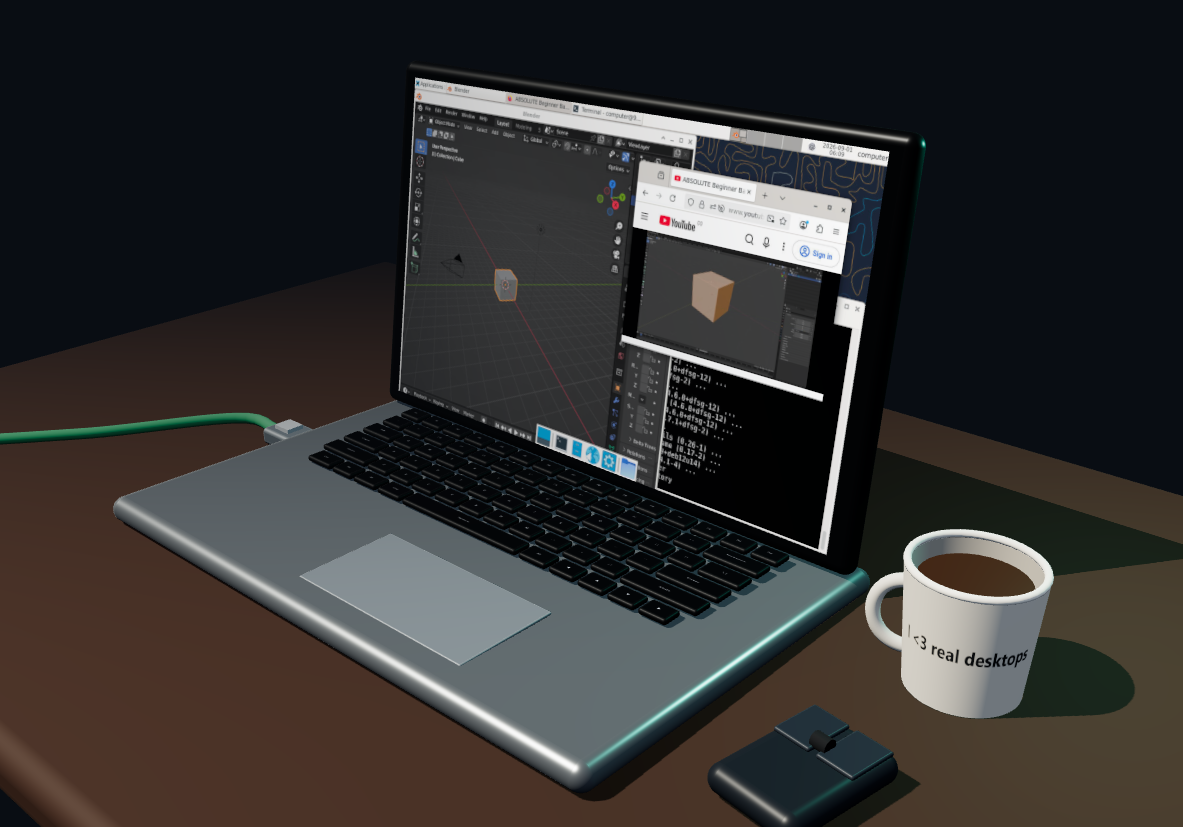
A VM for your agent. And for you.
- click the mug to switch between a virtual desktop or a real one
- unplug the network cable and cut network access
- use the computer screen like a normal screen
- copy and paste text between the host browser and the Xfce desktop
- model can use terminal, create/read/edit files, see the screen, click, type
- little fun thing: if either you or the llm types text, you see that on the keyboard; if one uses the cursor, you see the mouse move on the table.
- auto installs docker and all prerequresits (hopefully)
MCP client example
{
  "mcpServers": {
    "virtual-computer": {
      "command": "uvx",
      "args": ["mcp-virtual-computer"],
      "env": {
        "COMPUTER_ID": "agent-workstation",
        "DESKTOP_ENVIRONMENT": "false",
        "NETWORK_ACCESS": "true",
        "AUTO_INSTALL_DOCKER": "true",
        "EXPOSE_LIFECYCLE_TOOLS": "false"
      }
    }
  }
}
What it exposes
terminal_execute— run a command in the configured Docker computer.read_file— read a UTF-8 text file relative to/workspaceor by absolute path.write_file— atomically write a UTF-8 text file.edit_file— replace one exact text match, or all matches when requested.computer_ui— open or attach the Three.js computer view.
With DESKTOP_ENVIRONMENT=true, it additionally exposes:
look_at_screen— return the current PNG framebuffer, AT-SPI snapshot, or both.click,type, andscroll— interact by AT-SPI element reference or coordinates.list_windowsandswitch_window— enumerate and activate real Xfce windows.move_window,maximize_window,restore_window,minimize_window, andclose_window— control a selected window by ID, title, or class.computer://screen/current.png— current live framebuffer resource.computer://screen/accessibility.json— Playwright-like AT-SPI tree with element refs, roles, names, actions, focus state, and screen bounds.
The MCP App can always call runtime_status, set_network_access, and set_desktop_environment. Set EXPOSE_LIFECYCLE_TOOLS=true to additionally expose those lifecycle controls to the model; they remain model-hidden by default.
License and origin
MIT licensed. This project is a Docker-only fork of Kilntainers.
1 maintainer

Metadata
1 maintainer
Release files for mcp-virtual-computer 0.2.8
For a detailed explanation of source distributions (sdists) and built distributions (wheels), please see the package formats documentation.
Source distribution (sdist)
| File | Size | Uploaded | |
|---|---|---|---|
| mcp_virtual_computer-0.2.8.tar.gz | 478.4 kB | Details |
Built distribution (wheel)
| File | Interpreter | ABI | Platform | Reset |
|---|---|---|---|---|
| mcp_virtual_computer-0.2.8-py3-none-any.whl | Python 3 | none | any | Details |
Total release size: 974.4 kB
Release files / mcp_virtual_computer-0.2.8.tar.gz
| Download URL | mcp_virtual_computer-0.2.8.tar.gz |
|---|---|
| Size | 478.4 kB |
| Tags | Source |
|
SHA-256 checksum How to use checksums |
db4dd97b5627b6e565cb6aa3422cd6dce66c374935b49fa6490c43e758fa2647
|
|
BLAKE2b-256 checksum How to use checksums |
40b34c99d16247a0b9c2138f01b5306c2d897649d459159cb797b43f327bdd1c
|
| Upload date | |
|
Uploaded using Trusted Publishing? What is trusted publishing? |
No |
| Uploaded via |
uv/0.12.7 {"installer":{"name":"uv","version":"0.12.7","subcommand":["publish"]},"python":null,"implementation":{"name":null,"version":null},"distro":null,"system":{"name":null,"release":null},"cpu":null,"openssl_version":null,"setuptools_version":null,"rustc_version":null,"ci":null}
|
Release files / mcp_virtual_computer-0.2.8-py3-none-any.whl
| Download URL | mcp_virtual_computer-0.2.8-py3-none-any.whl |
|---|---|
| Size | 496.1 kB |
| Tags | Python 3 |
|
SHA-256 checksum How to use checksums |
d859ab41ac90b22e90891b9479c72ef26fd8d4284f72db8dc7a134f8953a648d
|
|
BLAKE2b-256 checksum How to use checksums |
f0d1c75fc03491045719b9be2ed046dc6a9f1924858dd11ef7c53731f8239de0
|
| Upload date | |
|
Uploaded using Trusted Publishing? What is trusted publishing? |
No |
| Uploaded via |
uv/0.12.7 {"installer":{"name":"uv","version":"0.12.7","subcommand":["publish"]},"python":null,"implementation":{"name":null,"version":null},"distro":null,"system":{"name":null,"release":null},"cpu":null,"openssl_version":null,"setuptools_version":null,"rustc_version":null,"ci":null}
|














