
AI Memory and Conversation Management Framework - Simple as mem0, Powerful as MemU
Verified details
These details have been verified by PyPIProject links
GitHub Statistics
Maintainers


Project description

MemU
A Future-Oriented Agentic Memory System





MemU is an agentic memory framework for LLM and AI agent backends. It receives multimodal inputs (conversations, documents, images), extracts them into structured memory, and organizes them into a hierarchical file system that supports both embedding-based (RAG) and non-embedding (LLM) retrieval.
MemU is collaborating with four open-source projects to launch the 2026 New Year Challenge. 🎉Between January 8–18, contributors can submit PRs to memU and earn cash rewards, community recognition, and platform credits. 🎁Learn more & get involved
✨ Core Features
| Feature | Description |
|---|---|
| 🗂️ Hierarchical File System | Three-layer architecture: Resource → Item → Category with full traceability |
| 🔍 Dual Retrieval Methods | RAG (embedding-based) for speed, LLM (non-embedding) for deep semantic understanding |
| 🎨 Multimodal Support | Process conversations, documents, images, audio, and video |
| 🔄 Self-Evolving Memory | Memory structure adapts and improves based on usage patterns |
🗂️ Hierarchical File System
MemU organizes memory using a three-layer architecture inspired by hierarchical storage systems:

| Layer | Description | Examples |
|---|---|---|
| Resource | Raw multimodal data warehouse | JSON conversations, text documents, images, videos |
| Item | Discrete extracted memory units | Individual preferences, skills, opinions, habits |
| Category | Aggregated textual memory with summaries | preferences.md, work_life.md, relationships.md |
Key Benefits:
- Full Traceability: Track from raw data → items → categories and back
- Progressive Summarization: Each layer provides increasingly abstracted views
- Flexible Organization: Categories evolve based on content patterns
🎨 Multimodal Support
MemU processes diverse content types into unified memory:
| Modality | Input | Processing |
|---|---|---|
conversation |
JSON chat logs | Extract preferences, opinions, habits, relationships |
document |
Text files (.txt, .md) | Extract knowledge, skills, facts |
image |
PNG, JPG, etc. | Vision model extracts visual concepts and descriptions |
video |
Video files | Frame extraction + vision analysis |
audio |
Audio files | Transcription + text processing |
All modalities are unified into the same three-layer hierarchy, enabling cross-modal retrieval.
🚀 Quick Start
Option 1: Cloud Version
Try MemU instantly without any setup:
👉 memu.so - Hosted cloud service with full API access
For enterprise deployment and custom solutions, contact info@nevamind.ai
Cloud API (v3)
| Base URL | https://api.memu.so |
|---|---|
| Auth | Authorization: Bearer YOUR_API_KEY |
| Method | Endpoint | Description |
|---|---|---|
POST |
/api/v3/memory/memorize |
Register a memorization task |
GET |
/api/v3/memory/memorize/status/{task_id} |
Get task status |
POST |
/api/v3/memory/categories |
List memory categories |
POST |
/api/v3/memory/retrieve |
Retrieve memories (semantic search) |
Option 2: Self-Hosted
Installation
pip install -e .
Basic Example
Requirements: Python 3.13+ and an OpenAI API key
Test with In-Memory Storage (no database required):
export OPENAI_API_KEY=your_api_key
cd tests
python test_inmemory.py
Test with PostgreSQL Storage (requires pgvector):
# Start PostgreSQL with pgvector
docker run -d \
  --name memu-postgres \
  -e POSTGRES_USER=postgres \
  -e POSTGRES_PASSWORD=postgres \
  -e POSTGRES_DB=memu \
  -p 5432:5432 \
  pgvector/pgvector:pg16

# Run the test
export OPENAI_API_KEY=your_api_key
cd tests
python test_postgres.py
Both examples demonstrate the complete workflow:
- Memorize: Process a conversation file and extract structured memory
- Retrieve (RAG): Fast embedding-based search
- Retrieve (LLM): Deep semantic understanding search
See tests/test_inmemory.py and tests/test_postgres.py for the full source code.
📖 Core APIs
memorize() - Extract and Store Memory
Processes input resources and extracts structured memory:

result = await service.memorize(
    resource_url="path/to/file.json",  # File path or URL
    modality="conversation",            # conversation | document | image | video | audio
    user={"user_id": "123"}             # Optional: scope to a user
)

# Returns:
{
    "resource": {...},      # Stored resource metadata
    "items": [...],         # Extracted memory items
    "categories": [...]     # Updated category summaries
}
retrieve() - Query Memory
Retrieves relevant memory based on queries. MemU supports two retrieval strategies:

RAG-based Retrieval (method="rag")
Fast embedding vector search using cosine similarity:
- ✅ Fast: Pure vector computation
- ✅ Scalable: Efficient for large memory stores
- ✅ Returns scores: Each result includes similarity score
LLM-based Retrieval (method="llm")
Deep semantic understanding through direct LLM reasoning:
- ✅ Deep understanding: LLM comprehends context and nuance
- ✅ Query rewriting: Automatically refines query at each tier
- ✅ Adaptive: Stops early when sufficient information is found
Comparison
| Aspect | RAG | LLM |
|---|---|---|
| Speed | ⚡ Fast | 🐢 Slower |
| Cost | 💰 Low | 💰💰 Higher |
| Semantic depth | Medium | Deep |
| Tier 2 scope | All items | Only items in relevant categories |
| Output | With similarity scores | Ranked by LLM reasoning |
Both methods support:
- Context-aware rewriting: Resolves pronouns using conversation history
- Progressive search: Categories → Items → Resources
- Sufficiency checking: Stops when enough information is retrieved
Usage
result = await service.retrieve(
    queries=[
        {"role": "user", "content": {"text": "What are their preferences?"}},
        {"role": "user", "content": {"text": "Tell me about work habits"}}
    ],
    where={"user_id": "123"}  # Optional: scope filter
)

# Returns:
{
    "categories": [...],     # Relevant categories (with scores for RAG)
    "items": [...],          # Relevant memory items
    "resources": [...],      # Related raw resources
    "next_step_query": "..." # Rewritten query for follow-up (if applicable)
}
Scope Filtering: Use where to filter by user model fields:
where={"user_id": "123"}- exact matchwhere={"agent_id__in": ["1", "2"]}- match any in list- Omit
whereto retrieve across all scopes
📚 For complete API documentation, see SERVICE_API.md - includes all methods, CRUD operations, pipeline configuration, and configuration types.
💡 Use Cases
Example 1: Conversation Memory
Extract and organize memory from multi-turn conversations:
export OPENAI_API_KEY=your_api_key
python examples/example_1_conversation_memory.py
What it does:
- Processes multiple conversation JSON files
- Extracts memory items (preferences, habits, opinions, relationships)
- Generates category markdown files (
preferences.md,work_life.md, etc.)
Best for: Personal AI assistants, customer support bots, social chatbots
Example 2: Skill Extraction from Logs
Extract skills and lessons learned from agent execution logs:
export OPENAI_API_KEY=your_api_key
python examples/example_2_skill_extraction.py
What it does:
- Processes agent logs sequentially
- Extracts actions, outcomes, and lessons learned
- Demonstrates incremental learning - memory evolves with each file
- Generates evolving skill guides (
log_1.md→log_2.md→skill.md)
Best for: DevOps teams, agent self-improvement, knowledge management
Example 3: Multimodal Memory
Process diverse content types into unified memory:
export OPENAI_API_KEY=your_api_key
python examples/example_3_multimodal_memory.py
What it does:
- Processes documents and images together
- Extracts memory from different content types
- Unifies into cross-modal categories (
technical_documentation,visual_diagrams, etc.)
Best for: Documentation systems, learning platforms, research tools
📊 Performance
MemU achieves 92.09% average accuracy on the Locomo benchmark across all reasoning tasks.
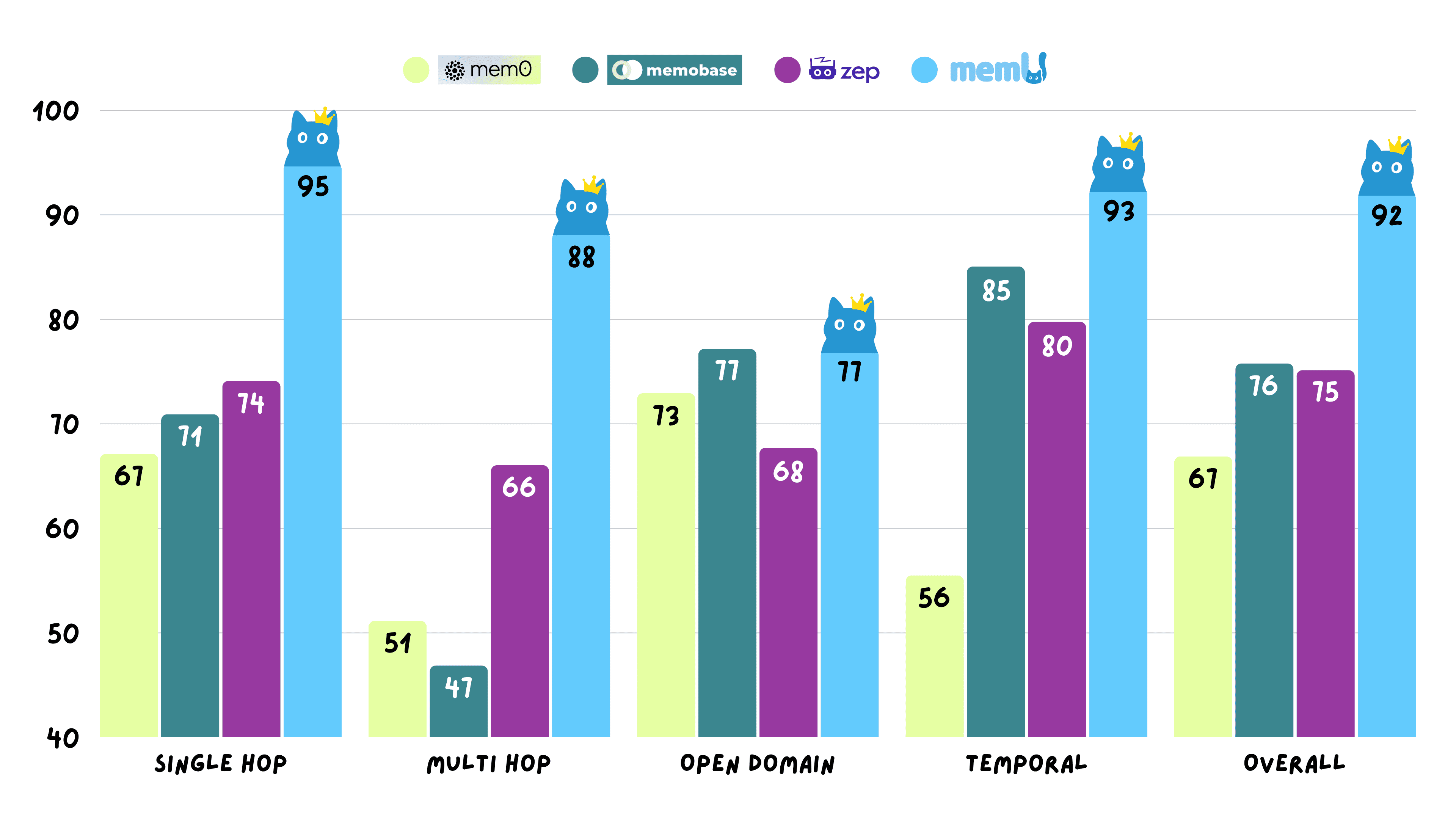
View detailed experimental data: memU-experiment
🧩 Ecosystem
| Repository | Description | Use Case |
|---|---|---|
| memU | Core algorithm engine | Embed AI memory into your product |
| memU-server | Backend service with CRUD, user system, RBAC | Self-host a memory backend |
| memU-ui | Visual dashboard | Ready-to-use memory console |
Quick Links:
🤝 Partners





📄 License
🌍 Community
- GitHub Issues: Report bugs & request features
- Discord: Join the community
- X (Twitter): Follow @memU_ai
- Contact: info@nevamind.ai
⭐ Star us on GitHub to get notified about new releases!
Project details
Verified details
These details have been verified by PyPIProject links
GitHub Statistics
Maintainers
Release history Release notifications | RSS feed


Download files
Download the file for your platform. If you're not sure which to choose, learn more about installing packages.
Source Distribution
Built Distributions
Filter files by name, interpreter, ABI, and platform.
If you're not sure about the file name format, learn more about wheel file names.
Copy a direct link to the current filters
File details
Details for the file memu_py-1.0.1.tar.gz.
File metadata
- Download URL: memu_py-1.0.1.tar.gz
- Upload date:
- Size: 9.8 MB
- Tags: Source
- Uploaded using Trusted Publishing? Yes
- Uploaded via: twine/6.1.0 CPython/3.13.7
File hashes
| Algorithm | Hash digest | |
|---|---|---|
| SHA256 |
c2587276372208a924362a7f6b5f1df503e804e1f0663e0f5743dd92d330dbee
|
|
| MD5 |
ac65ff2f8b49a41f83d2e6adfc8d006a
|
|
| BLAKE2b-256 |
74b0e2ecbae88af962954a1b8cd5e8e50e62ba39163bd8339c66cb185220d73c
|
Provenance
The following attestation bundles were made for memu_py-1.0.1.tar.gz:
Publisher:
release-please.yml on NevaMind-AI/memU
-
Statement:
-
Statement type:
https://in-toto.io/Statement/v1 -
Predicate type:
https://docs.pypi.org/attestations/publish/v1 -
Subject name:
memu_py-1.0.1.tar.gz -
Subject digest:
c2587276372208a924362a7f6b5f1df503e804e1f0663e0f5743dd92d330dbee - Sigstore transparency entry: 797567442
- Sigstore integration time:
-
Permalink:
NevaMind-AI/memU@8ed7f153afc05ca9a9805cb022db788cdd7c7f4b -
Branch / Tag:
refs/heads/main - Owner: https://github.com/NevaMind-AI
-
Access:
public
-
Token Issuer:
https://token.actions.githubusercontent.com -
Runner Environment:
github-hosted -
Publication workflow:
release-please.yml@8ed7f153afc05ca9a9805cb022db788cdd7c7f4b -
Trigger Event:
push
-
Statement type:
File details
Details for the file memu_py-1.0.1-cp313-abi3-win_amd64.whl.
File metadata
- Download URL: memu_py-1.0.1-cp313-abi3-win_amd64.whl
- Upload date:
- Size: 219.2 kB
- Tags: CPython 3.13+, Windows x86-64
- Uploaded using Trusted Publishing? Yes
- Uploaded via: twine/6.1.0 CPython/3.13.7
File hashes
| Algorithm | Hash digest | |
|---|---|---|
| SHA256 |
d070d688c9ccd32465ad96b2e74e3f91524afa9b941a0090df33299e85711918
|
|
| MD5 |
3e939695d12c4d8037eda9695a69b967
|
|
| BLAKE2b-256 |
af7f76272d0ff093e01d692c2ef2ebd63608c3df6707e2fcfc0802a12ecbff9a
|
Provenance
The following attestation bundles were made for memu_py-1.0.1-cp313-abi3-win_amd64.whl:
Publisher:
release-please.yml on NevaMind-AI/memU
-
Statement:
-
Statement type:
https://in-toto.io/Statement/v1 -
Predicate type:
https://docs.pypi.org/attestations/publish/v1 -
Subject name:
memu_py-1.0.1-cp313-abi3-win_amd64.whl -
Subject digest:
d070d688c9ccd32465ad96b2e74e3f91524afa9b941a0090df33299e85711918 - Sigstore transparency entry: 797567465
- Sigstore integration time:
-
Permalink:
NevaMind-AI/memU@8ed7f153afc05ca9a9805cb022db788cdd7c7f4b -
Branch / Tag:
refs/heads/main - Owner: https://github.com/NevaMind-AI
-
Access:
public
-
Token Issuer:
https://token.actions.githubusercontent.com -
Runner Environment:
github-hosted -
Publication workflow:
release-please.yml@8ed7f153afc05ca9a9805cb022db788cdd7c7f4b -
Trigger Event:
push
-
Statement type:
File details
Details for the file memu_py-1.0.1-cp313-abi3-manylinux_2_39_x86_64.whl.
File metadata
- Download URL: memu_py-1.0.1-cp313-abi3-manylinux_2_39_x86_64.whl
- Upload date:
- Size: 356.0 kB
- Tags: CPython 3.13+, manylinux: glibc 2.39+ x86-64
- Uploaded using Trusted Publishing? Yes
- Uploaded via: twine/6.1.0 CPython/3.13.7
File hashes
| Algorithm | Hash digest | |
|---|---|---|
| SHA256 |
16edf3586a7b2ea4b9f8f375e1902860f6eb38143ae90fada7f43a1163ea2639
|
|
| MD5 |
f02be51e8b725fd1f07e2feecf9f90c0
|
|
| BLAKE2b-256 |
e20dbdf02031987f7d5549418eb971799c87ee20481c89d669fa25839f40a733
|
Provenance
The following attestation bundles were made for memu_py-1.0.1-cp313-abi3-manylinux_2_39_x86_64.whl:
Publisher:
release-please.yml on NevaMind-AI/memU
-
Statement:
-
Statement type:
https://in-toto.io/Statement/v1 -
Predicate type:
https://docs.pypi.org/attestations/publish/v1 -
Subject name:
memu_py-1.0.1-cp313-abi3-manylinux_2_39_x86_64.whl -
Subject digest:
16edf3586a7b2ea4b9f8f375e1902860f6eb38143ae90fada7f43a1163ea2639 - Sigstore transparency entry: 797567453
- Sigstore integration time:
-
Permalink:
NevaMind-AI/memU@8ed7f153afc05ca9a9805cb022db788cdd7c7f4b -
Branch / Tag:
refs/heads/main - Owner: https://github.com/NevaMind-AI
-
Access:
public
-
Token Issuer:
https://token.actions.githubusercontent.com -
Runner Environment:
github-hosted -
Publication workflow:
release-please.yml@8ed7f153afc05ca9a9805cb022db788cdd7c7f4b -
Trigger Event:
push
-
Statement type:
File details
Details for the file memu_py-1.0.1-cp313-abi3-macosx_11_0_arm64.whl.
File metadata
- Download URL: memu_py-1.0.1-cp313-abi3-macosx_11_0_arm64.whl
- Upload date:
- Size: 324.9 kB
- Tags: CPython 3.13+, macOS 11.0+ ARM64
- Uploaded using Trusted Publishing? Yes
- Uploaded via: twine/6.1.0 CPython/3.13.7
File hashes
| Algorithm | Hash digest | |
|---|---|---|
| SHA256 |
43cfdb648ef54fa199b9bcbf4813db2e8225347c800dced231874132bee42795
|
|
| MD5 |
9c3c918f3d1054b37d4542d727861860
|
|
| BLAKE2b-256 |
78c9c8f98b527cda93b31e8ee03dec2830a0306d34f0f387b9e49c6ae6c779f0
|
Provenance
The following attestation bundles were made for memu_py-1.0.1-cp313-abi3-macosx_11_0_arm64.whl:
Publisher:
release-please.yml on NevaMind-AI/memU
-
Statement:
-
Statement type:
https://in-toto.io/Statement/v1 -
Predicate type:
https://docs.pypi.org/attestations/publish/v1 -
Subject name:
memu_py-1.0.1-cp313-abi3-macosx_11_0_arm64.whl -
Subject digest:
43cfdb648ef54fa199b9bcbf4813db2e8225347c800dced231874132bee42795 - Sigstore transparency entry: 797567445
- Sigstore integration time:
-
Permalink:
NevaMind-AI/memU@8ed7f153afc05ca9a9805cb022db788cdd7c7f4b -
Branch / Tag:
refs/heads/main - Owner: https://github.com/NevaMind-AI
-
Access:
public
-
Token Issuer:
https://token.actions.githubusercontent.com -
Runner Environment:
github-hosted -
Publication workflow:
release-please.yml@8ed7f153afc05ca9a9805cb022db788cdd7c7f4b -
Trigger Event:
push
-
Statement type:
File details
Details for the file memu_py-1.0.1-cp313-abi3-macosx_10_12_x86_64.whl.
File metadata
- Download URL: memu_py-1.0.1-cp313-abi3-macosx_10_12_x86_64.whl
- Upload date:
- Size: 327.3 kB
- Tags: CPython 3.13+, macOS 10.12+ x86-64
- Uploaded using Trusted Publishing? Yes
- Uploaded via: twine/6.1.0 CPython/3.13.7
File hashes
| Algorithm | Hash digest | |
|---|---|---|
| SHA256 |
b6c7cd133ff0277ad3f467148ca0bffa392457ac0647ac30a27f1b5bf268a578
|
|
| MD5 |
0ca74db1630d610286dbae84c324fab9
|
|
| BLAKE2b-256 |
b29730c957238848f36657d46094863587fe6084538f918925e5a628ddd63a78
|
Provenance
The following attestation bundles were made for memu_py-1.0.1-cp313-abi3-macosx_10_12_x86_64.whl:
Publisher:
release-please.yml on NevaMind-AI/memU
-
Statement:
-
Statement type:
https://in-toto.io/Statement/v1 -
Predicate type:
https://docs.pypi.org/attestations/publish/v1 -
Subject name:
memu_py-1.0.1-cp313-abi3-macosx_10_12_x86_64.whl -
Subject digest:
b6c7cd133ff0277ad3f467148ca0bffa392457ac0647ac30a27f1b5bf268a578 - Sigstore transparency entry: 797567456
- Sigstore integration time:
-
Permalink:
NevaMind-AI/memU@8ed7f153afc05ca9a9805cb022db788cdd7c7f4b -
Branch / Tag:
refs/heads/main - Owner: https://github.com/NevaMind-AI
-
Access:
public
-
Token Issuer:
https://token.actions.githubusercontent.com -
Runner Environment:
github-hosted -
Publication workflow:
release-please.yml@8ed7f153afc05ca9a9805cb022db788cdd7c7f4b -
Trigger Event:
push
-
Statement type:






