
This release is a pre-release and may not be stable for production use.

Meridian


Deploy it right. Share it easily.
One command sets up an undetectable proxy — firewall, TLS, routing, all hardened by default.
What is this
Most proxy setups leak — an open port here, a TLS mismatch there, a fingerprint that gives the server away. Meridian locks every layer down automatically: firewall, certificates, SNI routing, fingerprinting. You deploy in one command. Your people connect by scanning a QR code. That's it.
When an IP gets blocked, add a new server with one command; your users pick it up on their next subscription refresh.
Whether you're the "tech friend" setting up a VPN for people you care about, a power user running several servers, or an NGO providing access in a censored region, Meridian handles the complexity so you can focus on staying connected.
See SECURITY.md for the threat model and what Meridian protects against (and what it doesn't).
Why Meridian?
Meridian ships the strongest available protocol — today that's VLESS+Reality — and configures it so your server is indistinguishable from any other website. Nothing left open, nothing to give it away.
| Meridian | Raw Remnawave | Marzban | Hiddify Manager | |
|---|---|---|---|---|
| Install | One command | Manual Docker + panel config | Docker + CLI | Script + web UI |
| Client handoff | QR + hosted page | Manual URL sharing | Panel-only | Panel-only |
| Architecture | nginx+Xray+Remnawave (hardened) | Remnawave panel+node | Xray+Nginx | Xray+Nginx |
| Relay support | Built-in L4 relay | Manual | No | Manual |
| Rebuild workflow | node add NEW_IP |
Start over | Reconfigure | Reconfigure |
Install
Works on macOS and Linux. Windows users: use WSL.
curl -sSf https://getmeridian.org/install.sh | bash
Or install directly from PyPI:
uv tool install meridian-vpn    # recommended
pipx install meridian-vpn       # alternative
Upgrading from 3.x? Meridian 4.0 is not an in-place upgrade: it replaces 3x-ui with Remnawave, and every user needs a new link. Your 3.x servers keep working. See Upgrading from 3.x.
Quick start
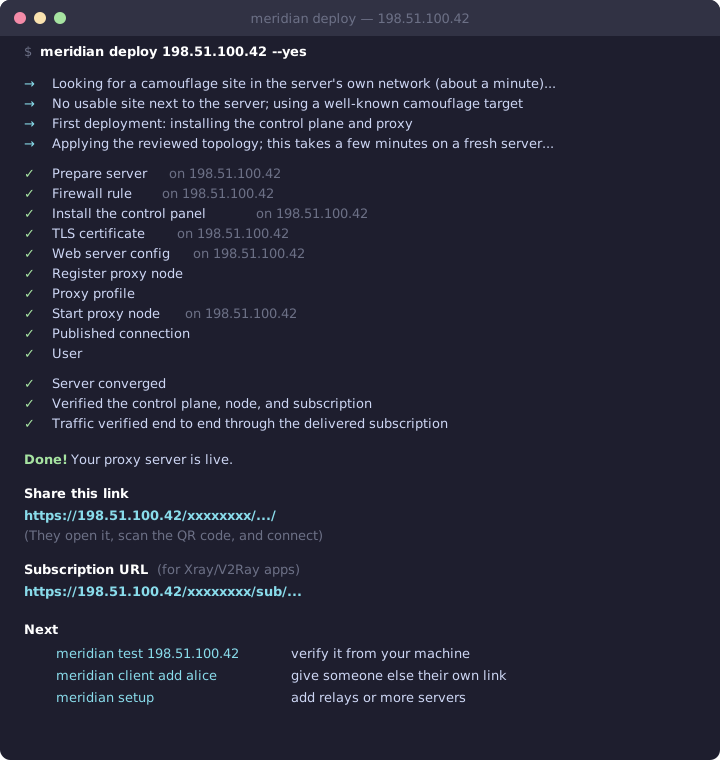
meridian deploy 198.51.100.10
That's the whole setup. Meridian hardens the server, installs the Remnawave panel and Xray, picks a camouflage target that works from your server, verifies real traffic, and prints a connection page (QR codes, app links) plus a subscription URL to share.

Give more people access:
meridian client add alice            # her own connection page and subscription
meridian client list                 # everyone, with status and traffic
meridian client disable alice        # cut off access immediately
Options worth knowing:
meridian deploy 198.51.100.10 --domain vpn.example.com   # add a Cloudflare CDN fallback
meridian deploy 198.51.100.10 --no-harden                # server shared with other services
meridian deploy local                                    # run on the server itself
By default the server blocks Russian domains and IPs through the proxy, to keep your VPS IP out of Russian services' logs. Deploy with --no-geo-block if your users need those sites through Meridian.
To redeploy, run the same command again — paths, keys, and users are kept.
More than one server
meridian setup                                          # guided wizard: exits, relays, routing, users
meridian node add 198.51.100.11 --name germany          # another exit
meridian relay add 203.0.113.10 --exit 198.51.100.10 # domestic entry point
Every change goes through one reviewed topology stored in ~/.config/meridian/cluster.yml. meridian plan shows what would change; meridian apply applies it with checkpoints, so an interrupted run resumes where it stopped.
How it works
Meridian deploys VLESS+Reality — a protocol that makes your server indistinguishable from a legitimate website:
| Censorship method | How Meridian beats it |
|---|---|
| Deep Packet Inspection | Traffic looks like ordinary HTTPS. No proxy signatures. |
| Active probing | Anyone probing your server sees the real certificate of a popular site (such as Google's). Only clients with your key reach the proxy. |
| TLS fingerprinting | uTLS copies Chrome's exact Client Hello, matching billions of real devices. |
| IP blocking | Domain mode adds XHTTP and WSS through Cloudflare's CDN; relays add a domestic entry point. |

- Single server — nginx on port 443 routes Reality traffic to Xray by SNI and serves the panel, connection pages, and subscriptions with a Let's Encrypt IP certificate. No domain needed.
- Domain mode — adds XHTTP and WSS on your domain, carried by Cloudflare's CDN when the server IP is blocked. Hysteria2 over UDP/443 is available as an opt-in.
- Relays — a lightweight TCP forwarder (Realm) on a domestic server passes Reality traffic to the exit abroad, encrypted end to end.
What you need
- A VPS (Debian/Ubuntu) with SSH key access as root or a sudo user — about $5/month from most providers
- Optional: a domain on Cloudflare for the CDN fallback
Commands
| Command | Description |
|---|---|
meridian deploy [IP|local] |
Deploy one server and get a shareable link |
meridian setup |
Guided, resumable wizard for several servers |
meridian plan / meridian apply |
Review and apply the topology in cluster.yml |
meridian client add|show|list|enable|disable |
Manage the people who connect |
meridian node add|list|remove |
Manage exit servers |
meridian relay add|list|remove |
Manage relays |
meridian fleet status|inventory |
Fleet health and inventory |
meridian test [IP] |
Push real traffic through the delivered subscription (no SSH) |
meridian check [IP] |
Check fleet health, or whether a new server can run Meridian |
meridian test [IP] --probe |
Look at your server the way a censor would |
meridian scan [IP] |
Find camouflage targets near a server |
meridian doctor [IP] |
Collect diagnostics for bug reports |
meridian teardown [IP] |
Remove Meridian from a server |
meridian update |
Update the CLI |
client remove revokes a client permanently; removing a node or relay isn't available yet. Most commands support --json for scripting. See the CLI reference for every command and flag.
Client apps
| Platform | App |
|---|---|
| iOS | v2RayTun |
| Android | v2rayNG |
| Windows | v2rayN |
| All platforms | Hiddify |
Troubleshooting
Not connecting? Run meridian test 198.51.100.10 from your machine, or use the web-based ping tool. IP blocked? See the recovery guide.
Something else? Get AI-ready diagnostics:
meridian doctor --ai # copies a redacted, AI-ready prompt to your clipboard
Or open an issue with meridian doctor output.
Docs
Full documentation, interactive command builder, and setup guides:
getmeridian.org · Connection page demo
Community
- Вастрик.Клуб — launch post (78 upvotes, 3k+ views)
1 maintainer

Metadata
1 maintainer
Release files for meridian-vpn 4.0.0b2
For a detailed explanation of source distributions (sdists) and built distributions (wheels), please see the package formats documentation.
Source distribution (sdist)
| File | Size | Uploaded | |
|---|---|---|---|
| meridian_vpn-4.0.0b2.tar.gz | 5.5 MB | Details |
Built distribution (wheel)
| File | Interpreter | ABI | Platform | Reset |
|---|---|---|---|---|
| meridian_vpn-4.0.0b2-py3-none-any.whl | Python 3 | none | any | Details |
Total release size: 11.5 MB
Release files / meridian_vpn-4.0.0b2.tar.gz
| Download URL | meridian_vpn-4.0.0b2.tar.gz |
|---|---|
| Size | 5.5 MB |
| Tags | Source |
|
SHA-256 checksum How to use checksums |
9c4e7b1c95fc6fd875a1cd5f4cf4b43f6b72ee6cb6da4aaf966c45b834bf78eb
|
|
BLAKE2b-256 checksum How to use checksums |
2262a334a38e6fd41e65e6cb1fd2a3a7a4afb466dd6e91f426666c02375078a5
|
| Upload date | |
|
Uploaded using Trusted Publishing? What is trusted publishing? |
Yes |
| Uploaded via |
twine/7.0.0 CPython/3.13.14
|
Provenance
Provenance describes where a file came from. On PyPI, provenance is shared via attestations, which provide a verifiable record of the build or publishing details. View details, limitations and caveats.


PyPI Publish Attestation
PyPI verified that this artifact, at this checksum, originated from the publisher listed below.
Signed by GitHub Actions, verified by PyPI on Oct 13, 2026.
Transparency logRelease files / meridian_vpn-4.0.0b2-py3-none-any.whl
| Download URL | meridian_vpn-4.0.0b2-py3-none-any.whl |
|---|---|
| Size | 6.0 MB |
| Tags | Python 3 |
|
SHA-256 checksum How to use checksums |
8bccb5501ab8b9d031a876d849949b24c12eb7874292e3fb15b1185d1e3b0b5f
|
|
BLAKE2b-256 checksum How to use checksums |
4b007611b0e7925e4de631b3c30ec260f11bacfa87ac06f5aea004d92ba1c68e
|
| Upload date | |
|
Uploaded using Trusted Publishing? What is trusted publishing? |
Yes |
| Uploaded via |
twine/7.0.0 CPython/3.13.14
|
Provenance
Provenance describes where a file came from. On PyPI, provenance is shared via attestations, which provide a verifiable record of the build or publishing details. View details, limitations and caveats.
PyPI Publish Attestation
PyPI verified that this artifact, at this checksum, originated from the publisher listed below.
Signed by GitHub Actions, verified by PyPI on Oct 13, 2026.
Transparency log













