
This release is a pre-release and may not be stable for production use.

Meridian


Deploy it right. Share it easily.
One command turns a fresh VPS into a hardened VLESS+Reality proxy and gives you a link to share.
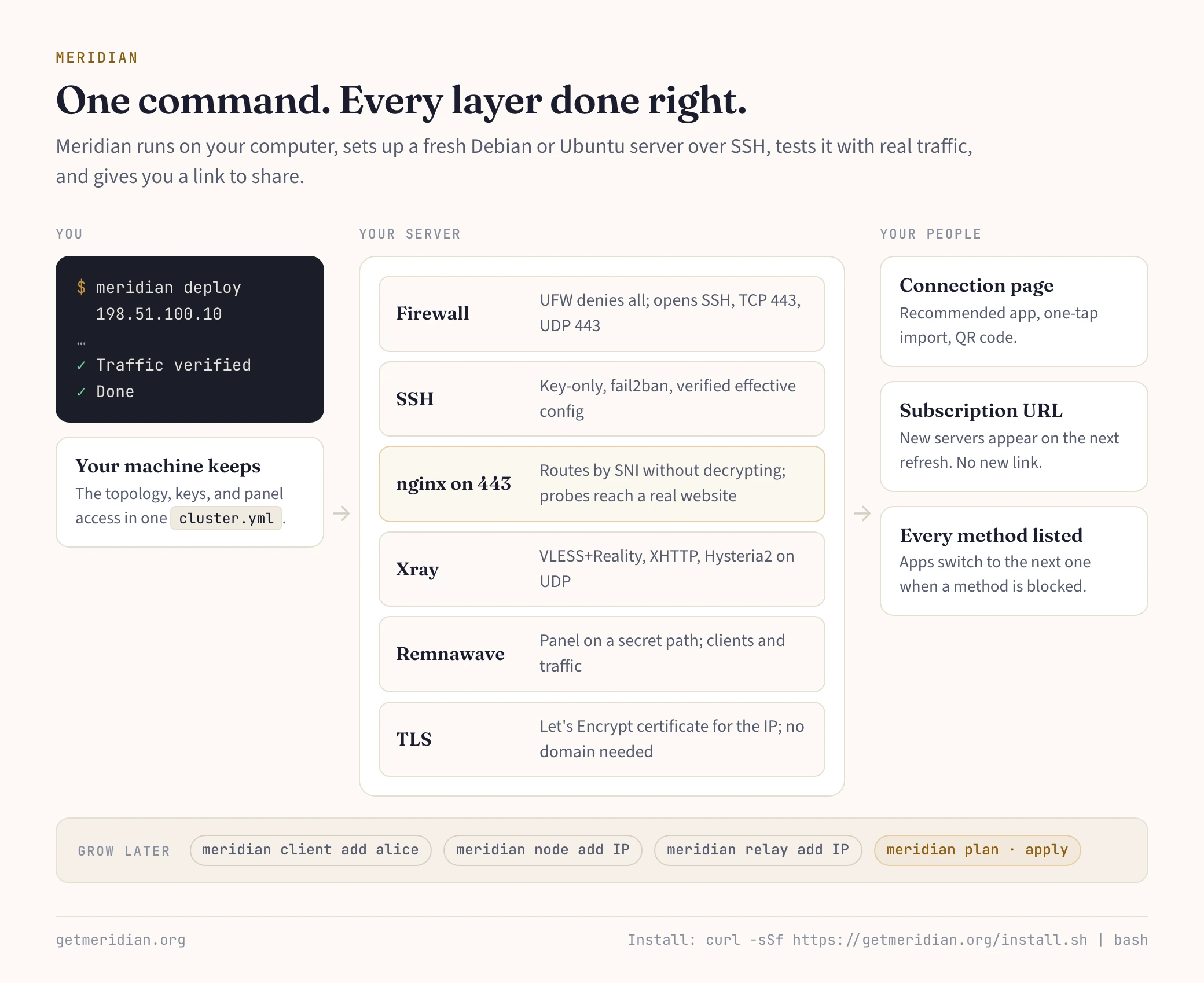
A proxy that works can still give itself away: an open admin port, a self-signed certificate, a container that skips the firewall. Meridian sets up every layer correctly, tests the server with real traffic, and hands each person a connection page with a QR code. When an address gets blocked, add or move a server; apps pick up the change on their next refresh.
Install
macOS or Linux (on Windows, use WSL):
curl -sSf https://getmeridian.org/install.sh | bash
Or from PyPI: uv tool install meridian-vpn (or pipx install meridian-vpn).
You need a fresh Debian or Ubuntu VPS you can reach over SSH with a key, as root or a user with passwordless sudo. Meridian runs on your computer, not on the server.
Quick start
meridian deploy 198.51.100.10 --client-name alice
When it prints "Done", send Alice her connection page link. She opens it, installs the recommended app, and taps once to connect. Then:
meridian client add bob carol      # one client per person
meridian client show bob           # print his link again
meridian test                      # real traffic through the delivered subscription
Re-run deploy at any time: keys, paths, and clients are kept. meridian setup asks the same questions as a guided wizard.
What one deploy sets up
- Methods: VLESS+Reality and XHTTP on TCP 443, Hysteria2 on UDP 443 with salamander. Every subscription lists all of them, and capable apps switch on their own.
- Camouflage: nginx routes TCP 443 by SNI without decrypting. A probe without the key reaches a real website and gets its genuine certificate. Deploy picks the target from the server's own network.
- Hardening: key-only SSH, fail2ban, UFW opening only SSH and 443, no public container ports, a Let's Encrypt certificate for the IP. No domain needed.
- Panel: Remnawave on a secret HTTPS path. Shared links never reveal it.
Options worth knowing:
meridian deploy 198.51.100.10 --domain vpn.example.com   # XHTTP + WSS through Cloudflare when the IP is blocked
meridian deploy 198.51.100.10 --display-name "Family VPN" # label on every connection page
meridian deploy 198.51.100.10 --no-geo-block             # allow Russian sites through the proxy (blocked by default)
meridian deploy local                                    # run on the server itself
Grow the fleet
meridian node add 198.51.100.20 --name germany        # another exit
meridian relay add 203.0.113.10 --exit 198.51.100.10  # domestic entry point (Realm TCP forwarder)
meridian node replace EXIT_ID 198.51.100.30           # move a blocked exit, keys and clients included
meridian setup                                        # any shape: relay chains, routing gateways
Every change edits one topology in ~/.config/meridian/cluster.yml. meridian plan shows what would change; meridian apply applies exactly that, with checkpoints, so an interrupted run resumes. Back up that folder: it holds your keys and panel access.
When something breaks
meridian test 198.51.100.10           # which step fails: network, TLS, subscription, or proxy
meridian test 198.51.100.10 --probe   # the server as a censor sees it (run from inside the censored network)
meridian check                        # server health over SSH
meridian doctor --ai                  # redacted report, ready to paste into an AI chat
IP blocked? Follow the recovery guide. Users can run "Check my connection" on their own page.
Commands
deploy, setup |
Set up one server, or any fleet with the wizard |
client add|show|list|enable|disable|remove |
The people who connect |
node add|list|replace|remove, relay add|list|remove |
Exits and relays |
route add|list|remove |
Send chosen sites through WARP, directly, or nowhere |
plan, apply |
Review and apply the topology |
test, check, scan, doctor |
Verify, inspect, find camouflage targets, report |
fleet status|inventory|upgrade, panel |
Fleet overview, Remnawave upgrades, panel access |
teardown, update |
Remove Meridian from a server; update the CLI |
help agents |
Explain Meridian to an AI agent |
Every command takes --help; most take --json. Full list: CLI reference.
Client apps
| App | Platforms |
|---|---|
| Happ | iOS, Android, Windows, macOS, Linux |
| FlClashX | Android, Windows, macOS, Linux |
| Clash Mi | iOS, Android, Windows, macOS, Linux |
| Throne | Windows, macOS, Linux |
The connection page recommends one for each device and links more.
AI agents
meridian help agents
prints a guide for Claude Code, Codex, Cursor, and other agents: how Meridian works and how to drive it safely (--yes, --json envelopes, exit codes, meridian api contracts). Every docs page is also served as Markdown, indexed at getmeridian.org/llms.txt.
More
- Docs: getmeridian.org · connection page demo · architecture
- Upgrading from 3.x: Meridian 4 replaces 3x-ui with Remnawave and is not an in-place upgrade; every user gets a new link. How to move.
- Security: SECURITY.md covers the threat model, including what Meridian does not protect against.
- Contributing: CONTRIBUTING.md · issues (attach
meridian doctoroutput) - License: MIT
1 maintainer

Metadata
1 maintainer
Release files for meridian-vpn 4.0.0b3
For a detailed explanation of source distributions (sdists) and built distributions (wheels), please see the package formats documentation.
Source distribution (sdist)
| File | Size | Uploaded | |
|---|---|---|---|
| meridian_vpn-4.0.0b3.tar.gz | 7.1 MB | Details |
Built distribution (wheel)
| File | Interpreter | ABI | Platform | Reset |
|---|---|---|---|---|
| meridian_vpn-4.0.0b3-py3-none-any.whl | Python 3 | none | any | Details |
Total release size: 14.6 MB
Release files / meridian_vpn-4.0.0b3.tar.gz
| Download URL | meridian_vpn-4.0.0b3.tar.gz |
|---|---|
| Size | 7.1 MB |
| Tags | Source |
|
SHA-256 checksum How to use checksums |
6766f5254d3bcd80b38c7df6578eb7404f2a3cc53022a1f09cb2ff2da412e0d8
|
|
BLAKE2b-256 checksum How to use checksums |
0b2ae070a4a586f27c2727c6de45dd64e0e9164d59f2de3d82f3212582cd2fd4
|
| Upload date | |
|
Uploaded using Trusted Publishing? What is trusted publishing? |
Yes |
| Uploaded via |
twine/7.0.0 CPython/3.13.14
|
Provenance
Provenance describes where a file came from. On PyPI, provenance is shared via attestations, which provide a verifiable record of the build or publishing details. View details, limitations and caveats.


PyPI Publish Attestation
PyPI verified that this artifact, at this checksum, originated from the publisher listed below.
Signed by GitHub Actions, verified by PyPI on Oct 14, 2026.
Transparency logRelease files / meridian_vpn-4.0.0b3-py3-none-any.whl
| Download URL | meridian_vpn-4.0.0b3-py3-none-any.whl |
|---|---|
| Size | 7.5 MB |
| Tags | Python 3 |
|
SHA-256 checksum How to use checksums |
fba922448e72ddd6e8802f018a6d4ad15af66f51f5cf7b6fcb7039c4fde2588a
|
|
BLAKE2b-256 checksum How to use checksums |
6137888fa3cf5e61bb7c6cf855f3613b971aaafdf9c1540d911b2120d45dd56e
|
| Upload date | |
|
Uploaded using Trusted Publishing? What is trusted publishing? |
Yes |
| Uploaded via |
twine/7.0.0 CPython/3.13.14
|
Provenance
Provenance describes where a file came from. On PyPI, provenance is shared via attestations, which provide a verifiable record of the build or publishing details. View details, limitations and caveats.
PyPI Publish Attestation
PyPI verified that this artifact, at this checksum, originated from the publisher listed below.
Signed by GitHub Actions, verified by PyPI on Oct 14, 2026.
Transparency log













