


MFEM + PyMFEM (FEM library)
This repository provides Python binding for MFEM. MFEM is a high performance parallel finite element method (FEM) library (http://mfem.org/).
Installer (setup.py) builds both MFEM and binding together. By default, "pip install mfem" downloads and builds the serial version of MFEM and PyMFEM. Additionally, the installer supports building MFEM with specific options together with other external libraries, including MPI version.
Install
Using pip (Serial MFEM)
pip install mfem # binary install is available only on linux platforms (Py38-312)
Build with additional features (MPI, GPU, GPU-Hypre, GSLIB, SuiteSparse, libCEED, LAPACK)
The setup script accept various options. Download the package manually and run the script. Examples below downloads and build parallel version of MFEM library (linked with Metis and Hypre) and installs under /mfem. See INSTALL for various other options
Download source and build
$ git clone https://github.com/mfem/PyMFEM.git
$ cd PyMFEM

# Build it from local source with MPI
$ pip install ./ -C"with-parallel=Yes" --verbose
Cleaning
$ rm -rf build    # clean build directory
$ rm -rf external # clean external dependencies + wrapper code
$ git clean -f    # clean files under mfem/_ser and mfem/_par
Run test
cd test
python run_examples.py -serial
Usage
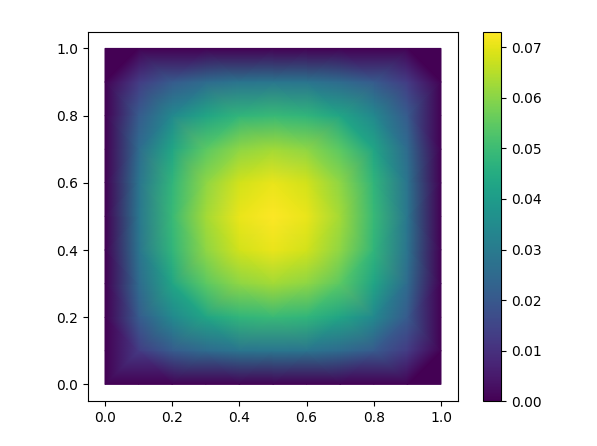
This example (modified from ex1.cpp) solves the Poisson equation,
$$\nabla \cdot (\alpha \nabla u) = f$$
in a square and plots the result using matplotlib.
Use the badge above to open this in Colab.
import mfem.ser as mfem

# Create a square mesh
mesh = mfem.Mesh(10, 10, "TRIANGLE")

# Define the finite element function space
fec = mfem.H1_FECollection(1, mesh.Dimension())   # H1 order=1
fespace = mfem.FiniteElementSpace(mesh, fec)

# Define the essential dofs
ess_tdof_list = mfem.intArray()
ess_bdr = mfem.intArray([1]*mesh.bdr_attributes.Size())
fespace.GetEssentialTrueDofs(ess_bdr, ess_tdof_list)

# Define constants for alpha (diffusion coefficient) and f (RHS)
alpha = mfem.ConstantCoefficient(1.0)
rhs = mfem.ConstantCoefficient(1.0)

"""
Note
-----
In order to represent a variable diffusion coefficient, you
must use a numba-JIT compiled function. For example:

>>> @mfem.jit.scalar
>>> def alpha(x):
>>>     return x+1.0
"""

# Define the bilinear and linear operators
a = mfem.BilinearForm(fespace)
a.AddDomainIntegrator(mfem.DiffusionIntegrator(alpha))
a.Assemble()
b = mfem.LinearForm(fespace)
b.AddDomainIntegrator(mfem.DomainLFIntegrator(rhs))
b.Assemble()

# Initialize a gridfunction to store the solution vector
x = mfem.GridFunction(fespace)
x.Assign(0.0)

# Form the linear system of equations (AX=B)
A = mfem.OperatorPtr()
B = mfem.Vector()
X = mfem.Vector()
a.FormLinearSystem(ess_tdof_list, x, b, A, X, B)
print("Size of linear system: " + str(A.Height()))

# Solve the linear system using PCG and store the solution in x
AA = mfem.OperatorHandle2SparseMatrix(A)
M = mfem.GSSmoother(AA)
mfem.PCG(AA, M, B, X, 1, 200, 1e-12, 0.0)
a.RecoverFEMSolution(X, b, x)

# Extract vertices and solution as numpy arrays
verts = mesh.GetVertexArray()
sol = x.GetDataArray()

# Plot the solution using matplotlib
import matplotlib.pyplot as plt
import matplotlib.tri as tri

triang = tri.Triangulation(verts[:,0], verts[:,1])

fig, ax = plt.subplots()
ax.set_aspect('equal')
tpc = ax.tripcolor(triang, sol, shading='gouraud')
fig.colorbar(tpc)
plt.show()
License
PyMFEM is licensed under BSD-3 license. All new contributions must be made under this license. See License for details.
Please refer the developers' web sites for the external libraries
1 maintainer

Metadata
1 maintainer
Release files for mfem 4.10.0
For a detailed explanation of source distributions (sdists) and built distributions (wheels), please see the package formats documentation.
Source distribution (sdist)
| File | Size | Uploaded | |
|---|---|---|---|
| mfem-4.10.0.tar.gz | 457.4 kB | Details |
Built distributions (wheels)
| File | Reset | |||
|---|---|---|---|---|
| mfem-4.10.0-cp314-cp314-manylinux_2_27_x86_64.manylinux_2_28_x86_64.whl | CPython 3.14 | CPython 3.14 | Linux glibc 2.27+ x86-64, Linux glibc 2.28+ x86-64 | Details |
| mfem-4.10.0-cp314-cp314-macosx_14_0_arm64.whl | CPython 3.14 | CPython 3.14 | macOS 14.0+ ARM64 | Details |
| mfem-4.10.0-cp313-cp313-manylinux_2_27_x86_64.manylinux_2_28_x86_64.whl | CPython 3.13 | CPython 3.13 | Linux glibc 2.28+ x86-64, Linux glibc 2.27+ x86-64 | Details |
| mfem-4.10.0-cp313-cp313-macosx_14_0_arm64.whl | CPython 3.13 | CPython 3.13 | macOS 14.0+ ARM64 | Details |
| mfem-4.10.0-cp312-cp312-manylinux_2_27_x86_64.manylinux_2_28_x86_64.whl | CPython 3.12 | CPython 3.12 | Linux glibc 2.28+ x86-64, Linux glibc 2.27+ x86-64 | Details |
| mfem-4.10.0-cp312-cp312-macosx_14_0_arm64.whl | CPython 3.12 | CPython 3.12 | macOS 14.0+ ARM64 | Details |
| mfem-4.10.0-cp311-cp311-manylinux_2_27_x86_64.manylinux_2_28_x86_64.whl | CPython 3.11 | CPython 3.11 | Linux glibc 2.28+ x86-64, Linux glibc 2.27+ x86-64 | Details |
| mfem-4.10.0-cp311-cp311-macosx_14_0_arm64.whl | CPython 3.11 | CPython 3.11 | macOS 14.0+ ARM64 | Details |
Total release size: 547.2 MB
Release files / mfem-4.10.0.tar.gz
| Download URL | mfem-4.10.0.tar.gz |
|---|---|
| Size | 457.4 kB |
| Tags | Source |
|
SHA-256 checksum How to use checksums |
2b7bad4cbc11882e6ed6765f40ed71fcd7db66b667c4748f5523142dbb5efb3c
|
|
BLAKE2b-256 checksum How to use checksums |
6a0b8bdd6f33515dc4e00c010777c955d44370d0709f6a1dad67eb8e8b1eac2c
|
| Upload date | |
|
Uploaded using Trusted Publishing? What is trusted publishing? |
No |
| Uploaded via |
twine/7.0.0 CPython/3.11.16
|
Release files / mfem-4.10.0-cp314-cp314-manylinux_2_27_x86_64.manylinux_2_28_x86_64.whl
| Download URL | mfem-4.10.0-cp314-cp314-manylinux_2_27_x86_64.manylinux_2_28_x86_64.whl |
|---|---|
| Size | 102.0 MB |
| Tags | CPython 3.14 Linux glibc 2.27+ x86-64 Linux glibc 2.28+ x86-64 |
|
SHA-256 checksum How to use checksums |
d818e7de79e0185861d66f1782c51cb805c0bc0a98833aeae4ceff4582f6f959
|
|
BLAKE2b-256 checksum How to use checksums |
73586ed821aebebfc39404008582c2a87421f114bc302bf0053f820be247edf0
|
| Upload date | |
|
Uploaded using Trusted Publishing? What is trusted publishing? |
No |
| Uploaded via |
twine/7.0.0 CPython/3.14.7
|
Release files / mfem-4.10.0-cp314-cp314-macosx_14_0_arm64.whl
| Download URL | mfem-4.10.0-cp314-cp314-macosx_14_0_arm64.whl |
|---|---|
| Size | 34.8 MB |
| Tags | CPython 3.14 macOS 14.0+ ARM64 |
|
SHA-256 checksum How to use checksums |
ee18ee4ef6ab1955b1a8ec388f21c2074cb0d340ec3d7a25ff8b0df0cca176fb
|
|
BLAKE2b-256 checksum How to use checksums |
e0ff58865e39eadc495e36ae1e26c5640240326e9cfdbe49cd7ba94b8b454209
|
| Upload date | |
|
Uploaded using Trusted Publishing? What is trusted publishing? |
No |
| Uploaded via |
twine/7.0.0 CPython/3.13.15
|
Release files / mfem-4.10.0-cp313-cp313-manylinux_2_27_x86_64.manylinux_2_28_x86_64.whl
| Download URL | mfem-4.10.0-cp313-cp313-manylinux_2_27_x86_64.manylinux_2_28_x86_64.whl |
|---|---|
| Size | 102.2 MB |
| Tags | CPython 3.13 Linux glibc 2.27+ x86-64 Linux glibc 2.28+ x86-64 |
|
SHA-256 checksum How to use checksums |
428d38c133909a9dbec437746ce99d91d9ddf72f276642ef040ce8e8951253fa
|
|
BLAKE2b-256 checksum How to use checksums |
db9dce44d68d22cfd1ab6cdf9e9161a9606af198ee1e8f876d5acfb3fd5ca901
|
| Upload date | |
|
Uploaded using Trusted Publishing? What is trusted publishing? |
No |
| Uploaded via |
twine/7.0.0 CPython/3.13.15
|
Release files / mfem-4.10.0-cp313-cp313-macosx_14_0_arm64.whl
| Download URL | mfem-4.10.0-cp313-cp313-macosx_14_0_arm64.whl |
|---|---|
| Size | 34.8 MB |
| Tags | CPython 3.13 macOS 14.0+ ARM64 |
|
SHA-256 checksum How to use checksums |
b0ab2d28760e85a21bc3456f510465f8fd0a3e6e37018e8d5b293c7e9a712a85
|
|
BLAKE2b-256 checksum How to use checksums |
e0af8699d2e9cf46ca8db186d985c4a69f589e7135be6ab004f6075d09b1adda
|
| Upload date | |
|
Uploaded using Trusted Publishing? What is trusted publishing? |
No |
| Uploaded via |
twine/7.0.0 CPython/3.13.15
|
Release files / mfem-4.10.0-cp312-cp312-manylinux_2_27_x86_64.manylinux_2_28_x86_64.whl
| Download URL | mfem-4.10.0-cp312-cp312-manylinux_2_27_x86_64.manylinux_2_28_x86_64.whl |
|---|---|
| Size | 102.1 MB |
| Tags | CPython 3.12 Linux glibc 2.27+ x86-64 Linux glibc 2.28+ x86-64 |
|
SHA-256 checksum How to use checksums |
fbbece5d455fc53bdc748322333995b186fa9ff98c26c941fd0ead4884784e00
|
|
BLAKE2b-256 checksum How to use checksums |
e90e0ddb629030322d30e52a569fb1a697dd5bc06fe1b9675d1a238aef2ff74b
|
| Upload date | |
|
Uploaded using Trusted Publishing? What is trusted publishing? |
No |
| Uploaded via |
twine/7.0.0 CPython/3.12.14
|
Release files / mfem-4.10.0-cp312-cp312-macosx_14_0_arm64.whl
| Download URL | mfem-4.10.0-cp312-cp312-macosx_14_0_arm64.whl |
|---|---|
| Size | 34.9 MB |
| Tags | CPython 3.12 macOS 14.0+ ARM64 |
|
SHA-256 checksum How to use checksums |
e1882d3bec38a1aeb994d177393231211d3f3ebee721ee4ad046af485792558b
|
|
BLAKE2b-256 checksum How to use checksums |
a15e468e748a21ae8df10b30b5272e22ddfb131567c9d01d145bf2f884bab3eb
|
| Upload date | |
|
Uploaded using Trusted Publishing? What is trusted publishing? |
No |
| Uploaded via |
twine/7.0.0 CPython/3.13.15
|
Release files / mfem-4.10.0-cp311-cp311-manylinux_2_27_x86_64.manylinux_2_28_x86_64.whl
| Download URL | mfem-4.10.0-cp311-cp311-manylinux_2_27_x86_64.manylinux_2_28_x86_64.whl |
|---|---|
| Size | 101.4 MB |
| Tags | CPython 3.11 Linux glibc 2.27+ x86-64 Linux glibc 2.28+ x86-64 |
|
SHA-256 checksum How to use checksums |
5748f488336f9c4a0bb6871a4dcf06f3f0ae7c70fe1304ec7b64574ce963e65d
|
|
BLAKE2b-256 checksum How to use checksums |
6e04cbba90fe6676f2a7061f560e3e8f4db319504a41da5e3dca37f9254532c7
|
| Upload date | |
|
Uploaded using Trusted Publishing? What is trusted publishing? |
No |
| Uploaded via |
twine/7.0.0 CPython/3.11.16
|
Release files / mfem-4.10.0-cp311-cp311-macosx_14_0_arm64.whl
| Download URL | mfem-4.10.0-cp311-cp311-macosx_14_0_arm64.whl |
|---|---|
| Size | 34.6 MB |
| Tags | CPython 3.11 macOS 14.0+ ARM64 |
|
SHA-256 checksum How to use checksums |
85c46e7ce9c481b0e23b88fba7822028813cfcd712af7396f7f7747e2a31f301
|
|
BLAKE2b-256 checksum How to use checksums |
3452e7fe3739bed697b70e1194d358b3c79c038e08d9206ff43c2fc2a14427a0
|
| Upload date | |
|
Uploaded using Trusted Publishing? What is trusted publishing? |
No |
| Uploaded via |
twine/7.0.0 CPython/3.13.15
|














