
 MIDI Scripter



MIDI Scripter is a Python framework for filtering, modifying, routing and any other handling of MIDI, Open Sound Control (OSC), keyboard and mouse input and output.
MIDI Scripter listens to input ports and sends incoming messages to subscribed callables such as functions or methods. These callables, along with other Python code, can send modified or new messages through output ports. MIDI Scripter can serve as a proxy that filters, transforms and converts incoming messages.
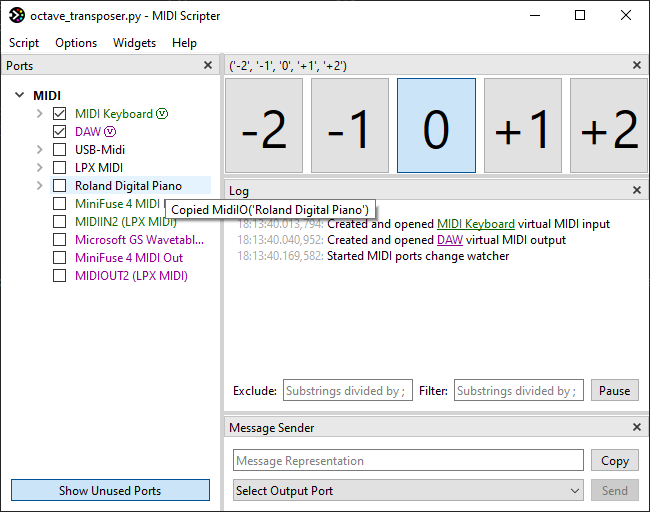
In addition, MIDI Scripter features a customizable graphical user interface (GUI) that provides logging, coding assistance, various controls and indicators to use in the script.
All that with no boilerplate and only a few lines of code.
An octave transposer with GUI controls in 10 lines of code:
from midiscripter import *

midi_keyboard = MidiIn('MIDI Keyboard')  # GUI will provide you the port names
proxy_output = MidiOut('To DAW', virtual=True)  # virtual proxy port for output

# GUI widget in a single line
octave_selector = GuiButtonSelectorH(('-2', '-1', '0', '+1', '+2'), select='0')

@midi_keyboard.subscribe  # decorated function will receive port's messages
def transpose(msg: MidiMsg) -> None:
	if msg.type == MidiType.NOTE_ON or msg.type == MidiType.NOTE_OFF:  # filter
		msg.data1 += 12 * int(octave_selector.selected_item_text)  # modify
	proxy_output.send(msg)  # route

if __name__ == '__main__':
	start_gui()  # opens helpful customizable GUI
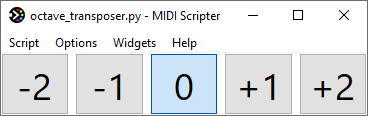
Screenshot with only octave_selector widget enabled:
Screenshot with service Ports and Log and Message Sender widgets:
The average latency for the script above is less than 0.25 milliseconds.
Currently, MIDI Scripter is at "beta" development stage. It is fully functional but needs more user feedback.
Use cases
- Programming MIDI input/output handling scripts that may also use OSC, keyboard and mouse input/output.
- Mapping your MIDI controller in your own custom way, from simple MIDI message filtering or conversion to mostly anything you can imagine.
- Controlling Ableton Live with Python, without diving into it's complex MIDI remote scripting or Max for Live.
Examples
- Launch an app or run any Python code with a MIDI message.
- Show pressed chord description.
- Control Ableton Live with remote script or AbletonOSC.
- Make custom mapping overlay on top of Ableton Live built-in MIDI controller integration.
- Run Python code with Ableton Live clips.
- Save and load global presets for Ableton Live devices.
- Add extra banks to MIDI controller.
Documentation
MIDI Scripter has fully documented and type hinted API.
Overview and API documentation is available here.
Installation
- Install Python 3.11+ including pip.
- Run
pip install midiscripter.
Extra steps for Windows:
- Enable
Add python .exe to PATHoption in Python installer. - Install loopMIDI for virtual MIDI port support.
Quick Start Guide
- Paste the script template into your Python IDE or a plain text editor. Using IDE is recommended.
- Run the template script directly from the IDE or by
python your_script.py. This will open the GUI, providing information about available ports and incoming input. - Ensure that the “Show Unused Ports” button located under the port list is activated. Enable the checkboxes for any available ports to open them. Monitor the log for incoming messages.
- Click on the port names and messages in the log or port list to copy their declarations to the clipboard. You can paste the declarations into your script.
- Rewrite the template function to achieve desired functionality. Use
log('messages')for debugging purposes. - Restart the script from the GUI to see how it performs.
- Develop more complex scripts by utilizing additional inputs, outputs and functions (callables).
Subscribe new callables to input messages using the
@input_port.subscribedecorator.
License
MIDI Scripter assets and code is under LGPL 3.0 license.
The code that use it can have any license.
1 maintainer

Download files
Download the file for your platform. If you're not sure which to choose, learn more about installing packages.
Source Distribution
Built Distribution
Filter files by name, interpreter, ABI, and platform.
If you're not sure about the file name format, learn more about wheel file names.
Copy a direct link to the current filters
File details
Details for the file midiscripter-0.8.1.tar.gz.
File metadata
- Download URL: midiscripter-0.8.1.tar.gz
- Upload date:
- Size: 94.5 kB
- Tags: Source
- Uploaded using Trusted Publishing? Yes
- Uploaded via:
twine/6.1.0 CPython/3.13.7
File hashes
| Algorithm | Hash digest | |
|---|---|---|
| SHA256 |
8c8911b5e0d2be163b40101c5c002e08969903134c0e8d9ca9bbdaf4bfc9b958
|
|
| MD5 |
504f4a59182f5bba090a4e437fcbda33
|
|
| BLAKE2b-256 |
3ea49ec363bc8be7d08f8fc65025022b0d9a4d98204aa177d9a0da26d55009b8
|
Provenance
The following attestation bundles were made for midiscripter-0.8.1.tar.gz:
Publisher:
publish-to-pypi.yml on Maboroshy/midi-scripter
-
Statement:
-
Statement type:
https://in-toto.io/Statement/v1 -
Predicate type:
https://docs.pypi.org/attestations/publish/v1 -
Subject name:
midiscripter-0.8.1.tar.gz -
Subject digest:
8c8911b5e0d2be163b40101c5c002e08969903134c0e8d9ca9bbdaf4bfc9b958 - Sigstore transparency entry: 538272157
- Sigstore integration time:
-
Permalink:
Maboroshy/midi-scripter@917019d35a88685c70bd3419306469988a258c6f -
Branch / Tag:
refs/heads/master - Owner: https://github.com/Maboroshy
-
Access:
public
-
Token Issuer:
https://token.actions.githubusercontent.com -
Runner Environment:
github-hosted -
Publication workflow:
publish-to-pypi.yml@917019d35a88685c70bd3419306469988a258c6f -
Trigger Event:
workflow_dispatch
-
Statement type:
File details
Details for the file midiscripter-0.8.1-py3-none-any.whl.
File metadata
- Download URL: midiscripter-0.8.1-py3-none-any.whl
- Upload date:
- Size: 116.8 kB
- Tags: Python 3
- Uploaded using Trusted Publishing? Yes
- Uploaded via:
twine/6.1.0 CPython/3.13.7
File hashes
| Algorithm | Hash digest | |
|---|---|---|
| SHA256 |
faa76f6f3a90e2c11f679f17538053db2b4d4a170954ce5efcca14d1f91c1212
|
|
| MD5 |
fc68a8a20bffede7c1973e9cc8b0b580
|
|
| BLAKE2b-256 |
98c2c18ddc91cc15ac68909361b43b627906d44d96779f7daf79438073bf65b1
|
Provenance
The following attestation bundles were made for midiscripter-0.8.1-py3-none-any.whl:
Publisher:
publish-to-pypi.yml on Maboroshy/midi-scripter
-
Statement:
-
Statement type:
https://in-toto.io/Statement/v1 -
Predicate type:
https://docs.pypi.org/attestations/publish/v1 -
Subject name:
midiscripter-0.8.1-py3-none-any.whl -
Subject digest:
faa76f6f3a90e2c11f679f17538053db2b4d4a170954ce5efcca14d1f91c1212 - Sigstore transparency entry: 538272193
- Sigstore integration time:
-
Permalink:
Maboroshy/midi-scripter@917019d35a88685c70bd3419306469988a258c6f -
Branch / Tag:
refs/heads/master - Owner: https://github.com/Maboroshy
-
Access:
public
-
Token Issuer:
https://token.actions.githubusercontent.com -
Runner Environment:
github-hosted -
Publication workflow:
publish-to-pypi.yml@917019d35a88685c70bd3419306469988a258c6f -
Trigger Event:
workflow_dispatch
-
Statement type:














