
 MIDI Scripter



MIDI Scripter is a Python framework for filtering, modifying, routing and any other handling of MIDI, Open Sound Control (OSC), keyboard and mouse input and output.
MIDI Scripter listens to input ports and sends incoming messages to subscribed callables such as functions or methods. These callables, along with other Python code, can send modified or new messages through output ports. MIDI Scripter can serve as a proxy that filters, transforms and converts incoming messages.
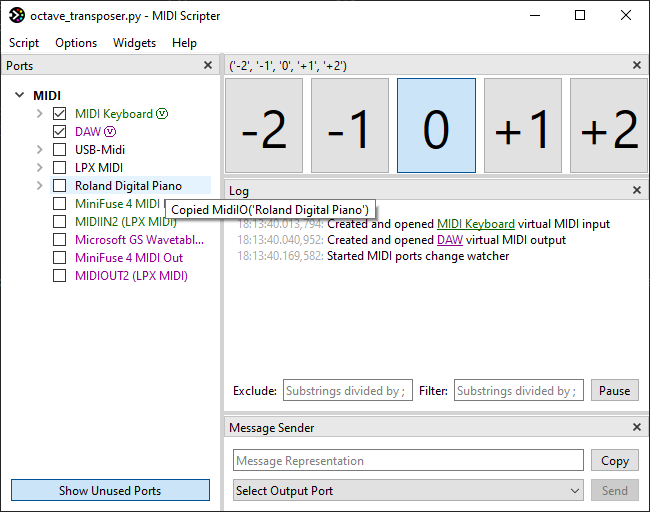
In addition, MIDI Scripter features a customizable graphical user interface (GUI) that provides logging, coding assistance, various controls and indicators to use in the script.
All that with no boilerplate and only a few lines of code.
An octave transposer with GUI controls in 10 lines of code:
from midiscripter import *

midi_keyboard = MidiIn('MIDI Keyboard')  # GUI will provide you the port names
proxy_output = MidiOut('To DAW', virtual=True)  # virtual proxy port for output

# GUI widget in a single line
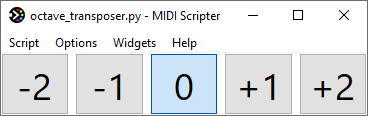
octave_selector = GuiButtonSelectorH(('-2', '-1', '0', '+1', '+2'), select='0')

@midi_keyboard.subscribe  # decorated function will receive port's messages
def transpose(msg: MidiMsg) -> None:
	if msg.type == MidiType.NOTE_ON or msg.type == MidiType.NOTE_OFF:  # filter
		msg.data1 += 12 * int(octave_selector.selected_item_text)  # modify
	proxy_output.send(msg)  # route

if __name__ == '__main__':
	start_gui()  # opens helpful customizable GUI
Screenshot with only octave_selector widget enabled:
Screenshot with Ports and Log widgets enabled:
The average latency for the script above is less than 0.25 milliseconds.
Use cases
- Programming MIDI input/output handling scripts that may also use OSC, keyboard and mouse input/output.
- Mapping your MIDI controller in your own custom way, from simple MIDI message filtering or conversion to mostly anything you can imagine.
- Controlling Ableton Live with Python, without diving into it's complex MIDI remote scripting or Max for Live.
Examples
- Launch an app or run any Python code with a MIDI message.
- Show pressed chord description.
- Control Ableton Live with remote script or AbletonOSC.
- Make custom mapping overlay on top of Ableton Live built-in MIDI controller integration.
- Run Python code with Ableton Live clips.
- Save and load global presets for Ableton Live devices.
- Add extra banks to MIDI controller.
Documentation
MIDI Scripter has fully documented and type hinted API.
Overview and API documentation is available here.
Installation
- Install Python 3.11+ including pip.
- Run
pip install midiscripter.
Extra steps for Windows:
- Enable
Add python.exe to PATHoption in Python installer. - For virtual MIDI port support install loopMIDI
and enable
Compatible with older WindowsMIDI 1.0 port naming in MIDI Settings app. The alternative is setting up loopback ports in MIDI Settings app.
Quick Start Guide
- Paste the script template into your Python IDE or a plain text editor. Using IDE is recommended.
- Run the template script directly from the IDE or by
python your_script.py. This will open the GUI, providing information about available ports and incoming input. - Ensure that the “Show Unused Ports” button located under the port list is activated. Enable the checkboxes for any available ports to open them. Monitor the log for incoming messages.
- Click on the port names and messages in the log or port list to copy their declarations to the clipboard.
You can paste the declarations into your script.
Ctrl+ Click copies the arguments. - Rewrite the template function to achieve desired functionality. Use
log('messages')for debugging purposes. - Restart the script from the GUI to see how it performs.
- Develop more complex scripts by utilizing additional inputs, outputs and functions (callables).
Subscribe new callables to input messages using the
@input_port.subscribedecorator.
License
MIDI Scripter assets and code is under LGPL 3.0 license.
The code that use it can have any license.
1 maintainer

Metadata
1 maintainer
Release files for midiscripter 0.9
For a detailed explanation of source distributions (sdists) and built distributions (wheels), please see the package formats documentation.
Source distribution (sdist)
| File | Size | Uploaded | |
|---|---|---|---|
| midiscripter-0.9.tar.gz | 96.0 kB | Details |
Built distribution (wheel)
| File | Interpreter | ABI | Platform | Reset |
|---|---|---|---|---|
| midiscripter-0.9-py3-none-any.whl | Python 3 | none | any | Details |
Total release size: 214.9 kB
Release files / midiscripter-0.9.tar.gz
| Download URL | midiscripter-0.9.tar.gz |
|---|---|
| Size | 96.0 kB |
| Tags | Source |
|
SHA-256 checksum How to use checksums |
eb1f450a48ef913f0abb9eb09deddea3c6fc8c968d4663bed26be0cef0aaf0ab
|
|
BLAKE2b-256 checksum How to use checksums |
19fd1001aed0ea88f1fed1e4e0a55be25ddcf97dab5365c9cc80ab28d443a399
|
| Upload date | |
|
Uploaded using Trusted Publishing? What is trusted publishing? |
Yes |
| Uploaded via |
twine/7.0.0 CPython/3.13.14
|
Provenance
Provenance describes where a file came from. On PyPI, provenance is shared via attestations, which provide a verifiable record of the build or publishing details. View details, limitations and caveats.


PyPI Publish Attestation
PyPI verified that this artifact, at this checksum, originated from the publisher listed below.
Signed by GitHub Actions, verified by PyPI on Sep 22, 2026.
Transparency logRelease files / midiscripter-0.9-py3-none-any.whl
| Download URL | midiscripter-0.9-py3-none-any.whl |
|---|---|
| Size | 118.9 kB |
| Tags | Python 3 |
|
SHA-256 checksum How to use checksums |
8fb225dd57a7db23888b151520ead555dddb38ea777e01e55a6826f91c54533e
|
|
BLAKE2b-256 checksum How to use checksums |
6cc7ab6987977117ce3999f06c7d8d448a5bc9a87f9bb017d8701915afb1ec42
|
| Upload date | |
|
Uploaded using Trusted Publishing? What is trusted publishing? |
Yes |
| Uploaded via |
twine/7.0.0 CPython/3.13.14
|
Provenance
Provenance describes where a file came from. On PyPI, provenance is shared via attestations, which provide a verifiable record of the build or publishing details. View details, limitations and caveats.
PyPI Publish Attestation
PyPI verified that this artifact, at this checksum, originated from the publisher listed below.
Signed by GitHub Actions, verified by PyPI on Sep 22, 2026.
Transparency log













