
This release is a pre-release and may not be stable for production use.

MIKE IO 1D: Read MIKE 1D in python





Read, manipulate, and analyze res1d, res, resx, out, and xns11 files.
For other MIKE files (Dfs0, Dfs1, Dfs2, Dfsu,...) use the related package MIKE IO
Most users of MIKE IO 1D will also find MIKE+Py of interest.
Requirements
- Windows, Linux (experimental)
- Python x64 3.12 - 3.14
- (Windows) VC++ redistributables (already installed if you have MIKE)
- (Linux) .NET Runtime (not installed by default)
Installation
From PyPI:
pip install mikeio1d
Linux users will need to install .NET runtime. For Ubuntu, you can install .NET runtime as follows:
sudo apt install dotnet-runtime-8.0
Or development version:
pip install https://github.com/DHI/mikeio1d/archive/main.zip
If you're on the development branch, you need .NET SDK. Ubuntu users can install these dependencies as follows:
sudo apt install dotnet-sdk-8.0
Documentation
Check out the official documentation for MIKE IO 1D.
Getting started
Read network results into a DataFrame
>>>  import mikeio1d
>>>  res = mikeio1d.open('my_results.res1d')
>>>  df = res.read()

>>>  df_reach = res.reaches['my_reach'].Discharge.read()
>>>  df_node  = res.nodes['my_node'].WaterLevel.read()
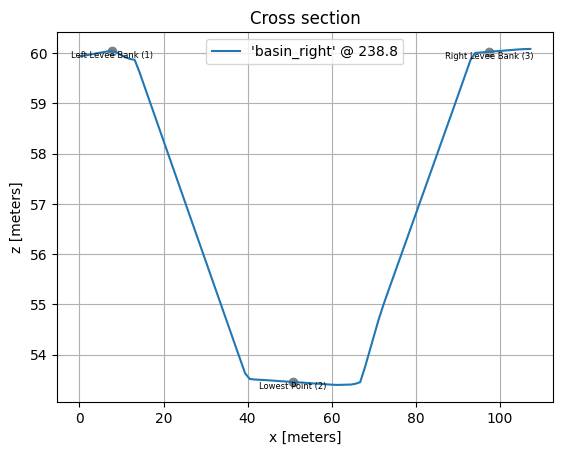
Read Xns11 file and plot a cross section
>>>  import mikeio1d

# Plot section with location id 'basin_right', chainage '238.800', and topo id '1'.
>>>  xns = mikeio1d.open("mikep_cs_demo.xns11")
>>>  xns['basin_right', '238.800', '1'].plot()
Continue learning with additional examples.
Where can I get help?
- Reference - Documentation
- New ideas and feature requests - GitHub Discussions
- Bugs - GitHub Issues
1 maintainer

Metadata
1 maintainer
Release files for mikeio1d 1.3.2a1
For a detailed explanation of source distributions (sdists) and built distributions (wheels), please see the package formats documentation.
Built distributions (wheels)
| File | Interpreter | ABI | Platform | Reset |
|---|---|---|---|---|
| mikeio1d-1.3.2a1-py3-none-win_amd64.whl | Python 3 | none | Windows x86-64 | Details |
| mikeio1d-1.3.2a1-py3-none-manylinux2010_x86_64.whl | Python 3 | none | Linux glibc 2.12+ x86-64 | Details |
Total release size: 24.7 MB
Release files / mikeio1d-1.3.2a1-py3-none-win_amd64.whl
| Download URL | mikeio1d-1.3.2a1-py3-none-win_amd64.whl |
|---|---|
| Size | 6.4 MB |
| Tags | Python 3 Windows x86-64 |
|
SHA-256 checksum How to use checksums |
4aa7e33f1e19ed9b570c68d8b0c92eba8e50e2445cfc3b86c845eecf0741a456
|
|
BLAKE2b-256 checksum How to use checksums |
e23964d803793782e8b4f496c8a3ff13c4e71a142301f64f0be6e46ffc9b2964
|
| Upload date | |
|
Uploaded using Trusted Publishing? What is trusted publishing? |
No |
| Uploaded via |
twine/7.0.0 CPython/3.12.14
|
Release files / mikeio1d-1.3.2a1-py3-none-manylinux2010_x86_64.whl
| Download URL | mikeio1d-1.3.2a1-py3-none-manylinux2010_x86_64.whl |
|---|---|
| Size | 18.3 MB |
| Tags | Linux glibc 2.12+ x86-64 Python 3 |
|
SHA-256 checksum How to use checksums |
9898f1535a9ce0b6e6f63951397eebfc3ba3b3ee46ea9dd40fbbe59aaae034c5
|
|
BLAKE2b-256 checksum How to use checksums |
2b3a578468c4ae5703004ab7b5e2557b50997d72dbc3510038d1b76bb884b60e
|
| Upload date | |
|
Uploaded using Trusted Publishing? What is trusted publishing? |
No |
| Uploaded via |
twine/7.0.0 CPython/3.12.14
|














