
This release is a pre-release and may not be stable for production use.







- What Is MindSpore
- Installation
- Quickstart
- Docs
- Community
- Contributing
- Maintenance phases
- Maintenance status
- Release Notes
- License
What Is MindSpore
MindSpore is a new open source deep learning training/inference framework that could be used for mobile, edge and cloud scenarios. MindSpore is designed to provide development experience with friendly design and efficient execution for the data scientists and algorithmic engineers, native support for Ascend AI processor, and software hardware co-optimization. At the meantime MindSpore as a global AI open source community, aims to further advance the development and enrichment of the AI software/hardware application ecosystem.

For more details please check out our Architecture Guide.
Automatic Differentiation
Currently, there are two automatic differentiation techniques in mainstream deep learning frameworks:
- Operator Overloading (OO): Overloading the basic operators of the programming language to encapsulate their gradient rules. Record the operation trajectory of the network during forward execution in an operator overloaded manner, then apply the chain rule to the dynamically generated data flow graph to implement automatic differentiation.
- Source Transformation (ST): This technology is evolving from the functional programming framework and performs automatic differential transformation on the intermediate expression (the expression form of the program during the compilation process) in the form of just-in-time compilation (JIT), supporting complex control flow scenarios, higher-order functions and closures.
PyTorch used OO. Compared to ST, OO generates gradient graph in runtime, so it does not need to take function call and control flow into consideration, which makes it easier to develop. However, OO can not perform gradient graph optimization in compilation time and the control flow has to be unfolded in runtime, so it is difficult to achieve extreme optimization in performance.
MindSpore implemented automatic differentiation based on ST. On the one hand, it supports automatic differentiation of automatic control flow, so it is quite convenient to build models like PyTorch. On the other hand, MindSpore can perform static compilation optimization on neural networks to achieve great performance.

The implementation of MindSpore automatic differentiation can be understood as the symbolic differentiation of the program itself. Because MindSpore IR is a functional intermediate expression, it has an intuitive correspondence with the composite function in basic algebra. The derivation formula of the composite function composed of arbitrary basic functions can be derived. Each primitive operation in MindSpore IR can correspond to the basic functions in basic algebra, which can build more complex flow control.
Automatic Parallel
The goal of MindSpore automatic parallel is to build a training method that combines data parallelism, model parallelism, and hybrid parallelism. It can automatically select a least cost model splitting strategy to achieve automatic distributed parallel training.
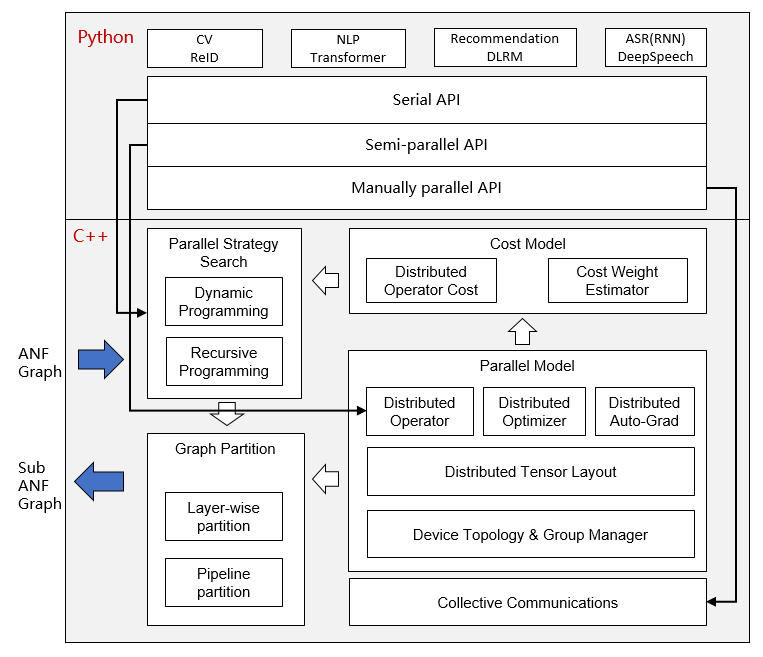
At present, MindSpore uses a fine-grained parallel strategy of splitting operators, that is, each operator in the figure is split into a cluster to complete parallel operations. The splitting strategy during this period may be very complicated, but as a developer advocating Pythonic, you don't need to care about the underlying implementation, as long as the top-level API compute is efficient.
Installation
Pip mode method installation
MindSpore offers build options across multiple backends:
| Hardware Platform | Operating System | Status |
|---|---|---|
| Ascend | Ubuntu-x86 | ✔️ |
| Ubuntu-aarch64 | ✔️ | |
| EulerOS-aarch64 | ✔️ | |
| CentOS-x86 | ✔️ | |
| CentOS-aarch64 | ✔️ | |
| GPU CUDA 10.1 | Ubuntu-x86 | ✔️ |
| CPU | Ubuntu-x86 | ✔️ |
| Ubuntu-aarch64 | ✔️ | |
| Windows-x86 | ✔️ |
For installation using pip, take CPU and Ubuntu-x86 build version as an example:
-
Download whl from MindSpore download page, and install the package.
pip install https://ms-release.obs.cn-north-4.myhuaweicloud.com/1.2.0-rc1/MindSpore/cpu/ubuntu_x86/mindspore-1.2.0rc1-cp37-cp37m-linux_x86_64.whl
-
Run the following command to verify the install.
import numpy as np
import mindspore.context as context
import mindspore.nn as nn
from mindspore import Tensor
from mindspore.ops import operations as P

context.set_context(mode=context.GRAPH_MODE, device_target="CPU")

class Mul(nn.Cell):
    def __init__(self):
        super(Mul, self).__init__()
        self.mul = P.Mul()

    def construct(self, x, y):
        return self.mul(x, y)

x = Tensor(np.array([1.0, 2.0, 3.0]).astype(np.float32))
y = Tensor(np.array([4.0, 5.0, 6.0]).astype(np.float32))

mul = Mul()
print(mul(x, y))
[ 4. 10. 18.]
Use pip mode method to install MindSpore in different environments. Refer to the following documents.
- Using pip mode method to install MindSpore in Ascend environment
- Using pip mode method to install MindSpore in GPU environment
- Using pip mode method to install MindSpore in CPU environment
Source code compilation installation
Use the source code compilation method to install MindSpore in different environments. Refer to the following documents.
- Using the source code compilation method to install MindSpore in Ascend environment
- Using the source code compilation method to install MindSpore in GPU environment
- Using the source code compilation method to install MindSpore in CPU environment
Docker Image
MindSpore docker image is hosted on Docker Hub, currently the containerized build options are supported as follows:
| Hardware Platform | Docker Image Repository | Tag | Description |
|---|---|---|---|
| CPU | mindspore/mindspore-cpu |
x.y.z |
Production environment with pre-installed MindSpore x.y.z CPU release. |
devel |
Development environment provided to build MindSpore (with CPU backend) from the source, refer to https://www.mindspore.cn/install/en for installation details. |
||
runtime |
Runtime environment provided to install MindSpore binary package with CPU backend. |
||
| GPU | mindspore/mindspore-gpu |
x.y.z |
Production environment with pre-installed MindSpore x.y.z GPU release. |
devel |
Development environment provided to build MindSpore (with GPU CUDA10.1 backend) from the source, refer to https://www.mindspore.cn/install/en for installation details. |
||
runtime |
Runtime environment provided to install MindSpore binary package with GPU CUDA10.1 backend. |
NOTICE: For GPU
develdocker image, it's NOT suggested to directly install the whl package after building from the source, instead we strongly RECOMMEND you transfer and install the whl package inside GPUruntimedocker image.
-
CPU
For
CPUbackend, you can directly pull and run the latest stable image using the below command:docker pull mindspore/mindspore-cpu:1.1.0 docker run -it mindspore/mindspore-cpu:1.1.0 /bin/bash
-
GPU
For
GPUbackend, please make sure thenvidia-container-toolkithas been installed in advance, here are some install guidelines forUbuntuusers:DISTRIBUTION=$(. /etc/os-release; echo $ID$VERSION_ID) curl -s -L https://nvidia.github.io/nvidia-docker/gpgkey | apt-key add - curl -s -L https://nvidia.github.io/nvidia-docker/$DISTRIBUTION/nvidia-docker.list | tee /etc/apt/sources.list.d/nvidia-docker.list sudo apt-get update && sudo apt-get install -y nvidia-container-toolkit nvidia-docker2 sudo systemctl restart docker
Then edit the file daemon.json:
$ vim /etc/docker/daemon.json
{
    "runtimes": {
        "nvidia": {
            "path": "nvidia-container-runtime",
            "runtimeArgs": []
        }
    }
}
Restart docker again:
sudo systemctl daemon-reload
sudo systemctl restart docker
Then you can pull and run the latest stable image using the below command:
docker pull mindspore/mindspore-gpu:1.1.0
docker run -it -v /dev/shm:/dev/shm --runtime=nvidia --privileged=true mindspore/mindspore-gpu:1.1.0 /bin/bash
To test if the docker image works, please execute the python code below and check the output:
import numpy as np
import mindspore.context as context
from mindspore import Tensor
from mindspore.ops import functional as F

context.set_context(mode=context.PYNATIVE_MODE, device_target="GPU")

x = Tensor(np.ones([1,3,3,4]).astype(np.float32))
y = Tensor(np.ones([1,3,3,4]).astype(np.float32))
print(F.tensor_add(x, y))
[[[ 2.  2.  2.  2.],
[ 2.  2.  2.  2.],
[ 2.  2.  2.  2.]],

[[ 2.  2.  2.  2.],
[ 2.  2.  2.  2.],
[ 2.  2.  2.  2.]],

[[ 2.  2.  2.  2.],
[ 2.  2.  2.  2.],
[ 2.  2.  2.  2.]]]
If you want to learn more about the building process of MindSpore docker images, please check out docker repo for the details.
Quickstart
See the Quick Start to implement the image classification.
Docs
More details about installation guide, tutorials and APIs, please see the User Documentation.
Community
Governance
Check out how MindSpore Open Governance works.
Communication
- IRC channel at
#mindspore(only for meeting minutes logging purpose) - Video Conferencing: TBD
- Mailing-list: https://mailweb.mindspore.cn/postorius/lists
Contributing
Welcome contributions. See our Contributor Wiki for more details.
Maintenance phases
Project stable branches will be in one of the following states:
| State | Time frame | Summary |
|---|---|---|
| Planning | 1 - 3 months | Features are under planning. |
| Development | 3 months | Features are under development. |
| Maintained | 6 - 12 months | All bugfixes are appropriate. Releases produced. |
| Unmaintained | 0 - 3 months | All bugfixes are appropriate. No Maintainers and No Releases produced. |
| End Of Life (EOL) | N/A | Version no longer accepting changes. |
Maintenance status
| Version | Status | Initial Release Date | Next Phase | EOL Date |
|---|---|---|---|---|
| r2.4 | Maintained | 2024-10-30 | Unmaintained 2025-10-30 estimated |
2025-10-30 |
| r2.3 | Maintained | 2024-07-15 | Unmaintained 2025-07-15 estimated |
2025-07-15 |
| r2.2 | End Of Life | 2023-10-18 | 2024-10-18 | |
| r2.1 | End Of Life | 2023-07-29 | 2024-07-29 | |
| r2.0 | End Of Life | 2023-06-15 | 2024-06-15 | |
| r1.10 | End Of Life | 2023-02-02 | 2024-02-02 | |
| r1.9 | End Of Life | 2022-10-26 | 2023-10-26 | |
| r1.8 | End Of Life | 2022-07-29 | 2023-07-29 | |
| r1.7 | End Of Life | 2022-04-29 | 2023-04-29 | |
| r1.6 | End Of Life | 2022-01-29 | 2023-01-29 | |
| r1.5 | End Of Life | 2021-10-15 | 2022-10-15 | |
| r1.4 | End Of Life | 2021-08-15 | 2022-08-15 | |
| r1.3 | End Of Life | 2021-07-15 | 2022-07-15 | |
| r1.2 | End Of Life | 2021-04-15 | 2022-04-29 | |
| r1.1 | End Of Life | 2020-12-31 | 2021-09-30 | |
| r1.0 | End Of Life | 2020-09-24 | 2021-07-30 | |
| r0.7 | End Of Life | 2020-08-31 | 2021-02-28 | |
| r0.6 | End Of Life | 2020-07-31 | 2020-12-30 | |
| r0.5 | End Of Life | 2020-06-30 | 2021-06-30 | |
| r0.3 | End Of Life | 2020-05-31 | 2020-09-30 | |
| r0.2 | End Of Life | 2020-04-30 | 2020-08-31 | |
| r0.1 | End Of Life | 2020-03-28 | 2020-06-30 |
Release Notes
The release notes, see our RELEASE.
License
1 maintainer

Metadata
1 maintainer
Release files for mindspore-dev 2.5.0.dev20250119
For a detailed explanation of source distributions (sdists) and built distributions (wheels), please see the package formats documentation.
Built distributions (wheels)
Total release size: 5.7 GB
Release files / mindspore_dev-2.5.0.dev20250119-cp311-none-any.whl
| Download URL | mindspore_dev-2.5.0.dev20250119-cp311-none-any.whl |
|---|---|
| Size | 347.1 MB |
| Tags | CPython 3.11 |
|
SHA-256 checksum How to use checksums |
baef61eecbf2ed1196b767c6203c498085fb86c788af79a5e4ff330c07f5d555
|
|
BLAKE2b-256 checksum How to use checksums |
7af7e1b4296c4e59f7e6411a25c5f1c8d60565089cccb67a42c3b6dafd95606c
|
| Upload date | |
|
Uploaded using Trusted Publishing? What is trusted publishing? |
No |
| Uploaded via |
twine/3.8.0 pkginfo/1.8.2 readme-renderer/33.0 requests/2.27.1 requests-toolbelt/0.9.1 urllib3/1.26.8 tqdm/4.63.0 importlib-metadata/4.11.2 keyring/23.5.0 rfc3986/2.0.0 colorama/0.4.4 CPython/3.7.1
|
Release files / mindspore_dev-2.5.0.dev20250119-cp311-cp311-win_amd64.whl
| Download URL | mindspore_dev-2.5.0.dev20250119-cp311-cp311-win_amd64.whl |
|---|---|
| Size | 102.9 MB |
| Tags | CPython 3.11 Windows x86-64 |
|
SHA-256 checksum How to use checksums |
32e6685c897b0ac67453060fcc8852e8beff392adf2de7e9ff3f4be8014aab7c
|
|
BLAKE2b-256 checksum How to use checksums |
dadf88334dc3b6a9bd7381ee9c6ae2af21b869966c08ce8e5f1ccd488209f772
|
| Upload date | |
|
Uploaded using Trusted Publishing? What is trusted publishing? |
No |
| Uploaded via |
twine/3.8.0 pkginfo/1.8.2 readme-renderer/33.0 requests/2.27.1 requests-toolbelt/0.9.1 urllib3/1.26.8 tqdm/4.63.0 importlib-metadata/4.11.2 keyring/23.5.0 rfc3986/2.0.0 colorama/0.4.4 CPython/3.7.1
|
Release files / mindspore_dev-2.5.0.dev20250119-cp311-cp311-manylinux1_x86_64.whl
| Download URL | mindspore_dev-2.5.0.dev20250119-cp311-cp311-manylinux1_x86_64.whl |
|---|---|
| Size | 961.6 MB |
| Tags | CPython 3.11 Linux glibc 2.5+ x86-64 |
|
SHA-256 checksum How to use checksums |
0b298c645793231537d26e873ee562c4e4d763067db3cd1b3781d9466a965bb9
|
|
BLAKE2b-256 checksum How to use checksums |
59f24e85ccb8d3a918b4332f60cfc496fe0d34d7ca5f02cc83743b7ca082459f
|
| Upload date | |
|
Uploaded using Trusted Publishing? What is trusted publishing? |
No |
| Uploaded via |
twine/3.8.0 pkginfo/1.8.2 readme-renderer/33.0 requests/2.27.1 requests-toolbelt/0.9.1 urllib3/1.26.8 tqdm/4.63.0 importlib-metadata/4.11.2 keyring/23.5.0 rfc3986/2.0.0 colorama/0.4.4 CPython/3.7.1
|
Release files / mindspore_dev-2.5.0.dev20250119-cp311-cp311-macosx_11_0_arm64.whl
| Download URL | mindspore_dev-2.5.0.dev20250119-cp311-cp311-macosx_11_0_arm64.whl |
|---|---|
| Size | 230.9 MB |
| Tags | CPython 3.11 macOS 11.0+ ARM64 |
|
SHA-256 checksum How to use checksums |
cee9476f4aedf1976b26aa4e6028619ab432df38d9b4a492b46b1981f3bea92a
|
|
BLAKE2b-256 checksum How to use checksums |
6d21672e981ec8dfc14f4ace97993002014f1ce6db236eefbdeb8f1395f40e46
|
| Upload date | |
|
Uploaded using Trusted Publishing? What is trusted publishing? |
No |
| Uploaded via |
twine/3.8.0 pkginfo/1.8.2 readme-renderer/33.0 requests/2.27.1 requests-toolbelt/0.9.1 urllib3/1.26.8 tqdm/4.63.0 importlib-metadata/4.11.2 keyring/23.5.0 rfc3986/2.0.0 colorama/0.4.4 CPython/3.7.1
|
Release files / mindspore_dev-2.5.0.dev20250119-cp311-cp311-macosx_10_15_x86_64.whl
| Download URL | mindspore_dev-2.5.0.dev20250119-cp311-cp311-macosx_10_15_x86_64.whl |
|---|---|
| Size | 248.5 MB |
| Tags | CPython 3.11 macOS 10.15+ x86-64 |
|
SHA-256 checksum How to use checksums |
4a6be9e8b0d8867607841b26133fb243fa29a63104039f156893c2b66cc95a3d
|
|
BLAKE2b-256 checksum How to use checksums |
80acb7a6f8e943332262c8ae594b4ad36509b0f3883484f5d7b0fb75aa275006
|
| Upload date | |
|
Uploaded using Trusted Publishing? What is trusted publishing? |
No |
| Uploaded via |
twine/3.8.0 pkginfo/1.8.2 readme-renderer/33.0 requests/2.27.1 requests-toolbelt/0.9.1 urllib3/1.26.8 tqdm/4.63.0 importlib-metadata/4.11.2 keyring/23.5.0 rfc3986/2.0.0 colorama/0.4.4 CPython/3.7.1
|
Release files / mindspore_dev-2.5.0.dev20250119-cp310-none-any.whl
| Download URL | mindspore_dev-2.5.0.dev20250119-cp310-none-any.whl |
|---|---|
| Size | 344.7 MB |
| Tags | CPython 3.10 |
|
SHA-256 checksum How to use checksums |
4cdc59feae2d916f36a09a3e65fc1ddc774026a7350153b3b841078221fb075e
|
|
BLAKE2b-256 checksum How to use checksums |
9227868c0e10073f79fb2e8b3e6ea564751a61edc7e8d2e0974053082e9ff797
|
| Upload date | |
|
Uploaded using Trusted Publishing? What is trusted publishing? |
No |
| Uploaded via |
twine/3.8.0 pkginfo/1.8.2 readme-renderer/33.0 requests/2.27.1 requests-toolbelt/0.9.1 urllib3/1.26.8 tqdm/4.63.0 importlib-metadata/4.11.2 keyring/23.5.0 rfc3986/2.0.0 colorama/0.4.4 CPython/3.7.1
|
Release files / mindspore_dev-2.5.0.dev20250119-cp310-cp310-win_amd64.whl
| Download URL | mindspore_dev-2.5.0.dev20250119-cp310-cp310-win_amd64.whl |
|---|---|
| Size | 102.8 MB |
| Tags | CPython 3.10 Windows x86-64 |
|
SHA-256 checksum How to use checksums |
65f1915e88d6ea6b828e908cd5476e396d4d5158f1f485944ade08be064fa932
|
|
BLAKE2b-256 checksum How to use checksums |
4cac7070fdb7ac24beabb13880f4d6c319e1eaedf06a3fc8a9088d8801b46c58
|
| Upload date | |
|
Uploaded using Trusted Publishing? What is trusted publishing? |
No |
| Uploaded via |
twine/3.8.0 pkginfo/1.8.2 readme-renderer/33.0 requests/2.27.1 requests-toolbelt/0.9.1 urllib3/1.26.8 tqdm/4.63.0 importlib-metadata/4.11.2 keyring/23.5.0 rfc3986/2.0.0 colorama/0.4.4 CPython/3.7.1
|
Release files / mindspore_dev-2.5.0.dev20250119-cp310-cp310-manylinux1_x86_64.whl
| Download URL | mindspore_dev-2.5.0.dev20250119-cp310-cp310-manylinux1_x86_64.whl |
|---|---|
| Size | 958.1 MB |
| Tags | CPython 3.10 Linux glibc 2.5+ x86-64 |
|
SHA-256 checksum How to use checksums |
1ea574adc30d46cb1b95e62fd8099019161023d546ee7b21f05ad5fbb7dab282
|
|
BLAKE2b-256 checksum How to use checksums |
76a9dbf2c25c880397ad43ee838f238a0ca3b8d2547645aaea2cac05ca1e09ef
|
| Upload date | |
|
Uploaded using Trusted Publishing? What is trusted publishing? |
No |
| Uploaded via |
twine/3.8.0 pkginfo/1.8.2 readme-renderer/33.0 requests/2.27.1 requests-toolbelt/0.9.1 urllib3/1.26.8 tqdm/4.63.0 importlib-metadata/4.11.2 keyring/23.5.0 rfc3986/2.0.0 colorama/0.4.4 CPython/3.7.1
|
Release files / mindspore_dev-2.5.0.dev20250119-cp310-cp310-macosx_11_0_arm64.whl
| Download URL | mindspore_dev-2.5.0.dev20250119-cp310-cp310-macosx_11_0_arm64.whl |
|---|---|
| Size | 230.6 MB |
| Tags | CPython 3.10 macOS 11.0+ ARM64 |
|
SHA-256 checksum How to use checksums |
59e3d660e4ca2d2528ad36f11af411b1fc21301690974db65c72d4ce5c12a95b
|
|
BLAKE2b-256 checksum How to use checksums |
81cf4a378113d01aafe5781fd4be768f0ec62590f3d38b7162f52a991f8ed557
|
| Upload date | |
|
Uploaded using Trusted Publishing? What is trusted publishing? |
No |
| Uploaded via |
twine/3.8.0 pkginfo/1.8.2 readme-renderer/33.0 requests/2.27.1 requests-toolbelt/0.9.1 urllib3/1.26.8 tqdm/4.63.0 importlib-metadata/4.11.2 keyring/23.5.0 rfc3986/2.0.0 colorama/0.4.4 CPython/3.7.1
|
Release files / mindspore_dev-2.5.0.dev20250119-cp310-cp310-macosx_10_15_x86_64.whl
| Download URL | mindspore_dev-2.5.0.dev20250119-cp310-cp310-macosx_10_15_x86_64.whl |
|---|---|
| Size | 248.0 MB |
| Tags | CPython 3.10 macOS 10.15+ x86-64 |
|
SHA-256 checksum How to use checksums |
badaf49e94937712126a9e39cca60850bfc2463438139690784b2b6dec2bab74
|
|
BLAKE2b-256 checksum How to use checksums |
1c5516c5a6fb62e18370ca279c7cd20796617f29455ab02eaf1c52597b7393f2
|
| Upload date | |
|
Uploaded using Trusted Publishing? What is trusted publishing? |
No |
| Uploaded via |
twine/3.8.0 pkginfo/1.8.2 readme-renderer/33.0 requests/2.27.1 requests-toolbelt/0.9.1 urllib3/1.26.8 tqdm/4.63.0 importlib-metadata/4.11.2 keyring/23.5.0 rfc3986/2.0.0 colorama/0.4.4 CPython/3.7.1
|
Release files / mindspore_dev-2.5.0.dev20250119-cp39-none-any.whl
| Download URL | mindspore_dev-2.5.0.dev20250119-cp39-none-any.whl |
|---|---|
| Size | 344.7 MB |
| Tags | CPython 3.9 |
|
SHA-256 checksum How to use checksums |
2c22eafec0e9fd164e79dc4f4bdfec79a89ec90ea0b5ac3c3c1c62fd074928b2
|
|
BLAKE2b-256 checksum How to use checksums |
9b3be6e7a61a30c4564940357c174b8bb154217de71d7074d956c32e9d2eb56e
|
| Upload date | |
|
Uploaded using Trusted Publishing? What is trusted publishing? |
No |
| Uploaded via |
twine/3.8.0 pkginfo/1.8.2 readme-renderer/33.0 requests/2.27.1 requests-toolbelt/0.9.1 urllib3/1.26.8 tqdm/4.63.0 importlib-metadata/4.11.2 keyring/23.5.0 rfc3986/2.0.0 colorama/0.4.4 CPython/3.7.1
|
Release files / mindspore_dev-2.5.0.dev20250119-cp39-cp39-win_amd64.whl
| Download URL | mindspore_dev-2.5.0.dev20250119-cp39-cp39-win_amd64.whl |
|---|---|
| Size | 103.0 MB |
| Tags | CPython 3.9 Windows x86-64 |
|
SHA-256 checksum How to use checksums |
e57aaf6465869fc0578ead13adca602edf88f1400934feee4c53b96abd9126f9
|
|
BLAKE2b-256 checksum How to use checksums |
878f003ccd9f4f03c11b6059a7604ae3bd26a7b286e413debc7c98a31944b9a5
|
| Upload date | |
|
Uploaded using Trusted Publishing? What is trusted publishing? |
No |
| Uploaded via |
twine/3.8.0 pkginfo/1.8.2 readme-renderer/33.0 requests/2.27.1 requests-toolbelt/0.9.1 urllib3/1.26.8 tqdm/4.63.0 importlib-metadata/4.11.2 keyring/23.5.0 rfc3986/2.0.0 colorama/0.4.4 CPython/3.7.1
|
Release files / mindspore_dev-2.5.0.dev20250119-cp39-cp39-manylinux1_x86_64.whl
| Download URL | mindspore_dev-2.5.0.dev20250119-cp39-cp39-manylinux1_x86_64.whl |
|---|---|
| Size | 958.0 MB |
| Tags | CPython 3.9 Linux glibc 2.5+ x86-64 |
|
SHA-256 checksum How to use checksums |
dc28f2aff99c386492ef0cb5062ce55e1cd53caea1ea18a1f3e7d74d1be9708d
|
|
BLAKE2b-256 checksum How to use checksums |
9b1a90cd7188db6103ac17725f1f6cca8101635648a0f1217cacfe3c93a78cec
|
| Upload date | |
|
Uploaded using Trusted Publishing? What is trusted publishing? |
No |
| Uploaded via |
twine/3.8.0 pkginfo/1.8.2 readme-renderer/33.0 requests/2.27.1 requests-toolbelt/0.9.1 urllib3/1.26.8 tqdm/4.63.0 importlib-metadata/4.11.2 keyring/23.5.0 rfc3986/2.0.0 colorama/0.4.4 CPython/3.7.1
|
Release files / mindspore_dev-2.5.0.dev20250119-cp39-cp39-macosx_11_0_arm64.whl
| Download URL | mindspore_dev-2.5.0.dev20250119-cp39-cp39-macosx_11_0_arm64.whl |
|---|---|
| Size | 230.6 MB |
| Tags | CPython 3.9 macOS 11.0+ ARM64 |
|
SHA-256 checksum How to use checksums |
dc0fd4f094eaabdecd79334392eeb72fe7c4709fa941d04fad043d67e90485bf
|
|
BLAKE2b-256 checksum How to use checksums |
a5c23447fc03ce70ae8251a274432e6320f03631576d9109eca114974b3b6f05
|
| Upload date | |
|
Uploaded using Trusted Publishing? What is trusted publishing? |
No |
| Uploaded via |
twine/3.8.0 pkginfo/1.8.2 readme-renderer/33.0 requests/2.27.1 requests-toolbelt/0.9.1 urllib3/1.26.8 tqdm/4.63.0 importlib-metadata/4.11.2 keyring/23.5.0 rfc3986/2.0.0 colorama/0.4.4 CPython/3.7.1
|
Release files / mindspore_dev-2.5.0.dev20250119-cp39-cp39-macosx_10_15_x86_64.whl
| Download URL | mindspore_dev-2.5.0.dev20250119-cp39-cp39-macosx_10_15_x86_64.whl |
|---|---|
| Size | 248.0 MB |
| Tags | CPython 3.9 macOS 10.15+ x86-64 |
|
SHA-256 checksum How to use checksums |
3e0a751ee10c844c713385acd8f98e2c235027da39f3c411ac88c3fd279cbd95
|
|
BLAKE2b-256 checksum How to use checksums |
f8d2b682fd45439c247a550a5529894928aa7fd8beb418f33b47a28fe15660ba
|
| Upload date | |
|
Uploaded using Trusted Publishing? What is trusted publishing? |
No |
| Uploaded via |
twine/3.8.0 pkginfo/1.8.2 readme-renderer/33.0 requests/2.27.1 requests-toolbelt/0.9.1 urllib3/1.26.8 tqdm/4.63.0 importlib-metadata/4.11.2 keyring/23.5.0 rfc3986/2.0.0 colorama/0.4.4 CPython/3.7.1
|














