

MCSC - Minecraft Server Creator
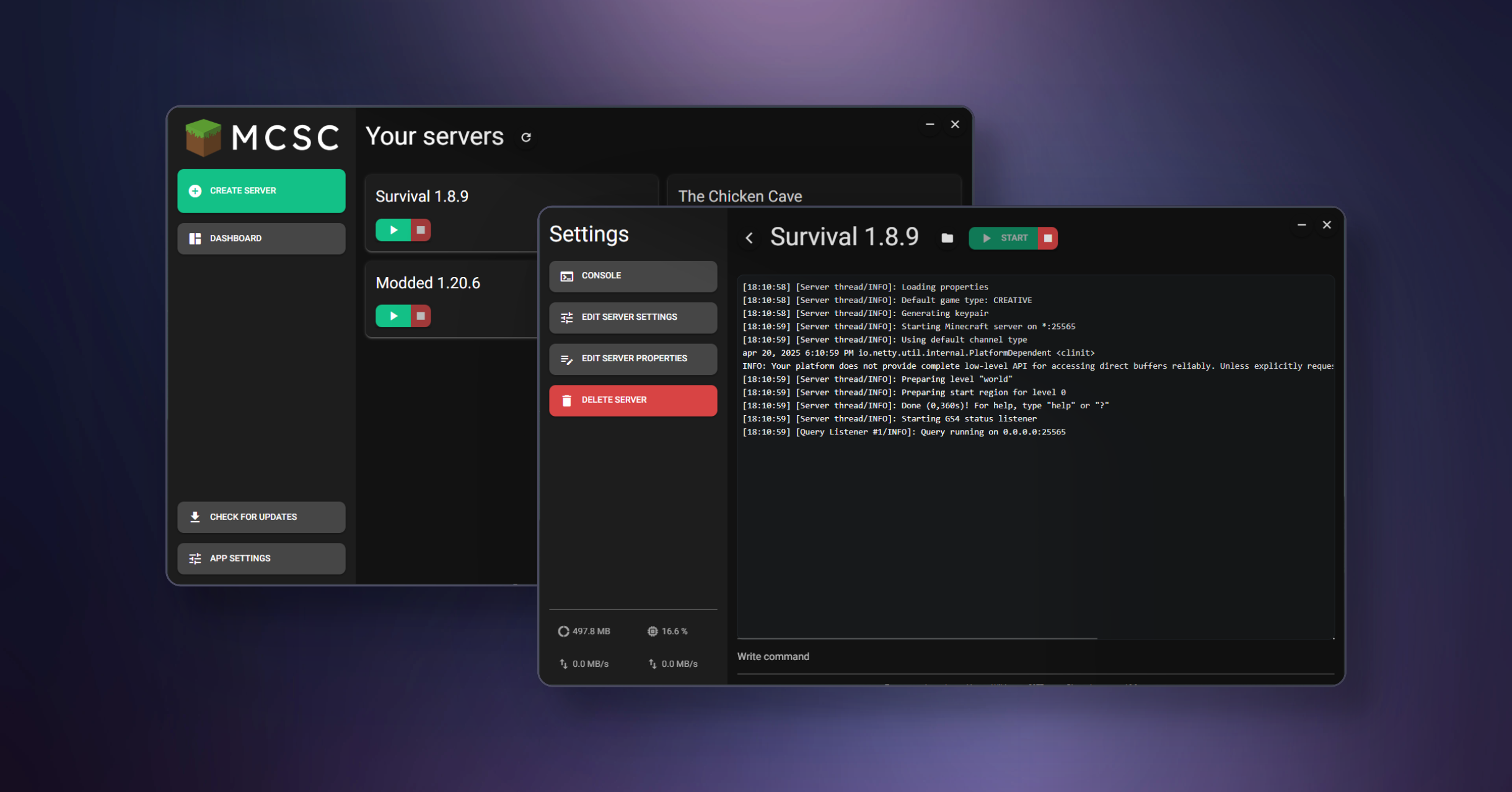
MCSC is a user-friendly tool written in Python with a GUI that simplifies the process of creating and managing Minecraft servers. Whether you're a beginner or experienced, MCSC allows you to easily set up, run, and control multiple Minecraft servers from a single interface.
Warning: MCSC is still in development, thus it may not be completely error free.
Features
- Create Multiple Servers: Set up and manage multiple Minecraft servers from within the app.
- Start/Stop Servers: Easily start and stop your Minecraft servers directly from the GUI.
- Console Interaction: Read the console output in real-time and send commands to the Minecraft server console.
- Edit server.properties: Customize your Minecraft server settings by editing the
server.propertiesfile with a built-in editor. - User-Friendly GUI: A simple and intuitive interface designed for both beginners and experienced users.
- Manage Server Instances: Keep track of all your servers in one place.
Installation
To install and run MCSC on your local machine:
-
Clone the repository:
git clone https://github.com/ddavidel/minecraft-server-creator.git -
Navigate to the project folder and install the required dependencies:
pip install -r requirements.txt -
Run the application by double clicking
START.bator with the following command:python ServerCreator.py
Upcoming Features
- Support for more server types: In the future updates, MCSC will support creating and managing many popular Minecraft server types.
- Plugin and Mod Manager: Easily manage plugins and mods.
1 maintainer

Metadata
1 maintainer
Release files for minecraft-server-creator 2.1.1
For a detailed explanation of source distributions (sdists) and built distributions (wheels), please see the package formats documentation.
Source distribution (sdist)
| File | Size | Uploaded | Provenance | Actions |
|---|---|---|---|---|
| minecraft_server_creator-2.1.1.tar.gz | 37.8 kB | Without provenance | Details for minecraft_server_creator-2.1.1.tar.gz |
Built distribution (wheel)
| File | Interpreter | ABI | Platform | Actions Reset |
|---|---|---|---|---|
| minecraft_server_creator-2.1.1-py3-none-any.whl | Python 3 | none | any | Details for minecraft_server_creator-2.1.1-py3-none-any.whl |
Total release size: 80.0 kB
Release files / minecraft_server_creator-2.1.1.tar.gz
| Download URL | minecraft_server_creator-2.1.1.tar.gz |
|---|---|
| Size | 37.8 kB |
| Tags | Source |
|
SHA-256 checksum How to use checksums |
a8074d999cf52ac92f4bffb4cbe64e97ac50197be5363c49fbe4d12b7debcc08
|
|
BLAKE2b-256 checksum How to use checksums |
3434da75be159bea22a1089a495afb64d2814a60f2817a7f91622767a88502c0
|
| Upload date | |
|
Uploaded using Trusted Publishing? What is trusted publishing? |
No |
| Uploaded via |
twine/6.2.0 CPython/3.12.0
|
Release files / minecraft_server_creator-2.1.1-py3-none-any.whl
| Download URL | minecraft_server_creator-2.1.1-py3-none-any.whl |
|---|---|
| Size | 42.2 kB |
| Tags | Python 3 |
|
SHA-256 checksum How to use checksums |
9ab8d999664db15e1e076715e4ec946518963b4b76c1cff65f3393b05decb7a3
|
|
BLAKE2b-256 checksum How to use checksums |
c61090d30cadbe5eb6d150a54ff9de4f4efaff17abd42737338f45971ce021bb
|
| Upload date | |
|
Uploaded using Trusted Publishing? What is trusted publishing? |
No |
| Uploaded via |
twine/6.2.0 CPython/3.12.0
|
Security for minecraft-server-creator 2.1.1
Provenance
Provenance describes where a file came from. On PyPI, provenance is shared via attestations, which provide a verifiable record of the build or publishing details. View details, limitations and caveats.
No provenance found
None of the files in this release were uploaded with provenance metadata.
A note on package security
PyPI is a repository for distributing packages, not a service for auditing them. While third-party security researchers and our staff do their best to detect and remove malicious packages, PyPI cannot guarantee the quality, security or suitability of any given package.
To learn more about protecting yourself from malicious actors, visit our package security documentation.














