

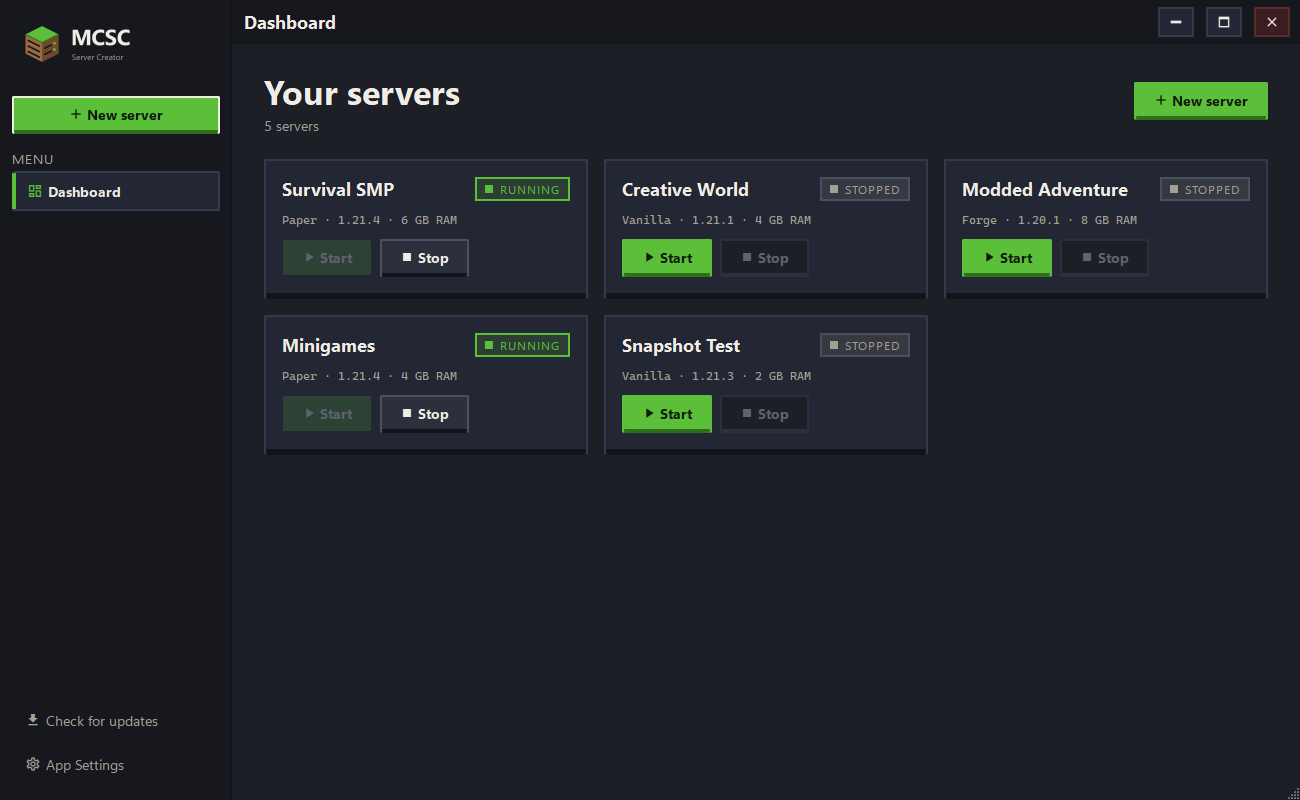
MCSC - Minecraft Server Creator
MCSC is a user-friendly tool written in Python with a GUI that simplifies the process of creating and managing Minecraft servers. Whether you're a beginner or experienced, MCSC allows you to easily set up, run, and control multiple Minecraft servers from a single interface.
Warning: MCSC is still in development, thus it may not be completely error free.
Features
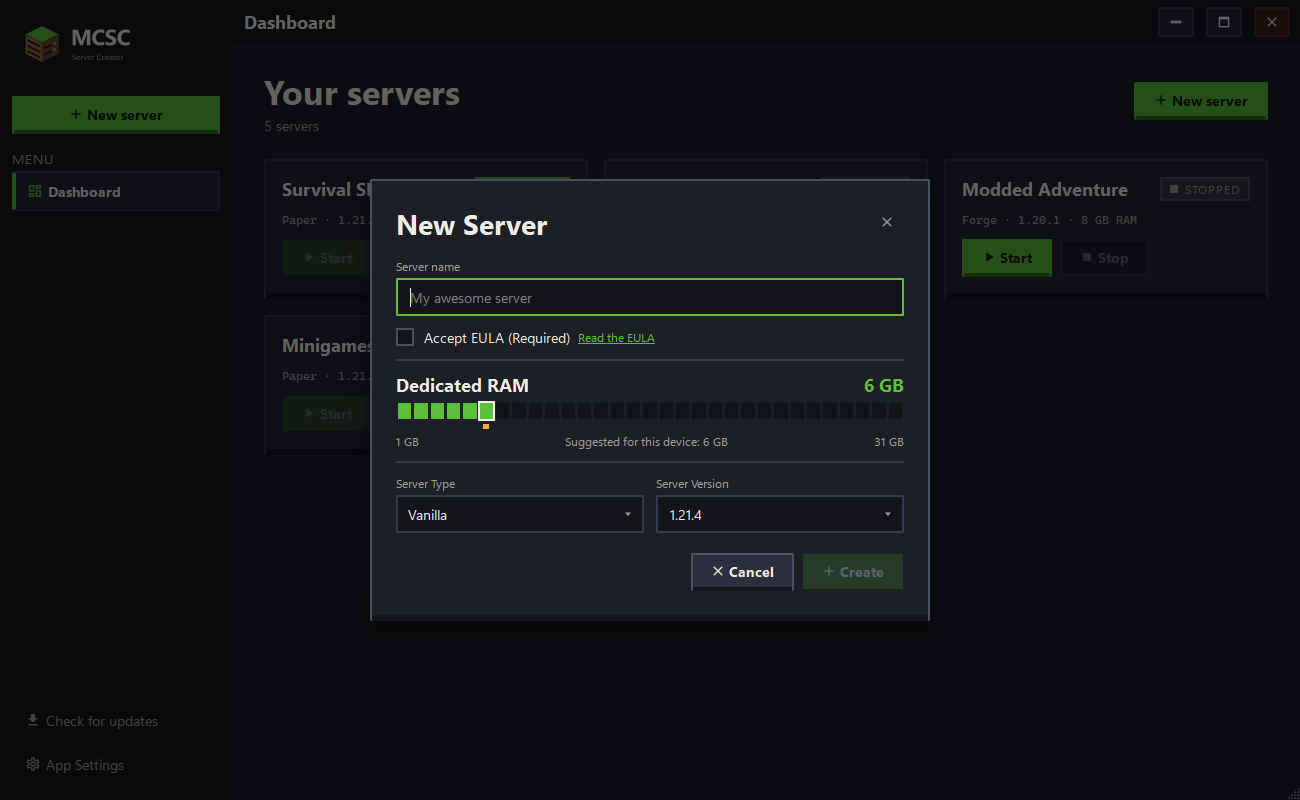
- Create Multiple Servers: Set up and manage multiple Minecraft servers from within the app.
- Start/Stop Servers: Easily start and stop your Minecraft servers directly from the GUI.
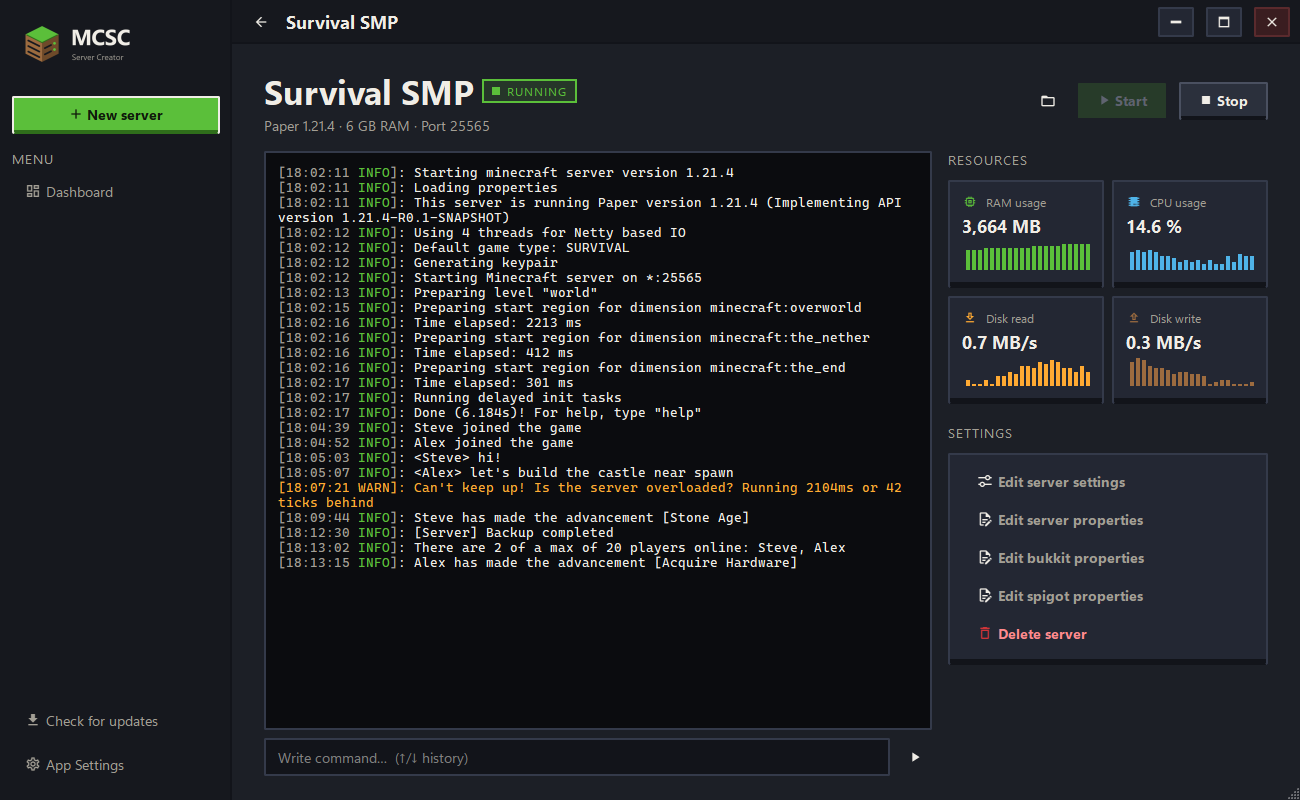
- Console Interaction: Read the console output in real-time and send commands to the Minecraft server console.
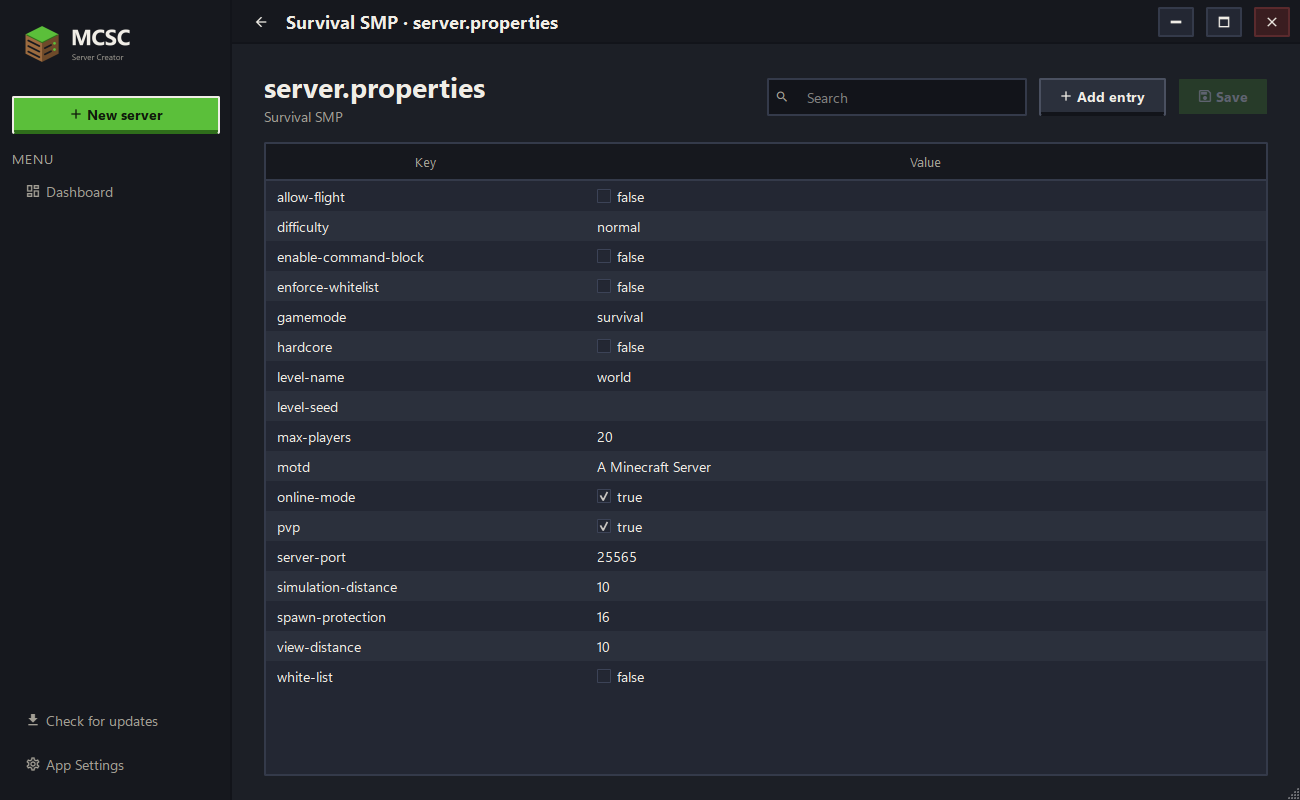
- Edit server.properties: Customize your Minecraft server settings by editing the
server.propertiesfile with a built-in editor. - User-Friendly GUI: A simple and intuitive interface designed for both beginners and experienced users.
- Manage Server Instances: Keep track of all your servers in one place.
- Backups: Back up a server with one click and restore it later (the current state is saved first). Backups can also be automatic, when a server starts or stops (app-wide or per server), keeping the latest ones. They are stored in the app data folder, under
backups/<server id>/. - Export and Import: Export a server to a single
.zipto move it to another PC, then import it there, or import an existing server folder made outside MCSC (it is copied, never moved).
Screenshots
| Server console and resources | Config editor |
|---|---|
 |
 |
| New server |
|---|
 |
Installation
Windows installer (no Python needed)
Download mcsc-setup-<version>.exe from the latest release
and run it. It installs MCSC with its own private Python, adds it to the Start menu and keeps
it up to date from the app. No admin rights are needed. Uninstall it from Settings > Apps:
your servers and settings are kept. Java is still required to run Minecraft servers.
From PyPI
MCSC requires Python 3.12+ and Java.
Install it from PyPI and run it:
pip install minecraft-server-creator
mcsc
To run it from the source code:
-
Clone the repository:
git clone https://github.com/ddavidel/minecraft-server-creator.git -
Navigate to the project folder and install it with its dependencies:
pip install -e . -
Run the application with
mcscorpython scripts/start.py(add--debugto log to the console).
Project structure
src/mcsc_gui: the desktop app (Qt/PySide6 interface, translations, settings, telemetry, updates).- Server management (creating, running, monitoring and configuring servers) is provided by the
pymcsc library, imported as
mcsc.
Release notes
The "What's New" popup (shown once after an update) and the changelog in the App Settings
read src/mcsc_gui/static/changelog.json. The notes are written once per release, not in
every PR — just keep using conventional commit messages (feat(scope): …, fix: …).
- In the release PR (
develop→main), draft the entry from the commits since the last tag:python scripts/draft_changelog.py(--dry-runto only print it,--include-fixesto list the fixes too,--version X.Y.Zto choose the version). - Edit the draft: user-facing wording, remove internal changes, add the
ittranslation (missing languages fall back to English). - Commit it in the release PR. The release workflow fails on a minor/major release without notes (patch releases only get a warning, and the app shows nothing for them).
Code signing policy
Free code signing provided by SignPath.io, certificate by SignPath Foundation.
- Committers and reviewers: repository members
- Approvers: ddavidel
The Windows installer is built from this repository by GitHub Actions
(.github/workflows/installer.yml) and signed only after an approver confirms the release.
Privacy policy
When it starts, MCSC sends an anonymous usage event to mcscreator.altervista.org. The event
holds a random client ID generated on first run, the event name, a timestamp and the app
version. It doesn't send personal data, server contents or files. It also checks PyPI for updates and downloads Minecraft server files when you create a
server. Nothing else is sent to other networked systems unless you ask for it.
Upcoming Features
- Support for more server types: In the future updates, MCSC will support creating and managing many popular Minecraft server types.
- Plugin and Mod Manager: Easily manage plugins and mods.
1 maintainer

Metadata
1 maintainer
Release files for minecraft-server-creator 3.1.0
For a detailed explanation of source distributions (sdists) and built distributions (wheels), please see the package formats documentation.
Source distribution (sdist)
| File | Size | Uploaded | Provenance | Actions |
|---|---|---|---|---|
| minecraft_server_creator-3.1.0.tar.gz | 163.3 kB | With provenance | Details for minecraft_server_creator-3.1.0.tar.gz |
Built distribution (wheel)
| File | Interpreter | ABI | Platform | Actions Reset |
|---|---|---|---|---|
| minecraft_server_creator-3.1.0-py3-none-any.whl | Python 3 | none | any | Details for minecraft_server_creator-3.1.0-py3-none-any.whl |
Total release size: 344.2 kB
Release files / minecraft_server_creator-3.1.0.tar.gz
| Download URL | minecraft_server_creator-3.1.0.tar.gz |
|---|---|
| Size | 163.3 kB |
| Tags | Source |
|
SHA-256 checksum How to use checksums |
1dda3a2cd76b333b9e2345fe2a6b24672f728074098236895750e516cffa958e
|
|
BLAKE2b-256 checksum How to use checksums |
629e35281b94e9fa21684ff8cc5c8e7ef41f52169cc863643eef83b0acab8636
|
| Upload date | |
|
Uploaded using Trusted Publishing? What is trusted publishing? |
Yes |
| Uploaded via |
twine/7.0.0 CPython/3.13.16
|
Provenance
Provenance describes where a file came from. On PyPI, provenance is shared via attestations, which provide a verifiable record of the build or publishing details. View details, limitations and caveats.


PyPI Publish Attestation
PyPI verified that this artifact, at this checksum, originated from the publisher listed below.
Signed by GitHub Actions, verified by PyPI on Nov 21, 2026.
Transparency logRelease files / minecraft_server_creator-3.1.0-py3-none-any.whl
| Download URL | minecraft_server_creator-3.1.0-py3-none-any.whl |
|---|---|
| Size | 180.9 kB |
| Tags | Python 3 |
|
SHA-256 checksum How to use checksums |
02bd0e2b62d630fc28eb29c13667e44365a897ef9d2d2ccbef4b90e7ce06b8cf
|
|
BLAKE2b-256 checksum How to use checksums |
4d1de46605cfad6c8ab045a658bf6a69d47f3f981e1160b9a7e81c68c6e200e3
|
| Upload date | |
|
Uploaded using Trusted Publishing? What is trusted publishing? |
Yes |
| Uploaded via |
twine/7.0.0 CPython/3.13.16
|
Provenance
Provenance describes where a file came from. On PyPI, provenance is shared via attestations, which provide a verifiable record of the build or publishing details. View details, limitations and caveats.
PyPI Publish Attestation
PyPI verified that this artifact, at this checksum, originated from the publisher listed below.
Signed by GitHub Actions, verified by PyPI on Nov 21, 2026.
Transparency logSecurity for minecraft-server-creator 3.1.0
Provenance
Provenance describes where a file came from. On PyPI, provenance is shared via attestations, which provide a verifiable record of the build or publishing details. View details, limitations and caveats.
Full provenance
Both files in this release have been uploaded with provenance metadata.
Attestation for minecraft_server_creator-3.1.0.tar.gz
PyPI Publish Attestation
PyPI verified that this artifact, at this checksum, originated from the publisher listed below.
Signed by GitHub Actions, verified by PyPI on Nov 21, 2026.
Transparency logA note on package security
PyPI is a repository for distributing packages, not a service for auditing them. While third-party security researchers and our staff do their best to detect and remove malicious packages, PyPI cannot guarantee the quality, security or suitability of any given package.
To learn more about protecting yourself from malicious actors, visit our package security documentation.














