
Machine Learning Research Wizard

Project description

MLWiz
Machine Learning Research Wizard — reproducible experiments from YAML (model selection + risk assessment) for vectors, images, time-series, and graphs.





🔗 Quick Links
- 📘 Docs: https://mlwiz.readthedocs.io/en/stable/
- 🧪 Tutorial (recommended): https://mlwiz.readthedocs.io/en/stable/tutorial.html
- 📦 PyPI: https://pypi.org/project/mlwiz/
- 📝 Changelog:
CHANGELOG.md - 🤝 Contributing:
CONTRIBUTING.md
✨ What It Does
MLWiz helps you run end-to-end research experiments with minimal boilerplate:
- 🧱 Build/prepare datasets and generate splits (hold-out or nested CV)
- 🎛️ Expand a hyperparameter search space (grid, random, or Bayesian search)
- ⚡ Run model selection + risk assessment in parallel with Ray (CPU/GPU or cluster)
- 📈 Log dashboard-ready metric histories and checkpoints in a consistent folder structure
Inspired by (and a generalized version of) PyDGN.
✅ Key Features
| Area | What you get |
|---|---|
| Research Oriented Framework | Anything is customizable, easy prototyping of models and setups |
| Reproducibility | Ensure your results are reproducible across multiple runs |
| Automatic Split Generation | Dataset preparation + .splits generation for hold-out / (nested) CV |
| Automatic and Robust Evaluation | Nested model selection (inner folds) + risk assessment (outer folds) |
| Parallelism | Ray-based execution across CPU/GPU (or a Ray cluster) |
🚀 Getting Started
📦 Installation
MLWiz supports Python 3.10+.
pip install mlwiz
Tip: for GPU / graph workloads, install PyTorch and PyG following their official instructions first, then pip install mlwiz.
⚡ Quickstart
| Step | Command | Notes |
|---|---|---|
| 1) Prepare dataset + splits | mlwiz-data --config-file examples/DATA_CONFIGS/config_MNIST.yml |
Creates processed data + a .splits file |
| 2) Run an experiment (grid search) | mlwiz-exp --config-file examples/MODEL_CONFIGS/config_MLP.yml |
Add --debug to run sequentially and print logs |
| 3) Inspect results | cat RESULTS/mlp_MNIST/MODEL_ASSESSMENT/assessment_results.json |
Aggregated results live under RESULTS/ |
| 4) Explore in MLWiz Dashboard | mlwiz-dashboard --logdir RESULTS |
Browse model-selection configs and final-run metric histories |
| 5) Stop a running experiment | Press Ctrl-C |
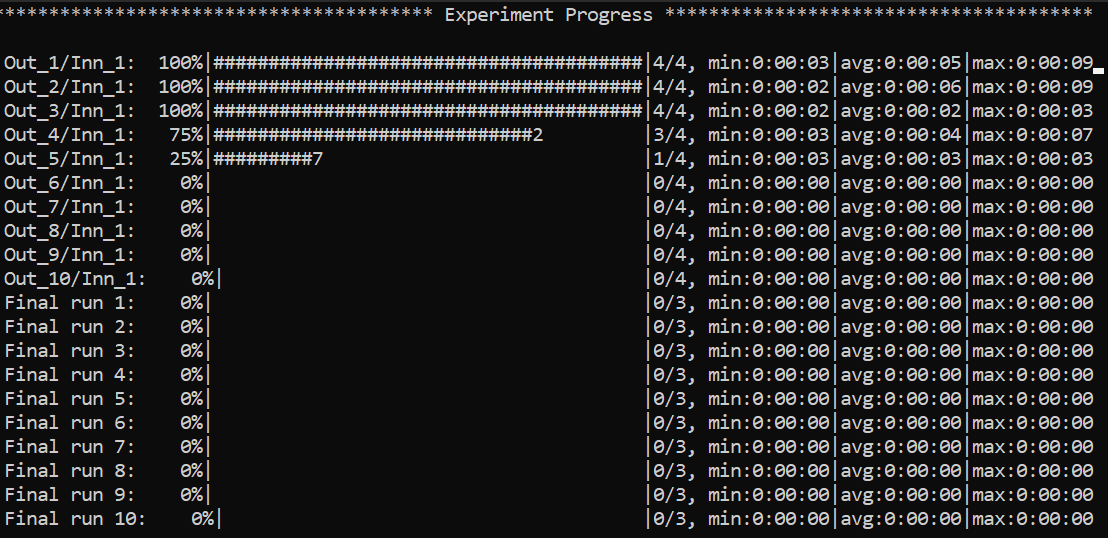
🧭 Navigating the CLI (non-debug mode)
Example of the global view CLI:
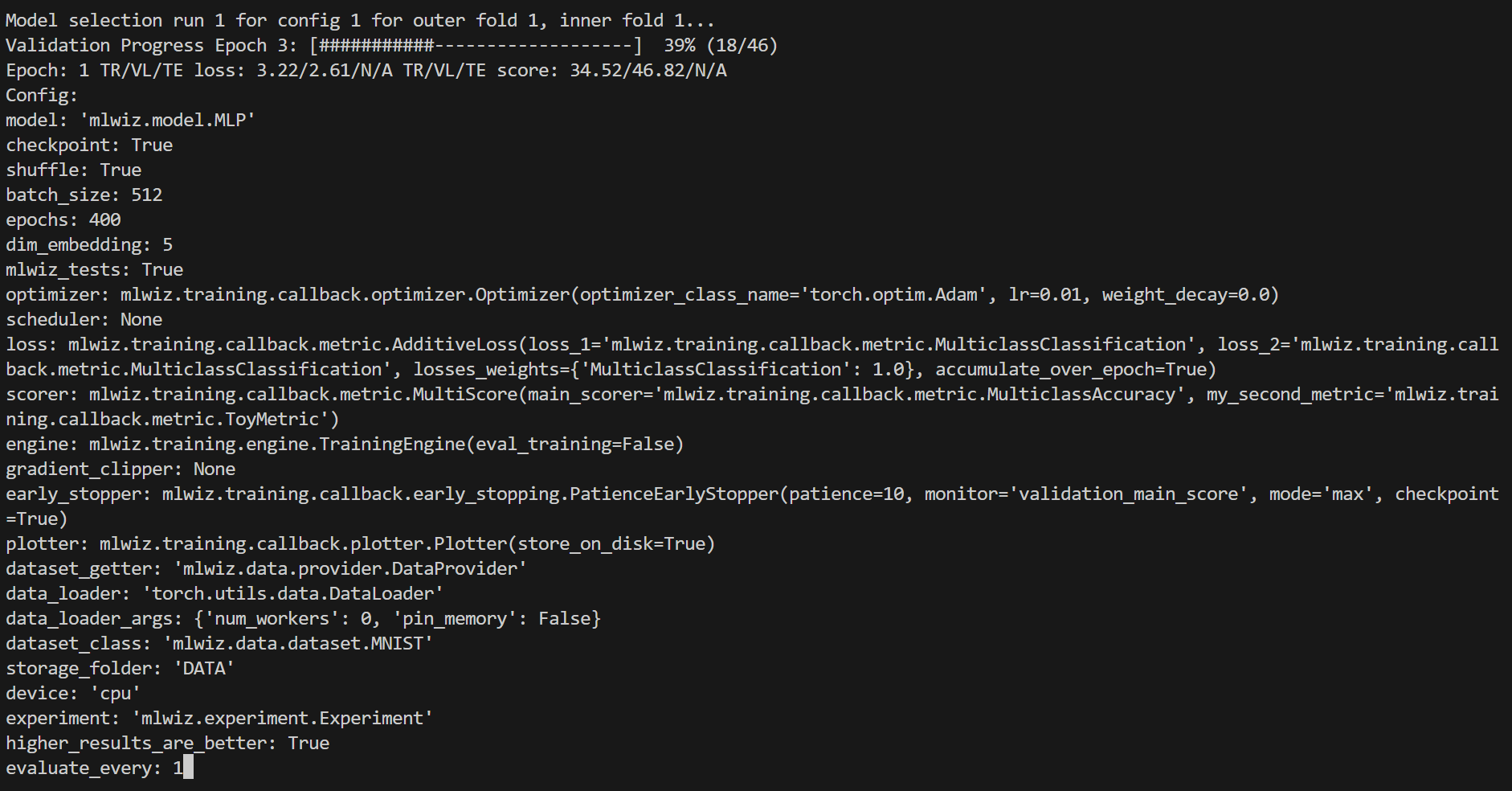
Specific views can be accessed, e.g. to visualize a specific model run:
:<outer_fold> <inner_fold> <config_id> <run_id>
…or, analogously, a risk assessment run:
:<outer_fold> <run_id>
Here is how it will look like
Handy commands:
:  # or :g or :global (back to global view)
:r # or :refresh (refresh the screen)
You can use left-right arrows to move across configurations, and up-down arrows to switch between model selection and risk assessment runs.
🧩 Architecture (High-Level)
MLWiz is built around two YAML files and a small set of composable components:
data.yml ──► mlwiz-data ──► processed dataset + .splits
exp.yml  ──► mlwiz-exp  ──► Ray workers
                      ├─ inner folds: model selection (best hyperparams)
                      └─ outer folds: risk assessment (final scores)
- 🧰 Data pipeline:
mlwiz-datainstantiates your dataset class and writes a.splitsfile for hold-out / (nested) CV. - 🧪 Search space:
grid:andrandom:sections expand into concrete hyperparameter configurations. - 🛰️ Orchestration: the evaluator schedules training runs with Ray across CPU/GPU (or a Ray cluster).
- 🏗️ Execution: each run builds a model + training engine from dotted paths, then logs artifacts and returns structured results.
⚙️ Configuration At A Glance
MLWiz expects:
- 🗂️ one YAML for data + splits
- 🧾 one YAML for experiment + search space
Minimal data config:
splitter:
  splits_folder: DATA_SPLITS/
  class_name: mlwiz.data.splitter.Splitter
  args:
    n_outer_folds: 3
    n_inner_folds: 2
    seed: 42

dataset:
  class_name: mlwiz.data.dataset.MNIST
  args:
    storage_folder: DATA/
Minimal experiment config (grid search):
storage_folder: DATA
dataset_class: mlwiz.data.dataset.MNIST
data_splits_file: DATA_SPLITS/MNIST/MNIST_outer3_inner2.splits

device: cpu
max_cpus: 8

dataset_getter: mlwiz.data.provider.DataProvider
data_loader:
  class_name: torch.utils.data.DataLoader
  args:
    num_workers : 0
    pin_memory: False

result_folder: RESULTS
exp_name: mlp
experiment: mlwiz.experiment.Experiment
model_selection_criteria:
  - metric: main_score
    direction: max
evaluate_every: 1
risk_assessment_training_runs: 3
model_selection_training_runs: 2

grid:
  model: mlwiz.model.MLP
  epochs: 400
  batch_size: 512
  dim_embedding: 5
  mlwiz_tests: True  # patch: allow reshaping of MNIST dataset
  optimizer:
    - class_name: mlwiz.training.callback.optimizer.Optimizer
      args:
        optimizer_class_name: torch.optim.Adam
        lr:
          - 0.01
          - 0.03
        weight_decay: 0.
  loss: mlwiz.training.callback.metric.MulticlassClassification
  scorer: mlwiz.training.callback.metric.MulticlassAccuracy
  engine:
    class_name: mlwiz.training.engine.TrainingEngine
    args:
      mixed_precision: false
      mixed_precision_dtype: torch.float16
When mixed_precision: true is used on CPU, requesting
mixed_precision_dtype: torch.float16 is automatically converted to
torch.bfloat16.
higher_results_are_better remains available as a legacy shortcut for
main_score, but it cannot be set together with model_selection_criteria.
See examples/ for complete configs (including random/Bayesian search, schedulers, early stopping, and more).
🧩 Custom Code Via Dotted Paths
Point YAML entries to your own classes (in your project). mlwiz-data and mlwiz-exp add the current working directory to sys.path, so this works out of the box:
grid:
  model: my_project.models.MyModel

dataset:
  class_name: my_project.data.MyDataset
📦 Outputs
Runs are written under RESULTS/:
| Output | Location |
|---|---|
| Aggregated outer-fold results | RESULTS/<exp_name>_<dataset>/MODEL_ASSESSMENT/assessment_results.json |
| Per-fold summaries | RESULTS/<exp_name>_<dataset>/MODEL_ASSESSMENT/OUTER_FOLD_k/outer_results.json |
| Model selection (inner folds + winner config) | .../MODEL_SELECTION/... |
| Final retrains with selected hyperparams | .../final_run*/ |
When a Plotter callback is configured, each training run writes dashboard
histories to <run_dir>/metrics_data.torch.
MLWiz Dashboard
MLWiz includes a local, read-only experiment dashboard tailored to the result hierarchy above. Start it from the project that contains your results:
mlwiz-dashboard --logdir RESULTS
Open the URL printed by the command (by default
http://127.0.0.1:6006). The run browser groups results by experiment, outer
fold, model-selection configuration, inner fold, and final run. Selecting a
configuration compares all of its child runs; selecting an individual run
shows only that run. Score and loss histories are refreshed after every epoch
by default. Set store_every_N_epochs to a larger value to reduce the write
frequency.
Hover over a chart to inspect the training, validation, and test values at one
epoch. The ± Log scale control uses a symmetric logarithmic transform, so it
also supports zero and negative values. Each experiment has its own lazy-loaded
configuration filter: choose any discovered score or loss, compare it with a
threshold using ≥ or ≤, choose training or validation values, and combine
multiple conditions with AND or OR. Completed experiments use their aggregated
results; running experiments use the latest values available in
metrics_data.torch. While a filter is active, final runs are hidden and an
experiment with no matching configuration shows only its filter controls.
The header also provides a persistent refresh-interval setting and a day/dark theme toggle. Dark mode is the default.
Above the selected configuration or run, a collapsible overview summarizes its
parent experiment only: completed, running, queued, and failed runs; aggregated
configurations; recorded compute time; average and median run duration; and an
estimated remaining compute budget. Timing comes from the profiler markers in
each experiment.log. The remaining estimate is deliberately reported as
compute time because parallel execution may complete in less wall-clock time.
The collapsible Model graph panel loads architecture information only when
opened. For a running job it reads last_checkpoint.pth; for a completed job
it prefers best_checkpoint.pth, falling back to the other checkpoint when
necessary. A checkpoint selector can explicitly display Best or Last whenever
that file exists, while Auto retains the status-based policy. New runs store a
small model_manifest.json, allowing the dashboard
to reconstruct the current CPU module hierarchy after loading checkpoint
weights. Older runs remain inspectable through their checkpoint parameter
hierarchy. Enable checkpoint: true to produce last checkpoints; best
checkpoints are available when the configured early stopper stores them.
To bound temporary memory pressure, the graph is not loaded when the checkpoint
file itself is larger than the cache ceiling configured in the dashboard.
Oversized Best/Last choices remain visible but disabled in the selector.
The charts read metrics_data.torch. Configure the Plotter callback to write
this artifact (metric storage is enabled by default):
plotter: mlwiz.training.callback.plotter.Plotter
Use mlwiz-dashboard --help for host, port, and browser-opening options.
Metric artifacts are loaded only when a configuration or run is selected. The
dashboard keeps normalized histories in a least-recently-used cache (256 MB by
default); its memory limit can be changed from the dashboard header, and 0
disables caching. The limit applies only to retained cache entries: a selected
configuration is still loaded and displayed even when it is larger than the
configured buffer. Lazily generated model graphs share this bounded cache and
are also cleared by the header's cache-reset button.
🛠️ Utilities
🗂️ Config Management (CLI)
Duplicate a base experiment config across multiple datasets:
mlwiz-config-duplicator --base-exp-config base.yml --data-config-files data1.yml data2.yml
📊 Post-process Results (Python)
Filter configurations from a MODEL_SELECTION/ folder and convert them to a DataFrame:
from mlwiz.evaluation.util import retrieve_experiments, filter_experiments, create_dataframe

configs = retrieve_experiments(
    "RESULTS/mlp_MNIST/MODEL_ASSESSMENT/OUTER_FOLD_1/MODEL_SELECTION/"
)
filtered = filter_experiments(configs, logic="OR", parameters={"lr": 0.001})
df = create_dataframe(
    config_list=filtered,
    key_mappings=[("lr", float), ("avg_validation_score", float)],
)
Export aggregated assessment results to LaTeX:
from mlwiz.evaluation.util import create_latex_table_from_assessment_results

experiments = [
    ("RESULTS/mlp_MNIST", "MLP", "MNIST"),
    ("RESULTS/dgn_PROTEINS", "DGN", "PROTEINS"),
]

latex_table = create_latex_table_from_assessment_results(
    experiments,
    metric_key="main_score",
    no_decimals=3,
    model_as_row=True,
    use_single_outer_fold=False,
)
print(latex_table)
Compare statistical significance between models (Welch t-test):
from mlwiz.evaluation.util import statistical_significance

reference = ("RESULTS/mlp_MNIST", "MLP", "MNIST")
competitors = [
    ("RESULTS/baseline1_MNIST", "B1", "MNIST"),
    ("RESULTS/baseline2_MNIST", "B2", "MNIST"),
]

df = statistical_significance(
    highlighted_exp_metadata=reference,
    other_exp_metadata=competitors,
    metric_key="main_score",
    set_key="test",
    confidence_level=0.95,
)
print(df)
🔍 Load a Trained Model (Notebook-friendly)
Load the best configuration for a fold, instantiate dataset/model, and restore a checkpoint:
from mlwiz.evaluation.util import (
    retrieve_best_configuration,
    instantiate_dataset_from_config,
    instantiate_model_from_config,
    load_checkpoint,
)

config = retrieve_best_configuration(
    "RESULTS/mlp_MNIST/MODEL_ASSESSMENT/OUTER_FOLD_1/MODEL_SELECTION/"
)
dataset = instantiate_dataset_from_config(config)
model = instantiate_model_from_config(config, dataset)
load_checkpoint(
    "RESULTS/mlp_MNIST/MODEL_ASSESSMENT/OUTER_FOLD_1/final_run1/best_checkpoint.pth",
    model,
    device="cpu",
)
For more post-processing helpers, see the tutorial: https://mlwiz.readthedocs.io/en/stable/tutorial.html
🤝 Contributing
See CONTRIBUTING.md.
📄 License
BSD-3-Clause. See LICENSE.
Release history Release notifications | RSS feed


Download files
Download the file for your platform. If you're not sure which to choose, learn more about installing packages.
Source Distribution
Built Distribution
Filter files by name, interpreter, ABI, and platform.
If you're not sure about the file name format, learn more about wheel file names.
Copy a direct link to the current filters
File details
Details for the file mlwiz-1.6.2.tar.gz.
File metadata
- Download URL: mlwiz-1.6.2.tar.gz
- Upload date:
- Size: 2.3 MB
- Tags: Source
- Uploaded using Trusted Publishing? No
- Uploaded via: twine/6.1.0 CPython/3.13.13
File hashes
| Algorithm | Hash digest | |
|---|---|---|
| SHA256 |
f698fd4cb5548d123ef68ac9e9d1d1339b85a92ab978617673b4e2296639b6f2
|
|
| MD5 |
fbd5712697fdb2ea84abb8556b8cf1df
|
|
| BLAKE2b-256 |
218b6c6d821b3894d55e4db0828d07f74be16635cf1521f4be8cef05be57e394
|
File details
Details for the file mlwiz-1.6.2-py3-none-any.whl.
File metadata
- Download URL: mlwiz-1.6.2-py3-none-any.whl
- Upload date:
- Size: 2.3 MB
- Tags: Python 3
- Uploaded using Trusted Publishing? No
- Uploaded via: twine/6.1.0 CPython/3.13.13
File hashes
| Algorithm | Hash digest | |
|---|---|---|
| SHA256 |
95b12fa044a460c1503cebfe74ba549948d2f863aac20cb95685b1269ec6389b
|
|
| MD5 |
c6f16068c3587530117d297087e52929
|
|
| BLAKE2b-256 |
cabe2cbb14a9162cb8686f5b858f9f0e88ad4db849c2c8b8433783bffb95ce6e
|






