
HuggingFace model management for MLX on Apple Silicon

Project description
 MLX-Knife 2.0
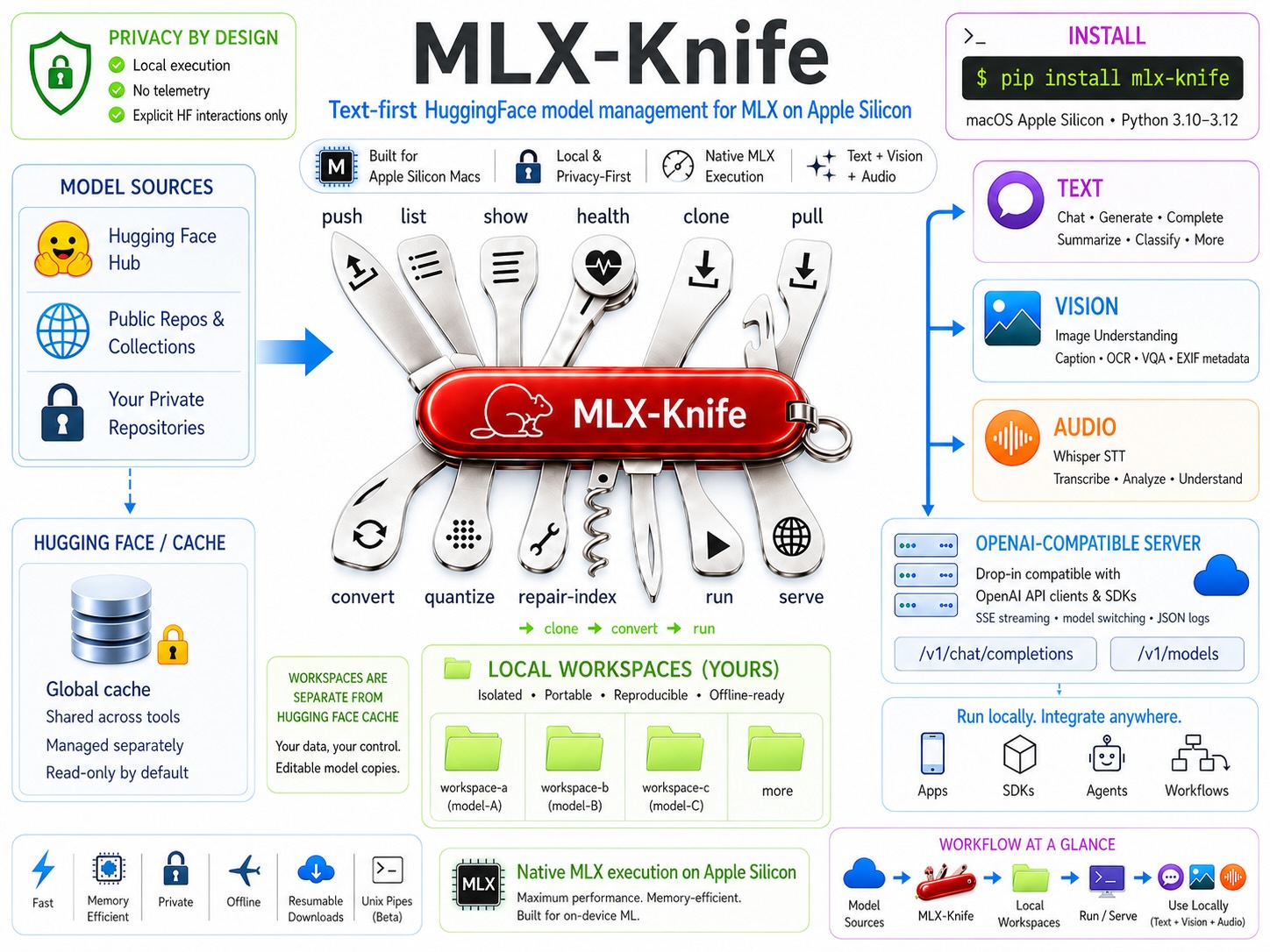
What mlx-knife is — at a glance. Release notes: CHANGELOG.md.
Current Version: 2.0.6 (stable)





Release Notes: See CHANGELOG.md for detailed changes, fixes, and migration guides.
What mlx-knife is
A text-first model CLI for Apple Silicon. Every standard text model
(Llama, Mistral, Qwen, Phi, Gemma, etc.) works out of the box via list,
clone, run, convert, quantize, and serve.
Alongside text, mlx-knife has curated support for a verified set of
vision and audio model types (Whisper, Pixtral, Gemma-3, Qwen2-VL,
VibeVoice, and others). The current per-release list with status per
operation lives in docs/MODEL-COVERAGE.md.
What mlx-knife is not
A universal multimodal wrapper. Vision and audio support tracks a chosen
subset of mlx-vlm / mlx-audio upstream capabilities — not every model
those libraries load will be accepted here. Model types outside the
verified set are rejected explicitly at convert --quantize, not
silently converted (which would destroy the multimodal config and
produce a broken workspace).
Core Functionality
- Run Models - Native MLX execution with streaming, chat modes, vision, and audio
- Audio Transcription (STT) - Whisper speech-to-text via
--audioflag - Vision with EXIF Metadata - Image analysis with automatic GPS/date/camera extraction
- Clone & Convert - Local model workflows without HuggingFace round-trips
- Model Repair - Fix broken mlx-vlm models with
--repair-index - List & Health - Browse cache, verify integrity, check MLX runtime compatibility
- Resumable Downloads - Interrupted clone/pull operations continue automatically
- Safe Vision Chunking - Automatic batching prevents Metal OOM crashes
- Unix Pipes (Beta) - Chain models without temp files (
cat | mlx-run model -) - Privacy - No background network or telemetry; explicit HuggingFace interactions only
What's New in 2.0.6
Two focused improvements:
content_hashnow actually covers the workspace. v1 sampled onlyconfig.json, safetensor name+size+4 KB, and tokenizer name+size —Clean: ✓could quietly miss changes to the safetensors index, processor / preprocessor / generation configs, chat templates, custom Python, or anything in subdirectories. v2 is include-by-default with a portable recipe stored in the sentinel. Existing workspaces migrate in place with onemlxk show <name> --recalc-hash.- Capability labels are now correct. STT model types had been
showing as
base+audio, and Gemma 4 text variants carried a spuriousaudiotag — both go back to the introduction of multimodal support. Detection now uses truthy-dict predicates and matches the STT family as a substring.
Along for the ride:
mlxk listis roughly 85 % faster on a sampled portfolio (~8 s → under 2 s).- MLX-stack refresh — mlx-lm 0.31.3 / mlx-vlm 0.4.4 / mlx-audio 0.4.3 /
transformers 5.5.4. Gemma 4 (text and vision) is now supported in the
runtime portfolio, and
mlxk convert --quantizeaccepts Gemma 4 vision. torch + torchvisionare bundled by default so Pixtral / Llama-Vision / Mistral-Small-3.1 work out of the box (lean-stack opt-out documented in CHANGELOG).mlxk run M "prompt"against an STT or embedding model now gives a pre-execution hint instead of a cryptic loader trace.
Unix Pipe Integration (Beta)
Chain models with standard Unix pipes - no temp files needed:
export MLXK2_ENABLE_PIPES=1

# Model chaining
cat article.txt | mlx-run translator_model - | mlx-run summarizer_model - "3 bullets"

# Works with Unix tools
mlx-run chat_model "explain quicksort" | tee explanation.txt | head -20
Robust handling of SIGPIPE and early pipe termination (| head, | grep -m1).
Requirements
- macOS with Apple Silicon
- Python 3.10-3.12 (see Python Compatibility below)
- 8GB+ RAM recommended + RAM to run LLM
⚖️ Model Usage and Licenses
mlx-knife is a tooling layer for running ML models (e.g. from Hugging Face) locally.
The project does not distribute any model weights and does not decide which models you use or how you use them.
Please note:
- Each model (weights, tokenizer, configuration, etc.) is governed by its own license.
- When
mlx-knifedownloads a model from a third-party service (e.g. Hugging Face), it does so on your behalf. - You are responsible for:
- reading and understanding the license of each model you use,
- complying with any restrictions (e.g. Non-Commercial, Research Only, RAIL, etc.),
- ensuring that your use of a given model (private, research, commercial, on-prem services, etc.) is legally permitted.
The mlx-knife source code itself is provided under the open-source license specified in this repository.
This license applies only to the mlx-knife code and does not extend to any external models.
This is not legal advice. Always refer to the original model license text and, if necessary, seek professional legal counsel.
Python Compatibility
✅ Python 3.10 - 3.12 - Full support (Text + Vision + Audio) ❌ Python 3.9 - Use version 2.0.3 (text + cache management only) ❌ Python 3.13+ - Not supported (miniaudio lacks pre-built wheels)
Recommended: Python 3.10 or 3.11 for best compatibility.
Installation
1. PyPI (Recommended)
pip install mlx-knife
mlxk --version  # → mlxk 2.0.6
Requirements: macOS Apple Silicon, Python 3.10-3.12 Includes: Text, Vision, Audio (Whisper STT), EXIF metadata, Unix pipes
2. Developer Installation
git clone https://github.com/mzau/mlx-knife.git
cd mlx-knife
pip install -e ".[dev,test]"

mlxk --version  # → mlxk 2.0.6
pytest -v
Requirements: macOS Apple Silicon, Python 3.10-3.12
Migrating from 1.x
If you're upgrading from MLX Knife 1.x, see MIGRATION.md for important information about the license change (MIT → Apache 2.0) and behavior changes.
Quick Start
# List models (human-readable)
mlxk list
mlxk list --health
mlxk list --verbose --health

# Check cache health
mlxk health

# Show model details
mlxk show "mlx-community/Phi-3-mini-4k-instruct-4bit"

# Pull a model
mlxk pull "mlx-community/Llama-3.2-3B-Instruct-4bit"

# Resume interrupted download (skip prompt)
mlxk pull "model-name" --force-resume

# Run interactive chat
mlxk run "Phi-3-mini" -c

# Start OpenAI-compatible server
mlxk serve --port 8080
Commands
| Command | Description |
|---|---|
list |
Model discovery with JSON output; supports cache and workspace paths |
show |
Detailed model information with --files, --config |
health |
Corruption detection and cache analysis |
pull |
HuggingFace model downloads with corruption detection |
rm |
Model deletion with lock cleanup and fuzzy matching |
run |
Interactive and single-shot model execution with streaming/batch modes |
server/serve |
OpenAI-compatible API server; SIGINT-robust (Supervisor); SSE streaming |
clone |
Model workspace cloning - create local editable copy from cache |
push |
Upload to HuggingFace Hub (requires --private flag for safety) |
convert |
Workspace transformations: --repair-index, --quantize <bits> |
🔒 pipe mode |
Beta feature - Unix pipes with mlxk run <model> - ...; requires MLXK2_ENABLE_PIPES=1 |
Model References
MLX-Knife supports multiple ways to reference models:
HuggingFace Models (Cache)
| Format | Example | Description |
|---|---|---|
| Full name | mlx-community/Phi-4-4bit |
Exact HuggingFace repo ID |
| Short name | Phi-4 |
Fuzzy match against cache |
| With hash | Phi-4@e96f3b2 |
Specific commit/version |
mlxk run "mlx-community/Phi-4-4bit" "Hello"
mlxk run "Phi-4" "Hello"                    # Fuzzy match
mlxk show "Qwen3@e96" --json                # Specific version
Local Paths (2.0.4-beta.6+)
| Format | Example |
|---|---|
| Relative | ./my-workspace |
| Absolute | /Volumes/External/model |
| Prefix match | ./gemma- (all workspaces starting with "gemma-") |
| Directory | . (all workspaces in current directory) |
# List workspaces
mlxk list .                        # All workspaces in current directory
mlxk list ./gemma-                 # Prefix match: gemma-3n-4bit, gemma-3n-FIXED-4bit, ...
mlxk list $PWD/models              # Absolute path → absolute output

# Clone → Run
mlxk clone org/model ./workspace
mlxk run ./workspace "Hello"

# Convert → Run
mlxk convert ./broken ./fixed --repair-index
mlxk run ./fixed "Test"
Output format: List output mirrors input format - relative patterns produce relative names (like ls), absolute paths produce absolute names.
Disambiguating paths vs cache names: When a local directory exists with the same name as a cached model, use ./ prefix to force workspace resolution. Otherwise, cache lookup is attempted first.
Workspaces
Why Workspaces?
The HuggingFace cache (~/.cache/huggingface) is a shared namespace. Multiple libraries write to it during inference, often without notice. This makes it hard to know what a model actually needs, whether it works offline, or if something changed since you last tested it.
Workspaces solve this by giving each model its own directory with full isolation:
- Self-contained: All files in one place — model weights, config, tokenizer, and any runtime downloads (captured in
.hf_cache/) - Reproducible: After one successful run, everything is local. Archive it, move it to another machine, run it offline
- Platform-independent: Workspaces are plain directories with standard formats (safetensors + config.json). They work regardless of where the model originally came from
- Transparent:
mlxk showandmlxk healthtell you exactly what's inside, whether anything changed, and if the model is ready to run
For quick testing, mlxk pull + mlxk run still works. Workspaces are for when you want control.
Quick Start
# Set up a workspace directory (add to your shell profile)
export MLXK_WORKSPACE_HOME=~/mlx-models

# Clone a model (target auto-derived from model name, org prefix stripped)
mlxk clone mlx-community/Llama-3.2-1B-Instruct-4bit
# → ~/mlx-models/Llama-3.2-1B-Instruct-4bit

# Run it (fuzzy match finds the workspace)
mlxk run Llama-3.2 "Hello"

# See your portfolio (workspaces + cache)
mlxk list
When
MLXK_WORKSPACE_HOMEis set,clonederives the target directory automatically (strips org prefix, stays flat). Explicit targets still work:mlxk clone model ./local-dirormlxk clone model custom-name.
Development Workflow
Full local cycle for model experimentation, repair, quantization, and testing:
mlxk clone mlx-community/model                     # Clone to workspace home
mlxk convert ./model ./fixed --repair-index         # Fix broken index
mlxk convert ./model ./quantized --quantize 4       # Or quantize to 4-bit
mlxk list .                                         # See all local workspaces
mlxk run ./fixed "test prompt"                      # Local inference
mlxk server --model ./fixed                         # Dev server
mlxk push ./fixed "your-org/model"                  # Optional publish
Key capabilities:
- Model repair: Fix index/shard mismatches from mlx-vlm conversions
- Quantization: Convert bf16/fp16 models to 2, 3, 4, 6, or 8-bit
- Cross-volume: Clone/convert works across APFS volumes, SMB, NFS
- Local testing: Run/server/show without pushing to HuggingFace
- Rapid iteration: Clone → Modify → Test loop
Workspace Commands Reference
| Command | Workspace Support | Example |
|---|---|---|
run |
✅ Yes | mlxk run ./workspace "prompt" |
show |
✅ Yes | mlxk show ./workspace --files |
health |
✅ Yes | mlxk health ./workspace |
server |
✅ Yes | mlxk server --model ./workspace |
clone |
✅ Creates | mlxk clone org/model (shorthand) or mlxk clone org/model ./workspace |
convert |
✅ Repair/Quantize | mlxk convert ./in ./out --quantize 4 |
push |
✅ Yes | mlxk push ./workspace "org/name" |
list |
✅ Yes | mlxk list . or mlxk list ./gemma- |
pull |
❌ Cache only | Downloads to HuggingFace cache |
rm |
❌ Cache only | Use rm -rf ./workspace for local directories |
Web Interface
For a web-based chat UI, use nChat - a lightweight web interface for the BROKE ecosystem:
# Clone once (local setup):
git clone https://github.com/mzau/broke-nchat.git
cd broke-nchat

# Start mlx-knife server:
mlxk serve

# Open web UI:
open webui/index.html
On-Prem: Pure HTML/CSS/JS - runs entirely locally, zero dependencies.
Note: nChat is a separate project designed for the entire BROKE ecosystem (MLX Knife + BROKE Cluster). See nChat README for CORS configuration.
Multi-Modal Support
MLX Knife supports multiple input modalities beyond text. All multi-modal features share a common output pattern: model responses are followed by collapsible metadata tables for transparency and traceability.
Vision
Image analysis via the --image flag (CLI and server). Requires Python 3.10+. Stable since 2.0.4.
Requirements
- Python 3.10+ (mlx-vlm dependency)
- Backend: mlx-vlm 0.4+ (included in base install)
Usage
# Image analysis with custom prompt
mlxk run "mlx-community/Llama-3.2-11B-Vision-Instruct-4bit" \
  --image photo.jpg "Describe what you see in detail"

# Multiple images (space-separated or glob)
mlxk run vision-model --image img1.jpg img2.jpg img3.jpg "Compare these images"
mlxk run vision-model --image photos/*.jpg "Which images show outdoor scenes?"

# Auto-prompt (default: "Describe the image.")
mlxk run vision-model --image cat.jpg

# Text-only on vision model (no --image flag)
mlxk run "mlx-community/Llama-3.2-11B-Vision-Instruct-4bit" "What is 2+2?"
Batch Processing
Terminology Note: mlx-knife uses "batch" in the traditional computing sense (sequential job processing in groups), not ML inference batching (parallel batch_size > 1 in a single forward pass). Images are processed sequentially in groups for memory safety, not performance parallelization.
Default behavior: Vision processing defaults to one image at a time for maximum stability on all systems. Use --chunk N to process multiple images per batch when your system can handle it.
# Default: one image at a time (most robust, automatic chunking)
mlxk run pixtral "Describe image" --image photos/*.jpg

# Faster: 5 images per batch (requires more RAM, may trigger model-specific issues)
mlxk run pixtral "Describe images" --chunk 5 --image photos/*.jpg

# Alternative: Use --prompt flag (useful when experimenting with different prompts)
mlxk run pixtral --chunk 5 --image photos/*.jpg --prompt "Describe images"

# Set default chunk size via environment variable
export MLXK2_VISION_CHUNK_SIZE=3
mlxk run pixtral "Describe images" --image photos/*.jpg
Why chunking?
- Safety: Prevents Metal OOM crashes by limiting images per processing group (
--chunk N) - Isolation: Fresh inference session per chunk (KV cache cleared, conversation context reset)
- Trade-off: ~2-3s model load overhead per chunk vs guaranteed isolation
Reliability: Vision models can sometimes describe details they didn't actually see. MLX Knife prevents this automatically:
- Default (chunk=1): Most reliable - each image processed independently
- Larger chunks: Still safe, but models may occasionally confuse details between images in the same batch
For maximum accuracy, use the default chunk=1 (no configuration needed).
Server API:
curl -X POST http://localhost:8000/v1/chat/completions \
  -H "Content-Type: application/json" \
  -d '{"model": "pixtral", "chunk": 3, "messages": [...]}'
Note: chunk is an mlx-knife extension parameter. See SERVER-HANDBOOK.md for details.
Metadata Output Format
When processing images, MLX Knife automatically prepends metadata in a collapsible table (collapsed by default) before the model output:
<details>
<summary>📸 Chunk 1/3: Images 1-4</summary>

| Image | Filename | Original | Location | Date | Camera |
|-------|----------|----------|----------|------|--------|
| 1 | image_abc123.jpeg | beach.jpg | 📍 32.7900°N, 16.9200°W | 📅 2023-12-06 12:19 | 📷 Apple iPhone SE |
| 2 | image_def456.jpeg | mountain.jpg | 📍 32.8700°N, 17.1700°W | 📅 2023-12-10 15:42 | 📷 Apple iPhone SE |
| 3 | image_xyz789.jpeg | sunset.jpg | 📍 32.8200°N, 17.0500°W | 📅 2023-12-08 18:30 | 📷 Apple iPhone SE |
| 4 | image_uvw456.jpeg | forest.jpg | 📍 32.8800°N, 17.1200°W | 📅 2023-12-09 10:15 | 📷 Apple iPhone SE |

</details>

A beach with palm trees and clear blue water. A mountain landscape with snow-capped peaks...
Chunk information in summary:
- Shows current chunk and total chunks (e.g., "Chunk 1/3")
- Shows image range in current chunk (e.g., "Images 1-4")
- Helps track progress in WebUI and prevents confusion about which images are being described
Why metadata comes first:
- The model sees GPS, date, and camera info when analyzing images (enables location/time-aware descriptions)
- The markdown table shows you exactly what the model knows about each image
- Helps verify which description belongs to which file
Metadata includes:
- Image ID → Filename mapping (identify which description belongs to which file)
- GPS coordinates (latitude/longitude, if available in EXIF)
- Precision: 4 decimal places (~11m accuracy) for street-level context
- Capture date/time (ISO 8601 format)
- Camera model (device info)
Privacy control:
EXIF extraction is enabled by default. To disable (e.g., for privacy-sensitive images):
export MLXK2_EXIF_METADATA=0
mlxk run vision-model --image photo.jpg "describe"
Output is the same for CLI and server - metadata tables work in terminals, web UIs (nChat), and can be parsed programmatically.
Limitations
- Image limits: Model-dependent due to Metal / unified-memory constraints and peak activation usage
- pixtral-12b-8bit: Up to 5 images tested on M2 Max 64GB (multi-image capable)
- Llama-3.2-11B / Other models: Single-image only
- Larger models (24B+): Limited to 1-2 images on 64GB RAM
- Default server guardrails: 20 MB per image, 50 MB total (configurable). Base64 encoding adds ~33% overhead.
Server API
Vision models work with OpenAI-compatible /v1/chat/completions endpoint using base64-encoded images:
curl http://localhost:8000/v1/chat/completions -H "Content-Type: application/json" -d '{
  "model": "llama-vision",
  "messages": [{
    "role": "user",
    "content": [
      {"type": "text", "text": "What is in this image?"},
      {"type": "image_url", "image_url": {"url": "data:image/jpeg;base64,..."}}
    ]
  }]
}'
Model Compatibility
Vision support routes through mlx-vlm upstream. File integrity is verified by mlxk health, but runtime behavior depends on the per-model upstream state.
For the authoritative per-release status of every supported
model_type, seedocs/MODEL-COVERAGE.md.
A reasonable starting point: Pixtral 12B 8-bit (mlx-community/pixtral-12b-8bit, ~13.5 GB) — multi-image capable, strong text recognition, verified across recent releases. Other verified model families, repair workflows for legacy conversions, and known runtime issues are tracked release-by-release in the coverage matrix.
Some legacy mlx-vlm conversions need a one-time index repair before they load — use mlxk convert <src> <dst> --repair-index. The coverage matrix lists which families still need this and which are clean since mlx-vlm 0.4+.
Audio Transcription (Speech-to-Text)
🎙️ Audio Transcription: Speech-to-text via Whisper models (mlx-audio backend). Works out-of-the-box with PyPI install. Backward compatible with Gemma-3n multimodal audio (mlx-vlm).
Requirements:
- Python 3.10+ (mlx-audio dependency, included in base install)
- No system dependencies: MP3/WAV decoding via embedded libsndfile (no ffmpeg or Homebrew required)
Reference model: mlx-community/whisper-large-v3-turbo-4bit (~464 MB, supports >10 min audio, 4bit + 8bit variants both verified). See docs/MODEL-COVERAGE.md for the full per-release verified list.
🔧 Backend Architecture:
mlx-knife automatically routes audio models to the optimal backend:
- Dedicated STT (Whisper / Voxtral family) → mlx-audio (long-form, best accuracy)
- Multimodal LLMs with audio input → mlx-vlm (token-limited duration, secondary path)
⚙️ Audio Defaults:
| Setting | Audio | Text/Vision | Reason |
|---|---|---|---|
| Temperature | 0.0 | 0.7 | Greedy decoding (STT best practice) |
| Default Prompt | "Transcribe this audio." | - | Minimal prompt for pure transcription |
💡 Quick Start:
# Pull a Whisper model (one-time setup)
mlxk pull mlx-community/whisper-large-v3-turbo-4bit

# Transcribe audio (WAV, MP3, M4A - native on macOS)
mlxk run whisper-large --audio speech.mp3
# → Automatic greedy decoding (temp=0.0)

# With language hint for better accuracy
mlxk run whisper-large --audio speech.mp3 --language en

# Longer audio (>10 minutes supported)
mlxk run whisper-large --audio podcast.wav
⚠️ Limitations:
- Duration: depends on model architecture — dedicated STT models (Whisper) support >10 min; multimodal LLMs with audio are typically token-limited to ~30 s
- File size: 50 MB max per request (configurable)
- Formats: WAV, MP3, M4A on macOS (M4A via Core Audio); Linux needs ffmpeg for non-WAV
- Legacy weights:
.npz-only models are not supported — use.safetensorsvariants
🎯 Advanced Usage:
# Explicit temperature control (0.0 = greedy, deterministic)
mlxk run whisper-large --audio speech.wav --temperature 0.0

# Force specific language (improves accuracy)
mlxk run whisper-large --audio german.mp3 --language de

# Segment metadata (MLXK2_AUDIO_SEGMENTS=1 for timestamps)
MLXK2_AUDIO_SEGMENTS=1 mlxk run whisper-large --audio meeting.wav
JSON API
📋 Complete API Specification: See JSON API Specification for comprehensive schema, error codes, and examples.
All commands support both human-readable and JSON output (--json flag) for automation and scripting, enabling seamless integration with CI/CD pipelines and cluster management systems.
Command Structure
All commands support JSON output via --json flag:
mlxk list --json | jq '.data.models[].name'
mlxk health --json | jq '.data.summary'
mlxk show "Phi-3-mini" --json | jq '.data.model'
Response Format:
{
    "status": "success|error",
    "command": "list|health|show|pull|rm|clone|convert|version|push|run|server",
    "data": { /* command-specific data */ },
    "error": null | { "type": "...", "message": "..." }
}
Examples
List Models
mlxk list --json
# Output:
{
  "status": "success",
  "command": "list",
  "data": {
    "models": [
      {
        "name": "mlx-community/Phi-3-mini-4k-instruct-4bit",
        "hash": "a5339a41b2e3abcdef1234567890ab12345678ef",
        "size_bytes": 4613734656,
        "last_modified": "2024-10-15T08:23:41Z",
        "framework": "MLX",
        "model_type": "chat",
        "capabilities": ["text-generation", "chat"],
        "health": "healthy",
        "runtime_compatible": true,
        "reason": null,
        "cached": true
      }
    ],
    "count": 1
  },
  "error": null
}
Health Check
mlxk health --json
# Output:
{
  "status": "success",
  "command": "health",
  "data": {
    "healthy": [
      {
        "name": "mlx-community/Phi-3-mini-4k-instruct-4bit",
        "status": "healthy",
        "reason": "Model is healthy"
      }
    ],
    "unhealthy": [],
    "summary": { "total": 1, "healthy_count": 1, "unhealthy_count": 0 }
  },
  "error": null
}
Show Model Details
mlxk show "Phi-3-mini" --json --files
# Output (simplified):
{
  "status": "success",
  "command": "show",
  "data": {
    "model": {
      "name": "mlx-community/Phi-3-mini-4k-instruct-4bit",
      "hash": "a5339a41b2e3abcdefgh1234567890ab12345678",
      "size_bytes": 4613734656,
      "framework": "MLX",
      "model_type": "chat",
      "capabilities": ["text-generation", "chat"],
      "last_modified": "2024-10-15T08:23:41Z",
      "health": "healthy",
      "runtime_compatible": true,
      "reason": null,
      "cached": true
    },
    "files": [
      {"name": "config.json", "size": "1.2KB", "type": "config"},
      {"name": "model.safetensors", "size": "2.3GB", "type": "weights"}
    ],
    "metadata": null
  },
  "error": null
}
Integration Examples
Broke-Cluster Integration
# Get available model names for scheduling
MODELS=$(mlxk list --json | jq -r '.data.models[].name')

# Check cache health before deployment
HEALTH=$(mlxk health --json | jq '.data.summary.healthy_count')
if [ "$HEALTH" -eq 0 ]; then
    echo "No healthy models available"
    exit 1
fi

# Download required models
mlxk pull "mlx-community/Phi-3-mini-4k-instruct-4bit" --json
CI/CD Pipeline Usage
# Verify model integrity in CI
mlxk health --json | jq -e '.data.summary.unhealthy_count == 0'

# Clean up CI artifacts
mlxk rm "test-model-*" --json --force

# Pre-warm cache for deployment
mlxk pull "production-model" --json
Model Management Automation
# Find models by pattern
LARGE_MODELS=$(mlxk list --json | jq -r '.data.models[] | select(.name | contains("30B")) | .name')

# Show detailed info for analysis
for model in $LARGE_MODELS; do
    mlxk show "$model" --json --config | jq '.data.model_config'
done
Human Output
MLX Knife provides rich human-readable output by default (without --json flag).
Error Handling (2.0.3+): Errors print to stderr for clean pipe workflows:
mlxk show badmodel | grep ...      # Errors don't contaminate stdout
mlxk pull badmodel > log 2> err    # Capture errors separately
Basic Usage
mlxk list
mlxk list --health
mlxk health
mlxk show "mlx-community/Phi-3-mini-4k-instruct-4bit"
mlxk pull "mlx-community/Llama-3.2-3B-Instruct-4bit"
Pull Command
Download models from HuggingFace:
mlxk pull "mlx-community/Phi-3-mini-4k-instruct-4bit"
Interrupted downloads (2.0.4-beta.5+): If a download fails (network issue, Ctrl-C), mlxk pull will detect this and prompt to resume:
$ mlxk pull "model-name"
Model 'model-name' has partial download:
  No model weights found. Use --force-resume to attempt resume or 'mlxk rm' to delete.
Resume download? [Y/n]: y
Automation/scripting: Use --force-resume to skip the prompt:
mlxk pull "model-name" --force-resume
List Filters
list: Shows MLX chat models only (compact names, safe default)list --verbose: Shows all MLX models (chat + base) with full org/names and Framework columnlist --all: Shows all frameworks (MLX, GGUF, PyTorch)- Flags are combinable:
--all --verbose,--all --health,--verbose --health
mlxk list Output Columns
mlxk list shows workspace and cache models in one portfolio view. Output expands by mode; --health is a modular extension on top of the base columns.
Default columns (compact mode):
| Column | Meaning |
|---|---|
Name |
Model identifier (compact form; workspaces use display_name) |
Hash |
First 7 chars of content hash |
Size |
Combined weights + config size |
Modified |
Last filesystem modification |
Src |
cache · ws (clean workspace) · ws* (modified) · ws? (v1 legacy — run mlxk show <name> --recalc-hash to migrate) |
Type |
Capability label (e.g. chat, chat+vision, audio) |
--verbose (or --all) adds the Clean column (workspace integrity: ✓ clean · ✗ modified · — cache or migration-pending) and the Framework column (MLX / PyTorch / GGUF).
--health adds health diagnostics. In compact mode this is a single Health column; in verbose mode it splits into Integrity, Runtime, and Reason.
| Health value | Meaning |
|---|---|
healthy |
file integrity OK and MLX runtime compatible |
healthy* |
files intact but MLX runtime can't execute (wrong framework, incompatible model_type, or mlx-lm too old) |
unhealthy |
file integrity failed or unknown format |
Default — workspace + cache models, MLX-only, healthy + runnable:
mlxk list
Name                  | Hash    | Size  | Modified | Src   | Type
----------------------+---------+-------+----------+-------+-----
Llama-3.2-3B-Instruct | a1b2c3d | 2.1GB | 2d ago   | cache | chat
my-llama-workspace    | 9f8e7d6 | 2.1GB | 1h ago   | ws    | chat
legacy-workspace      | 7a6b5c4 | 4.8GB | 5d ago   | ws?   | chat
--verbose — adds Clean and Framework columns:
mlxk list --verbose
Name                  | Hash    | Size  | Modified | Src   | Clean | Framework | Type
----------------------+---------+-------+----------+-------+-------+-----------+-----
Llama-3.2-3B-Instruct | a1b2c3d | 2.1GB | 2d ago   | cache | —     | MLX       | chat
my-llama-workspace    | 9f8e7d6 | 2.1GB | 1h ago   | ws    | ✓     | MLX       | chat
edited-workspace      | 9f8e7d6 | 2.1GB | 5m ago   | ws*   | ✗     | MLX       | chat
--verbose --health — verbose mode splits health into three columns:
mlxk list --verbose --health
Name                  | Hash    | Size  | Modified | Src   | Clean | Framework | Type | Integrity | Runtime | Reason
----------------------+---------+-------+----------+-------+-------+-----------+------+-----------+---------+-------
Llama-3.2-3B-Instruct | a1b2c3d | 2.1GB | 2d ago   | cache | —     | MLX       | chat | healthy   | yes     | -
my-llama-workspace    | 9f8e7d6 | 2.1GB | 1h ago   | ws    | ✓     | MLX       | chat | healthy   | yes     | -
--json is unaffected by the human-mode healthy + runtime_compatible filter and always returns the full model list with health/runtime fields.
Logging & Debugging
MLX Knife 2.0 provides structured logging with configurable output formats and levels.
Log Levels
Control verbosity with --log-level (server mode):
# Default: Show startup, model loading, and errors
mlxk serve --log-level info

# Quiet: Only warnings and errors
mlxk serve --log-level warning

# Silent: Only errors
mlxk serve --log-level error

# Verbose: All logs including HTTP requests
mlxk serve --log-level debug
Log Level Behavior:
debug: All logs + Uvicorn HTTP access logs (GET /v1/models, etc.)info: Application logs (startup, model switching, errors) + HTTP access logswarning: Only warnings and errors (no startup messages, no HTTP access logs)error: Only error messages
JSON Logs (Machine-Readable)
Enable structured JSON output for log aggregation tools:
# JSON logs (recommended - CLI flag)
mlxk serve --log-json

# JSON logs (alternative - environment variable)
MLXK2_LOG_JSON=1 mlxk serve
Note: --log-json also formats Uvicorn access logs as JSON for consistent output.
JSON Format:
{"ts": 1760830072.96, "level": "INFO", "msg": "MLX Knife Server 2.0 starting up..."}
{"ts": 1760830073.14, "level": "INFO", "msg": "Switching to model: mlx-community/...", "model": "..."}
{"ts": 1760830074.52, "level": "ERROR", "msg": "Model type bert not supported.", "logger": "root"}
Fields:
ts: Unix timestamplevel: Log level (INFO, WARN, ERROR, DEBUG)msg: Log message (HF tokens and user paths automatically redacted)logger: Source logger (mlxk2= application,root= external libraries like mlx-lm)- Additional fields:
model,request_id,detail,duration_ms(context-dependent)
Security: Automatic Redaction
Sensitive data is automatically removed from logs:
- HuggingFace tokens (
hf_...) →[REDACTED_TOKEN] - User home paths (
/Users/john/...) →~/...
Example:
# Original (unsafe):
Using token hf_AbCdEfGhIjKlMnOpQrStUvWxYz123456 from /Users/john/models

# Logged (safe):
Using token [REDACTED_TOKEN] from ~/models
Configuration Reference
MLX Knife supports comprehensive runtime configuration via environment variables. All settings can be controlled without code changes.
Workspace Configuration
| Variable | Description | Default | Since |
|---|---|---|---|
MLXK_WORKSPACE_HOME |
Directory for workspace model portfolio. Enables clone shorthand (no target needed), portfolio discovery for list, health, run, serve. |
(none) | 2.0.5 |
# Recommended: add to shell profile
export MLXK_WORKSPACE_HOME=~/mlx-models

mlxk clone mlx-community/model  # → ~/mlx-models/model (org stripped)
mlxk list                       # Shows workspaces + cache models
mlxk run whisper "transcribe"   # Finds whisper in workspace home
mlxk health                     # Checks workspaces + cache
Feature Gates
Enable experimental features:
| Variable | Description | Default | Since |
|---|---|---|---|
MLXK2_ENABLE_PIPES |
Enable Unix pipe integration (mlxk run <model> -) |
0 (disabled) |
2.0.4 |
MLXK2_EXIF_METADATA |
Extract EXIF metadata from images (Vision models) | 1 (enabled) |
2.0.4 |
Examples:
# Enable pipe mode for stdin processing
export MLXK2_ENABLE_PIPES=1
echo "Hello" | mlxk run model - "translate to Spanish"

# Disable EXIF extraction for privacy (enabled by default)
export MLXK2_EXIF_METADATA=0
mlxk run vision-model --image photo.jpg "describe this"
Server Configuration
Control server behavior without command-line flags:
| Variable | Description | Default | Since |
|---|---|---|---|
MLXK2_HOST |
Server bind address | 127.0.0.1 |
2.0.0 |
MLXK2_PORT |
Server port | 8000 |
2.0.0 |
MLXK2_PRELOAD_MODEL |
Model to load at startup (set by --model flag) |
(none) | 2.0.0-beta |
MLXK2_MAX_TOKENS |
Override default max_tokens for all requests | (auto) | 2.0.4 |
MLXK2_RELOAD |
Enable Uvicorn auto-reload (development only) | 0 (disabled) |
2.0.0 |
Vision Processing
Control vision model behavior (Python 3.10+, beta):
| Variable | Description | Default | Since |
|---|---|---|---|
MLXK2_VISION_CHUNK_SIZE |
Default chunk size for vision image processing | 1 |
2.0.4-beta.7 |
Examples:
# Process 3 images per chunk instead of 1 (faster but requires more RAM)
export MLXK2_VISION_CHUNK_SIZE=3
mlxk run pixtral --image photos/*.jpg "Describe images"

# CLI flag overrides environment variable
mlxk run pixtral --chunk 5 --image photos/*.jpg "Describe images"  # Uses 5, not 3
Server Configuration Examples
# Custom host/port binding
MLXK2_HOST=0.0.0.0 MLXK2_PORT=9000 mlxk serve

# Preload model for faster first request
MLXK2_PRELOAD_MODEL="mlx-community/Qwen2.5-3B-Instruct-4bit" mlxk serve

# Override max_tokens for all requests
MLXK2_MAX_TOKENS=4096 mlxk serve

# Development mode with auto-reload
MLXK2_RELOAD=1 mlxk serve
Logging Configuration
Control log output format and verbosity:
| Variable | Description | Default | Since |
|---|---|---|---|
MLXK2_LOG_JSON |
Enable JSON log format | 0 (text) |
2.0.0 |
MLXK2_LOG_LEVEL |
Log level (debug, info, warning, error) |
info |
2.0.0 |
Examples:
# JSON logs for log aggregation tools
MLXK2_LOG_JSON=1 mlxk serve

# Quiet mode (warnings and errors only)
MLXK2_LOG_LEVEL=warning mlxk serve

# Verbose debug output
MLXK2_LOG_LEVEL=debug mlxk serve
Note: CLI flags (--log-json, --log-level) take precedence over environment variables.
HuggingFace Integration
Control HuggingFace Hub authentication and cache:
| Variable | Description | Default | Since |
|---|---|---|---|
HF_HOME |
HuggingFace cache directory | ~/.cache/huggingface |
N/A |
HF_TOKEN |
HuggingFace API token (for private models, push) |
(none) | N/A |
HUGGINGFACE_HUB_TOKEN |
Alternative token variable (fallback) | (none) | N/A |
Examples:
# Custom cache location
HF_HOME=/data/models mlxk list

# Authentication for private models
HF_TOKEN=hf_... mlxk pull org/private-model

# Upload to HuggingFace Hub
HF_TOKEN=hf_... mlxk push ./workspace org/model --private
Configuration Priority
When multiple sources define the same setting, precedence order is:
- CLI flags (highest priority) - e.g.,
--log-json,--port - Environment variables - e.g.,
MLXK2_LOG_JSON=1 - Defaults (lowest priority) - documented above
Example:
# CLI flag wins over environment variable
MLXK2_PORT=9000 mlxk serve --port 8080  # Uses port 8080, not 9000
HuggingFace Cache Safety
MLX-Knife 2.0 respects standard HuggingFace cache structure and practices:
Best Practices for Shared Environments
- Read operations (
list,health,show) always safe with concurrent processes - Write operations (
pull,rm) coordinate during maintenance windows - Lock cleanup automatic but avoid during active downloads
- Your responsibility: Coordinate with team, use good timing
Example Safe Workflow
# Check what's in cache (always safe)
mlxk list --json | jq '.data.count'

# Maintenance window - coordinate with team
mlxk rm "corrupted-model" --json --force
mlxk pull "replacement-model" --json

# Back to normal operations
mlxk health --json | jq '.data.summary'
Workspace Features: clone, push, convert
Workspace Structure
A workspace is a self-contained directory containing model files in a flat structure (not the HuggingFace cache format). Workspaces are portable, editable, and can be health-checked standalone.
Structure:
workspace/
├── config.json              # Model configuration
├── tokenizer.json           # Tokenizer definition
├── tokenizer_config.json    # Tokenizer settings
├── model.safetensors        # Weights (single file)
├── (or model-*.safetensors) # Weights (multi-shard)
└── README.md                # Optional documentation
Key characteristics:
| Aspect | Workspace | HuggingFace Cache |
|---|---|---|
| Structure | Flat, self-contained | Nested (hub/models--org--repo/snapshots/...) |
| Models | Exactly one model per workspace | Many models (models--org--repo1, models--org--repo2, ...) |
| Purpose | Portable working directory | Download cache (managed) |
| Health Check | Standalone (no cache needed) | Requires cache structure |
| Portability | Goal: USB stick, SMB share, any volume | Fixed location (HF_HOME) |
| Ownership | User owns files | Managed by HuggingFace Hub |
| Operations | clone (creates), push (uploads from) |
pull (downloads to) |
Portability (Phase 1 limitation):
- Current: Same APFS volume as cache (CoW optimization)
- Community Goal: Any location (USB stick, SMB share, different volumes)
- Future: Cross-volume support planned
Typical workflow:
mlxk pull org/model→ Downloads to cachemlxk clone org/model workspace/→ Creates editable workspace copy- Edit files in
workspace/(modify config, quantize, etc.) mlxk push workspace/ org/new-model→ Upload modified version- (Optional) Copy workspace to USB stick for sharing
clone - Model Workspace Creation
mlxk clone creates a local workspace from a cached model for modification and development.
- Creates isolated workspace from cached models
- Shorthand: When
MLXK_WORKSPACE_HOMEis set, target is optional (org prefix stripped automatically) - Supports APFS copy-on-write optimization on same-volume scenarios; falls back to regular copy cross-volume
- Includes health check integration for workspace validation
- Resumable: Interrupted pulls resume automatically
Examples:
# Shorthand (MLXK_WORKSPACE_HOME set):
mlxk clone mlx-community/pixtral-12b-bf16          # → $MLXK_WORKSPACE_HOME/pixtral-12b-bf16
mlxk clone mlx-community/pixtral-12b-bf16 my-name  # → $MLXK_WORKSPACE_HOME/my-name

# Explicit path:
mlxk clone org/model ./workspace                   # → ./workspace
push - Upload to Hub
mlxk push uploads a local folder to a Hugging Face model repository using huggingface_hub/upload_folder.
- Requires
HF_TOKEN(write-enabled). - Default branch:
main(explicitly override with--branch). - Safety:
--privateis required to avoid accidental public uploads. - No validation or manifests. Basic hard excludes are applied by default:
.git/**,.DS_Store,__pycache__/, common virtualenv folders (.venv/,venv/), and*.pyc. .hfignore(gitignore-like) in the workspace is supported and merged with the defaults.- Repo creation: use
--createif the target repo does not exist; harmless on existing repos. Missing branches are created during upload. - JSON output: includes
commit_sha,commit_url,no_changes,uploaded_files_count(when available),local_files_count(approx),change_summaryand a shortmessage. - Quiet JSON by default: with
--json(without--verbose) progress bars/console logs are suppressed; hub logs are still captured indata.hf_logs. - Human output: derived from JSON; add
--verboseto include extras such as the commit URL or a short message variant. JSON schema is unchanged. - Local workspace check: use
--check-onlyto validate a workspace without uploading. Producesworkspace_healthin JSON (no token/network required). - Dry-run planning: use
--dry-runto compute a plan vs remote without uploading. Returnsdry_run: true,dry_run_summary {added, modified:null, deleted}, and sampleadded_files/deleted_files. - Testing: see TESTING.md ("Push Testing (2.0)") for offline tests and opt-in live checks with markers/env.
- Carefully review the result on the Hub after pushing.
- Responsibility: You are responsible for complying with Hugging Face Hub policies and applicable laws (e.g., copyright/licensing) for any uploaded content.
Example:
# Upload to private repo
mlxk push --private ./workspace org/model --create --commit "init"
convert - Workspace Transformations
Transform models with --repair-index (fix broken mlx-vlm conversions) or --quantize (reduce model size).
Repair workflow (mlx-vlm #624 affected models):
# With MLXK_WORKSPACE_HOME (bare names):
mlxk clone mlx-community/Qwen2.5-VL-7B-Instruct-4bit
mlxk convert Qwen2.5-VL-7B-Instruct-4bit ws-qwen-fixed --repair-index
mlxk health ws-qwen-fixed

# Or with explicit paths:
mlxk clone mlx-community/Qwen2.5-VL-7B-Instruct-4bit ./ws-qwen
mlxk convert ./ws-qwen ./ws-qwen-fixed --repair-index
Quantize workflow:
# With MLXK_WORKSPACE_HOME (bare names):
mlxk clone mlx-community/Llama-3.2-1B-Instruct
mlxk convert Llama-3.2-1B-Instruct llama-4bit --quantize 4

# Or with custom group size (32 = better quality, larger file)
mlxk convert Llama-3.2-1B-Instruct llama-4bit-g32 --quantize 4 --q-group-size 32
Supported bits: 2, 3, 4, 6, 8
Key features:
- Cache sanctity: Hard blocks writes to HF cache (workspaces only)
- Cross-volume: Works across APFS volumes, SMB, NFS (with fallback copy)
- Health check integration: Automatic validation (skip with
--skip-health) - APFS CoW: Instant, space-efficient cloning when on same volume
Future modes: --dequantize, vision model quantization (planned).
pipe mode - stdin for run (beta, mlx-run shorthand)
Pipe mode is beta (feature complete) and requires MLXK2_ENABLE_PIPES=1. It lets mlxk run (and mlx-run) read stdin when you pass - as the prompt.
- Status: Beta (feature complete), API stable (syntax will not change)
- Gate:
MLXK2_ENABLE_PIPES=1(will become default in a future stable release) - Auto-batch: When stdout is a pipe (non-TTY), streaming is disabled automatically for clean output
- Robust: Handles SIGPIPE and BrokenPipeError gracefully (
| head,| grep -m1work correctly) - Scope: Applies to
mlxk runandmlx-run; other commands unchanged - Usage examples (replace
<model>with a cached MLX chat model):
# stdin + trailing text (batch when piped)
MLXK2_ENABLE_PIPES=1 echo "from stdin" | mlxk run "<model>" - "append extra context"

# list → run summarization
MLXK2_ENABLE_PIPES=1 mlxk list --json \
  | MLXK2_ENABLE_PIPES=1 mlxk run "<model>" - "Summarize the model list as a concise table." >my-hf-table.md

# Wrapper shorthand
MLXK2_ENABLE_PIPES=1 mlx-run "<model>" - "translate into german" < README.md

# Vision → Text chain: Photo tour review
MLXK2_ENABLE_PIPES=1 mlxk run pixtral --image photos/*.jpg "Describe each picture" \
  | MLXK2_ENABLE_PIPES=1 mlxk run qwen3 - \
    "Write a tour review. Create a table with picture names, metadata, and descriptions." \
  > tour-review.md
Testing
The 2.0 test suite runs by default (pytest discovery points to tests_2.0/):
# Run 2.0 tests (default)
pytest -v

# Explicitly run legacy 1.x tests (not maintained on this branch)
pytest tests/ -v

# Test categories (2.0 example):
# - ADR-002 edge cases
# - Integration scenarios
# - Model naming logic
# - Robustness testing

# Current status: all current 2.0 tests pass (some optional schema tests may be skipped without extras)
Test Architecture:
- Isolated Cache System - Zero risk to user data
- Atomic Context Switching - Production/test cache separation
- Mock Models - Realistic test scenarios
- Edge Case Coverage - All documented failure modes tested
Compatibility Notes
- Streaming note: Some UIs buffer SSE; verify real-time with
curl -N. Server sends clear interrupt markers on abort.
Contributing
This branch follows the established MLX-Knife development patterns:
# Run quality checks
python test-multi-python.sh  # Tests across Python 3.9-3.14
./run_linting.sh             # Code quality validation

# Key files:
mlxk2/                       # 2.0.0 implementation
tests_2.0/                   # 2.0 test suite
docs/ADR/                    # Architecture decision records
See CONTRIBUTING.md for detailed guidelines.
Support & Feedback
- Issues: GitHub Issues
- Discussions: GitHub Discussions
- API Specification: JSON API Specification
- Documentation: See
docs/directory for technical details - Security Policy: See SECURITY.md
License
Apache License 2.0 — see LICENSE (root) and mlxk2/NOTICE.
Acknowledgments
- Built for Apple Silicon using the MLX framework
- Models hosted by the MLX Community on HuggingFace
- Inspired by ollama's user experience
Made with ❤️ by The BROKE team
Version 2.0.6 | May 2026
Supported by Anthropic Claude Code
💬 Web UI: nChat - lightweight chat interface •
🔮 Multi-node: BROKE Cluster

Release history Release notifications | RSS feed


Download files
Download the file for your platform. If you're not sure which to choose, learn more about installing packages.
Source Distribution
Built Distribution
Filter files by name, interpreter, ABI, and platform.
If you're not sure about the file name format, learn more about wheel file names.
Copy a direct link to the current filters
File details
Details for the file mlx_knife-2.0.6.tar.gz.
File metadata
- Download URL: mlx_knife-2.0.6.tar.gz
- Upload date:
- Size: 946.8 kB
- Tags: Source
- Uploaded using Trusted Publishing? No
- Uploaded via: twine/6.1.0 CPython/3.10.18
File hashes
| Algorithm | Hash digest | |
|---|---|---|
| SHA256 |
eff0375c499931ac7c195ee9d45d30deabc64c706b4fe2185e87151f0d3a7d4c
|
|
| MD5 |
706d91c14bc0317148fa0b5558b89a5d
|
|
| BLAKE2b-256 |
be247f87464084e6a94ad4211b092db25a705b00af69ecdb1bc18be75da9cfc1
|
File details
Details for the file mlx_knife-2.0.6-py3-none-any.whl.
File metadata
- Download URL: mlx_knife-2.0.6-py3-none-any.whl
- Upload date:
- Size: 936.1 kB
- Tags: Python 3
- Uploaded using Trusted Publishing? No
- Uploaded via: twine/6.1.0 CPython/3.10.18
File hashes
| Algorithm | Hash digest | |
|---|---|---|
| SHA256 |
f3ceaff86bfc3a38cd56e40757a8ca725717639c6240b55b325102c345f61aff
|
|
| MD5 |
bf08d6a10ab3fa6f65e1b16c69d46717
|
|
| BLAKE2b-256 |
6a41a5c759c7cabad31f37d67859ac51c9c0b947b1c3d73c3b47b4f230d4af11
|






