
This release is a pre-release and may not be stable for production use.
Mnemo Memory
Give Codex and Claude Code durable project context without replaying entire chats or codebases.
Mnemo is a local-first memory and context layer for coding agents. It helps a fresh agent session continue from the last useful state: what was being built, what changed, which decision won, what failed, what was verified, and what should happen next.
It works alongside your existing agent through MCP. Mnemo does not replace the agent, change its model, proxy its model endpoint, or silently record every conversation.
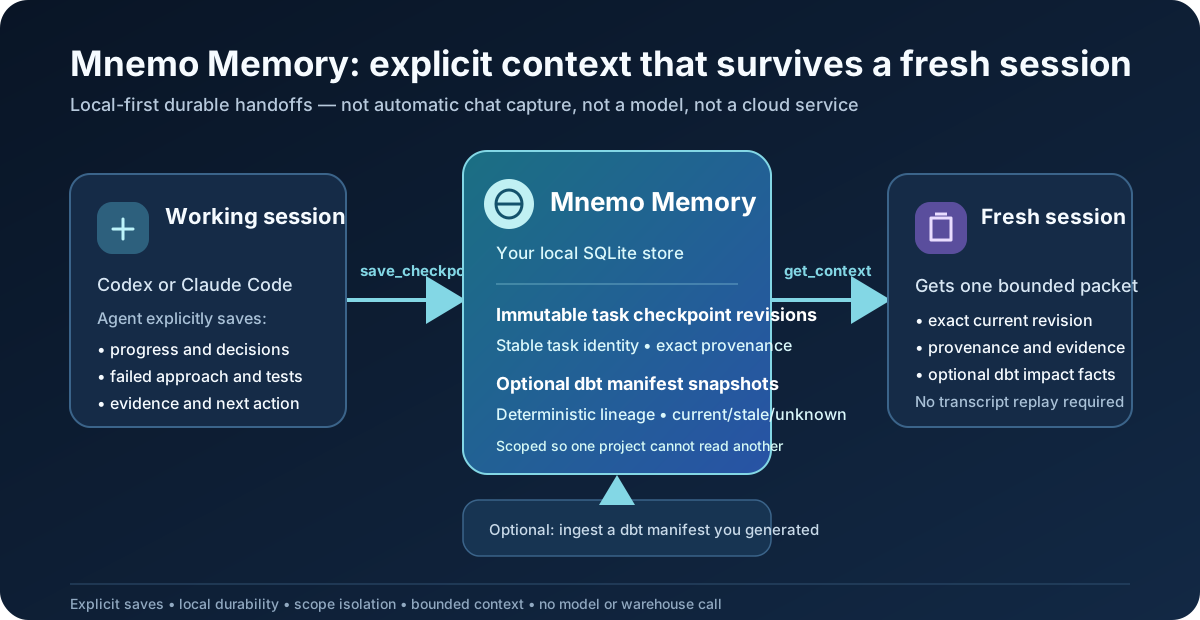
The problem Mnemo solves
Coding agents usually start a new session without reliable knowledge of earlier work. You may have to explain the task again, replay a long transcript, or ask the agent to reread many files. That costs time and context tokens, and important details can still be missed.
Mnemo keeps a compact, evidence-backed handoff instead:
Work with an agent → save a compact handoff → end the session
                              ↓
Start a fresh session → Mnemo supplies relevant context → continue with the next action
What you get
- Install once. Use one local Mnemo installation with Codex, Claude Code, or both.
- Enable each project once. Mnemo creates and reuses a private project binding; you do not manage UUIDs.
- Automatic session continuity. A supported client retrieves bounded context at a fresh session and is reminded to save the next handoff.
- Less repeated reading. Mnemo can return a compact task checkpoint, relevant documentation, and a static source-structure map instead of replaying everything.
- Cross-client continuity. Codex and Claude Code can use the same saved project memory when they use the same Mnemo data directory.
- Local-first privacy. Personal memory stays in a local SQLite database. Source bodies, raw transcripts, terminal output, and prompts are not stored as memory.
- Traceable answers. Returned context includes provenance, currentness, conflicts, omissions, and token accounting.
- User control. You can inspect, correct, retract, expire, or erase different kinds of retained context through explicit workflows.
You do not need to add the same Mnemo rule to every AGENTS.md or CLAUDE.md after enabling
automatic memory for a supported client.
Where you can use it
Mnemo is useful for:
- long-running software work that spans many agent sessions;
- switching between Codex and Claude Code on the same project;
- navigating Python, JavaScript/JSX, TypeScript/TSX, Go, Rust, C, C++, C#, Java, and PHP projects;
- dbt projects where verified model lineage and impact matter;
- repository documentation, architecture notes, decision records, and reusable playbooks;
- an optional Obsidian vault used as project knowledge; and
- operator-managed team deployments that need PostgreSQL-backed workspace isolation.
What the token tests show
Mnemo includes deterministic, model-free synthetic benchmarks. The current fixtures compare the context available to a cold fresh session:
| Synthetic comparison | Full context | Mnemo context | Estimated reduction |
|---|---|---|---|
| Prior task transcript | 2,948 | 499 | 83.1% fewer context tokens |
| dbt manifest structure | 3,431 | 927 | 73.0% fewer structural-context tokens |
| Transcript + manifest | 6,379 | 1,426 | 77.6% fewer combined-context tokens |
In those fixtures, Mnemo retains 100% of the required handoff facts and provenance. The unified fixture also gates exact dbt lineage precision and recall, scope isolation, currentness, and packet budgets.
These are reproducible estimates from Mnemo's local ceil(characters / 3) estimator. They are
not provider-billed token measurements, cost or latency claims, or proof that a model will
produce a better answer. A normal turn that does not request Mnemo context adds none of these
packet tokens. Every real packet has its own bounded size.
Run the same tests locally:
npm run eval:resumption -- --json
npm run eval:unified-context -- --json
See the fresh-session benchmark and unified-context benchmark for the methodology and limits.
Install and connect in five minutes
The PyPI distribution is mnemo-unified-context; the primary installed command is mnemo.
mnemo-memory remains a compatibility alias for existing scripts and client registrations.
uv tool install mnemo-unified-context==0.1.0a15
mnemo --version
mnemo init

cd /path/to/your/project
mnemo connect codex
For Claude Code, use:
mnemo connect claude-code
You can run both connection commands. Restart the connected client after registration. Repeat only
the connection step for another repository. Running the connection enables automatic project
memory and scans the current directory by default. Use --dry-run to preview, --confirm to ask
before changing client configuration, --project-dir for another directory, or
--auto-memory-disable for an MCP-only connection. If you only want to create or refresh the local
project index, use:
mnemo scan
scan needs no UUIDs. It refreshes the source-structure snapshot and, when the project root has
the canonical dbt_project.yml, registers the same project scope and ingests an existing
target/manifest.json. It reports a missing manifest without running dbt or other project code.
If you prefer a guided explanation, run:
mnemo agent
This is a local deterministic setup guide, not another model or autonomous agent.
Check the connection at any time:
mnemo status
mnemo connect codex --check
mnemo connect claude-code --check
How everyday use works
After connecting, work normally.
- At a fresh supported-client session, Mnemo attaches a bounded saved handoff and relevant same-project context.
- During work, the agent may request more specific saved knowledge, dbt lineage, source identity, or static impact.
- Before meaningful work stops or compacts, the lifecycle reminder asks the agent to save an evidence-backed checkpoint.
- The next session receives the latest applicable checkpoint, not the entire prior conversation.
The automatic fresh-session attachment has a 1,750-token total budget and happens at session boundaries, not continuously on every turn. At prompt boundaries, Mnemo may transiently use at most 512 characters of the submitted prompt to select already-saved same-project context; it does not persist that prompt.
If no checkpoint was saved, Mnemo does not pretend it remembers the missing conversation. It can still provide an enabled project's current structural overview and an honest handoff-needed reminder.
Ask what you were working on
From an enabled project, ask for the latest saved handoff or a recent window:
mnemo recap
mnemo recap --days 3
mnemo recap --3days  # shorthand for --days 3
mnemo recap means “show the newest saved checkpoint from my previous agent session.” A day
window returns the newest handoff for each checkpoint in that period, newest first. Mnemo reads at
most 50 scoped lifecycle events, returns at most eight handoffs within a 1,300-token budget, and
cites every checkpoint and revision. It does not reconstruct unsaved chats, terminal commands, or
model reasoning.
You can also ask a connected agent, “Mnemo recap what I worked on for the past 3 days.” The automatic hook selects the same bounded checkpoint evidence, and the agent can phrase it conversationally without Mnemo making another model call or scanning the repository.
What Mnemo remembers
Mnemo keeps several kinds of context separate because they have different authority and deletion rules:
- Task checkpoints: objective, progress, decisions, failed approaches, blockers, verification, evidence, relevant files, and next actions.
- Correction lessons: the trigger, mistaken assumption, evidence-backed correction, and a prevention step explicitly saved by the agent.
- Approved facts: bounded evidence-backed decisions, failures, and tool outcomes.
- Project knowledge: bounded current sections from opted-in repository Markdown, stored and returned as cited untrusted evidence.
- Source structure: a rebuildable static map of files, modules, declarations, imports, and safely resolved calls. Mnemo stores identities and fingerprints, not source bodies.
- dbt structure: authoritative upstream and downstream relationships from ingested dbt artifacts; Mnemo does not infer lineage from SQL with a model.
- Procedures and skills: explicit checked-in playbooks selected by declared metadata.
Mnemo does not automatically store every chat, command, source file, model reasoning trace, environment value, SQL query, or terminal result. A checkpoint or correction lesson is saved explicitly by the agent with evidence; source and knowledge projections refresh through the project's enabled lifecycle.
Read How Mnemo remembers context for a longer walkthrough.
Update, correct, or forget memory
The right action depends on what you want to change:
| Goal | User action |
|---|---|
| Update task progress | Ask the connected agent to revise the active Mnemo checkpoint. |
| Preserve a mistake as a lesson | Ask the agent to record the correction and its evidence. |
| Correct an approved fact | mnemo memory event correct EVENT_ID ... |
| Remove an approved fact's retained payload | mnemo memory event retract EVENT_ID ... |
| Update repository knowledge | Edit or delete the Markdown source; the next sync makes only the current revision searchable. |
| Stop using an Obsidian vault | mnemo memory vault disable |
| Stop automatic hooks | mnemo memory disable or disconnect the client. Saved data remains. |
| Erase the recognized local Mnemo data directory | mnemo uninstall --delete-data --yes |
Expiry can remove an old checkpoint from active retrieval while preserving its audit history. Exports and user-held backups are separate copies: Mnemo cannot recall or erase a copy that you control outside its data directory.
For the exact behavior and safeguards, read Review, correct, and forget memory.
Optional project intelligence
Static source awareness
Automatic memory creates a private static structure snapshot and refreshes it at lifecycle boundaries. Inspect it directly with:
mnemo scan
mnemo memory history
mnemo memory changes
mnemo memory impact --path src/example.py
mnemo memory refresh
Structural memory is a navigation aid, not a substitute for reading the exact code before changing it. Unsupported, dynamic, ambiguous, or oversized relationships are omitted rather than guessed.
Ask a connected agent, “What are the main components of this repository and how do they connect?” Mnemo answers from one compact projection of the saved graph: exact snapshot counts, bounded component/file/symbol samples, and resolved or explicitly unresolved structural relationships with provenance. It does not dump the graph into the prompt. For a targeted implementation question, Mnemo returns the matching symbols, paths, and nearby static edges so the agent can open only the few relevant source files.
dbt intelligence
Scan one dbt repository once, or use the existing advanced dbt commands directly:
cd /path/to/dbt-project
mnemo scan
mnemo dbt status
The scan detects the exact dbt_project.yml marker and ingests an existing manifest. The optional
dbt wrapper can regenerate and refresh verified manifest context after successful dbt commands.
See the dbt command wrapper guide.
A simple question such as “can you see the dbt models?” uses one compact manifest inventory fact: the exact enabled-model count, snapshot ID, project name, and currentness. It does not enumerate model files or run shell commands. Individual model records stay opt-in and bounded for questions that actually need names, tags, tests, lineage, or impact.
Repository notes and Obsidian
Enabled repository Markdown is refreshed at safe work boundaries and selected in bounded cited sections. To add one Obsidian vault:
mnemo memory vault enable "/path/to/My Obsidian Vault"
mnemo memory vault status
Mnemo treats returned notes as untrusted evidence, never as instructions. Optional semantic note search runs locally after explicit installation and indexing; literal search remains the default.
Personal and Team modes
Personal mode is the normal single-user installation and uses local SQLite. Team mode is a separate operator-managed service backed by PostgreSQL with authenticated workspace scope, authorization, quotas, retention, backup controls, and rate limits. Do not expose the personal SQLite service as a multi-user team server.
See Team mode in everyday terms before planning a team deployment.
Privacy and safety boundaries
- Personal data stays in the configured local Mnemo directory.
- Local services bind to loopback by default.
- Authorization and scope filtering happen before ranking or retrieval.
- Missing scope is never treated as a wildcard.
- Clear secret-like content is rejected before supported persistence and embedding paths.
- Notes, checkpoints, tool results, and model output are treated as untrusted data, not commands.
- Mnemo failure does not prevent Codex or Claude Code from continuing without Mnemo context.
- Mnemo never changes the client's model, credentials, endpoint, or network permissions.
Start the optional loopback dashboard with mnemo start, open
http://127.0.0.1:8765/, and stop it with mnemo stop.
Installation lifecycle
Create a verified local backup before a manual package change:
mnemo backup
For uv- or pipx-managed installs:
mnemo upgrade
mnemo uninstall --yes
mnemo upgrade explicitly considers prereleases and reports the exact before/after installed
versions, distinguishing a real upgrade from an already-current installation.
Normal uninstall preserves the configured data directory and backups. Permanent local data erasure
requires the separate --delete-data form described in the memory-management guide.
Documentation
- Practical user guide — setup, normal use, source awareness, notes, Obsidian, playbooks, dashboard, and dbt.
- Review, correct, and forget memory — lifecycle and deletion choices in plain language.
- Codex and Claude Code guide — connection and troubleshooting.
- Team mode guide — what Team mode is, who operates it, and its security boundary.
- Local MCP reference — exact tool operations and payloads.
- Product memory contract — authority, evidence, scope, and retention rules.
- Threat model — security and privacy analysis.
- Implementation status — completed build history.
Development and verification
Bootstrap only from the committed lockfiles:
uv sync --locked
npm ci --ignore-scripts
npm run check
The release workflow builds source-independent artifacts, installs and exercises the exact wheel and source distribution, publishes through PyPI trusted publishing, and verifies uploaded metadata and hashes. The project is clean-room original; see the product ownership policy.
1 maintainer

Metadata
1 maintainer
Release files for mnemo-unified-context 0.1.0a15
For a detailed explanation of source distributions (sdists) and built distributions (wheels), please see the package formats documentation.
Source distribution (sdist)
| File | Size | Uploaded | |
|---|---|---|---|
| mnemo_unified_context-0.1.0a15.tar.gz | 480.7 kB | Details |
Built distribution (wheel)
| File | Interpreter | ABI | Platform | Reset |
|---|---|---|---|---|
| mnemo_unified_context-0.1.0a15-py3-none-any.whl | Python 3 | none | any | Details |
Total release size: 1.1 MB
Release files / mnemo_unified_context-0.1.0a15.tar.gz
| Download URL | mnemo_unified_context-0.1.0a15.tar.gz |
|---|---|
| Size | 480.7 kB |
| Tags | Source |
|
SHA-256 checksum How to use checksums |
4de0d62f042eec2d6b7f86bf69dd32a790ca81522f798e9dd5072501ac3978e1
|
|
BLAKE2b-256 checksum How to use checksums |
c2972e34df333f5f650ace1efbd35022c50f3fe52f1c86d34cb537729e1da640
|
| Upload date | |
|
Uploaded using Trusted Publishing? What is trusted publishing? |
Yes |
| Uploaded via |
twine/6.1.0 CPython/3.13.13
|
Provenance
Provenance describes where a file came from. On PyPI, provenance is shared via attestations, which provide a verifiable record of the build or publishing details. View details, limitations and caveats.


PyPI Publish Attestation
PyPI verified that this artifact, at this checksum, originated from the publisher listed below.
Signed by GitHub Actions, verified by PyPI on Aug 10, 2026.
Transparency logRelease files / mnemo_unified_context-0.1.0a15-py3-none-any.whl
| Download URL | mnemo_unified_context-0.1.0a15-py3-none-any.whl |
|---|---|
| Size | 607.0 kB |
| Tags | Python 3 |
|
SHA-256 checksum How to use checksums |
3cb593c68e36acb05ee5c426933310eca74160c9e0766b14a285211a68f7a97d
|
|
BLAKE2b-256 checksum How to use checksums |
4157a745bdfae62feea50d4cc9315f4064c2302d32885f5a3f543107004f61ca
|
| Upload date | |
|
Uploaded using Trusted Publishing? What is trusted publishing? |
Yes |
| Uploaded via |
twine/6.1.0 CPython/3.13.13
|
Provenance
Provenance describes where a file came from. On PyPI, provenance is shared via attestations, which provide a verifiable record of the build or publishing details. View details, limitations and caveats.
PyPI Publish Attestation
PyPI verified that this artifact, at this checksum, originated from the publisher listed below.
Signed by GitHub Actions, verified by PyPI on Aug 10, 2026.
Transparency log













