
model2data






Realistic, test-passing data for any data model, and the dbt project around it, in one command.
You describe the tables. model2data generates data whose foreign keys resolve, whose dates make
sense and whose revenue adds up to a number it tells you in advance, and it writes a dbt project
that loads, builds and tests that data with one dbt build. No production access, no
hand-made CSVs, no dbt boilerplate.
pip install model2data
model2data --file examples/ecommerce.model2data.yml --rows 200 --seed 42   # examples/ is in the GitHub repository
cd dbt_ecommerce && dbt build                                               # PASS=59 ERROR=0

Rather design the model than type it? model2data studio is this engine in the browser: draw the schema, see every column's values before you generate, shape the data on a sample of your own, and export a dbt project with a star schema or Data Vault on top. Start free, no install →
The problem
Every data project starts the same way: the model is ready and the data isn't.
- Production data is off-limits. Privacy, a pending contract, a source system nobody has access to yet. The pipeline waits; the client demo waits.
- Hand-made mock data breaks on contact. Two CSVs are fine. Ten tables later, orders point at
customers who don't exist, shipments leave before they are ordered, and every
relationshipstest fails for reasons that have nothing to do with your SQL. - Random data proves nothing. A dashboard over
Lorem ipsumand uniform noise can't tell you whether revenue is right, because nobody knows what revenue should be. - Fixtures rot. A CSV committed once is right the day it was exported; after that it drifts from the model, and CI tests against the past.
So teams spend days on throwaway data, or ship pipelines tested against nothing.
The solution
Write the model once. model2data reads it and produces data that behaves like the real thing, and the dbt project to prove it:
| You need | model2data gives you |
|---|---|
| Data that looks real | email gets emails, city gets cities, sku ean13 gets barcodes: about 40 name patterns and every Faker provider, in any locale. |
| Joins that work | Tables generated in dependency order; every foreign key hits a row that exists. An order never predates its customer (after: customers.created_at). |
| A project, not a pile of files | Seeds, staging models, not_null/unique/relationships/accepted_values tests and a DuckDB or Postgres profile. dbt build goes green. |
| Numbers you can check | A metrics file defines revenue once; the run writes its exact value per month and a dbt test that the warehouse must reproduce. |
| Fixtures you can commit | Same model, seed and --as-of: the same bytes, on any machine, any day. |
| Data that fails on purpose | --defects training breaks each standard dbt test once and writes down which. |
Nothing but a schema goes in; nothing but synthetic data comes out. It is MIT licensed and runs anywhere Python 3.10 to 3.14 does.
Before and after
In: a model (here the orders table of
examples/ecommerce.model2data.yml) and, optionally, the
metrics that matter (examples/ecommerce.metrics.yml). DBML,
hand-written or exported from an existing database, works as input too.
  orders:
    columns:
      id: {type: bigint, pk: true, not_null: true}
      customer_id: {type: bigint, not_null: true, references: customers.id}
      order_date: {type: timestamp, not_null: true}
      total_amount:
        type: numeric
        not_null: true
        generate: {min: 10, max: 5000}
      status: order_status
metrics:
  revenue:
    measure: orders.total_amount
    agg: sum
    where:
      orders.status: [processing, shipped, delivered]
    time: orders.order_date
model2data --file examples/ecommerce.model2data.yml --metrics examples/ecommerce.metrics.yml \
  --rows 200 --seed 42 --as-of 2026-01-31
Out: a dbt project that runs.
dbt_ecommerce/
├── seeds/raw/                  customers.csv, orders.csv, order_items.csv, products.csv, ...
├── models/staging/             stg_<table>.sql + stg_<table>.yml (with tests), for each table
├── data-tests/metrics/         one test per metric: the warehouse must match the known value
├── osi/ecommerce.yml           the model and its metrics as Apache Ossie
├── metric_values.json          each metric's known value, overall and per month
├── dbt_project.yml
└── profiles.yml                DuckDB, zero config
Finished running 5 seeds, 49 data tests, 5 view models in 0 hours 0 minutes and 0.71 seconds (0.71s).

Done. PASS=59 WARN=0 ERROR=0 SKIP=0 NO-OP=0 REUSED=0 TOTAL=59
And metric_values.json says what a dashboard on this data must show: revenue 220,291.80 over
92 orders, month by month. If your semantic layer or BI tool says otherwise, the bug is in the
SQL, and you know it before a stakeholder does.
Who it's for
- Consultants who need a demo before source access. Write the client's model after the kick-off call, generate a year of their business, and show a working dbt project and dashboard in week one, without touching production.
- Analytics engineers who want real fixtures in CI. Commit the model, generate with
--seedand--as-of, and every CI run builds against the same bytes.--dayshands an incremental model tomorrow's batch. - Trainers who need data that fails for the right reason.
--defects trainingmakesunique,not_null,relationshipsandaccepted_valueseach fail once, and says where. - Teams who define metrics once. Write revenue in one file, let
dbt buildprove the SQL, and hand the definitions to Apache Ossie or Lightdash.
model2data studio: design the model, ship the project
The CLI is the engine. model2data studio is where models get designed, shown to a client and handed to a team, and it is built by the same people on the same engine, so what you preview is byte for byte what you export.
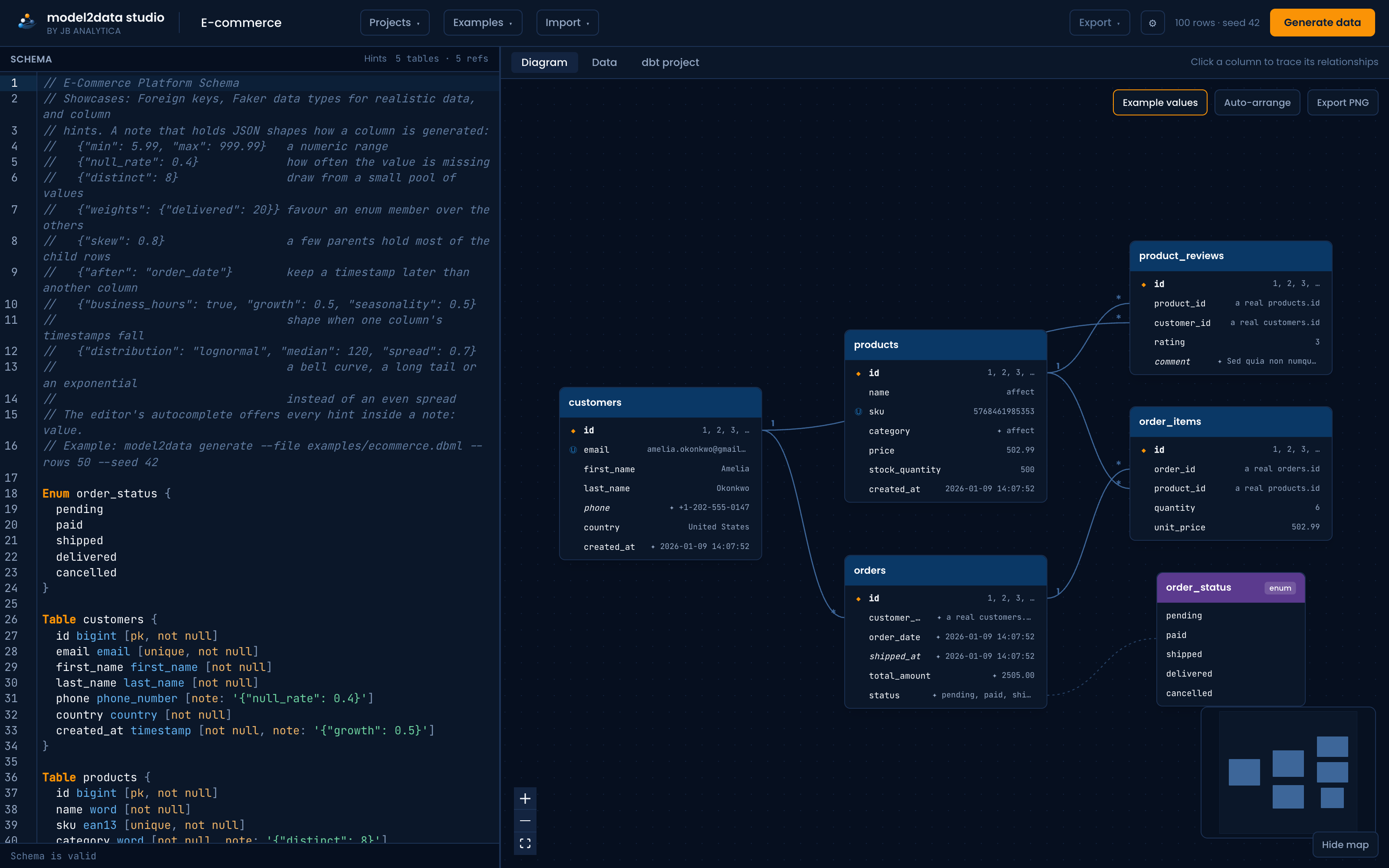
What it adds to the CLI:
- A live diagram as you type. Write YAML or DBML (dbdiagram schemas work unchanged), or paste
SQL
CREATE TABLEstatements, and the entity diagram redraws as you type. Click a column to see everything that joins to it. Drag a column onto another to draw the reference. - See the data before you generate it. Every column shows an example of the value it will get, and columns nothing recognises are flagged, so placeholder data never slips through.
- Shape it like your data. Drop in a CSV sample, or just summary statistics when even a sample can't leave the warehouse, and the studio proposes ranges, distributions, null rates, enum weights, seasonality and skew, each with a before-and-after chart. The file is profiled in your browser and never uploaded.
- More than staging. Export the dbt project with a Kimball star schema, a Data Vault, or a dbt semantic layer on top, real models with tests, derived from the same schema.
- Regenerate in CI. An API key, the
model2data-studioCLI and an MCP server let a pipeline or a coding agent pull fresh data from the saved project, so fixtures follow the model instead of the last export. - Share it. A read-only link that also embeds as a clean diagram in Notion, Confluence or a wiki.
| CLI (this repo) | Studio Free | Studio Pro | |
|---|---|---|---|
| Engine: realistic, FK-correct, deterministic data | ✓ | ✓ | ✓ |
| Live diagram, value previews, model checks | ✓ | ✓ | |
| Rows per table | unlimited | 100 | 50,000 |
| Saved projects | 2 | unlimited | |
| Share links and embeds | ✓ | ✓ | |
| CSV export | ✓ | ✓ | ✓ |
| dbt project download | ✓ (staging) | preview | ✓ |
| Shape from a sample, visual shaping | preview | ✓ | |
| Star schema, Data Vault, semantic layer | preview | ✓ | |
| API keys, CI pulls, MCP server | ✓ |
Pro is EUR 99 a month (or EUR 990 a year); Team is EUR 399 a month for five seats. For a consultant, that's less than an hour of the time it replaces on the first project.
Open the studio, free → · Plans and pricing
Keep using the CLI for scripting and committed fixtures; it stays free and open source. Use the studio when the model is still being designed, when someone else needs to see it, or when the project needs more than a staging layer.
Everything the engine does
Values that look real. About 40 column-name patterns (email, first_name, city, phone,
company, ...), any Faker provider as a type (billing_country state, sku ean13), and
--locale nl_BE for people and addresses from one country. → The model file
Foreign keys that resolve. Every foreign key points at a parent row that exists, onto a
primary or a unique key; composite keys hold; after: customers.created_at keeps a child's date
after its parent's; a column that repeats a parent's value through a foreign key holds the right
parent's value. → The model file
A dbt project that runs. Seeds, staging models, schema tests, tests from the model's own hints,
optional unit test fixtures (--unit-tests), and a DuckDB or Postgres profile.
→ The generated dbt project
The same files, byte for byte. Same model, --seed, --as-of and options, same files, with
the same model2data version. --table-seed orders=7 re-rolls one table and leaves the rest alone.
→ The determinism promise
Days after the first. --days 7 or --next adds new rows and updates existing ones; enum
transitions move an order from pending to shipped; each day is a batch or a changelog.
→ Days after the first
History tables. history: true writes every version of every row with valid_from,
valid_to and is_current, an SCD type 2 source. → History tables
When things happen. --business-hours, --growth and --seasonality shape timestamps;
updated_at never precedes created_at; when fills shipped_at only on shipped orders.
→ When things happen
How the data is spread. --skew lets a few customers place most orders; weights,
true_rate, null_rate, distinct and normal, lognormal or exponential distributions shape a
column. → How the data is spread
Defects on purpose. --defects training or messy, or a table's own list: duplicate keys,
orphans, nulls, invalid values, messy text, late-arriving rows. EXPECTED_FAILURES.md says what
should fail. → Defects on purpose
Metrics with known values. Each metric's value in metric_values.json, a dbt test per metric,
an Apache Ossie semantic model, and with --lightdash the same metrics as Lightdash reads them.
→ Metrics with known values
Validate in CI. model2data validate prints GitHub annotations; uses: JB-Analytica/model2data@v1
fails a pull request that breaks a model. Pre-commit and GitLab CI too. → Validate models in CI
Use it from an agent. uvx model2data@latest guide prints instructions written for a coding
agent; LLMS.md takes an LLM from a plain-English description to a running project.
→ Agents and LLMs
How it works
model (.model2data.yml or DBML) + metrics file (optional)
  -> read and validate -> generate -> scaffold the dbt project + compute each metric's known value
  -> seeds, staging models and tests, metric tests, metric_values.json, osi/, profiles.yml
  -> dbt build
- Read. The model is checked against the spec (DBML is converted to the same model first), and a metrics file against its spec and the model. A model with errors is refused with every issue and where it is.
- Generate. Typed generation for SQL types, then a Faker provider named as the type, then name-aware inference; foreign keys resolve against parent rows already generated. The metrics file is never read here, so the data is the same with or without it.
- Scaffold. CSV seeds, staging models that
ref()them, schema and hint tests, descriptions from the model, and a DuckDB or Postgres profile. - Compute metrics. Each metric's known value, a dbt test that checks it, the Apache Ossie
file and, with
--lightdash, Lightdash metrics in the staging YAML.
Installation
pip install model2data                 # DuckDB included
pip install "model2data[postgres]"     # to target Postgres with --adapter postgres
uvx model2data --help                  # or run it without installing
Python 3.10 to 3.14. The examples used on this page are in examples/.
Or skip the install: model2data studio runs the same engine in the browser.
Documentation
- The model file:
.model2data.yml, DBML as input,validate,convert - Generating a project: row counts,
--as-of, the determinism promise,--table-seed,--locale - The generated dbt project:
dbt build, Postgres, unit tests, hint tests, structure - Days after the first and history tables
- When things happen and how the data is spread
- Defects on purpose
- Metrics with known values
- Validate models in CI
- Agents and LLMs, and LLMS.md
- The model spec and the metrics spec
- Examples and the changelog
dbt-core versions
model2data requires dbt-core >= 1.11, tracking dbt's own version support
policy: 1.11 is the oldest minor release dbt Labs
still supports. Generated projects build without deprecation warnings on every supported
version, and CI proves it on each push with a real dbt build against both the floor and the
newest release. Pinned to an older dbt-core? model2data 0.5.x supports down to 1.8.5.
Design decisions and limitations
- DuckDB by default, because it needs no setup. Postgres is supported with
--adapter postgres; other adapters need their profile adjusted by hand. - Deterministic synthetic data, for testing, demos and prototyping. It is not a replacement for real data, a migration tool or a real-time generator.
- Metrics describe, never steer. Adding or changing a metric changes no generated data, only the known values and tests computed from it.
- Generation is heuristic. It looks real and keeps every key and rule the model states, but it won't reproduce every quirk of a production distribution. (The studio's Shape from a sample gets closer, from your own data's statistics.)
- The generated project stops at staging. Marts are yours to write, or the studio's Pro export adds a star schema, Data Vault or semantic layer.
- Composite foreign keys are generated as independent single-column keys: each column is valid,
the combination only when the child declares it as a key (
keys). - A reference onto a column that is not a key is allowed with a warning; its values are drawn from the ones the parent column holds.
Project status
model2data is stable and actively developed, and follows semantic versioning. CI runs a real
dbt build against the oldest supported and the newest dbt-core on every push and checks the
output of a spread of models byte for byte. The changelog names every release
that changes what a seed produces.
Open for contributions: more database adapters (Snowflake, BigQuery), and example mart-layer models on top of staging.
Contributing
Issues and pull requests are welcome: bugs, feature requests, example models, generators. See CONTRIBUTING.md for guidelines, DEVELOPMENT.md for the local setup and release process, and our Code of Conduct.
License
MIT. See LICENSE.

Built and maintained by JB Analytica:
Data & Analytics Engineering · Data Platform Architecture · Modern BI.
Designing a model? Try model2data studio, free in the browser.
1 maintainer

Metadata
1 maintainer
Release files for model2data 1.16.3
For a detailed explanation of source distributions (sdists) and built distributions (wheels), please see the package formats documentation.
Source distribution (sdist)
| File | Size | Uploaded | |
|---|---|---|---|
| model2data-1.16.3.tar.gz | 464.5 kB | Details |
Built distribution (wheel)
| File | Interpreter | ABI | Platform | Reset |
|---|---|---|---|---|
| model2data-1.16.3-py3-none-any.whl | Python 3 | none | any | Details |
Total release size: 796.6 kB
Release files / model2data-1.16.3.tar.gz
| Download URL | model2data-1.16.3.tar.gz |
|---|---|
| Size | 464.5 kB |
| Tags | Source |
|
SHA-256 checksum How to use checksums |
bc0666b50ca68e94573e6f4f94766ee06b27246954f4dce32fb7bab9935e65db
|
|
BLAKE2b-256 checksum How to use checksums |
179b3434ffc2bd406e3a3b9b45a52df59e7426e57fadcf1b6b22ac18cc5270ff
|
| Upload date | |
|
Uploaded using Trusted Publishing? What is trusted publishing? |
No |
| Uploaded via |
twine/7.0.0 CPython/3.13.14
|
Release files / model2data-1.16.3-py3-none-any.whl
| Download URL | model2data-1.16.3-py3-none-any.whl |
|---|---|
| Size | 332.1 kB |
| Tags | Python 3 |
|
SHA-256 checksum How to use checksums |
17f1dcfa5d060cf83e182dae1275fa7e7dde51f3c6f453fdfb7a838f6d89622d
|
|
BLAKE2b-256 checksum How to use checksums |
71770cc897fbc741157efdf52b4fa691ebfd8556a990479ff8c23c09e6c3f250
|
| Upload date | |
|
Uploaded using Trusted Publishing? What is trusted publishing? |
No |
| Uploaded via |
twine/7.0.0 CPython/3.13.14
|














