
Static scanning library for detecting malicious code, backdoors, and other security risks in ML model files


Project description
ModelAudit
A security scanner for AI models. Quickly check your AIML models for potential security risks before deployment.
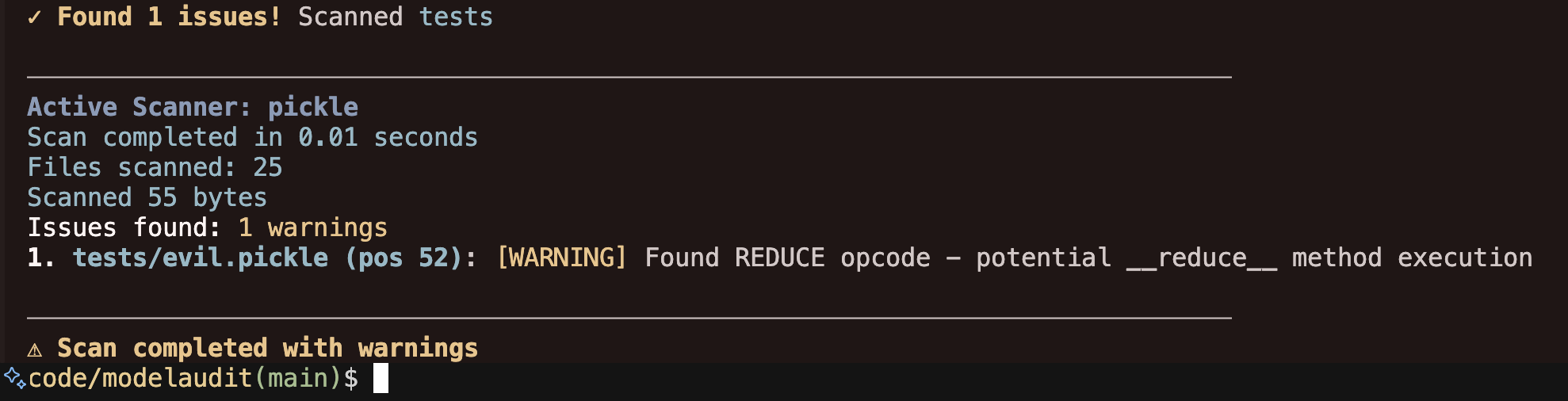
Table of Contents
- What It Does
- Quick Start
- Features
- Security Scanners
- Development
- Configuration
- JSON Output Format
- Contributing
- License
🔍 What It Does
ModelAudit scans ML model files for:
- Malicious code execution (e.g.,
os.systemcalls in pickled models) - Suspicious TensorFlow operations (PyFunc, file I/O operations)
- Potentially unsafe Keras Lambda layers with arbitrary code execution
- Dangerous pickle opcodes (REDUCE, INST, OBJ, STACK_GLOBAL)
- Encoded payloads and suspicious string patterns
- Risky configurations in model architectures
- Suspicious patterns in model manifests and configuration files
- Models with blacklisted names or content patterns
- Malicious content in ZIP archives including nested archives and zip bombs
🚀 Quick Start
Installation
Basic installation:
pip install modelaudit
With optional dependencies for specific model formats:
# For TensorFlow SavedModel scanning
pip install modelaudit[tensorflow]

# For Keras H5 model scanning
pip install modelaudit[h5]

# For PyTorch model scanning
pip install modelaudit[pytorch]

# For YAML manifest scanning
pip install modelaudit[yaml]

# Install all optional dependencies
pip install modelaudit[all]
Development installation:
git clone https://github.com/promptfoo/modelaudit.git
cd modelaudit

# Using Poetry (recommended)
poetry install --all-extras

# Or using pip
pip install -e .[all]
Basic Usage
Scan individual files:
# Scan a single model
modelaudit scan model.pkl

# Scan multiple models
modelaudit scan model1.pkl model2.h5 model3.pt

# Scan a directory
modelaudit scan ./models/
Advanced scanning options:
# Export results to JSON
modelaudit scan model.pkl --format json --output results.json

# Set maximum file size to scan (1GB limit)
modelaudit scan model.pkl --max-file-size 1073741824

# Add custom blacklist patterns
modelaudit scan model.pkl --blacklist "unsafe_model" --blacklist "malicious_net"

# Set scan timeout (5 minutes)
modelaudit scan large_model.pkl --timeout 300

# Verbose output for debugging
modelaudit scan model.pkl --verbose
Example output:
$ modelaudit scan suspicious_model.pkl

────────────────────────────────────────────────────────────────────────────────
ModelAudit Security Scanner
Scanning for potential security issues in ML model files
────────────────────────────────────────────────────────────────────────────────
Paths to scan: suspicious_model.pkl
────────────────────────────────────────────────────────────────────────────────

✓ Scanning suspicious_model.pkl

Active Scanner: pickle
Scan completed in 0.02 seconds
Files scanned: 1
Scanned 156 bytes
Issues found: 2 errors, 1 warnings

1. suspicious_model.pkl (pos 28): [CRITICAL] Suspicious module reference found: posix.system
2. suspicious_model.pkl (pos 52): [WARNING] Found REDUCE opcode - potential __reduce__ method execution

────────────────────────────────────────────────────────────────────────────────
✗ Scan completed with errors
Exit Codes
ModelAudit uses different exit codes to indicate scan results:
- 0: Success - No security issues found
- 1: Security issues found (scan completed successfully)
- 2: Errors occurred during scanning (e.g., file not found, scan failures)
CI/CD Integration:
# Stop deployment if security issues are found
modelaudit scan model.pkl || exit 1

# In GitHub Actions
- name: Security scan models
  run: |
    poetry run modelaudit scan models/ --format json --output scan-results.json
    if [ $? -eq 1 ]; then
      echo "Security issues found in models!"
      exit 1
    fi
✨ Features
Core Capabilities
- Multiple Format Support: PyTorch (.pt, .pth), TensorFlow (SavedModel), Keras (.h5, .keras), Pickle (.pkl), ZIP archives (.zip)
- Automatic Format Detection: Identifies model formats automatically
- Deep Security Analysis: Examines model internals, not just metadata
- Recursive Archive Scanning: Scans contents of ZIP files and nested archives
- Batch Processing: Scan multiple files and directories efficiently
- Configurable Scanning: Set timeouts, file size limits, custom blacklists
Reporting & Integration
- Detailed Reporting: Scan duration, files processed, bytes scanned, issue severity
- Multiple Output Formats: Human-readable text and machine-readable JSON
- Severity Levels: ERROR, WARNING, INFO, DEBUG for flexible filtering
- CI/CD Ready: Clear exit codes for automated pipeline integration
Security Detection
- Code Execution: Detects embedded Python code, eval/exec calls, system commands
- Pickle Security: Analyzes dangerous opcodes, suspicious imports, encoded payloads
- Model Integrity: Checks for unexpected files, suspicious configurations
- Archive Security: Directory traversal attacks, zip bombs, malicious nested files
- Pattern Matching: Custom blacklist patterns for organizational policies
🛡️ Security Scanners
Pickle Scanner
Detects malicious code in Python pickle files:
- Dangerous opcodes:
REDUCE,INST,OBJ,STACK_GLOBAL - Suspicious imports:
os,subprocess,eval,exec - Encoded payloads and obfuscated code
__reduce__method exploits
TensorFlow Scanner
Analyzes TensorFlow SavedModel for suspicious operations:
- File I/O operations:
ReadFile,WriteFile - Python execution:
PyFunc,PyCall - System operations:
ShellExecute,SystemConfig - Checks SavedModel directory structure
Keras Scanner
Examines Keras H5 models for security risks:
- Dangerous layer types:
Lambda,TFOpLambda - Suspicious configurations containing code execution
- Custom objects and metrics with arbitrary code
- Model architecture analysis
PyTorch Scanner
Scans PyTorch models (ZIP-based format):
- Embedded pickle file analysis
- Missing standard files (data.pkl warnings)
- Suspicious additional files (Python scripts, executables)
- Custom blacklist pattern matching
Manifest Scanner
Analyzes configuration and manifest files:
- Suspicious keys: network access, file paths, execution commands
- Credential exposure: passwords, API keys, secrets
- Blacklisted model names and patterns
- Supports JSON, YAML, XML, TOML formats
ZIP Scanner
Scans ZIP archives and their contents:
- Recursive scanning: Analyzes files within ZIP archives using appropriate scanners
- Security checks: Detects directory traversal attempts, zip bombs, suspicious compression ratios
- Nested archive support: Scans ZIP files within ZIP files up to configurable depth
- Content analysis: Each file in the archive is scanned with its appropriate scanner
- Resource limits: Configurable max depth, max entries, and max file size protections
Weight Distribution Scanner
Detects anomalous weight patterns that may indicate trojaned models:
- Outlier detection: Uses Z-score analysis to find neurons with abnormal weight magnitudes
- Dissimilarity analysis: Identifies weight vectors that are significantly different from others using cosine similarity
- Extreme value detection: Flags neurons with unusually large weight values
- Multi-format support: Works with PyTorch, Keras/TensorFlow H5, ONNX, and SafeTensors models
- Focus on classification models: Designed for models with <10k output classes
Note: This scanner is disabled by default for LLMs (models with >10k vocabulary size) as the detection methods are not effective for large language models. To enable experimental LLM scanning, use --config '{"enable_llm_checks": true}'.
🛠️ Development
Setup
# Clone repository
git clone https://github.com/promptfoo/modelaudit.git
cd modelaudit

# Install with Poetry (recommended)
poetry install --all-extras

# Or with pip
pip install -e .[all]
Testing with Development Version
Install and test your local development version:
# Option 1: Install in development mode with pip
pip install -e .[all]

# Then test the CLI directly
modelaudit scan test_model.pkl

# Option 2: Use Poetry (recommended)
poetry install --all-extras

# Test with Poetry run (no shell activation needed)
poetry run modelaudit scan test_model.pkl

# Test with Python import
poetry run python -c "from modelaudit.core import scan_file; print(scan_file('test_model.pkl'))"
Create test models for development:
# Create a simple test pickle file
python -c "import pickle; pickle.dump({'test': 'data'}, open('test_model.pkl', 'wb'))"

# Test scanning it
modelaudit scan test_model.pkl
Running Tests
# Run all tests
poetry run pytest

# Run with coverage
poetry run pytest --cov=modelaudit

# Run specific test categories
poetry run pytest tests/test_pickle_scanner.py -v
poetry run pytest tests/test_integration.py -v

# Run tests with all optional dependencies
poetry install --all-extras
poetry run pytest
Development Workflow
# Run linting and formatting with Ruff
poetry run ruff check .          # Check entire codebase (including tests)
poetry run ruff check --fix .    # Automatically fix lint issues
poetry run ruff format .         # Format code

# Type checking
poetry run mypy modelaudit/

# Build package
poetry build

# Publish (maintainers only)
poetry publish
Code Quality Tools:
This project uses modern Python tooling for maintaining code quality:
- Ruff: Ultra-fast Python linter and formatter (replaces Black, isort, flake8)
- MyPy: Static type checker
Contributing
# Create feature branch
git checkout -b feature/your-feature-name

# Make your changes...
git add .
git commit -m "feat: description"
git push origin feature/your-feature-name
Pull Request Guidelines:
- Create PR against
mainbranch - Follow Conventional Commits format (
feat:,fix:,docs:, etc.) - All PRs are squash-merged with a conventional commit message
- Keep changes small and focused
Project Structure
modelaudit/
├── modelaudit/
│   ├── scanners/          # Model format scanners
│   │   ├── pickle_scanner.py      # Pickle/joblib security scanner
│   │   ├── tf_savedmodel_scanner.py  # TensorFlow SavedModel scanner
│   │   ├── keras_h5_scanner.py    # Keras H5 model scanner
│   │   ├── pytorch_zip_scanner.py # PyTorch ZIP format scanner
│   │   └── manifest_scanner.py    # Config/manifest scanner
│   ├── utils/             # Utility modules
│   ├── cli.py            # Command-line interface
│   └── core.py           # Core scanning logic
├── tests/                # Test suite
└── docs/                 # Documentation
📝 License
This project is licensed under the MIT License - see the LICENSE file for details.
Release history Release notifications | RSS feed


Download files
Download the file for your platform. If you're not sure which to choose, learn more about installing packages.
Source Distribution
Built Distribution
Filter files by name, interpreter, ABI, and platform.
If you're not sure about the file name format, learn more about wheel file names.
Copy a direct link to the current filters
File details
Details for the file modelaudit-0.1.1.tar.gz.
File metadata
- Download URL: modelaudit-0.1.1.tar.gz
- Upload date:
- Size: 44.2 kB
- Tags: Source
- Uploaded using Trusted Publishing? No
- Uploaded via: poetry/1.8.4 CPython/3.12.3 Darwin/23.5.0
File hashes
| Algorithm | Hash digest | |
|---|---|---|
| SHA256 |
259fbaa44776420696cfdc4e0c8d6fdd6d009384fa65d4258aed8edf21221f9b
|
|
| MD5 |
f606370b32552b65a7058440c2e42dd2
|
|
| BLAKE2b-256 |
884444b8bb50c79c16423577bf0a3d315583e0919372386a7899cfdf4b00bf6e
|
File details
Details for the file modelaudit-0.1.1-py3-none-any.whl.
File metadata
- Download URL: modelaudit-0.1.1-py3-none-any.whl
- Upload date:
- Size: 50.0 kB
- Tags: Python 3
- Uploaded using Trusted Publishing? No
- Uploaded via: poetry/1.8.4 CPython/3.12.3 Darwin/23.5.0
File hashes
| Algorithm | Hash digest | |
|---|---|---|
| SHA256 |
6cd34d6989b73a8b93b30e51951fc97aac87be89eef5621eea34f5a8382c8c6b
|
|
| MD5 |
4ecdaae62ef8f138b824b2ce1ccd6eff
|
|
| BLAKE2b-256 |
015f2ed31f319ccd2fd07f496af78addc8f6cc7d093a1a9f3527456a5a82bf2f
|






