
Dynamic CLI for modular-api

Project description
Modular-CLI
Content
- General information
- Installation
- Configuration
- First run
- Autocomplete
- Modular CLI schema
- Project information
1. General information
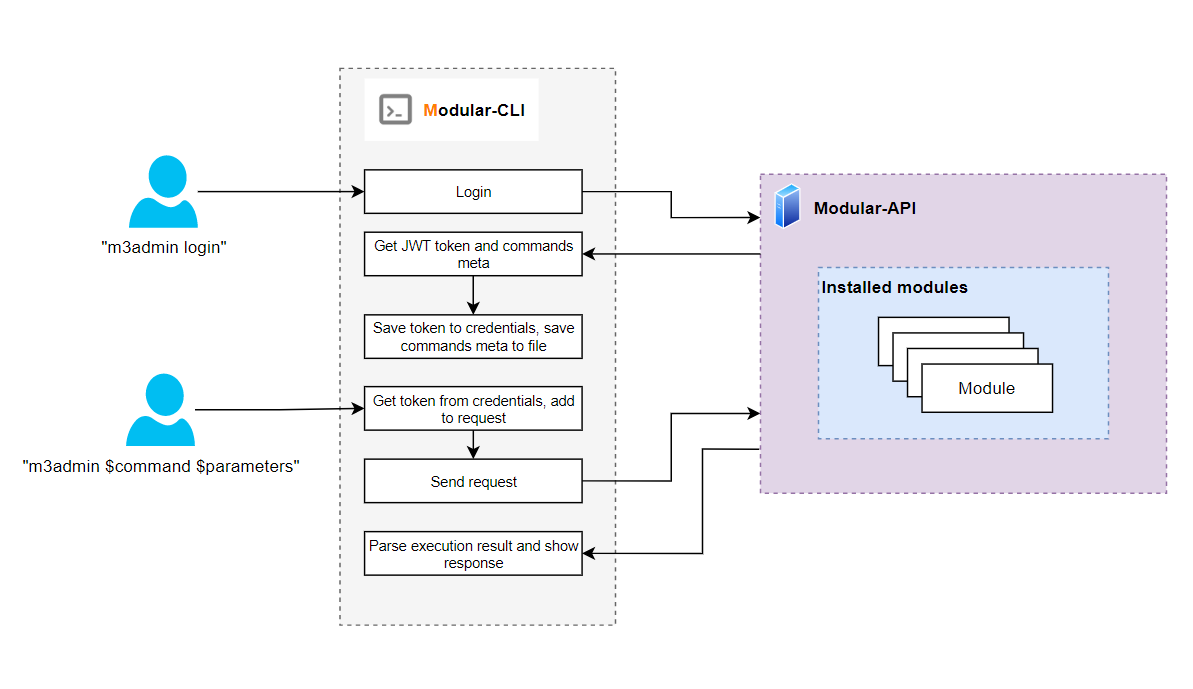
Modular-CLI is the specialized tool for interacting with the Modular-API. Automatically generate auth token, request body based on received meta from Modular-API and send it via HTTP requests.
2. Installation
The installation of Modular-CLI assumed that you have Python3.10 and pip installed.
Use the following links to install the tools in case they are not installed.
NOTE: Due to the best Python practices, it is highly recommended to use virtual environment to protect project against dependency breakage.
Creating Virtual Environments Guide
- Create:
python -m venv modular_cli_venv - Activate (Linux):
source modular_cli_venv/bin/activate
Activate (Windows):source modular_cli_venv/Scripts/activate - Installation:
pip install .
3. Configuration
By default, the entry point for Modular-CLI is set as modular-cli and this name will be used
in all next commands examples. However, you have the ability to customize this name using an
environment variable during installation:
- Set the
MODULAR_CLI_ENTRY_POINTenvironment variable to your desired command name - Install Modular-CLI with the custom entry point:
export MODULAR_CLI_ENTRY_POINT=your-custom-name
pip install .
Before first run Modular-CLI should be properly configured. Please create the user
in Modular-API
by yourself or ask for support your system administrator. For using
Modular-CLI you need to know your username, password and link to Modular-API.
After that use the next command:
modular-cli setup --username $USER --password $PASSWORD --api_path $LINK_TO_MODULAR_API
Please NOTE: Modular-API server should be in running state when setup command will be executed
If you would like update access credentials just execute modular-cli setup command again.
To delete credentials run modular-cli cleanup command
Optional configuration
The following environment variables could be used:
LOG_PATH: in case you need to store the Modular-cli log file by the custom path.
4. First run
First step you should do after configuration it is retrieving jwt token for authorization and available for your user commands meta.
Execute modular-cli login - to get fresh jwt token and available commands
Response:
Login successful
Execute modular-cli - to see available for your user commands
Available modules:
        module_1
        module_2
        ...
        module_N
Available groups:
        group_1
        group_2
        ...
        group_N
Available commands:
        cleanup
        login
        setup
        version
Try to execute any available by Modular-API policy command
modular-cli $module_name $group_name $command_name --$parameter $parameter value
Response:
$Command execution result
In every command you can add --json or --table flag and change output mode.
- If
--jsonflag was specified:
modular-cli $module_name $group_name $command_name --$parameter $parameter value --json
{
    "Status": "SUCCESS",
    "Code": 200,
    "Message": "$Command execution result",
    "Warnings": []
}
- If
--tableflag was specified:
modular-cli $module_name $group_name $command_name --$parameter $parameter value --table
+---------+------+----------------------------------------------------+
|  Status | Code |                      Response                      |
+---------+------+----------------------------------------------------+
| SUCCESS | 200  |             $Command execution result              |
+---------+------+----------------------------------------------------+
If you want to extend list of available commands/modules please contact to your system administrator with request about adding desired resources.
Commands syntax:
modular-cli <available commands> <parameters>
modular-cli <available modules> <group or command> <parameters>
modular-cli <available groups> <subgroup or command> <parameters>
5. Autocomplete
The user has ability to enable autocompletion feature for Modular-CLI tool. Autocomplete option available only on Unix-based platforms (bash&zsh interpreters).
To activate it do a few steps:
- Activate virtual environment by command
source <path_to_venv>/bin/activate - Create SYMLINK to virtual environment
sudo ln -s <your_path_to_venv>/bin/modular-cli /usr/local/bin/modular-cli - Start a new terminal session
- Execute command
sudo modular-cli enable_autocomplete - Restart terminal session
To deactivate:
- Execute the
sudo modular-cli disable_autocompletecommand - Restart terminal session
6. Modular CLI schema
6. Project information
Source Code: https://github.com/epam/modular-cli
Documentation: https://github.com/epam/modular-cli/blob/main/README.md
Changelog: https://github.com/epam/modular-cli/blob/main/CHANGELOG.md
Supported Python Version: 3.10
Release history Release notifications | RSS feed


Download files
Download the file for your platform. If you're not sure which to choose, learn more about installing packages.
Source Distribution
Built Distribution
Filter files by name, interpreter, ABI, and platform.
If you're not sure about the file name format, learn more about wheel file names.
Copy a direct link to the current filters
File details
Details for the file modular_cli-2.3.11.tar.gz.
File metadata
- Download URL: modular_cli-2.3.11.tar.gz
- Upload date:
- Size: 32.5 kB
- Tags: Source
- Uploaded using Trusted Publishing? Yes
- Uploaded via: twine/6.1.0 CPython/3.13.7
File hashes
| Algorithm | Hash digest | |
|---|---|---|
| SHA256 |
61ca0469b97ea70fe81382af35f767ee040fe053f960ab004c990d3cf35981ee
|
|
| MD5 |
547ce40bae8fa1db646010958e63cd42
|
|
| BLAKE2b-256 |
396dee06e51e6afcff32b8e9265a520ccc223ac2d14d874be24e99fb554a7013
|
Provenance
The following attestation bundles were made for modular_cli-2.3.11.tar.gz:
Publisher:
pypi-package.yml on epam/modular-cli
-
Statement:
-
Statement type:
https://in-toto.io/Statement/v1 -
Predicate type:
https://docs.pypi.org/attestations/publish/v1 -
Subject name:
modular_cli-2.3.11.tar.gz -
Subject digest:
61ca0469b97ea70fe81382af35f767ee040fe053f960ab004c990d3cf35981ee - Sigstore transparency entry: 505869272
- Sigstore integration time:
-
Permalink:
epam/modular-cli@3b2bd8b23d906cd1b2bb24a3136f50e5d7e5a346 -
Branch / Tag:
refs/tags/2.3.11 - Owner: https://github.com/epam
-
Access:
public
-
Token Issuer:
https://token.actions.githubusercontent.com -
Runner Environment:
github-hosted -
Publication workflow:
pypi-package.yml@3b2bd8b23d906cd1b2bb24a3136f50e5d7e5a346 -
Trigger Event:
release
-
Statement type:
File details
Details for the file modular_cli-2.3.11-py3-none-any.whl.
File metadata
- Download URL: modular_cli-2.3.11-py3-none-any.whl
- Upload date:
- Size: 36.6 kB
- Tags: Python 3
- Uploaded using Trusted Publishing? Yes
- Uploaded via: twine/6.1.0 CPython/3.13.7
File hashes
| Algorithm | Hash digest | |
|---|---|---|
| SHA256 |
794727d599a5d65c951b4189047b567a3fdd0ecf77afb3d3ac69823ce2841301
|
|
| MD5 |
ea5cc4c25c8f23374a41e2add0da51c8
|
|
| BLAKE2b-256 |
5ebfc567b9c85aae18691b18645349637e71c77061a532eb8be3bf162945fead
|
Provenance
The following attestation bundles were made for modular_cli-2.3.11-py3-none-any.whl:
Publisher:
pypi-package.yml on epam/modular-cli
-
Statement:
-
Statement type:
https://in-toto.io/Statement/v1 -
Predicate type:
https://docs.pypi.org/attestations/publish/v1 -
Subject name:
modular_cli-2.3.11-py3-none-any.whl -
Subject digest:
794727d599a5d65c951b4189047b567a3fdd0ecf77afb3d3ac69823ce2841301 - Sigstore transparency entry: 505869278
- Sigstore integration time:
-
Permalink:
epam/modular-cli@3b2bd8b23d906cd1b2bb24a3136f50e5d7e5a346 -
Branch / Tag:
refs/tags/2.3.11 - Owner: https://github.com/epam
-
Access:
public
-
Token Issuer:
https://token.actions.githubusercontent.com -
Runner Environment:
github-hosted -
Publication workflow:
pypi-package.yml@3b2bd8b23d906cd1b2bb24a3136f50e5d7e5a346 -
Trigger Event:
release
-
Statement type:






