



multiserialviewer
See multiple serial text streams in a single window
What you can do with it
- evaluate the output of one or more serial ports
- automatically highlight text, e.g. in color, according to user-defined patterns
- open and close all serial ports with a single click
- search the output of a serial port and navigate between the findings
- watch key-value pairs and display the last value
- count text while the data is being received
- get insights into your serial port bandwidth utilization
- keep all your settings and window sizes until next time
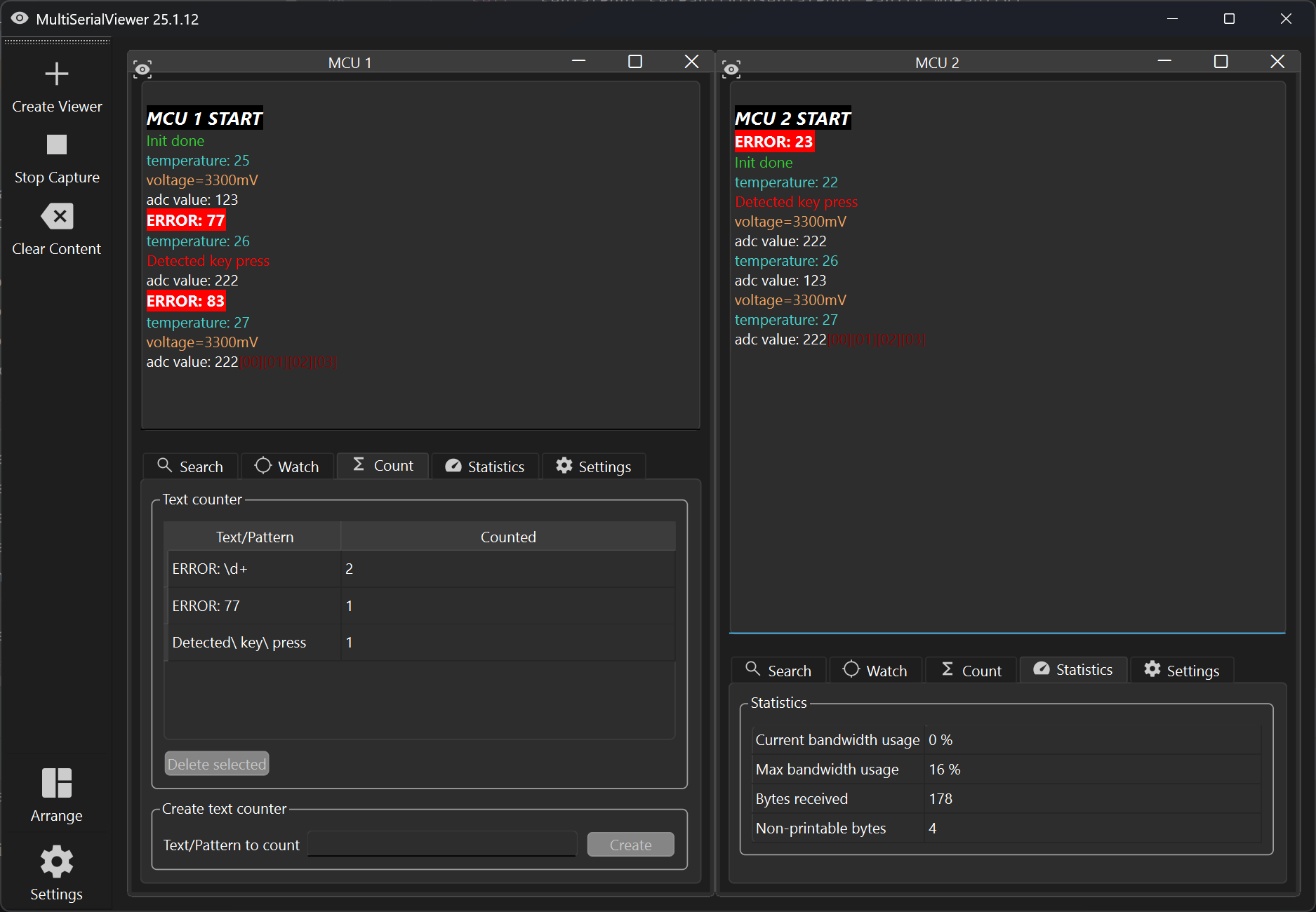
Screenshots
Installation
You can install this tool using the package installer for Python (pypi/multiserialviewer).
pip install multiserialviewer
If already installed, run the following command to install the latest version:
pip install multiserialviewer --upgrade
Start
After installation using pip, you can start it by running
multiserialviewer
in a console.
Start it using a Windows batch file
Create a batch file, e.g. multiserialviewer.bat, with the following content (enter your python path accordingly):
start /B pythonw "C:\myPythonInstallDir\Python311\Scripts\multiserialviewer.exe"
With this, you will not get a console window in the background.
Usage
Set up your serial port connections
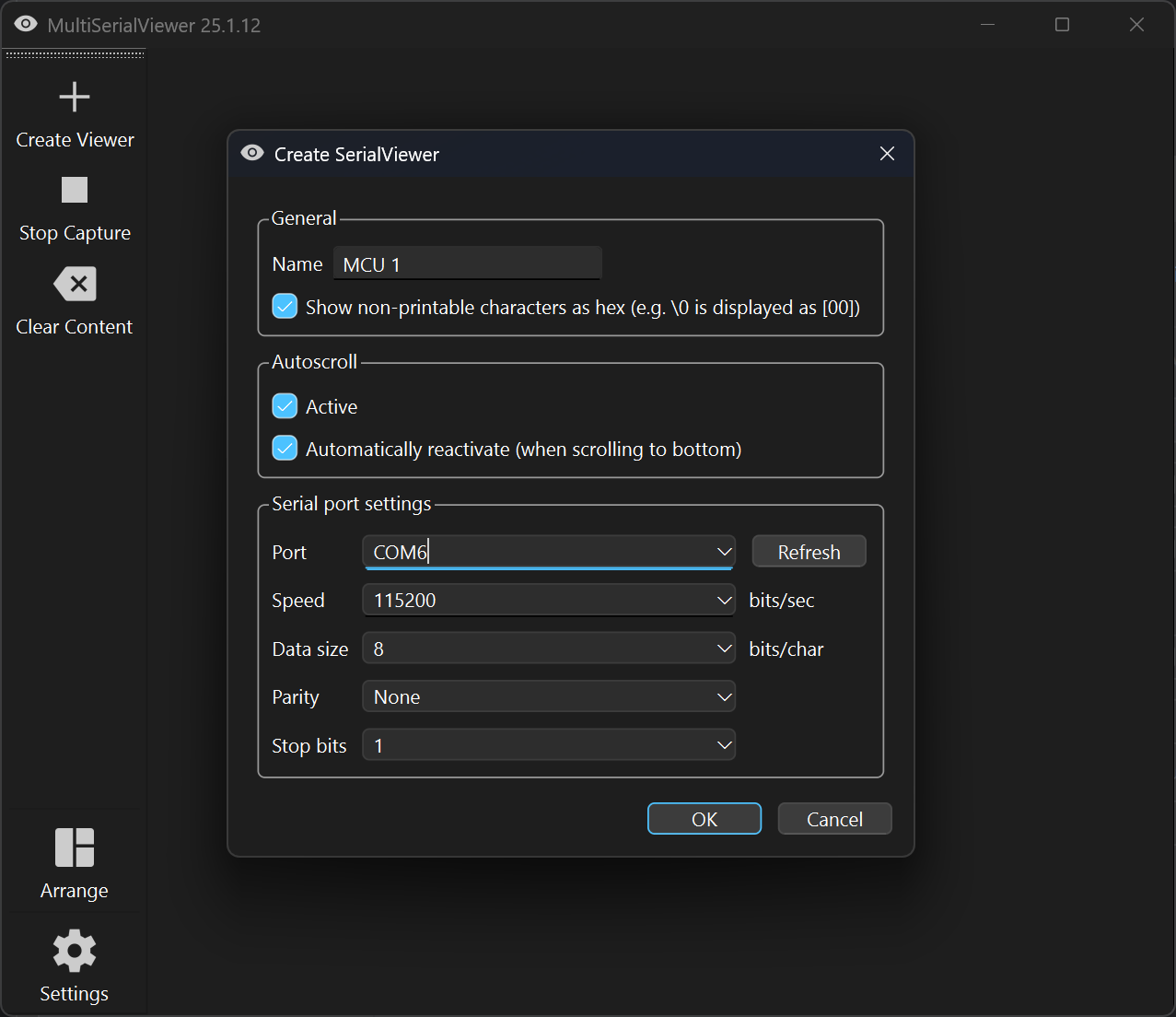
Click the button "Create Viewer" and enter your connection details. You can give the window a name and set your autoscroll preferences. The latter may be changed at any time later (but not the connection details).
It is not possible to create a viewer for the same port multiple times.
Open your serial ports and receive data
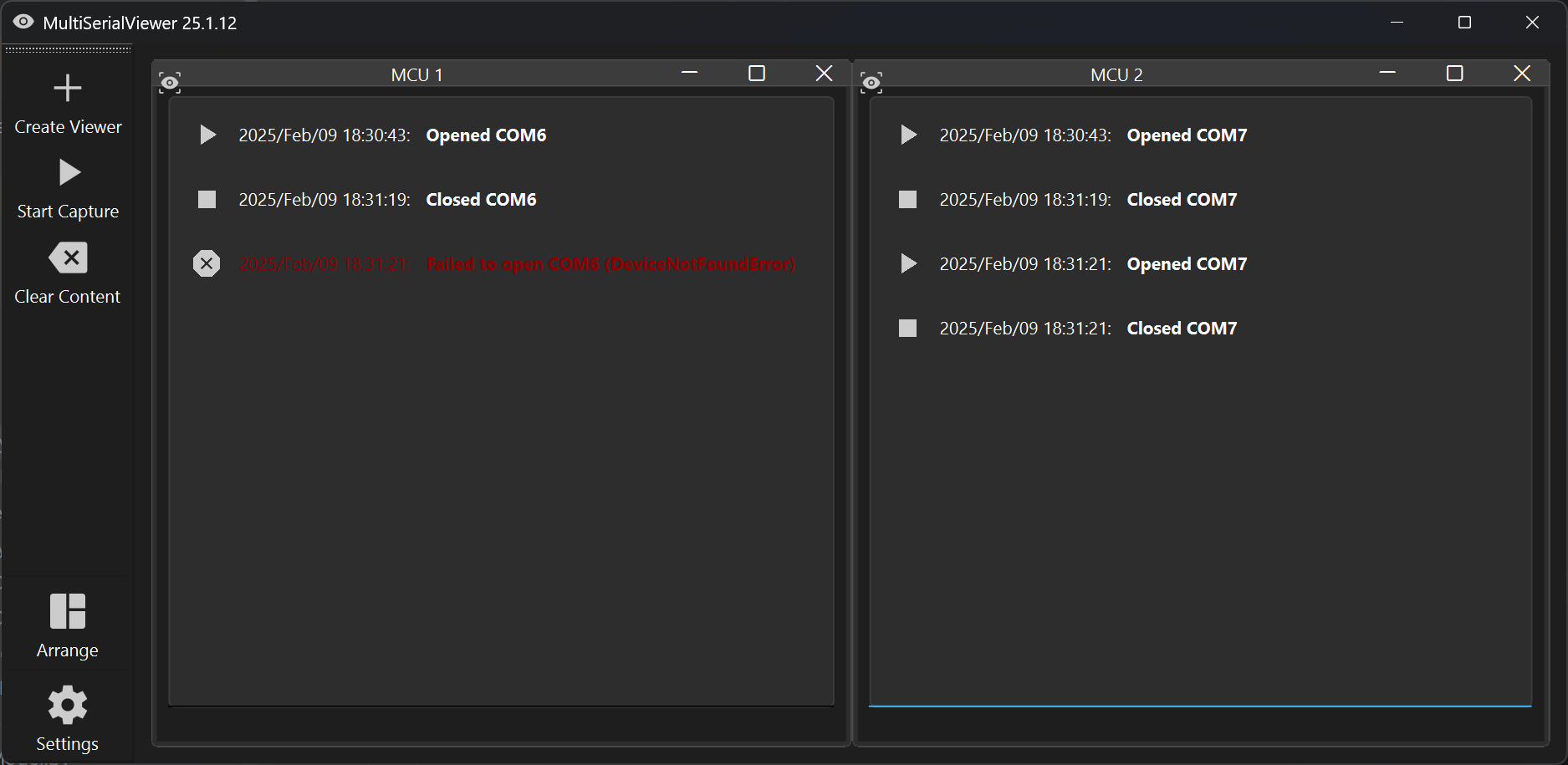
After you created all SerialViewers you need, start receiving your data by clicking "Start Capture".
You can close all serial ports by clicking "Stop Capture".
If one of your serial ports can not be opened, you will see an error message in the corresponding SerialView window. In this case all other connections will be closed again automatically.
What data is displayed?
You will only see printable characters in the output window, meaning every character with a value between (including) 32 and 126. LineFeed and CarriageReturn will cause a line break/new line.
If you want to see non-printable characters (in hex), you can enable this in the settings dialog. E.g. '\0' will then be printed as [00].
Work with the data you received (while you receive it)
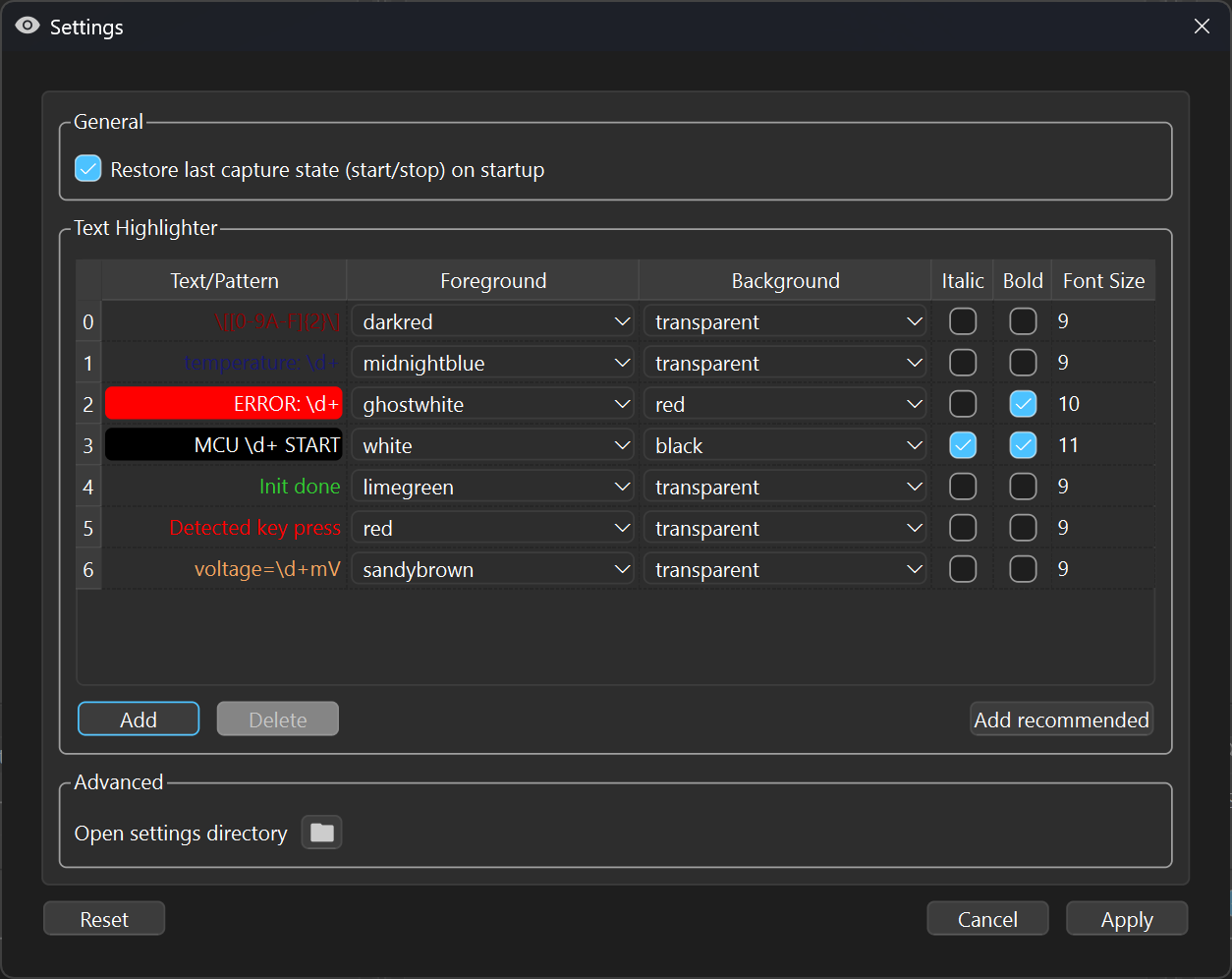
Specify text patterns to highlight information
If you want to highlight specific text, you can define text patterns using regular expression syntax. If you just want to highlight certain words, just enter them as normal text.
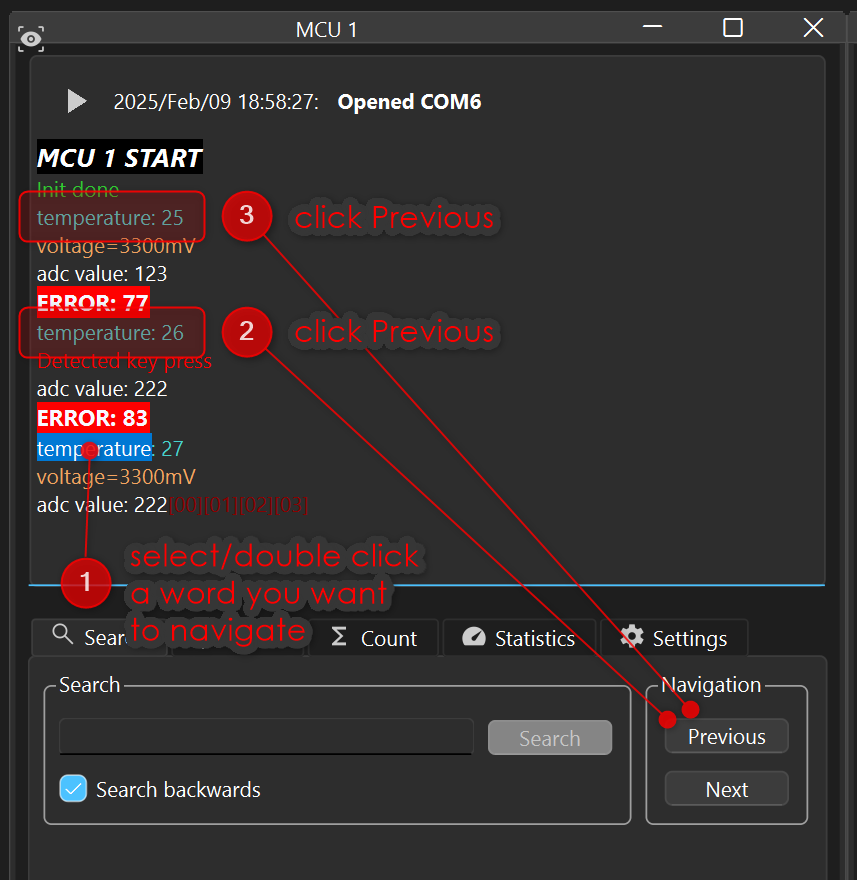
Search for a word and jump to the next/previous occurrence
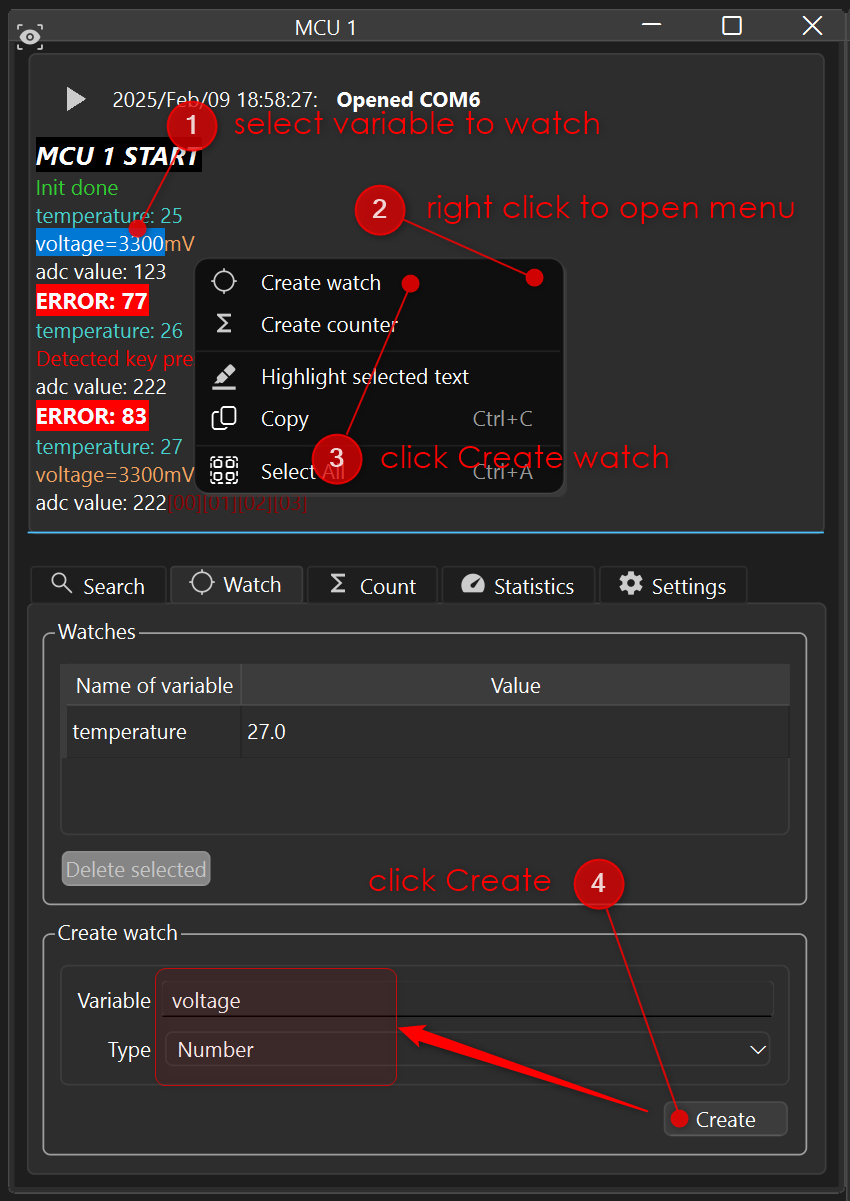
Watch values of key-value pairs
If you receive a lot of data and want to keep track of single values, e.g. temperature=88, you
can create a watch and display these values in a separate table. In this table, the last received
value will be displayed.
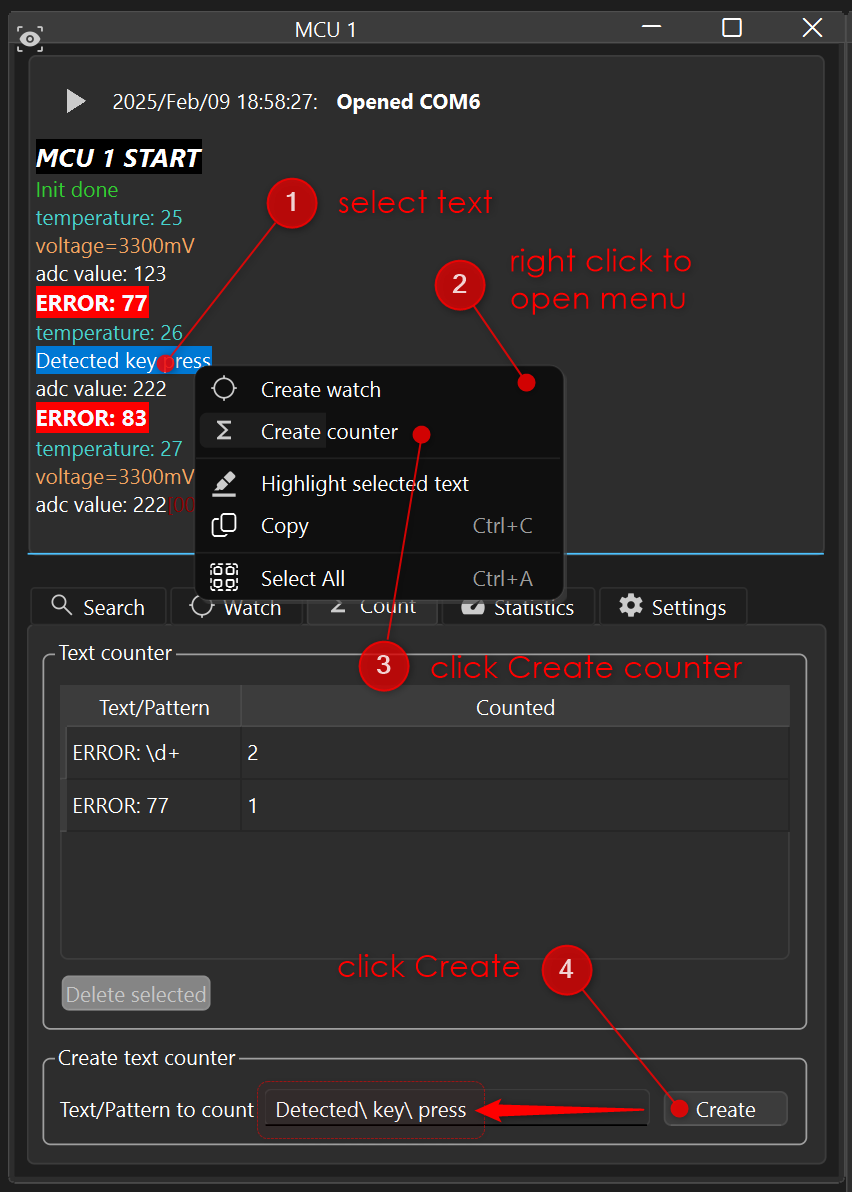
Count the occurrence of text patterns
If you are just interested in the number of occurrences of a word (or text pattern), you can create counter.
Get an idea of how much data you received and bandwidth is left
In the statistics tab you find basic information about the received data.
Share the received data with other applications
A serial port can only be opened by one application at a time. So normally you have to stop the capture of a port before another application (e.g. a script of yours) can use it.
To avoid that, you can enable the "Serial data server" in the settings dialog. It provides the received raw data of all your ports on a local TCP port (default 45600), read-only.
As long as somebody reads the data of a port, its window title says so, e.g.
COM6 [1 client is reading].
Reading the data from your own script
SerialDataClient comes with multiserialviewer. It reads through multiserialviewer if it captures
the port, and opens the port directly if it does not - your script does not have to know which of
the two applies:
from multiserialviewer.client import SerialDataClient

with SerialDataClient('COM6', 115200) as client:
    print(f'reading from {client.description}')
    while True:
        data = client.read()
        if not data:
            break                  # the port is free now
        ...
Importing multiserialviewer.client does not pull in PySide6 - the standard library is enough.
Only the direct access to a serial port needs pyserial:
pip install multiserialviewer[direct]
Pass allowDirectAccess=False if your script must never occupy the port itself, and
getPortsOccupiedByMsv() tells you which ports multiserialviewer holds at the moment.
See examples/readSerialData.py for a complete script.
Reading the data without writing a script
multiserialviewer-client COM6 --baudrate 115200   # raw data to stdout, can be piped
multiserialviewer-client --list                   # ports currently occupied
The protocol
If you want to read the data from another language, this is all it takes. A client connects, sends the name of the serial port it is interested in and receives the raw data from then on:
SUB COM6\n  ->  'OK COM6\n' + raw data stream
                'ERR CLOSED\n' if the port is currently not captured
                'ERR NOPORT\n' if no serial viewer exists for that port
LIST\n      ->  'PORTS COM3 COM6\n' (ports currently occupied by multiserialviewer)
'OK' is sent only if multiserialviewer really holds the port at that moment. So a client that does not get a data stream can safely open the serial port on its own - it does not have to know whether multiserialviewer is running at all.
1 maintainer

Metadata
1 maintainer
Release files for multiserialviewer 26.8.0
For a detailed explanation of source distributions (sdists) and built distributions (wheels), please see the package formats documentation.
Source distribution (sdist)
| File | Size | Uploaded | Provenance | Actions |
|---|---|---|---|---|
| multiserialviewer-26.8.0.tar.gz | 176.2 kB | With provenance | Details for multiserialviewer-26.8.0.tar.gz |
Built distribution (wheel)
| File | Interpreter | ABI | Platform | Actions Reset |
|---|---|---|---|---|
| multiserialviewer-26.8.0-py3-none-any.whl | Python 3 | none | any | Details for multiserialviewer-26.8.0-py3-none-any.whl |
Total release size: 382.0 kB
Release files / multiserialviewer-26.8.0.tar.gz
| Download URL | multiserialviewer-26.8.0.tar.gz |
|---|---|
| Size | 176.2 kB |
| Tags | Source |
|
SHA-256 checksum How to use checksums |
291f1b6b92cc653bf764202c2d3bfcbce0e3cda6bbc8e974d64c20222897ea80
|
|
BLAKE2b-256 checksum How to use checksums |
0a358abda7b73fead825b10be35b3f351b90d035c9fae8ceb40995d96632a42a
|
| Upload date | |
|
Uploaded using Trusted Publishing? What is trusted publishing? |
Yes |
| Uploaded via |
twine/7.0.0 CPython/3.13.14
|
Provenance
Provenance describes where a file came from. On PyPI, provenance is shared via attestations, which provide a verifiable record of the build or publishing details. View details, limitations and caveats.


PyPI Publish Attestation
PyPI verified that this artifact, at this checksum, originated from the publisher listed below.
Signed by GitHub Actions, verified by PyPI on Aug 22, 2026.
Transparency logRelease files / multiserialviewer-26.8.0-py3-none-any.whl
| Download URL | multiserialviewer-26.8.0-py3-none-any.whl |
|---|---|
| Size | 205.8 kB |
| Tags | Python 3 |
|
SHA-256 checksum How to use checksums |
f4f20a717d9653ffc284e5df2e8279708e0798dfdedfcdfbe7ac854ed8640f82
|
|
BLAKE2b-256 checksum How to use checksums |
3f3f945b7fdc4a69852be99ec5ac2b56d107be76afa436687405d0d4bf6d91fe
|
| Upload date | |
|
Uploaded using Trusted Publishing? What is trusted publishing? |
Yes |
| Uploaded via |
twine/7.0.0 CPython/3.13.14
|
Provenance
Provenance describes where a file came from. On PyPI, provenance is shared via attestations, which provide a verifiable record of the build or publishing details. View details, limitations and caveats.
PyPI Publish Attestation
PyPI verified that this artifact, at this checksum, originated from the publisher listed below.
Signed by GitHub Actions, verified by PyPI on Aug 22, 2026.
Transparency logSecurity for multiserialviewer 26.8.0
Provenance
Provenance describes where a file came from. On PyPI, provenance is shared via attestations, which provide a verifiable record of the build or publishing details. View details, limitations and caveats.
Full provenance
All 2 files in this release have been uploaded with provenance metadata.
Attestation for multiserialviewer-26.8.0.tar.gz
PyPI Publish Attestation
PyPI verified that this artifact, at this checksum, originated from the publisher listed below.
Signed by GitHub Actions, verified by PyPI on Aug 22, 2026.
Transparency logA note on package security
PyPI is a repository for distributing packages, not a service for auditing them. While third-party security researchers and our staff do their best to detect and remove malicious packages, PyPI cannot guarantee the quality, security or suitability of any given package.
To learn more about protecting yourself from malicious actors, visit our package security documentation.














