
Convert MusicXML files into clean, analyzable PNG visualizations

Project description
musicxml-to-png
Visualize and analyze MusicXML scores for humans, classrooms, and AI collaborations/workflows
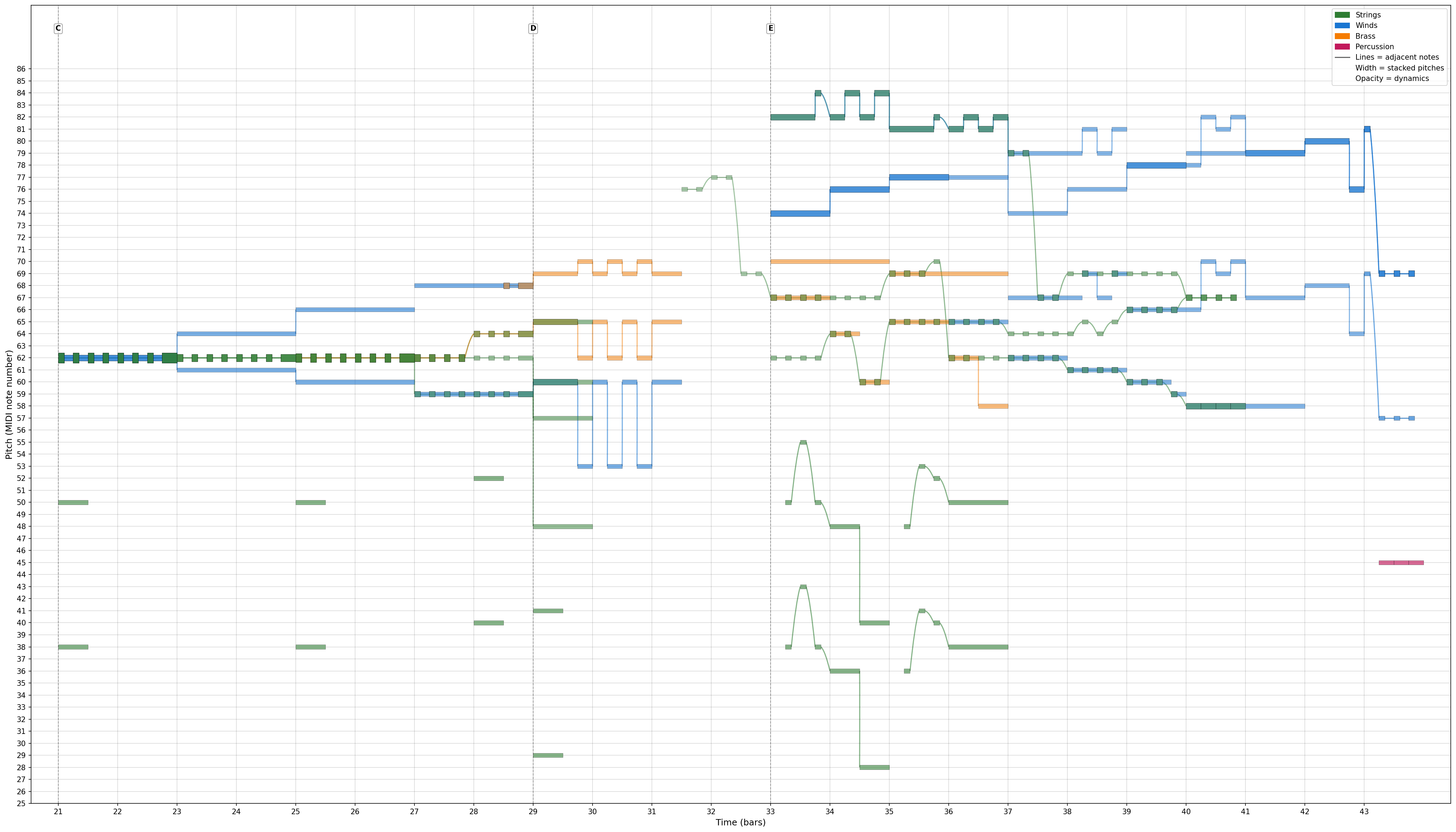
MusicXML is rich and expressive for human-facing notation software, but challenging to scan at a glance or share with AI systems. This tool converts MusicXML into clear visual timelines and pitch maps for score study, arrangement review, education, and pipeline integration—while still making it easy for humans and AI to explore music side by side.
Use cases: Human-AI collaboration on musical analysis, visual comparison of arrangements, AI pipeline integration for score processing, and educational visualization of orchestration principles.
Quick Start
Requirements: Python 3.12 or higher
# Install from PyPI
pip install musicxml-to-png

# Convert a MusicXML file
musicxml-to-png your-score.mxl

# With options
musicxml-to-png your-score.mxl --ensemble bigband --minimal -o output.png
Features
Core Features:
- Parse MusicXML files (.mxl, .musicxml, .xml)
- Extract note events (pitch, duration, start time, instrument)
- High-resolution 2D visualization (time × pitch) with grid/labels
- Multiple ensemble types:
- Ungrouped (default): every part gets its own color, even if multiple of the same instrument appear
- Orchestra: strings, winds, brass, percussion
- Bigband: trumpets, trombones, saxophones, rhythm section
- (More ensemble types coming - jazzcombo, chamber, etc.)
- Color-coded instruments or families (per-instrument by default, ensemble palettes when requested)
- Automatically normalize transposing instruments to concert pitch for consistent visualization
- Export as high-resolution PNG (default 150 DPI)
Common Customization:
- Grid lines (enabled by default, disable with
--no-grid) - Minimal mode (remove all labels, legend, title, borders,
--minimal) - Custom titles (
-t "Custom Title") - Output DPI control:
--dpi(default 150) - Transparent background:
--transparentfor PNG output with transparent backgrounds (useful for overlays) - Note connections (beta):
--show-connectionsto visualize connections between adjacent notes with straight lines - Timeline units for x-axis: bars/measures (default) or beats (
--timeline-unit measureor--timeline-unit beat), labels are 1-indexed
Advanced Options:
- Width controls:
--time-stretchor--fig-widthto adjust timeline width - Staccato shortening (default 40%); override with
--staccato-factor(0.1–0.9) - Timeline slicing by bars/measures or beats using
--slice-range start-end(unit from--timeline-unit, default bar/measure)- Slice ranges are 1-based and end-exclusive (e.g.,
2-4yields bars 2–3;2-3beats yields only beat 2)
- Slice ranges are 1-based and end-exclusive (e.g.,
- Same-pitch stacking is split by default so only overlapping segments thicken; opt out with
--no-overlap-splittingfor the legacy whole-note look - No-output mode for smoke tests:
--no-output - Verbose mode for debugging (
-v/--verbose) - Connection styling: tune connection linewidth with
--connection-linewidth(advanced; requires--show-connections; default linewidth=1.5; curve height auto-scales)
Usage
Command Line Interface
Convert a MusicXML file to PNG:
musicxml-to-png input.mxl
This creates input.png in the same directory. Supports both .xml and .mxl (compressed) MusicXML files.
Basic Options:
# Specify custom output file
musicxml-to-png input.mxl -o output.png

# Add custom title
musicxml-to-png input.mxl --title "My Composition"
# Titles are hidden by default; use --show-title or --title to display one

# Ensemble types - select instrument categorization scheme
musicxml-to-png input.mxl                              # Ungrouped (default) - every instrument gets its own color
musicxml-to-png input.mxl --ensemble orchestra        # Group by orchestra families
musicxml-to-png input.mxl --ensemble bigband          # Group by bigband families

# Disable grid lines
musicxml-to-png input.mxl --no-grid

# Minimal mode (no labels, legend, title, or borders)
musicxml-to-png input.mxl --minimal

# Transparent background (useful for overlays)
musicxml-to-png input.mxl --transparent
Common Options:
# Control visibility of specific elements
musicxml-to-png input.mxl --no-rehearsal-marks  # Hide rehearsal marks
musicxml-to-png input.mxl --no-legend          # Hide legend
musicxml-to-png input.mxl --show-title         # Show title (hidden by default, uses filename)

# Output quality
musicxml-to-png input.mxl --dpi 300            # Higher resolution (default 150)

# Note connections (beta)
musicxml-to-png input.mxl --show-connections   # Show connections between adjacent notes

# Timeline display
musicxml-to-png input.mxl --timeline-unit beat  # Show beats instead of bars
Advanced Options:
# Width controls
musicxml-to-png input.mxl --time-stretch 1.2   # Widen timeline by 20%
musicxml-to-png input.mxl --fig-width 24.0    # Explicit width in inches

# Musical adjustments
musicxml-to-png input.mxl --staccato-factor 0.4  # Shorten staccato notes (default 0.4)
musicxml-to-png input.mxl --no-overlap-splitting # Legacy whole-note stacking

# Timeline slicing (bars 5-10, 1-indexed, end-exclusive)
musicxml-to-png input.mxl --slice-range 5-10 --timeline-unit bar

# Connection styling (requires --show-connections)
musicxml-to-png input.mxl --show-connections \
  --connection-linewidth 1.2

# Smoke tests / CI
musicxml-to-png input.mxl --no-output          # Run full pipeline without writing PNG

# Debugging
musicxml-to-png input.mxl --verbose            # Show music21 warnings and diagnostics
# or
musicxml-to-png input.mxl -v
Python Library
Use as a library in your Python code:
from musicxml_to_png import convert_musicxml_to_png
from pathlib import Path

# Basic conversion
output_path = convert_musicxml_to_png(
    input_path=Path("input.mxl"),
    output_path=Path("output.png"),  # Optional
    title="My Composition"           # Optional
)

# Titles are hidden by default; pass show_title=True or supply a title to display one.

# With common options
output_path = convert_musicxml_to_png(
    input_path=Path("input.mxl"),
    output_path=Path("output.png"),
    title="My Composition",
    show_grid=False,             # Disable grid lines
    minimal=True,                # Remove all labels/borders
    ensemble="bigband",          # Use bigband categorization
    transparent=True,            # Use transparent background
    show_connections=True,       # Show note connections (beta)
    show_rehearsal_marks=False,  # Hide rehearsal marks
    show_legend=False,           # Hide legend
    show_title=True,             # Show title (default hidden)
    dpi=300,                     # Higher resolution
    timeline_unit="beat"         # Show beats instead of bars
)

# Advanced options
output_path = convert_musicxml_to_png(
    input_path=Path("input.mxl"),
    output_path=Path("output.png"),
    ensemble="orchestra",
    time_stretch=1.2,            # Widen timeline by 20%
    fig_width=24.0,              # Explicit figure width in inches
    staccato_factor=0.4,         # Shorten staccato notes to 40%
    split_overlaps=False,        # Legacy whole-note stacking
    slice_mode="bar",            # Slice by bars
    slice_start=5,               # Start at bar 5 (1-indexed)
    slice_end=10,                # End before bar 10
    write_output=True,           # Set False for smoke tests
    show_connections=True,       # Enable connections
    connection_linewidth=1.2    # Line width for connections
)
Contributing
See Roadmap for planned features.
This project emerged from human-AI collaborative exploration of musical structure. Contributions, ideas, and feedback are welcome!
Philosophy: This tool exists to enable human-AI collaboration, not to replace human musical intuition. The goal is to create shared visual language that helps both humans and AI systems understand musical architecture more deeply, together.
Local sandbox: For ad-hoc MusicXML/PNG samples, use sandbox/ (gitignored except for .gitkeep) to keep git status clean; automated fixtures live under tests/.
License
This project is licensed under the MIT License - see the LICENSE file for details.
Acknowledgments
Built through collaborative iteration between human musical expertise and AI technical assistance. Created to bridge the gap between MusicXML (machine-readable but visually dense) and visual analysis (human-friendly and AI-parseable).
Special thanks to: The music21 project for their excellent MusicXML parsing library.
Release history Release notifications | RSS feed


Download files
Download the file for your platform. If you're not sure which to choose, learn more about installing packages.
Source Distribution
Built Distribution
Filter files by name, interpreter, ABI, and platform.
If you're not sure about the file name format, learn more about wheel file names.
Copy a direct link to the current filters
File details
Details for the file musicxml_to_png-0.6.3.tar.gz.
File metadata
- Download URL: musicxml_to_png-0.6.3.tar.gz
- Upload date:
- Size: 50.1 kB
- Tags: Source
- Uploaded using Trusted Publishing? No
- Uploaded via: twine/6.2.0 CPython/3.12.12
File hashes
| Algorithm | Hash digest | |
|---|---|---|
| SHA256 |
4de849e2565fb989ae995a99c87ba075452d0f73f3e90cb864c9fa97c0f231f8
|
|
| MD5 |
87ba25307e77ae483d588209866bc416
|
|
| BLAKE2b-256 |
4f05058756845f16362bc76b9c2f29f8d4a8f1b7b7ed066789bd3b36eeeb37e7
|
File details
Details for the file musicxml_to_png-0.6.3-py3-none-any.whl.
File metadata
- Download URL: musicxml_to_png-0.6.3-py3-none-any.whl
- Upload date:
- Size: 33.3 kB
- Tags: Python 3
- Uploaded using Trusted Publishing? No
- Uploaded via: twine/6.2.0 CPython/3.12.12
File hashes
| Algorithm | Hash digest | |
|---|---|---|
| SHA256 |
dcf53931ae77e07b6a5bc20e4d31d52a36e297faa450e0883cd7c35687e76186
|
|
| MD5 |
fa79d6e22f83188f9f43119224d11e31
|
|
| BLAKE2b-256 |
9c087d0451a1f09d2e62bf24aeb66fc6d758e94a96f2d2346b4f92c56394617e
|






