
Convert MusicXML files into clean, analyzable PNG visualizations

Project description
musicxml-to-png
A tool for human-AI musical collaboration
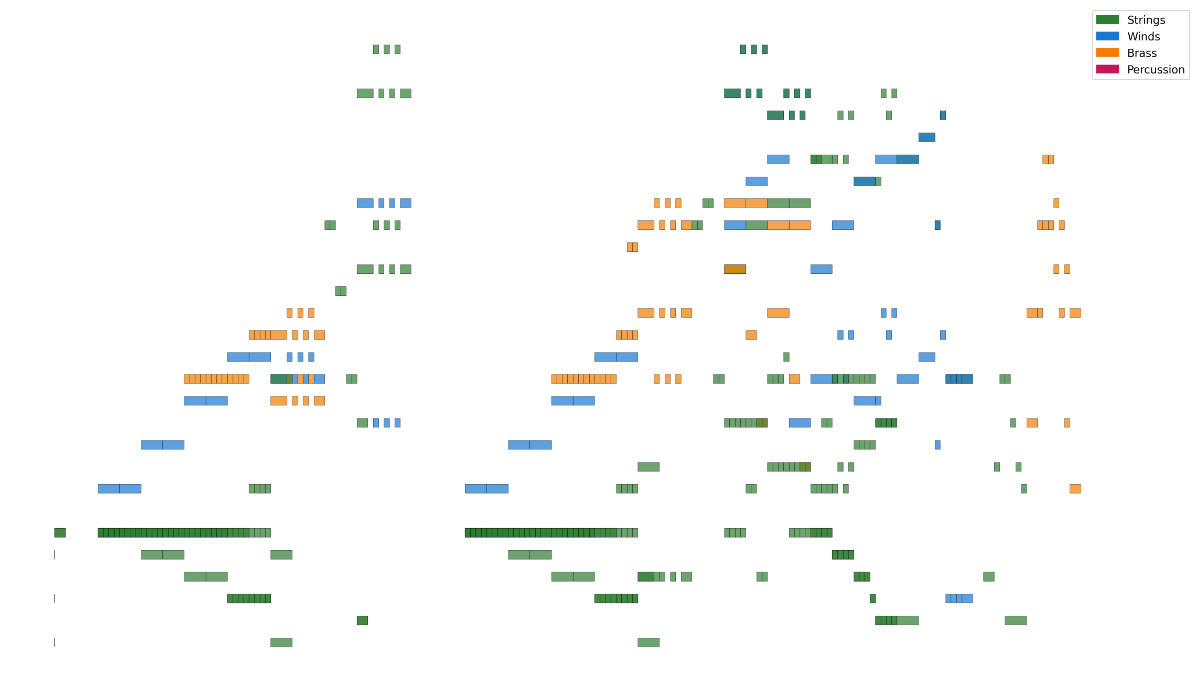
MusicXML is rich and expressive for human-facing notation software, but challenging for AI systems to "see" structurally. This tool bridges that gap by converting MusicXML files into visual representations that both humans and AI can analyze together. Designed for composers, arrangers, educators, and anyone exploring human-AI collaboration in music.
Quick Start
Requirements: Python 3.12 or higher
# Install from PyPI
pip install musicxml-to-png

# Convert a MusicXML file
musicxml-to-png your-score.mxl

# With options
musicxml-to-png your-score.mxl --ensemble bigband --minimal -o output.png
See Installation for development setup.
Features
Convert MusicXML files into clean, analyzable PNG visualizations showing temporal flow (horizontal axis = time), pitch range (vertical axis = low to high), note duration (length of visual bars), and instrument families (color-coded by ensemble type).
Use cases: Human-AI collaboration on musical analysis, visual comparison of arrangements, AI pipeline integration for score processing, and educational visualization of orchestration principles.
- Parse MusicXML files (.xml, .musicxml, .mxl)
- Extract note events (pitch, duration, start time, instrument)
- High-resolution 2D visualization (time × pitch) with fine-grained grid
- Multiple ensemble types:
- Orchestra: strings, winds, brass, percussion
- Bigband: trumpets, trombones, saxophones, rhythm section
- (More ensemble types coming - jazz combo, chamber, etc.)
- Color-coded instrument families (distinct palettes per ensemble)
- Customizable visualization:
- Grid lines (enabled by default, disable with --no-grid)
- Minimal mode (remove all labels, legend, title, borders)
- Custom titles
- Verbose mode for debugging (-v/--verbose)
- Export as high-resolution PNG (300 DPI)
Getting Your Music into MusicXML
Most modern notation software can export to MusicXML format. Here are some popular options:
Desktop Software:
- Dorico - File → Export → MusicXML (or use compressed .mxl format)
- Finale - File → Export → MusicXML
- LilyPond - Can export via
lilypond --formats=xml - MuseScore (Free, open source) - File → Export → MusicXML
- Notion - File → Export → MusicXML
- Overture - File → Export → MusicXML
- Sibelius - File → Export → MusicXML
Web-Based:
- Flat.io - File → Export → MusicXML
- Noteflight - File → Export → MusicXML
For detailed export instructions, please refer to your notation software's documentation. Most software supports both uncompressed .mxl and compressed .xml formats - this tool handles both!
Installation
For End Users
Simply install from PyPI:
pip install musicxml-to-png
Note: Requires Python 3.12 or higher. If you don't have Python 3.12, pip will show an error with installation instructions.
For Developers
If you want to contribute or develop locally:
-
Python Version: This project requires Python 3.12. The
.python-versionfile will automatically set this if you usepyenv,asdf, or similar version managers.Using pyenv:
pyenv install 3.12  # If not already installed
python --version    # Verify it shows Python 3.12.x
-
Clone the repository:
git clone <repository-url>
cd musicxml-to-png
-
Set up Python environment:
# Create and activate virtual environment
python -m venv venv
source venv/bin/activate  # On Windows: venv\Scripts\activate

# Install dependencies
pip install -r requirements.txt

# Install package in development mode
pip install -e .
Note: Activate the virtual environment (source venv/bin/activate) each time you work on the project. You'll see (venv) in your prompt when active.
Usage
Command Line Interface
Convert a MusicXML file to PNG:
musicxml-to-png input.xml
This creates input.png in the same directory. Supports both .xml and .mxl (compressed) MusicXML files.
Basic Options:
# Specify custom output file
musicxml-to-png input.xml -o output.png

# Add custom title
musicxml-to-png input.xml --title "My Composition"

# Disable grid lines
musicxml-to-png input.xml --no-grid

# Minimal mode (no labels, legend, title, or borders)
musicxml-to-png input.xml --minimal

# Show music21 warnings and diagnostics
musicxml-to-png input.xml --verbose
# or
musicxml-to-png input.xml -v
Ensemble Types:
Select the instrument categorization scheme:
# Orchestra (default) - strings, winds, brass, percussion
musicxml-to-png input.xml

# Bigband - trumpets, trombones, saxophones, rhythm section
musicxml-to-png input.xml --ensemble bigband
Combining Options:
musicxml-to-png input.xml --ensemble bigband --minimal --no-grid -o output.png
Python Library
Use as a library in your Python code:
from musicxml_to_png import convert_musicxml_to_png
from pathlib import Path

# Basic conversion
output_path = convert_musicxml_to_png(
    input_path=Path("input.xml"),
    output_path=Path("output.png"),  # Optional
    title="My Composition"  # Optional
)

# With all options
output_path = convert_musicxml_to_png(
    input_path=Path("input.xml"),
    output_path=Path("output.png"),
    title="My Composition",
    show_grid=False,           # Disable grid lines
    minimal=True,              # Remove all labels/borders
    ensemble="bigband"         # Use bigband categorization
)
Contributing
See Roadmap for planned features.
This project emerged from human-AI collaborative exploration of musical structure. Contributions, ideas, and feedback are welcome!
Philosophy: This tool exists to enable human-AI collaboration, not to replace human musical intuition. The goal is to create shared visual language that helps both humans and AI systems understand musical architecture more deeply.
License
This project is licensed under the MIT License - see the LICENSE file for details.
Acknowledgments
Built through collaborative iteration between human musical expertise and AI technical assistance. Created to bridge the gap between MusicXML (machine-readable but visually dense) and visual analysis (human-friendly and AI-parseable).
Special thanks to: The music21 project for their excellent MusicXML parsing library.
Release history Release notifications | RSS feed


Download files
Download the file for your platform. If you're not sure which to choose, learn more about installing packages.
Source Distribution
Built Distribution
Filter files by name, interpreter, ABI, and platform.
If you're not sure about the file name format, learn more about wheel file names.
Copy a direct link to the current filters
File details
Details for the file musicxml_to_png-0.2.2.tar.gz.
File metadata
- Download URL: musicxml_to_png-0.2.2.tar.gz
- Upload date:
- Size: 23.5 kB
- Tags: Source
- Uploaded using Trusted Publishing? No
- Uploaded via: twine/6.2.0 CPython/3.12.12
File hashes
| Algorithm | Hash digest | |
|---|---|---|
| SHA256 |
38b9a0b7f038622d405275c810666f79db30991fb8bb1e3115e2eb9659f219a3
|
|
| MD5 |
c7aa1588ad9fffc05ec0543217a4e339
|
|
| BLAKE2b-256 |
47976cfbe6af8acbf3674a5fa3b5b7915d719e363c436c7729f44a7cc2e2ae9a
|
File details
Details for the file musicxml_to_png-0.2.2-py3-none-any.whl.
File metadata
- Download URL: musicxml_to_png-0.2.2-py3-none-any.whl
- Upload date:
- Size: 15.7 kB
- Tags: Python 3
- Uploaded using Trusted Publishing? No
- Uploaded via: twine/6.2.0 CPython/3.12.12
File hashes
| Algorithm | Hash digest | |
|---|---|---|
| SHA256 |
ce52c18f2d486d080d38a011aa5155a9ee6927014326cef7300e887b2a65013f
|
|
| MD5 |
ca25e88d573c72f53e82fe41c5acd30c
|
|
| BLAKE2b-256 |
8442961f8c5e153f923c490f5624d457d990c49cd414e2df46b7f15e3a17c5bc
|






