
nahiarhdlog




Embedded observability for FastAPI — searchable logs, error tracking, alerts, metrics, tracing, and a token-locked dashboard. Zero infrastructure: everything lives in one SQLite file.
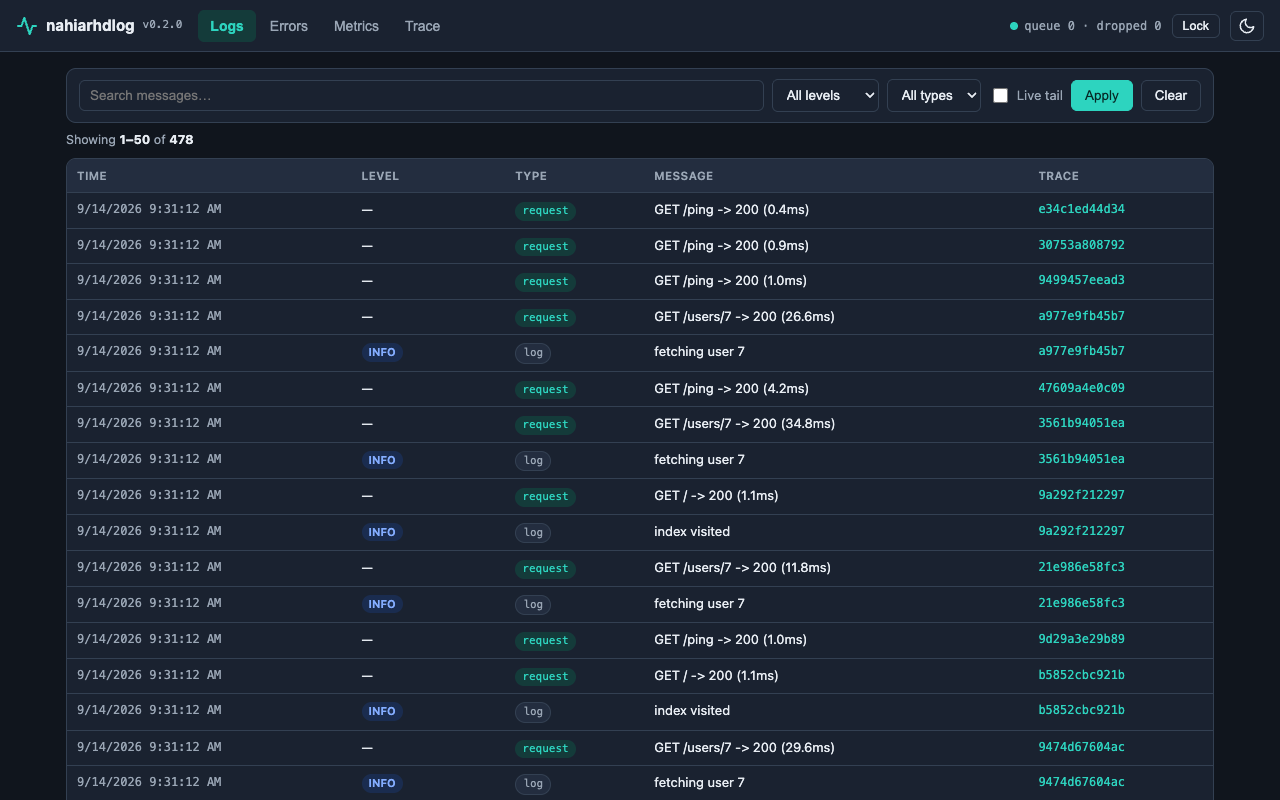
Why nahiarhdlog?
- No infrastructure. No ELK, no agents, no SaaS —
pip installand you have history, search, and a UI. - Embedded dashboard. Your logs live at
/admin/logsinside your own app, behind your own token. - Negligible overhead. Requests enqueue a small dict (p95 ~0.04 ms); SQLite writes happen in batches on a background thread. The queue is bounded — when full, events drop with a visible counter instead of ever blocking a request.
- Framework-agnostic core. FastAPI first; the core imports no web framework, so Flask/Django adapters can follow without changing it.
Install
pip install nahiarhdlog
# or: uv add nahiarhdlog
Requires Python ≥ 3.10. Events are stored in .nahiarhdlog/nahiarhdlog.db (SQLite, WAL mode, FTS5 search).
Quickstart
from fastapi import FastAPI
from nahiarhdLOG import observe

app = FastAPI()
observe(app, dashboard_token="secret")  # logs + errors + metrics + dashboard
That's it. Every request, every stdlib log record, and every uncaught exception is now captured. Open /admin/logs and enter the token on the lock screen.
Features
| Area | What you get |
|---|---|
| Logs | Auto-captured stdlib records + requests; full-text search (FTS5), level/type/time/trace filters, pagination |
| Errors | Grouped by ExcType@file.py:line, full tracebacks, top-errors ranking |
| Alerts | Threshold rules (N events in M seconds) + cooldown; webhook, Telegram, and SMTP sinks |
| Metrics | RPS, error rate, latency p50/p95, time-bucketed series — computed from the same request events |
| Tracing | One trace_id per request shared by logs and errors; timeline view; optional OpenTelemetry export |
| Dashboard | Embedded at /admin/logs, token-locked, dark/light mode, mobile-friendly, live tail |
Configuration — all arguments and .env wiring
observe() takes explicit arguments and never reads your environment or .env file itself — each app owns its config, so the same package works unchanged across projects:
| Argument | Default | Meaning |
|---|---|---|
db_path |
".nahiarhdlog/nahiarhdlog.db" |
SQLite file for events (parent dirs auto-created) |
dashboard_token |
None (dashboard off) |
Token for the dashboard; unset = no dashboard |
dashboard_prefix |
"/admin/logs" |
Where the dashboard lives |
retention_days |
7 |
How long events are kept |
sample_rate |
1.0 |
1.0 = every request; 500s are always kept |
level |
logging.INFO |
Minimum stdlib level captured |
skip_paths |
[] |
Extra paths the middleware ignores (dashboard prefix is always excluded) |
Typical .env-based wiring in your app:
# .env (never commit this file)
NAHILOG_DB=/var/lib/myapp/nahiarhdlog.db
NAHILOG_TOKEN=long-random-secret
import os
from fastapi import FastAPI
from nahiarhdLOG import observe

app = FastAPI()
observe(
    app,
    db_path=os.environ.get("NAHILOG_DB", ".nahiarhdlog/nahiarhdlog.db"),
    dashboard_token=os.environ.get("NAHILOG_TOKEN"),  # None = dashboard disabled
)
If your app loads
.envviadotenv_values(read-only dict) instead ofload_dotenv,os.environwon't see those values — pass them through your env helper instead.
Alerts & OpenTelemetry — rules, sinks, trace export
from nahiarhdLOG.alerter import Rule, SmtpSink, TelegramSink, WebhookSink

observe(
    app,
    rules=[Rule("api-errors", count=10, window_seconds=600, cooldown_seconds=1800)],
    sinks=[
        WebhookSink("https://hooks.example/deploy"),          # POSTs {"subject","body"} as JSON
        TelegramSink(bot_token="123:ABC", chat_id="-100..."),  # Bot API sendMessage
        SmtpSink("smtp.example.com", ["ops@example.com"], username="bot", password="..."),
    ],
    dashboard_token="secret",
)
Rules evaluate in a background thread; a failing sink never blocks the others.
pip install "nahiarhdlog[otel]"
from nahiarhdLOG.otel import export_trace
from nahiarhdLOG.query import get_trace

export_trace(get_trace(collector.storage, trace_id))  # keeps the original trace id
Example app
# terminal 1: run the demo
uv run python examples/basic_app.py serve

# terminal 2: generate traffic
uv run python examples/basic_app.py traffic --n 300
Open http://127.0.0.1:8000/admin/logs with token demo-token.
FAQ
Which Python versions? 3.10+ (3.10, 3.11, 3.12 tested in CI).
Where is data stored? One SQLite file (.nahiarhdlog/nahiarhdlog.db by default), WAL mode, FTS5 index for search. Delete the directory to wipe everything. Set retention_days for automatic purging.
Is the dashboard secure? It is mounted only when dashboard_token is set, and every page + API call requires the token (cookie set at login; old ?token= links migrate). Without it you get a lock screen (401). Use a long random token and HTTPS in production.
Why don't I see the dashboard's own requests in the logs? By design: the dashboard prefix is auto-excluded so its polling doesn't drown your signal. Add more with skip_paths.
What's the overhead? Requests only enqueue a small dict; SQLite writes happen in batches on a background thread. Run python scripts/probe_perf.py to measure on your machine.
Flask / Django / plain scripts? On the roadmap. The core (collector, storage, query, alerter, metrics) imports no web framework — only the thin adapters/ layer does, enforced by an automated boundary test.
How do I disable the dashboard? Omit dashboard_token (default): nothing is mounted.
Roadmap
- Core logging, SQLite+FTS5 storage, search API
- Error tracker + webhook alerts
- Metrics + tracing (+ optional OpenTelemetry export)
- Embedded dashboard UI
- Flask/Django adapters
- Postgres storage backend
Development
uv pip install -e ".[dev,otel]"
uv run --no-sync python -m pytest
uv run --no-sync python scripts/probe_perf.py --n 10000
Changelog
- 0.2.0 — Default database moved to
.nahiarhdlog/nahiarhdlog.db(a dot-directory keeps project roots clean; missing parent dirs are auto-created). Note: apps on the old default start a fresh database here — the oldnahiarhdlog.dbis left untouched. - 0.1.3 — Dashboard login persists via cookie: refresh and new tabs stay signed in; lock screen signs in without putting the token in the URL; old
?token=bookmarks keep working and migrate to a cookie. Added Lock button. Shutdown hook moved to lifespan composition (works alongside user-defined lifespans, Starlette 0.52–1.x). - 0.1.2 — Requests capture client IP + user agent; detail dialog rebuilt (no empty rows, status chips, "view full trace" jump); log rows keyboard-accessible (Tab + Enter).
- 0.1.1 —
NahiarhdHandlerno longer appends a second traceback when the message already contains one (loguru-style pre-formatted records, manually formatted tracebacks). - 0.1.0 — Initial release: searchable logs, error tracker + alerts, metrics, tracing, embedded dashboard.
License
MIT — see LICENSE.
By Raihan Hidayatullah Djunaedi · nahiarhd.com · PyPI @nahiarhd
1 maintainer

Metadata
1 maintainer
Release files for nahiarhdlog 0.2.0
For a detailed explanation of source distributions (sdists) and built distributions (wheels), please see the package formats documentation.
Source distribution (sdist)
| File | Size | Uploaded | |
|---|---|---|---|
| nahiarhdlog-0.2.0.tar.gz | 43.0 kB | Details |
Built distribution (wheel)
| File | Interpreter | ABI | Platform | Reset |
|---|---|---|---|---|
| nahiarhdlog-0.2.0-py3-none-any.whl | Python 3 | none | any | Details |
Total release size: 78.9 kB
Release files / nahiarhdlog-0.2.0.tar.gz
| Download URL | nahiarhdlog-0.2.0.tar.gz |
|---|---|
| Size | 43.0 kB |
| Tags | Source |
|
SHA-256 checksum How to use checksums |
0c046d7f55b58b4434b46849d7258492f5d018df191f19df9842cb6952962b83
|
|
BLAKE2b-256 checksum How to use checksums |
504d49951e8e02527e23176261655941ddefcc73858de0c379bb4183a58b55c3
|
| Upload date | |
|
Uploaded using Trusted Publishing? What is trusted publishing? |
No |
| Uploaded via |
twine/7.0.0 CPython/3.12.13
|
Release files / nahiarhdlog-0.2.0-py3-none-any.whl
| Download URL | nahiarhdlog-0.2.0-py3-none-any.whl |
|---|---|
| Size | 35.9 kB |
| Tags | Python 3 |
|
SHA-256 checksum How to use checksums |
78ce14fdd3f5f12593df91d070e6fea1532c47d21c9e532be2e570dbd084519c
|
|
BLAKE2b-256 checksum How to use checksums |
8d978285f8e9b8b75590d778c7b3973f50d5b5befbb61e9569af574dce889b7a
|
| Upload date | |
|
Uploaded using Trusted Publishing? What is trusted publishing? |
No |
| Uploaded via |
twine/7.0.0 CPython/3.12.13
|














