
Napari-3D-Counter







A plugin for manually counting objects in 3D images
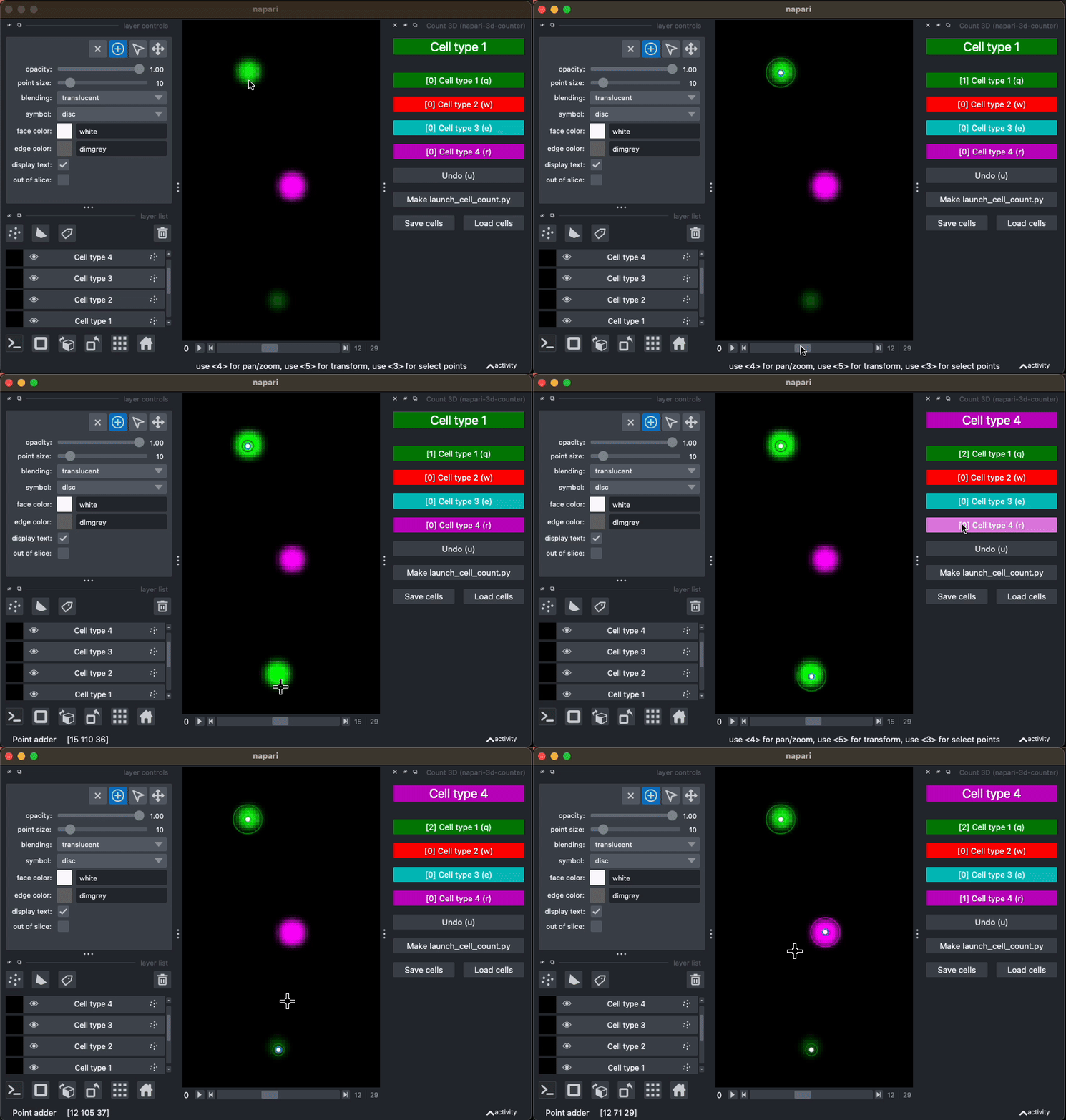
Documentation can be found below and at the this site
This napari plugin was generated with Cookiecutter using @napari's cookiecutter-napari-plugin template.
Prerequisites
It is recommended to use conda to install Napari-3D-Counter and napari. Installation instructions for the miniconda distribution of conda can be found here:
https://www.anaconda.com/docs/getting-started/miniconda/install
Installation
You can install napari-3d-counter via conda
conda create -n n3dc-env -c conda-forge -y napari napari-3d-counter pyqt python=3.12
conda activate n3dc-env
pip
pip install napari-3d-counter
Troubleshooting
If above conda and pip installs do not work. follow the instructions to get a working napari installation. Then install napari-3d counter into that environment:
conda activate napari-env
pip install napari-3d-counter
Count3D Usage
- First launch napari with the
naparicommand. - Count3D can be launched from the plugin menu of napari, or through the command palette (Ctrl+Shift+P). Select Count3D.
This will spawn several Points Layers:
Point adder
This layer acts as the interface for napari-3d-counter. Any points added to this layer are dispatched into the appropriate data layer labeled by the GUI. Any other actions to this layer has no effects
Cell Type N
These are the data layers. The points actually live in these layers, and you can edit the style or delete individual points here.
out of slice
This contains the x and y of all points in all layers. This may be useful to keep track of what regions of the data have been annotated.
Adding a cell
You can add a cell of the currently selected cell type by clicking on the viewer. The counter on the current cell type's button (on the right side of the screen) will be incremented.
Troubleshooting
No cell was added
- Ensure that
Point adderlayer is selected - Ensure that
Add pointstool is selected - Ensure that there are no image layers obscuring the layers spawned by napari
- Click on the viewer where you would like the point to be added
The cell marker is the wrong size
- See Change appearance of a cell type
- Use the
point sizeslider
https://github.com/pnewstein/napari-3d-counter/assets/30813691/745d495e-1d18-43dd-aa5e-e9ecd835cdae
Changing cell type
You can change the currently selected cell type by clicking on that cell type's button. This change will be reflected in the the color and text of the first box in the GUI. Now any clicks to the canvas will be added to that type.
Additionally, the keyboard shortcut for that cell type can be used. Keyboard shortcuts are listed on the button, and are "q", "w", "e", "r", "t", "y" by default
https://github.com/pnewstein/napari-3d-counter/assets/30813691/844d04ce-2795-4226-a98b-d5fe5a0b131e
Undo last added cell
The undo button (shortcut u) will remove last added cell, regardless of cell type. This will change both remove the cell from the canvas and decrease the count in the appropriate type.
https://github.com/pnewstein/napari-3d-counter/assets/30813691/c04ca5e3-9f48-4dd5-89e5-a9866b353e03
Remove a particular cell
To remove a particular cell, change to the layer containing the cell you would
like to remove. Then select the select points tool (arrow) to select the points to
delete, then use Delete selected points (x) to delete those points
This change will be reflected in the counts.
https://github.com/pnewstein/napari-3d-counter/assets/30813691/d0787cba-9b23-46d5-9cd3-21a4ad73460a
Change appearance of a cell type
Changes to the name or edge color of a points layer will be reflected in the previously added points, as well as the GUI. Features that are editable in this way include:
- face color
- edge color
- symbol
- point size
https://github.com/pnewstein/napari-3d-counter/assets/30813691/6c495270-d4c4-473e-9091-8d2e0f8e2764
Save configuration
Use the Make launch_cell_count.py button to create a python script that will
launch napari with 3DCounter added to the dock and with all cell type
appearances. This functions to save any manual changes you made to the
appearance of a cell type between sessions.
https://github.com/pnewstein/napari-3d-counter/assets/30813691/3448652d-3064-4900-8bbe-e88d75667108
Save cells
Use the "Save cells" button to save the cell coordinates for all layers into a csv file. This saves the coordinates and the names of each of the cells.
https://github.com/pnewstein/napari-3d-counter/assets/30813691/38b30f2a-cc83-46c2-8b19-4d44715c07c5
Load cells
Use the "Load cells" button to load the cells from a csv file into new layers
https://github.com/pnewstein/napari-3d-counter/assets/30813691/7df74688-85b1-4b61-aa51-dab179763832
Launch with saved configuration
To run Count3D with custom configuration, paste the following code into your napari ipython console
from napari_3d_counter import Count3D, CellTypeConfig

cell_type_config = [
    # The first cell type is called "cq+eve+" and should be green
    CellTypeConfig(
        name="cq+eve+",
        color="g"
    ),
    # The first cell type is called "cq+eve-" and should be cyan
    CellTypeConfig(
        name="cq+eve-",
        color="c"
    ),
    # The first cell type is called "cq-eve+" and should be red
    CellTypeConfig(
        name="cq-eve+",
        color="r"
    ),
]
# Launch the plugin with configuration
viewer.window.add_dock_widget(Count3D(viewer, cell_type_config=cell_type_config))
Usage example can be found in /example/launch_count_3d.py
Auxiliary plugins
Ingress Points
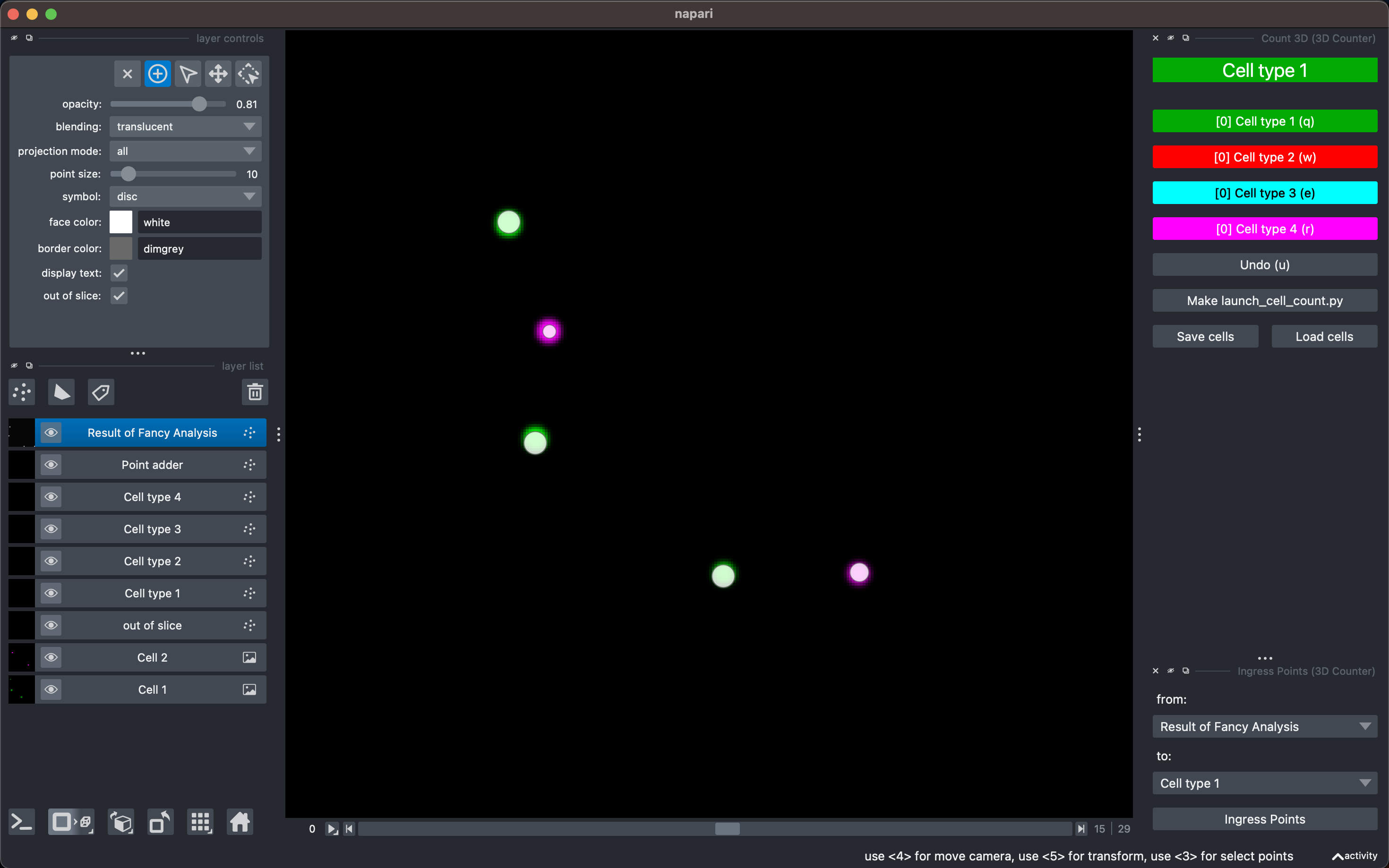
This plugin takes a points layer and adds the points to the selected cell type layer. This can be useful if you want to manually count cells after cell identification.
Usage example can be found in /example/launch_ingress_points.py
Split on Shapes
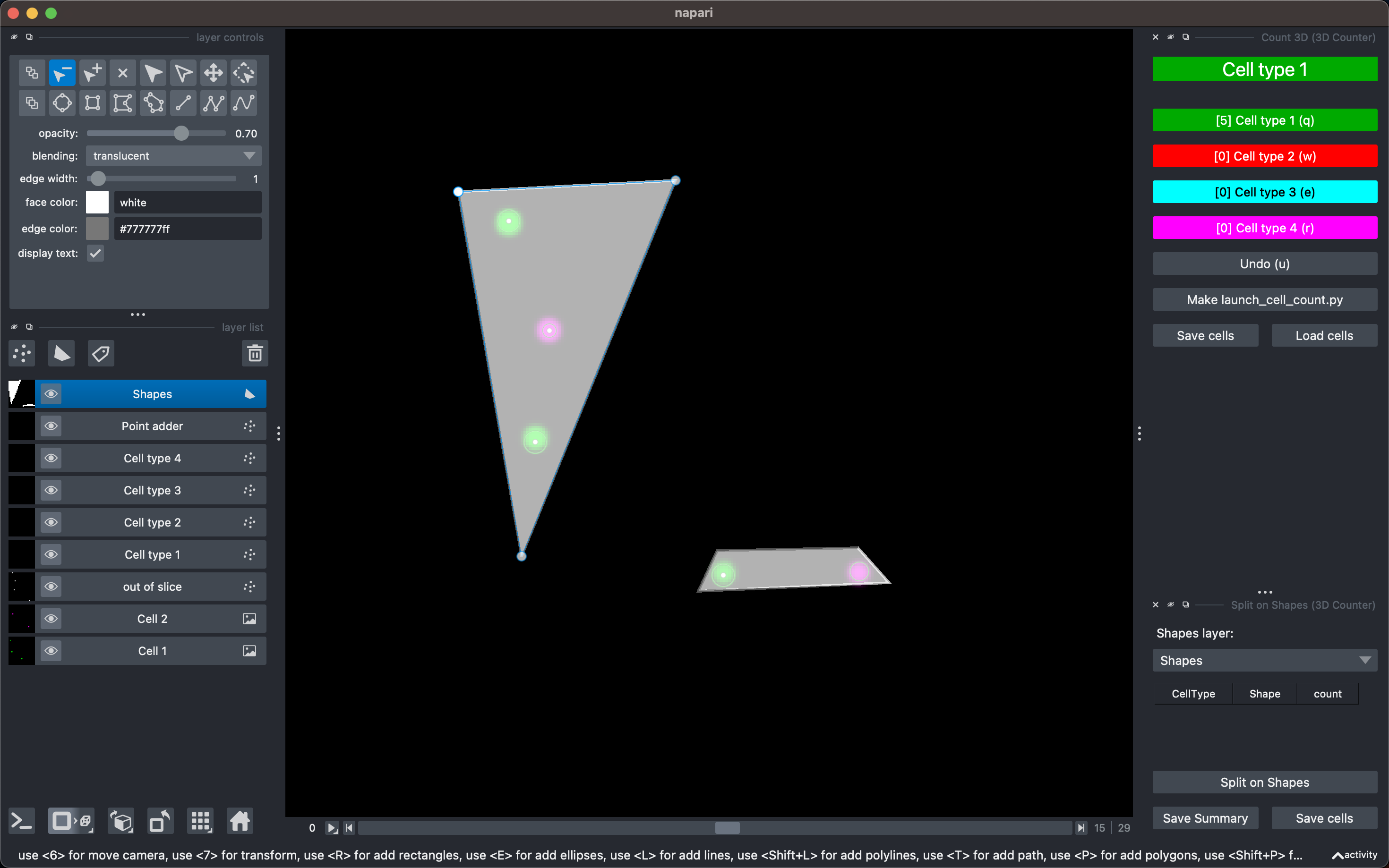
This plugin can be used to subset a cell type into several groups based on their x-y location. Simply draw a shape that surrounds your cells (perhaps in a segment of segmentaly repeating tissue) and run this plugin to get a list of cells of each type in each shape.
Usage example can be found in /example/launch_split_on_shapes.py
Reconstruct Selected
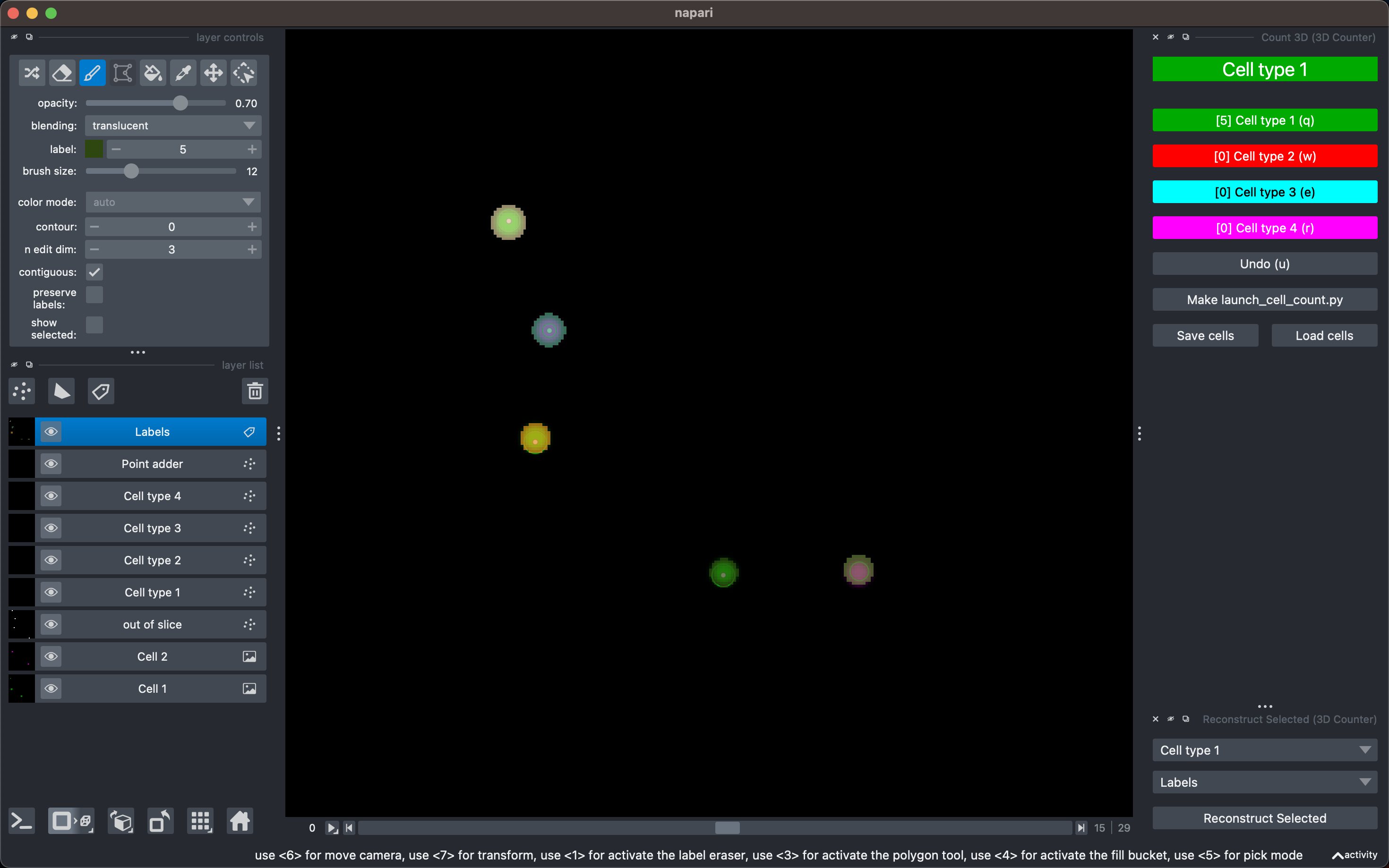
One use case of Napari 3D Counter is to visualize a subset of labeled cells. For example, automated process label your cells of interest as well as a set of off-target cells, and you would like to visualize only your cells of interest. This can be accomplished by using Napari 3D Counter to count your cells of interest, and some other process to create labels (perhaps nsbatwm) and using Reconstruct Selected to create a new image layer of those labels which have been counted as a particular cell type.
Usage example can be found in /example/launch_reconstruct_selected.py
Contributing
Contributions are very welcome. However, code written by LLMs is not welcome. Tests can be run with tox, please ensure the coverage at least stays the same before you submit a pull request.
To contribute, first fork and clone the repository on GitHub: (GitHub docs)[https://docs.github.com/en/pull-requests/collaborating-with-pull-requests/working-with-forks/fork-a-repo]
Then install localy:
cd napari-3d-counter
pip install -e '.[testing]'
Run unit tests:
pytest
Run full test suite, ensuring it installs properly:
tox
License
Distributed under the terms of the GNU GPL v3.0 license, "napari-3d-counter" is free and open source software
Citing Napari-3D-Counter
Please cite this JOSS article: https://doi.org/10.21105/joss.09091
Issues
If you encounter any problems, please file an issue along with a detailed description.
1 maintainer

Metadata
1 maintainer
Release files for napari-3d-counter 0.6.0
For a detailed explanation of source distributions (sdists) and built distributions (wheels), please see the package formats documentation.
Source distribution (sdist)
| File | Size | Uploaded | Provenance | |
|---|---|---|---|---|
| napari_3d_counter-0.6.0.tar.gz | 54.9 kB | With provenance | Details |
Built distribution (wheel)
| File | Interpreter | ABI | Platform | Reset |
|---|---|---|---|---|
| napari_3d_counter-0.6.0-py3-none-any.whl | Python 3 | none | any | Details |
Total release size: 97.2 kB
Release files / napari_3d_counter-0.6.0.tar.gz
| Download URL | napari_3d_counter-0.6.0.tar.gz |
|---|---|
| Size | 54.9 kB |
| Tags | Source |
|
SHA-256 checksum How to use checksums |
be4edc1bdacd5b848454c24dd64927b2edaa42322e4bb68e8009cd0ca8ed7664
|
|
BLAKE2b-256 checksum How to use checksums |
7a13fc4cfeb7632e66ff7198f8cde83412fc4736aaf3f43f3f447d12cac5f101
|
| Upload date | |
|
Uploaded using Trusted Publishing? What is trusted publishing? |
Yes |
| Uploaded via |
twine/7.0.0 CPython/3.13.14
|
Provenance
Provenance describes where a file came from. On PyPI, provenance is shared via attestations, which provide a verifiable record of the build or publishing details. View details, limitations and caveats.


PyPI Publish Attestation
PyPI verified that this artifact, at this checksum, originated from the publisher listed below.
Signed by GitHub Actions, verified by PyPI on Aug 27, 2026.
Transparency logRelease files / napari_3d_counter-0.6.0-py3-none-any.whl
| Download URL | napari_3d_counter-0.6.0-py3-none-any.whl |
|---|---|
| Size | 42.3 kB |
| Tags | Python 3 |
|
SHA-256 checksum How to use checksums |
269f01d114a3d81820c4be7ae7cdad66d920b3b21073e6b8d2728335a1f7750c
|
|
BLAKE2b-256 checksum How to use checksums |
697d77dd403ecf276f33c4d05f236c1ab492ae7cf816092ffea467dec9220c66
|
| Upload date | |
|
Uploaded using Trusted Publishing? What is trusted publishing? |
Yes |
| Uploaded via |
twine/7.0.0 CPython/3.13.14
|
Provenance
Provenance describes where a file came from. On PyPI, provenance is shared via attestations, which provide a verifiable record of the build or publishing details. View details, limitations and caveats.
PyPI Publish Attestation
PyPI verified that this artifact, at this checksum, originated from the publisher listed below.
Signed by GitHub Actions, verified by PyPI on Aug 27, 2026.
Transparency logSecurity for napari-3d-counter 0.6.0
Provenance
Provenance describes where a file came from. On PyPI, provenance is shared via attestations, which provide a verifiable record of the build or publishing details. View details, limitations and caveats.
Full provenance
All 2 files in this release have been uploaded with provenance metadata.
Attestation for napari_3d_counter-0.6.0.tar.gz
PyPI Publish Attestation
PyPI verified that this artifact, at this checksum, originated from the publisher listed below.
Signed by GitHub Actions, verified by PyPI on Aug 27, 2026.
Transparency logA note on package security
PyPI is a repository for distributing packages, not a service for auditing them. While third-party security researchers and our staff do their best to detect and remove malicious packages, PyPI cannot guarantee the quality, security or suitability of any given package.
To learn more about protecting yourself from malicious actors, visit our package security documentation.














