
napari-cell-gater





A napari plugin to perform cell marker gating for multiplexed immunofluorescent imaging.
napari-cell-gater is part of the openDVP
ecosystem (documentation). Use it to pick, per
sample and per marker, the intensity threshold that separates positive from negative
cells — while looking at the image, the segmentation mask and the intensity
distribution side by side.
Installation
napari-cell-gater needs Python 3.10–3.12 and a working napari installation
(see the napari installation guide).
We recommend a fresh environment:
conda create -n cell-gater python=3.11
conda activate cell-gater
pip install "napari[all]"
pip install napari-cell-gater
or, with uv:
uv venv --python 3.11 && source .venv/bin/activate
uv pip install "napari[all]" napari-cell-gater
To get the latest unreleased changes instead:
pip install git+https://github.com/CosciaLab/napari-cell-gater.git@main
Then launch napari and open the plugin from Plugins → napari-cell-gater.
Inputs
You need three directories — images, segmentation masks and quantifications — with one file per sample:
| Directory | File per sample | Notes |
|---|---|---|
| images | 1.ome.tif or 1.tif |
channel order must match the marker columns of the quantification csv |
| masks | 1.tif |
label image; large masks can be slow to load |
| quantifications | 1.csv |
one row per cell, one column per marker, plus morphology columns |
Assumptions:
- Files are named after the sample (
1,2, … or any shared stem), and the same stem is used in all three directories. - Every sample must be present in all three directories.
- Any extra file in those directories can make the plugin fail — keep them clean.
A ready-to-run example dataset ships with the repository under
tests/test_data/ — 5 samples as imgs/{1..5}.ome.tif,
segs/{1..5}.tif and quants/{1..5}.csv. Point the plugin at those three folders to
try it out without preparing your own data.
Output
Gates are written to a csv with one row per sample/marker pair — see
gates_example.csv:
sample_id,marker_id,gate_value
68,Rabbit IgG,3478.531304347826
68,Goat IgG,0.0
Gate values are always saved in linear space, even when plotting in log10. The same file can be read back with Load existing gates.
How to use
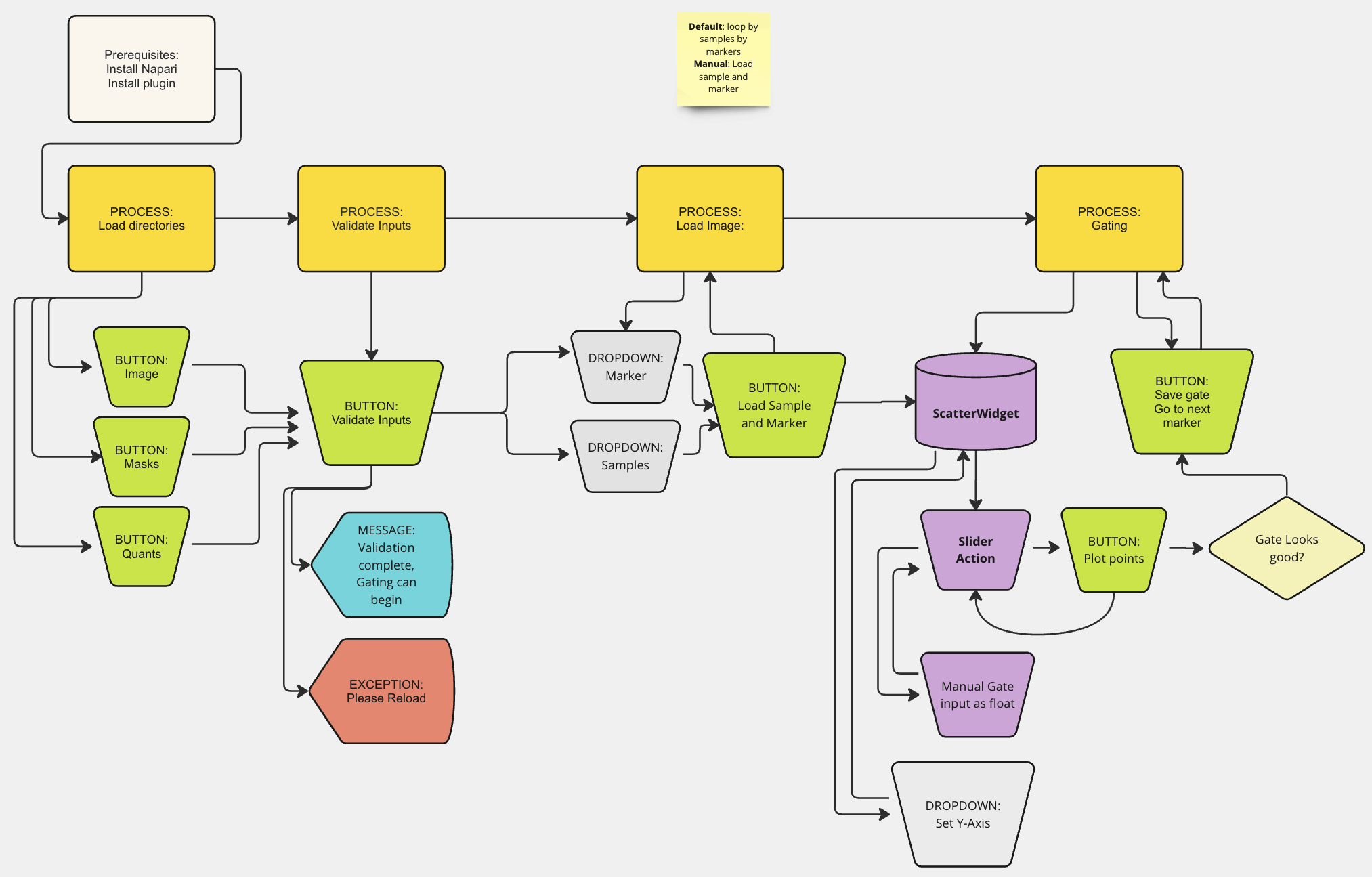
- Load your three directories with Load quantifications dir, Load image dir and Load mask dir. Optionally use Opt: Load channel map to supply an explicit channel-to-marker mapping.
- Set Select lowerbound marker column and Select upperbound marker column to the first and last quantification columns you want to gate. Pick the same bounds every session if you plan to save and reload gates.
- Optionally adjust Remove markers with prefix (default
DNA, DAPI) to drop nuclear channels from the marker list. - Click Validate input. On success the gating controls appear; on failure fix the inputs and validate again.
- Choose a sample and a marker from the dropdowns. Three layers load: the
reference channel (Select reference channel), the segmentation mask, and the
channel being gated. A plot of marker intensity (x) against Choose Y-axis
(default
Area) appears, with a slider underneath whose position is drawn as a vertical line. - Tune the view: switch Plot type to
Hexbinfor dense clusters, and Logarithmic scale toYesto plot in log10 (often easier to read). Adjust image contrast from the napari layer controls at the top left. - Drag the slider to the threshold you think is correct, or type a value into Manual gate input and click Set gate manually.
- Click Plot Points to overlay the cells the current gate calls positive.
- Repeat steps 6–8 until you are satisfied, then click Save Gate. The first save asks where to write the gates csv; later saves reuse that path. Go back to step 5 for the next marker or sample.
Contributing
Contributions are very welcome. To set up a development install:
git clone https://github.com/CosciaLab/napari-cell-gater.git
cd napari-cell-gater
pip install -e ".[dev]"
pytest
Please ensure test coverage at least stays the same before you submit a pull request.
Citation
napari-cell-gater is developed as part of the openDVP
ecosystem. Until the paper is out, please cite this repository and the openDVP
documentation at https://coscialab.github.io/openDVP/.
License
Distributed under the terms of the BSD-3 license, "napari-cell-gater" is free and open source software.
Issues
If you encounter any problems, please file an issue along with a detailed description.
1 maintainer

Metadata
1 maintainer
Release files for napari-cell-gater 0.5.2
For a detailed explanation of source distributions (sdists) and built distributions (wheels), please see the package formats documentation.
Source distribution (sdist)
| File | Size | Uploaded | |
|---|---|---|---|
| napari_cell_gater-0.5.2.tar.gz | 26.7 kB | Details |
Built distribution (wheel)
| File | Interpreter | ABI | Platform | Reset |
|---|---|---|---|---|
| napari_cell_gater-0.5.2-py3-none-any.whl | Python 3 | none | any | Details |
Total release size: 47.0 kB
Release files / napari_cell_gater-0.5.2.tar.gz
| Download URL | napari_cell_gater-0.5.2.tar.gz |
|---|---|
| Size | 26.7 kB |
| Tags | Source |
|
SHA-256 checksum How to use checksums |
f36843a0a5829a89c91a93ab453be1c859940da68643c32b939626ddff26450c
|
|
BLAKE2b-256 checksum How to use checksums |
22a6ae78cd34ba469abebf3a4086005c28d8821f665679c48c3463f35b8458ab
|
| Upload date | |
|
Uploaded using Trusted Publishing? What is trusted publishing? |
No |
| Uploaded via |
twine/7.0.0 CPython/3.13.14
|
Release files / napari_cell_gater-0.5.2-py3-none-any.whl
| Download URL | napari_cell_gater-0.5.2-py3-none-any.whl |
|---|---|
| Size | 20.3 kB |
| Tags | Python 3 |
|
SHA-256 checksum How to use checksums |
2b8d84e2e8542cf712423a4aa8c63c1cda97da91ebe08cb95f6466275ce4188e
|
|
BLAKE2b-256 checksum How to use checksums |
cbdd9d8c26a49667b29d8198af93371e26d9631987157ed604a662f3dc6082e0
|
| Upload date | |
|
Uploaded using Trusted Publishing? What is trusted publishing? |
No |
| Uploaded via |
twine/7.0.0 CPython/3.13.14
|














