
This release is a pre-release and may not be stable for production use.
napari-copick






A plugin for collaborative annotation in cryoET using copick
This napari plugin was generated with Cookiecutter using @napari's cookiecutter-napari-plugin template.
Installation
You can install napari-copick via pip:
pip install napari-copick
Copick 2 / OME-Zarr 0.5 prereleases use the alpha channel:
pip install --pre napari-copick
To install latest development version:
pip install git+https://github.com/copick/napari-copick.git@v2.0
Usage
Using a copick config file
napari-copick run --config path/to/copick_config.json
Using dataset IDs from CZ cryoET Data Portal
napari-copick run --dataset-ids 10440 10441 --overlay-root /path/to/overlay_root
You can specify multiple dataset IDs separated by spaces.
GUI Usage
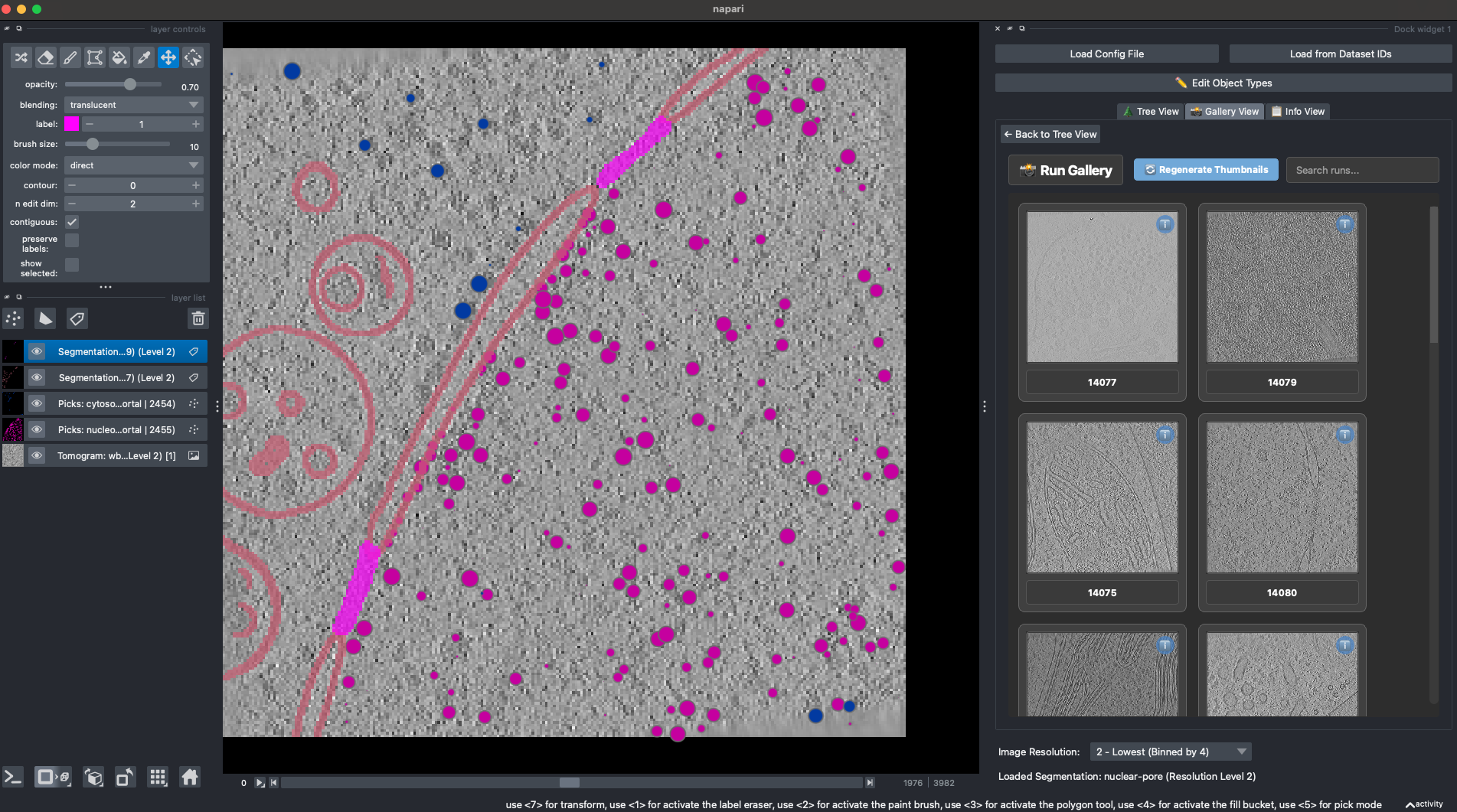
The plugin provides an intuitive interface with two loading options:
- Load Config File: Opens a file dialog to select a copick configuration JSON file
- Load from Dataset IDs: Opens a dialog to enter CZ cryoET Data Portal dataset IDs and overlay root path
After loading, you'll see a hierarchical tree of the project structure that you can navigate to access tomograms, segmentations, and picks.
Tomogram Handling
napari-copick handles multiscale OME-Zarr arrays directly:
- Selects resolution levels from OME multiscale metadata, including non-numeric dataset paths
- Reads both legacy OME-Zarr 0.4 / Zarr v2 and OME-Zarr 0.5 / Zarr v3 stores
- Loads the selected resolution level into memory before adding it to napari
- Applies the selected dataset's OME coordinate transformation as the layer scale
This direct zarr handling provides better performance and more flexibility compared to relying on external plugins.
Volume reads use the Zarr store supplied by copick and require OME multiscales metadata. Stores written by copick 1.x
(OME-Zarr 0.4 / Zarr v2) and copick 2.x (OME-Zarr 0.5 / Zarr v3) are supported. Third-party stores that expose only
a root data array without OME multiscales metadata are intentionally unsupported; napari-copick does not infer a
dataset path from array names or root-key order. Storage backend access and retry behavior remain owned by copick.
Contributing
Contributions are very welcome. Tests can be run with tox, please ensure the coverage at least stays the same before you submit a pull request.
License
Distributed under the terms of the MIT license, "napari-copick" is free and open source software
Issues
If you encounter any problems, please file an issue along with a detailed description.
Code of Conduct
This project adheres to the Contributor Covenant code of conduct. By participating, you are expected to uphold this code. Please report unacceptable behavior to opensource@chanzuckerberg.com.
Reporting Security Issues
If you believe you have found a security issue, please responsibly disclose by contacting us at security@chanzuckerberg.com.
1 maintainer

Metadata
1 maintainer
Release files for napari-copick 2.0.0a2
For a detailed explanation of source distributions (sdists) and built distributions (wheels), please see the package formats documentation.
Source distribution (sdist)
| File | Size | Uploaded | |
|---|---|---|---|
| napari_copick-2.0.0a2.tar.gz | 1.1 MB | Details |
Built distribution (wheel)
| File | Interpreter | ABI | Platform | Reset |
|---|---|---|---|---|
| napari_copick-2.0.0a2-py3-none-any.whl | Python 3 | none | any | Details |
Total release size: 1.2 MB
Release files / napari_copick-2.0.0a2.tar.gz
| Download URL | napari_copick-2.0.0a2.tar.gz |
|---|---|
| Size | 1.1 MB |
| Tags | Source |
|
SHA-256 checksum How to use checksums |
41b848f41922ca9b1e022c419d2fd8878fb543af989f9bac2e88a0e9735c8602
|
|
BLAKE2b-256 checksum How to use checksums |
b18164fb6c96179ab910ad12e26062de21c4e6ff2239e5a652fccd1026a79c18
|
| Upload date | |
|
Uploaded using Trusted Publishing? What is trusted publishing? |
Yes |
| Uploaded via |
twine/7.0.0 CPython/3.13.14
|
Provenance
Provenance describes where a file came from. On PyPI, provenance is shared via attestations, which provide a verifiable record of the build or publishing details. View details, limitations and caveats.


PyPI Publish Attestation
PyPI verified that this artifact, at this checksum, originated from the publisher listed below.
Signed by GitHub Actions, verified by PyPI on Oct 8, 2026.
Transparency logRelease files / napari_copick-2.0.0a2-py3-none-any.whl
| Download URL | napari_copick-2.0.0a2-py3-none-any.whl |
|---|---|
| Size | 84.1 kB |
| Tags | Python 3 |
|
SHA-256 checksum How to use checksums |
04d8fd5b26d61c390dfa108edcde9fdaf06bfc2b8b0846b5583cd56d3f5c389b
|
|
BLAKE2b-256 checksum How to use checksums |
360c8a09d9b61a02764b84b3d62d345095a537e0ea48595a6002d7cf761c2857
|
| Upload date | |
|
Uploaded using Trusted Publishing? What is trusted publishing? |
Yes |
| Uploaded via |
twine/7.0.0 CPython/3.13.14
|
Provenance
Provenance describes where a file came from. On PyPI, provenance is shared via attestations, which provide a verifiable record of the build or publishing details. View details, limitations and caveats.
PyPI Publish Attestation
PyPI verified that this artifact, at this checksum, originated from the publisher listed below.
Signed by GitHub Actions, verified by PyPI on Oct 8, 2026.
Transparency log













