
Crop regions in napari manually
Verified details
These details have been verified by PyPIProject links
GitHub Statistics
Maintainers


Project description
napari-crop






🚨🚨🚨 Call for maintainers 🚨🚨🚨
If you are interested in further developing it, please get in touch or create a fork.
Crop regions in napari manually
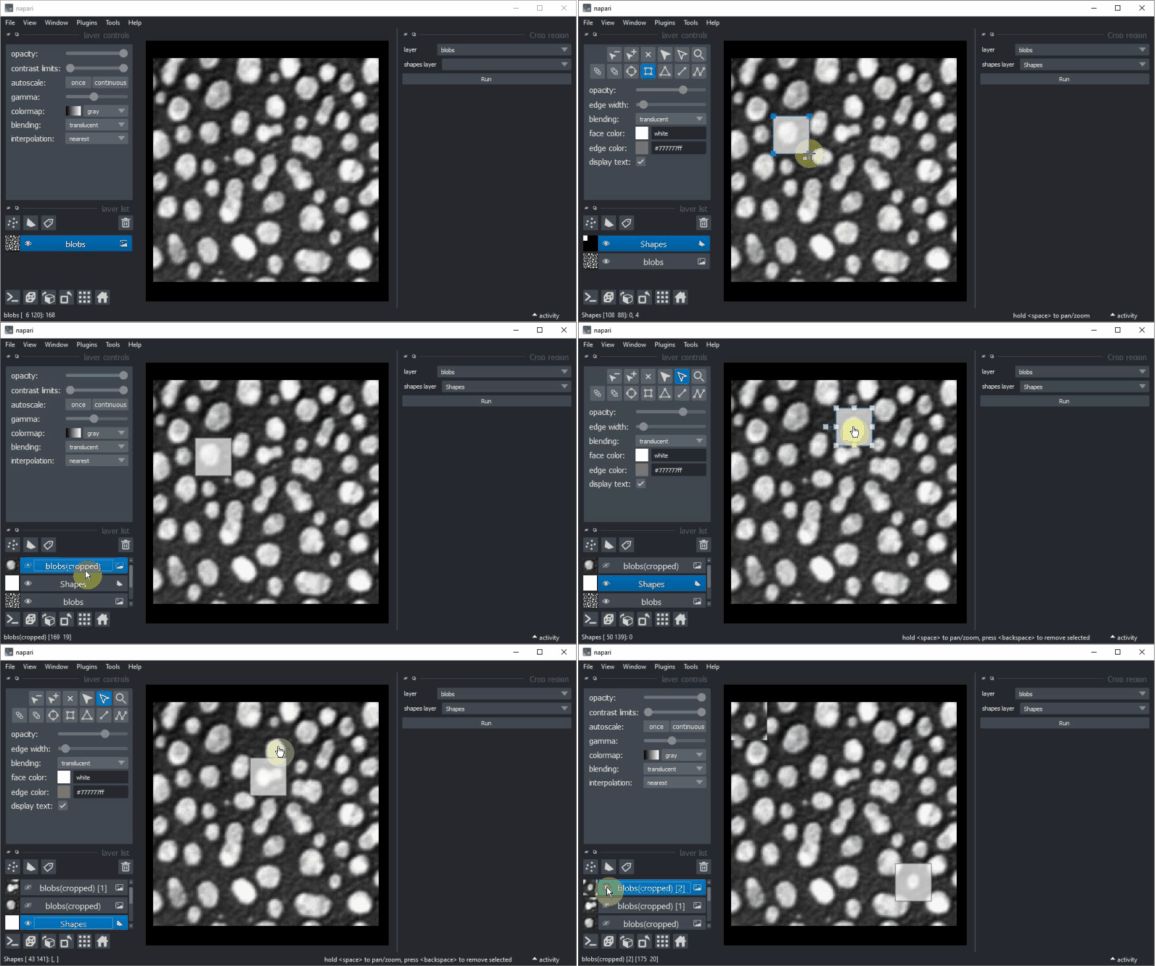
Crop in any dimension
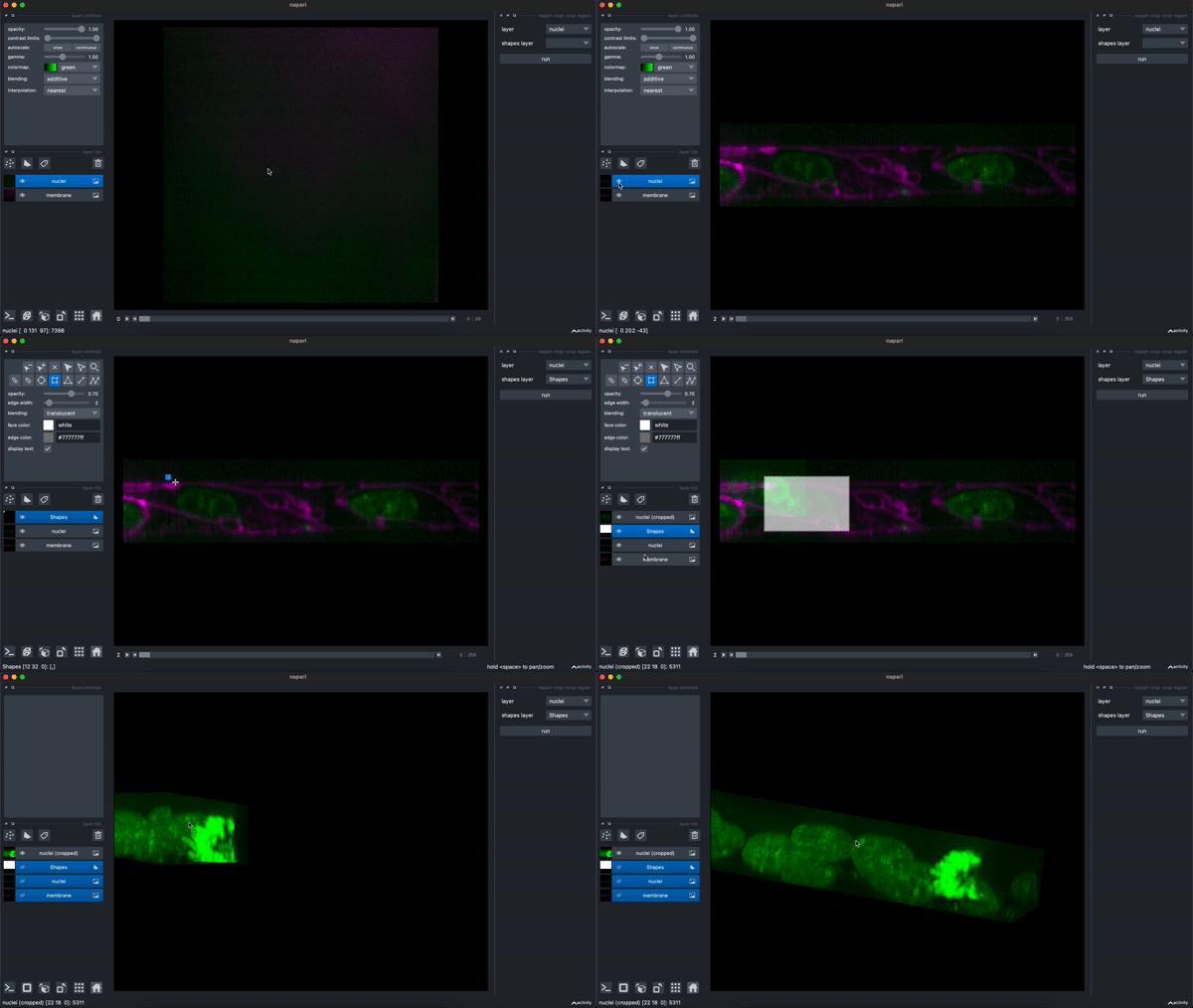
Cut a volume using a plane
Note:
- this functionality currently only works with 3D data
- to drag the plane, hold the 'SHIFT' key from your keyboard
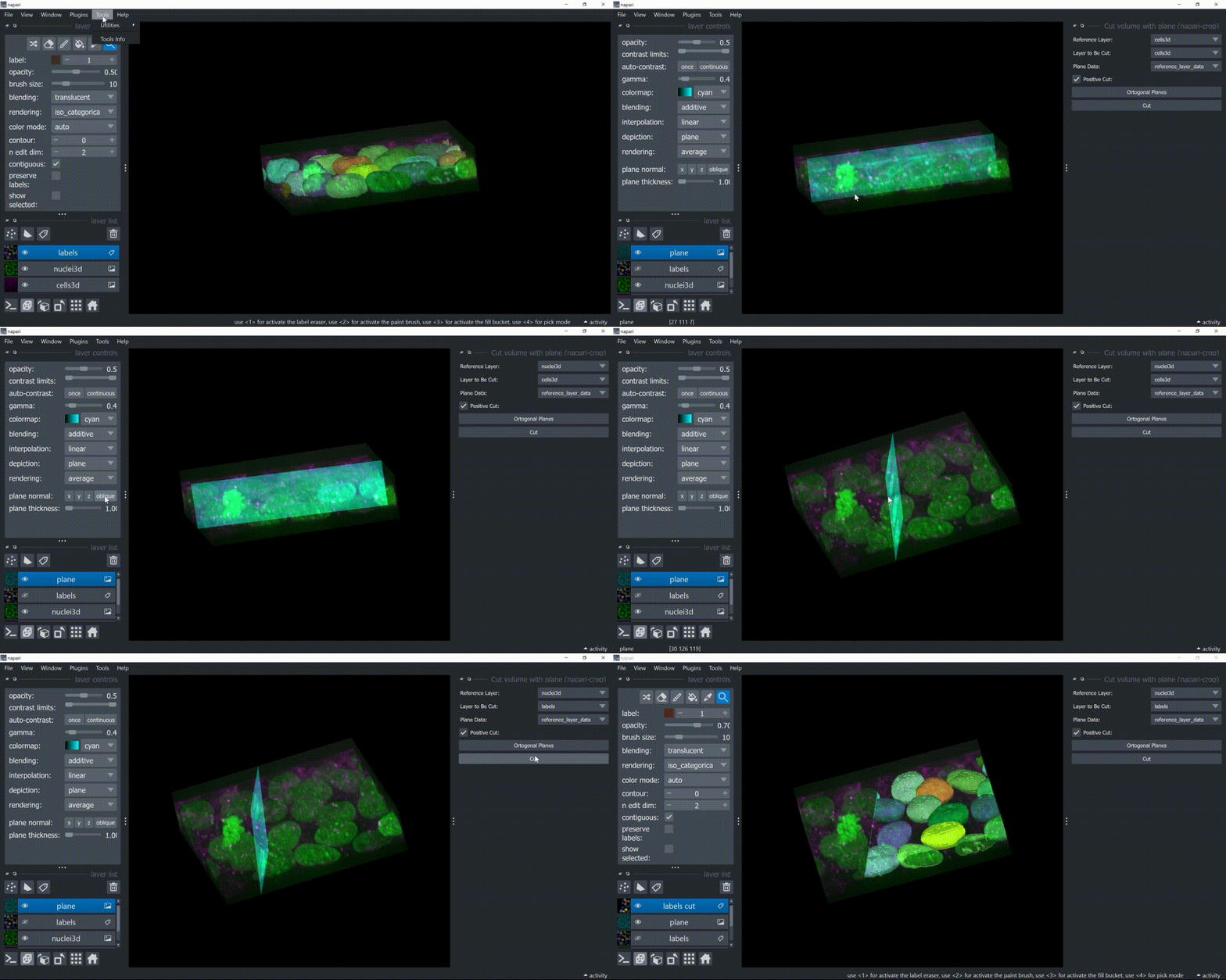
Draw shapes of fixed size at given coordinates for later cropping
Note:
- the shapes are drawn with the specified width and height, but, since the crop widget is very permissive as it tends to include all pixels the shape "touches", the cropped result tends to be 1pixel larger in both dimensions. Therefore, to have a 64x64 array after cropping, it is best to set the shape sizes here to 63x63 for example.
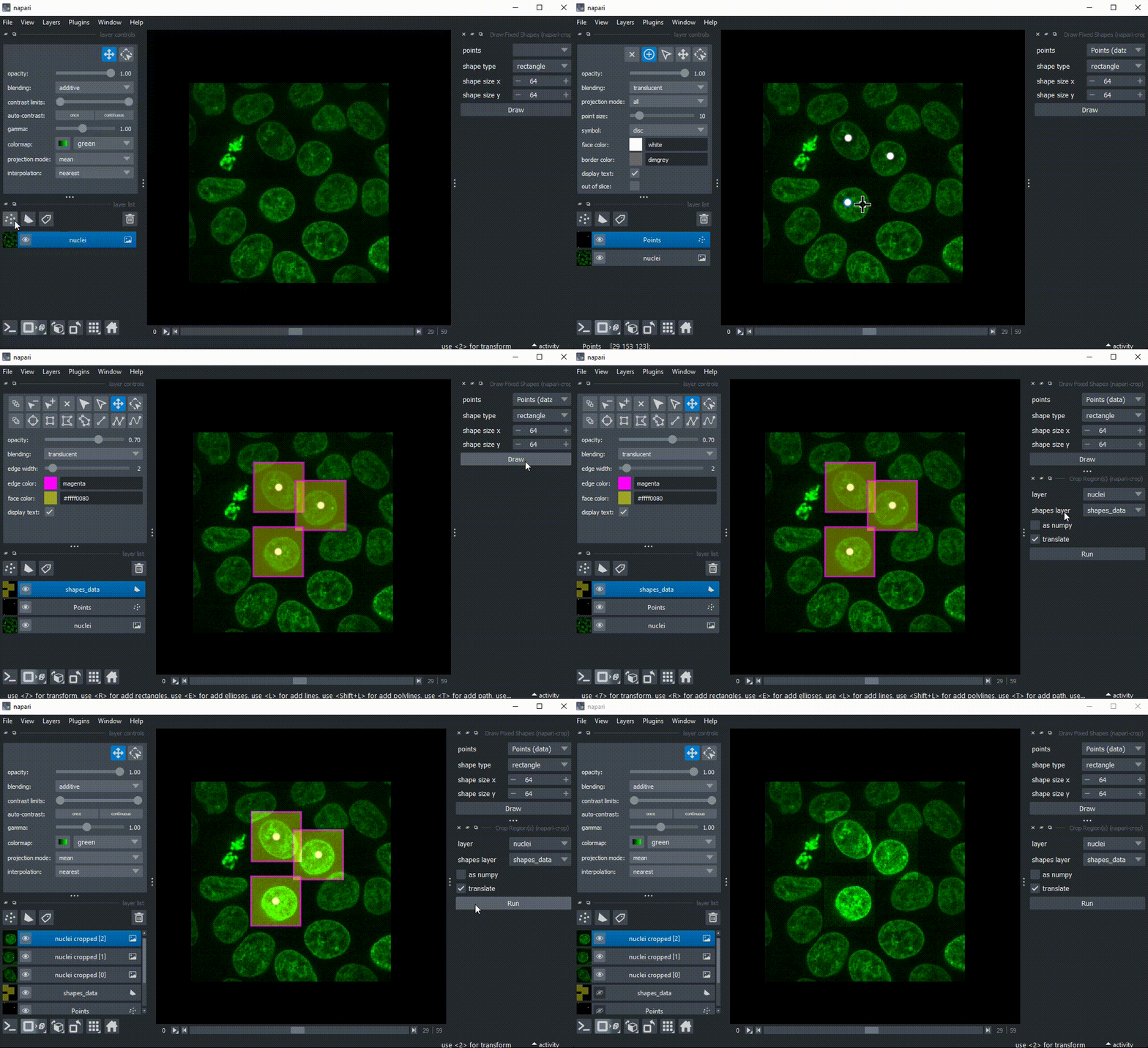
Usage
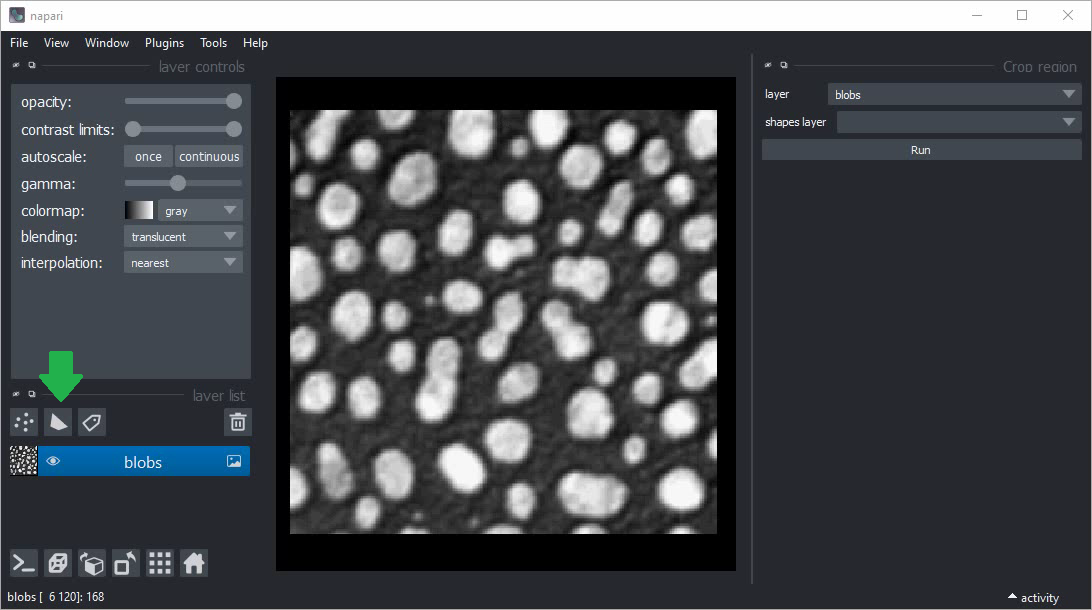
Create a new shapes layer to annotate the region you would like to crop:
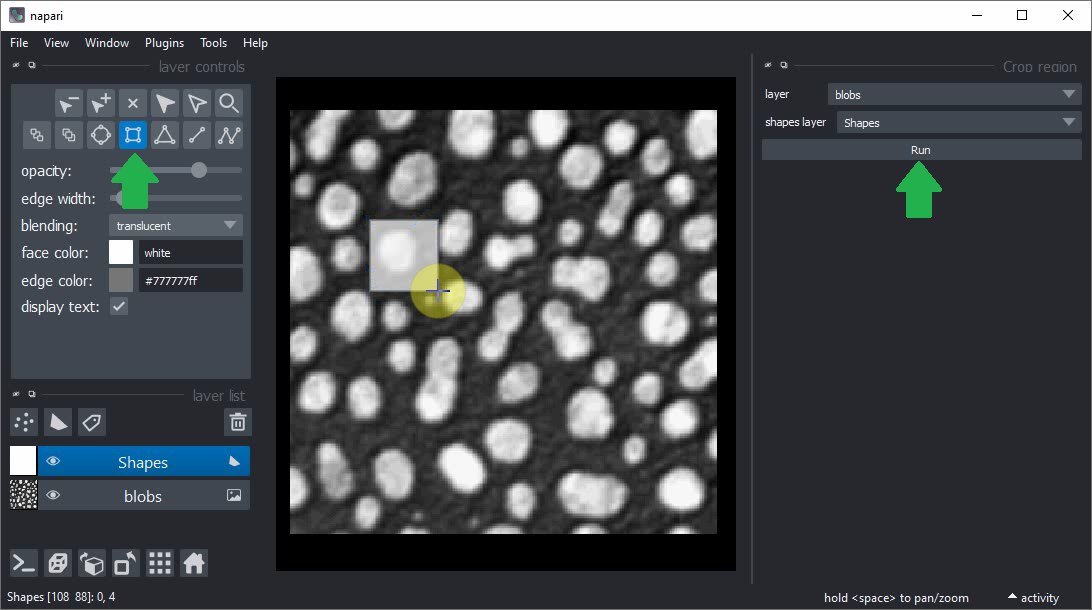
Use the rectangle tool to annotate a region. Start the crop tool from the Plugins > napari-crop > Crop region or, if available, Tools > Utilities > Crop region menu or Layer > Transform > Crop region(s).
Click the Run button to crop the region.
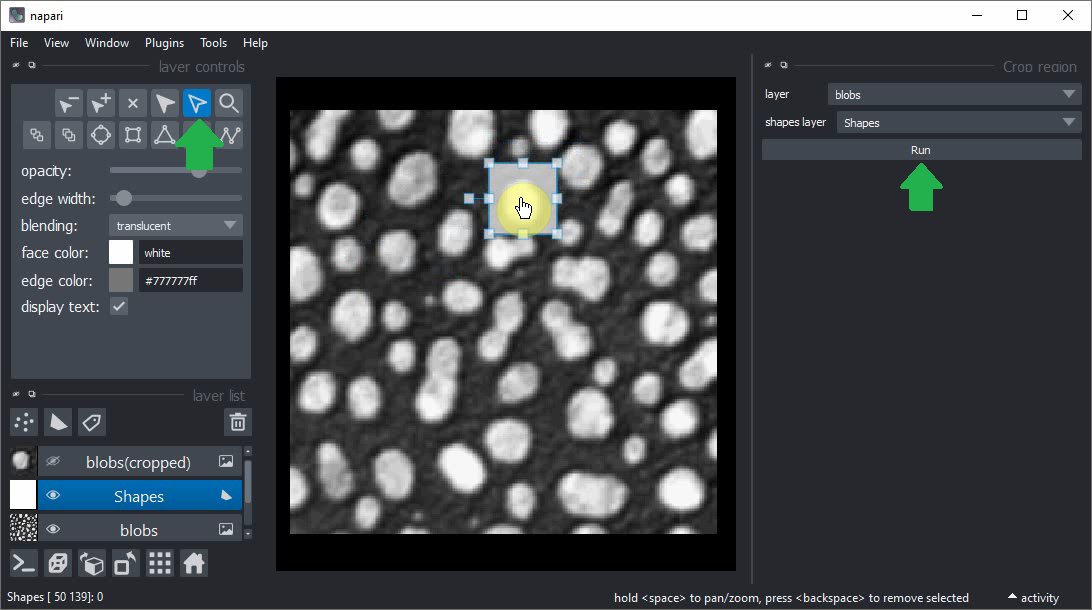
You can also use the Select shapes tool to move the rectangle to a new place and crop another region by clicking on Run.
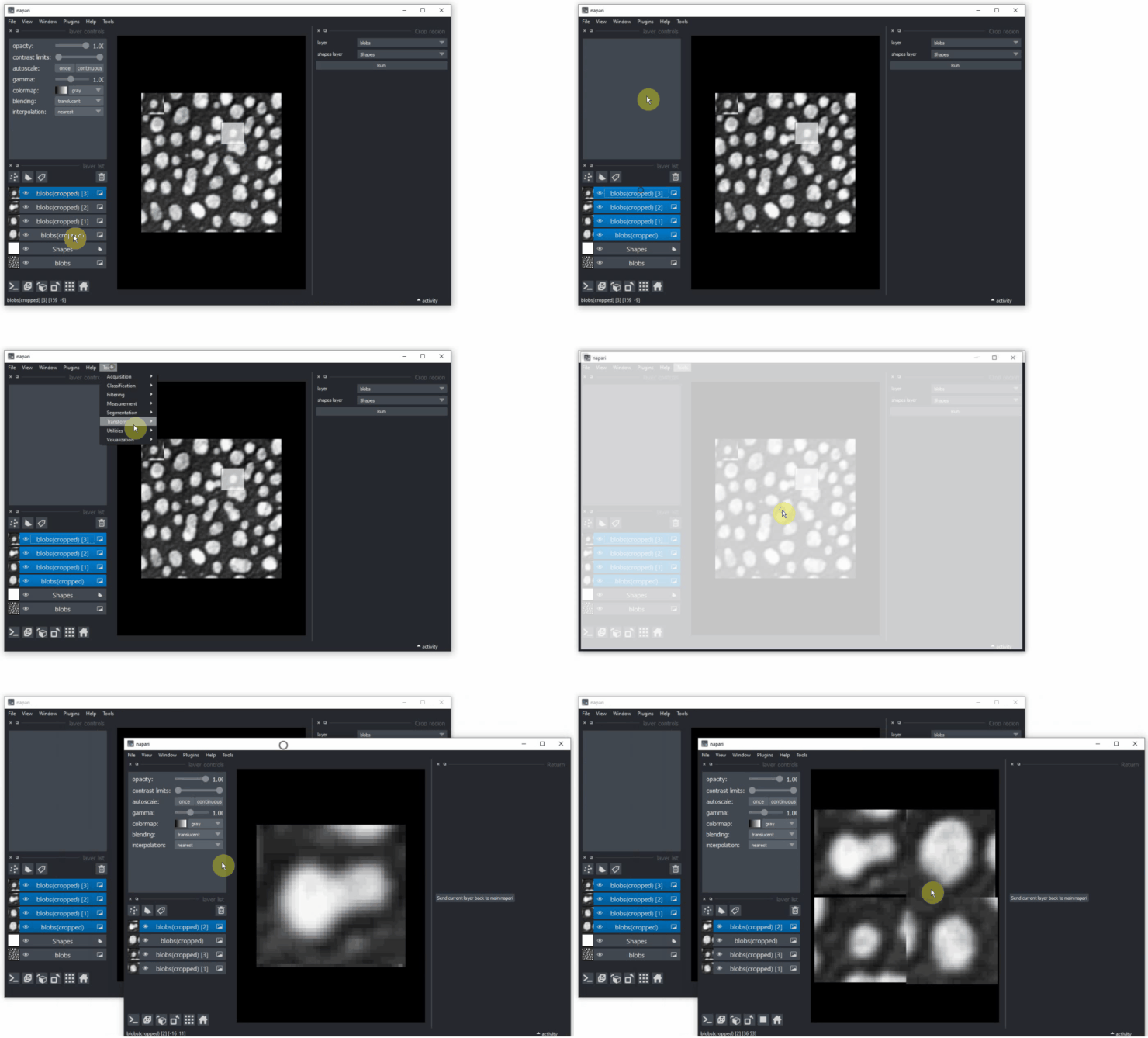
Hint: You can also use the napari-tabu plugin to send all your cropped images to a new napari window.
This napari plugin was generated with Cookiecutter using with @napari's cookiecutter-napari-plugin template.
Installation
You can install napari-crop via pip:
pip install napari-crop
Contributing
Contributions are very welcome.
License
Distributed under the terms of the BSD-3 license, "napari-crop" is free and open source software
Issues
If you encounter any problems, please create a thread on image.sc along with a detailed description and tag @haesleinhuepf.
Project details
Verified details
These details have been verified by PyPIProject links
GitHub Statistics
Maintainers
Release history Release notifications | RSS feed


Download files
Download the file for your platform. If you're not sure which to choose, learn more about installing packages.
Source Distribution
Built Distribution
Filter files by name, interpreter, ABI, and platform.
If you're not sure about the file name format, learn more about wheel file names.
Copy a direct link to the current filters
File details
Details for the file napari_crop-0.1.12.tar.gz.
File metadata
- Download URL: napari_crop-0.1.12.tar.gz
- Upload date:
- Size: 24.5 MB
- Tags: Source
- Uploaded using Trusted Publishing? Yes
- Uploaded via: twine/6.1.0 CPython/3.13.7
File hashes
| Algorithm | Hash digest | |
|---|---|---|
| SHA256 |
52a2304407b3264e3ed9ecd5a2ed344ba820472455d3fdef67b443deb6612f2e
|
|
| MD5 |
96440fba83610592a747866b6180da41
|
|
| BLAKE2b-256 |
4af397c50445a741400bb015e94f8b6df251b2cf13a31bf8b014a80e2026da3f
|
Provenance
The following attestation bundles were made for napari_crop-0.1.12.tar.gz:
Publisher:
test_and_deploy.yml on BiAPoL/napari-crop
-
Statement:
-
Statement type:
https://in-toto.io/Statement/v1 -
Predicate type:
https://docs.pypi.org/attestations/publish/v1 -
Subject name:
napari_crop-0.1.12.tar.gz -
Subject digest:
52a2304407b3264e3ed9ecd5a2ed344ba820472455d3fdef67b443deb6612f2e - Sigstore transparency entry: 844678870
- Sigstore integration time:
-
Permalink:
BiAPoL/napari-crop@70b55c794b624498f8ca0d6a8bb0b1ee37a6a38b -
Branch / Tag:
refs/tags/v0.1.12 - Owner: https://github.com/BiAPoL
-
Access:
public
-
Token Issuer:
https://token.actions.githubusercontent.com -
Runner Environment:
github-hosted -
Publication workflow:
test_and_deploy.yml@70b55c794b624498f8ca0d6a8bb0b1ee37a6a38b -
Trigger Event:
push
-
Statement type:
File details
Details for the file napari_crop-0.1.12-py3-none-any.whl.
File metadata
- Download URL: napari_crop-0.1.12-py3-none-any.whl
- Upload date:
- Size: 7.7 MB
- Tags: Python 3
- Uploaded using Trusted Publishing? Yes
- Uploaded via: twine/6.1.0 CPython/3.13.7
File hashes
| Algorithm | Hash digest | |
|---|---|---|
| SHA256 |
23574096829f448f9b10f942ed535da9a4a3329b205ec74e9d688893621d709c
|
|
| MD5 |
5d0300414cc65392f4f2a61e566dfc3c
|
|
| BLAKE2b-256 |
6c2b55de2ebf31babaef125f281e09f035cea5e3ee293b598db568f6d638fe7a
|
Provenance
The following attestation bundles were made for napari_crop-0.1.12-py3-none-any.whl:
Publisher:
test_and_deploy.yml on BiAPoL/napari-crop
-
Statement:
-
Statement type:
https://in-toto.io/Statement/v1 -
Predicate type:
https://docs.pypi.org/attestations/publish/v1 -
Subject name:
napari_crop-0.1.12-py3-none-any.whl -
Subject digest:
23574096829f448f9b10f942ed535da9a4a3329b205ec74e9d688893621d709c - Sigstore transparency entry: 844678872
- Sigstore integration time:
-
Permalink:
BiAPoL/napari-crop@70b55c794b624498f8ca0d6a8bb0b1ee37a6a38b -
Branch / Tag:
refs/tags/v0.1.12 - Owner: https://github.com/BiAPoL
-
Access:
public
-
Token Issuer:
https://token.actions.githubusercontent.com -
Runner Environment:
github-hosted -
Publication workflow:
test_and_deploy.yml@70b55c794b624498f8ca0d6a8bb0b1ee37a6a38b -
Trigger Event:
push
-
Statement type:






