
Semantic Segmentation and Image processing using Deep Learning ONNX models packaged as *.czann files

Project description
napari-czann-segment




Semantic Segmentation of multidimensional images using Deep Learning ONNX models packaged as *.czann files.
This napari plugin was generated with Cookiecutter using @napari's cookiecutter-napari-plugin template.
Installation
Before installing, please setup a conda environment. If you have never worked with conda environments, go through this tutorial first.
You can then install napari-czann-segment via pip:
pip install napari-czann-segment
This installs CPU inference support and works on Windows, Linux, and macOS (including Apple Silicon). For GPU acceleration on Windows/Linux with an NVIDIA GPU, see CPU vs. GPU Inference.
What does the plugin do
The plugin allows you to:
- Use a *.czann file containing the Deep Neural Network (ONNX) for semantic segmentation and metadata
- Segmentation will be applied per 2D plane for all dimensions
- Processing larger multidimensional images it uses the cztile package to chunk the individual 2d arrays using a specific overlap.
- multidimensional images will be processed plane-by-plane
What does the plugin NOT do
Before one can actually use a model it needs to be trained, which is NOT done by this plugin.
There are two main ways hwo such a model can be created:
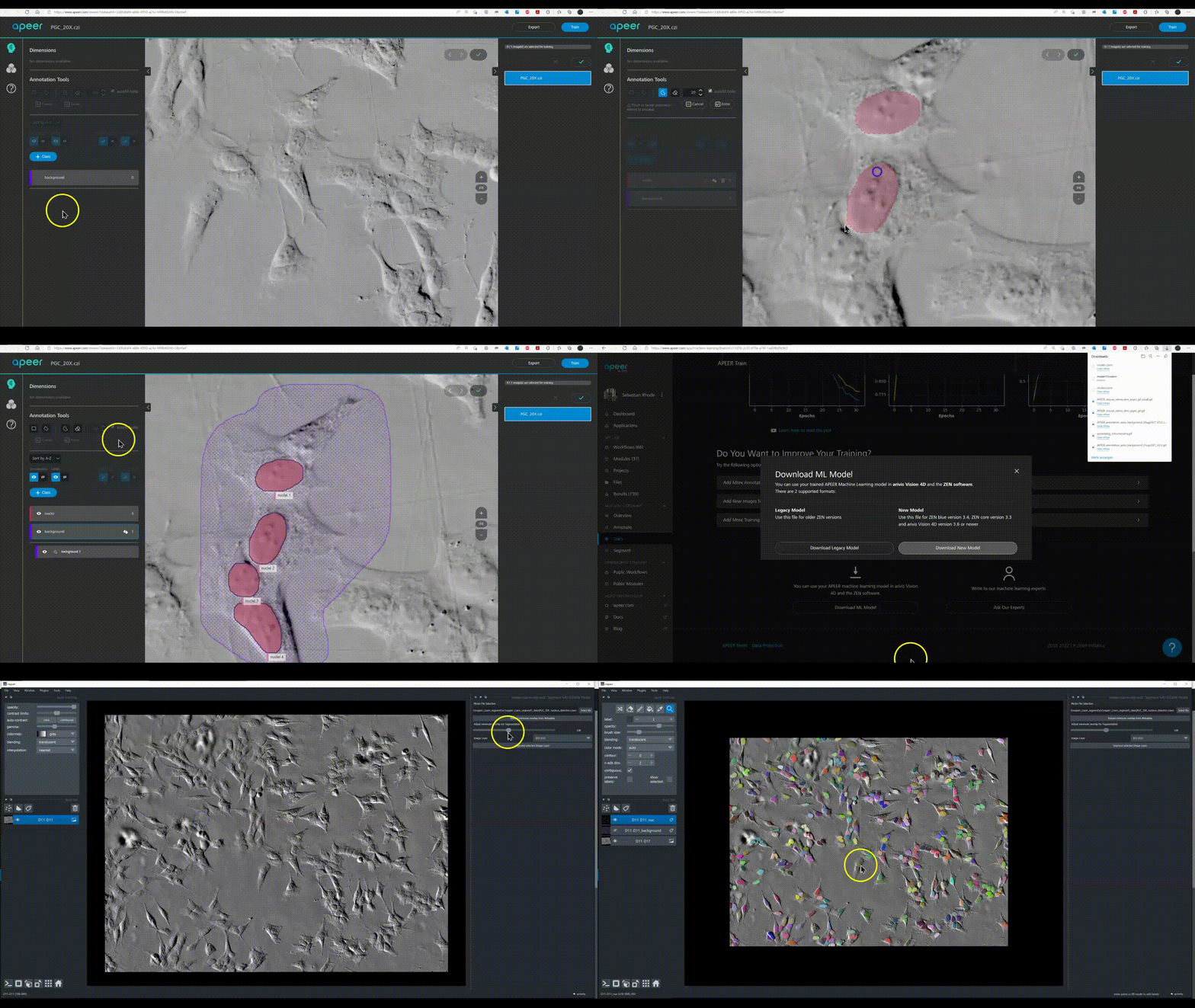
- Train the segmentation model fully automated on APEER and download the *.czann file
- Train your model in a Jupyter notebook etc. and package it using the czmodel python package as an *.czann
Using this plugin
Sample Data
A test image and a *.czann model file can be downloaded here.
PGC_20X.ome.tiff--> usePGC_20X_nucleus_detector.czannto segment
In order to use this plugin the user has to do the following things:
- Open the image using "File - Open Files(s)" (requires [napari-bioio] plugin).
- Click napari-czann-segment: Segment with CZANN model in the "Plugins" menu.
- Select a czann file to use the model for segmentation.
- metadata of the model will be shown (see example below)
| Parameter | Value | Explanation |
|---|---|---|
| model_type | ModelType.SINGLE_CLASS_SEMANTIC_SEGMENTATION | see: czmodel for details |
| input_shape | [1024, 1024, 1] | tile dimensions of model input |
| output_shape | [1024, 1024, 3] | tile dimensions of model output |
| model_id | ba32bc6d-6bc9-4774-8b47-20646c7cb838 | unique GUID for that model |
| min_overlap | [128, 128] | tile overlap used during training (for this model) |
| classes | ['background', 'grains', 'inclusions'] | available classes |
| model_name | APEER-trained model | name of the model |
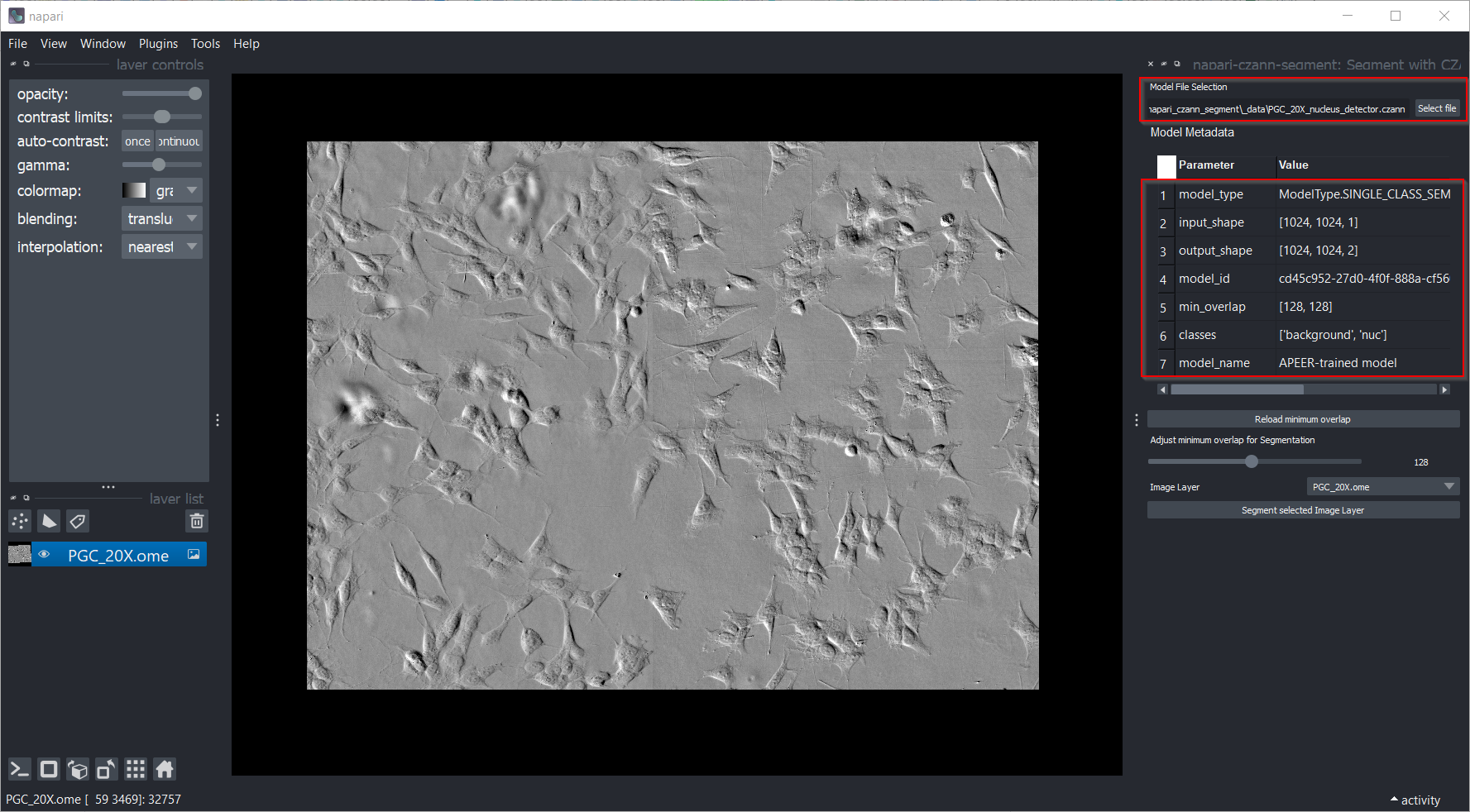
- Adjust the minimum overlap for the tiling (optional, see cztile for details).
- Select the layer to be segmented.
- Toggle Use GPU for inference checkbox to enable / disable using a GPU (Nvidia) for the segmentation (experimental feature).
- Press Segment Selected Image Layer to run the segmentation.
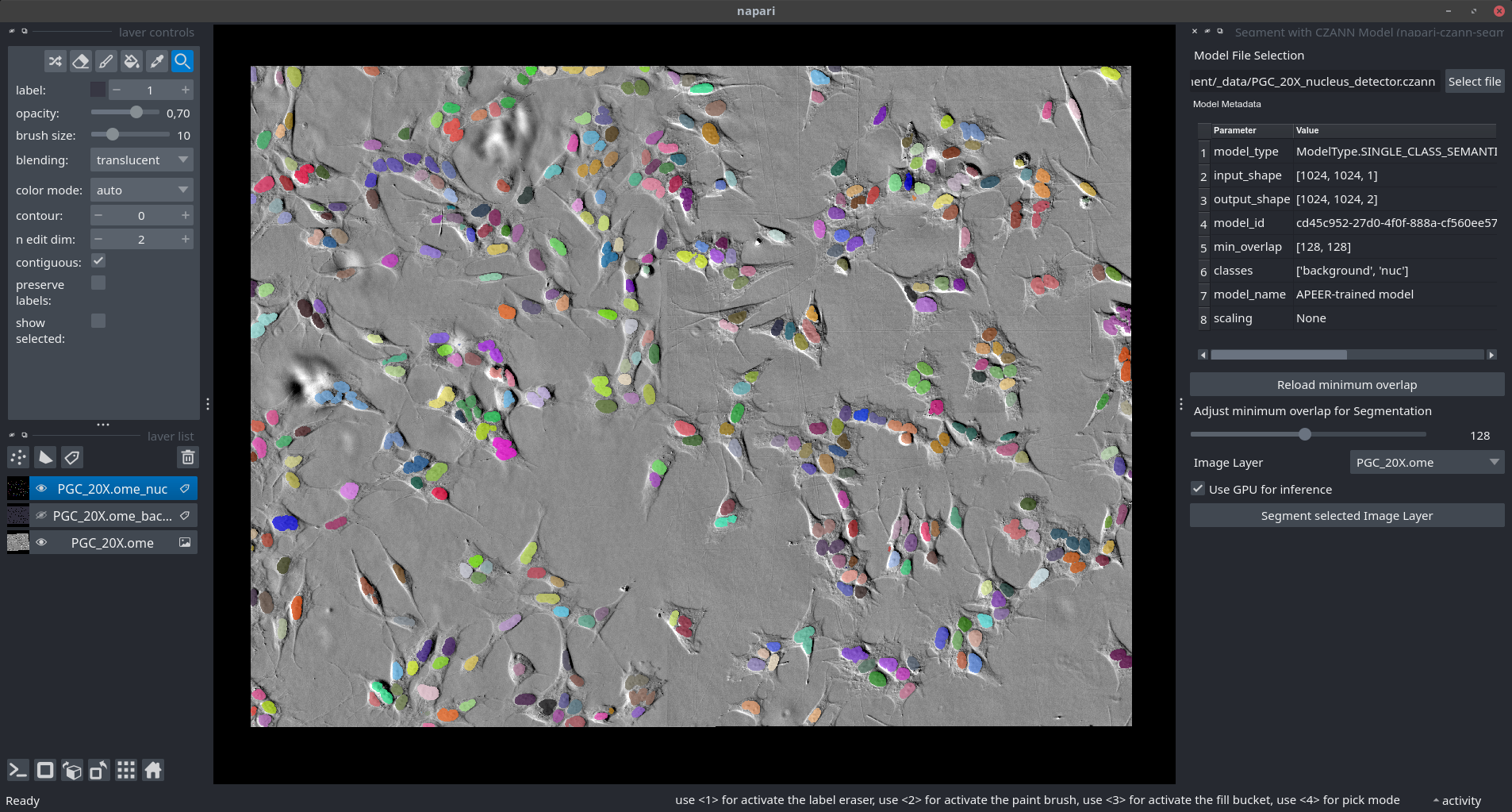
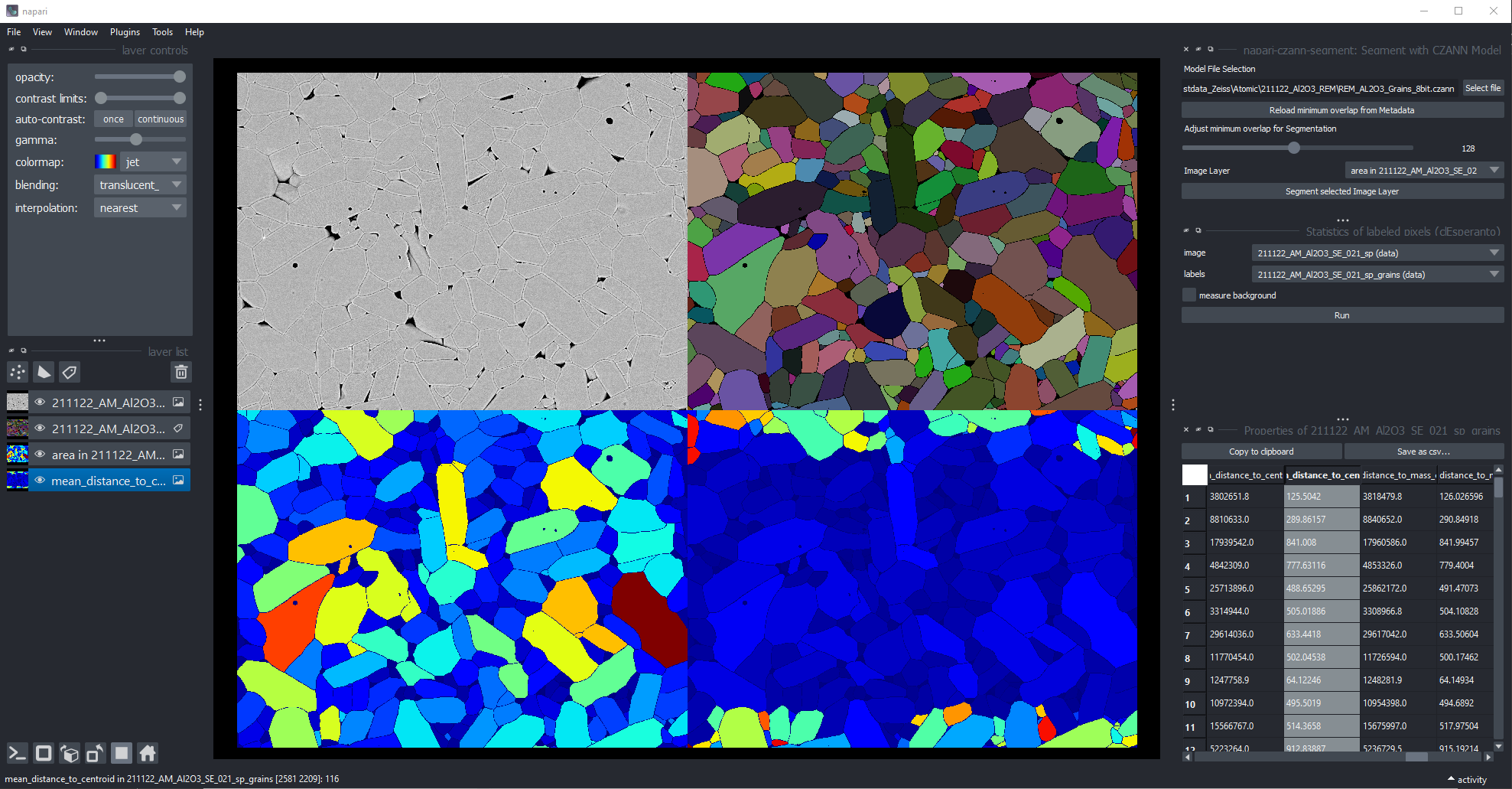
A successful is obviously only the starting point for further image analysis steps to extract the desired numbers from the segmented image. Another example is shown below demonstrating a simple "Grain Size Analysis" using a deep-learning model trained on APEER used in napari
Remarks
IMPORTANT: Currently the plugin only supports using models trained on a single channel image. Therefore, make sure that during the training on APEER or somewhere else the correct inputs images are used. It is quite simple to train a single RGB image, which actually has three channels, load this image in napari and notice only then that the model will not work, because the image will 3 channels inside napari.
CPU vs. GPU Inference
CPU (default - works everywhere)
By default, the plugin uses CPU inference via ONNX-CPU. This works on all platforms (Windows, Linux, macOS including Apple Silicon) without additional setup:
pip install napari-czann-segment
When the plugin starts, it checks GPU availability and logs the result. If no GPU is detected, the "Use GPU" checkbox is automatically disabled and all inference runs on CPU.
macOS
On macOS (both Intel and Apple Silicon), the plugin works with CPU inference only. NVIDIA CUDA is not available on macOS, so the [gpu] extra should not be installed — onnxruntime-gpu does not publish macOS wheels and installation will fail. Simply use:
pip install napari-czann-segment
The GPU checkbox will be automatically disabled on macOS.
GPU (optional - Windows/Linux with NVIDIA GPU)
GPU acceleration uses ONNX-GPU and requires an NVIDIA GPU with the correct CUDA libraries. To enable it:
-
Install the GPU extra (recommended - includes CUDA and cuDNN pip packages):
pip install napari-czann-segment[gpu]This installs
onnxruntime-gpualong with the required CUDA 12.x and cuDNN 9.x libraries as pip packages, so no separate CUDA toolkit installation is needed in most cases. -
Verify GPU support after installation:
python -c "import onnxruntime; print(onnxruntime.get_available_providers())"You should see
CUDAExecutionProviderin the list. -
(Alternative) Use a conda environment with system CUDA libraries. See the example conda environment YAML:
conda env create --file env_napari_czann_segment.yml
Note: If you have PyTorch with CUDA installed, onnxruntime-gpu (>= 1.21) can automatically reuse PyTorch's CUDA/cuDNN DLLs via its preload_dlls() mechanism. The plugin calls this automatically at startup.
Troubleshooting GPU
cublasLt64_12.dllorcufft64_11.dllnot found: CUDA runtime libraries are missing. The easiest fix ispip install onnxruntime-gpu[cuda,cudnn]which installs them as pip packages. Alternatively, install via conda:conda install nvidia::libcublas=12.4 nvidia::libcufft=11.*.onnxruntime-gpuandonnxruntimeconflict: These packages cannot coexist. If you see onlyCPUExecutionProviderdespite havingonnxruntime-gpuinstalled, runpip uninstall onnxruntime onnxruntime-gpuand thenpip install onnxruntime-gpu[cuda,cudnn].- Plugin shows "GPU support is not available": Check the napari log output for detailed diagnostics. The plugin always falls back to CPU safely.
- CUDA version mismatch:
onnxruntime-gpurequires specific CUDA versions. Check the ONNX Runtime GPU requirements.
For developers
-
Please clone this repository first using your favorite tool.
-
Ideally one creates a new conda environment or use an existing environment that already contains Napari.
Feel free to create a new environment using the example YAML file at your own risk:
cd the-github-repo-with-YAML-file
conda env create --file env_napari_czann_segment.yml
conda activate napari_czann_segment
- Install the plugin locally
Please run the following command:
pip install -e .
To install latest development version:
pip install git+https://github.com/sebi06/napari_czann_segment.git
Contributing
Contributions and Feedback are very welcome.
License
Distributed under the terms of the BSD-3 license, "napari-czann-segment" is free and open source software
Issues
If you encounter any problems, please file an issue along with a detailed description.
Release history Release notifications | RSS feed


Download files
Download the file for your platform. If you're not sure which to choose, learn more about installing packages.
Source Distribution
Built Distribution
Filter files by name, interpreter, ABI, and platform.
If you're not sure about the file name format, learn more about wheel file names.
Copy a direct link to the current filters
File details
Details for the file napari_czann_segment-0.0.22.tar.gz.
File metadata
- Download URL: napari_czann_segment-0.0.22.tar.gz
- Upload date:
- Size: 27.3 MB
- Tags: Source
- Uploaded using Trusted Publishing? No
- Uploaded via: twine/6.1.0 CPython/3.13.7
File hashes
| Algorithm | Hash digest | |
|---|---|---|
| SHA256 |
ff83f26587ee32619ea3e6b974e9f433e67718ae99d0dfc92977140df2141e53
|
|
| MD5 |
46118967c6e70ab6f8f05e06b1a19ebe
|
|
| BLAKE2b-256 |
a941a49675f25190195c8f9d400df06d2d0077911221dce5b750a26351b9676b
|
File details
Details for the file napari_czann_segment-0.0.22-py3-none-any.whl.
File metadata
- Download URL: napari_czann_segment-0.0.22-py3-none-any.whl
- Upload date:
- Size: 15.6 MB
- Tags: Python 3
- Uploaded using Trusted Publishing? No
- Uploaded via: twine/6.1.0 CPython/3.13.7
File hashes
| Algorithm | Hash digest | |
|---|---|---|
| SHA256 |
281fc5d5de3dda9830d2ead81945ce479eaa01916c2094a6ec22d8d70c1018b8
|
|
| MD5 |
a3d0038d55b08d9bd62dea141cd63bd2
|
|
| BLAKE2b-256 |
3eabd4481abceb985fd049df88ea2d76c806d953d99031a5c5527ab9734e6b48
|






