
A plugin that allows napari to connect to the Omero CCI server to visualize and download image data
Verified details
These details have been verified by PyPIProject links
GitHub Statistics
Maintainers

Project description
napari-omero-downloader-cci








A plugin that allows napari to connect to the Omero CCI server to visualize and download image data.
This napari plugin was generated with copier using the napari-plugin-template (None).
Installation
First napari installation
First install miniconda from conda forge: [https://conda-forge.org/download/]. This is mandatory!
Recommanded, create an environment for napari, bundling both napari and omero.
conda create -n napari -c conda-forge napari omero-py pyqt --yes
conda activate napari
napari
Or you can download from my github repo the install_napari_omero (bat for window, sh for Mac/Linux). This will also install the plugin!
Already python and napari installed
In this case, activate your environment and install Omero:
conda install -c conda-forge omero-py --yes
Plugin installation
You can install the plugin through the napari plugin manager: Plugins -> Install/Uninstall Plugins.. -> search for 'omero'.
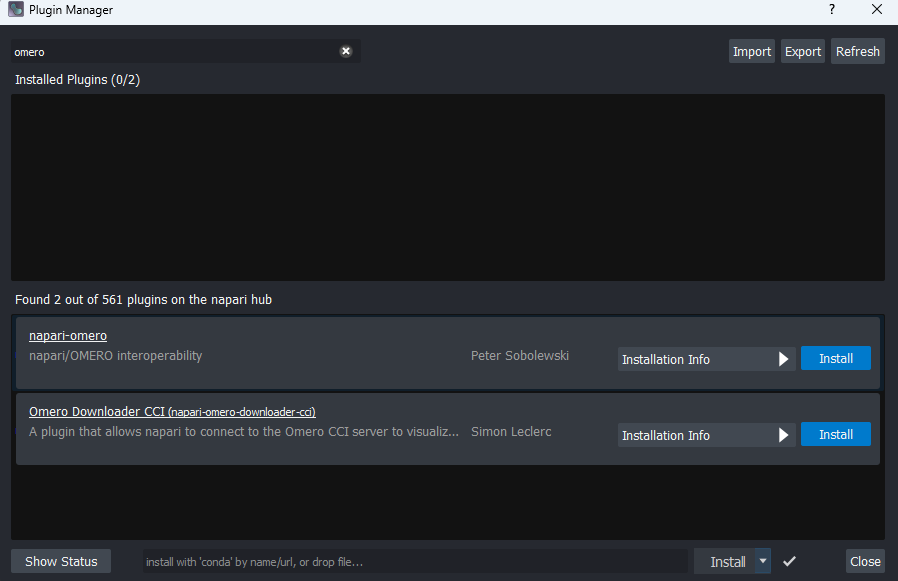
The plugin is named Omero Downloader CCI.
Or you can install napari-omero-downloader-cci via pip:
pip install napari-omero-downloader-cci
To install latest development version :
pip install git+https://github.com/CCI-GU-Sweden/napari-omero-downloader-cci.git
— or, during development —
pip install -e .
Running the plugin after Installation
The easy step: download from my github repo the start_napari (bat for window, sh for Mac/Linux) and run it. It should open python, activate the env then run napari (can take 10-30 seconds the first time!)
Otherwise, open the conda-forge CLI, then:
conda activate napari
napari
The plug will be in the plugin tab.
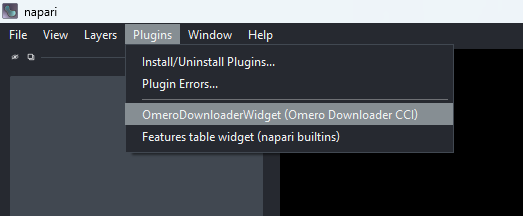
Plugin
The plugin requires that you have access to Omero with the following features:
- CLI enable
- OAuth enable (2FA token)
Why this plugin?
Another solution outside of this plugin is available: omero.insight (openmicroscopy website), as well as a FiJi plugin.
However, they do not fullfill the prerequiste at the CCI: A simple tool to quickly visualize and download data while being secure with 2FA.
Login
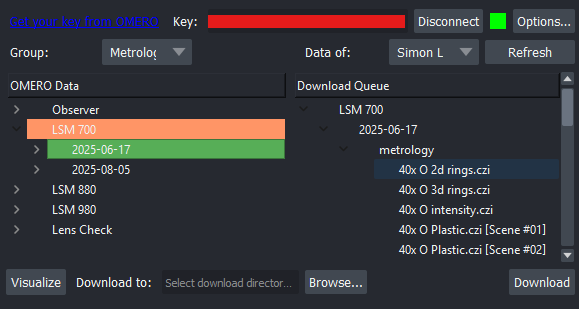
In 'Options...', indicate the omero server address and port. The default is the one for the CCI at the University of Gothenburg.
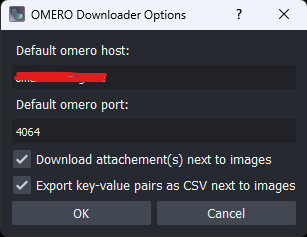
Click on the link, login on Omero and grab a key. This key is valid only for a certain amount of time and for this session. Generating a new key, or closing your session (via the 'Disconnect') will invalidate the key.
Enter the key in the field and click on 'Connect'.
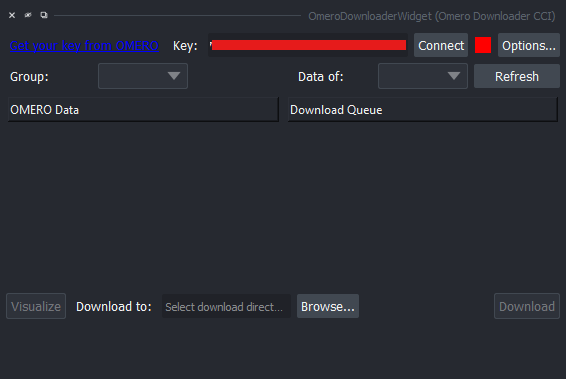
The square next to the connect button is indicating the connection status:
- Red: not connected
- Yellow: busy
- Green: ready
Groups and users
If you are part of multiple group, you can change group with the drop down menu. If your Omero administrator allows it, you can also see the data of other people in the same group. If data are being imported on the Omero server, you may need to refresh the visualization to be able to see them.
Queuing data for download
The data will be organized as a hierachical tree. Project -> Database -> Image.
Clicking on the arrow allow you to reveal the contained data.
Double click to add the element in the 'Download Queue'. Double clicking on a project will queue the whole project. Same for a dataset. However, double clicking on one image will download only this image.
There is a color on the 'OMERO Data' as well:
- Green: will download all the child of the element
- Yellow: will partially download the child of the element
You can remove an element by double clicking on it in the 'Download queue'.
Data Visualization
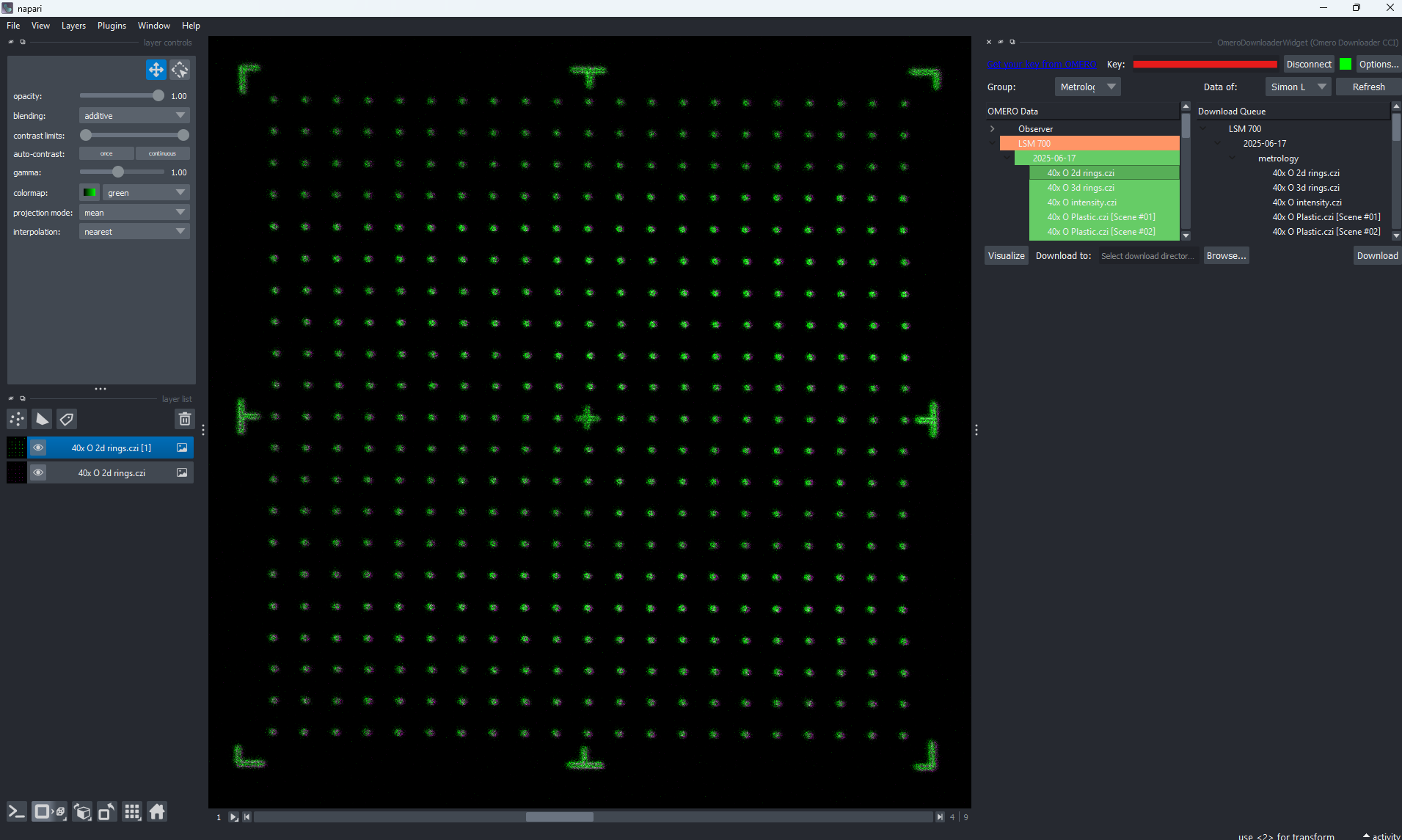
It is possible to visualize the selected data (in the 'OMERO Data' tree) by clicking on the 'Visualize' button. This will download and display only one plane (first time point, middle of stack in case of multi-dimensional image). It is possible to scroll the data, but keep in mind that this is streamed from the Omero server. Do not expect high performance specially if the image is large!
Data Downloading
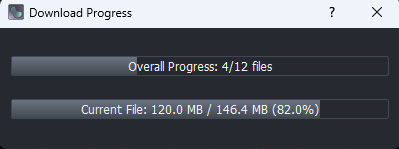
To download the data that are queued, select a directory to save them (with the 'Browse...' button) then it the 'Download' button.
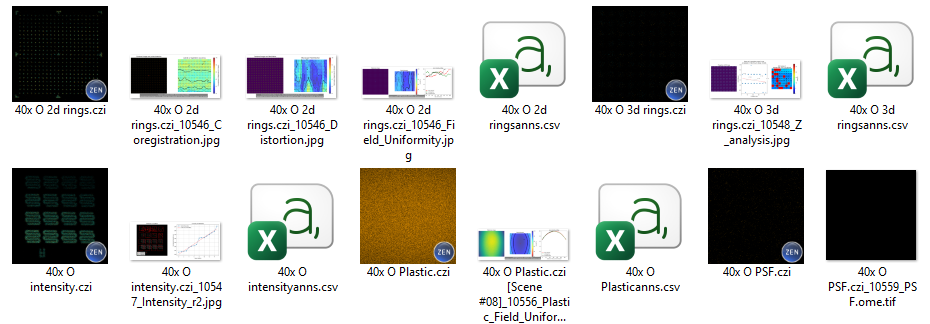
The data will be organized in a similar way that they are on the Omero server. If you have a key-value pair called 'Folder' associated to an image, the image will be nested on level deeper, in this folder.
In option, if download attachement and key-value pair is enable, these files will also be downloaded alongside the image.
Data deletion
This napari plugin is NOT allowed to delete data on the Omero server. If you need to delete data, you should do it via Omero.web.
Warning about standalone napari
A standalone version of napari is available, and the plugin will be available on the napari hub. However, installation through the standalone app is not recommanded, since it relies on pip which does not distribute system ready dependancy for Ice.
You are welcome to write a protocol/procedure on how to install omero and ice with pip.
Contributing
Contributions are very welcome. Tests can be run with tox, please ensure the coverage at least stays the same before you submit a pull request.
License
Distributed under the terms of the MIT license, "napari-omero-downloader-cci" is free and open source software
Issues
If you encounter any problems, please file an issue along with a detailed description.
Project details
Verified details
These details have been verified by PyPIProject links
GitHub Statistics
Maintainers


Download files
Download the file for your platform. If you're not sure which to choose, learn more about installing packages.
Source Distribution
Built Distribution
Filter files by name, interpreter, ABI, and platform.
If you're not sure about the file name format, learn more about wheel file names.
Copy a direct link to the current filters
File details
Details for the file napari_omero_downloader_cci-0.3.2.tar.gz.
File metadata
- Download URL: napari_omero_downloader_cci-0.3.2.tar.gz
- Upload date:
- Size: 755.3 kB
- Tags: Source
- Uploaded using Trusted Publishing? Yes
- Uploaded via: twine/6.1.0 CPython/3.13.7
File hashes
| Algorithm | Hash digest | |
|---|---|---|
| SHA256 |
2d93acc85d076a2c24754ff3eea46e9cb83d553868cee51f39906d520d2ca845
|
|
| MD5 |
6baffcf45c2e46a921fb88dbb03225e0
|
|
| BLAKE2b-256 |
9b7db97eab58fbabe5a002804e71a200601e3ea732331e5af8fb8720148a4e03
|
Provenance
The following attestation bundles were made for napari_omero_downloader_cci-0.3.2.tar.gz:
Publisher:
test_and_deploy.yml on CCI-GU-Sweden/napari-omero-downloader-cci
-
Statement:
-
Statement type:
https://in-toto.io/Statement/v1 -
Predicate type:
https://docs.pypi.org/attestations/publish/v1 -
Subject name:
napari_omero_downloader_cci-0.3.2.tar.gz -
Subject digest:
2d93acc85d076a2c24754ff3eea46e9cb83d553868cee51f39906d520d2ca845 - Sigstore transparency entry: 701224486
- Sigstore integration time:
-
Permalink:
CCI-GU-Sweden/napari-omero-downloader-cci@5d9f47e55e3f35e3f17d9585d3564c63881210e3 -
Branch / Tag:
refs/tags/v0.3.2 - Owner: https://github.com/CCI-GU-Sweden
-
Access:
public
-
Token Issuer:
https://token.actions.githubusercontent.com -
Runner Environment:
github-hosted -
Publication workflow:
test_and_deploy.yml@5d9f47e55e3f35e3f17d9585d3564c63881210e3 -
Trigger Event:
push
-
Statement type:
File details
Details for the file napari_omero_downloader_cci-0.3.2-py3-none-any.whl.
File metadata
- Download URL: napari_omero_downloader_cci-0.3.2-py3-none-any.whl
- Upload date:
- Size: 26.5 kB
- Tags: Python 3
- Uploaded using Trusted Publishing? Yes
- Uploaded via: twine/6.1.0 CPython/3.13.7
File hashes
| Algorithm | Hash digest | |
|---|---|---|
| SHA256 |
dc2262fedb2597b53538e716cf64b51b82d813d68165f00191f553d48e2f05e4
|
|
| MD5 |
21c0542f371c71595187fd876fb1f295
|
|
| BLAKE2b-256 |
9b4c4e135a459a70657168aec94a649e607a10f058485ce03f86866e1bec80b9
|
Provenance
The following attestation bundles were made for napari_omero_downloader_cci-0.3.2-py3-none-any.whl:
Publisher:
test_and_deploy.yml on CCI-GU-Sweden/napari-omero-downloader-cci
-
Statement:
-
Statement type:
https://in-toto.io/Statement/v1 -
Predicate type:
https://docs.pypi.org/attestations/publish/v1 -
Subject name:
napari_omero_downloader_cci-0.3.2-py3-none-any.whl -
Subject digest:
dc2262fedb2597b53538e716cf64b51b82d813d68165f00191f553d48e2f05e4 - Sigstore transparency entry: 701224488
- Sigstore integration time:
-
Permalink:
CCI-GU-Sweden/napari-omero-downloader-cci@5d9f47e55e3f35e3f17d9585d3564c63881210e3 -
Branch / Tag:
refs/tags/v0.3.2 - Owner: https://github.com/CCI-GU-Sweden
-
Access:
public
-
Token Issuer:
https://token.actions.githubusercontent.com -
Runner Environment:
github-hosted -
Publication workflow:
test_and_deploy.yml@5d9f47e55e3f35e3f17d9585d3564c63881210e3 -
Trigger Event:
push
-
Statement type:






