
napari-orthogonal-views








A napari plugin for dynamically displaying orthogonal views and syncing events between the different viewers.
This napari plugin was generated with copier using the napari-plugin-template.
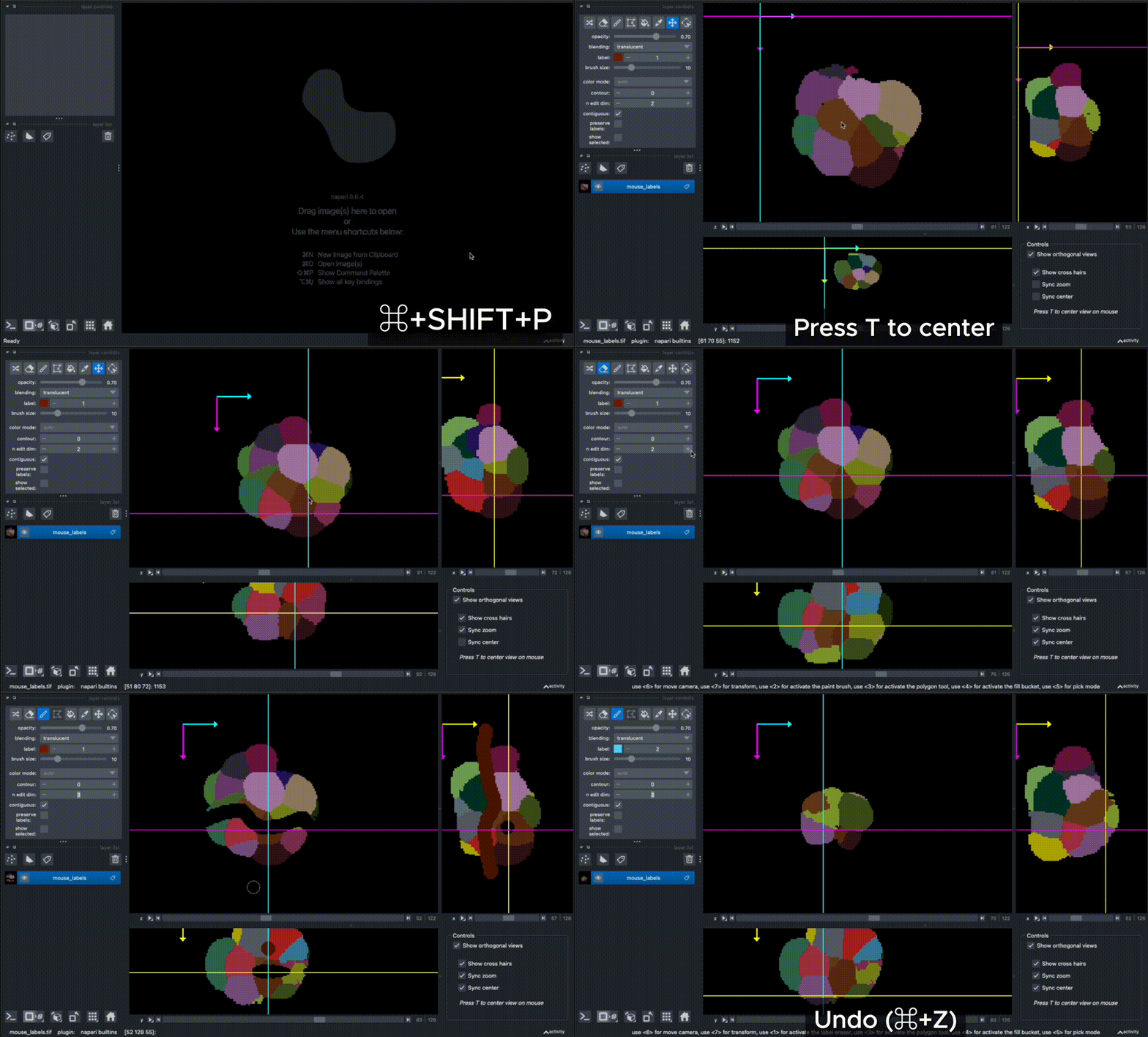
This plugin is based on this example, with extra display and synchronization functionalities. The crosshair overlay is based on this and this example.
Installation
You can install the latest development version of napari-orthogonal-views via pip:
pip install git+https://github.com/AnniekStok/napari-orthogonal-views.git
Usage
This plugin is not discoverable as a widget, but commands are available in Views>Commands Palette (CMD+SHIFT+P):
- Show Orthogonal Views
- Hide Orthogonal Views
- Toggle Orthogonal Views
- Remove Orthogonal Views
Once shown, it can also be popped up or collapsed using the checkbox in the bottom right corner 'Show orthogonal views'. Alternatively, you can show the orthogonal views via the console:
from napari_orthogonal_views.ortho_view_manager import show_orthogonal_views
show_orthogonal_views(viewer)
And access the OrthoViewManager via _get_manager:
from napari_orthogonal_views.ortho_view_manager import _get_manager
m = _get_manager(viewer)
m.is_shown()
Out[6]: True
The size of the orthogonal view windows can be adjusted by clicking and dragging the small dot in between the views, optionally one or two views can be hidden entirely. The checkboxes in the bottom right corner can be used to show the crosshair overlay or for more control over camera zoom and axis center syncing.
Pressing T on the keyboard will center all views to the current mouse location.
By default, all events (including label editing such as painting) are synced across all views. The different views share the same underlying data array and undo/redo history.
Syncing properties
By default, all layer properties should be synced between the layer on the main viewer and the orthoviews. However, it is possible to have more finegrained control over the synced properties via the set_sync_filters function, as long as it is specified before the orthogonal views are activated.
For example, to disable syncing of all properties on Tracks layers and specifically the contour property on Labels layers:
from napari_orthogonal_views.ortho_view_manager import _get_manager
from napari.layers import Tracks, Labels
m = _get_manager(viewer)
sync_filters = {
    Tracks: {
        "forward_exclude": "*",  # disable all forward sync
        "reverse_exclude": "*",  # disable all reverse sync
    },
    Labels: {
        "forward_exclude": "contour" # exclude contour from forward syncing
    },
}
m.set_sync_filters(sync_filters)
Then add 3D data (e.g. File > Open Sample > napari builtins > Balls (3D)). Activate the labels layer and change the contour value. You should see that the contour property is not synced from main viewer to orthoviews now.
Layer hooks
Some syncing cannot be expressed as a property copy: painting on a Labels layer, undo/redo, and the point selection each need their own wiring, because they do not emit an event that the property syncing can pick up. These are implemented as layer hooks in layer_sync_hooks.py, and are installed automatically.
A hook is called once per layer, per orthogonal view:
def my_hook(orig_layer, copied_layer):
    # do something to the layers, e.g. connect a signal to a handler
    orig_layer.events.some_signal.connect(my_handler)
    # return a cleanup callable that disconnects the signal again
    return [lambda: orig_layer.events.some_signal.disconnect(my_handler)]
Layers can be removed while the orthogonal views stay open, so a hook has to report what it did. It returns an iterable mixing (signal, handler) pairs it connected and zero-argument callables that undo anything else; returning None means it left nothing behind.
Adding behavior
register_layer_hook attaches an extra hook to a layer type. This can be useful if you want the main viewer to respond in a certain way to events of specific layer (sub)classes occuring on the ortho views. For example:
from napari_orthogonal_views.ortho_view_manager import _get_manager
from napari.layers import Labels

m = _get_manager(viewer)

def report_clicks(orig_layer, copied_layer):
    def click(layer, event):
        orig_layer.selected_label = layer.get_value(
            event.position,
            view_direction=event.view_direction,
            dims_displayed=event.dims_displayed,
            world=True,
        )

    copied_layer.mouse_drag_callbacks.append(click)
    return [lambda: copied_layer.mouse_drag_callbacks.remove(click)]

m.register_layer_hook(Labels, report_clicks)
allows the original layer in the main viewer to respond to click events in the ortho views. The property 'selected_label' will then automatically sync to the ortho views as well.
Overriding the built-in behavior
The built-in hooks are keyed by name (labels_undo_redo, labels_paint, points_selection) so a single one can be replaced without disturbing the others. Use this to keep the default behavior and add to it:
from napari_orthogonal_views.layer_sync_hooks import sync_labels_paint

def paint_and_recount(orig_layer, copied_layer):
    cleanup = sync_labels_paint(orig_layer, copied_layer)

    def on_paint(_event):
        my_app.recount_labels(orig_layer)

    copied_layer.events.paint.connect(on_paint)
    return [*cleanup, (copied_layer.events.paint, on_paint)]

m.set_layer_hook("labels_paint", paint_and_recount)
Passing None disables a built-in entirely. set_layer_hook and register_layer_hook may be called after the orthogonal views are shown; the change then applies to layers added from that point on.
Changing the ortho view layer counterparts
By default, the plugin will create shallow copies of each layer when activating the orthogonal views. These copies are of the same layer type but share the underlying data arrays with the original, to avoid duplication of the data. OrthoViewManager.set_copy_layer allows to change the copy layer function to a custom function: for example, instead of creating a copy of the same layer type, you can specify that the ortho views should make a copy of a specific layer subclass that has slightly different behavior, or that certain layer types should not be copied but produce an empty dummy layer in the ortho views instead.
Screen recording
The 'Screen recording' tab offers a quick way to save a stitched image of the viewer with its orthogonal views. It is also possible to slide along a given axis and record a movie that is saved as a .avi file.
Known issues and ongoing work
- Deprecation warnings on
Window._qt_window,LayerList._get_step_size,LayerList._get_extent_world(suppressed for now). - After removing the OrthoViewManager with
delete_and_cleanup(Remove Orthogonal Views command), the canvas may become temporarily unresponsive. Clicking outside of Napari and then back on the Napari window usually fixes this.
Contributing
Contributions are very welcome. Tests can be run with tox, please ensure the coverage at least stays the same before you submit a pull request.
License
Distributed under the terms of the BSD-3 license, "napari-orthogonal-views" is free and open source software
Issues
If you encounter any problems, please file an issue along with a detailed description.
1 maintainer

Download files
Download the file for your platform. If you're not sure which to choose, learn more about installing packages.
Source Distribution
Built Distribution
Filter files by name, interpreter, ABI, and platform.
If you're not sure about the file name format, learn more about wheel file names.
Copy a direct link to the current filters
File details
Details for the file napari_orthogonal_views-0.4.2.tar.gz.
File metadata
- Download URL: napari_orthogonal_views-0.4.2.tar.gz
- Upload date:
- Size: 59.6 kB
- Tags: Source
- Uploaded using Trusted Publishing? No
- Uploaded via:
twine/7.0.0 CPython/3.14.7
File hashes
| Algorithm | Hash digest | |
|---|---|---|
| SHA256 |
37fc5afab6cb47216df47e6ca7e4ca08038f86aac96a4b29197a4d28956e3a87
|
|
| MD5 |
297e589089dc2d2641b326757a021fbb
|
|
| BLAKE2b-256 |
55ad94bd58dc919c799e9c354ab7d221e72e2a48419006b2eca6afe80c9f2830
|
File details
Details for the file napari_orthogonal_views-0.4.2-py3-none-any.whl.
File metadata
- Download URL: napari_orthogonal_views-0.4.2-py3-none-any.whl
- Upload date:
- Size: 55.0 kB
- Tags: Python 3
- Uploaded using Trusted Publishing? No
- Uploaded via:
twine/7.0.0 CPython/3.14.7
File hashes
| Algorithm | Hash digest | |
|---|---|---|
| SHA256 |
36326e070f765cc8d6217ba0ef5ef079cc241a9d59bf8d840ab9afe20a01b021
|
|
| MD5 |
b6226f3c10a2f3ce73498358b1011c4a
|
|
| BLAKE2b-256 |
40cad466f87c285758d49de8fb3529cf808776efef43c8c7472800ca64858a07
|














