
A simple plugin to use phasor analysis
Verified details
These details have been verified by PyPIProject links
GitHub Statistics
Maintainers


Project description
napari-phasors







A comprehensive plugin for phasor analysis in napari. Based on the phasorpy library.
Usage
napari-phasors is a comprehensive plugin that provides a complete workflow for phasor analysis in napari. It includes widgets for reading various FLIM and hyperspectral file formats, performing phasor analysis, calibration, component analysis, FRET analysis, filtering, manual selections, and exporting results.
Sample Data
Two sample datasets for FLIM are provided, along with their corresponding calibration images. Additionally, a paramecium image is included as sample data for hyperspectral analysis.

Phasor Analysis
Plot FLIM Data
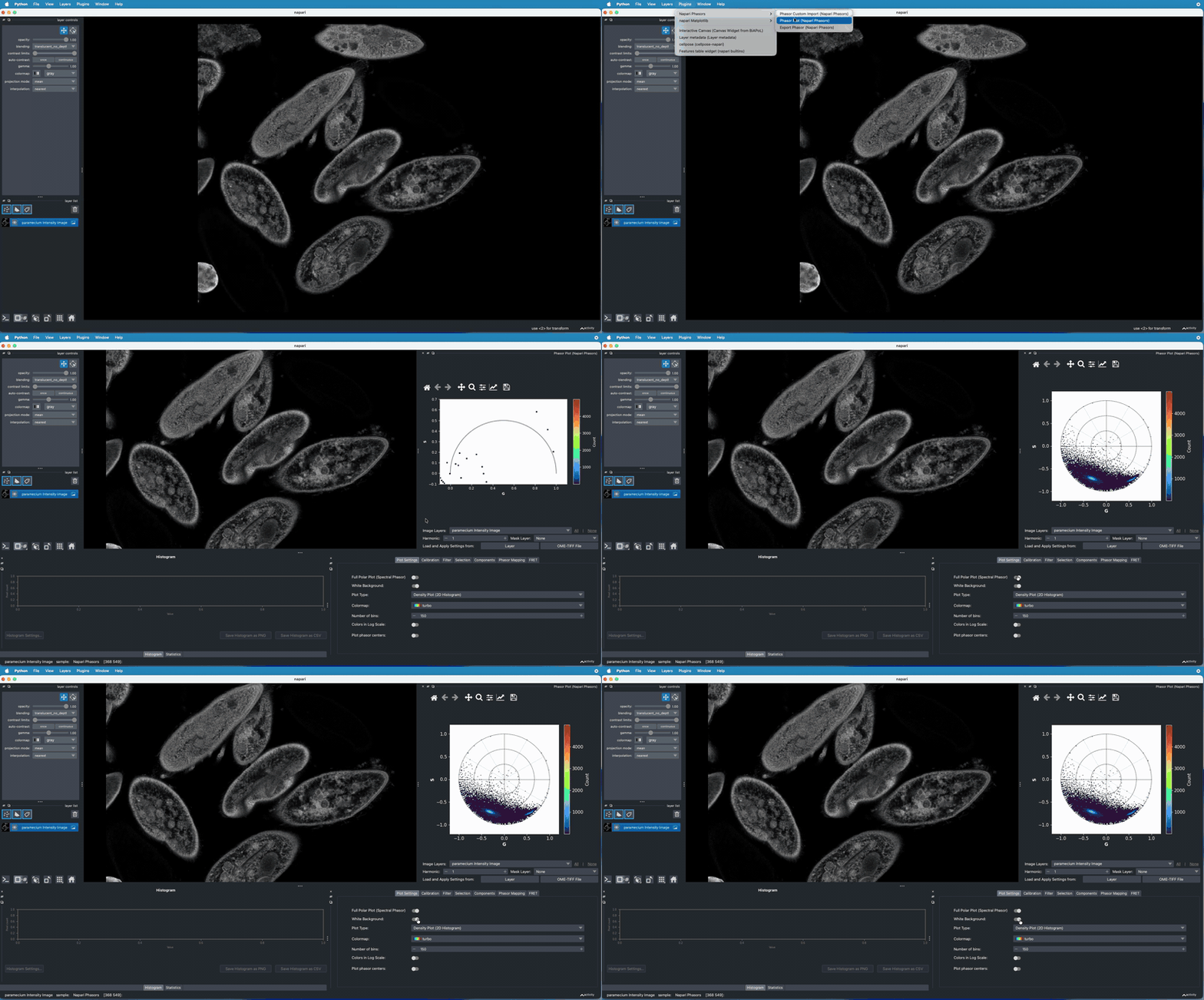
FLIM phasor data can be plotted as a 2D histogram or scatter plot in the "Phasor Plot" widget. The colormap, the number of bins and the scale of the colors can be customized.

Plot Hyperspectral Data
Hyperspectral phasor data can also be plotted as a 2D histogram or scatter plot and visualized in the full universal circle. The 'Universal Semi-Circle/Full Polar Plot' in the "Plot Settings" tab must be unchecked.
Phasor Calibration
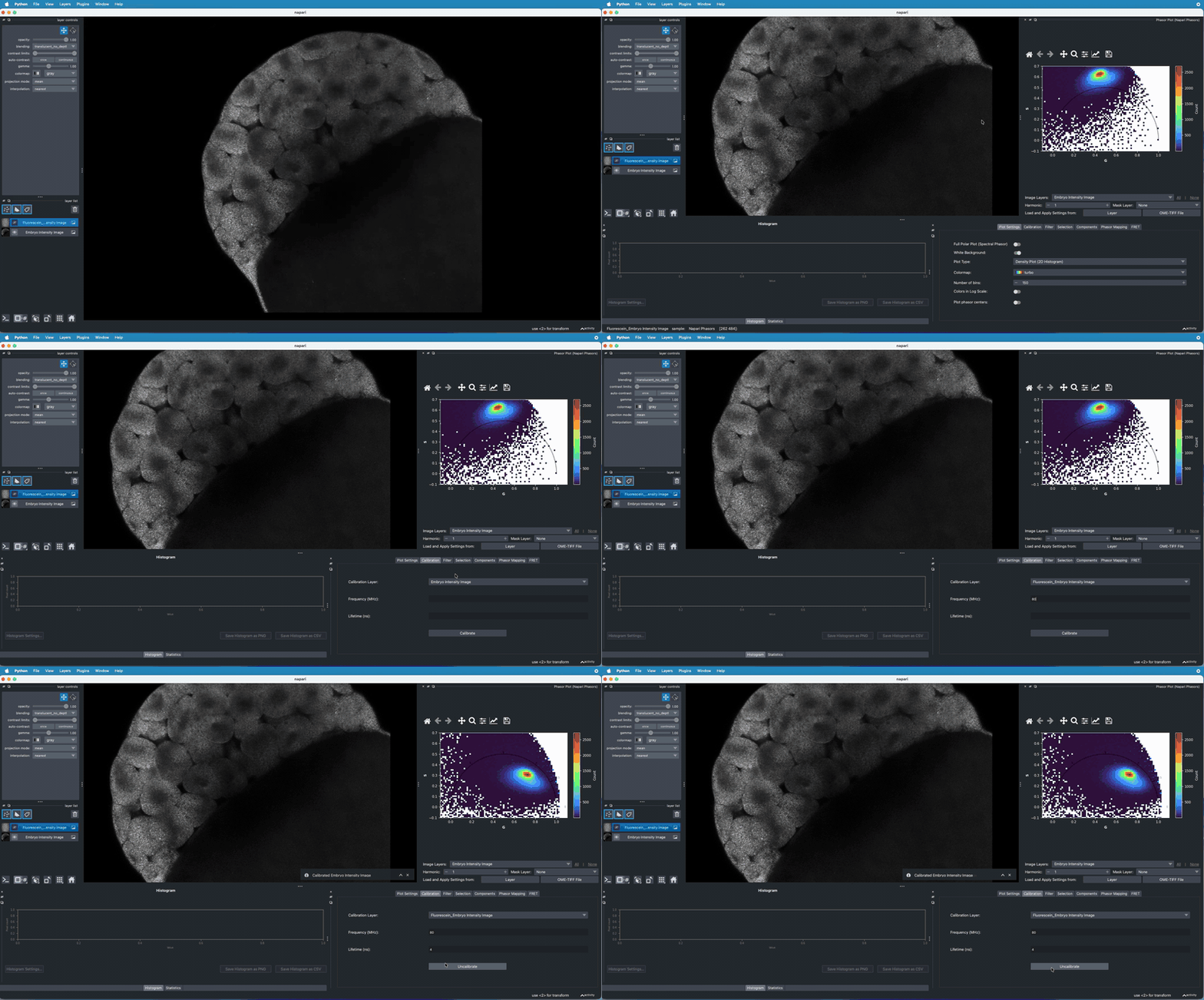
FLIM images can be calibrated using a reference image acquired under the same experimental parameters in the "Calibration" tab of the "Phasor Plot" widget. This reference image should consist of a homogeneous solution of a fluorophore with a known fluorescence lifetime and the laser frequency used in the experiment. This ensures accuracy and consistency in lifetime measurements.
Filtering and Thresholding
Apply various filters and thresholds to your phasor data to enhance analysis quality in the "Filter/Threshold" tab on the "Phasor Plot" widget. You can filter phasor coordinates using the median or wavelet filter.

Mask
You can create a mask using either a shapes layer or a labels layer in napari. Once the mask is created, select it from the mask combobox in the "Phasor Plot" widget. Only the pixels inside the selected mask will be plotted in the phasor space and included in subsequent analyses. This allows you to focus your analysis on specific regions of interest within your data.

Copy Settings and Analysis
You can quickly copy plot settings and analysis parameters, such as calibration, frequency, filter settings, and component locations, from another layer or from an OME-TIF file previously exported with the napari-phasors plugin. This feature streamlines the workflow by allowing you to reuse established configurations, ensuring consistency and saving time when analyzing multiple datasets.

Manual Phasor Selections
Create manual selections on the phasor plot to identify specific regions of interest. These selections can be used to highlight corresponding pixels in the intensity image and perform targeted analysis. Shape of selection can be chosen at the top of the phasor plot and the selection ID can be selected in the "Selection" tab of the "Phasor Plot" widget.

Component Analysis
Perform multi-component analysis to identify and separate different fluorescent species in your sample. This feature allows you to decompose complex phasor distributions into individual components with distinct lifetimes. Multi-component analysis can be done in the "Components" tab of the "Phasor Plot" widget, either by projection to a line between components (only two component analysis), or by component fitting 'n' number of components based on the available harmonics. For more than three component analysis, the location of the components in higher harmonics must be provided.

Apparent or Normal Lifetime Analysis
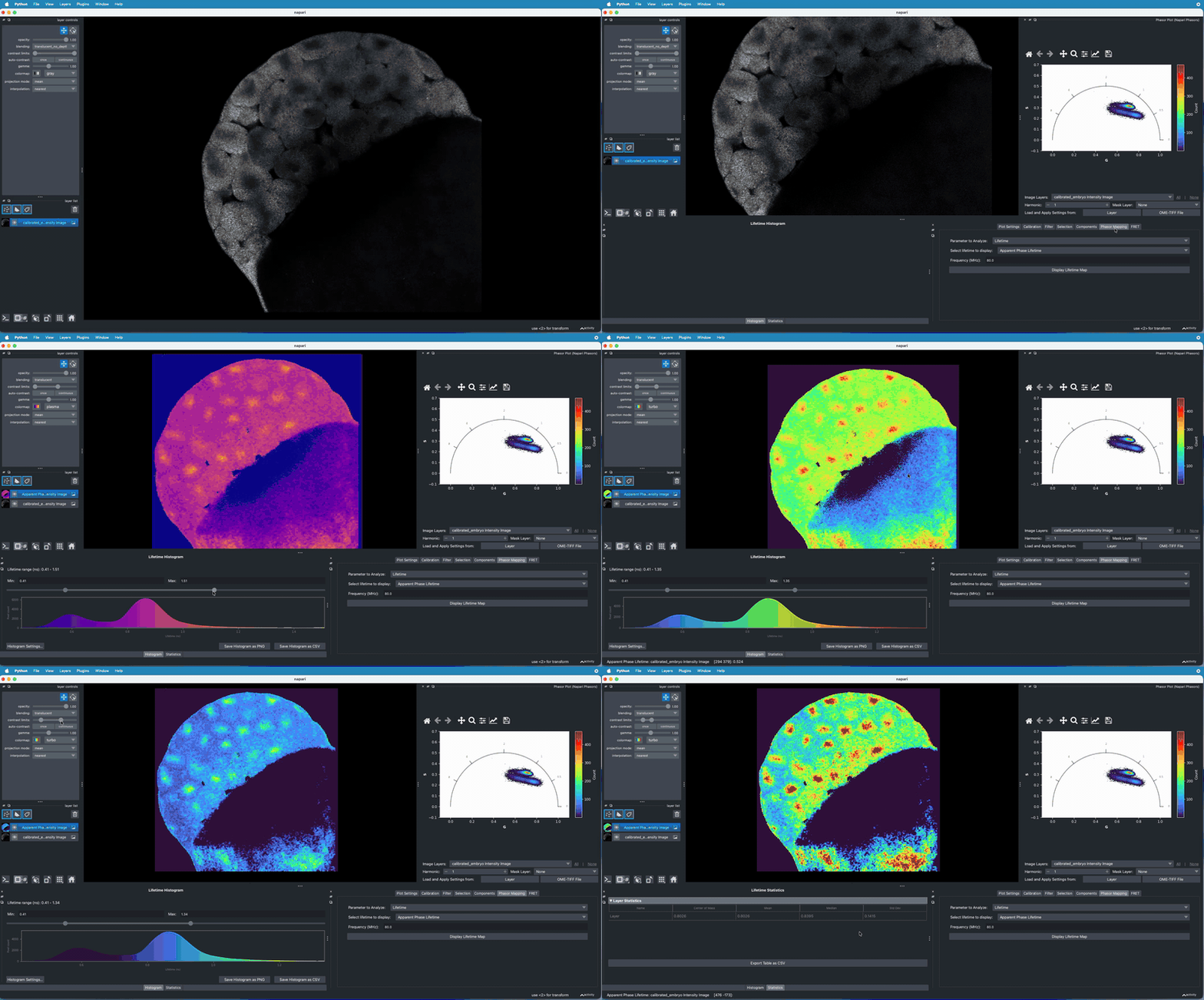
A FLIM image can be colormapped according to the phase or modulation apparent lifetime, as well as the normal lifetime in the "Lifetime" tab of the "Phasor Plot" widget. A histogram is also created for visualization of the distribution of apparent lifetimes of the FLIM image.
FRET Analysis
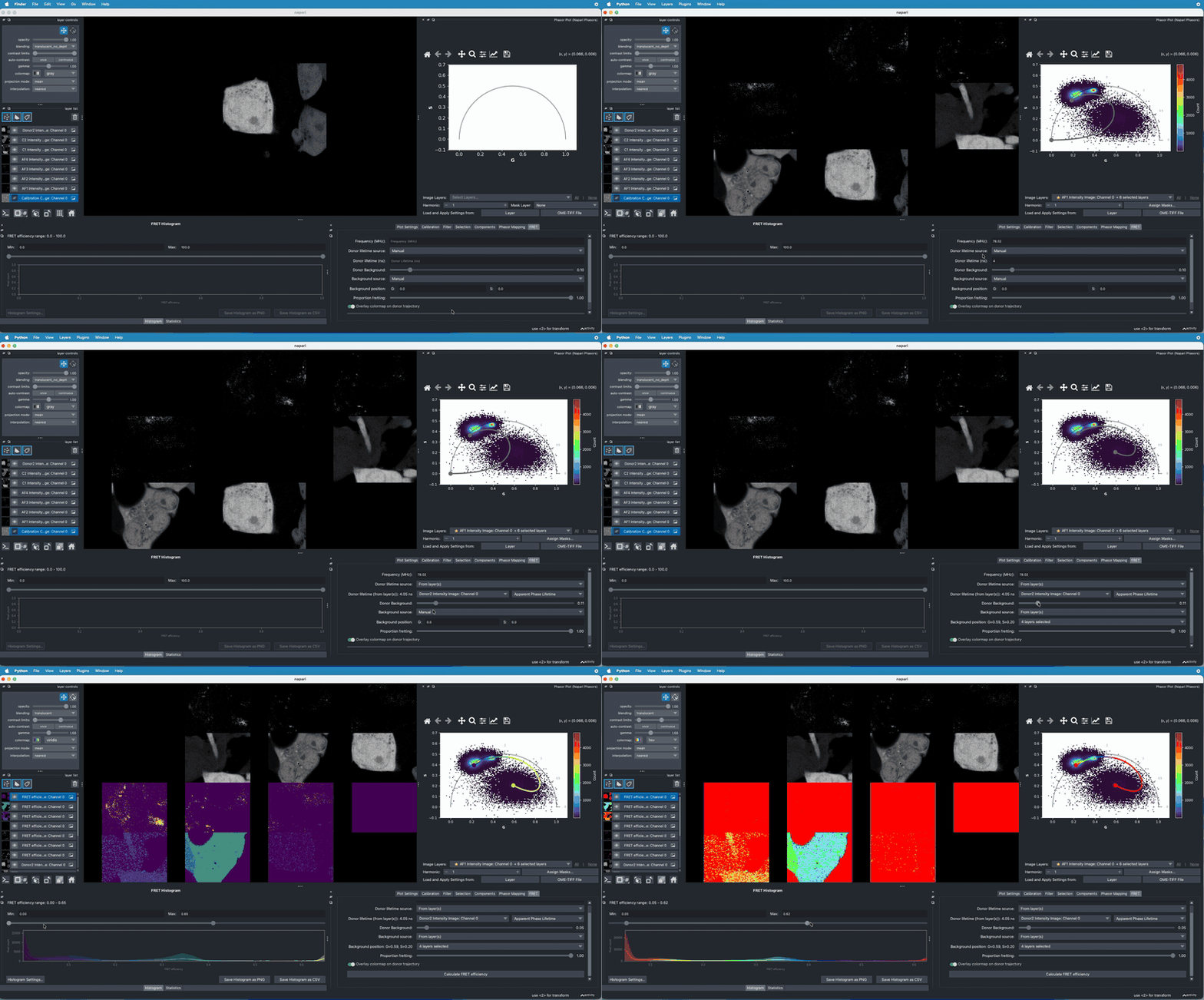
Analyze Förster Resonance Energy Transfer (FRET) trajectories and efficiencies in the "FRET" tab of the "Phasor Plot" widget. The lifetime of the donor and the location of the background in the phasor plot can be obtained automatically from another layer.
Phasor Custom Import
Supported file formats (.tif, .ptu, .sdt, .fbd, .lsm, .ome.tif)
can be imported and converted to phasor space using the "Phasor Custom Import" widget.
Depending on the file format, you can specify additional options such as harmonics, channels, and frames.
The signal can then be visualized according to the selected parameters for each file.

Data Export
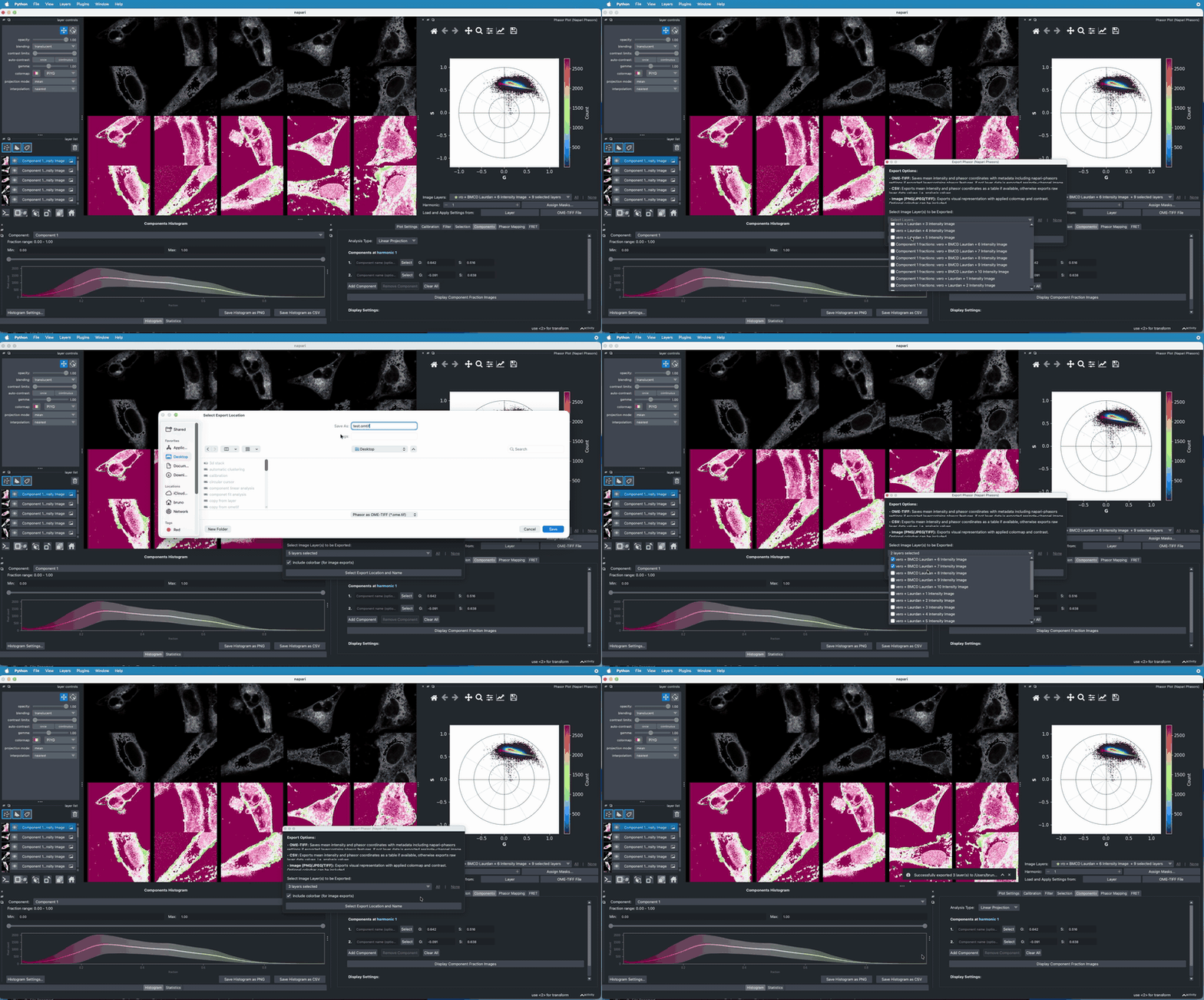
The average intensity image and phasor coordinates can be exported as OME-TIF files, which are compatible with both napari-phasors and PhasorPy. Alternatively, you can export the phasor coordinates and selections as a CSV file using the "Export Phasor" widget. Analysis results—such as lifetime, FRET efficiency, and component fractions—can also be exported to CSV. Additionally, the colormapped image layer can be exported with or without its associated colorbar.
Installation
You can install napari-phasors via pip. Follow these steps from a
terminal.
We recommend using miniforge whenever possible. Click
here to choose the right download option for your OS.
If you do not use miniforge, but rather Anaconda or Miniconda, replace
the mamba term whenever you see it below with conda.
Create a conda environment with napari by typing :
mamba create -y -n napari-phasors-env napari pyqt python=3.12
Activate the environment :
mamba activate napari-phasors-env
Install napari-phasors via pip :
pip install napari-phasors
Alternatively, install latest development version with :
pip install git+https://github.com/napari-phasors/napari-phasors.git
Contributing
Contributions are very welcome. Tests can be run with tox, please ensure the coverage at least stays the same before you submit a pull request.
License
Distributed under the terms of the BSD-3 license, "napari-phasors" is free and open source software.
Please cite doi: https://doi.org/10.5281/zenodo.14647626 if napari-phasors contributes to a project that leads to a publication.
Issues
If you encounter any problems, please file an issue along with a detailed description.
Project details
Verified details
These details have been verified by PyPIProject links
GitHub Statistics
Maintainers
Release history Release notifications | RSS feed


Download files
Download the file for your platform. If you're not sure which to choose, learn more about installing packages.
Source Distribution
Built Distribution
Filter files by name, interpreter, ABI, and platform.
If you're not sure about the file name format, learn more about wheel file names.
Copy a direct link to the current filters
File details
Details for the file napari_phasors-0.4.0a1.tar.gz.
File metadata
- Download URL: napari_phasors-0.4.0a1.tar.gz
- Upload date:
- Size: 162.9 kB
- Tags: Source
- Uploaded using Trusted Publishing? Yes
- Uploaded via: twine/6.1.0 CPython/3.13.7
File hashes
| Algorithm | Hash digest | |
|---|---|---|
| SHA256 |
c536a5dd17978c53a86f4eae25c1a04cbacd1892c67163e666949e7e325ab78a
|
|
| MD5 |
873db20968bd86a22ae2adeeccac5175
|
|
| BLAKE2b-256 |
953b939a533f5d4262e5d577f5531a23ed7d1386c7186fd9e0e982347065a37f
|
Provenance
The following attestation bundles were made for napari_phasors-0.4.0a1.tar.gz:
Publisher:
run-tests.yml on napari-phasors/napari-phasors
-
Statement:
-
Statement type:
https://in-toto.io/Statement/v1 -
Predicate type:
https://docs.pypi.org/attestations/publish/v1 -
Subject name:
napari_phasors-0.4.0a1.tar.gz -
Subject digest:
c536a5dd17978c53a86f4eae25c1a04cbacd1892c67163e666949e7e325ab78a - Sigstore transparency entry: 930725925
- Sigstore integration time:
-
Permalink:
napari-phasors/napari-phasors@b324b922f5f4bfd0348fc4713f39e40d567902fd -
Branch / Tag:
refs/tags/v0.4.0a1 - Owner: https://github.com/napari-phasors
-
Access:
public
-
Token Issuer:
https://token.actions.githubusercontent.com -
Runner Environment:
github-hosted -
Publication workflow:
run-tests.yml@b324b922f5f4bfd0348fc4713f39e40d567902fd -
Trigger Event:
push
-
Statement type:
File details
Details for the file napari_phasors-0.4.0a1-py3-none-any.whl.
File metadata
- Download URL: napari_phasors-0.4.0a1-py3-none-any.whl
- Upload date:
- Size: 172.2 kB
- Tags: Python 3
- Uploaded using Trusted Publishing? Yes
- Uploaded via: twine/6.1.0 CPython/3.13.7
File hashes
| Algorithm | Hash digest | |
|---|---|---|
| SHA256 |
5976a36db50e6298c0abaa2d9e2af202d075b2f3725203d8340b01b945adeea5
|
|
| MD5 |
d77977c0e1c19837bfd8204bdc0ac556
|
|
| BLAKE2b-256 |
63538823974390021c12fdeec9556292a95982aaf0ca1ed70aedeabd74638677
|
Provenance
The following attestation bundles were made for napari_phasors-0.4.0a1-py3-none-any.whl:
Publisher:
run-tests.yml on napari-phasors/napari-phasors
-
Statement:
-
Statement type:
https://in-toto.io/Statement/v1 -
Predicate type:
https://docs.pypi.org/attestations/publish/v1 -
Subject name:
napari_phasors-0.4.0a1-py3-none-any.whl -
Subject digest:
5976a36db50e6298c0abaa2d9e2af202d075b2f3725203d8340b01b945adeea5 - Sigstore transparency entry: 930725981
- Sigstore integration time:
-
Permalink:
napari-phasors/napari-phasors@b324b922f5f4bfd0348fc4713f39e40d567902fd -
Branch / Tag:
refs/tags/v0.4.0a1 - Owner: https://github.com/napari-phasors
-
Access:
public
-
Token Issuer:
https://token.actions.githubusercontent.com -
Runner Environment:
github-hosted -
Publication workflow:
run-tests.yml@b324b922f5f4bfd0348fc4713f39e40d567902fd -
Trigger Event:
push
-
Statement type:






